battery NISSAN ROGUE 2023 Owner's Manual
[x] Cancel search | Manufacturer: NISSAN, Model Year: 2023, Model line: ROGUE, Model: NISSAN ROGUE 2023Pages: 508, PDF Size: 2.44 MB
Page 186 of 508
3-16Pre-driving checks and adjustments
.Opening any door.
. Pushing the ignition switch.
During this 1-minute time period, if the
UNLOCK
button on the Intelligent Key
is pushed, all doors will be locked auto-
matically after another 1 minute.
NOTE:
The unlocking operation can be chan-
ged in selective unlock in the Vehicle
Settings of the vehicle information dis-
play. For additional information, see
“Vehicle Settings” (P.2-23).
Opening liftgate
1. Carry the Intelligent Key.
2. Push the liftgate opener switch
.
3. The liftgate will unlock.
BATTERY SAVER SYSTEM
When all the following conditions are met
for a period of time, the battery saver
system will cut off the power supply to
prevent battery discharge.
. The ignition switch is in the ON posi-
tion. (See “Push-button ignition switch
positions” (P.5-16).)
. All doors are closed, and
. The shift lever is in the P (Park)
position (CVT model) or N (Neutral)
position (MT model).
WARNING LIGHTS AND AUDIBLE RE-
MINDERS
To help prevent the vehicle from moving
unexpectedly by erroneous operation of
the Intelligent Key listed on the following
chart or to help prevent the vehicle from
being stolen, chime or beep sounds inside
and outside the vehicle and the warning
display appears on the vehicle informa-
tion display.
When a chime or beep sounds or the
warning display appears, be sure to check
the vehicle and Intelligent Key.
See “Troubleshooting guide” (P.3-17) and
“Vehicle information display” (P.2-19).
Page 188 of 508
3-18Pre-driving checks and adjustments
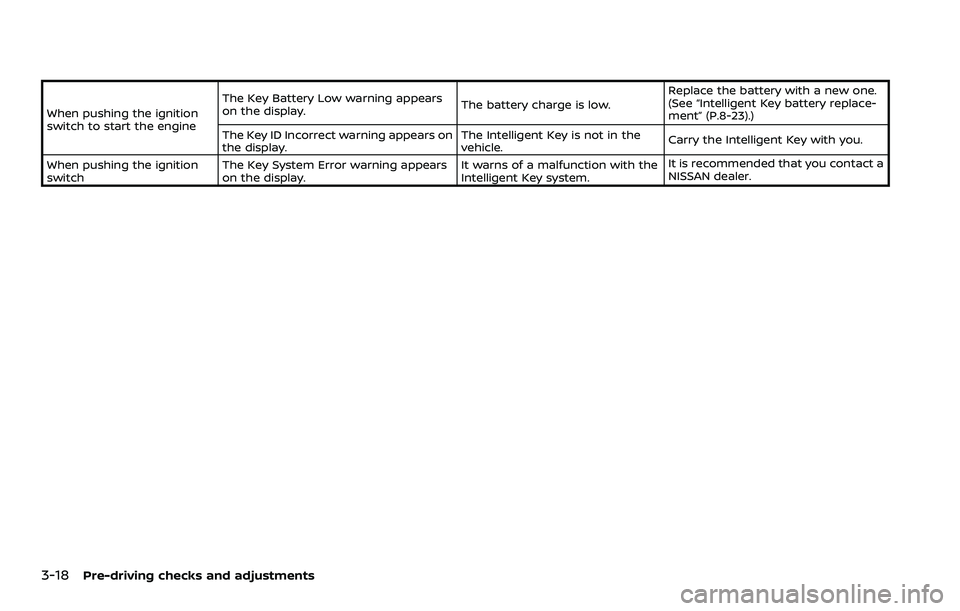
When pushing the ignition
switch to start the engineThe Key Battery Low warning appears
on the display.
The battery charge is low.Replace the battery with a new one.
(See “Intelligent Key battery replace-
ment” (P.8-23).)
The Key ID Incorrect warning appears on
the display. The Intelligent Key is not in the
vehicle.
Carry the Intelligent Key with you.
When pushing the ignition
switch The Key System Error warning appears
on the display. It warns of a malfunction with the
Intelligent Key system.It is recommended that you contact a
NISSAN dealer.
Page 189 of 508
HOW TO USE REMOTE KEYLESS
ENTRY FUNCTION
WARNING
.Radio waves could adversely af-
fect electric medical equipment.
Those who use a pacemaker
should contact the electric med-
ical equipment manufacturer for
the possible influences before
use.
. The Intelligent Key transmits
radio waves when the buttons
are pushed. The FAA advises that
the radio waves may affect air-
craft navigation and communica-
tion systems. Do not operate the
Intelligent Key while on an air-
plane. Make sure the buttons are
not operated unintentionally
when the unit is stored during a
flight.
CAUTION
.Do not allow the Intelligent Key,
which contains electrical compo-
nents, to come into contact with
water or salt water. This could affect the system function.
. Do not drop the Intelligent Key.
. Do not strike the Intelligent Key
sharply against another object.
. Do not change or modify the
Intelligent Key.
. Wetting may damage the Intelli-
gent Key. If the Intelligent Key
gets wet, immediately wipe until
it is completely dry.
. If the outside temperature is be-
low 14°F (-10°C) degrees, the bat-
tery of the Intelligent Key may not
function properly.
. Do not place the Intelligent Key
for an extended period in an area
where temperatures exceed
140°F (60°C).
. Do not attach the Intelligent Key
with a key holder that contains a
magnet.
. Do not place the Intelligent Key
near equipment that produces a
magnetic field, such as a TV,
audio equipment, personal com-
puters or cellular phone.
The remote keyless entry function can
operate all door locks using the remote
keyless entry function of the Intelligent Key. The remote keyless entry function
can operate at a distance of approxi-
mately 33 ft (10 m) from the vehicle. (The
operating distance depends upon the
conditions around the vehicle.)
The remote keyless entry function will not
operate:
.
When the Intelligent Key is not within
the operational range.
. When the doors are open or not
closed securely.
. When the Intelligent Key battery is
discharged.
The remote keyless entry function can
also operate the vehicle alarm.
Pre-driving checks and adjustments3-19
Page 193 of 508
WARNING
To avoid risk of injury or death, do
not use the remote engine start
function when the vehicle is in an
enclosed area such as a garage.
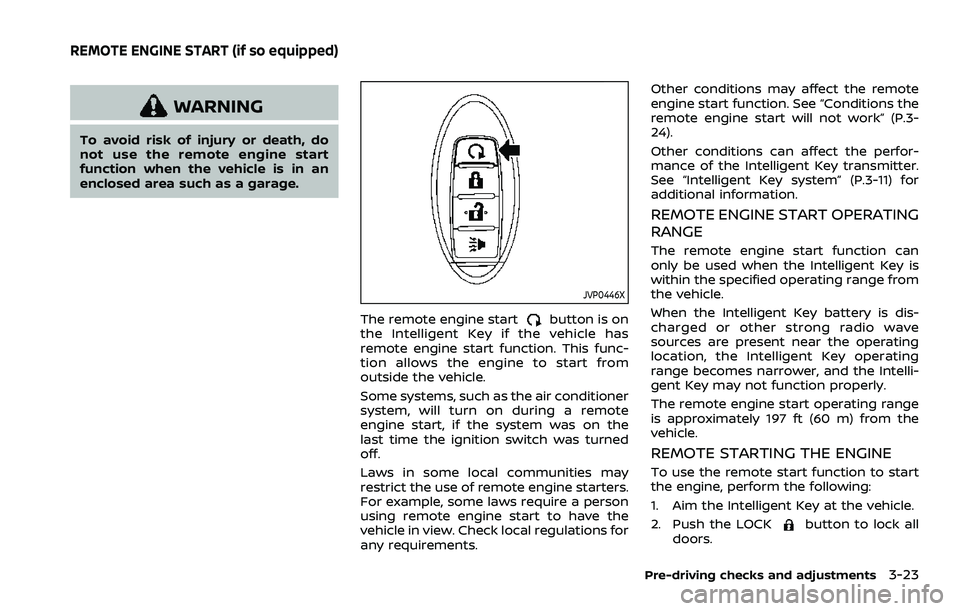
JVP0446X
The remote engine startbutton is on
the Intelligent Key if the vehicle has
remote engine start function. This func-
tion allows the engine to start from
outside the vehicle.
Some systems, such as the air conditioner
system, will turn on during a remote
engine start, if the system was on the
last time the ignition switch was turned
off.
Laws in some local communities may
restrict the use of remote engine starters.
For example, some laws require a person
using remote engine start to have the
vehicle in view. Check local regulations for
any requirements. Other conditions may affect the remote
engine start function. See “Conditions the
remote engine start will not work” (P.3-
24).
Other conditions can affect the perfor-
mance of the Intelligent Key transmitter.
See “Intelligent Key system” (P.3-11) for
additional information.
REMOTE ENGINE START OPERATING
RANGE
The remote engine start function can
only be used when the Intelligent Key is
within the specified operating range from
the vehicle.
When the Intelligent Key battery is dis-
charged or other strong radio wave
sources are present near the operating
location, the Intelligent Key operating
range becomes narrower, and the Intelli-
gent Key may not function properly.
The remote engine start operating range
is approximately 197 ft (60 m) from the
vehicle.
REMOTE STARTING THE ENGINE
To use the remote start function to start
the engine, perform the following:
1. Aim the Intelligent Key at the vehicle.
2. Push the LOCK
button to lock all
doors.
Pre-driving checks and adjustments3-23
REMOTE ENGINE START (if so equipped)
Page 197 of 508
CAUTION
Do not use accessory carriers that
attach to the liftgate. Doing so will
cause damage to the vehicle.
JVP0396X
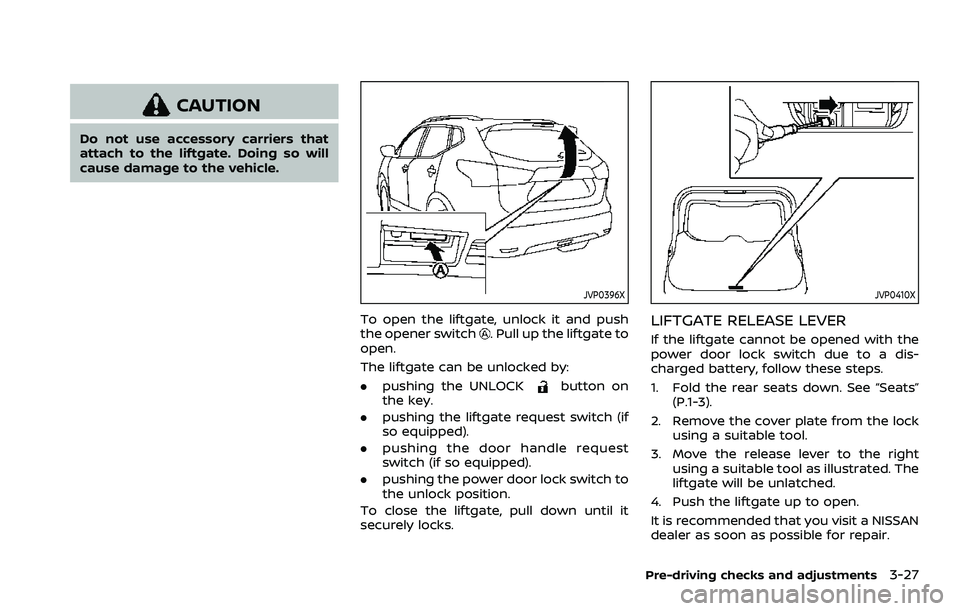
To open the liftgate, unlock it and push
the opener switch. Pull up the liftgate to
open.
The liftgate can be unlocked by:
. pushing the UNLOCK
button on
the key.
. pushing the liftgate request switch (if
so equipped).
. pushing the door handle request
switch (if so equipped).
. pushing the power door lock switch to
the unlock position.
To close the liftgate, pull down until it
securely locks.
JVP0410X
LIFTGATE RELEASE LEVER
If the liftgate cannot be opened with the
power door lock switch due to a dis-
charged battery, follow these steps.
1. Fold the rear seats down. See “Seats” (P.1-3).
2. Remove the cover plate from the lock using a suitable tool.
3. Move the release lever to the right using a suitable tool as illustrated. The
liftgate will be unlatched.
4. Push the liftgate up to open.
It is recommended that you visit a NISSAN
dealer as soon as possible for repair.
Pre-driving checks and adjustments3-27
Page 212 of 508
4-6Monitor, heater, air conditioner, audio and phone systems
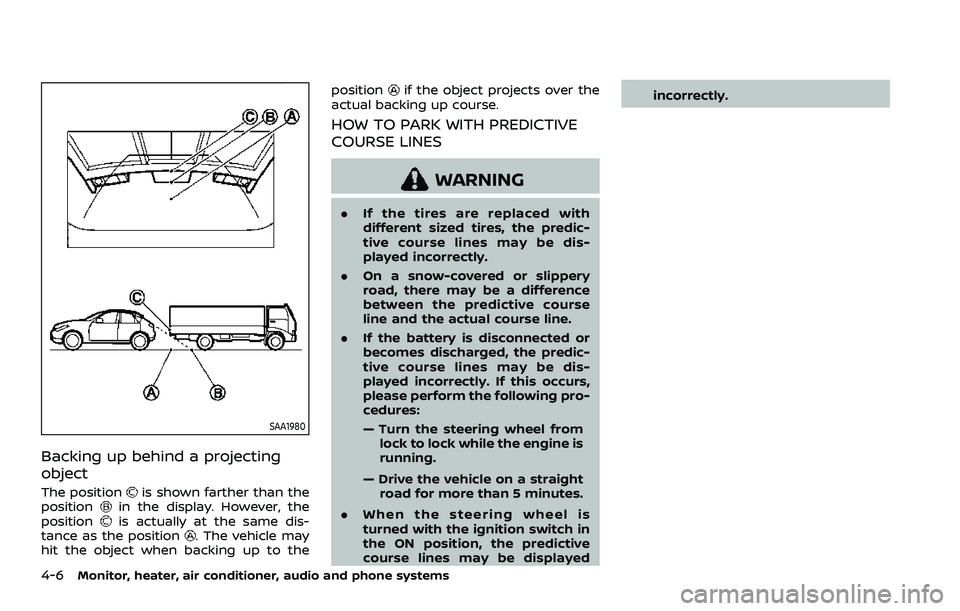
SAA1980
Backing up behind a projecting
object
The positionis shown farther than the
positionin the display. However, the
positionis actually at the same dis-
tance as the position. The vehicle may
hit the object when backing up to the position
if the object projects over the
actual backing up course.
HOW TO PARK WITH PREDICTIVE
COURSE LINES
WARNING
. If the tires are replaced with
different sized tires, the predic-
tive course lines may be dis-
played incorrectly.
. On a snow-covered or slippery
road, there may be a difference
between the predictive course
line and the actual course line.
. If the battery is disconnected or
becomes discharged, the predic-
tive course lines may be dis-
played incorrectly. If this occurs,
please perform the following pro-
cedures:
— Turn the steering wheel from
lock to lock while the engine is
running.
— Drive the vehicle on a straight road for more than 5 minutes.
. When the steering wheel is
turned with the ignition switch in
the ON position, the predictive
course lines may be displayed incorrectly.
Page 222 of 508
4-16Monitor, heater, air conditioner, audio and phone systems
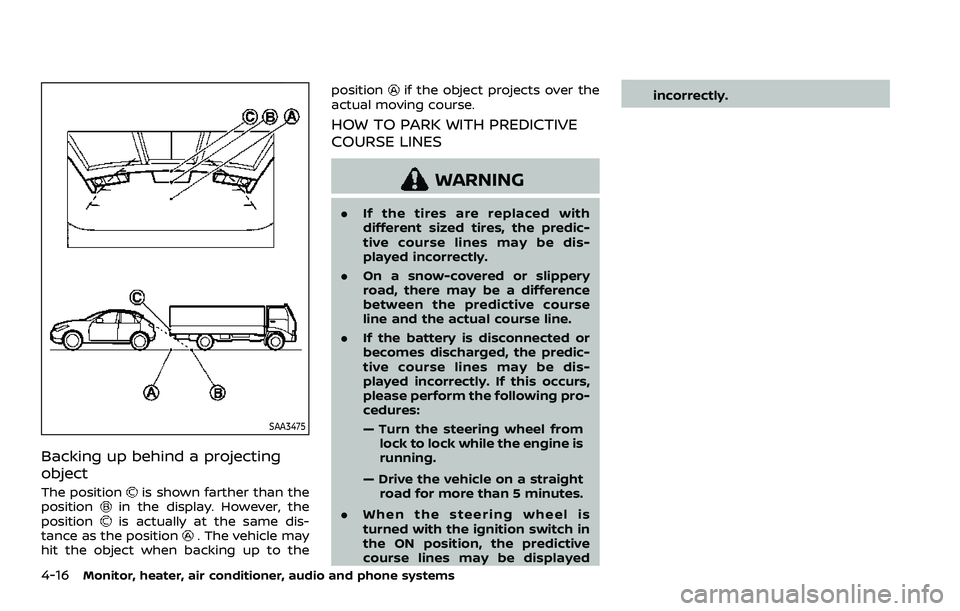
SAA3475
Backing up behind a projecting
object
The positionis shown farther than the
positionin the display. However, the
positionis actually at the same dis-
tance as the position. The vehicle may
hit the object when backing up to the position
if the object projects over the
actual moving course.
HOW TO PARK WITH PREDICTIVE
COURSE LINES
WARNING
. If the tires are replaced with
different sized tires, the predic-
tive course lines may be dis-
played incorrectly.
. On a snow-covered or slippery
road, there may be a difference
between the predictive course
line and the actual course line.
. If the battery is disconnected or
becomes discharged, the predic-
tive course lines may be dis-
played incorrectly. If this occurs,
please perform the following pro-
cedures:
— Turn the steering wheel from
lock to lock while the engine is
running.
— Drive the vehicle on a straight road for more than 5 minutes.
. When the steering wheel is
turned with the ignition switch in
the ON position, the predictive
course lines may be displayed incorrectly.
Page 241 of 508
5 Starting and driving
Precautions when starting and driving ...................... 5-4Exhaust gas (carbon monoxide) ................................ 5-4
Three-way catalyst ............................................................... 5-4
Tire Pressure Monitoring System (TPMS) ........... 5-5
Avoiding collision and rollover .................................... 5-8
On-pavement and off-road
driving precautions .............................................................. 5-9
Off-road recovery .................................................................. 5-9
Rapid air pressure loss ...................................................... 5-9
Drinking alcohol/drugs and driving ..................... 5-10
Driving safety precautions .......................................... 5-10
Ignition switch (models without Intelligent
Key system) ........................................................................\
............ 5-12
Continuously Variable
Transmission (CVT) ............................................................ 5-13
Manual Transmission (MT) ........................................... 5-13
Key positions ........................................................................\
.. 5-14
Push-button ignition switch (model with
Intelligent Key system) .......................................................... 5-14 Operating range for engine start function ...... 5-14
Push-button ignition switch operation ............. 5-15
Push-button ignition switch positions .............. 5-16
Emergency engine shut off ........................................ 5-16
Intelligent Key battery discharge ........................... 5-17
Before starting the engine ................................................. 5-17 Starting the engine (model without Intelligent
Key system) ........................................................................\
........... 5-18
Starting the engine (model with Intelligent
Key system) ........................................................................\
........... 5-19
Remote engine start (if so equipped) .............. 5-20
Driving the vehicle ................................................................... 5-20
Continuously Variable
Transmission (CVT) ......................................................... 5-20
Manual Transmission (MT) ........................................ 5-25
Parking brake ........................................................................\
....... 5-27
Pedal type ........................................................................\
....... 5-27
Switch type (models with electronic
parking brake system) ................................................. 5-27
Automatic brake hold (if so equipped) .................... 5-29 How to activate/deactivate the automatic
brake hold function ........................................................ 5-30
How to use the automatic brake
hold function ........................................................................\
5-31
SPORT mode switch (if so equipped) ....................... 5-32
ECO mode system ................................................................... 5-32
ECO Pedal Guide function ......................................... 5-33
Ambient ECO ........................................................................\
5-34
ECO Drive Report .............................................................. 5-34
Lane Departure Warning (LDW) ..................................... 5-35 LDW system operation ................................................. 5-36
How to enable/disable the LDW system ....... 5-37
Page 243 of 508
Turning the AEB with Pedestrian Detection
system ON/OFF ................................................................ 5-100
AEB with Pedestrian Detection
system limitations .......................................................... 5-101
System temporarily unavailable ......................... 5-105
System malfunction ...................................................... 5-105
System maintenance ................................................... 5-106
Intelligent Forward Collision
Warning (I-FCW) ....................................................................... 5-107 I-FCW system operation ............................................ 5-109
Turning the I-FCW system ON/OFF ................. 5-110
I-FCW system limitations .......................................... 5-112
System temporarily unavailable ......................... 5-114
System malfunction ...................................................... 5-114
System maintenance ................................................... 5-115
Rear Automatic Braking (RAB) .................................... 5-116 RAB system operation ................................................ 5-117
Turning the RAB system ON/OFF ...................... 5-117
RAB system limitations .............................................. 5-118
System malfunction ...................................................... 5-120
System maintenance ................................................... 5-121
Break-in schedule ................................................................. 5-121
Fuel Efficient Driving Tips ................................................ 5-122
Increasing fuel economy ................................................. 5-123
Intelligent 4x4 (if so equipped) ................................... 5-123 Intelligent 4x4 LOCK switch operations ...... 5-125
Parking/parking on hills ................................................... 5-127 Electric power steering .................................................... 5-128
Brake system ........................................................................\
... 5-129
Braking precautions ................................................... 5-129
Brake assist ........................................................................\
....... 5-130
Brake assist ....................................................................... 5-130
Anti-lock Braking System (ABS) ........................ 5-130
Vehicle Dynamic Control (VDC) system .............. 5-131
Chassis control ....................................................................... 5-133
Intelligent Trace Control ......................................... 5-133
Intelligent Engine Brake (Continuously
Variable Transmission (CVT) models) .......... 5-134
Active Ride Control ..................................................... 5-135
Hill Start Assist system ..................................................... 5-136
Rear Sonar System (RSS) ................................................ 5-136
System operation ......................................................... 5-137
How to enable/disable the RSS ........................ 5-139
RSS limitations ................................................................ 5-140
System temporarily unavailable ....................... 5-140
System maintenance ................................................ 5-141
Cold weather driving ......................................................... 5-141 Freeing a frozen door lock ................................... 5-141
Anti-freeze ........................................................................\
.. 5-141
Battery ........................................................................\
........... 5-141
Draining of coolant water ..................................... 5-141
Tire equipment ............................................................... 5-142
Special winter equipment ..................................... 5-142
Driving on snow or ice ............................................. 5-142
Page 254 of 508
5-14Starting and driving
KEY POSITIONS
LOCK: Normal parking position (0)
OFF: (Not used) (1)
This position activates electrical acces-
sories such as the radio when the engine
is not running.
ON: Normal operating position (2)
This position turns on the ignition system
and the electrical accessories.
START: (3)
This position starts the engine. As soon as
the engine has started, release the key. It
automatically returns to the ON position.
WARNING
Do not operate the push-button
ignition switch while driving the ve-
hicle except in an emergency. (The
engine will stop when the ignition
switch is pushed 3 consecutive times
or the ignition switch is pushed and
held for more than 2 seconds.) If the
engine stops while the vehicle is
being driven, this could lead to a
crash and serious injury.
Before operating the push-button igni-
tion switch, be sure to move the shift
lever to the P (Park) position (for Con-
tinuously Variable Transmission (CVT)
models) or the shift lever to the N
(Neutral) position (for Manual Transmis-
sion (MT) models).
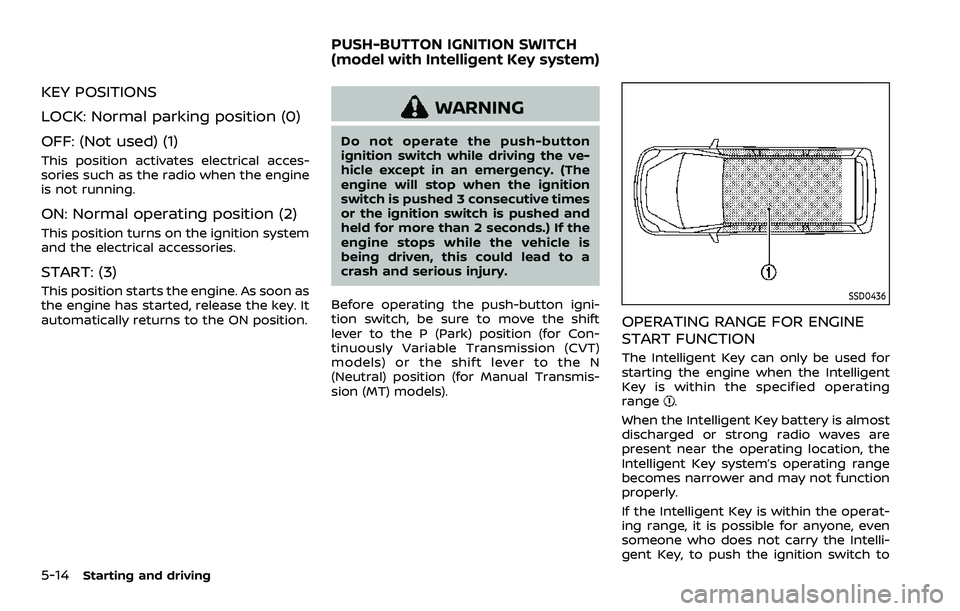
SSD0436
OPERATING RANGE FOR ENGINE
START FUNCTION
The Intelligent Key can only be used for
starting the engine when the Intelligent
Key is within the specified operating
range
.
When the Intelligent Key battery is almost
discharged or strong radio waves are
present near the operating location, the
Intelligent Key system’s operating range
becomes narrower and may not function
properly.
If the Intelligent Key is within the operat-
ing range, it is possible for anyone, even
someone who does not carry the Intelli-
gent Key, to push the ignition switch to
PUSH-BUTTON IGNITION SWITCH
(model with Intelligent Key system)