cargo NISSAN ROGUE 2023 Owner's Manual
[x] Cancel search | Manufacturer: NISSAN, Model Year: 2023, Model line: ROGUE, Model: NISSAN ROGUE 2023Pages: 508, PDF Size: 2.44 MB
Page 329 of 508
tions (for example, tire wear,
abnormal tire pressure, instal-
lation of a spare tire (if so
equipped), tire chains, non-
standard wheels)
— When the vehicle is equipped with non-original brake or
suspension parts
— When an object such as a sticker or cargo obstructs the
camera
— When excessively heavy bag- gage is loaded in the rear seat
or luggage area of your vehi-
cle
— When the vehicle load capa- city is exceeded
. Excessive noise will interfere with
the warning chime sound, and
the beep may not be heard.
. For the ProPILOT assist system to
operate properly, the windshield
in front of the camera must be
clean. Replace worn wiper blades.
The correct size wiper blades
must be used to help make sure
the windshield is kept clean. Only
use Genuine NISSAN wiper blades,
or equivalent wiper blades, that
are specifically designed for use on your vehicle model and model
year. It is recommended that you
visit your NISSAN dealer for the
correct parts for your vehicle.
Steering Assist temporary standby
Automatic standby due to driving op-
eration:
When the driver activates the turn signal,
the Steering Assist is temporarily placed
in a standby mode. (The Steering Assist
restarts automatically when the operat-
ing conditions are met again.)
Automatic standby:
In the following cases, a warning mes-
sage is displayed along with the chime,
and the Steering Assist is placed in a
temporary standby mode. (The Steering
Assist restarts automatically when the
operating conditions are met again.)
.
When lane markers on both sides are
no longer detected
. When a vehicle ahead is no longer
detected under approximately 37 MPH
(60 km/h)
Steering assist cancel
Under the following conditions, the steer-
ing assist cancels, and the steering assist
status indicator and the steering assist
indicator turn off:
. When unusual lane markers appear in
the traveling lane or when the lane
marker cannot be correctly detected
for some time due to certain condi-
tions (for example, a snow rut, the
reflection of light on a rainy day, the
presence of several unclear lane mar-
kers)
. When the windshield wiper operates
in the high speed operation (the
steering assist is disabled when the
wiper operates for more than approxi-
mately 10 seconds)
Action to take:
Turn the ICC system off using the CANCEL
switch. When the conditions listed above
are no longer present, turn the ICC
system on again.
Steering assist malfunction
When the system malfunctions, it turns
off automatically. The steering assist
status warning (orange) illuminates. A
chime may sound depending on the
situation.
Starting and driving5-89
Page 341 of 508
AEB WITH PEDESTRIAN DETECTION
SYSTEM LIMITATIONS
WARNING
Listed below are the system limita-
tions for the AEB with Pedestrian
Detection system. Failure to operate
the vehicle in accordance with these
system limitations could result in
serious injury or death.
.The AEB with Pedestrian Detec-
tion system cannot detect all
vehicles or pedestrians under all
conditions.
. The AEB with Pedestrian Detec-
tion system does not detect the
following:
— Pedestrians that are small (for
example, children), in a sitting
position, operating toys/ska-
teboards, on scooters or in
wheelchairs, or not in an up-
right standing or walking po-
sition.
— Animals of any size.
— Obstacles (for example, cargo or debris) on the roadway or
roadside. — Oncoming or crossing vehicles
— Vehicles where the tires are
difficult to see or the shape of
the rear of the vehicle is un-
clear or obstructed.
— Parked vehicles.
. The AEB with Pedestrian Detec-
tion system has some perfor-
mance limitations.
— If a stationary vehicle is in the
vehicle’s path, the system will
not function when the vehicle
approaches the stationary ve-
hicle at speeds over approxi-
mately 50 MPH (80 km/h).
— Pedestrian Detection will not function when the vehicle is
driven at speeds over ap-
proximately 37 MPH (60
km/h) or below approxi-
mately 6 MPH (10 km/h).
. For pedestrians, the AEB with
Pedestrian Detection system will
not issue the first warning.
. The FEB with Pedestrian Detec-
tion system may not function
properly or detect a vehicle or
pedestrian ahead in the following
conditions: — In poor visibility conditions
(such as rain, snow, fog, dust
storms, sand storms, smoke,
and road spray from other
vehicles).
— If dirt, ice, snow, fog or other material is covering the radar
sensor area or camera area of
the windshield.
— If strong light (for example, sunlight or high beams) en-
ters the front camera or a
sudden change in brightness
occurs (for example, entering
a tunnel or driving in light-
ning).
— In dark or dimly lit conditions, such as at night or in tunnels,
including cases where your
vehicle’s headlights are off or
dim, or the tail lights of the
vehicle ahead are off.
— When the direction of the camera is misaligned.
— When driving on a steep downhill slope, on roads with
sharp curves, and/or bumpy
or dirt roads.
Starting and driving5-101
Page 342 of 508

5-102Starting and driving
— If there is interference byother radar sources.
— When your vehicle’s position or movement is changed
quickly or significantly (for
example, lane change, turning
vehicle, abrupt steering, sud-
den acceleration or decelera-
tion).
— When your vehicle or the ve- hicle or pedestrian ahead
moves quickly or significantly
such that the system cannot
detect and react in time (for
example, pedestrian moving
quickly toward the vehicle at
close range, vehicle cutting in,
changing lanes, making a
turn, steering abruptly, sud-
den acceleration or decelera-
tion).
— When the vehicle or pedes- trian is offset from the vehi-
cle’s forward path.
— If the speed difference be- tween the two vehicles is
small.
— The pedestrian’s profile is par- tially obscured or unidentifi-
able; for example, due to transporting luggage, push-
ing a stroller, wearing bulky
or very loose-fitting clothing
or accessories, or being in a
unique posture (such as rais-
ing hands).
— There is poor contrast of a person to the background,
such as having clothing color
or pattern which is similar to
the background.
— For approximately 15 seconds after starting the engine
— If the vehicle ahead has a unique or unusual shape, ex-
tremely low or high clearance
heights, or unusual cargo
loading or is narrow (for ex-
ample, a motorcycle).
— When the vehicle or pedes- trian is located near a traffic
sign, a reflective area (for ex-
ample, water on road), or is in
a shadow.
— When multiple pedestrians are grouped together.
— When the view of the pedes- trian is obscured by a vehicle
or other object. — While towing a trailer or other
vehicle.
. The system performance may
degrade in the following condi-
tions:
— The vehicle is driven on a
slippery road.
— The vehicle is driven on a slope.
— Excessively heavy baggage is loaded in the rear seat or the
cargo area of your vehicle.
. The system is designed to auto-
matically check the sensor (radar
and camera)’s functionality, with-
in certain limitations. The system
may not detect some forms of
obstruction of the sensor areas
such as ice, snow or stickers, for
example. In these cases, the sys-
tem may not be able to warn the
driver properly. Be sure that you
check, clean and clear sensor
areas regularly.
. In some road and traffic condi-
tions, the AEB with Pedestrian
Detection system may unexpect-
edly apply partial braking. When
acceleration is necessary, de-
press the accelerator pedal to
Page 392 of 508
6-10In case of emergency
.Do not use the emergency tire
puncture repair kit for a purpose
other than to inflate and check
the tire pressure for the vehicle.
. Use the emergency tire puncture
repair kit only on DC12V.
. Keep water and dust off the
emergency tire puncture repair
kit.
. Do not disassemble or modify the
emergency tire puncture repair
kit.
. Do not drop the kit or allow hard
impacts to the kit.
. Do not use the emergency tire
puncture repair kit under the
following conditions. It is recom-
mended that contact a NISSAN
dealer or professional road assis-
tance.
— when the sealant has passed
its expiration date (shown on
the label attached to the bot-
tle)
— when the cut or the puncture is approximately 0.2 in (5 mm)
or longer
— when the side of the tire is damaged — when the vehicle has been
driven with a considerable
loss of air from the tire
— when the tire is completely displaced inside or outside
the rim
— when the tire rim is damaged
— when two or more tires are flat
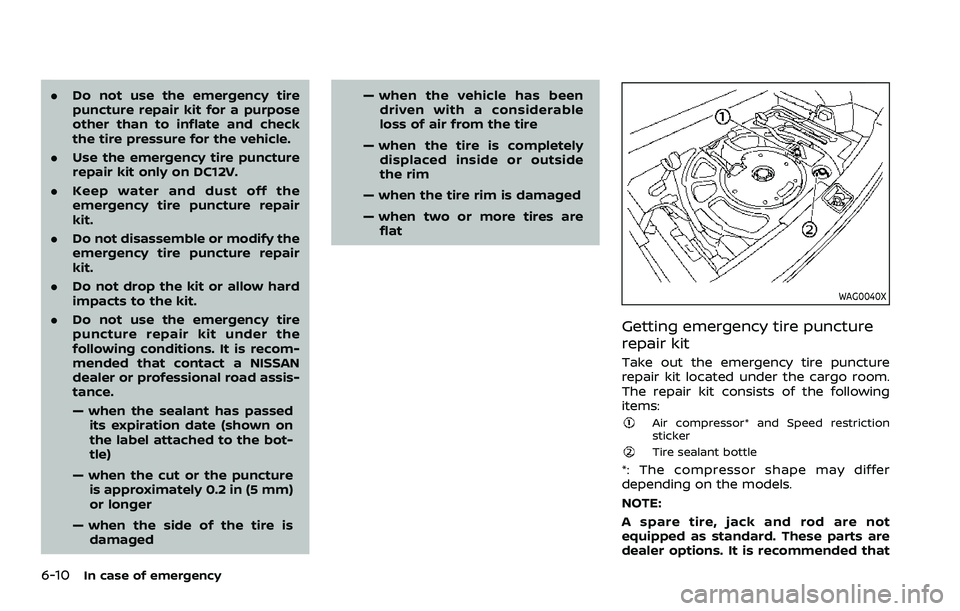
WAG0040X
Getting emergency tire puncture
repair kit
Take out the emergency tire puncture
repair kit located under the cargo room.
The repair kit consists of the following
items:
Air compressor* and Speed restriction
sticker
Tire sealant bottle
*: The compressor shape may differ
depending on the models.
NOTE:
A spare tire, jack and rod are not
equipped as standard. These parts are
dealer options. It is recommended that
Page 437 of 508
WAI0093X
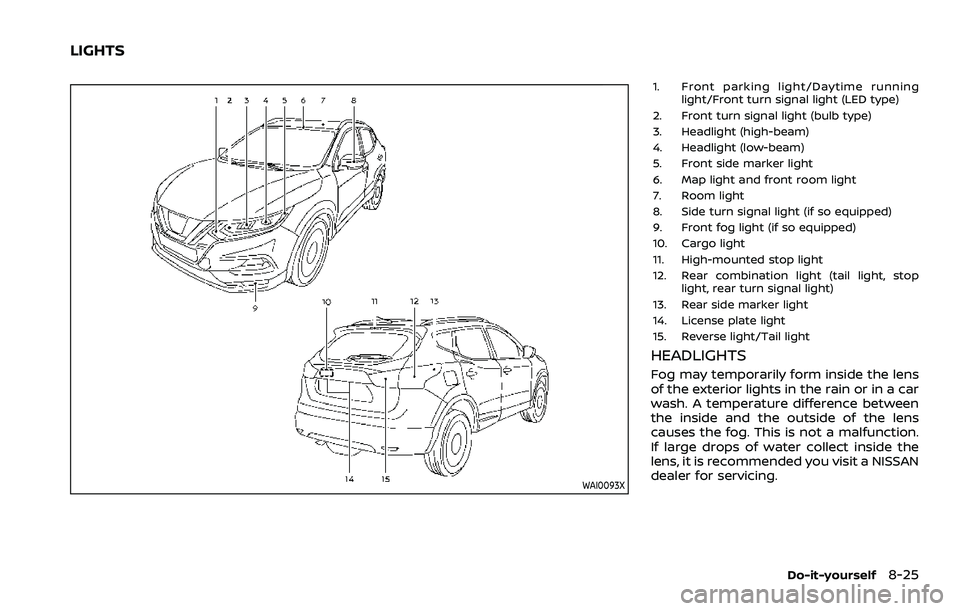
1. Front parking light/Daytime runninglight/Front turn signal light (LED type)
2. Front turn signal light (bulb type)
3. Headlight (high-beam)
4. Headlight (low-beam)
5. Front side marker light
6. Map light and front room light
7. Room light
8. Side turn signal light (if so equipped)
9. Front fog light (if so equipped)
10. Cargo light
11. High-mounted stop light
12. Rear combination light (tail light, stop light, rear turn signal light)
13. Rear side marker light
14. License plate light
15. Reverse light/Tail light
HEADLIGHTS
Fog may temporarily form inside the lens
of the exterior lights in the rain or in a car
wash. A temperature difference between
the inside and the outside of the lens
causes the fog. This is not a malfunction.
If large drops of water collect inside the
lens, it is recommended you visit a NISSAN
dealer for servicing.
Do-it-yourself8-25
LIGHTS
Page 439 of 508
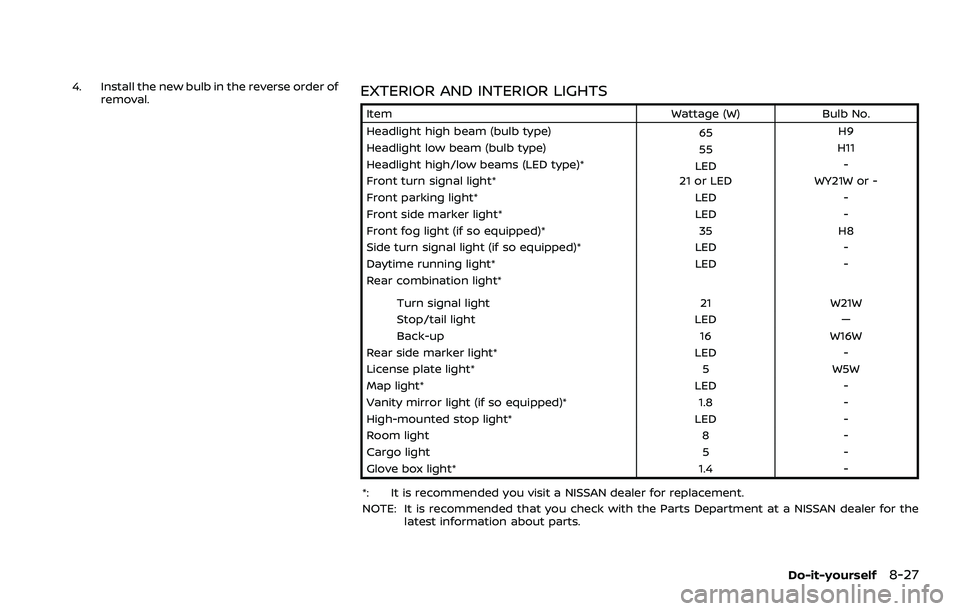
4. Install the new bulb in the reverse order ofremoval.EXTERIOR AND INTERIOR LIGHTS
Item Wattage (W)Bulb No.
Headlight high beam (bulb type) 65H9
Headlight low beam (bulb type) 55H11
Headlight high/low beams (LED type)* LED-
Front turn signal light* 21 or LEDWY21W or -
Front parking light* LED-
Front side marker light* LED-
Front fog light (if so equipped)* 35H8
Side turn signal light (if so equipped)* LED-
Daytime running light* LED-
Rear combination light*
Turn signal light 21W21W
Stop/tail light LED—
Back-up 16W16W
Rear side marker light* LED-
License plate light* 5W5W
Map light* LED-
Vanity mirror light (if so equipped)* 1.8-
High-mounted stop light* LED-
Room light 8-
Cargo light 5-
Glove box light* 1.4-
*: It is recommended you visit a NISSAN dealer for replacement.
NOTE: It is recommended that you check with the Parts Department at a NISSAN dealer for the latest information about parts.
Do-it-yourself8-27
Page 440 of 508
8-28Do-it-yourself
SDI2306
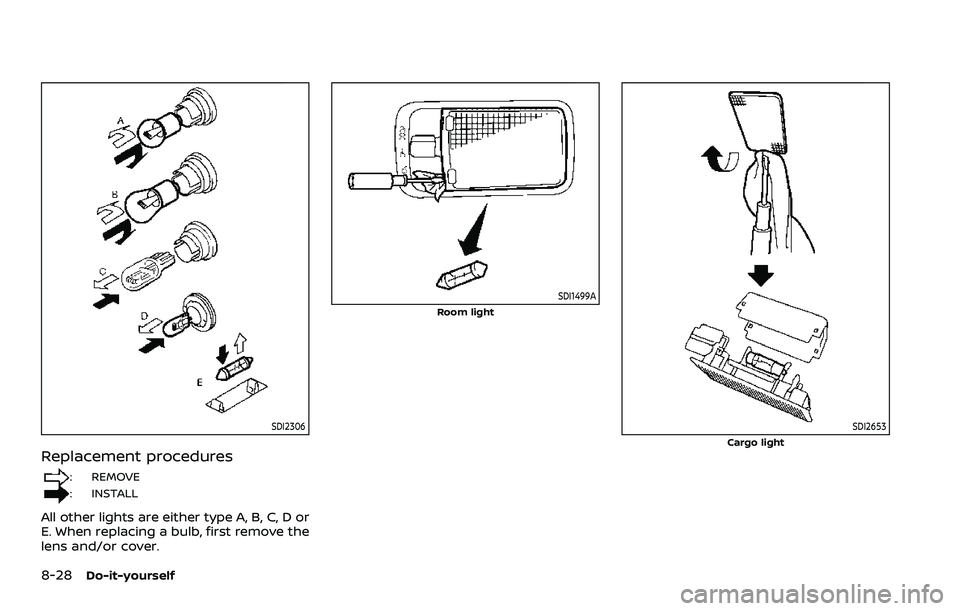
Replacement procedures
: REMOVE
: INSTALL
All other lights are either type A, B, C, D or
E. When replacing a bulb, first remove the
lens and/or cover.
SDI1499A
Room light
SDI2653Cargo light
Page 488 of 508
10-12Technical and consumer information
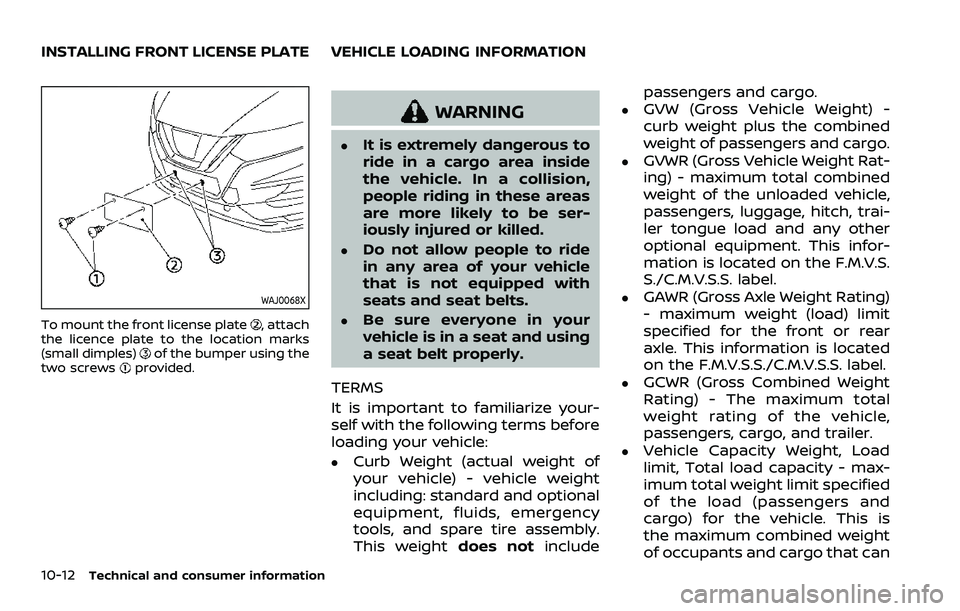
WAJ0068X
To mount the front license plate, attach
the licence plate to the location marks
(small dimples)
of the bumper using the
two screwsprovided.
WARNING
.It is extremely dangerous to
ride in a cargo area inside
the vehicle. In a collision,
people riding in these areas
are more likely to be ser-
iously injured or killed.
.Do not allow people to ride
in any area of your vehicle
that is not equipped with
seats and seat belts.
.Be sure everyone in your
vehicle is in a seat and using
a seat belt properly.
TERMS
It is important to familiarize your-
self with the following terms before
loading your vehicle:
.Curb Weight (actual weight of
your vehicle) - vehicle weight
including: standard and optional
equipment, fluids, emergency
tools, and spare tire assembly.
This weight does notinclude passengers and cargo.
.GVW (Gross Vehicle Weight) -
curb weight plus the combined
weight of passengers and cargo.
.GVWR (Gross Vehicle Weight Rat-
ing) - maximum total combined
weight of the unloaded vehicle,
passengers, luggage, hitch, trai-
ler tongue load and any other
optional equipment. This infor-
mation is located on the F.M.V.S.
S./C.M.V.S.S. label.
.GAWR (Gross Axle Weight Rating)
- maximum weight (load) limit
specified for the front or rear
axle. This information is located
on the F.M.V.S.S./C.M.V.S.S. label.
.GCWR (Gross Combined Weight
Rating) - The maximum total
weight rating of the vehicle,
passengers, cargo, and trailer.
.Vehicle Capacity Weight, Load
limit, Total load capacity - max-
imum total weight limit specified
of the load (passengers and
cargo) for the vehicle. This is
the maximum combined weight
of occupants and cargo that can
INSTALLING FRONT LICENSE PLATE VEHICLE LOADING INFORMATION
Page 489 of 508
be loaded into the vehicle. If the
vehicle is used to tow a trailer,
the trailer tongue weight must
be included as part of the cargo
load. This information is located
on the Tire and Loading Infor-
mation label.
.Cargo capacity - permissible
weight of cargo, the subtracted
weight of occupants from the
load limit.
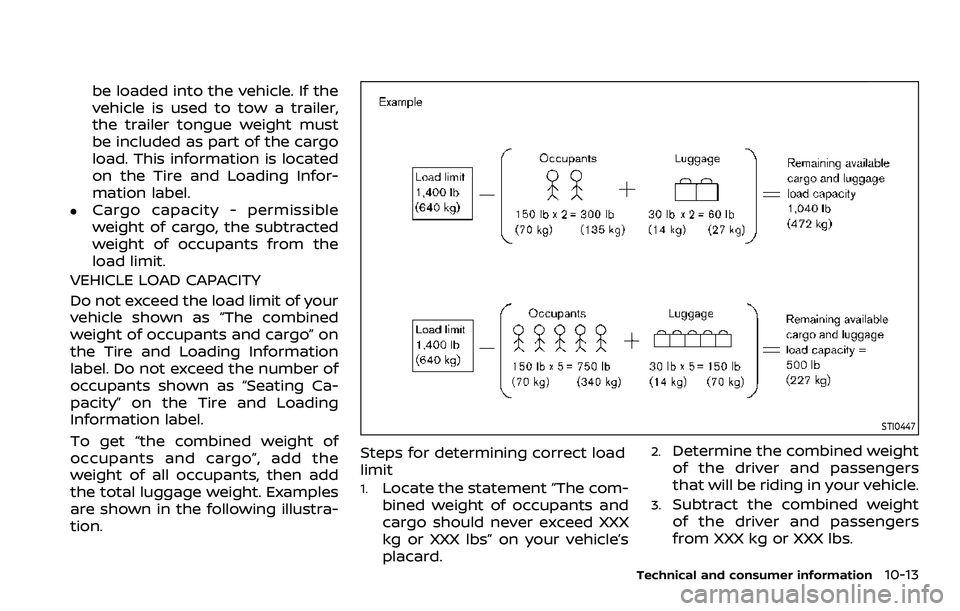
VEHICLE LOAD CAPACITY
Do not exceed the load limit of your
vehicle shown as “The combined
weight of occupants and cargo” on
the Tire and Loading Information
label. Do not exceed the number of
occupants shown as “Seating Ca-
pacity” on the Tire and Loading
Information label.
To get “the combined weight of
occupants and cargo”, add the
weight of all occupants, then add
the total luggage weight. Examples
are shown in the following illustra-
tion.
STI0447
Steps for determining correct load
limit
1.Locate the statement “The com-
bined weight of occupants and
cargo should never exceed XXX
kg or XXX lbs” on your vehicle’s
placard.
2.Determine the combined weight
of the driver and passengers
that will be riding in your vehicle.
3.Subtract the combined weight
of the driver and passengers
from XXX kg or XXX lbs.
Technical and consumer information10-13
Page 490 of 508
10-14Technical and consumer information
4.The resulting figure equals the
available amount of cargo and
luggage load capacity. For ex-
ample, if the XXX amount equals
1400 lbs. and there will be five
150 lb. passengers in your vehi-
cle, the amount of available
cargo and luggage load capacity
is 650 lbs. (1400 − 750 (5 x 150) =
650 lbs) or (640 − 340 (5 x 70) =
300 kg.)
5.Determine the combined weight
of luggage and cargo being
loaded on the vehicle. That
weight may not safely exceed
the available cargo and luggage
load capacity calculated in Step
4.
Before driving a loaded vehicle,
confirm that you do not exceed
the Gross Vehicle Weight Rating
(GVWR) or the Gross Axle Weight
Rating (GAWR) for your vehicle. (See
“Measurement of weights” (P.10-15).)
Also check tires for proper inflation
pressures. See the Tire and Loading
Information label.JVI1686X
SECURING THE LOAD
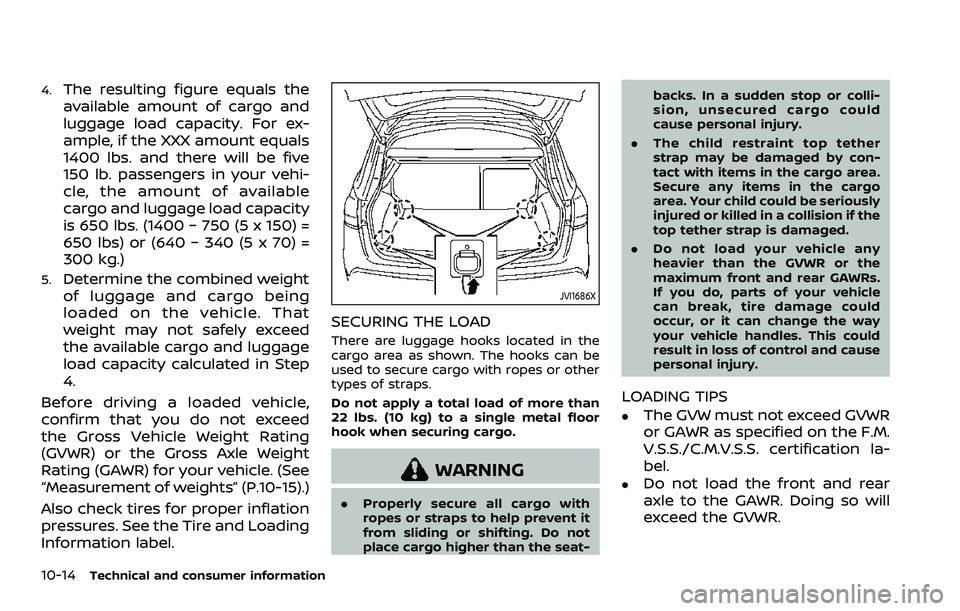
There are luggage hooks located in the
cargo area as shown. The hooks can be
used to secure cargo with ropes or other
types of straps.
Do not apply a total load of more than
22 lbs. (10 kg) to a single metal floor
hook when securing cargo.
WARNING
. Properly secure all cargo with
ropes or straps to help prevent it
from sliding or shifting. Do not
place cargo higher than the seat- backs. In a sudden stop or colli-
sion, unsecured cargo could
cause personal injury.
. The child restraint top tether
strap may be damaged by con-
tact with items in the cargo area.
Secure any items in the cargo
area. Your child could be seriously
injured or killed in a collision if the
top tether strap is damaged.
. Do not load your vehicle any
heavier than the GVWR or the
maximum front and rear GAWRs.
If you do, parts of your vehicle
can break, tire damage could
occur, or it can change the way
your vehicle handles. This could
result in loss of control and cause
personal injury.
LOADING TIPS
.The GVW must not exceed GVWR
or GAWR as specified on the F.M.
V.S.S./C.M.V.S.S. certification la-
bel.
.Do not load the front and rear
axle to the GAWR. Doing so will
exceed the GVWR.