fog light NISSAN ROGUE HYBRID 2017 2.G Owners Manual
[x] Cancel search | Manufacturer: NISSAN, Model Year: 2017, Model line: ROGUE HYBRID, Model: NISSAN ROGUE HYBRID 2017 2.GPages: 520
Page 30 of 520
1. Front view camera (if so equipped)(P. 4-17)
2. Engine hood (P. 3-23)
3. Wiper and washer switch (P. 2-36) Wiper blades (P. 8-16)
4. Windshield (P. 8-16) Windshield-washer fluid (P. 8-11)
5. Power windows (P. 2-55)
6. Door locks (P. 3-4) NISSAN Intelligent Key® (P. 3-7)
Keys (P. 3-2)
7. Mirrors (P. 3-36) Side view camera (if so equipped)
(P. 4-17)
8. Tire pressure (P. 8-28) Flat tire (P. 6-3)
Tire chains (P. 8-28)
9. Fog light switch (if so equipped)
(P. 2-39)
Daytime running light system (P. 2-39)
10. Headlight and turn signal switch
(P. 2-39)
Replacing bulbs (P. 8-24)
Refer to the page number indicated in pa-
rentheses for operating details.
LII2493
EXTERIOR FRONT
Illustrated table of contents0-3
Page 33 of 520
1. Vent (P. 4-32)
2. Headlight/fog light (if so equipped)/turnsignal switch (P. 2-39)
3. Meters and gauges (P. 2-4) Warning and indicator lights (P. 2-10)
Vehicle information display (P. 2-20)
4. Wiper and washer switch, rear wiper
washer switch (P. 2-36)
5. Push-button ignition switch (P. 5-13)
6. Hazard warning flasher switch (P. 6-2)
7. Radio (P. 4-36) Navigation system* (if so equipped)
(P. 4-4)
8. Front passenger supplemental air bag
(P. 1-42)
9. Glove box (P. 2-49)
10. Heater and air conditioning controls
(P. 4-33)
11. Power outlet (P. 2-46)
12. Shift lever (P. 5-17)
13. Auxiliary jack (P. 4-57) USB port (P. 4-57)
14. Front passenger air bag status light
(P. 1-42)
LII2516
INSTRUMENT PANEL
0-6Illustrated table of contents
Page 36 of 520
Warninglight Name Page
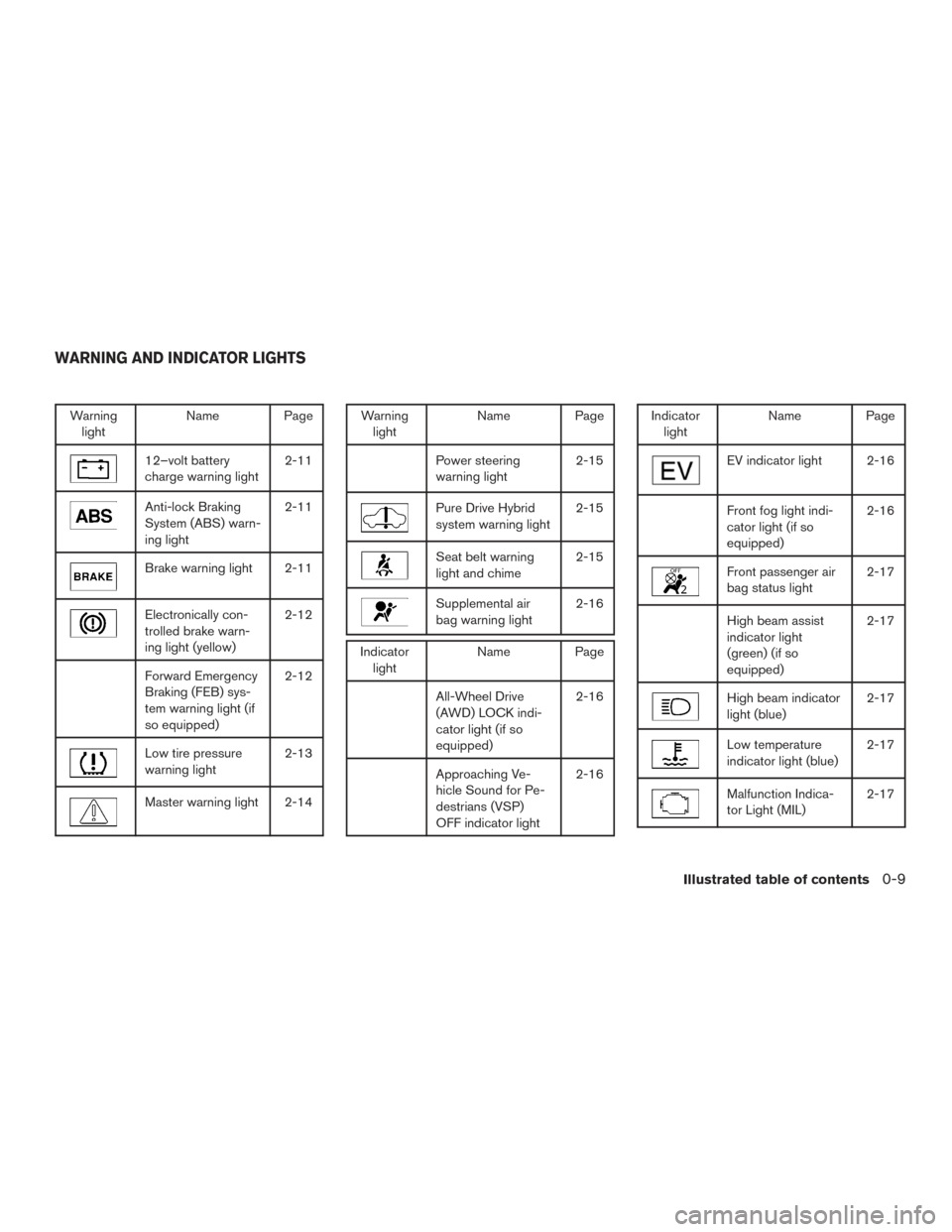
12–volt battery
charge warning light 2-11
Anti-lock Braking
System (ABS) warn-
ing light2-11
Brake warning light 2-11
Electronically con-
trolled brake warn-
ing light (yellow)2-12
Forward Emergency
Braking (FEB) sys-
tem warning light (if
so equipped)2-12
Low tire pressure
warning light
2-13
Master warning light 2-14
Warning
light Name Page
Power steering
warning light 2-15
Pure Drive Hybrid
system warning light2-15
Seat belt warning
light and chime2-15
Supplemental air
bag warning light2-16
Indicator
light Name Page
All-Wheel Drive
(AWD) LOCK indi-
cator light (if so
equipped) 2-16
Approaching Ve-
hicle Sound for Pe-
destrians (VSP)
OFF indicator light2-16
Indicator
light Name Page
EV indicator light 2-16
Front fog light indi-
cator light (if so
equipped) 2-16
Front passenger air
bag status light
2-17
High beam assist
indicator light
(green) (if so
equipped)2-17
High beam indicator
light (blue)
2-17
Low temperature
indicator light (blue)2-17
Malfunction Indica-
tor Light (MIL)2-17
WARNING AND INDICATOR LIGHTS
Illustrated table of contents0-9
Page 99 of 520
2 Instruments and controls
Instrument panel...................................2-2
Meters and gauges ................................2-4
Speedometer and odometer .....................2-4
Tachometer ....................................2-5
Fuel gauge ....................................2-6
Assist charge gauge ............................2-6
Compass (if so equipped) ..........................2-7
Compass display ...............................2-7
Warning lights, indicator lights and audible
reminders ........................................ 2-10
Checking lights ............................... 2-11
Warning lights ................................ 2-11
Indicator lights ................................ 2-16
Audible reminders ............................. 2-19
Vehicle information display ......................... 2-20
How to use the vehicle information display .......2-20
Startup display ................................ 2-20
Resetting the trip computer .....................2-21
Settings ...................................... 2-21
Vehicle information display warnings and
indicators ..................................... 2-30
Security systems ................................. 2-34
Vehicle security system ......................... 2-34NISSAN vehicle immobilizer system
.............2-35
Wiper and washer switch ......................... 2-36
Switch operation .............................. 2-36
Rear switch operation .......................... 2-38
Rear window and outside mirror defroster switch .....2-39
Headlight and turn signal switch ....................2-39
Headlight control switch ........................ 2-39
Daytime running light system ....................2-41
Instrument brightness control ...................2-42
Turn signal switch ............................. 2-42
Fog light switch (if so equipped) ................2-43
Horn ............................................ 2-43
Heated seat switches ............................. 2-43
Heated steering wheel switch (if so equipped) .......2-44
Vehicle Dynamic Control (VDC) off switch ...........2-45
All-wheel drive
(AWD) lock switch (if so equipped) . . . 2-46
E-call (SOS) switch (if so equipped) ................2-46
Power outlets .................................... 2-46
12v outlets ................................... 2-46
Extended storage switch .......................... 2-48
Storage ......................................... 2-49
Seatback pockets ............................. 2-49
Glove box .................................... 2-50
Page 101 of 520
1. Vent (P. 4-32)
2. Headlight/fog light (if so equipped)/turnsignal switch (P. 2-39)
3. Meters and gauges (P. 2-4) Warning and indicator lights (P. 2-10)
Vehicle information display (P. 2-20)
4. Wiper and washer switch, rear wiper
washer switch (P. 2-36)
5. Push-button ignition switch (P. 5-13)
6. Hazard warning flasher switch (P. 6-2)
7. Radio (P. 4-36) Navigation system* (if so equipped)
(P. 4-4)
8. Front passenger supplemental air bag
(P. 1-42)
9. Glove box (P. 2-49)
10. Heater and air conditioning controls
(P. 4-33)
11. Power outlet (P. 2-46)
12. Shift lever (P. 5-17)
13. Auxiliary jack (P. 4-57) USB port (P. 4-57)
14. Front passenger air bag status light
(P. 1-42)
LII2516
INSTRUMENT PANEL
2-2Instruments and controls
Page 109 of 520
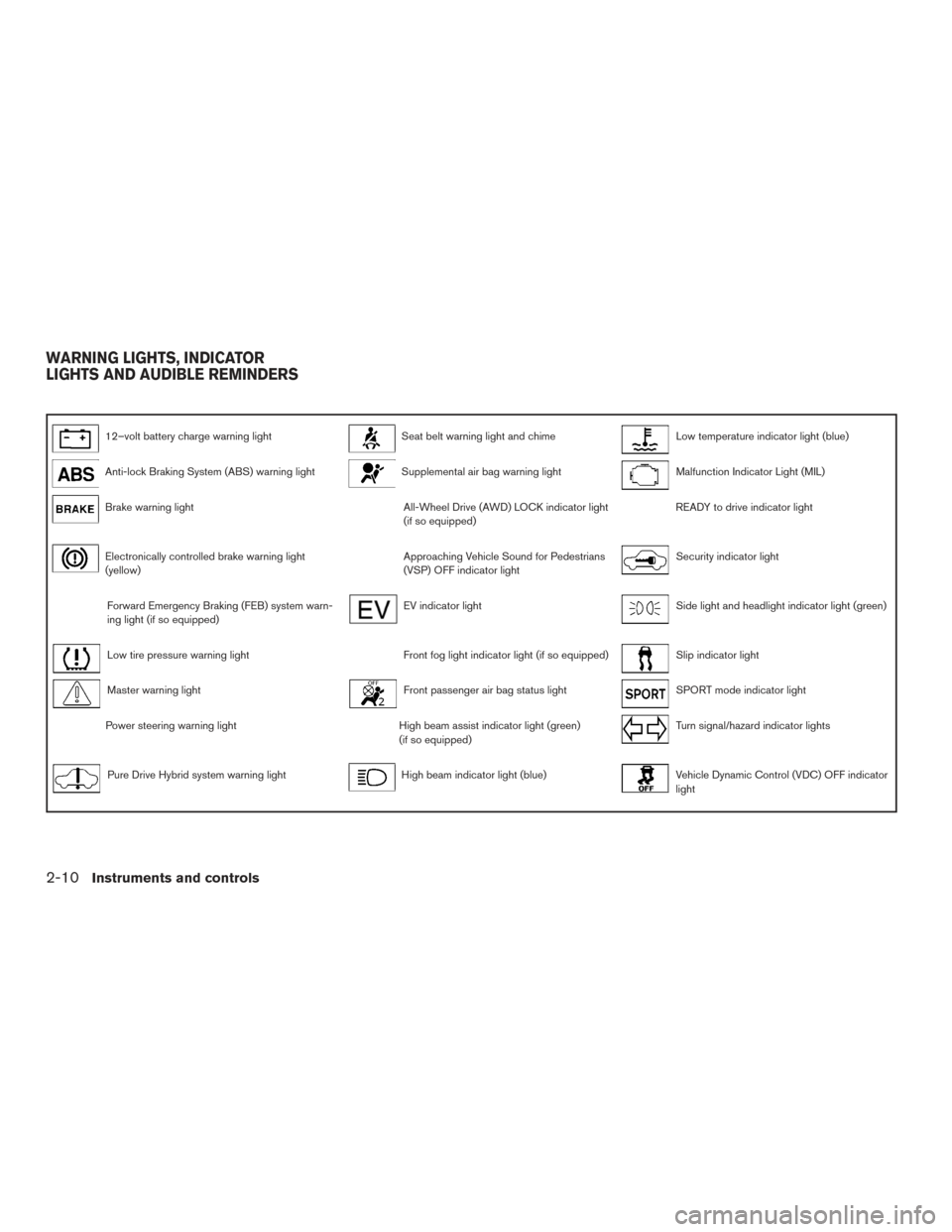
12–volt battery charge warning lightSeat belt warning light and chimeLow temperature indicator light (blue)
Anti-lock Braking System (ABS) warning lightSupplemental air bag warning lightMalfunction Indicator Light (MIL)
Brake warning lightAll-Wheel Drive (AWD) LOCK indicator light
(if so equipped)READY to drive indicator light
Electronically controlled brake warning light
(yellow)Approaching Vehicle Sound for Pedestrians
(VSP) OFF indicator lightSecurity indicator light
Forward Emergency Braking (FEB) system warn-
ing light (if so equipped)EV indicator lightSide light and headlight indicator light (green)
Low tire pressure warning lightFront fog light indicator light (if so equipped)Slip indicator light
Master warning lightFront passenger air bag status lightSPORT mode indicator light
Power steering warning lightHigh beam assist indicator light (green)
(if so equipped)Turn signal/hazard indicator lights
Pure Drive Hybrid system warning lightHigh beam indicator light (blue)Vehicle Dynamic Control (VDC) OFF indicator
light
WARNING LIGHTS, INDICATOR
LIGHTS AND AUDIBLE REMINDERS
2-10Instruments and controls
Page 115 of 520
sounds for about 6 seconds unless the driver’s
seat belt is securely fastened.
The seat belt warning light may also illuminate if
the front passenger’s seat belt is not fastened
when the front passenger’s seat is occupied. For
7 seconds after the ignition switch is placed in
the ON position, the system does not activate the
warning light for the front passenger.
For additional information, refer to “Seat belts” in
the “Safety—Seats, seat belts and supplemental
restraint system” section of this manual.
Supplemental air bag warninglight
When the ignition switch is placed in the ON or
START position, the supplemental air bag warn-
ing light illuminates for about 7 seconds and then
turns off. This means the system is operational.
If any of the following conditions occur, the front
air bag, side air bag, curtain air bag, and preten-
sioner seat belt systems need servicing:
● The supplemental air bag warning light re-
mains on after approximately 7 seconds.
● The supplemental air bag warning light
flashes intermittently.
● The supplemental air bag warning light does
not come on at all. It is recommended that you visit a NISSAN dealer
for these services.
Unless checked and repaired, the supplemental
restraint system (air bag system) and/or the pre-
tensioner(s) may not function properly. For addi-
tional information, refer to “Supplemental Re-
straint System (SRS)” in the “Safety—Seats, seat
belts and supplemental restraint system” section
of this manual.
WARNING
If the supplemental air bag warning light
is on, it could mean that the front air bag,
side air bag, curtain air bag and/or preten-
sioner systems will not operate in an acci-
dent. To help avoid injury to yourself or
others, have your vehicle checked as soon
as possible. It is recommended that you
visit a NISSAN dealer for this service.
INDICATOR LIGHTS
For additional information, refer to “Vehicle infor-
mation display” in this section.
All-Wheel Drive (AWD) LOCK
indicator light (if so equipped)
When the ignition switch is in the ON position,
the All-Wheel Drive (AWD) LOCK indicator light
illuminates and then turns off. When selecting AWD LOCK mode while the
hybrid system is running, the AWD LOCK indica-
tor light illuminates.
CAUTION
Do not drive on dry hard surface roads in
the LOCK mode.
Approaching Vehicle Sound
for Pedestrians (VSP) OFF
indicator light
This light comes on if there is a malfunction in the
Approaching Vehicle Sound for Pedestrians
(VSP) system.
EV indicator light
This light illuminates when the engine stops run-
ning.
Front fog light indicator light (ifso equipped)
The front fog light indicator light illuminates when
the front fog lights are on. For additional informa-
tion, refer to “Fog light switch” in this section.
2-16Instruments and controls
Page 142 of 520
FOG LIGHT SWITCH (if so equipped)
To turn the fog lights on, turn the headlight switch
to the
position, then turn the fog light
switch to the
position.
To turn the fog lights on with the headlight switch
in the AUTO position, the headlights must be on,
then turn the fog light switch to the
posi-
tion.
To turn the fog lights off, turn the fog light switch
to the OFF position.
The headlights must be on and the low beams
selected for the fog lights to operate. The fog
lights automatically turn off when the high beam
headlights are selected. To sound the horn, push near the horn icon on the
steering wheel.
WARNING
Do not disassemble the horn. Doing so
could affect proper operation of the
supplemental front air bag system. Tam-
pering with the supplemental front air bag
system may result in serious personal
injury.
WARNING
Do not use or allow occupants to use the
seat heater if you or the occupants cannot
monitor elevated seat temperatures or
have an inability to feel pain in body parts
that contact the seat. Use of the seat
heater by such people could result in seri-
ous injury.
CAUTION
●
The 12–volt battery could run down if
the seat heater is operated while the
engine is not running.
● Do not use the seat heater for extended
periods or when no one is using the
seat.
● Do not put anything on the seat which
insulates heat, such as a blanket, cush-
ion, seat cover, etc. Otherwise, the seat
may become overheated.
● Do not place anything hard or heavy on
the seat or pierce it with a pin or similar
object. This may result in damage to the
heater.
● Any liquid spilled on the heated seat
should be removed immediately with a
dry cloth.
LIC2639LIC2319
HORN HEATED SEAT SWITCHES
Instruments and controls2-43
Page 237 of 520
NOTE:● Odors from inside and outside the vehicle
can build up in the air conditioner unit. Odor
can enter the passenger compartment
through the vents.
● When parking, set the heater and air condi-
tioner controls to turn off air recirculation to
allow fresh air into the passenger compart-
ment. This should help reduce odors inside
the vehicle.
AUTOMATIC OPERATION
Cooling and/or dehumidified heating
(AUTO)
This mode may be used all year round as the
system automatically works to keep a constant
temperature. Air flow distribution and fan speed
are also controlled automatically.
1. Press the AUTO button on. The indicator on the button will illuminate.
2. Turn the temperature control dial to the left or right to set the desired temperature.
● The temperature of the passenger compart-
ment will be maintained automatically. Air
flow distribution and fan speed are also con-
trolled automatically. ●
A visible mist may be seen coming from the
vents in hot, humid conditions as the air is
cooled rapidly. This does not indicate a mal-
function.
3. You can individually set driver’s and front passenger’s side temperature using each
temperature control dial. When the DUAL
button or passenger’s side temperature dial
is turned, the DUAL indicator will come on.
To turn off the passenger’s side temperature
control, press the DUAL button.
Heating (A/C OFF)
The air conditioner does not activate. When you
need to heat only, use this mode.
1. Press the AUTO button.
2. Turn the temperature control dial to set the desired temperature.
● The temperature of the passenger compart-
ment will be maintained automatically. Air
flow distribution and fan speed are also con-
trolled automatically.
● Do not set the temperature lower than the
outside air temperature. Otherwise, the sys-
tem may not work properly.
● Not recommended if windows fog up.
Dehumidified defrosting or defogging
1. Press thefront defroster button on.
The indicator light on the button will come
on.
2. Turn the temperature control dial to set the maximum temperature to aid in defrosting or
defogging.
● To quickly remove ice from the outside of the
windows, use the fan speed control dial to
set the fan speed to maximum.
● As soon as possible after the windshield is
clean, press the AUTO button to return to
the automatic mode.
● When the
front defroster button is
pressed, the air conditioner will automati-
cally be turned on at outside temperatures
above 36°F (2°C) . The air recirculate mode
automatically turns off, allowing outside air
to be drawn into the passenger compart-
ment to further improve the defogging per-
formance. When the air recirculate mode
automatically turns off, the air fresh mode will
automatically turn on.
4-34Monitor, climate, audio, phone and voice recognition systems
Page 359 of 520
NOTE:
The approach warning chime may sound
and the system display may blink when the
ICC sensor detects objects on the side of
the vehicle or on the side of the road. This
may cause the ICC system to decelerate or
accelerate the vehicle. The ICC sensor may
detect these objects when the vehicle is
driven on winding roads, narrow roads, hilly
roads, or when entering or exiting a curve.
In these cases you will have to manually
control the proper distance ahead of your
vehicle.
Also, the sensor sensitivity can be affected by
vehicle operation (steering maneuver or driving
position in the lane) or traffic or vehicle condition
(for example, if a vehicle is being driven with some
damage) .
Automatic cancellation
A chime sounds under the following conditions
and the control is automatically canceled:● When the vehicle ahead is not detected and
your vehicle is traveling below the speed of
15 mph (24 km/h)
● When the system judges the vehicle is at a
standstill ●
When the shift lever is not in the D (Drive)
position or Manual mode
● When the parking brake system is applied
● When the VDC system is turned off
● When ABS or VDC operates
● When distance measurement becomes im-
paired due to adhesion of dirt or obstruction
to the sensor
● When a wheel slips
● When the radar signal is temporarily inter-
rupted
VEHICLE-TO-VEHICLE DISTANCE
CONTROL MODE LIMITATIONS
WARNING
Listed below are the system limitations for
the ICC system. Failure to operate the
vehicle in accordance with these system
limitations could result in serious injury or
death.
●The ICC system is primarily intended for
use on straight, dry, open roads with
light traffic. It is not advisable to use the
ICC system in city traffic or congested
areas. ●
The ICC system will not adapt automati-
cally to road conditions. This system
should be used in evenly flowing traffic.
Do not use the system on roads with
sharp curves, or on icy roads, in heavy
rain or in fog.
● As there is a performance limit to the
distance control function, never rely
solely on the ICC system. This system
does not correct careless, inattentive or
absentminded driving, or overcome
poor visibility in rain, fog, or other bad
weather. Decelerate the vehicle speed
by depressing the brake pedal, depend-
ing on the distance to the vehicle ahead
and the surrounding circumstances in
order to maintain a safe distance be-
tween vehicles.
● If the vehicle ahead comes to a stop, the
vehicle decelerates to a standstill
within the limitations of the system. The
system will cancel once it judges that
the vehicle has come to a standstill and
sound a warning chime. To prevent the
vehicle from moving, the driver must
depress the brake pedal.
5-54Starting and driving