fog light NISSAN ROGUE HYBRID 2019 Owners Manual
[x] Cancel search | Manufacturer: NISSAN, Model Year: 2019, Model line: ROGUE HYBRID, Model: NISSAN ROGUE HYBRID 2019Pages: 508, PDF Size: 6.17 MB
Page 29 of 508
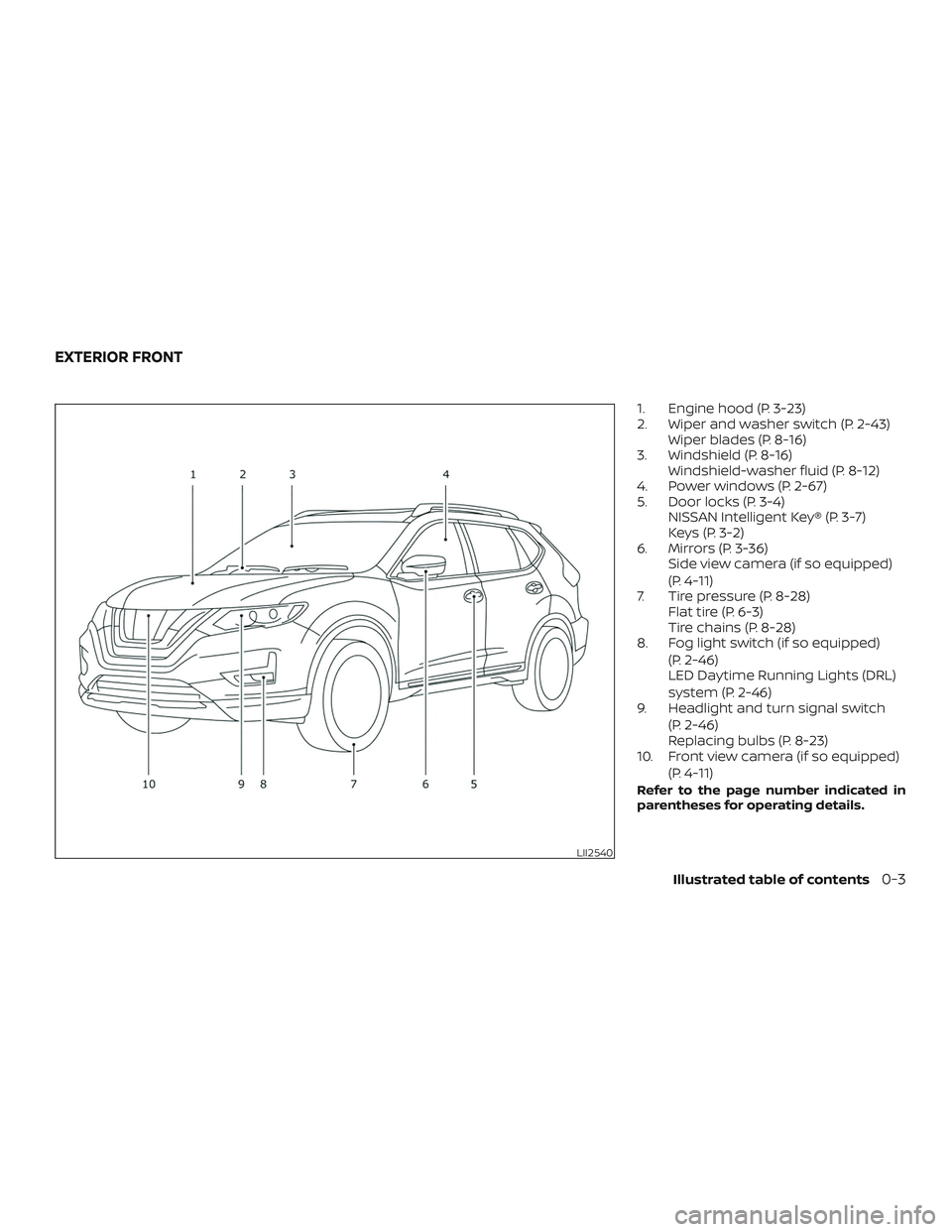
1. Engine hood (P. 3-23)
2. Wiper and washer switch (P. 2-43)Wiper blades (P. 8-16)
3. Windshield (P. 8-16) Windshield-washer fluid (P. 8-12)
4. Power windows (P. 2-67)
5. Door locks (P. 3-4) NISSAN Intelligent Key® (P. 3-7)
Keys (P. 3-2)
6. Mirrors (P. 3-36) Side view camera (if so equipped)
(P. 4-11)
7. Tire pressure (P. 8-28) Flat tire (P. 6-3)
Tire chains (P. 8-28)
8. Fog light switch (if so equipped)
(P. 2-46)
LED Daytime Running Lights (DRL)
system (P. 2-46)
9. Headlight and turn signal switch
(P. 2-46)
Replacing bulbs (P. 8-23)
10. Front view camera (if so equipped)
(P. 4-11)
Refer to the page number indicated in
parentheses for operating details.
LII2540
EXTERIOR FRONT
Illustrated table of contents0-3
Page 32 of 508
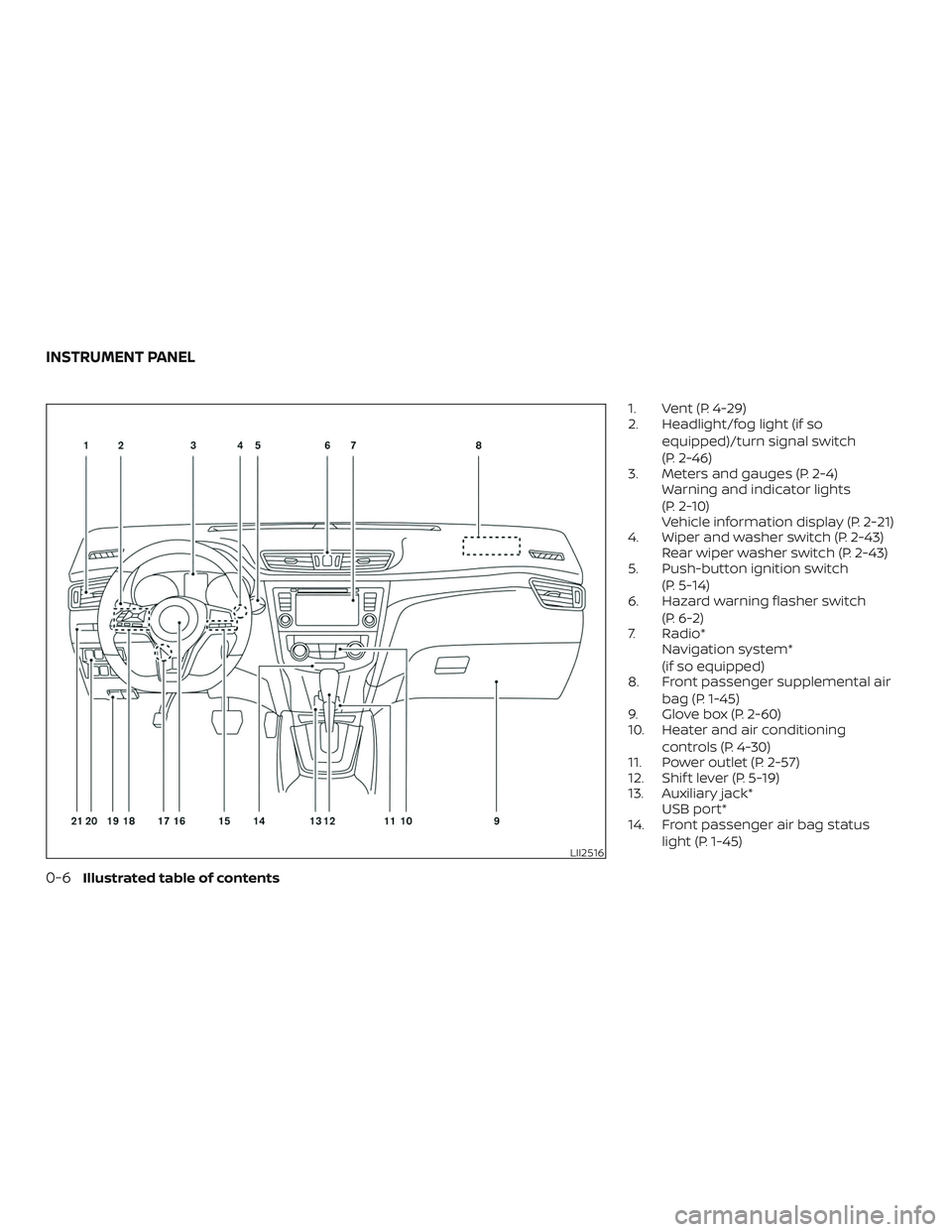
1. Vent (P. 4-29)
2. Headlight/fog light (if soequipped)/turn signal switch
(P. 2-46)
3. Meters and gauges (P. 2-4) Warning and indicator lights
(P. 2-10)
Vehicle information display (P. 2-21)
4. Wiper and washer switch (P. 2-43) Rear wiper washer switch (P. 2-43)
5. Push-button ignition switch
(P. 5-14)
6. Hazard warning flasher switch
(P. 6-2)
7. Radio* Navigation system*
(if so equipped)
8. Front passenger supplemental air
bag (P. 1-45)
9. Glove box (P. 2-60)
10. Heater and air conditioning
controls (P. 4-30)
11. Power outlet (P. 2-57)
12. Shif t lever (P. 5-19)
13. Auxiliary jack* USB port*
14. Front passenger air bag status
light (P. 1-45)
LII2516
INSTRUMENT PANEL
0-6Illustrated table of contents
Page 36 of 508
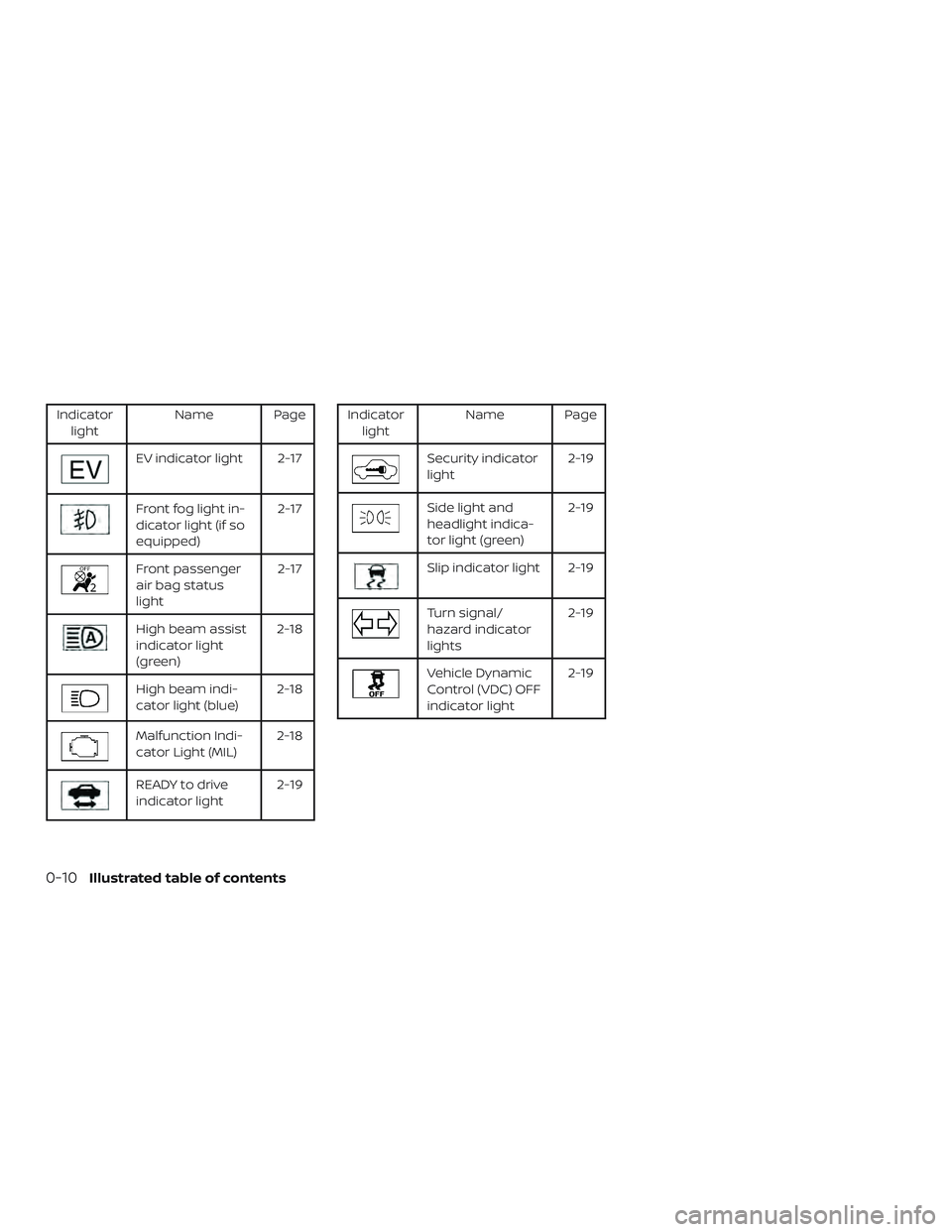
Indicatorlight Name Page
EV indicator light 2-17
Front fog light in-
dicator light (if so
equipped) 2-17
Front passenger
air bag status
light2-17
High beam assist
indicator light
(green)2-18
High beam indi-
cator light (blue)
2-18
Malfunction Indi-
cator Light (MIL)2-18
READY to drive
indicator light 2-19
Indicator
light Name Page
Security indicator
light 2-19
Side light and
headlight indica-
tor light (green)2-19
Slip indicator light 2-19
Turn signal/
hazard indicator
lights2-19
Vehicle Dynamic
Control (VDC) OFF
indicator light2-19
0-10Illustrated table of contents
Page 102 of 508
2 Instruments and controls
Instrument panel................................2-2
Meters and gauges ..............................2-4
Speedometer and odometer .................2-4
Tachometer ..................................2-6
Fuel gauge ...................................2-6
Assist charge gauge .......................... 2-7
Compass (if so equipped) ....................... 2-7
Compass display ............................. 2-7
Warning lights, indicator lights and audible
reminders ...................................... 2-10
Checking lights ............................... 2-11
Warning lights ................................ 2-11
Indicator lights .............................. 2-17
Audible reminders ........................... 2-20
Vehicle information display .....................2-21
How to use the vehicle information
display ...................................... 2-21
Startup display .............................. 2-21
Resetting the drive computer ................2-22
Settings ..................................... 2-22
Vehicle information display warnings
and indicators ............................... 2-33
Security systems ............................... 2-40
Vehicle security system .....................2-40NISSAN Vehicle Immobilizer System
.........2-42
Wiper and washer switch .......................2-43
Switch operation ............................ 2-43
Rear switch operation .......................2-44
Rear window and outside mirror defroster
switch .......................................... 2-45
Headlight and turn signal switch ...............2-46
Headlight control switch .....................2-46
LED Daytime Running Lights (DRL)
system ...................................... 2-50
Instrument brightness control ...............2-51
Turn signal switch ........................... 2-51
Fog light switch (if so equipped) .............2-52
Horn ........................................... 2-52
Heated seat switches .......................... 2-53
Heated steering wheel switch (if so equipped) . . 2-54
Dynamic driver assistance switch
(if so equipped) ................................. 2-54
V ehicle
Dynamic Control (VDC) OFF switch ......2-55
All-Wheel Drive (AWD) LOCK switch
(if so equipped) ................................. 2-56
Rear Door Alert ................................. 2-56
E-call (SOS) button (if so equipped) .............2-57
Power outlets .................................. 2-57
Page 104 of 508
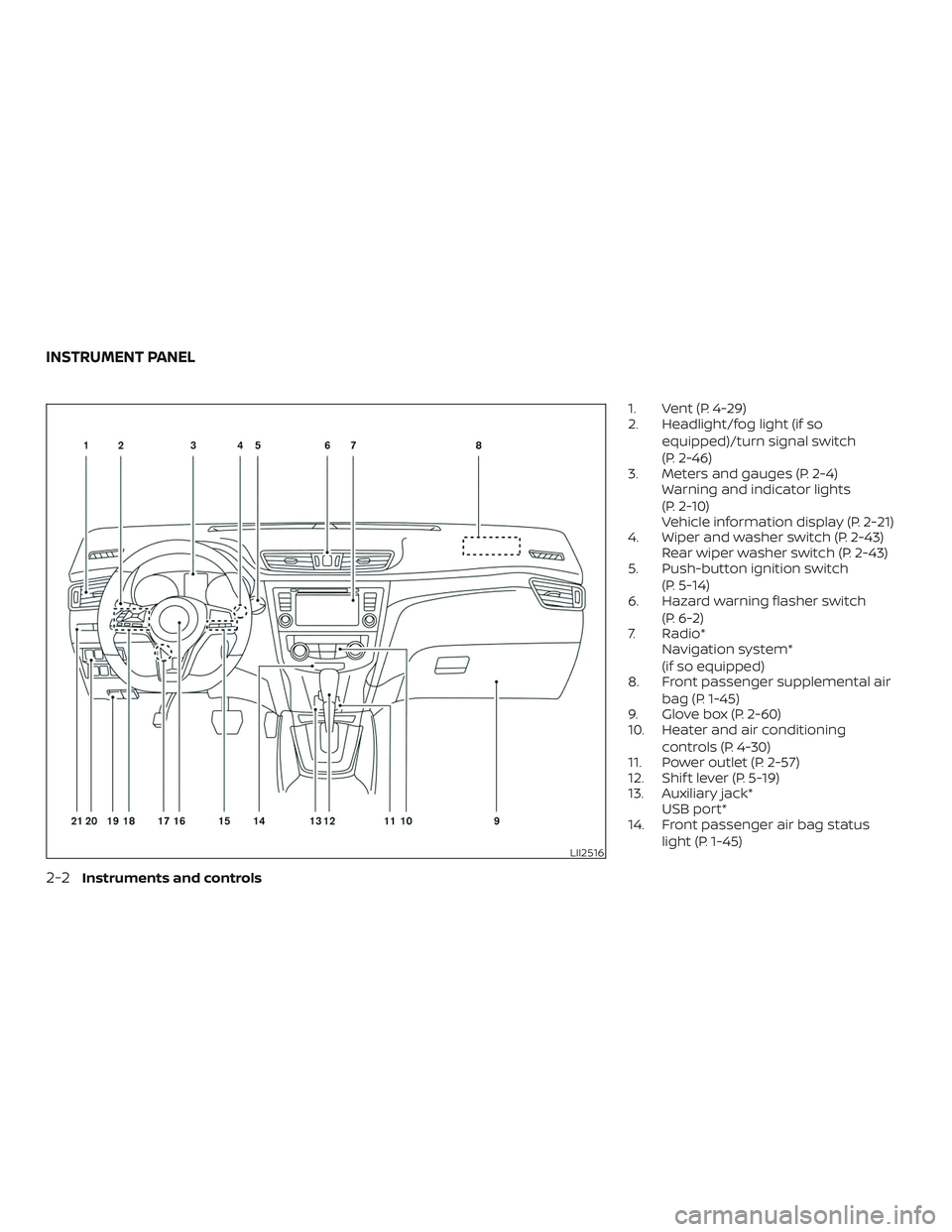
1. Vent (P. 4-29)
2. Headlight/fog light (if soequipped)/turn signal switch
(P. 2-46)
3. Meters and gauges (P. 2-4) Warning and indicator lights
(P. 2-10)
Vehicle information display (P. 2-21)
4. Wiper and washer switch (P. 2-43) Rear wiper washer switch (P. 2-43)
5. Push-button ignition switch
(P. 5-14)
6. Hazard warning flasher switch
(P. 6-2)
7. Radio* Navigation system*
(if so equipped)
8. Front passenger supplemental air
bag (P. 1-45)
9. Glove box (P. 2-60)
10. Heater and air conditioning
controls (P. 4-30)
11. Power outlet (P. 2-57)
12. Shif t lever (P. 5-19)
13. Auxiliary jack* USB port*
14. Front passenger air bag status
light (P. 1-45)
LII2516
INSTRUMENT PANEL
2-2Instruments and controls
Page 112 of 508
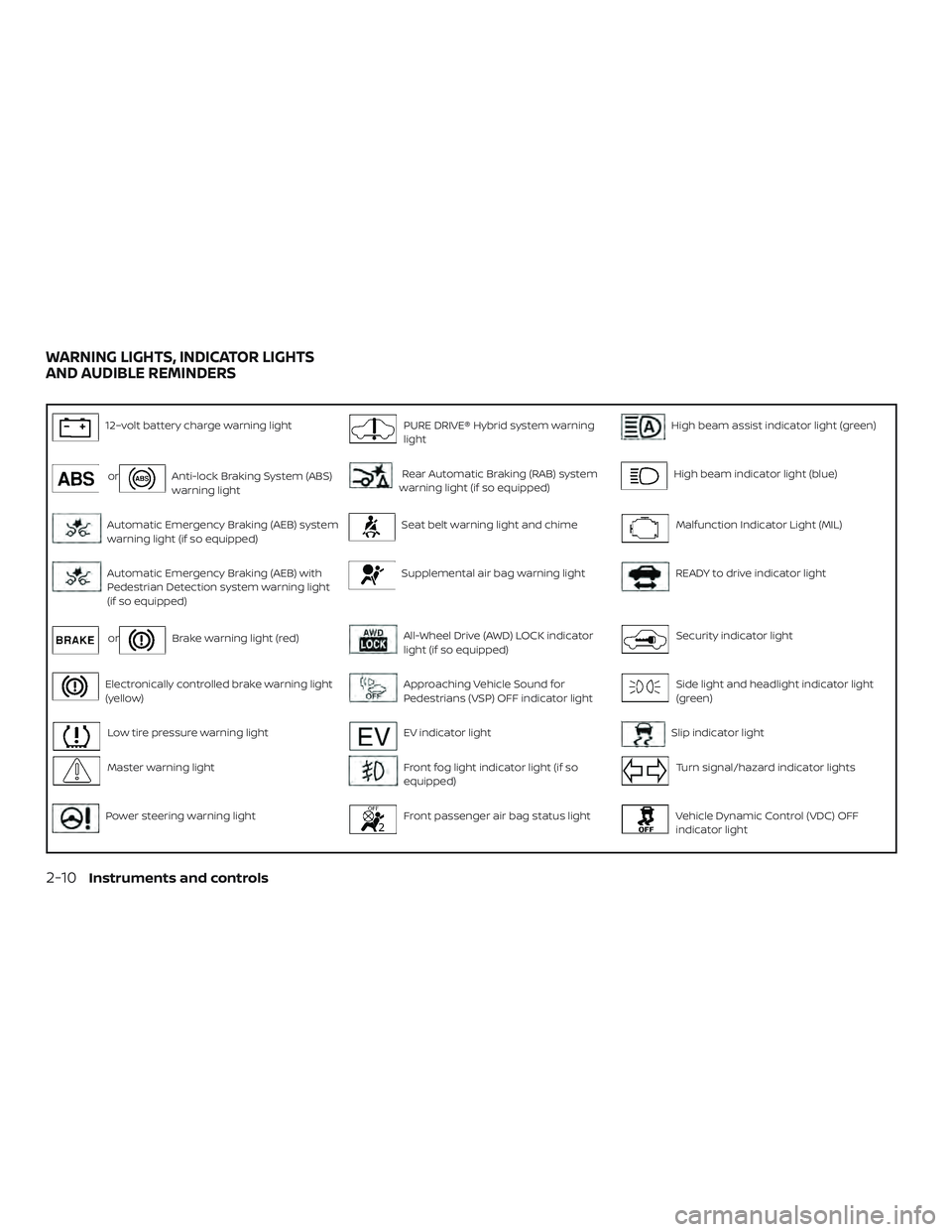
12–volt battery charge warning lightPURE DRIVE® Hybrid system warning
lightHigh beam assist indicator light (green)
orAnti-lock Braking System (ABS)
warning lightRear Automatic Braking (RAB) system
warning light (if so equipped)High beam indicator light (blue)
Automatic Emergency Braking (AEB) system
warning light (if so equipped)Seat belt warning light and chimeMalfunction Indicator Light (MIL)
Automatic Emergency Braking (AEB) with
Pedestrian Detection system warning light
(if so equipped)Supplemental air bag warning lightREADY to drive indicator light
orBrake warning light (red)All-Wheel Drive (AWD) LOCK indicator
light (if so equipped)Security indicator light
Electronically controlled brake warning light
(yellow)Approaching Vehicle Sound for
Pedestrians (VSP) OFF indicator lightSide light and headlight indicator light
(green)
Low tire pressure warning lightEV indicator lightSlip indicator light
Master warning lightFront fog light indicator light (if so
equipped)Turn signal/hazard indicator lights
Power steering warning lightFront passenger air bag status lightVehicle Dynamic Control (VDC) OFF
indicator light
WARNING LIGHTS, INDICATOR LIGHTS
AND AUDIBLE REMINDERS
2-10Instruments and controls
Page 119 of 508
∙ The supplemental air bag warning lightflashes intermittently.
∙ The supplemental air bag warning light does not come on at all.
It is recommended that you visit a NISSAN
dealer for these services.
Unless checked and repaired, the supple-
mental restraint system (air bag system)
and/or the pretensioner(s) may not func-
tion properly. For additional information, re-
fer to “Supplemental Restraint System
(SRS)” in the “Safety—Seats, seat belts and
supplemental restraint system” section of
this manual.
WARNING
If the supplemental air bag warning
light is on, it could mean that the front
air bag, side air bag, curtain air bag
and/or pretensioner systems will not
operate in an accident. To help avoid
injury to yourself or others, have your
vehicle checked as soon as possible. It is
recommended that you visit a NISSAN
dealer for this service.
INDICATOR LIGHTS
For additional information, refer to “Vehicle
information display” in this section.
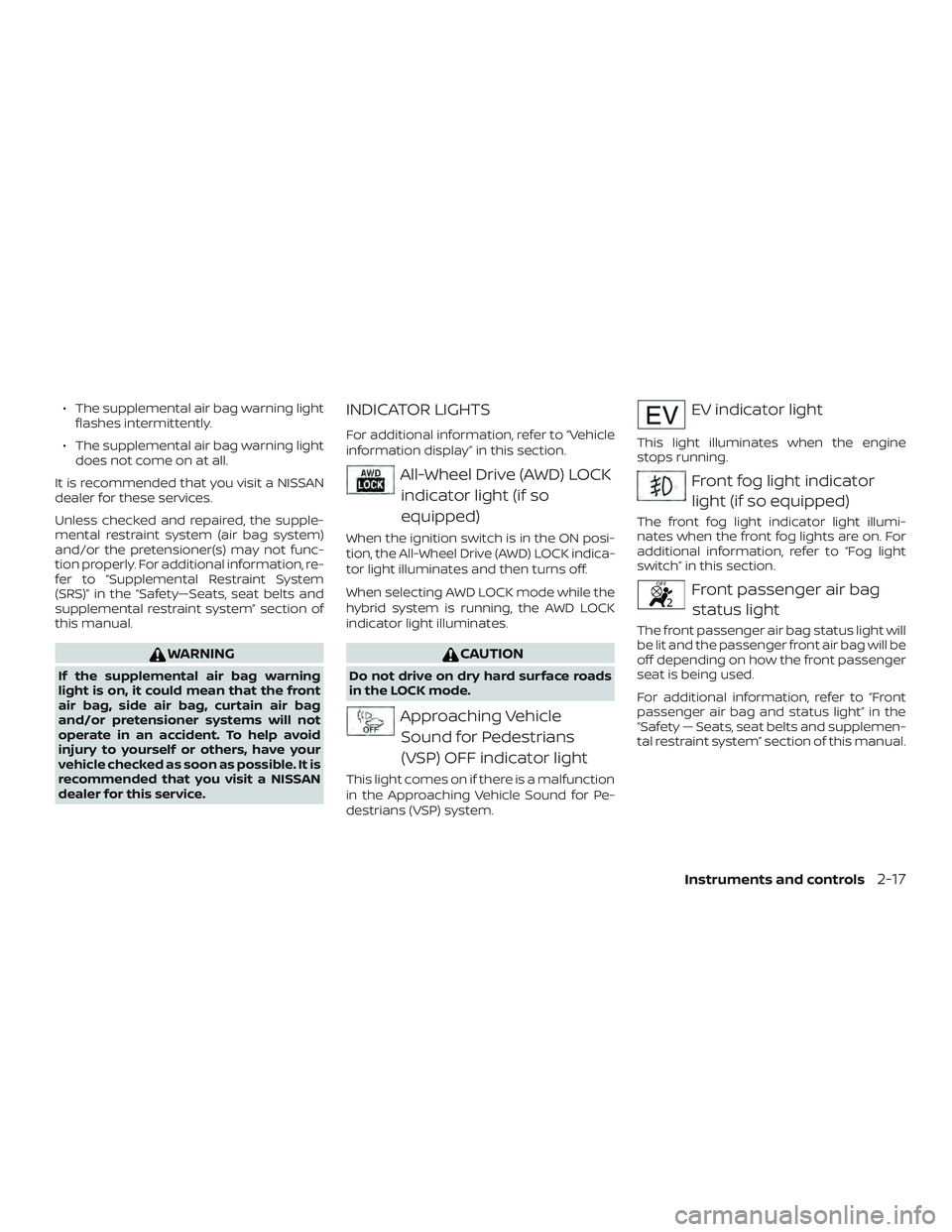
All-Wheel Drive (AWD) LOCK indicator light (if so
equipped)
When the ignition switch is in the ON posi-
tion, the All-Wheel Drive (AWD) LOCK indica-
tor light illuminates and then turns off.
When selecting AWD LOCK mode while the
hybrid system is running, the AWD LOCK
indicator light illuminates.
CAUTION
Do not drive on dry hard surface roads
in the LOCK mode.
Approaching VehicleSound for Pedestrians
(VSP) OFF indicator light
This light comes on if there is a malfunction
in the Approaching Vehicle Sound for Pe-
destrians (VSP) system.
EV indicator light
This light illuminates when the engine
stops running.
Front fog light indicatorlight (if so equipped)
The front fog light indicator light illumi-
nates when the front fog lights are on. For
additional information, refer to “Fog light
switch” in this section.
Front passenger air bagstatus light
The front passenger air bag status light will
be lit and the passenger front air bag will be
off depending on how the front passenger
seat is being used.
For additional information, refer to “Front
passenger air bag and status light” in the
“Safety — Seats, seat belts and supplemen-
tal restraint system” section of this manual.
Instruments and controls2-17
Page 150 of 508
High Beam Assist
The High Beam Assist system will operate
when the vehicle is driven at speeds of ap-
proximately 25 mph (40 km/h) and above. If
an oncoming vehicle or leading vehicle ap-
pears in front of your vehicle when the
headlight high beam is on, the headlight
will be switched to the low beam automati-
cally.
WARNING
∙ The High Beam Assist system is a con-venience but it is not a substitute for
safe driving operation. The driver
should remain alert at all times, en-
sure safe driving practices and switch
the high beams and low beam manu-
ally when necessary.
∙ The high beam or low beam may not switch automatically under the fol-
lowing conditions. Switch the high
beam and low beam manually.
– During bad weather (rain, fog, snow, wind, etc.).
– When a light source similar to a headlight or tail light is in the vicin-
ity of the vehicle. – When the headlights of the on-
coming vehicle or the leading ve-
hicle are turned off, when the color
of the light is affected due to for-
eign materials on the lights, or
when the light beam is out of
position.
– When there is a sudden, continu- ous change in brightness.
– When driving on a road that passes over rolling hills, or a road that has
level differences.
– When driving on a road with many curves.
– When a sign or mirror-like surface is reflecting intense light towards
the front of the vehicle.
– When the container, etc. being towed by a leading vehicle is re-
flecting intense light.
– When a headlight on your vehicle is damaged or dirty.
– When the vehicle is leaning at an angle due to a punctured tire, be-
ing towed, etc. ∙ The timing of switching the low beam
and high beam may change under the
following situations.
– The brightness of the headlights of the oncoming vehicle or leading
vehicle.
– The movement and direction of the oncoming vehicle and the lead-
ing vehicle.
– When only one light on the oncom- ing vehicle or the leading vehicle is
illuminated.
– When the oncoming vehicle or the leading vehicle is a two-wheeled
vehicle.
– Road conditions (incline, curve, the road surface, etc.).
– The number of passengers and the amount of luggage.
2-48Instruments and controls
Page 154 of 508
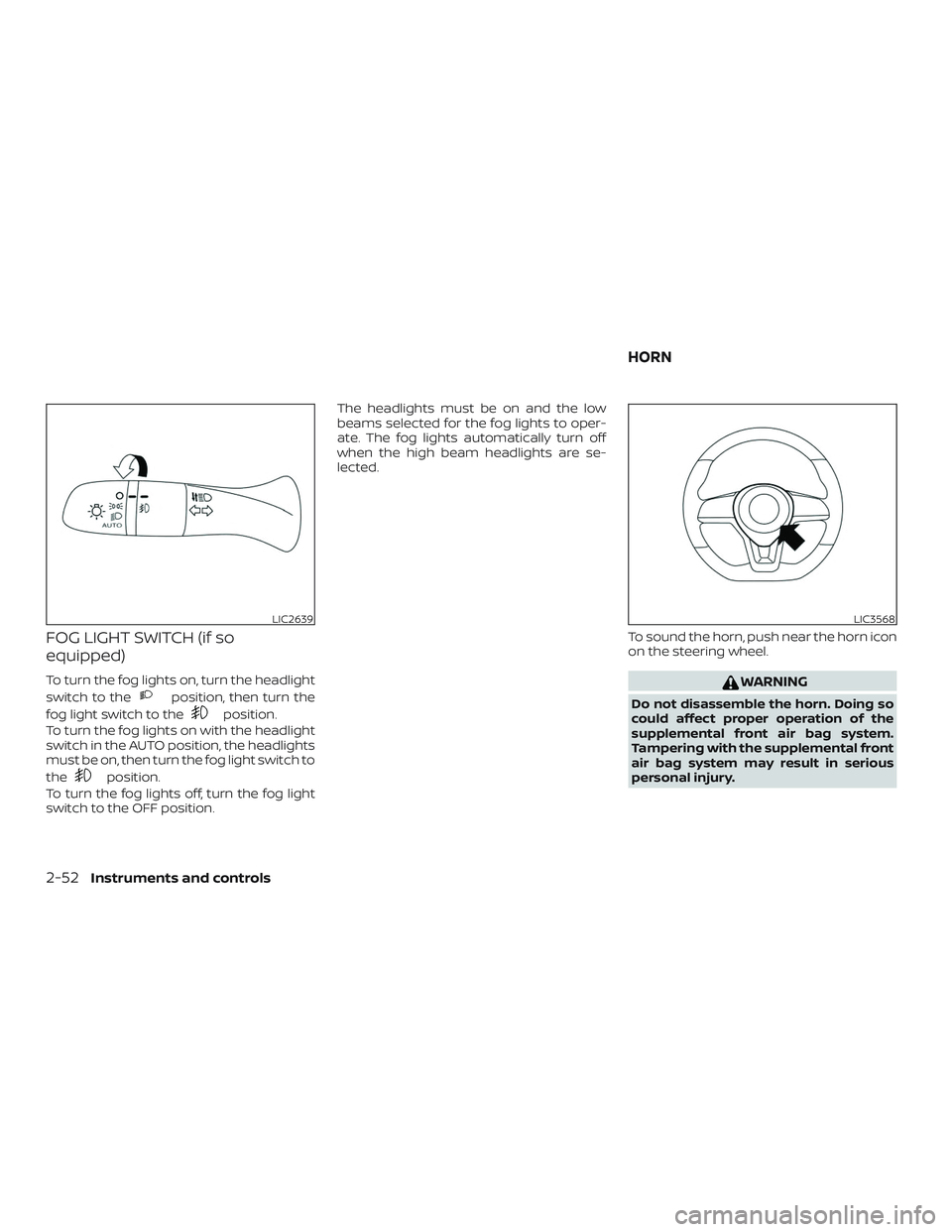
FOG LIGHT SWITCH (if so
equipped)
To turn the fog lights on, turn the headlight
switch to the
position, then turn the
fog light switch to the
position.
To turn the fog lights on with the headlight
switch in the AUTO position, the headlights
must be on, then turn the fog light switch to
the
position.
To turn the fog lights off, turn the fog light
switch to the OFF position. The headlights must be on and the low
beams selected for the fog lights to oper-
ate. The fog lights automatically turn off
when the high beam headlights are se-
lected.
To sound the horn, push near the horn icon
on the steering wheel.
WARNING
Do not disassemble the horn. Doing so
could affect proper operation of the
supplemental front air bag system.
Tampering with the supplemental front
air bag system may result in serious
personal injury.
LIC2639LIC3568
HORN
2-52Instruments and controls
Page 255 of 508
NOTE:∙ Odors from inside and outside the ve-
hicle can build up in the air condi-
tioner unit. Odor can enter the pas-
senger compartment through the
vents.
∙ When parking, set the heater and air
conditioner controls to turn off air re-
circulation to allow fresh air into the
passenger compartment. This should
help reduce odors inside the vehicle.
AUTOMATIC OPERATION
Cooling and/or dehumidified
heating (AUTO)
This mode may be used all year round as
the system automatically works to keep a
constant temperature. Air flow distribution,
air intake control and fan speed are also
controlled automatically.
1. Press the AUTO button on. The indica- tor on the button will illuminate.
2. Turn the temperature control dial to the lef t or right to set the desired tem-
perature. ∙ The temperature of the passenger
compartment will be maintained auto-
matically. Air flow distribution, air intake
control and fan speed are also con-
trolled automatically.
∙ A visible mist may be seen coming from the vents in hot, humid conditions as
the air is cooled rapidly. This does not
indicate a malfunction.
3. You can individually set driver’s and front passenger’s side temperature us-
ing each temperature control dial.
When the DUAL button is pressed or
passenger’s side temperature dial is
turned, the DUAL indicator will come
on. To turn off the passenger’s side
temperature control, press the DUAL
button.
Heating (A/C OFF)
The air conditioner does not activate. When
you need to heat only, use this mode.
1. Press the AUTO button.
2. Turn the temperature control dial to set the desired temperature. ∙ The temperature of the passenger
compartment will be maintained auto-
matically. Air flow distribution and fan
speed are also controlled automatically.
∙ Do not set the temperature lower than the outside air temperature. Otherwise,
the system may not work properly.
∙ Not recommended if windows fog up.
Dehumidified defrosting or
defogging
1. Press thefront defroster button
on. The indicator light on the button will
come on.
2. Turn the temperature control dial to set the maximum temperature to aid in
defrosting or defogging.
∙ To quickly remove ice from the outside of the windows, use the fan speed con-
trol dial to set the fan speed to maxi-
mum.
∙ As soon as possible af ter the wind- shield is clean, press the AUTO button to
return to the automatic mode.
Monitor, climate, audio, phone and voice recognition systems4-31