lock NISSAN ROGUE SELECT 2015 Owner's Guide
[x] Cancel search | Manufacturer: NISSAN, Model Year: 2015, Model line: ROGUE SELECT, Model: NISSAN ROGUE SELECT 2015Pages: 322, PDF Size: 2.21 MB
Page 100 of 322
prevent it, nor can it prevent the theft of interior
or exterior vehicle components in all situations.
Always secure your vehicle even if parking for a
brief period. Never leave your keys in the vehicle,
and always lock it when unattended. Be aware
of your surroundings, and park in secure, well-lit
areas whenever possible.
Many devices offering additional protection,
such as component locks, identification markers,
and tracking systems, are available at auto
supply stores and specialty shops. Your
NISSAN dealer may also offer such equipment.
Check with your insurance company to see if
you may be eligible for discounts for various
theft protection features.
SIC2045
How to arm the vehicle security system
1. Close all windows.The system can be armed even if the
windows are open.
2. Turn the ignition switch to the LOCK position and remove the key.
3. Close all doors. Lock all doors. The doors can be locked with:
.the lock buttonon the key fob.the power door lock switch.Master key
4. Confirm that the security indicator light illuminates. The security indicator light stays
on for about 30 seconds. The vehicle security system is now pre-armed. After
about 30 seconds the vehicle security
system automatically shifts into the armed
phase. The security light begins to flash
once every approximately 3 seconds. If,
during this 30-second pre-arm time period,
the door is unlocked, or the ignition switch is
turned to the ACC or ON position, the
system will not arm.
Even when the driver and/or passengers
are in the vehicle, the system will activate
with all doors locked with the ignition
switch in the LOCK position. When turning
the ignition switch to the ACC or ON
position, the system will be released.
Vehicle security system activation
The vehicle security system will give the follow-
ing alarm:
. The headlights blink and the horn sounds
intermittently.
. The alarm automatically turns off after
approximately 50 seconds. However, the
alarm reactivates if the vehicle is tampered
with again.
The alarm is activated by:
. Unlocking the door without using the key
fob, or the key. (Even if the door is opened
by releasing the door inside lock knob, the
Instruments and controls2-25
Page 101 of 322

2-26Instruments and controls
alarm will activate.)
How to stop an activated alarm
The alarm will stop by unlocking a door by
pushing the unlock buttonon the key fob, or
using the key. The alarm will not stop if the
ignition switch is turned to the ACC or ON
position.
If the system does not operate as de-
scribed above, have it checked by a
NISSAN dealer.
NISSAN VEHICLE IMMOBILIZER SYS-
TEM
The NISSAN Vehicle Immobilizer System will not
allow the engine to start without the use of the
registered key.
If the engine fails to start using the registered
key, it may be due to interference caused by
another registered key, an automated toll road
device or automated payment device on the key
ring. Restart the engine using the following
procedures:
1. Leave the ignition switch in the ON position for approximately 5 seconds.
2. Turn the ignition switch to the OFF or LOCK position and wait approximately 10 seconds.
3. Repeat step 1 and 2 again. 4. Restart the engine while holding the device
(which may have caused the interference)
separate from the registered key.
If this procedure allows the engine to start,
NISSAN recommends placing the regis-
tered key on a separate key ring to avoid
interference from other devices.
Statement related to section 15 of FCC
rules for NISSAN Vehicle Immobilizer
System (CONT ASSY-BCM. ANT ASSY-
IMMOBILISER)
FCC Notice:
This device complies with Part 15 of the
FCC Rules. Operation is subject to the
following two conditions: (1) This device
may not cause harmful interference, and
(2) this device must accept any interfer-
ence received, including interference that
may cause undesired operation.
NOTE:
Changes or modifications not expressly
approved by the party responsible for
compliance could void the user’s authority
to operate the equipment.SIC2045
Security indicator light
The security indicator light is located on the
meter panel. It indicates the status of the
NISSAN Vehicle Immobilizer System.
The light blinks after the ignition switch was in
the LOCK position. This function indicates the
security systems equipped on the vehicle are
operational.
If the NISSAN Vehicle Immobilizer System is
malfunctioning, this light will remain on while the
ignition switch is in the ON position.
If the light still remains on and/or the
engine will not start, see a NISSAN dealer
for NISSAN Vehicle Immobilizer System
Page 104 of 322
SIC3480
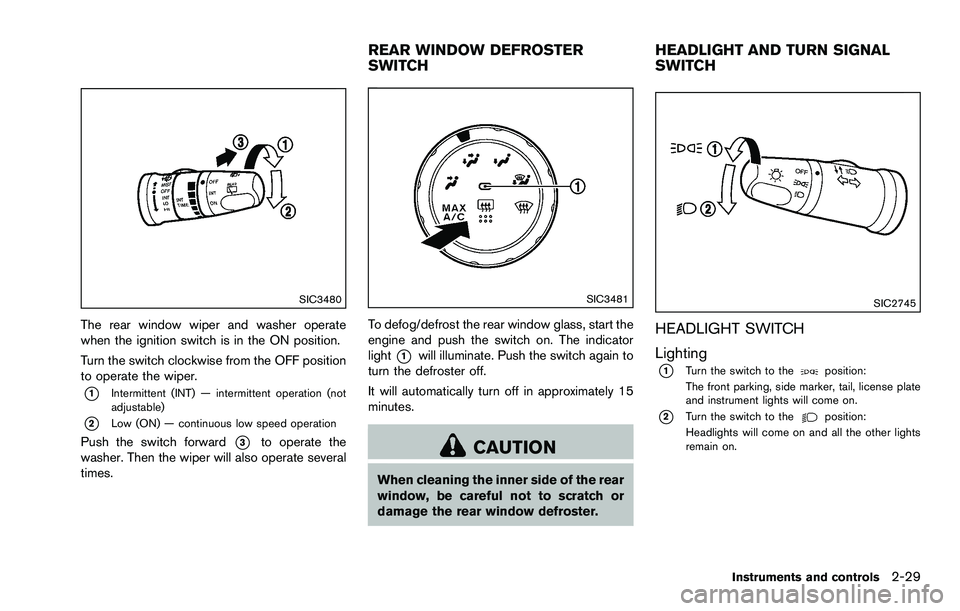
The rear window wiper and washer operate
when the ignition switch is in the ON position.
Turn the switch clockwise from the OFF position
to operate the wiper.
*1Intermittent (INT) — intermittent operation (not
adjustable)
*2Low (ON) — continuous low speed operation
Push the switch forward*3to operate the
washer. Then the wiper will also operate several
times.
SIC3481
To defog/defrost the rear window glass, start the
engine and push the switch on. The indicator
light
*1will illuminate. Push the switch again to
turn the defroster off.
It will automatically turn off in approximately 15
minutes.
CAUTION
When cleaning the inner side of the rear
window, be careful not to scratch or
damage the rear window defroster.
SIC2745
HEADLIGHT SWITCH
Lighting
*1Turn the switch to theposition:
The front parking, side marker, tail, license plate
and instrument lights will come on.
*2Turn the switch to theposition:
Headlights will come on and all the other lights
remain on.
Instruments and controls2-29
REAR WINDOW DEFROSTER
SWITCH HEADLIGHT AND TURN SIGNAL
SWITCH
Page 109 of 322
2-34Instruments and controls
.Do not leave glasses in the sun-
glasses holder while parking in
direct sunlight. The heat may da-
mage the glasses.
SIC3497
SIC3498
GLOVE BOX
WARNING
Keep glove box lid closed while driving
to help prevent injury in an accident or a
sudden stop.
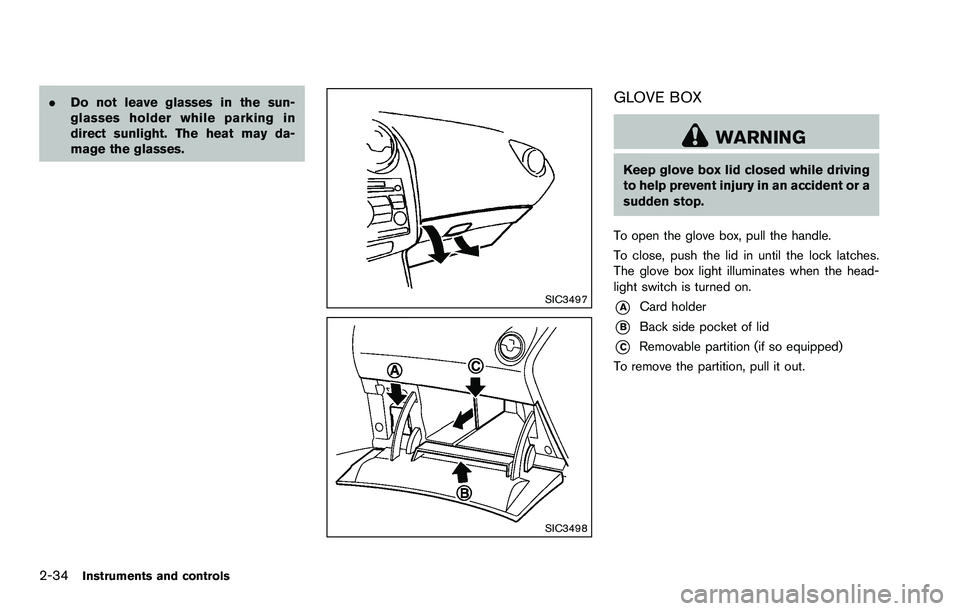
To open the glove box, pull the handle.
To close, push the lid in until the lock latches.
The glove box light illuminates when the head-
light switch is turned on.
*ACard holder
*BBack side pocket of lid
*CRemovable partition (if so equipped)
To remove the partition, pull it out.
Page 110 of 322
SIC3499
CONSOLE BOX
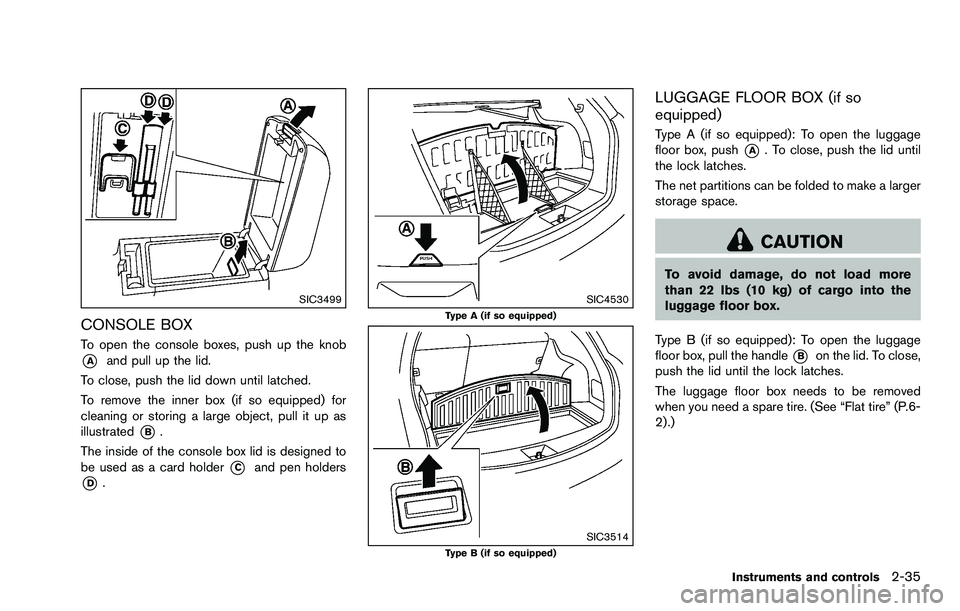
To open the console boxes, push up the knob
*Aand pull up the lid.
To close, push the lid down until latched.
To remove the inner box (if so equipped) for
cleaning or storing a large object, pull it up as
illustrated
*B.
The inside of the console box lid is designed to
be used as a card holder
*Cand pen holders
*D.
SIC4530Type A (if so equipped)
SIC3514Type B (if so equipped)
LUGGAGE FLOOR BOX (if so
equipped)
Type A (if so equipped): To open the luggage
floor box, push
*A. To close, push the lid until
the lock latches.
The net partitions can be folded to make a larger
storage space.
CAUTION
To avoid damage, do not load more
than 22 lbs (10 kg) of cargo into the
luggage floor box.
Type B (if so equipped): To open the luggage
floor box, pull the handle
*Bon the lid. To close,
push the lid until the lock latches.
The luggage floor box needs to be removed
when you need a spare tire. (See “Flat tire” (P.6-
2) .)
Instruments and controls2-35
Page 113 of 322
2-38Instruments and controls
SIC4550
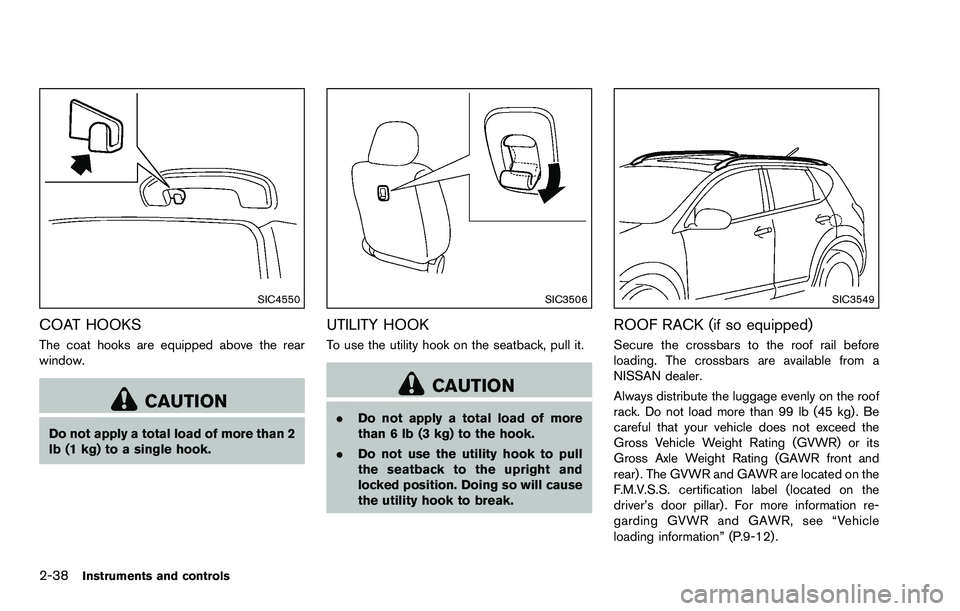
COAT HOOKS
The coat hooks are equipped above the rear
window.
CAUTION
Do not apply a total load of more than 2
lb (1 kg) to a single hook.
SIC3506
UTILITY HOOK
To use the utility hook on the seatback, pull it.
CAUTION
.Do not apply a total load of more
than 6 lb (3 kg) to the hook.
. Do not use the utility hook to pull
the seatback to the upright and
locked position. Doing so will cause
the utility hook to break.
SIC3549
ROOF RACK (if so equipped)
Secure the crossbars to the roof rail before
loading. The crossbars are available from a
NISSAN dealer.
Always distribute the luggage evenly on the roof
rack. Do not load more than 99 lb (45 kg) . Be
careful that your vehicle does not exceed the
Gross Vehicle Weight Rating (GVWR) or its
Gross Axle Weight Rating (GAWR front and
rear) . The GVWR and GAWR are located on the
F.M.V.S.S. certification label (located on the
driver’s door pillar) . For more information re-
garding GVWR and GAWR, see “Vehicle
loading information” (P.9-12) .
Page 114 of 322

WARNING
.Drive extra carefully when the vehi-
cle is loaded at or near the cargo
carrying capacity, especially if the
significant portion of that load is
carried on the roof rack.
. Heavy loading of the roof rack has
the potential to affect the vehicle
stability and handling during sud-
den or unusual handling maneuvers.
. Roof rack load should be evenly
distributed.
. Do not exceed maximum roof rack
load weight capacity.
. Properly secure all cargo with ropes
or straps to help prevent it from
sliding or shifting. In a sudden stop
or collision, unsecured cargo could
cause personal injury.
CAUTION
Use care when placing or removing
items from the roof rack. If you cannot
comfortably lift the items onto the roof rack from the ground, use a ladder or
stool.
POWER WINDOWS
WARNING
.
Make sure that all passengers have
their hands, etc. inside the vehicle
while it is in motion and before
closing the windows. Use the win-
dow lock switch to prevent unex-
pected use of the power windows.
. Do not leave children unattended
inside the vehicle. They could un-
knowingly activate switches or con-
trols and become trapped in the
window. Unattended children could
become involved in serious acci-
dents.
The power windows operate when the ignition
switch is in the ON position, or for about 45
seconds after the ignition switch is turned to the
OFF position. If the driver’s or front passenger’s
door is opened during this period of about 45
seconds, power to the windows is canceled.
Instruments and controls2-39
WINDOWS
Page 115 of 322

2-40Instruments and controls
SIC3507
1. Window lock button
2. Driver side window
3. Rear left passenger side window
4. Front passenger side window
5. Rear right passenger side window
Main power window switch (driver’s
side)
To open or close the window, push down*Aor
pull up
*Bthe switch and hold it. The main
switch (driver side switches) will open or close
all the windows.
Locking passengers’ windows
When the lock button*Cis pushed in, only the
driver side window can be opened or closed.
Push it in again to cancel.
SIC3508
Passenger side power window switch
The passenger side switch will open or close
only the corresponding window. To open or
close the window, push down or pull up the
switch and hold it.
Page 117 of 322

2-42Instruments and controls
CAUTION
Do not use for extended periods of time
with the engine stopped. This could
result in a discharged battery.
MAP LIGHTS
Push the light lens to turn the map light on or off.
SIC3512
The map light control switch has three positions:
ON
*1, DOOR*2and OFF*3.
The light
*4(if so equipped) will illuminate
when the headlight switch is turned to the
orposition.
ON position
When the switch is in the ON position*1, the
map lights will illuminate.
DOOR position
When the switch is in the DOOR position*2,
the map lights will illuminate under the following
conditions:
. ignition switch is turned to the LOCK
position
— remain on for about 15 seconds.
. doors are unlocked by pushing the unlock
button
(on the key fob) , with the ignition
switch in the LOCK position
— remain on for about 15 seconds.
. any door is opened and then closed with the
ignition switch in the LOCK position
— remain on for about 15 seconds.
. any door is opened with the ignition switch
in the ACC or ON position
— remain on while the door is opened.
When the door is closed, the lights go
off.
The lights will turn off after a period of
time when the lights remain illuminated to
prevent the battery from becoming dis-
charged.
INTERIOR LIGHTS
Page 118 of 322

OFF position
When the switch is in the OFF position*3, the
map lights will not illuminate, regardless of the
condition.
SIC3513
CEILING LIGHT
The ceiling light switch has three positions: ON,
DOOR and OFF.
ON position
When the switch is in the ON position*1, the
ceiling light will illuminate.
DOOR position
When the switch is in the DOOR position*2,
the ceiling light will illuminate under the following
conditions:
. ignition switch is turned to the LOCK
position — remain on for about 15 seconds.
. doors are unlocked by pushing the unlock
button
(on the key fob) , with the ignition
switch in the LOCK position
— remain on for about 15 seconds.
. any door is opened and then closed with the
ignition switch in the LOCK position
— remain on for about 15 seconds.
. any door is opened with the ignition switch
in the ACC or ON position
— remain on while the door is opened.
When the door is closed, the lights go
off.
The light will turn off after a period of time
when the lights remain illuminated to
prevent the battery from becoming dis-
charged.
OFF position
When the switch is in the OFF position*3, the
ceiling light will not illuminate, regardless of the
condition.
Instruments and controls2-43