maintenance NISSAN ROGUE SELECT 2015 Owner's Guide
[x] Cancel search | Manufacturer: NISSAN, Model Year: 2015, Model line: ROGUE SELECT, Model: NISSAN ROGUE SELECT 2015Pages: 322, PDF Size: 2.21 MB
Page 259 of 322
8-18Maintenance and do-it-yourself
JVM0501X
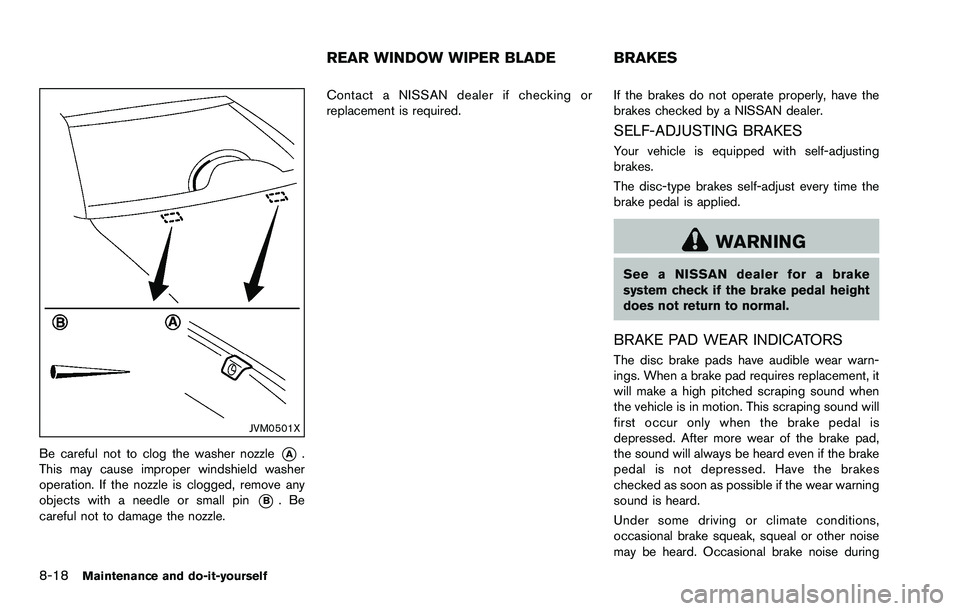
Be careful not to clog the washer nozzle*A.
This may cause improper windshield washer
operation. If the nozzle is clogged, remove any
objects with a needle or small pin
*B.Be
careful not to damage the nozzle. Contact a NISSAN dealer if checking or
replacement is required.
If the brakes do not operate properly, have the
brakes checked by a NISSAN dealer.
SELF-ADJUSTING BRAKES
Your vehicle is equipped with self-adjusting
brakes.
The disc-type brakes self-adjust every time the
brake pedal is applied.
WARNING
See a NISSAN dealer for a brake
system check if the brake pedal height
does not return to normal.
BRAKE PAD WEAR INDICATORS
The disc brake pads have audible wear warn-
ings. When a brake pad requires replacement, it
will make a high pitched scraping sound when
the vehicle is in motion. This scraping sound will
first occur only when the brake pedal is
depressed. After more wear of the brake pad,
the sound will always be heard even if the brake
pedal is not depressed. Have the brakes
checked as soon as possible if the wear warning
sound is heard.
Under some driving or climate conditions,
occasional brake squeak, squeal or other noise
may be heard. Occasional brake noise during
REAR WINDOW WIPER BLADE BRAKES
Page 260 of 322
light to moderate stops is normal and does not
affect the function or performance of the brake
system.
Proper brake inspection intervals should
be followed.For additional information, see the
maintenance log section of your “NISSAN
Service and Maintenance Guide”.
SDI2107
ENGINE COMPARTMENT
CAUTION
Never use a fuse of a higher or lower
amperage rating than that specified on
the fuse box cover. This could damage
the electrical system or cause a fire.
If any electrical equipment does not operate,
check for an open fuse.
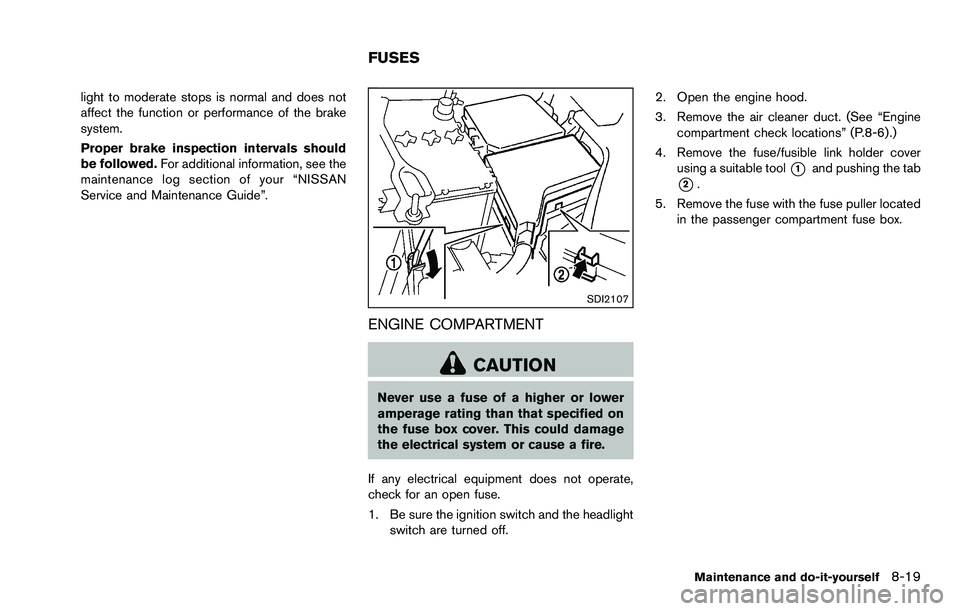
1. Be sure the ignition switch and the headlight switch are turned off. 2. Open the engine hood.
3. Remove the air cleaner duct. (See “Engine
compartment check locations” (P.8-6) .)
4. Remove the fuse/fusible link holder cover using a suitable tool
*1and pushing the tab
*2.
5. Remove the fuse with the fuse puller located in the passenger compartment fuse box.
Maintenance and do-it-yourself8-19
FUSES
Page 261 of 322
8-20Maintenance and do-it-yourself
SDI1753
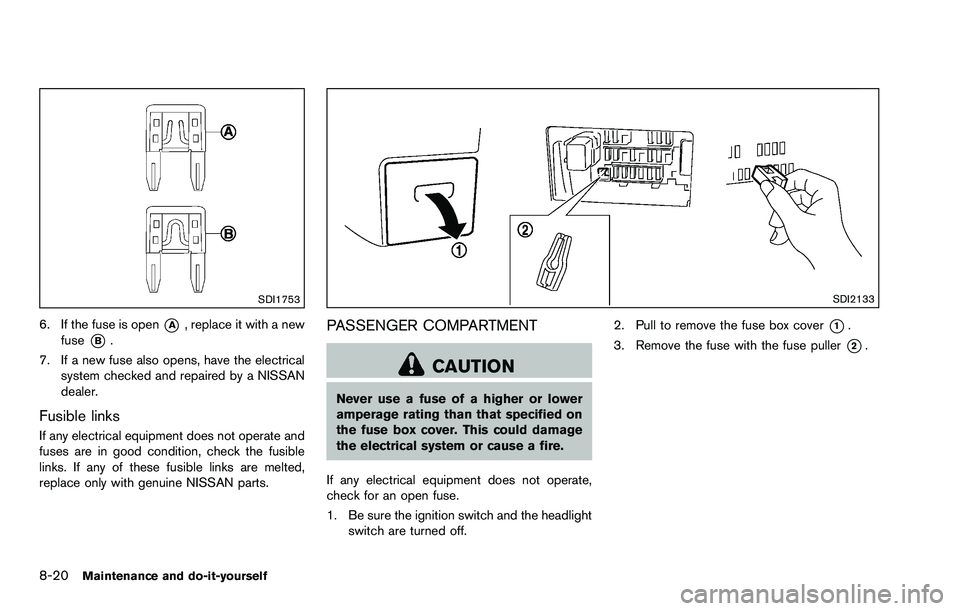
6. If the fuse is open*A, replace it with a new
fuse
*B.
7. If a new fuse also opens, have the electrical system checked and repaired by a NISSAN
dealer.
Fusible links
If any electrical equipment does not operate and
fuses are in good condition, check the fusible
links. If any of these fusible links are melted,
replace only with genuine NISSAN parts.
SDI2133
PASSENGER COMPARTMENT
CAUTION
Never use a fuse of a higher or lower
amperage rating than that specified on
the fuse box cover. This could damage
the electrical system or cause a fire.
If any electrical equipment does not operate,
check for an open fuse.
1. Be sure the ignition switch and the headlight switch are turned off. 2. Pull to remove the fuse box cover
*1.
3. Remove the fuse with the fuse puller
*2.
Page 262 of 322
SDI1753
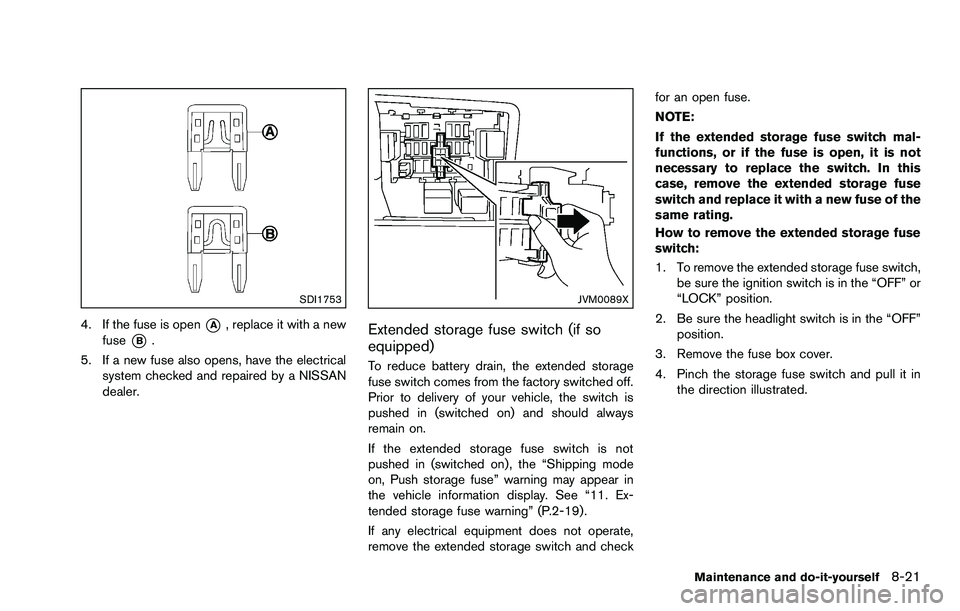
4. If the fuse is open*A, replace it with a new
fuse
*B.
5. If a new fuse also opens, have the electrical system checked and repaired by a NISSAN
dealer.
JVM0089X
Extended storage fuse switch (if so
equipped)
To reduce battery drain, the extended storage
fuse switch comes from the factory switched off.
Prior to delivery of your vehicle, the switch is
pushed in (switched on) and should always
remain on.
If the extended storage fuse switch is not
pushed in (switched on) , the “Shipping mode
on, Push storage fuse” warning may appear in
the vehicle information display. See “11. Ex-
tended storage fuse warning” (P.2-19) .
If any electrical equipment does not operate,
remove the extended storage switch and check for an open fuse.
NOTE:
If the extended storage fuse switch mal-
functions, or if the fuse is open, it is not
necessary to replace the switch. In this
case, remove the extended storage fuse
switch and replace it with a new fuse of the
same rating.
How to remove the extended storage fuse
switch:
1. To remove the extended storage fuse switch,
be sure the ignition switch is in the “OFF” or
“LOCK” position.
2. Be sure the headlight switch is in the “OFF” position.
3. Remove the fuse box cover.
4. Pinch the storage fuse switch and pull it in the direction illustrated.
Maintenance and do-it-yourself8-21
Page 263 of 322
8-22Maintenance and do-it-yourself
CAUTION
Be careful not to allow children to
swallow the battery and removed parts.
SDI2134
KEY FOB
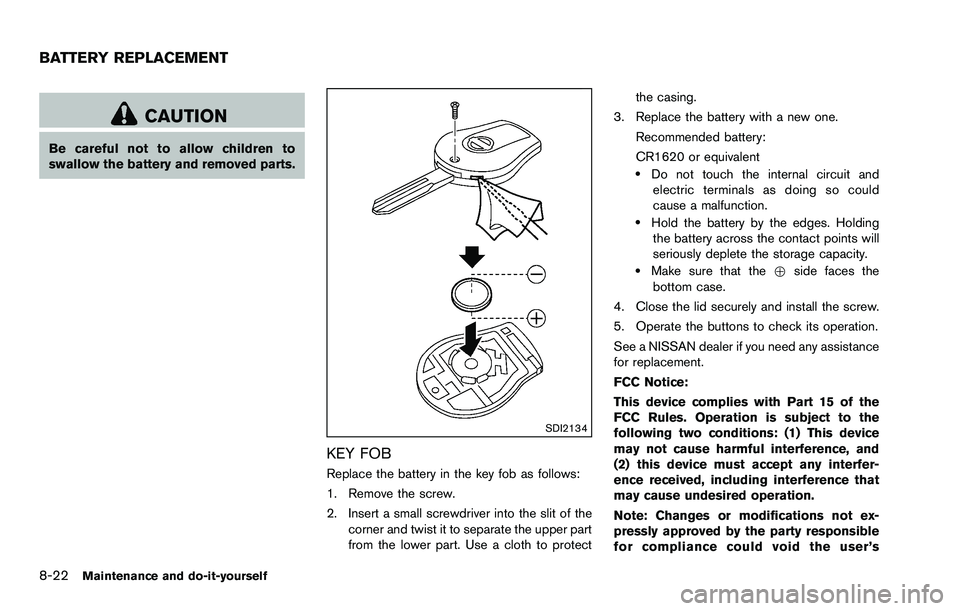
Replace the battery in the key fob as follows:
1. Remove the screw.
2. Insert a small screwdriver into the slit of thecorner and twist it to separate the upper part
from the lower part. Use a cloth to protect the casing.
3. Replace the battery with a new one.
Recommended battery:
CR1620 or equivalent
.Do not touch the internal circuit andelectric terminals as doing so could
cause a malfunction.
.Hold the battery by the edges. Holdingthe battery across the contact points will
seriously deplete the storage capacity.
.Make sure that the +side faces the
bottom case.
4. Close the lid securely and install the screw.
5. Operate the buttons to check its operation.
See a NISSAN dealer if you need any assistance
for replacement.
FCC Notice:
This device complies with Part 15 of the
FCC Rules. Operation is subject to the
following two conditions: (1) This device
may not cause harmful interference, and
(2) this device must accept any interfer-
ence received, including interference that
may cause undesired operation.
Note: Changes or modifications not ex-
pressly approved by the party responsible
for compliance could void the user’s
BATTERY REPLACEMENT
Page 264 of 322
authority to operate the equipment.
Maintenance and do-it-yourself8-23
Page 265 of 322
8-24Maintenance and do-it-yourself
JVM0520X
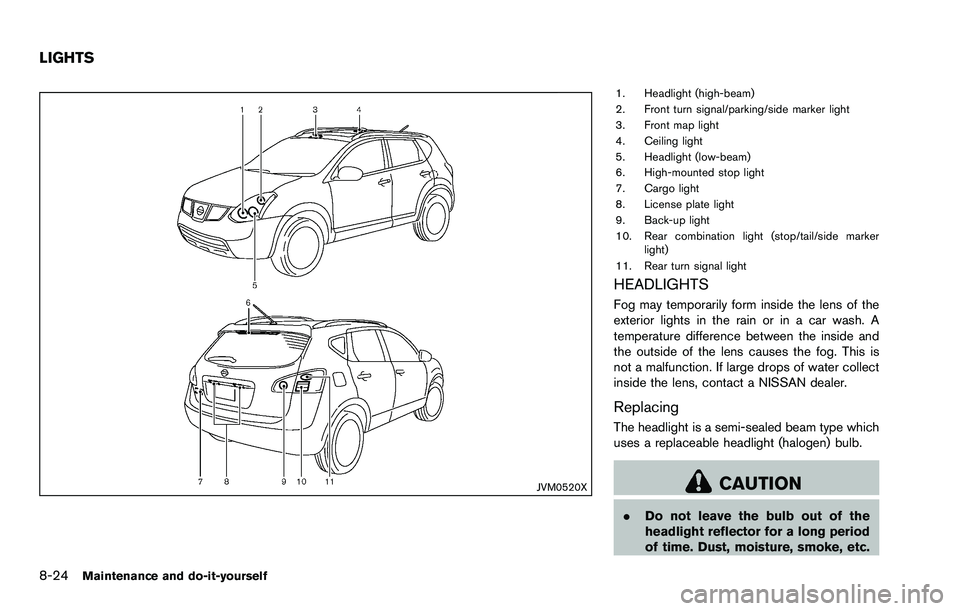
1. Headlight (high-beam)
2. Front turn signal/parking/side marker light
3. Front map light
4. Ceiling light
5. Headlight (low-beam)
6. High-mounted stop light
7. Cargo light
8. License plate light
9. Back-up light
10. Rear combination light (stop/tail/side markerlight)
11. Rear turn signal light
HEADLIGHTS
Fog may temporarily form inside the lens of the
exterior lights in the rain or in a car wash. A
temperature difference between the inside and
the outside of the lens causes the fog. This is
not a malfunction. If large drops of water collect
inside the lens, contact a NISSAN dealer.
Replacing
The headlight is a semi-sealed beam type which
uses a replaceable headlight (halogen) bulb.
CAUTION
. Do not leave the bulb out of the
headlight reflector for a long period
of time. Dust, moisture, smoke, etc.
LIGHTS
Page 266 of 322
entering the headlight body may
affect bulb performance.
. High pressure halogen gas is sealed
inside the halogen bulb. The bulb
may break if the glass envelope is
scratched or the bulb is dropped.
. Only touch the plastic base when
handling the bulb. Never touch the
glass envelope.
. Aiming is not necessary after repla-
cing the bulb. When aiming adjust-
ment is necessary, contact a
NISSAN dealer.
Use the same number and wattage as originally
installed: Low beam:Wattage: 55
Bulb no.: H11
High beam: Wattage: 60
Bulb no.: HB3
SDI2137
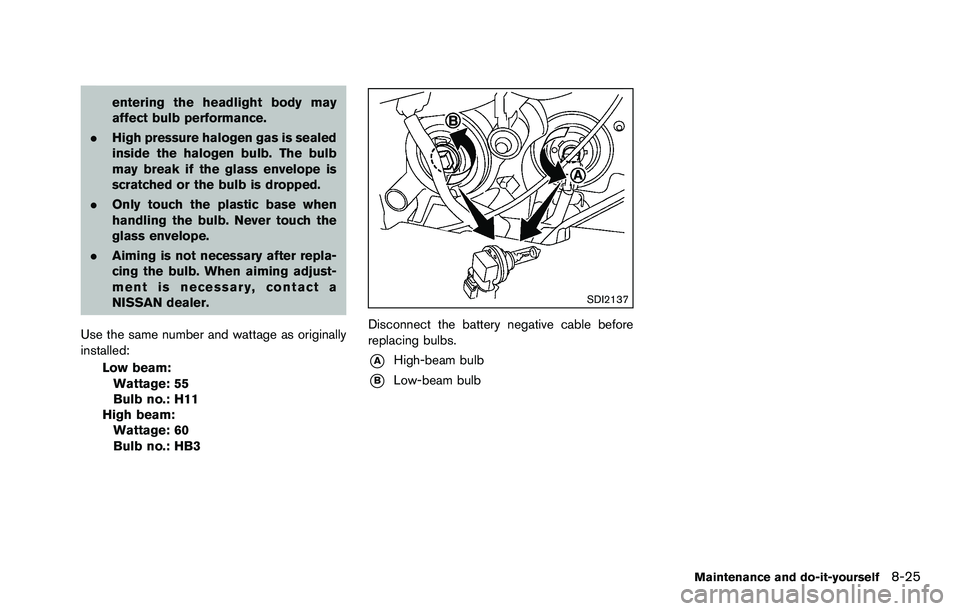
Disconnect the battery negative cable before
replacing bulbs.
*AHigh-beam bulb
*BLow-beam bulb
Maintenance and do-it-yourself8-25
Page 267 of 322
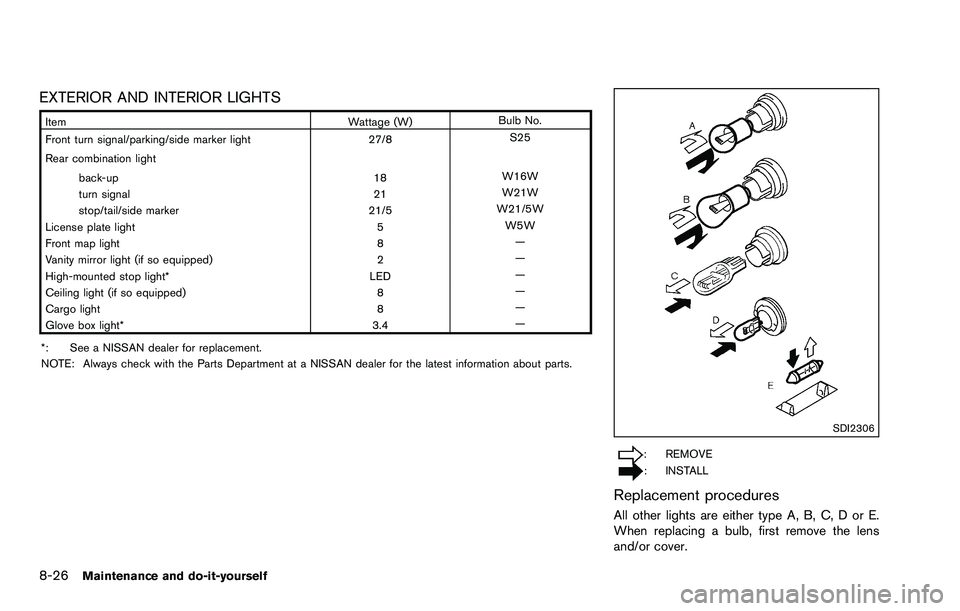
8-26Maintenance and do-it-yourself
EXTERIOR AND INTERIOR LIGHTS
ItemWattage (W)Bulb No.
Front turn signal/parking/side marker light 27/8S25
Rear combination light back-up 18W16W
turn signal 21W21W
stop/tail/side marker 21/5W21/5W
License plate light 5W5W
Front map light 8—
Vanity mirror light (if so equipped) 2—
High-mounted stop light* LED—
Ceiling light (if so equipped) 8—
Cargo light 8—
Glove box light* 3.4—
*: See a NISSAN dealer for replacement.
NOTE: Always check with the Parts Department at a NISSAN dealer for the latest information about parts.
SDI2306
: REMOVE
: INSTALL
Replacement procedures
All other lights are either type A, B, C, D or E.
When replacing a bulb, first remove the lens
and/or cover.
Page 268 of 322
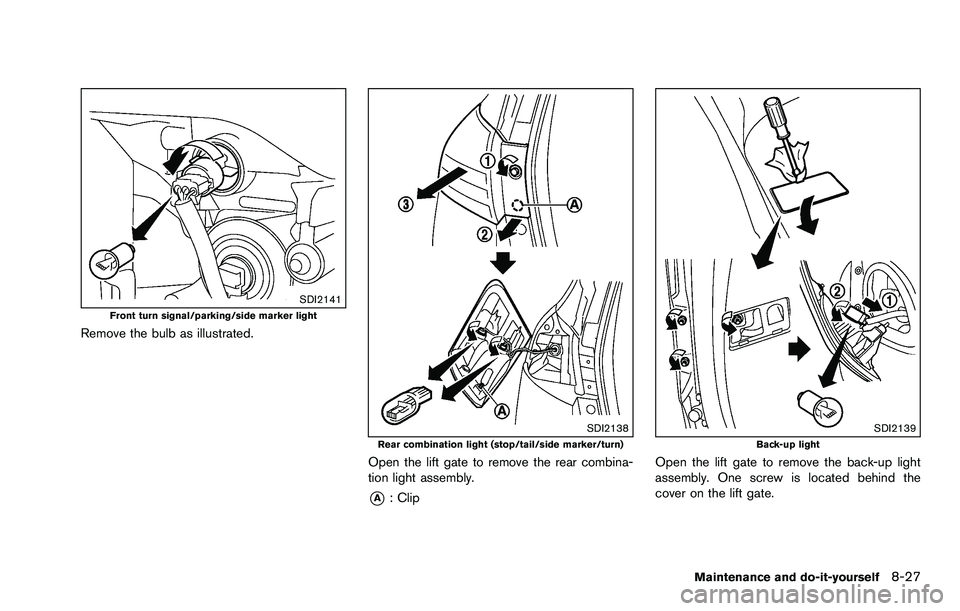
SDI2141Front turn signal/parking/side marker light
Remove the bulb as illustrated.
SDI2138Rear combination light (stop/tail/side marker/turn)
Open the lift gate to remove the rear combina-
tion light assembly.
*A: Clip
SDI2139Back-up light
Open the lift gate to remove the back-up light
assembly. One screw is located behind the
cover on the lift gate.
Maintenance and do-it-yourself8-27