lock NISSAN ROGUE SPORT 2017 Owners Manual
[x] Cancel search | Manufacturer: NISSAN, Model Year: 2017, Model line: ROGUE SPORT, Model: NISSAN ROGUE SPORT 2017Pages: 512, PDF Size: 3.33 MB
Page 306 of 512
.Do not downshift abruptly on
slippery roads. This may cause a
loss of control.
CAUTION
.To avoid possible damage to your
vehicle; when stopping the vehi-
cle on an uphill grade, do not hold
the vehicle by depressing the
accelerator pedal. The foot brake
should be used for this purpose.
. Except in an emergency, do not
shift to the N (Neutral) position
while driving. Coasting with the
transmission in the N (Neutral)
position may cause serious da-
mage to the transmission.
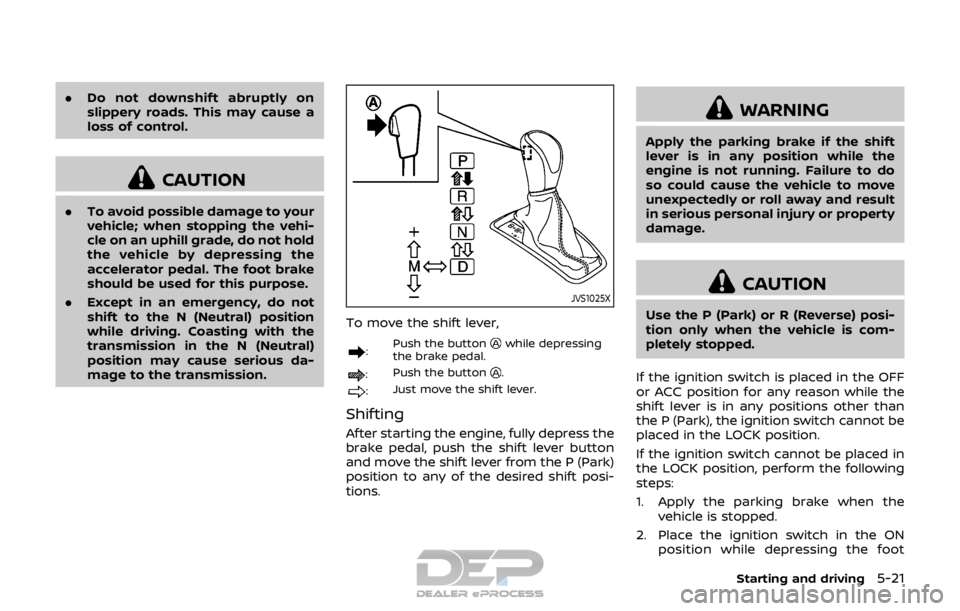
JVS1025X
To move the shift lever,
: Push the buttonwhile depressing
the brake pedal.
: Push the button.
:Just move the shift lever.
Shifting
After starting the engine, fully depress the
brake pedal, push the shift lever button
and move the shift lever from the P (Park)
position to any of the desired shift posi-
tions.
WARNING
Apply the parking brake if the shift
lever is in any position while the
engine is not running. Failure to do
so could cause the vehicle to move
unexpectedly or roll away and result
in serious personal injury or property
damage.
CAUTION
Use the P (Park) or R (Reverse) posi-
tion only when the vehicle is com-
pletely stopped.
If the ignition switch is placed in the OFF
or ACC position for any reason while the
shift lever is in any positions other than
the P (Park), the ignition switch cannot be
placed in the LOCK position.
If the ignition switch cannot be placed in
the LOCK position, perform the following
steps:
1. Apply the parking brake when the vehicle is stopped.
2. Place the ignition switch in the ON position while depressing the foot
Starting and driving5-21
Page 307 of 512
5-22Starting and driving
brake pedal.
3. Move the shift lever to the P (Park) position.
4. Place the ignition switch in the LOCK position.
CAUTION
To prevent transmission damage,
move the shift lever to the P (Park)
or R (Reverse) position only when the
vehicle is completely stopped.
P (Park):
Use this position when the vehicle is
parked or when starting the engine. Make
sure the vehicle is completely stopped.
The brake pedal must be depressed and
the shift lever button pushed in to move
the shift lever from N (Neutral) or any
drive position to P (Park). Apply the
parking brake. When parking on a hill,
apply the parking brake first, then move
the shift lever to the P (Park) position.
R (Reverse):
Use this position to back up. Make sure
the vehicle is completely stopped before
selecting the R (Reverse) position. The
brake pedal must be depressed and the
shift lever button pushed in to move the shift lever from P (Park), N (Neutral) or
any driving position to R (Reverse).
N (Neutral):
Neither forward nor reverse gear is en-
gaged. The engine can be started in this
position. You may shift to N (Neutral) and
restart a stalled engine while the vehicle
is moving.
D (Drive):
Use this position for all normal forward
driving.
Manual shift mode
When the shift lever is shifted from the D
(Drive) position to the manual shift gate,
the transmission enters the manual shift
mode. Shift ranges can be selected
manually by moving the shift lever up or
down.
In the manual shift mode, the shift range
is displayed on the position indicator in
the meter.
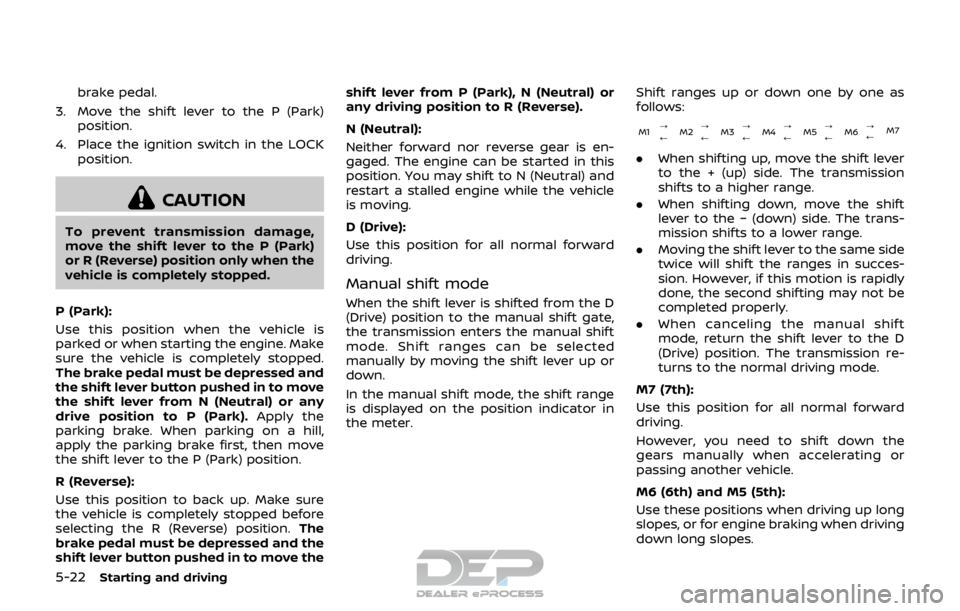
Shift ranges up or down one by one as
follows:
M1
?
M2?
M3?
M4?
M5 ?
M6 ?
M7
///// /
.
When shifting up, move the shift lever
to the + (up) side. The transmission
shifts to a higher range.
. When shifting down, move the shift
lever to the − (down) side. The trans-
mission shifts to a lower range.
. Moving the shift lever to the same side
twice will shift the ranges in succes-
sion. However, if this motion is rapidly
done, the second shifting may not be
completed properly.
. When canceling the manual shift
mode, return the shift lever to the D
(Drive) position. The transmission re-
turns to the normal driving mode.
M7 (7th):
Use this position for all normal forward
driving.
However, you need to shift down the
gears manually when accelerating or
passing another vehicle.
M6 (6th) and M5 (5th):
Use these positions when driving up long
slopes, or for engine braking when driving
down long slopes.
Page 309 of 512
5-24Starting and driving
place and allow the transmission to
return to normal operation, or have it
repaired if necessary.
Adaptive Shift Control (ASC)
The Adaptive Shift Control automatically
operates when the transmission is in the
“D” (Drive) position and selects an appro-
priate gear depending on the road con-
ditions such as uphill or downhill.
Control on uphill and curving roads:
A low gear is maintained that suits the
degree of the slope to allow smooth
driving with a small number of shifts.
Control on downhill roads:
The Adaptive Shift Control shifts to a low
gear that suits the degree of the slope
when the accelerator pedal is depressed,
and uses the engine braking to help
driving in the downhill.
Control on winding roads:
A low gear is maintained on continuous
curves that involve repeated acceleration
and deceleration, so that smooth accel-
eration is available instantly when the
accelerator pedal is depressed.NOTE:
.
Adaptive Shift Control may not op-
erate when the transmission oil
temperature is low immediately
after the start of driving or when it
is very hot.
. During some driving situations, hard
braking for example, the Adaptive
Shift Control may automatically op-
erate. The transmission may auto-
matically shift to a lower gear for
engine braking. This increases en-
gine speed but not vehicle speed.
Vehicle speed is controlled by the
accelerator pedal when the vehicle
is in the Adaptive Shift Control
mode.
. When the Adaptive Shift Control
operates, the transmission some-
times maintains a lower gear for a
longer period of time than when
Adaptive Shift Control is not operat-
ing. Engine speed will be higher for a
specific vehicle speed while Adap-
tive Shift Control is operating than
when Adaptive Shift Control is not
operating.
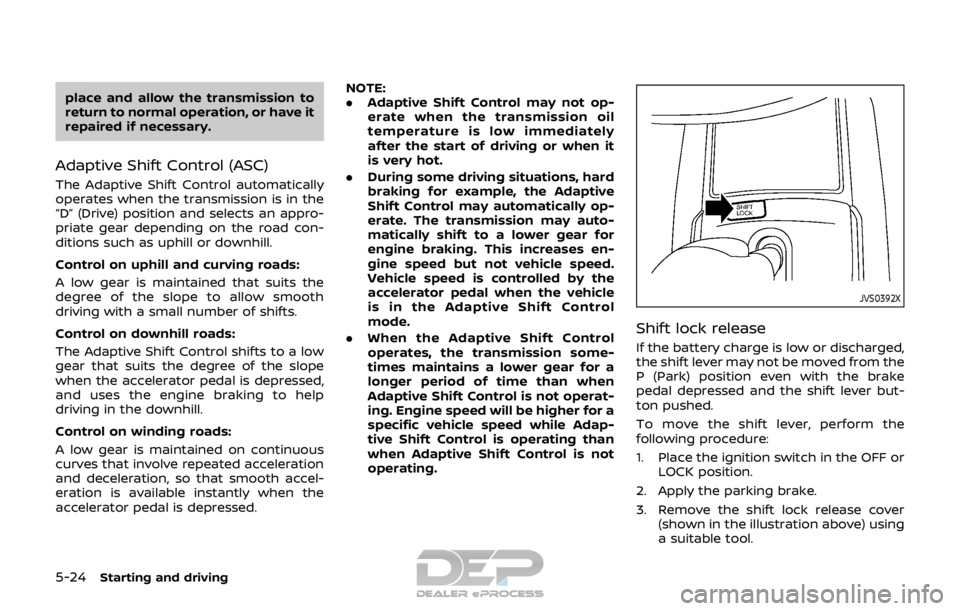
JVS0392X
Shift lock release
If the battery charge is low or discharged,
the shift lever may not be moved from the
P (Park) position even with the brake
pedal depressed and the shift lever but-
ton pushed.
To move the shift lever, perform the
following procedure:
1. Place the ignition switch in the OFF or
LOCK position.
2. Apply the parking brake.
3. Remove the shift lock release cover (shown in the illustration above) using
a suitable tool.
Page 310 of 512
4. Insert the mechanical key and pushdown the shift lock release.
5. Push the shift lever button and move the shift lever to the N (Neutral)
position while holding down the shift
lock release.
Place the ignition switch in the ON posi-
tion. The vehicle may be moved to the
desired location.
Replace the removed shift lock release
cover after the operation.
If the shift lever cannot be moved out of
the P (Park) position, have the CVT system
checked as soon as possible. It is recom-
mended you visit a NISSAN dealer for this
service.
WARNING
If the shift lever cannot be moved
from the P (Park) position while the
engine is running and the brake
pedal is depressed, the stop lights
may not work. Malfunctioning stop
lights could cause an accident injur-
ing yourself and others.
MANUAL TRANSMISSION (MT)
WARNING
. Do not downshift abruptly on
slippery roads. This may cause a
loss of control.
. Do not over-rev the engine when
shifting to a lower gear. This may
cause a loss of control or engine
damage.
. When the high fluid temperature
protection mode or fail-safe op-
eration occurs, vehicle speed may
be gradually reduced. The re-
duced speed may be lower than
other traffic, which could increase
the chance of a collision. Be
especially careful when driving. If
necessary, pull to the side of the
road at a safe place and allow the
transmission to return to normal
operation, or have it repaired if
necessary.
CAUTION
.Do not rest your foot on the
clutch pedal while driving. This may damage the clutch.
. Fully depress the clutch pedal
before shifting to help prevent
transmission damage.
. Stop your vehicle completely be-
fore shifting into R (Reverse).
. When the vehicle is stopped for a
period of time, for example at a
stop light, shift to N (Neutral) and
release the clutch pedal with the
foot brake applied.
Starting and driving5-25
Page 313 of 512
5-28Starting and driving
WARNING
.The electronic parking brake will
not be automatically applied
when the engine is stopped with-
out using the ignition switch (for
example, by engine stalling).
Without the vehicle stationary,
the electronic parking brake will
not be automatically applied
even if the engine is turned off
with the ignition switch.
. Before leaving the vehicle, move
the shift lever to the 1 (1st) or R
(Reverse) position and check that
the electronic parking brake
warning light is illuminated to
confirm that the electronic park-
ing brake is applied. The electro-
nic parking brake warning light
will remain on for a period of time
after the driver’s door is locked.
CAUTION
When parking in an area where the
outside temperature is below 32°F
(0°C), do not apply the parking brake
to prevent it from freezing. For safe parking, place the shift lever
in the 1 (1st) or R (Reverse) position
and securely block the wheels.
NOTE:
. To keep the electronic parking brake
released after the engine is turned
off, place the ignition switch in the
OFF position, depress the brake
pedal and push down the parking
brake switch before opening the
driver’s door.
. If a malfunction occurs in the electric
parking brake system (for example,
due to battery discharge), it is re-
commended to contact a NISSAN
dealer.
Manual operation
The electronic parking brake will not be
automatically applied if the engine is
stopped without using the ignition switch
(for example, by engine stalling). In such a
case, you have to apply the parking brake
manually.
To apply: Pull the switch up
. The
indicator lightwill illuminate.
To release: With the ignition switch in the
ON position, depress the brake pedal and
push the switch down
. The indicator
lightwill turn off. Before driving, check that the electronic
parking brake warning light
goes out.
For additional information, see “Warning
lights, indicator lights and audible remin-
ders” (P.2-10).
NOTE:
. A buzzer will sound if the vehicle is
driven without releasing the parking
brake. See “Audible reminders” (P.2-
17).
. While the electronic parking brake is
applied or released, an operating
sound is heard from the lower side
of the rear seat. This is normal and
does not indicate a malfunction.
. When the electronic parking brake is
frequently applied and released in a
short period of time, the parking
brake may not operate in order to
prevent the parking brake system
from overheating. If this occurs,
operate the electronic parking brake
switch again after waiting approxi-
mately 1 minute.
. If the electronic parking brake must
be applied while driving in an emer-
gency, pull up and hold the parking
brake switch. When you release the
parking brake switch, the parking
brake will be released.
. While pulling up the electronic park-
ing brake switch during driving, the
Page 335 of 512

5-50Starting and driving
JVS1090X
Vehicle information display
SYSTEM TEMPORARILY UNAVAIL-
ABLE
When radar blockage is detected, the BSW
system will be turned off automatically, a
chime will sound and the “Unavailable:
Side Radar Obstruction” warning mes-
sage will appear in the vehicle informa-
tion display
.
The system is not available until the
conditions no longer exist.
The radar sensors may be blocked by
temporary ambient conditions such as
splashing water, mist or fog. The blocked
condition may also be caused by objects
such as ice, frost or dirt obstructing the
radar sensors.
NOTE:
If the BSW system stops working, the
RCTA system will also stop working.
Action to take:
When the above conditions no longer
exist, the system will resume automati-
cally.
If the “Unavailable: Side Radar Obstruc-
tion” warning message continues to ap-
pear, have the system checked. It is
recommended that you visit a NISSAN
dealer for this service.
Page 336 of 512

SYSTEM MALFUNCTION
When the BSW system malfunctions, it will
be turned off automatically and the
system malfunction warning message will
appear in the vehicle information display.
NOTE:
If the BSW system stops working, the
RCTA system will also stop working.
Action to take:
Stop the vehicle in a safe location, turn
the engine off and restart the engine. If
the message continues to appear, have
the BSW system checked. It is recom-
mended that you visit a NISSAN dealer for
this service.
JVS0649X
SYSTEM MAINTENANCE
The two radar sensorsfor the BSW
system are located near the rear bumper.
Always keep the area near the radar
sensors clean.
The radar sensors may be blocked by
temporary ambient conditions such as
splashing water, mist or fog.
The blocked condition may also be
caused by objects such as ice, frost or
dirt obstructing the radar sensors.
Check for and remove objects obstruct-
ing the area around the radar sensors.
Do not attach stickers (including trans-
parent material), install accessories or apply additional paint near the radar
sensors.
Do not strike or damage the area around
the radar sensors.
See a NISSAN dealer or other authorized
repair shop if the area around the radar
sensors is damaged due to a collision.
Radio frequency statement
For USA
FCC : OAYSRR3B
This device complies with part 15 of the
FCC Rules. Operation is subject to the
following two conditions:
(1) This device may not cause harmful
interference, and (2) this device must
accept any interference received, in-
cluding interference that may cause
undesired operation.
FCC Warning
Changes or modifications not expressly
approved by the party responsible for
compliance could void the user’s
authority to operate the equipment
For Canada
Applicable law: Canada 310
This device complies with Industry Ca-
nada licence-exempt RSS standard(s).
Operation is subject to the following
two conditions: (1) this device may not
Starting and driving5-51
Page 343 of 512

5-58Starting and driving
JVS1090X
Vehicle information display
SYSTEM TEMPORARILY UNAVAIL-
ABLE
When radar blockage is detected, the
system will be deactivated automatically.
The “Unavailable: Side Radar Obstruction”
warning message will appear in the
vehicle information display.
The systems are not available until the
conditions no longer exist.
The radar sensors may be blocked by
temporary ambient conditions such as
splashing water, mist or fog.
The blocked condition may also be
caused by objects such as ice, frost or
dirt obstructing the radar sensors.
NOTE:
If the BSW system stops working, the
RCTA system will also stop working.
Action to take:
When the above conditions no longer
exist, the system will resume automati-
cally.
Page 344 of 512

SYSTEM MALFUNCTION
When the RCTA system malfunctions, it
will turn off automatically. The system
malfunction warning message will appear
in the vehicle information display.
NOTE:
If the BSW system stops working, the
RCTA system will also stop working.
Action to take:
Stop the vehicle in a safe location, turn
the engine off and restart the engine. If
the message continues to appear, have
the system checked. It is recommended
that you visit a NISSAN dealer for this
service.
JVS0649X
SYSTEM MAINTENANCE
The two radar sensorsfor the RCTA
system are located near the rear bumper.
Always keep the area near the radar
sensors clean.
The radar sensors may be blocked by
temporary ambient conditions such as
splashing water, mist or fog.
The blocked condition may also be
caused by objects such as ice, frost or
dirt obstructing the radar sensors.
Check for and remove objects obstruct-
ing the area around the radar sensors.
Do not attach stickers (including trans-
parent material), install accessories or apply additional paint near the radar
sensors.
Do not strike or damage the area around
the radar sensors. It is recommended that
you visit a NISSAN dealer if the area
around the radar sensors is damaged
due to a collision.
Radio frequency statement
For USA
FCC : OAYSRR3B
This device complies with part 15 of the
FCC Rules. Operation is subject to the
following two conditions:
(1) This device may not cause harmful
interference, and (2) this device must
accept any interference received, in-
cluding interference that may cause
undesired operation.
FCC Warning
Changes or modifications not expressly
approved by the party responsible for
compliance could void the user’s
authority to operate the equipment
For Canada
Applicable law: Canada 310
This device complies with Industry Ca-
nada licence-exempt RSS standard(s).
Operation is subject to the following
two conditions: (1) this device may not
cause interference, and (2) this device
Starting and driving5-59
Page 380 of 512
— The camera area of wind-shield is fogged up, or covered
with dirt, water drops, ice,
snow, etc.
— Strong light (for example, sun- light or high beams from on-
coming vehicles) enters the
front camera. Strong light
causes the area around the
pedestrian to be cast in a
shadow, making it difficult to
see.
— A sudden change in bright- ness occurs. (For example,
when the vehicle enters or
exits a tunnel or a shaded
area or lightning flashes.)
— The poor contrast of a person to the background, such as
having clothing color or pat-
tern which is similar to the
background.
— The pedestrian’s profile is par- tially obscured or unidentifi-
able due to the pedestrian
transporting cargo, wearing
bulky or very loose-fitting
clothing or accessories.
. The system performance may
degrade in the following condi- tions:
— The vehicle is driven on a
slippery road.
— The vehicle is driven on a slope.
— Excessively heavy baggage is loaded in the rear seat or the
cargo area of your vehicle.
. The system is designed to auto-
matically check the sensor (radar
and camera)’s functionality, with-
in certain limitations. The system
may not detect blockage of sen-
sor areas covered by ice, snow or
stickers, for example. In these
cases, the system may not be
able to warn the driver properly.
Be sure that you check, clean and
clear sensor areas regularly.
. In some road and traffic condi-
tions, the AEB system may unex-
pectedly apply partial braking.
When acceleration is necessary,
depress the accelerator pedal to
override the system.
. The AEB system may react a
roadside object (traffic sign,
guard rail etc.)
. Braking distances increase on
slippery surfaces. .
Excessive noise will interfere with
the warning chime sound, and
the chime may not be heard.
Starting and driving5-95