change wheel NISSAN ROGUE SPORT 2019 User Guide
[x] Cancel search | Manufacturer: NISSAN, Model Year: 2019, Model line: ROGUE SPORT, Model: NISSAN ROGUE SPORT 2019Pages: 500, PDF Size: 2.37 MB
Page 277 of 500
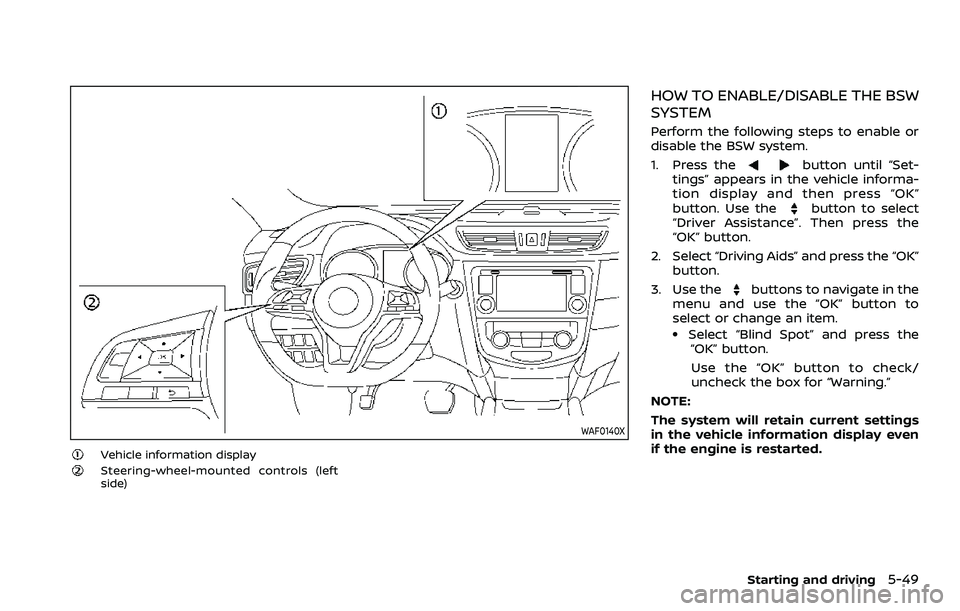
WAF0140X
Vehicle information displaySteering-wheel-mounted controls (left
side)
HOW TO ENABLE/DISABLE THE BSW
SYSTEM
Perform the following steps to enable or
disable the BSW system.
1. Press the
button until “Set-
tings” appears in the vehicle informa-
tion display and then press “OK”
button. Use the
button to select
“Driver Assistance”. Then press the
“OK” button.
2. Select “Driving Aids” and press the “OK” button.
3. Use the
buttons to navigate in the
menu and use the “OK” button to
select or change an item.
.Select “Blind Spot” and press the “OK” button.
Use the “OK” button to check/
uncheck the box for “Warning.”
NOTE:
The system will retain current settings
in the vehicle information display even
if the engine is restarted.
Starting and driving5-49
Page 298 of 500
5-70Starting and driving
SSD0254
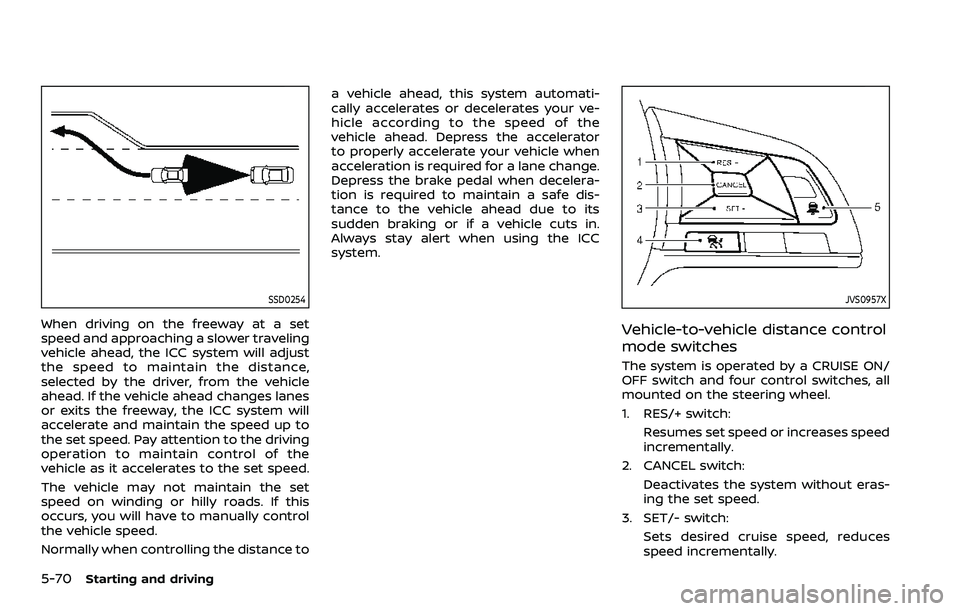
When driving on the freeway at a set
speed and approaching a slower traveling
vehicle ahead, the ICC system will adjust
the speed to maintain the distance,
selected by the driver, from the vehicle
ahead. If the vehicle ahead changes lanes
or exits the freeway, the ICC system will
accelerate and maintain the speed up to
the set speed. Pay attention to the driving
operation to maintain control of the
vehicle as it accelerates to the set speed.
The vehicle may not maintain the set
speed on winding or hilly roads. If this
occurs, you will have to manually control
the vehicle speed.
Normally when controlling the distance toa vehicle ahead, this system automati-
cally accelerates or decelerates your ve-
hicle according to the speed of the
vehicle ahead. Depress the accelerator
to properly accelerate your vehicle when
acceleration is required for a lane change.
Depress the brake pedal when decelera-
tion is required to maintain a safe dis-
tance to the vehicle ahead due to its
sudden braking or if a vehicle cuts in.
Always stay alert when using the ICC
system.
JVS0957X
Vehicle-to-vehicle distance control
mode switches
The system is operated by a CRUISE ON/
OFF switch and four control switches, all
mounted on the steering wheel.
1. RES/+ switch:
Resumes set speed or increases speed
incrementally.
2. CANCEL switch: Deactivates the system without eras-
ing the set speed.
3. SET/- switch:
Sets desired cruise speed, reduces
speed incrementally.
Page 313 of 500
3. Push, then quickly release the SET/-switch. Each time you do this, the set
speed will decrease by about 1 MPH
(1.6 km/h).
To resume the preset speed, push and
release the RES/+ switch. The vehicle will
resume the last set cruising speed when
the vehicle speed is over 25 MPH (40
km/h).
System temporarily unavailable
A chime sounds under the following
conditions and the control is automati-
cally canceled.
. When the vehicle slows down more
than 8 MPH (13 km/h) below the set
speed
. When the shift lever is not in the D
(Drive) or manual shift mode
. When the parking brake is applied.
. When the VDC (including the traction
control system) operates
. When a wheel slips
JVS1003X
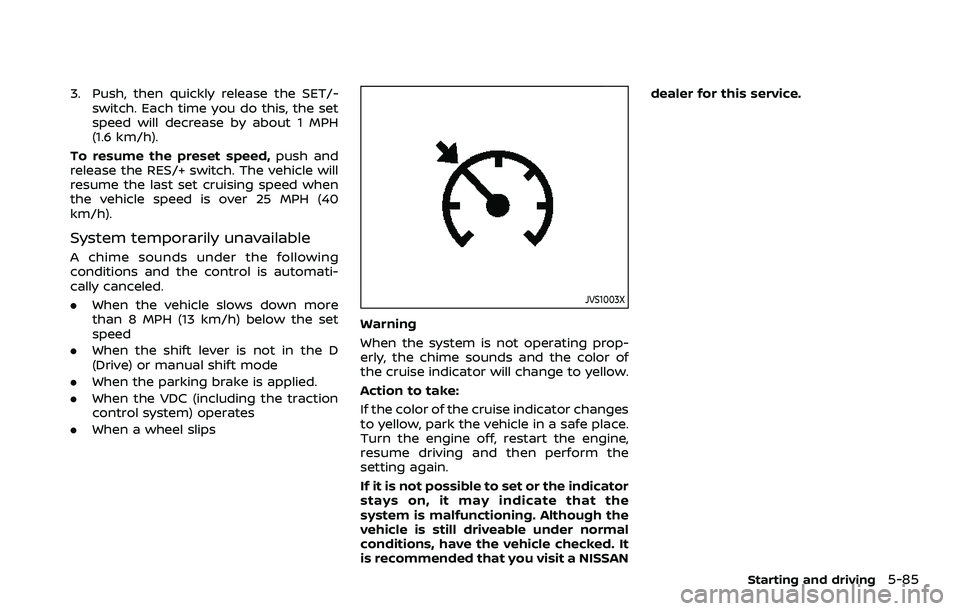
Warning
When the system is not operating prop-
erly, the chime sounds and the color of
the cruise indicator will change to yellow.
Action to take:
If the color of the cruise indicator changes
to yellow, park the vehicle in a safe place.
Turn the engine off, restart the engine,
resume driving and then perform the
setting again.
If it is not possible to set or the indicator
stays on, it may indicate that the
system is malfunctioning. Although the
vehicle is still driveable under normal
conditions, have the vehicle checked. It
is recommended that you visit a NISSAN dealer for this service.
Starting and driving5-85
Page 321 of 500
WAF0052X
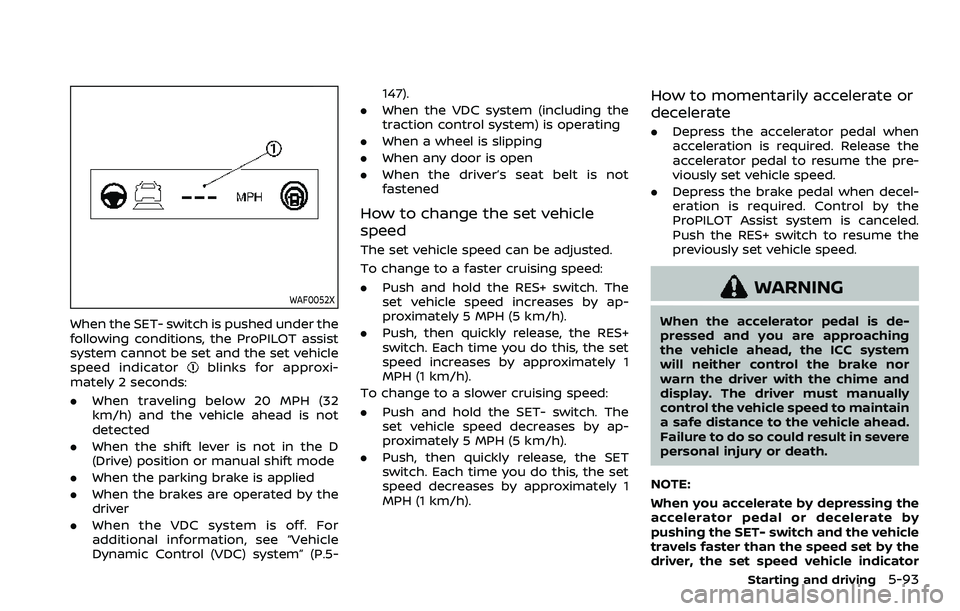
When the SET- switch is pushed under the
following conditions, the ProPILOT assist
system cannot be set and the set vehicle
speed indicator
blinks for approxi-
mately 2 seconds:
. When traveling below 20 MPH (32
km/h) and the vehicle ahead is not
detected
. When the shift lever is not in the D
(Drive) position or manual shift mode
. When the parking brake is applied
. When the brakes are operated by the
driver
. When the VDC system is off. For
additional information, see “Vehicle
Dynamic Control (VDC) system” (P.5- 147).
. When the VDC system (including the
traction control system) is operating
. When a wheel is slipping
. When any door is open
. When the driver’s seat belt is not
fastened
How to change the set vehicle
speed
The set vehicle speed can be adjusted.
To change to a faster cruising speed:
.Push and hold the RES+ switch. The
set vehicle speed increases by ap-
proximately 5 MPH (5 km/h).
. Push, then quickly release, the RES+
switch. Each time you do this, the set
speed increases by approximately 1
MPH (1 km/h).
To change to a slower cruising speed:
. Push and hold the SET- switch. The
set vehicle speed decreases by ap-
proximately 5 MPH (5 km/h).
. Push, then quickly release, the SET
switch. Each time you do this, the set
speed decreases by approximately 1
MPH (1 km/h).
How to momentarily accelerate or
decelerate
. Depress the accelerator pedal when
acceleration is required. Release the
accelerator pedal to resume the pre-
viously set vehicle speed.
. Depress the brake pedal when decel-
eration is required. Control by the
ProPILOT Assist system is canceled.
Push the RES+ switch to resume the
previously set vehicle speed.
WARNING
When the accelerator pedal is de-
pressed and you are approaching
the vehicle ahead, the ICC system
will neither control the brake nor
warn the driver with the chime and
display. The driver must manually
control the vehicle speed to maintain
a safe distance to the vehicle ahead.
Failure to do so could result in severe
personal injury or death.
NOTE:
When you accelerate by depressing the
accelerator pedal or decelerate by
pushing the SET- switch and the vehicle
travels faster than the speed set by the
driver, the set speed vehicle indicator
Starting and driving5-93
Page 324 of 500
5-96Starting and driving
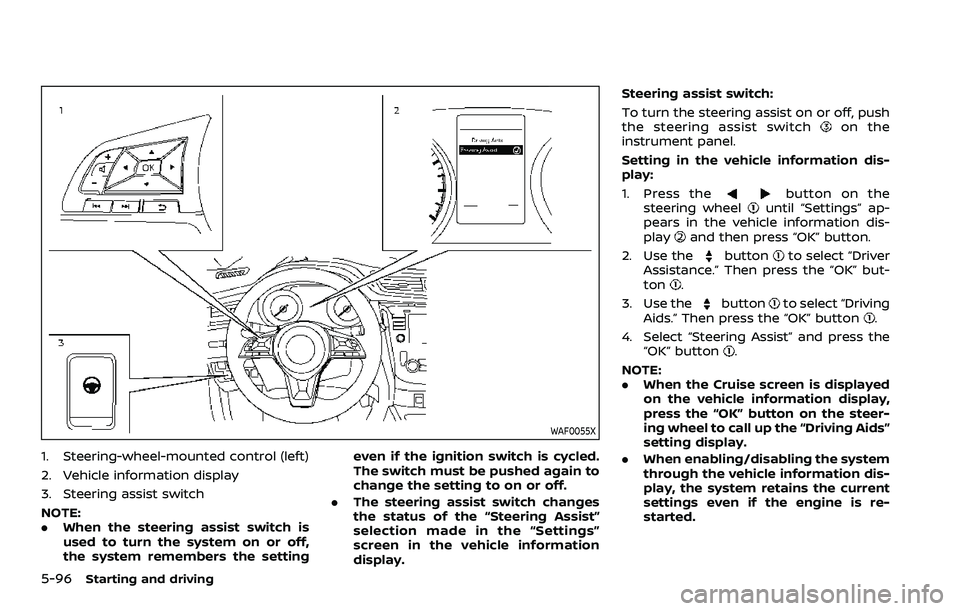
WAF0055X
1. Steering-wheel-mounted control (left)
2. Vehicle information display
3. Steering assist switch
NOTE:
.When the steering assist switch is
used to turn the system on or off,
the system remembers the setting even if the ignition switch is cycled.
The switch must be pushed again to
change the setting to on or off.
. The steering assist switch changes
the status of the “Steering Assist”
selection made in the “Settings”
screen in the vehicle information
display. Steering assist switch:
To turn the steering assist on or off, push
the steering assist switch
on the
instrument panel.
Setting in the vehicle information dis-
play:
1. Press the
button on the
steering wheeluntil “Settings” ap-
pears in the vehicle information dis-
play
and then press “OK” button.
2. Use the
buttonto select “Driver
Assistance.” Then press the “OK” but-
ton
.
3. Use the
buttonto select “Driving
Aids.” Then press the “OK” button.
4. Select “Steering Assist” and press the “OK” button
.
NOTE:
. When the Cruise screen is displayed
on the vehicle information display,
press the “OK” button on the steer-
ing wheel to call up the “Driving Aids”
setting display.
. When enabling/disabling the system
through the vehicle information dis-
play, the system retains the current
settings even if the engine is re-
started.
Page 337 of 500
Steering assist limitations
WARNING
.In the following situations, the
camera may not detect lane mar-
kers correctly or may detect lane
markers incorrectly and the
steering assist may not operate
properly:
— When driving on roads where
there are multiple parallel
lane markers, lane markers
that are faded or not painted
clearly, non-standard lane
markers, or lane markers cov-
ered with water, dirt, snow,
etc.
— When driving on roads with discontinued lane markers
— When driving on roads with a widening or narrowing lane
width
— When driving on roads where there are multiple lanes or
unclear lane markers due to
road construction
— When driving on roads where there are sharply contrasting
objects, such as shadows, snow, water, wheel ruts,
seams, or lines remaining
after road repairs (the steer-
ing assist could detect these
items as lane markers)
— When driving on roads where the traveling lane merges or
separates
. Do not use the steering assist
under the following conditions
because the system may not
properly detect lane markers.
Doing so could cause a loss of
vehicle control and result in an
accident.
— During bad weather (rain, fog,
snow, dust, etc.)
— When rain, snow, sand, etc., is thrown up by the wheels of
other vehicles
— When dirt, oil, ice, snow, water, or another object adheres to
the camera unit
— When the lens of the camera unit is foggy
— When strong light (for exam- ple, sunlight or high beams
from oncoming vehicles)
shines on the camera — When the headlights are not
bright due to dirt on the lens
or the headlights are off in
tunnels or darkness
— When a sudden change in brightness occurs (for exam-
ple, when the vehicle enters or
exits a tunnel or is under a
bridge)
— When driving on roads where the traveling lane merges or
separates or where there are
temporary lane markers be-
cause of road construction
— When there is a lane closure due to road repairs
— When driving on a bumpy road surface, such as an uneven
dirt road
— When driving on sharp curves or winding roads
— When driving on repeated up- hill and downhill roads
. Do not use the steering assist
under the following conditions
because the system will not op-
erate properly:
— When driving with a tire that is
not within normal tire condi-
Starting and driving5-109
Page 364 of 500
5-136Starting and driving
— The vehicle is driven in badweather (rain, fog, snow, etc.).
— The vehicle is driven on a steep hill.
— The vehicle’s posture is chan- ged (e.g., when driving over a
bump).
— The vehicle is driven on a slippery road.
— The vehicle is turned sharply by turning the steering wheel
fully.
— Snow chains are used.
— Wheels or tires other than NISSAN recommended are
used.
— The brakes are cold at low ambient temperatures or im-
mediately after driving has
started.
— The braking force becomes poor due to wet brakes after
driving through a puddle or
washing the vehicle.
. Turn the RAB system off in the
following conditions to prevent
the occurrence of an unexpected
accident resulting from sudden
system operation: — The vehicle is towed.
— The vehicle is carried on a
flatbed truck.
— The vehicle is on the chassis dynamometer.
— The vehicle drives on an un- even road surface.
— Suspension parts other than those designated as genuine
parts are used. (If the vehicle
height or the vehicle body
inclination is changed, the
system may not detect an
obstacle correctly.)
. Excessive noise (e.g., audio sys-
tem volume, an open vehicle win-
dow) will interfere with the chime
sound, and it may not be heard.SYSTEM MALFUNCTION
If the RAB system malfunctions, it will be
turned off automatically, the RAB system
warning light will illuminate, and the
“Malfunction” warning message will ap-
pear in the vehicle information display.
Action to take
If the warning light illuminates, park the
vehicle in a safe location, turn the engine
off, and restart the engine. If the warning
light continues to illuminate, have the
RAB system checked. It is recommended
that you visit a NISSAN dealer for this
service.
NOTE:
If the RAB system cannot be operated
temporarily, the RAB system warning
light blinks.
Page 368 of 500
5-140Starting and driving
to increased oil temperature. The driving
mode may change to Two-Wheel Drive
(2WD). If this warning is displayed, stop
the vehicle with the engine idling, as soon
as it is safe to do so. Then if the warning
turns off, you can continue driving.
The “Tire Size Incorrect” warning
may
appear if there is a large difference
between the diameters of front and rear
wheels. Pull off the road in a safe area,
with the engine idling. Check that all tire
sizes are the same, that the tire pressure
is correct and that the tires are not
excessively worn. Turn off the Intelligent
4x4 LOCK switch and do not drive fast.
If any warning message continues to be
displayed, have your vehicle checked by a
NISSAN dealer as soon as possible.
WARNING
. For AWD equipped vehicles, do
not attempt to raise two wheels
off the ground and shift the
transmission to any drive or re-
verse position with the engine
running. Doing so may result in
drivetrain damage or unexpected
vehicle movement which could
result in serious vehicle damage
or personal injury. .
Do not attempt to test an AWD
equipped vehicle on a 2–wheel
dynamometer (such as the dy-
namometers used by some
states for emissions testing) or
similar equipment even if the
other two wheels are raised off
the ground. Make sure that you
inform the test facility personnel
that your vehicle is equipped with
AWD before it is placed on a
dynamometer. Using the wrong
test equipment may result in
drive train damage or unex-
pected vehicle movement which
could result in serious vehicle
damage or personal injury.
CAUTION
.Do not operate the engine on a
free roller when any of the wheels
raised.
. The power train may be damaged
if you continue driving with the
“AWD Error” warning on.
. If the warning message remains
on after the above operation,
have your vehicle checked as
soon as possible. It is recom- mended that you visit a NISSAN
dealer for this service.
. If the “AWD Error” warning ap-
pears while driving, there may be
a malfunction in the AWD system.
Reduce the vehicle speed and
have your vehicle checked as
soon as possible. It is recom-
mended that you visit a NISSAN
dealer for this service.
. Never drive on dry, hard surface
roads in the LOCK mode, as this
will overload the powertrain and
may cause a serious malfunction.
Page 370 of 500
5-142Starting and driving
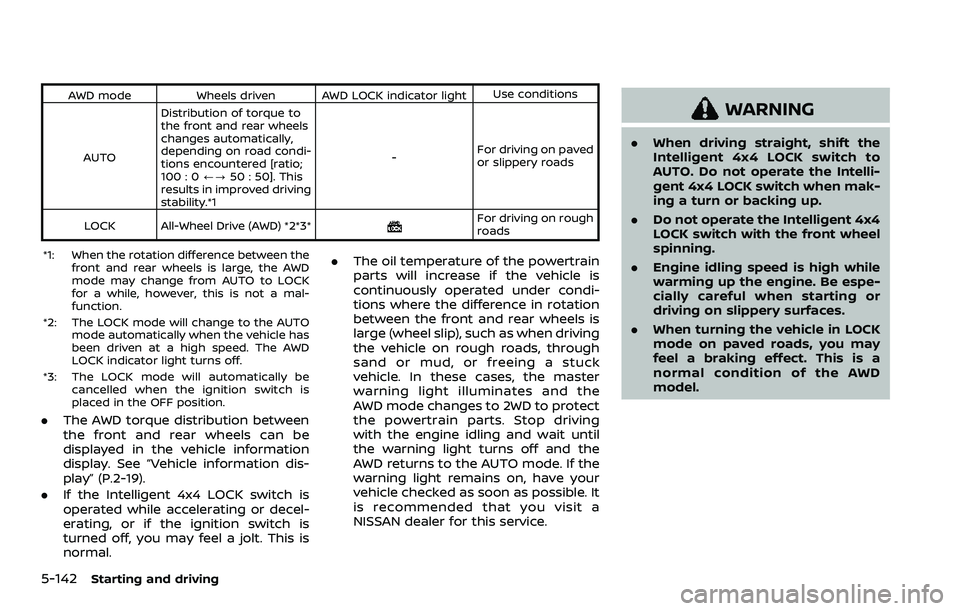
AWD modeWheels driven AWD LOCK indicator light Use conditions
AUTO Distribution of torque to
the front and rear wheels
changes automatically,
depending on road condi-
tions encountered [ratio;
100 : 0
/?50 : 50]. This
results in improved driving
stability.*1 -
For driving on paved
or slippery roads
LOCK All-Wheel Drive (AWD) *2*3*
For driving on rough
roads
*1: When the rotation difference between the front and rear wheels is large, the AWD
mode may change from AUTO to LOCK
for a while, however, this is not a mal-
function.
*2: The LOCK mode will change to the AUTO mode automatically when the vehicle has
been driven at a high speed. The AWD
LOCK indicator light turns off.
*3: The LOCK mode will automatically be cancelled when the ignition switch is
placed in the OFF position.
.The AWD torque distribution between
the front and rear wheels can be
displayed in the vehicle information
display. See “Vehicle information dis-
play” (P.2-19).
. If the Intelligent 4x4 LOCK switch is
operated while accelerating or decel-
erating, or if the ignition switch is
turned off, you may feel a jolt. This is
normal. .
The oil temperature of the powertrain
parts will increase if the vehicle is
continuously operated under condi-
tions where the difference in rotation
between the front and rear wheels is
large (wheel slip), such as when driving
the vehicle on rough roads, through
sand or mud, or freeing a stuck
vehicle. In these cases, the master
warning light illuminates and the
AWD mode changes to 2WD to protect
the powertrain parts. Stop driving
with the engine idling and wait until
the warning light turns off and the
AWD returns to the AUTO mode. If the
warning light remains on, have your
vehicle checked as soon as possible. It
is recommended that you visit a
NISSAN dealer for this service.
WARNING
.When driving straight, shift the
Intelligent 4x4 LOCK switch to
AUTO. Do not operate the Intelli-
gent 4x4 LOCK switch when mak-
ing a turn or backing up.
. Do not operate the Intelligent 4x4
LOCK switch with the front wheel
spinning.
. Engine idling speed is high while
warming up the engine. Be espe-
cially careful when starting or
driving on slippery surfaces.
. When turning the vehicle in LOCK
mode on paved roads, you may
feel a braking effect. This is a
normal condition of the AWD
model.
Page 372 of 500
5-144Starting and driving
curb..HEADED UPHILL WITH CURB:
Turn the wheels away from the
curb and move the vehicle back
until the curb side wheel gently
touches the curb.
.HEADED UPHILL OR DOWNHILL, NOCURB:
Turn the wheels toward the side of
the road so the vehicle will move
away from the center of the road if
it moves.
4. Models with Intelligent Key system:
Place the ignition switch in the OFF
position.
Models without Intelligent Key sys-
tem:
Place the ignition switch in the LOCK
position and remove the key.
WARNING
.If the engine is not running or is
turned off while driving, the
power assist for the steering will
not work. Steering will be harder
to operate.
. When the electric power steering
warning light illuminates with the
engine running, the power assist
for the steering will cease opera-
tion. You will still have control of
the vehicle but the steering will
be harder to operate.
The electric power steering is designed to
provide power assist while driving to
operate the steering wheel with light
force.
When the steering wheel is operated
repeatedly or continuously while parking
or driving at a very low speed, the power
assist for the steering wheel will be
reduced. This is to prevent overheating
of the electric power steering and protect
it from getting damaged. While the power
assist is reduced, steering wheel opera-
tion will become heavy. When the tem-
perature of the electric power steering
goes down, the power assist level will
return to normal. Avoid repeating such steering wheel operations that could
cause the electric power steering to over-
heat.
You may hear a noise when the steering
wheel is operated quickly. However, this is
not a malfunction.
If the electric power steering warning
light
illuminates while the engine is
running, it may indicate the electric
power steering is not functioning prop-
erly and may need servicing. Have the
electric power steering checked. It is
recommended that you visit a NISSAN
dealer for this service. (See “Electric power
steering warning light” (P.2-12).)
When the electric power steering warning
light illuminates with the engine running,
the power assist for the steering will
cease operation. You will still have control
of the vehicle. However, greater steering
effort is needed, especially in sharp turns
and at low speeds.
The mode of the Power Steering can be
changed to:
. NORMAL
. SPORT
For more information, see “Vehicle infor-
mation display” (P.2-19).
ELECTRIC POWER STEERING