sensor NISSAN ROGUE SPORT 2019 Workshop Manual
[x] Cancel search | Manufacturer: NISSAN, Model Year: 2019, Model line: ROGUE SPORT, Model: NISSAN ROGUE SPORT 2019Pages: 500, PDF Size: 2.37 MB
Page 349 of 500
Condition B
In the following conditions, the “Unavail-
able: Front Radar Obstruction” warning
message will appear in the vehicle infor-
mation display.
.The sensor area on the front of the
vehicle is covered with dirt or is
obstructed.
Action to take
If the message appears, stop the vehicle
in a safe place and turn the engine off.
Clean the radar cover on the front of the
vehicle with a soft cloth, and restart the
engine. If the warning message continues
to illuminate, have the AEB system
checked. It is recommended that you visit
a NISSAN dealer for this service.
. When driving on roads with limited
road structures or buildings (for ex-
ample, long bridges, deserts, snow
fields, driving next to long walls).
Action to take
When the above conditions no longer
exist, the AEB system will resume auto-
matically.
Condition C
When the Vehicle Dynamic Control (VDC)
system is OFF, the AEB brake will not
operate. In this case only visible and
audible warning operates. The AEB sys-
tem warning light (orange) will illuminate. Action to take
When the VDC system is ON, the AEB
system will resume automatically.
SYSTEM MALFUNCTION
If the AEB system malfunctions, it will be
turned off automatically, a chime will
sound, the AEB system warning light
(orange) will illuminate and the “Malfunc-
tion” warning message will appear in the
vehicle information display.
Action to take:
If the AEB system warning light (orange)
comes on, stop the vehicle in a safe
location. Turn the engine off and restart
the engine. If the warning light continues
to illuminate, have the AEB system
checked. It is recommended that you visit
a NISSAN dealer for this service.
JVS1041X
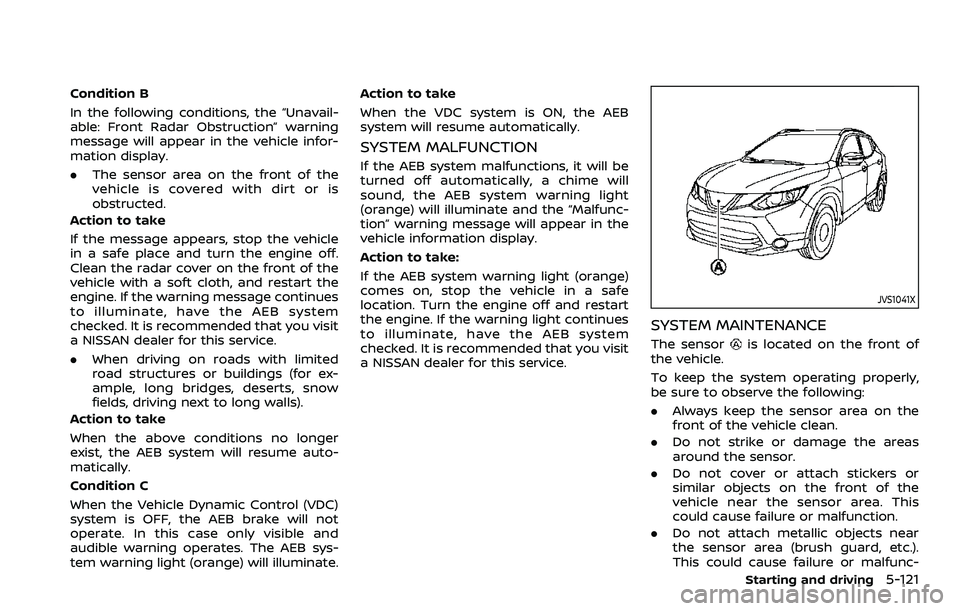
SYSTEM MAINTENANCE
The sensoris located on the front of
the vehicle.
To keep the system operating properly,
be sure to observe the following:
. Always keep the sensor area on the
front of the vehicle clean.
. Do not strike or damage the areas
around the sensor.
. Do not cover or attach stickers or
similar objects on the front of the
vehicle near the sensor area. This
could cause failure or malfunction.
. Do not attach metallic objects near
the sensor area (brush guard, etc.).
This could cause failure or malfunc-
Starting and driving5-121
Page 350 of 500
5-122Starting and driving
tion.
. Do not alter, remove or paint the front
of the vehicle near the sensor area.
Before customizing or restoring the
sensor area, it is recommended that
you visit a NISSAN dealer.
Radio frequency statement
For USA
FCC : OAYSRR3B
This device complies with part 15 of the
FCC Rules. Operation is subject to the
following two conditions:
(1) This device may not cause harmful
interference, and (2) this device must
accept any interference received, in-
cluding interference that may cause
undesired operation.
FCC Warning
Changes or modifications not expressly
approved by the party responsible for
compliance could void the user’s
authority to operate the equipment
For Canada
Applicable law: Canada 310
This device complies with Industry Ca-
nada licence-exempt RSS standard(s).
Operation is subject to the following
two conditions: (1) this device may not
cause interference, and (2) this device
must accept any interference, including interference that may cause undesired
operation of the device.
Frequency bands: 24.05 – 24.25GHz
Output power: less than 20 milliwatts*: if so equipped
WARNING
Failure to follow the warnings and
instructions for proper use of the
AEB with pedestrian detection sys-
tem could result in serious injury or
death.
.
The AEB with pedestrian detec-
tion system is a supplemental aid
to the driver. It is not a replace-
ment for the driver’s attention to
traffic conditions or responsibility
to drive safely. It cannot prevent
accidents due to carelessness or
dangerous driving techniques.
. The AEB with pedestrian detec-
tion system does not function in
all driving, traffic, weather and
road conditions.
The AEB with pedestrian detection sys-
tem can assist the driver when there is a
risk of a forward collision with the vehicle
ahead in the traveling lane or with a
pedestrian.
AUTOMATIC EMERGENCY BRAKING (AEB)
WITH PEDESTRIAN DETECTION SYSTEM*
Page 351 of 500
JVS1042X
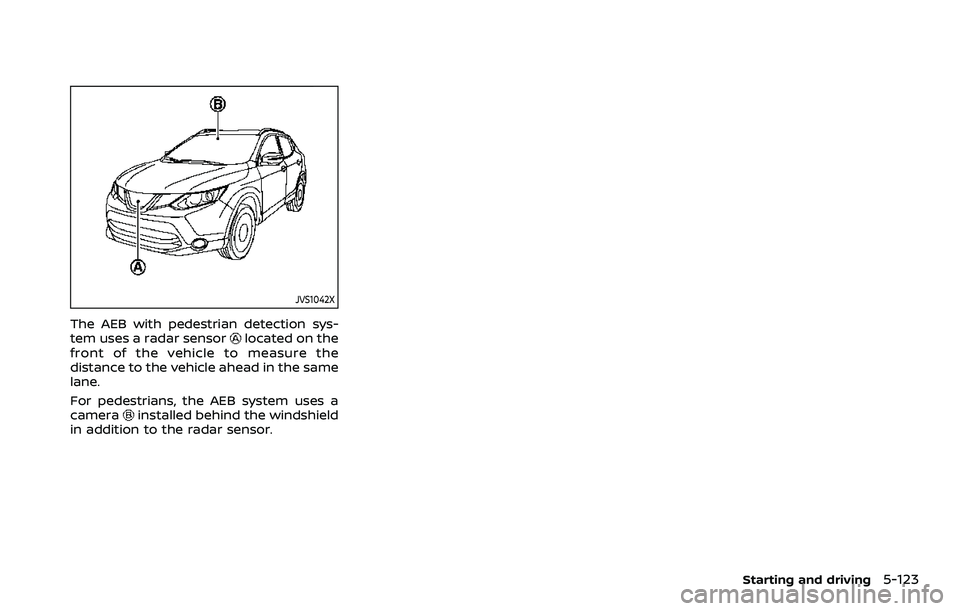
The AEB with pedestrian detection sys-
tem uses a radar sensorlocated on the
front of the vehicle to measure the
distance to the vehicle ahead in the same
lane.
For pedestrians, the AEB system uses a
camera
installed behind the windshield
in addition to the radar sensor.
Starting and driving5-123
Page 355 of 500
AEB WITH PEDESTRIAN DETECTION
SYSTEM LIMITATIONS
WARNING
Listed below are the system limita-
tions for the AEB with pedestrian
detection system. Failure to operate
the vehicle in accordance with these
system limitations could result in
serious injury or death.
.The AEB with pedestrian detec-
tion system cannot detect all
vehicles or pedestrians under all
conditions.
. The AEB with pedestrian detec-
tion system does not detect the
following objects:
— Small pedestrians (including
small children), animals and
cyclists.
— Pedestrians in wheelchairs or using mobile transport such
as scooters, child-operated
toys, or skateboards.
— Pedestrians who are seated or otherwise not in a full upright
standing or walking position. — Obstacles on the roadway
— Oncoming vehicles
— Crossing vehicles
— Obstacles on the roadside
. The AEB with pedestrian detec-
tion system has some perfor-
mance limitations.
— If a stationary vehicle is in the
vehicle’s path, the AEB with
pedestrian detection system
will not function when the
vehicle is driven at speeds
over approximately 50 MPH
(80 km/h).
— For pedestrian detection, the AEB with pedestrian detection
system will not function when
the vehicle is driven at speeds
over approximately 37 MPH
(60 km/h) or below approxi-
mately 6 MPH (10 km/h).
. The AEB with pedestrian detec-
tion system may not function for
pedestrians in darkness or in
tunnels, even if there is street
lighting in the area.
. For pedestrians, the AEB with
pedestrian detection system will
not issue the first warning. .
The AEB with pedestrian detec-
tion system may not function if
the vehicle ahead is narrow (for
example a motorcycle).
. The AEB with pedestrian detec-
tion system may not function if
speed difference between the
two vehicles is too small.
. The radar sensor may not func-
tion properly or detect a vehicle
ahead in the following conditions:
— Poor visibility (conditions such
as rain, snow, fog, dust
storms, sandstorms, and road
spray from other vehicles)
— Driving on a steep downhill slope or roads with sharp
curves.
— Driving on a bumpy road sur- face, such as an uneven dirt
road.
— If dirt, ice, snow or other ma- terial is covering the radar
sensor area.
— Interference by other radar sources.
. The camera may not function
properly or detect a vehicle
ahead in the following conditions:
Starting and driving5-127
Page 356 of 500
5-128Starting and driving
— The camera area of wind-shield is fogged up, or covered
with dirt, water drops, ice,
snow, etc.
— Strong light (for example, sun- light or high beams from on-
coming vehicles) enters the
front camera. Strong light
causes the area around the
pedestrian to be cast in a
shadow, making it difficult to
see.
— A sudden change in bright- ness occurs. (For example,
when the vehicle enters or
exits a tunnel or a shaded
area or lightning flashes.)
— The poor contrast of a person to the background, such as
having clothing color or pat-
tern which is similar to the
background.
— The pedestrian’s profile is par- tially obscured or unidentifi-
able due to the pedestrian
transporting cargo, wearing
bulky or very loose-fitting
clothing or accessories.
. The system performance may
degrade in the following condi- tions:
— The vehicle is driven on a
slippery road.
— The vehicle is driven on a slope.
— Excessively heavy baggage is loaded in the rear seat or the
cargo area of your vehicle.
. The system is designed to auto-
matically check the sensor (radar
and camera)’s functionality, with-
in certain limitations. The system
may not detect blockage of sen-
sor areas covered by ice, snow or
stickers, for example. In these
cases, the system may not be
able to warn the driver properly.
Be sure that you check, clean and
clear sensor areas regularly.
. In some road and traffic condi-
tions, the AEB system may unex-
pectedly apply partial braking.
When acceleration is necessary,
depress the accelerator pedal to
override the system.
. The AEB system may react a
roadside object (traffic sign,
guard rail etc.)
. Braking distances increase on
slippery surfaces. .
Excessive noise will interfere with
the warning chime sound, and
the chime may not be heard.
Page 357 of 500
SSD0253
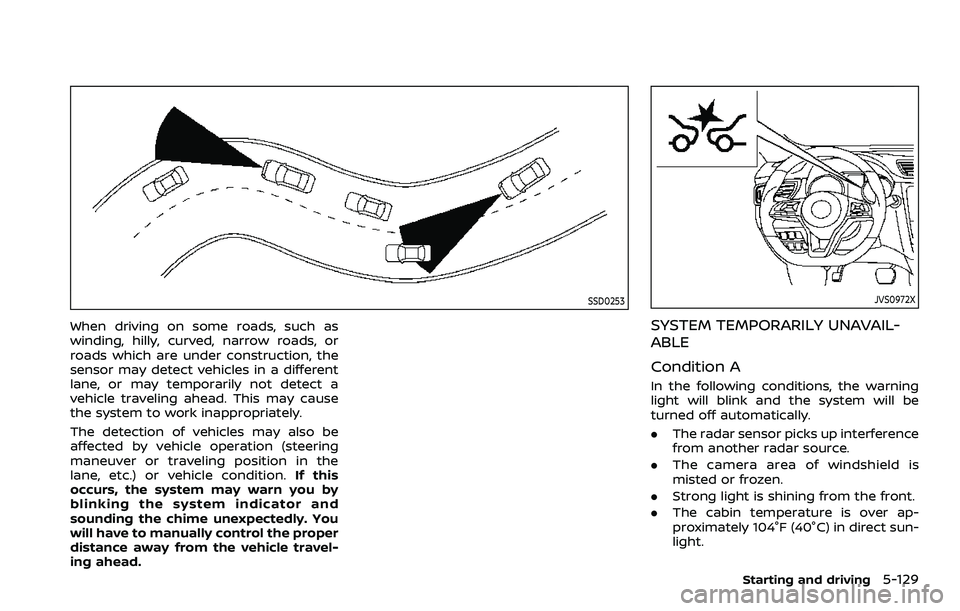
When driving on some roads, such as
winding, hilly, curved, narrow roads, or
roads which are under construction, the
sensor may detect vehicles in a different
lane, or may temporarily not detect a
vehicle traveling ahead. This may cause
the system to work inappropriately.
The detection of vehicles may also be
affected by vehicle operation (steering
maneuver or traveling position in the
lane, etc.) or vehicle condition.If this
occurs, the system may warn you by
blinking the system indicator and
sounding the chime unexpectedly. You
will have to manually control the proper
distance away from the vehicle travel-
ing ahead.
JVS0972X
SYSTEM TEMPORARILY UNAVAIL-
ABLE
Condition A
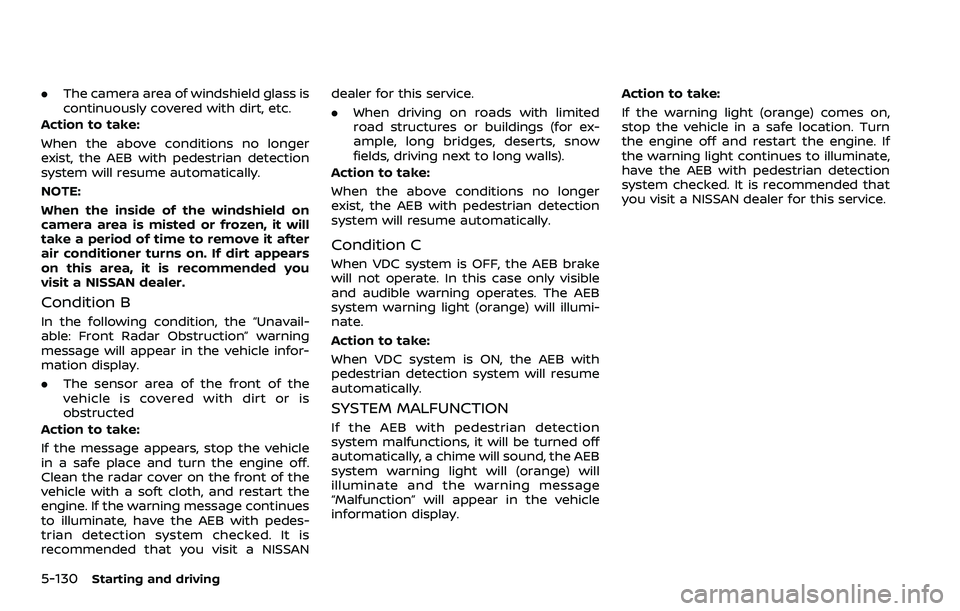
In the following conditions, the warning
light will blink and the system will be
turned off automatically.
. The radar sensor picks up interference
from another radar source.
. The camera area of windshield is
misted or frozen.
. Strong light is shining from the front.
. The cabin temperature is over ap-
proximately 104°F (40°C) in direct sun-
light.
Starting and driving5-129
Page 358 of 500
5-130Starting and driving
.The camera area of windshield glass is
continuously covered with dirt, etc.
Action to take:
When the above conditions no longer
exist, the AEB with pedestrian detection
system will resume automatically.
NOTE:
When the inside of the windshield on
camera area is misted or frozen, it will
take a period of time to remove it after
air conditioner turns on. If dirt appears
on this area, it is recommended you
visit a NISSAN dealer.
Condition B
In the following condition, the “Unavail-
able: Front Radar Obstruction” warning
message will appear in the vehicle infor-
mation display.
. The sensor area of the front of the
vehicle is covered with dirt or is
obstructed
Action to take:
If the message appears, stop the vehicle
in a safe place and turn the engine off.
Clean the radar cover on the front of the
vehicle with a soft cloth, and restart the
engine. If the warning message continues
to illuminate, have the AEB with pedes-
trian detection system checked. It is
recommended that you visit a NISSAN dealer for this service.
.
When driving on roads with limited
road structures or buildings (for ex-
ample, long bridges, deserts, snow
fields, driving next to long walls).
Action to take:
When the above conditions no longer
exist, the AEB with pedestrian detection
system will resume automatically.
Condition C
When VDC system is OFF, the AEB brake
will not operate. In this case only visible
and audible warning operates. The AEB
system warning light (orange) will illumi-
nate.
Action to take:
When VDC system is ON, the AEB with
pedestrian detection system will resume
automatically.
SYSTEM MALFUNCTION
If the AEB with pedestrian detection
system malfunctions, it will be turned off
automatically, a chime will sound, the AEB
system warning light will (orange) will
illuminate and the warning message
“Malfunction” will appear in the vehicle
information display. Action to take:
If the warning light (orange) comes on,
stop the vehicle in a safe location. Turn
the engine off and restart the engine. If
the warning light continues to illuminate,
have the AEB with pedestrian detection
system checked. It is recommended that
you visit a NISSAN dealer for this service.
Page 359 of 500
JVS1042X
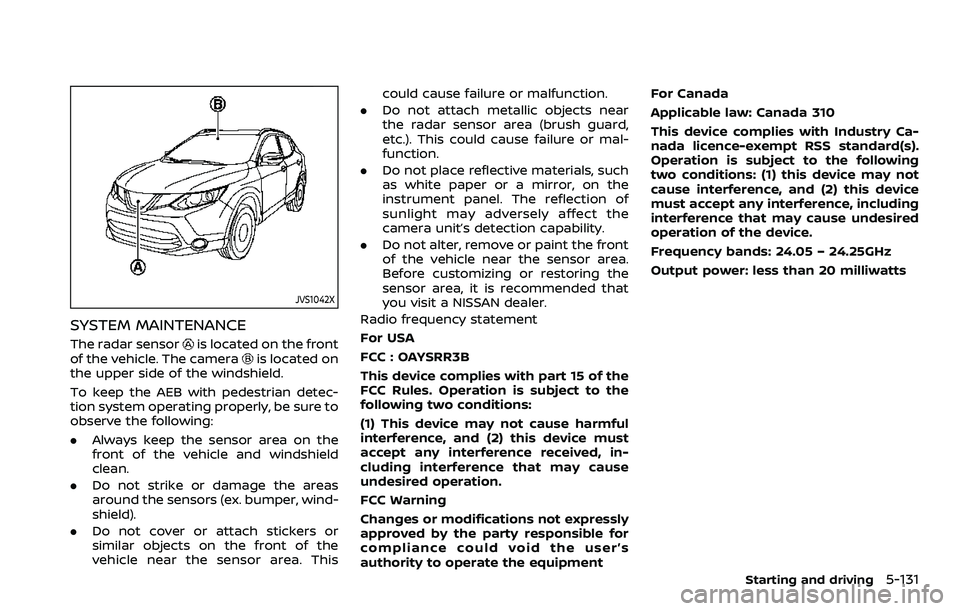
SYSTEM MAINTENANCE
The radar sensoris located on the front
of the vehicle. The camerais located on
the upper side of the windshield.
To keep the AEB with pedestrian detec-
tion system operating properly, be sure to
observe the following:
. Always keep the sensor area on the
front of the vehicle and windshield
clean.
. Do not strike or damage the areas
around the sensors (ex. bumper, wind-
shield).
. Do not cover or attach stickers or
similar objects on the front of the
vehicle near the sensor area. This could cause failure or malfunction.
. Do not attach metallic objects near
the radar sensor area (brush guard,
etc.). This could cause failure or mal-
function.
. Do not place reflective materials, such
as white paper or a mirror, on the
instrument panel. The reflection of
sunlight may adversely affect the
camera unit’s detection capability.
. Do not alter, remove or paint the front
of the vehicle near the sensor area.
Before customizing or restoring the
sensor area, it is recommended that
you visit a NISSAN dealer.
Radio frequency statement
For USA
FCC : OAYSRR3B
This device complies with part 15 of the
FCC Rules. Operation is subject to the
following two conditions:
(1) This device may not cause harmful
interference, and (2) this device must
accept any interference received, in-
cluding interference that may cause
undesired operation.
FCC Warning
Changes or modifications not expressly
approved by the party responsible for
compliance could void the user’s
authority to operate the equipment For Canada
Applicable law: Canada 310
This device complies with Industry Ca-
nada licence-exempt RSS standard(s).
Operation is subject to the following
two conditions: (1) this device may not
cause interference, and (2) this device
must accept any interference, including
interference that may cause undesired
operation of the device.
Frequency bands: 24.05 – 24.25GHz
Output power: less than 20 milliwatts
Starting and driving5-131
Page 363 of 500
brake pedal is depressed, the
function may not operate or the
start of the operation may be
delayed. The RAB system may
not operate or may not perform
sufficiently due to vehicle condi-
tions, driving conditions, the traf-
fic environment, the weather,
road surface conditions, etc. Do
not wait for the system to oper-
ate. Operate the brake pedal by
yourself as soon as necessary.
. If it is necessary to override RAB
operation, strongly press the ac-
celerator pedal.
. Always check your surroundings
and turn to check what is behind
you before and while backing up.
The RAB system detects station-
ary objects behind the vehicle.
The RAB system does not detect
the following objects:
— Moving objects
— Low objects
— Narrow objects
— Wedge-shaped objects
— Objects close to the bumper
(less than approximately 1 ft
[30 cm]) — Objects that suddenly appear
— Thin objects such as rope,
wire, chain, etc.
. The RAB system may not operate
for the following obstacles:
— Obstacles located high off the
ground
— Obstacles in a position offset from your vehicle
— Obstacles, such as spongy materials or snow, that have
soft outer surfaces and can
easily absorb a sound wave
. The RAB system may not operate
in the following conditions:
— There is rain, snow, ice, dirt,
etc., attached to the sonar
sensors.
— A loud sound is heard in the area around the vehicle.
— The surface of the obstacle is diagonal to the rear of the
vehicle.
. The RAB system may uninten-
tionally operate in the following
conditions:
— There is overgrown grass in
the area around the vehicle. — There is a structure (e.g., a
wall, toll gate equipment, a
narrow tunnel, a parking lot
gate) near the side of the
vehicle.
— There are bumps, protrusions, or manhole covers on the
road surface.
— The vehicle drives through a draped flag or a curtain.
— There is an accumulation of snow or ice behind the vehi-
cle.
— An ultrasonic wave source, such as another vehicle’s so-
nar, is near the vehicle.
. Once the automatic brake control
operates, it does not operate
again if the vehicle approaches
the same obstacle.
. The automatic brake control can
only operate for a short period of
time. Therefore, the driver must
depress the brake pedal.
. In the following situations, the
RAB system may not operate
properly or may not function
sufficiently:
Starting and driving5-135
Page 365 of 500
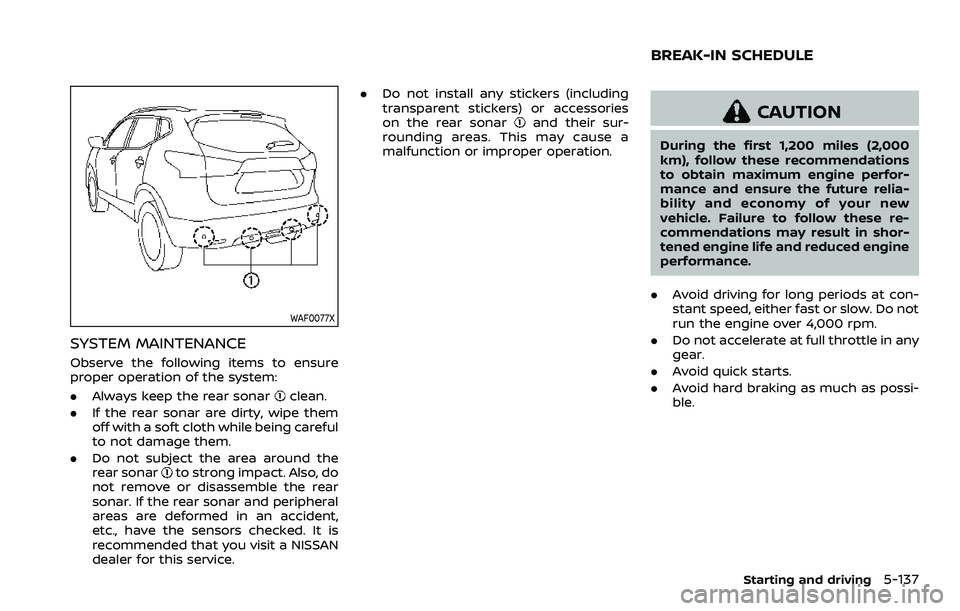
WAF0077X
SYSTEM MAINTENANCE
Observe the following items to ensure
proper operation of the system:
.Always keep the rear sonar
clean.
. If the rear sonar are dirty, wipe them
off with a soft cloth while being careful
to not damage them.
. Do not subject the area around the
rear sonar
to strong impact. Also, do
not remove or disassemble the rear
sonar. If the rear sonar and peripheral
areas are deformed in an accident,
etc., have the sensors checked. It is
recommended that you visit a NISSAN
dealer for this service. .
Do not install any stickers (including
transparent stickers) or accessories
on the rear sonar
and their sur-
rounding areas. This may cause a
malfunction or improper operation.CAUTION
During the first 1,200 miles (2,000
km), follow these recommendations
to obtain maximum engine perfor-
mance and ensure the future relia-
bility and economy of your new
vehicle. Failure to follow these re-
commendations may result in shor-
tened engine life and reduced engine
performance.
. Avoid driving for long periods at con-
stant speed, either fast or slow. Do not
run the engine over 4,000 rpm.
. Do not accelerate at full throttle in any
gear.
. Avoid quick starts.
. Avoid hard braking as much as possi-
ble.
Starting and driving5-137
BREAK-IN SCHEDULE