lock NISSAN ROGUE SPORT 2020 Owner's Manual
[x] Cancel search | Manufacturer: NISSAN, Model Year: 2020, Model line: ROGUE SPORT, Model: NISSAN ROGUE SPORT 2020Pages: 492, PDF Size: 2.02 MB
Page 53 of 492

passenger seat:
1.If you must install a child restraint in
the front seat, it should be placed in
a forward-facing direction only.
Move the seat to the rearmost posi-
tion. Child restraints for infants must
be used in the rear-facing direction
and, therefore, must not be used in
the front seat.
2. Position the child restraint on the seat. Always follow the child restraint man-
ufacturer’s instructions.
The back of the child restraint should
be secured against the vehicle seat-
back.
If necessary, adjust or remove the
head restraint to obtain the correct
child restraint fit. If the head restraint
is removed, store it in a secure place.
Be sure to reinstall the head re-
straint when the child restraint is
removed. See “Head restraints/head-
rests” (P.1-8) for head restraint adjust-
ment, removal and installation
information.
If the seating position does not have
an adjustable head restraint and it is
interfering with the proper child re-
straint fit, try another seating position
or a different child restraint.
SSS0360B
Forward-facing — step 3
3. Route the seat belt tongue through
the child restraint and insert it into the
buckle until you hear and feel the
latch engage. Be sure to follow the
child restraint manufacturer’s instruc-
tions for belt routing.
If the child restraint is equipped with a
top tether strap, route the top tether
strap and secure the tether strap to
the tether anchor point (rear seat
installation only). See “Installing top
tether strap” (P.1-37). Do not install
child restraints that require the use
of a top tether strap in seating posi-
tions that do not have a top tether
anchor.
SSS0651
Forward-facing — step 4
4. Pull the shoulder belt until the belt is fully extended. At this time, the seat
belt retractor is in the Automatic
Locking Retractor (ALR) mode (child
restraint mode). It reverts to Emer-
gency Locking Retractor (ELR) mode
when the seat belt is fully retracted.
Safety — Seats, seat belts and supplemental restraint system1-35
Page 55 of 492
the seat belt is not locked, repeat
steps 2 through 8.
SSS0676
Forward-facing — step 10
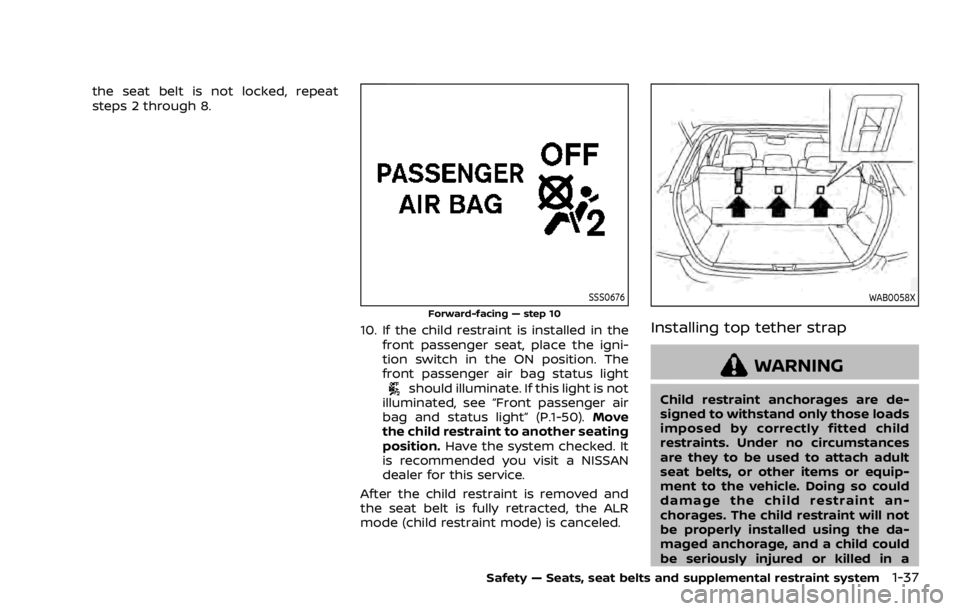
10. If the child restraint is installed in thefront passenger seat, place the igni-
tion switch in the ON position. The
front passenger air bag status light
should illuminate. If this light is not
illuminated, see “Front passenger air
bag and status light” (P.1-50). Move
the child restraint to another seating
position. Have the system checked. It
is recommended you visit a NISSAN
dealer for this service.
After the child restraint is removed and
the seat belt is fully retracted, the ALR
mode (child restraint mode) is canceled.
WAB0058X
Installing top tether strap
WARNING
Child restraint anchorages are de-
signed to withstand only those loads
imposed by correctly fitted child
restraints. Under no circumstances
are they to be used to attach adult
seat belts, or other items or equip-
ment to the vehicle. Doing so could
damage the child restraint an-
chorages. The child restraint will not
be properly installed using the da-
maged anchorage, and a child could
be seriously injured or killed in a
Safety — Seats, seat belts and supplemental restraint system1-37
Page 57 of 492

LRS0453
LRS0455
.Make sure the child’s head will be
properly supported by the booster
seat or vehicle seat. The seatback
must be at or above the center of
the child’s ears. For example, if a low
back booster seat
is chosen, the
vehicle seatback must be at or above
the center of the child’s ears. If the
seatback is lower than the center of
the child’s ears, a high back booster
seat
should be used.
. If the booster seat is compatible with
your vehicle, place your child in the
booster seat and check the various
adjustments to be sure the booster
seat is compatible with your child.
Always follow all recommended pro-
cedures.
LRS0464
All U.S. states and Canadian provinces
or territories require that infants and
small children be restrained in an ap-
proved child restraint at all times while
the vehicle is being operated.
The instructions in this section apply to
booster seat installation in the rear seats
or the front passenger seat.
Booster seat installation
WARNING
To avoid injury to child, do not use
the lap/shoulder belt Automatic
Locking Retractor (ALR) mode when
Safety — Seats, seat belts and supplemental restraint system1-39
Page 71 of 492

In addition to the above, certain objects
placed on the front passenger seat may
also cause the light to operate as de-
scribed above depending on their weight.
For additional information related to the
normal operation and troubleshooting of
this occupant classification sensor sys-
tem, please refer to “Normal operation”
(P.1-54) and “Troubleshooting” (P.1-55) in
this section.
Front passenger air bag:
The front passenger air bag is designed
to automatically turn OFF when the
vehicle is operated under some condi-
tions as described below as permitted by
U.S. regulations. If the front passenger air
bag is OFF, it will not inflate in a crash. The
driver air bag and other air bags in your
vehicle are not part of this system.
The purpose of the regulation is to help
reduce the risk of injury or death from an
inflating air bag to certain front passen-
ger seat occupants, such as children, by
requiring the air bag to be automatically
turned OFF.
The occupant classification sensors
(weight sensors) are on the seat cushion
frame under the front passenger seat and
are designed to detect an occupant and
objects on the seat. For example, if a child
is in the front passenger seat, the Ad-vanced Air Bag System is designed to turn
the passenger air bag OFF in accordance
with the regulations. Also, if a child
restraint of the type specified in the
regulations is on the seat, the occupant
classification sensors can detect it and
cause the air bag to turn OFF.
Front passenger seat adult occupants
who are properly seated and using the
seat belt as outlined in this manual
should not cause the passenger air bag
and passenger knee air bag to be auto-
matically turned OFF. For small adults it
may be turned OFF, however, if the
occupant does not sit in the seat properly
(for example, by not sitting upright, by
sitting on an edge of the seat, or by
otherwise being out of position), this
could cause the sensors to turn the air
bag OFF. Always be sure to be seated and
wearing the seat belt properly for the
most effective protection by the seat belt
and supplemental air bag.
NISSAN recommends that pre-teens and
children be properly restrained in a rear
seat. NISSAN also recommends that ap-
propriate child restraints and booster
seats be properly installed in a rear seat.
If this is not possible, the occupant
classification sensors are designed to
operate as described above to turn the
front passenger air bag and passenger
knee air bag OFF for specified child
restraints. Failing to properly secure child
restraints and to use the Automatic Lock-
ing Retractor (ALR) mode (child restraint
mode) may allow the restraint to tip or
move in an accident or sudden stop. This
can also result in the passenger air bag
and passenger knee air bag inflating in a
crash instead of being OFF. (See “Child
restraints” (P.1-21) for proper use and
installation.)
If the front passenger seat is not occu-
pied, the passenger air bag and passen-
ger knee air bag are designed not to
inflate in a crash. However, heavy objects
placed on the seat could result in air bag
inflation, because of the object being
detected by the occupant classification
sensors. Other conditions could also re-
sult in air bag inflation, such as if a child is
standing on the seat, or if two children
are on the seat, contrary to the instruc-
tions in this manual. Always be sure that
you and all vehicle occupants are seated
and restrained properly.
Using the front passenger air bag status
light, you can monitor when the front
passenger air bag and passenger knee air
bag are automatically turned OFF.
If an adult occupant is in the seat but the
front passenger air bag status light is
illuminated (indicating that the front pas-
Safety — Seats, seat belts and supplemental restraint system1-53
Page 73 of 492

5. Ensure proper classification by check-ing the front passenger air bag status
light.
NOTE:
This vehicle’s occupant classification
sensor system locks the classification
during driving so it is important that
you confirm that the front passenger is
properly classified prior to driving. Also,
the occupant classification sensor sys-
tem may recalculate the weight of the
occupant under some conditions (both
while driving and when stopped), so the
front passenger seat occupant should
continue to remain seated as outlined
above.
Troubleshooting:
If you think the front passenger air bag
status light is incorrect:
1. If the light is ON with an adult occupying the front passenger seat:
.Occupant is a small adult — the front
passenger air bag status light is func-
tioning as intended. The front passen-
ger air bag and passenger knee air
bag are suppressed.
However, if the occupant is not a small
adult, then this may be due to the
following conditions that may be interfer-
ing with the weight sensors: .
Occupant is not sitting upright, lean-
ing against the seatback, and cen-
tered on the seat cushion with his/her
feet comfortably extended to the
floor.
. A child restraint or other object press-
ing against the rear of the seatback.
. A rear passenger pushing or pulling
on the back of the front passenger
seat.
. Forcing the front seat or seatback
against an object on the seat or floor
behind it.
. An object placed under the front
passenger seat.
. An object placed between the seat
cushion and center console or be-
tween the seat cushion and the door.
If the vehicle is moving, please come to a
stop when it is safe to do so. Check and
correct any of the above conditions.
Restart the vehicle and wait 1 minute.
NOTE:
A system check will be performed dur-
ing which the front passenger air bag
status light will remain lit for about 7
seconds initially.
If the light is still ON after this, the person
should be advised not to ride in the front
passenger seat and it is recommended
that the vehicle should be checked by a NISSAN dealer as soon as possible.
2. If the light is OFF with a small adult, child
or child restraint occupying the front
passenger seat.
This may be due to the following condi-
tions that may be interfering with the
weight sensors:
.Small adult or child is not sitting
upright, leaning against the seatback,
and centered on the seat cushion with
his/her feet comfortably extended to
the floor.
. The child restraint is not properly
installed, as outlined. (See “Child re-
straints” (P.1-21).)
. An object weighing over 9.1 lbs (4 kg)
hanging on the seat or placed in the
seatback pocket.
. A child restraint or other object press-
ing against the rear of the seatback.
. A rear passenger pushing or pulling
on the back of the front passenger
seat.
. Forcing the front seat or seatback
against an object on the seat or floor
behind it.
. An object placed under the front
passenger seat.
. An object placed between the seat
cushion and center console.
Safety — Seats, seat belts and supplemental restraint system1-55
Page 81 of 492
.The supplemental air bag warning
light remains on after approximately
7 seconds.
. The supplemental air bag warning
light flashes intermittently.
. The supplemental air bag warning
light does not come on at all.
Under these conditions, the air bag and/
or pretensioner systems may not operate
properly. They must be checked and
repaired. It is recommended you visit a
NISSAN dealer for this service.
WARNING
If the supplemental air bag warning
light is on, it could mean that the
front air bag, knee air bag, side air
bag, curtain air bag and/or preten-
sioner systems will not operate in an
accident. To help avoid injury to
yourself or others, have your vehicle
checked as soon as possible. It is
recommended you visit a NISSAN
dealer for this service.
REPAIR AND REPLACEMENT PRO-
CEDURE
The front air bags, knee air bags, side air
bags, curtain air bags and pretensioners
are designed to activate on a one-time-
only basis. As a reminder, unless it is
damaged, the supplemental air bag
warning light will remain illuminated after
inflation has occurred. These systems
should be repaired and/or replaced as
soon as possible. It is recommended you
visit a NISSAN dealer for this service.
When maintenance work is required on
the vehicle, the front air bags, knee air
bags, side air bags, curtain air bags and
pretensioners and related parts should be
pointed out to the person performing the
maintenance. The ignition switch should
always be in the LOCK position when
working under the hood or inside the
vehicle.
WARNING
. Once a front air bag, knee air bag,
side air bag or curtain air bag has
inflated, the air bag module will
not function again and must be
replaced. Additionally, the acti-
vated pretensioners must also
be replaced. The air bag module and pretensioner should be re-
placed. It is recommended you
visit a NISSAN dealer for this
service. However, the air bag
modules and pretensioner sys-
tem cannot be repaired.
. The front air bag, knee air bag,
side air bag and curtain air bag
systems, and pretensioner sys-
tem should be inspected if there
is any damage to the front end or
side portion of the vehicle. It is
recommended you visit a NISSAN
dealer for this service.
. If you need to dispose of a sup-
plemental air bag or pretensioner
or scrap the vehicle, it is recom-
mended you visit a NISSAN deal-
er. Correct supplemental air bag
and pretensioner system dispo-
sal procedures are set forth in the
appropriate NISSAN Service Man-
ual. Incorrect disposal procedures
could cause personal injury.
. If there is an impact to your
vehicle from any direction, your
Occupant Classification Sensor
(OCS) should be checked to verify
it is still functioning correctly. It is
recommended that you visit a
NISSAN dealer for this service.
The OCS should be checked even
Safety — Seats, seat belts and supplemental restraint system1-63
Page 83 of 492

2 Instruments and controls
Cockpit ........................................................................\
.......................... 2-3
Instrument panel ........................................................................\
.. 2-4
Meters and gauges ..................................................................... 2-5Speedometer and odometer ........................................ 2-6
Tachometer ........................................................................\
........ 2-7
Engine coolant temperature gauge ....................... 2-7
Fuel gauge ........................................................................\
........... 2-8
Instrument brightness control .................................... 2-9
Continuously Variable Transmission (CVT)
position indicator (if so equipped) ........................... 2-9
Warning lights, indicator lights and
audible reminders ..................................................................... 2-10 Checking lights ..................................................................... 2-11
Warning lights ........................................................................\
2-11
Indicator lights ...................................................................... 2-16
Audible reminders .............................................................. 2-18
Vehicle information display ............................................... 2-19 How to use the vehicle
information display ........................................................... 2-20
Startup display ...................................................................... 2-20
Settings ........................................................................\
............... 2-20
Vehicle information display warnings
and indicators ........................................................................\
2-31
Trip computer ........................................................................\
2-40
Clock and outside air temperature ...................... 2-42 Intelligent Driver Alertness (if
so equipped) ........................................................................\
. 2-42
Traffic Sign Recognition (if so equipped) ...... 2-44
Security systems ....................................................................... 2-46 Vehicle Security System .............................................. 2-46
NISSAN Vehicle Immobilizer System ................. 2-48
Wiper and washer switch ................................................... 2-49 Windshield wiper and washer operation ...... 2-50
Rear window wiper and washer switch ................. 2-51
Rear window and outside mirror
defroster switch ........................................................................\
. 2-52
Headlight and turn signal switch ................................ 2-53 Headlight switch ............................................................... 2-53
Turn signal switch ........................................................... 2-58
Fog light switch (if so equipped) ......................... 2-58
Horn ........................................................................\
............................. 2-59
Heated steering wheel (if so equipped) .................. 2-59
Heated seats (if so equipped) ......................................... 2-60
Dynamic driver assistance switch
(models without ProPILOT assist) ............................... 2-61
Steering assist switch (models with
ProPILOT assist) ........................................................................\
. 2-62
Vehicle Dynamic Control (VDC) off switch ........... 2-62
Intelligent 4x4 LOCK switch (if so equipped) ...... 2-63
Rear door alert ........................................................................\
.... 2-63
ECO mode switch ..................................................................... 2-64
Page 85 of 492

WAA0118X
1. Instrument brightness control
2. TRIP RESET switch
3. Headlight and turn signal switch/Fog lightswitch*
4. Steering-wheel-mounted controls (left side)
— Audio control** — Vehicle information display control
5. Steering wheel — Horn
6. Wiper and washer switch
7. Hazard indicator flasher switch
8. Steering-wheel-mounted controls (right side) — Intelligent Lane Intervention (I-LI)
— Cruise control switches*
— ProPILOT assist*
— Bluetooth® Hands-Free Phone Sys-
tem**
— Voice Recognition system switch**
— Siri® Eyes Free**
9. Shift lever — Continuously Variable Transmission
(CVT)
— Manual Transmission (MT)
10. Vehicle Dynamic Control (VDC) OFF switch
11. Heated steering wheel switch*
12. Parking brake (Pedal type)
13. Intelligent 4x4 LOCK switch*
14. Steering assist switch* (models with Pro- PILOT assist) or Dynamic driver assistance
switch* (models without ProPILOT assist)
15. SPORT mode switch*
16. ECO switch
17. Push-button ignition switch (model with Intelligent Key system)
18. Ignition switch (model without Intelligent Key system)
19. Parking brake (Switch type)
20. Automatic brake hold switch*
*: if so equipped
**: See the separate NissanConnect® Own- er’s Manual (if so equipped).
Instruments and controls2-3
COCKPIT
Page 86 of 492

2-4Instruments and controls
WAA0119X
1. Side ventilator
2. Meters and gauges/Clock
3. Center ventilator
4. Audio system** or navigation system**— RearView Monitor*
— Intelligent Around View® Monitor*
— Bluetooth® Hands-Free Phone Sys- tem**
5. Front passenger supplemental air bag
6. Fuse box cover
7. Fuel-filler door release handle
8. Hood release handle
9. Steering wheel lock lever
10. Driver’s front-impact air bag /Horn 11. Driver supplemental knee air bag
12. Heater/air conditioner control
13. Auxiliary input jack** and USB connection
port**
14. Power outlet
15. Defroster switch
16. Passenger supplemental knee air bag
17. Glove box
*: if so equipped
**: See the separate NissanConnect® Own- er’s Manual (if so equipped).
INSTRUMENT PANEL
Page 87 of 492

JVC0581X
1. Tachometer
2. Warning/indicator lights
3. Vehicle information display— Odometer/twin trip odometer
4. Speedometer
5. Engine coolant temperature gauge
6. Fuel gaugeThe needle indicators may move
slightly after the ignition switch is
placed in the OFF or LOCK position. This
is not a malfunction.
CAUTION
. For cleaning, use a soft cloth,
dampened with water. Never use
a rough cloth, alcohol, benzine,
thinner or any kind of solvent or
paper towel with a chemical
cleaning agent. They will scratch
or cause discoloration to the lens.
. Do not spray any liquid such as
water on the meter lens. Spraying
liquid may cause the system to
malfunction.
Instruments and controls2-5
METERS AND GAUGES