window NISSAN ROGUE SPORT 2020 Owner's Manual
[x] Cancel search | Manufacturer: NISSAN, Model Year: 2020, Model line: ROGUE SPORT, Model: NISSAN ROGUE SPORT 2020Pages: 492, PDF Size: 2.02 MB
Page 192 of 492

3-26Pre-driving checks and adjustments
WAD0090X
1. Pull the hood lock release handlelocated below the instrument panel
until the hood springs up.
2. Locate the lever
in between the
hood and grille, and push the lever up
with your fingertips.
3. Raise the hood.
4. Remove the support rod and insert it into the slot
.
Hold the coated part
when removing
or resetting the support rod. Avoid
direct contact with the metal parts, as
they may be hot immediately after the
engine has been stopped.
When closing the hood: 1. While supporting the hood, return the
support rod to its original position.
2. Slowly lower the hood to about 8 to 12 in (20 to 30 cm) above the hood lock,
then let it drop.
3. Make sure it is securely latched.
WARNING
. Always be sure the liftgate has
been closed securely to prevent it
from opening while driving.
. Do not drive with the liftgate
open. This could allow dangerous
exhaust gases to be drawn into
the vehicle. For additional infor-
mation, refer to “Exhaust gas
(carbon monoxide)” (P.5-4).
. To help avoid risk of injury or
death through unintended opera-
tion of the vehicle and or its
systems, including entrapment
in windows or inadvertent door
lock activation, do not leave chil-
dren, people who require the
assistance of others or pets un-
attended in your vehicle. Addi-
tionally, the temperature inside a
closed vehicle on a warm day can
quickly become high enough to
cause a significant risk of injury
or death to people and pets.
. Always be sure that hands and
feet are clear of the door frame to
avoid injury while closing the
liftgate.
LIFTGATE
Page 199 of 492

indicator light will turn off. Push the “I”
switchto turn the system on.
Do not allow any object to cover the
sensors
or apply glass cleaner on
them. Doing so will reduce the sensitiv-
ity of the sensor, resulting in improper
operation.
For the HomeLink® Universal Transceiver
operation, see “HomeLink® Universal
Transceiver” (P.2-80).
OUTSIDE MIRRORS
WARNING
Objects viewed in the outside mirror
on the passenger side are closer
than they appear. Be careful when
moving to the right. Using only this
mirror could cause an accident. Use
the inside mirror or glance over your
shoulder to properly judge distances
to other objects.
JVP0395X
Adjusting outside mirrors
The outside mirror control switch is
located on the driver’s armrest.
The outside mirror will operate only when
the ignition switch is in the ACC or ON
position.
Move the switch right or left to select the
right or left side mirror
, then adjustusing the control switch.
Defrosting outside mirrors (if so
equipped)
The outside mirrors will be heated when
the rear window defroster switch is
operated. (See “Rear window and outside
mirror defroster switch” (P.2-52).)
Pre-driving checks and adjustments3-33
Page 204 of 492
4-2Monitor, heater, air conditioner, audio and phone systems
For models with NissanConnect® system,
refer to NissanConnect® Owner’s Manual
that includes the following information.
For models with NissanConnect® System
and Services featuring Apple CarPlay®
and Android Auto
TM, refer to the Nissan-
Connect® Owner’s Manual regarding the
following information.
Available functions may vary depending
on the models and specifications.
. Audio
. Hands-Free Phone
. Apple CarPlay®
. Android Auto
TM
.NissanConnect® Services powered by
SiriusXM®
. Navigation system
. Voice recognition
. Information and settings viewable on
NissanConnect®
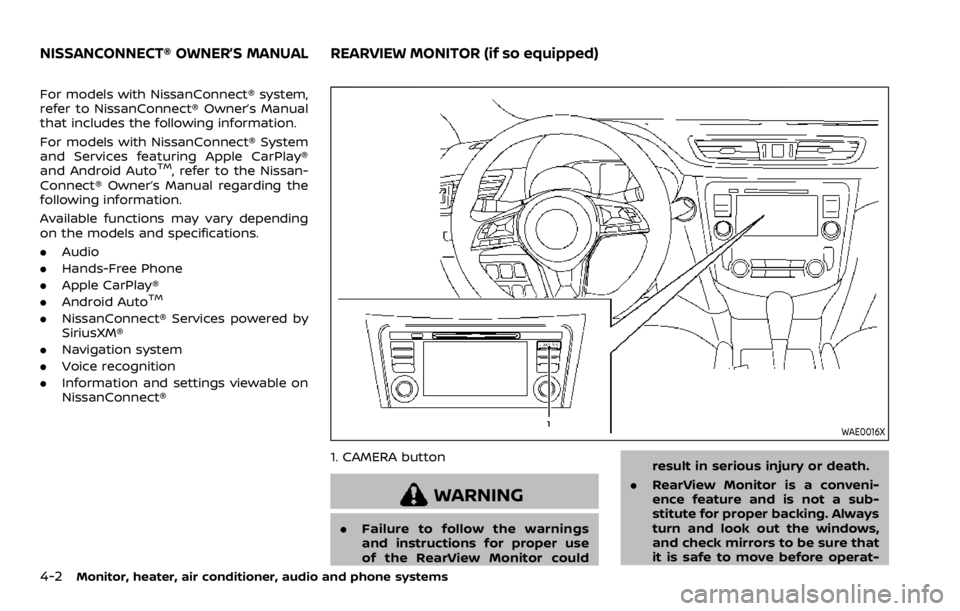
WAE0016X
1. CAMERA button
WARNING
.Failure to follow the warnings
and instructions for proper use
of the RearView Monitor could result in serious injury or death.
. RearView Monitor is a conveni-
ence feature and is not a sub-
stitute for proper backing. Always
turn and look out the windows,
and check mirrors to be sure that
it is safe to move before operat-
NISSANCONNECT® OWNER’S MANUALREARVIEW MONITOR (if so equipped)
Page 225 of 492
JVH1257X
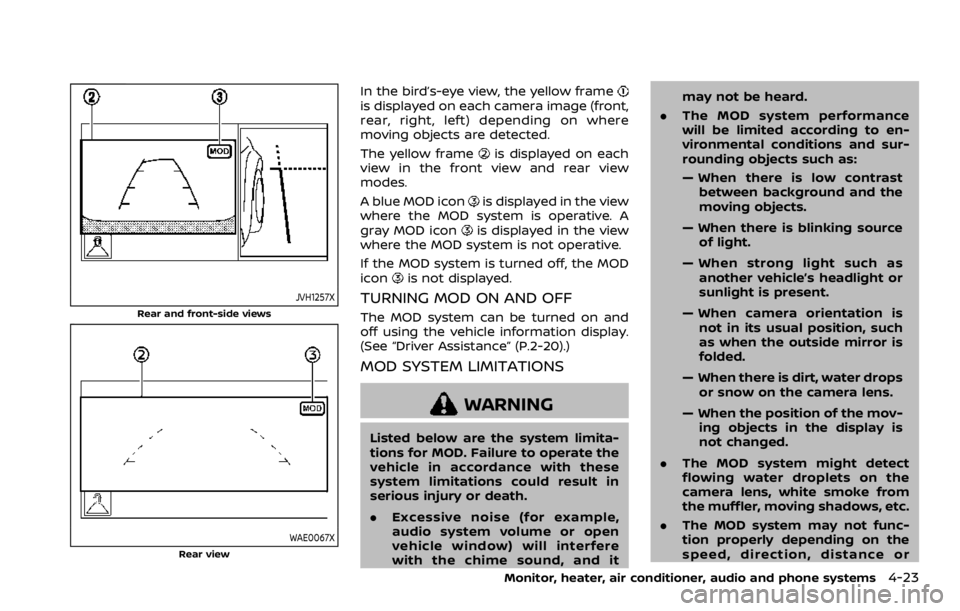
Rear and front-side views
WAE0067XRear view
In the bird’s-eye view, the yellow frameis displayed on each camera image (front,
rear, right, left) depending on where
moving objects are detected.
The yellow frame
is displayed on each
view in the front view and rear view
modes.
A blue MOD icon
is displayed in the view
where the MOD system is operative. A
gray MOD icon
is displayed in the view
where the MOD system is not operative.
If the MOD system is turned off, the MOD
icon
is not displayed.
TURNING MOD ON AND OFF
The MOD system can be turned on and
off using the vehicle information display.
(See “Driver Assistance” (P.2-20).)
MOD SYSTEM LIMITATIONS
WARNING
Listed below are the system limita-
tions for MOD. Failure to operate the
vehicle in accordance with these
system limitations could result in
serious injury or death.
. Excessive noise (for example,
audio system volume or open
vehicle window) will interfere
with the chime sound, and it may not be heard.
. The MOD system performance
will be limited according to en-
vironmental conditions and sur-
rounding objects such as:
— When there is low contrast
between background and the
moving objects.
— When there is blinking source of light.
— When strong light such as another vehicle’s headlight or
sunlight is present.
— When camera orientation is not in its usual position, such
as when the outside mirror is
folded.
— When there is dirt, water drops or snow on the camera lens.
— When the position of the mov- ing objects in the display is
not changed.
. The MOD system might detect
flowing water droplets on the
camera lens, white smoke from
the muffler, moving shadows, etc.
. The MOD system may not func-
tion properly depending on the
speed, direction, distance or
Monitor, heater, air conditioner, audio and phone systems4-23
Page 228 of 492
4-26Monitor, heater, air conditioner, audio and phone systems
WARNING
.The heater and air conditioner
operate only when the engine is
running.
. Never leave children or adults
who would normally require the
support of others alone in the
vehicle. Pets should not be left
alone either. They could unknow-
ingly activate switches or con-
trols and inadvertently become
involved in a serious accident
and injure themselves. On hot,
sunny days, temperatures in a
closed vehicle could quickly be-
come high enough to cause se-
vere or possibly fatal injuries to
people or animals.
. Do not use the recirculation mode
for long periods as it may cause
the interior air to become stale
and the windows to fog up.
. Do not adjust the heating and air
conditioning controls while driv-
ing so that full attention may be
given to vehicle operation.
The heater and air conditioner operate
when the engine is running. The air blower will operate even if the engine is
turned off and the ignition switch is
placed in the ON position.
NOTE:
.
Odors from inside and outside the
vehicle can build up in the air condi-
tioner unit. Odor can enter the pas-
senger compartment through the
ventilators.
. When parking, set the heater and air
conditioner controls to turn off air
recirculation to allow fresh air into
the passenger compartment. This
should help reduce odors inside the
vehicle.
HEATER AND AIR CONDITIONER
Page 229 of 492

JVH0664X
1. A/C button/Fan speed controldial
2. Air flow control buttons
3. MAX A/C button/Temperature control dial
4. Front defroster
button
5. Rear defrosterbutton (See “Rear
window and outside mirror defroster
switch” (P.2-52).)
6. Air recirculation
button
MANUAL AIR CONDITIONER AND
HEATER
Controls
Turning system on/off:
To turn on the system, turn the fan speed
control
dial out of the OFF position.
Turn the dial counterclockwise to the OFF
position to turn off the system.
Fan speed control:
Turn the fan speed control
dial
clockwise to increase the fan speed.
Turn the fan speed control
dial
counterclockwise to decrease the fan
speed. Temperature control:
Turn the temperature control dial to set
the desired temperature. Turn the dial
between the middle and the right posi-
tion to select the hot temperature. Turn
the dial between the middle and the left
position to select the cool temperature.
Air flow control:
Push one of the air flow control buttons
to select the air flow outlets.
— Air flows mainly from center and side
ventilators.
— Air flows mainly from center and sideventilators and foot outlets.
— Air flows mainly from the foot outletand partly from the defroster.
— Air flows mainly from the defrosterand foot outlets.
Air intake control:
The air intake control mode will change
each time the air recirculation
button
is pushed.
. When the indicator light is turned on,
the air recirculates inside the vehicle.
. When the indicator light is turned off,
the air flow is drawn from outside the
vehicle.
Monitor, heater, air conditioner, audio and phone systems4-27
Page 230 of 492

4-28Monitor, heater, air conditioner, audio and phone systems
A/C (Air Conditioner) operation:
Push the A/C button to turn on or off the
air conditioner. When the air conditioner
is on, the A/C indicator light on the button
illuminates.
MAX A/C (Quick Air Conditioning) op-
eration:
Push the MAX A/C button for maximum
cooling and dehumidifying.
When the MAX A/C mode is turned on, the
air flow mode indicator will turn off with
the air flow mode fixed at
.
At the same time, the indicator light on
the A/C button and the air recirculation
mode will turn on.
Push the MAX A/C button again to turn
off the MAX A/C mode. When the MAX A/C
mode is turned off, most of the settings
will return to the previous state, while the
indicator light on the A/C button will stay
on.
Heater operation
Heating:
This mode is used to direct heated air
from the foot outlets. Some air also flows
from the defroster outlets and the side
ventilator outlets.
1. Push the air recirculation
button
for normal heating. (The indicator light
will turn off.)
2. Push the
button. (The indicator
light will turn on.)
3. Turn the fan speed control
dial to
the desired position.
4. Turn the temperature control dial to the desired position between the
middle and the hot (right) position.
Ventilation:
This mode directs outside air from the
side and center ventilators.
1. Push the air recirculation
button.
(The indicator light will turn off.)
2. Push the
button. (The indicator
light will turn on.)
3. Turn the fan speed control
dial to
the desired position.
4. Turn the temperature control dial to the desired position. Defrosting or defogging:
This mode directs the air to the defroster
outlets to defrost/defog the windows.
1. Push the front defroster
button.
(The indicator light will turn on.)
2. Turn the fan speed control
dial to
the desired position.
3. Turn the temperature control dial to the desired position between the
middle and the hot (right) position.
To remove frost from the windshield
quickly, turn the temperature control
dial to the maximum hot (right) posi-
tion and the fan speed control
dial
to the maximum position.
When the front defroster mode is
selected, the air conditioner automa-
tically turns on if the outside tempera-
ture is more than 36°F (2°C). This
dehumidifies the air which helps defog
the windshield. The air recirculation
indicator automatically turns off, al-
lowing outside air to be drawn into
the passenger compartment to
further improve the defogging perfor-
mance. The recirculation mode can-
not be activated in the front defroster
mode.
Bi-level heating:
The bi-level mode directs warmed air to
Page 231 of 492

the side and center ventilators and to the
front and rear floor outlets.
1. Push the air recirculation
button.
(The indicator light will turn off.)
2. Push the
button. (The indicator
light will turn on.)
3. Turn the fan speed control
dial to
the desired position.
4. Turn the temperature control dial to the desired position.
Heating and defogging:
This mode heats the interior and defogs
the windows.
1. Push the
button. (The indicator
light will turn on.)
2. Turn the fan speed control
dial to
the desired position.
3. Turn the temperature control dial to the maximum hot (right) position.
When the
button is pushed, the air
conditioner automatically turns on if the
outside temperature is more than 36°F
(2°C). This dehumidifies the air which
helps defog the windshield. The air re-
circulation indicator automatically turns
off, allowing outside air to be drawn into
the passenger compartment to further
improve the defogging performance. NOTE:
Clear snow and ice from the wiper
blades and air inlet in front of the
windshield. This improves heater op-
eration.
Air conditioner operation
Start the engine, turn the fan speed
controldial to the desired position,
and push the A/C button to activate the
air conditioner. When the air conditioner
is on, cooling and dehumidifying func-
tions are added to the heater operation.
The air conditioner cooling function op-
erates only when the engine is running.
Cooling:
This mode is used to cool and dehumidify
the air.
1. Push the
button. (The indicator
light will turn on.)
2. Turn the fan speed control
dial to
the desired position.
3. Push the A/C button. (The indicator light will turn on.)
4. Turn the temperature control dial to the desired position between the
middle and the cool (left) position.
For quick cooling, push the MAX A/C
button. When the MAX A/C button is
pushed, it will activate the air recirculation
mode. The amount of air coming through the ventilators is the highest it can go
when in MAX A/C mode regardless of the
position of the fan speed control
dial.
Dehumidified heating:
This mode is used to heat and dehumidify
the air.
1. Push the air recirculation
button.
(The indicator light will turn off.)
2. Push the
button. (The indicator
light will turn on.)
3. Turn the fan speed control
dial to
the desired position.
4. Push the A/C button on. (The indicator light will turn on.)
5. Turn the temperature control dial to the desired position between the
middle and the hot (right) position.
Dehumidified defogging:
This mode is used to defog the windows
and dehumidify the air.
1. Push the front defroster
button.
(The indicator light will turn on.)
2. Turn the fan speed control
dial to
the desired position.
3. Turn the temperature control dial to the desired position.
When the front defroster or
mode is
selected, the air conditioner automatically
turns on if the outside temperature is
Monitor, heater, air conditioner, audio and phone systems4-29
Page 232 of 492

4-30Monitor, heater, air conditioner, audio and phone systems
more than 36°F (2°C). This dehumidifies
the air which helps defog the windshield.
The air recirculation mode automatically
turns off, allowing outside air to be drawn
into the passenger compartment to
further improve the defogging perfor-
mance.
The air conditioner is always on in front
defroster or
mode, regardless of
whether the indicator light is on or off.
NOTE:
. The air conditioner system should
be operated for approximately 10
minutes at least once a month. This
helps prevent damage to the air
conditioner system due to the lack
of lubrication.
. A visible mist may be seen coming
from the ventilators in hot, humid
conditions as the air is cooled ra-
pidly. This does not indicate a mal-
function.
. If the engine coolant temperature
becomes too high, the air recircula-
tion mode will be activated and the
indicator light will come on automa-
tically.
. If the engine coolant temperature
gauge indicates engine coolant tem-
perature over the normal range, turn
the air conditioner off. (See “If your
vehicle overheats” (P.6-16).)
JVH0665X
1. Front defrosterbutton
2. ON·OFF button/Temperature control dial (driver side)
3. MODE button
4. Display screen
5. A/C (Air Conditioner) button
6. DUAL button/Temperature control dial (passenger side)
7. Rear defroster
button (See “Rear
window and outside mirror defroster
switch” (P.2-52).)
8. Air recirculation
button
9. Fan speed controlbutton
10. AUTO button
11. Outside air circulation
button
AUTOMATIC AIR CONDITIONER AND
HEATER
Automatic operation (AUTO)
The AUTO mode may be used year-round
as the system automatically controls the
air conditioner to a constant tempera-
ture, air flow distribution and fan speed
after the desired temperature is set
manually.
Cooling and dehumidified heating:
1. Push the AUTO button (the indicator light will turn on).
2. Turn the temperature control dial to set the desired temperature.
Page 235 of 492
OPERATING TIPS (for automatic air
conditioner)
When the engine coolant temperature
and outside air temperature are low, the
air flow from the foot outlets may not
operate for a maximum of 150 seconds.
However, this is not a malfunction. After
the coolant temperature warms up, air
flow from the foot outlets will operate
normally.
The sensors
and, located on the
instrument panel, help maintain a con-
stant temperature. Do not put anything
on or around the sensors.
SERVICING AIR CONDITIONER
WARNING
The air conditioner system contains
refrigerant under high pressure. To
avoid personal injury, any air condi-
tioner service should be done only by
an experienced technician with the
proper equipment.
The air conditioner system in your vehicle
is charged with a refrigerant designed
with the environment in mind.
This refrigerant will not harm the
earth’s ozone layer. However, it maycontribute in a small part to global
warming.
Special charging equipment and lubricant
are required when servicing your vehicle’s
air conditioner. Using improper refriger-
ants or lubricants will cause severe da-
mage to the air conditioner system. (See
“Air conditioning system refrigerant and
lubricant recommendations” (P.10-6).)
A NISSAN dealer will be able to service
your environmentally friendly air condi-
tioner system.
In-cabin microfilter
The air conditioner system is equipped
with an in-cabin microfilter. To make sure
the air conditioner heats, defogs, and
ventilates efficiently, replace the filter
according the specified maintenance in-
tervals listed in the "9. Maintenance and
schedules" section. It is recommended to
visit a NISSAN dealer to replace the filter.
The filter should be replaced if the air flow
decreases significantly or if windows fog
up easily when operating the heater or air
conditioner.SAA2374
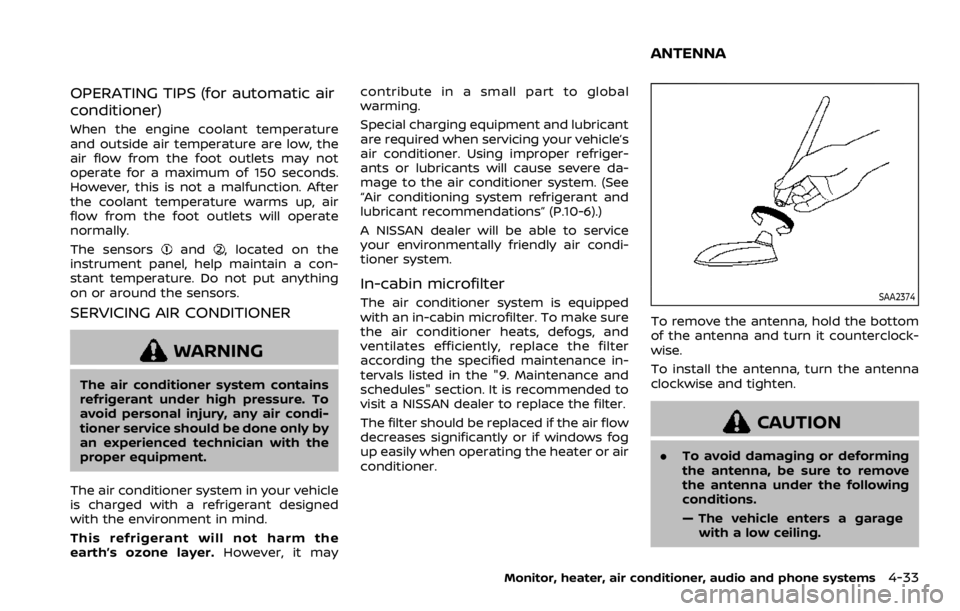
To remove the antenna, hold the bottom
of the antenna and turn it counterclock-
wise.
To install the antenna, turn the antenna
clockwise and tighten.
CAUTION
.
To avoid damaging or deforming
the antenna, be sure to remove
the antenna under the following
conditions.
— The vehicle enters a garage
with a low ceiling.
Monitor, heater, air conditioner, audio and phone systems4-33
ANTENNA