parking brake NISSAN ROGUE SPORT 2022 Owner's Guide
[x] Cancel search | Manufacturer: NISSAN, Model Year: 2022, Model line: ROGUE SPORT, Model: NISSAN ROGUE SPORT 2022Pages: 508, PDF Size: 2.43 MB
Page 262 of 508
5-22Starting and driving
brake pedal.
3. Move the shift lever to the P (Park) position.
4. Place the ignition switch in the LOCK position.
CAUTION
To prevent transmission damage,
move the shift lever to the P (Park)
or R (Reverse) position only when the
vehicle is completely stopped.
P (Park):
Use this position when the vehicle is
parked or when starting the engine. Make
sure the vehicle is completely stopped.
The brake pedal must be depressed and
the shift lever button pushed in to move
the shift lever from N (Neutral) or any
drive position to P (Park). Apply the
parking brake. When parking on a hill,
apply the parking brake first, then move
the shift lever to the P (Park) position.
R (Reverse):
Use this position to back up. Make sure
the vehicle is completely stopped before
selecting the R (Reverse) position. The
brake pedal must be depressed and the
shift lever button pushed in to move the shift lever from P (Park), N (Neutral) or
any driving position to R (Reverse).
N (Neutral):
Neither forward nor reverse gear is en-
gaged. The engine can be started in this
position. You may shift to N (Neutral) and
restart a stalled engine while the vehicle
is moving.
D (Drive):
Use this position for all normal forward
driving.
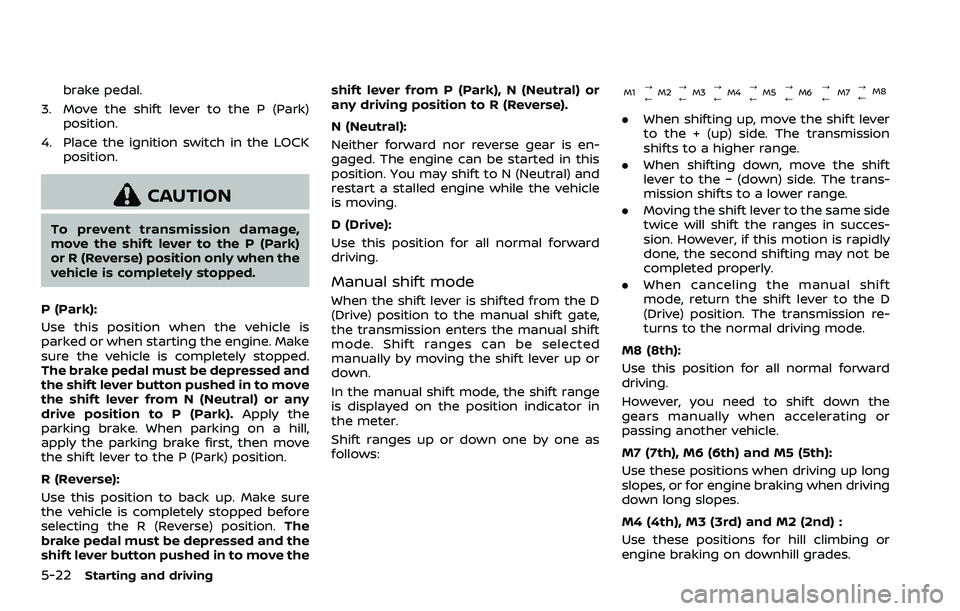
Manual shift mode
When the shift lever is shifted from the D
(Drive) position to the manual shift gate,
the transmission enters the manual shift
mode. Shift ranges can be selected
manually by moving the shift lever up or
down.
In the manual shift mode, the shift range
is displayed on the position indicator in
the meter.
Shift ranges up or down one by one as
follows:
M1
?
M2 ?
M3 ?
M4 ?
M5 ?
M6 ?
M7 ?
M8
// / / / / /
.
When shifting up, move the shift lever
to the + (up) side. The transmission
shifts to a higher range.
. When shifting down, move the shift
lever to the − (down) side. The trans-
mission shifts to a lower range.
. Moving the shift lever to the same side
twice will shift the ranges in succes-
sion. However, if this motion is rapidly
done, the second shifting may not be
completed properly.
. When canceling the manual shift
mode, return the shift lever to the D
(Drive) position. The transmission re-
turns to the normal driving mode.
M8 (8th):
Use this position for all normal forward
driving.
However, you need to shift down the
gears manually when accelerating or
passing another vehicle.
M7 (7th), M6 (6th) and M5 (5th):
Use these positions when driving up long
slopes, or for engine braking when driving
down long slopes.
M4 (4th), M3 (3rd) and M2 (2nd) :
Use these positions for hill climbing or
engine braking on downhill grades.
Page 264 of 508
5-24Starting and driving
Adaptive Shift Control (ASC)
The Adaptive Shift Control automatically
operates when the transmission is in the
“D” (Drive) position and selects an appro-
priate gear depending on the road con-
ditions such as uphill or downhill.
Control on uphill and curving roads:
A low gear is maintained that suits the
degree of the slope to allow smooth
driving with a small number of shifts.
Control on downhill roads:
The Adaptive Shift Control shifts to a low
gear that suits the degree of the slope
when the accelerator pedal is depressed,
and uses the engine braking to help
driving in the downhill.
Control on winding roads:
A low gear is maintained on continuous
curves that involve repeated acceleration
and deceleration, so that smooth accel-
eration is available instantly when the
accelerator pedal is depressed.
NOTE:
.Adaptive Shift Control may not op-
erate when the transmission oil
temperature is low immediately
after the start of driving or when it
is very hot. .
During some driving situations, hard
braking for example, the Adaptive
Shift Control may automatically op-
erate. The transmission may auto-
matically shift to a lower gear for
engine braking. This increases en-
gine speed but not vehicle speed.
Vehicle speed is controlled by the
accelerator pedal when the vehicle
is in the Adaptive Shift Control
mode.
. When the Adaptive Shift Control
operates, the transmission some-
times maintains a lower gear for a
longer period of time than when
Adaptive Shift Control is not operat-
ing. Engine speed will be higher for a
specific vehicle speed while Adap-
tive Shift Control is operating than
when Adaptive Shift Control is not
operating.
JVS0392X
Shift lock release
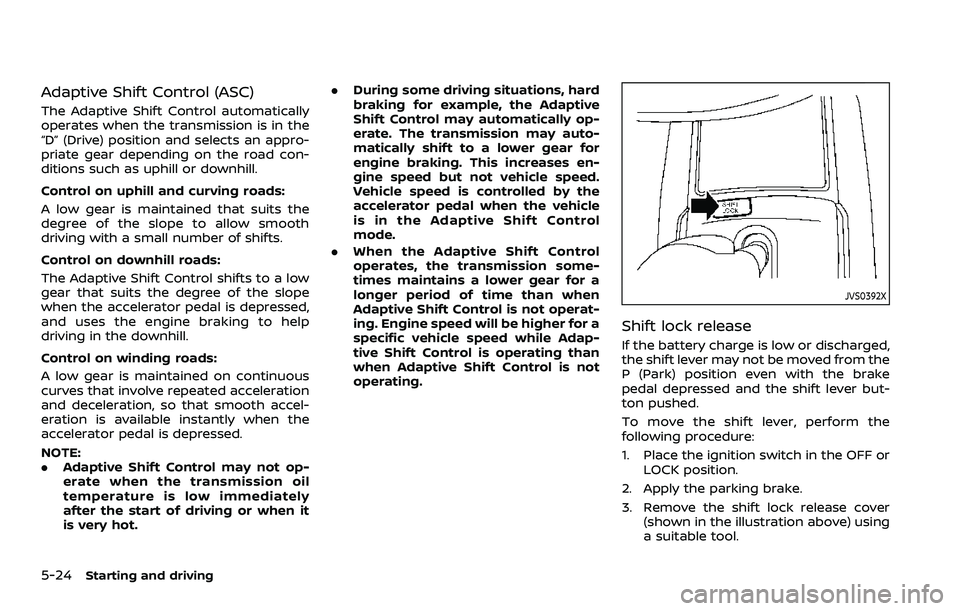
If the battery charge is low or discharged,
the shift lever may not be moved from the
P (Park) position even with the brake
pedal depressed and the shift lever but-
ton pushed.
To move the shift lever, perform the
following procedure:
1. Place the ignition switch in the OFF or
LOCK position.
2. Apply the parking brake.
3. Remove the shift lock release cover (shown in the illustration above) using
a suitable tool.
Page 267 of 508
WARNING
.Never drive the vehicle with the
parking brake applied. The brake
will overheat and fail to operate
and will lead to an accident.
. Never release the parking brake
from outside the vehicle. If the
vehicle moves, it will be impossi-
ble to push the foot brake pedal
and will lead to an accident.
. Never use the shift lever in place
of the parking brake. When park-
ing, be sure the parking brake is
fully applied.
. To help avoid risk of injury or
death through unintended opera-
tion of the vehicle and/or its
systems, do not leave children,
people who require the assis-
tance of others or pets unat-
tended in your vehicle.
Additionally, the temperature in-
side a closed vehicle on a warm
day can quickly become high
enough to cause a significant risk
of injury or death to people and
pets.
SPA2331
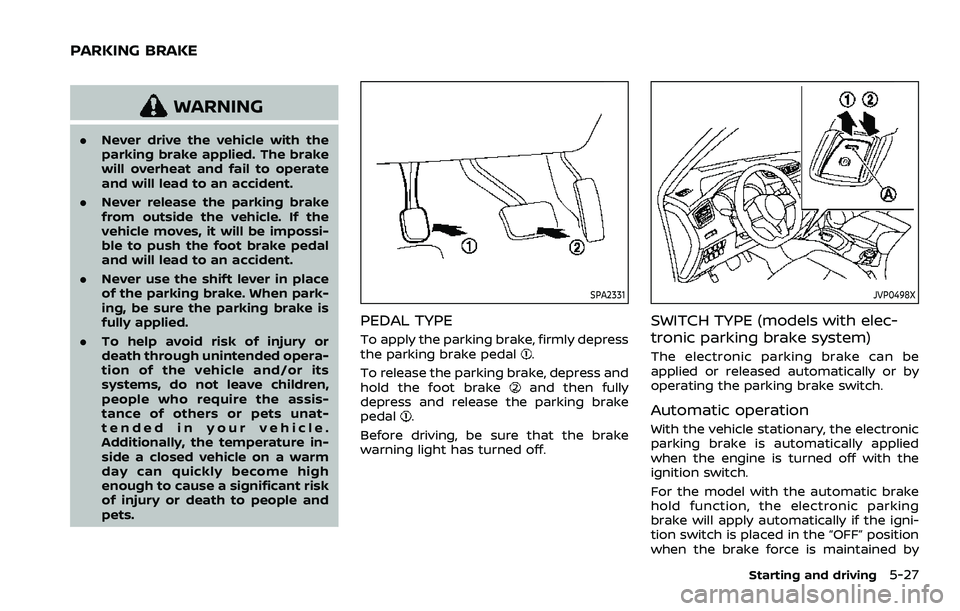
PEDAL TYPE
To apply the parking brake, firmly depress
the parking brake pedal.
To release the parking brake, depress and
hold the foot brake
and then fully
depress and release the parking brake
pedal
.
Before driving, be sure that the brake
warning light has turned off.
JVP0498X
SWITCH TYPE (models with elec-
tronic parking brake system)
The electronic parking brake can be
applied or released automatically or by
operating the parking brake switch.
Automatic operation
With the vehicle stationary, the electronic
parking brake is automatically applied
when the engine is turned off with the
ignition switch.
For the model with the automatic brake
hold function, the electronic parking
brake will apply automatically if the igni-
tion switch is placed in the “OFF” position
when the brake force is maintained by
Starting and driving5-27
PARKING BRAKE
Page 268 of 508
5-28Starting and driving
automatic brake hold function.
The electronic parking brake is automati-
cally released as soon as the vehicle
starts while the accelerator pedal is
depressed.
WARNING
.The electronic parking brake will
not be automatically applied
when the engine is stopped with-
out using the ignition switch (for
example, by engine stalling).
Without the vehicle stationary,
the electronic parking brake will
not be automatically applied
even if the engine is turned off
with the ignition switch.
. Before leaving the vehicle, move
the shift lever to the 1 (1st) or R
(Reverse) position and check that
the electronic parking brake in-
dicator light is illuminated to
confirm that the electronic park-
ing brake is applied. The electro-
nic parking brake indicator light
will remain on for a period of time
after the driver’s door is locked.
CAUTION
When parking in an area where the
outside temperature is below 32°F
(0°C), do not apply the parking brake
to prevent it from freezing.
For safe parking, place the shift lever
in the 1 (1st) or R (Reverse) position
and securely block the wheels.
NOTE:
. To keep the electronic parking brake
released after the engine is turned
off, place the ignition switch in the
OFF position, depress the brake
pedal and push down the parking
brake switch before opening the
driver’s door.
. If a malfunction occurs in the elec-
tronic parking brake system (for
example, due to battery discharge),
it is recommended to contact a
NISSAN dealer.
. If the shift lever is moved to the P
(Park) position when the brake force
is maintained by the automatic
brake hold function, the electronic
parking brake will apply automati-
cally. .
If the driver’s seat belt is unfastened
when the brake force is maintained
by the automatic brake hold func-
tion, the electronic parking brake
will apply automatically.
. If the ignition switch is placed in the
OFF position when the brake force is
maintained by the automatic brake
hold function, the electronic parking
brake will apply automatically.
Manual operation
The electronic parking brake will not be
automatically applied if the engine is
stopped without using the ignition switch
(for example, by engine stalling). In such a
case, you have to apply the parking brake
manually.
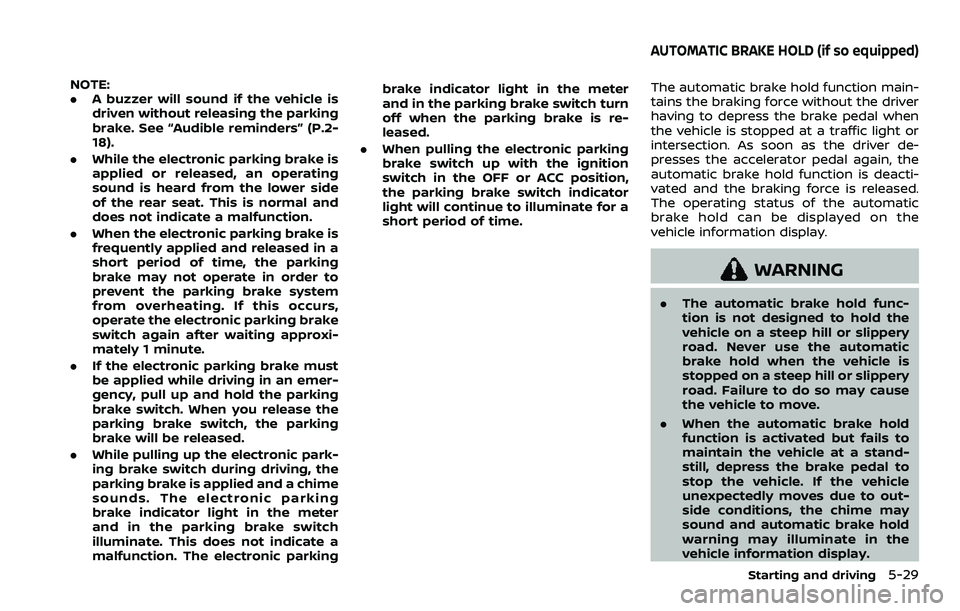
To apply: Pull the switch up
. The
indicator lightwill illuminate.
To release: With the ignition switch in the
ON position, depress the brake pedal and
push the switch down
. The indicator
lightwill turn off.
Before driving, check that the electronic
parking brake indicator light
goes
out. For additional information, see
“Warning lights, indicator lights and audi-
ble reminders” (P.2-10).
Page 269 of 508
NOTE:
.A buzzer will sound if the vehicle is
driven without releasing the parking
brake. See “Audible reminders” (P.2-
18).
. While the electronic parking brake is
applied or released, an operating
sound is heard from the lower side
of the rear seat. This is normal and
does not indicate a malfunction.
. When the electronic parking brake is
frequently applied and released in a
short period of time, the parking
brake may not operate in order to
prevent the parking brake system
from overheating. If this occurs,
operate the electronic parking brake
switch again after waiting approxi-
mately 1 minute.
. If the electronic parking brake must
be applied while driving in an emer-
gency, pull up and hold the parking
brake switch. When you release the
parking brake switch, the parking
brake will be released.
. While pulling up the electronic park-
ing brake switch during driving, the
parking brake is applied and a chime
sounds. The electronic parking
brake indicator light in the meter
and in the parking brake switch
illuminate. This does not indicate a
malfunction. The electronic parking brake indicator light in the meter
and in the parking brake switch turn
off when the parking brake is re-
leased.
. When pulling the electronic parking
brake switch up with the ignition
switch in the OFF or ACC position,
the parking brake switch indicator
light will continue to illuminate for a
short period of time.The automatic brake hold function main-
tains the braking force without the driver
having to depress the brake pedal when
the vehicle is stopped at a traffic light or
intersection. As soon as the driver de-
presses the accelerator pedal again, the
automatic brake hold function is deacti-
vated and the braking force is released.
The operating status of the automatic
brake hold can be displayed on the
vehicle information display.
WARNING
.The automatic brake hold func-
tion is not designed to hold the
vehicle on a steep hill or slippery
road. Never use the automatic
brake hold when the vehicle is
stopped on a steep hill or slippery
road. Failure to do so may cause
the vehicle to move.
. When the automatic brake hold
function is activated but fails to
maintain the vehicle at a stand-
still, depress the brake pedal to
stop the vehicle. If the vehicle
unexpectedly moves due to out-
side conditions, the chime may
sound and automatic brake hold
warning may illuminate in the
vehicle information display.
Starting and driving5-29
AUTOMATIC BRAKE HOLD (if so equipped)
Page 270 of 508
5-30Starting and driving
.Be sure to deactivate the auto-
matic brake hold function when
using a car wash or towing your
vehicle.
. Make sure to place the shift lever
in the P (Park) position and apply
the parking brake when parking
your vehicle, riding on or off the
vehicle, or loading luggage. Fail-
ure to do so could cause the
vehicle to move or roll away
unexpectedly and result in ser-
ious personal injury or property
damage.
. If any of the following conditions
occur, the automatic brake hold
function may not function. Have
the system checked promptly. It
is recommended that you visit a
NISSAN dealer for this service.
Failure to operate the vehicle in
accordance with these conditions
could cause the vehicle to move
or roll away unexpectedly and
result in serious personal injury
or property damage.
— A warning message appears
in the vehicle information dis-
play.
— The indicator light on the automatic brake hold switch does not illuminate when the
switch is pushed.
. The automatic brake hold func-
tion will not be activated if the
Vehicle Dynamic Control (VDC)
OFF indicator light, electronic
parking brake warning light or
master warning light illuminate
and the Chassis Control System
Error message appears in the
vehicle information display.
. To maintain the braking force to
keep the vehicle to a standstill, a
noise may be heard. This is not a
malfunction.
JVP0497X
HOW TO ACTIVATE/DEACTIVATE
THE AUTOMATIC BRAKE HOLD
FUNCTION
How to activate the automatic
brake hold function
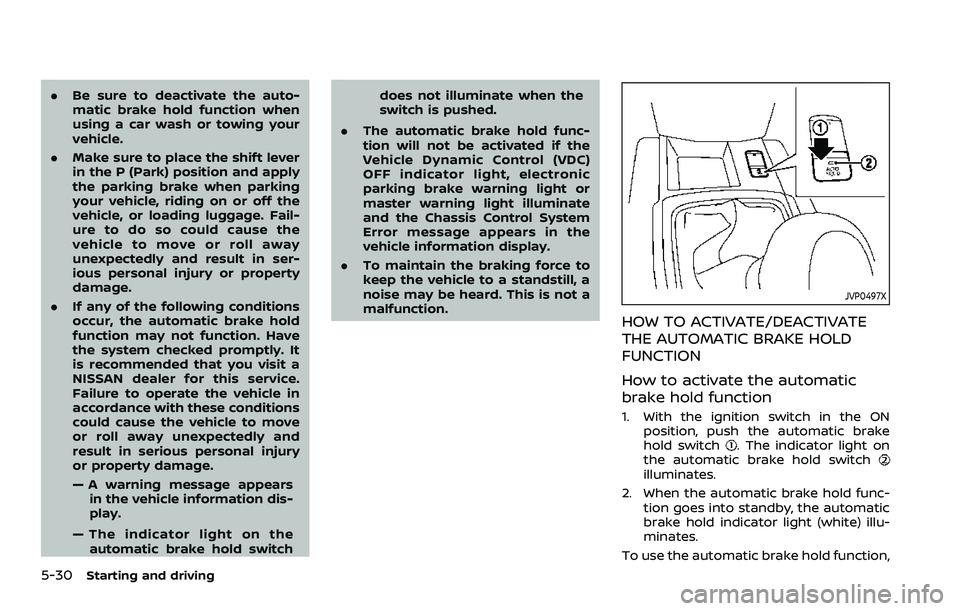
1. With the ignition switch in the ON
position, push the automatic brake
hold switch
. The indicator light on
the automatic brake hold switch
illuminates.
2. When the automatic brake hold func- tion goes into standby, the automatic
brake hold indicator light (white) illu-
minates.
To use the automatic brake hold function,
Page 271 of 508
the following conditions need to be met.
.The driver’s seat belt is fastened.
. The electronic parking brake is re-
leased.
. The shift lever is not in the P (Park)
position.
. The vehicle is not parked on a steep
hill.
NOTE:
The automatic brake hold function re-
sets to OFF every time the ignition
switch is switched from the OFF posi-
tion to the ON position.
How to deactivate the automatic
brake hold function
While the automatic brake hold function
is activated, push the automatic brake
hold switch to turn off the automatic
brake hold indicator light and deactivate
the automatic brake hold function. To
deactivate the automatic brake hold
function while the brake force has been
maintained by the automatic brake hold
function, depress the brake pedal and
push the automatic brake hold switch.
WARNING
Make sure to firmly depress and hold
the brake pedal when turning off the
automatic brake hold function while
the brake force is applied. When the
automatic brake hold function is
deactivated, the brake force will be
released. This could cause the vehi-
cle to move or roll away unexpect-
edly.
Failure to prevent the vehicle from
rolling may result in serious personal
injury or property damage.
HOW TO USE THE AUTOMATIC
BRAKE HOLD FUNCTION
For additional information on using the
automatic brake hold function, refer to
the instructions outlined in this section.
To maintain braking force auto-
matically
With the automatic brake hold function
activated and the automatic brake hold
indicator light (white) illuminated on the
meter, depress the braking pedal to stop
the vehicle. The brake force is automati-
cally applied without your foot depressed
on the brake pedal. While the brake hold is maintained, the automatic brake hold
indicator light (green) illuminates on the
meter.
To start the vehicle from a stand-
still
With the shift lever not in the P (Park) or N
(Neutral) position, depress the accelerator
pedal while the brake force is maintained.
The brake force will automatically be
released to restart the vehicle. The auto-
matic brake hold indicator light (white) on
the meter illuminates and the automatic
brake hold returns to standby.
Parking
When the shift lever is in the P (Park)
position with the brake force maintained
by the automatic brake hold function, the
parking brake will automatically be ap-
plied and the brake force of the auto-
matic brake hold will be released. The
automatic brake hold indicator light turns
off. When the parking brake is applied
with the brake force maintained by the
automatic brake hold function, the brake
force of the automatic brake hold will be
released. The automatic brake hold in-
dicator light turns off.
NOTE:
.
Under the following conditions, the
parking brake will automatically be
Starting and driving5-31
Page 311 of 508
WAF0052X
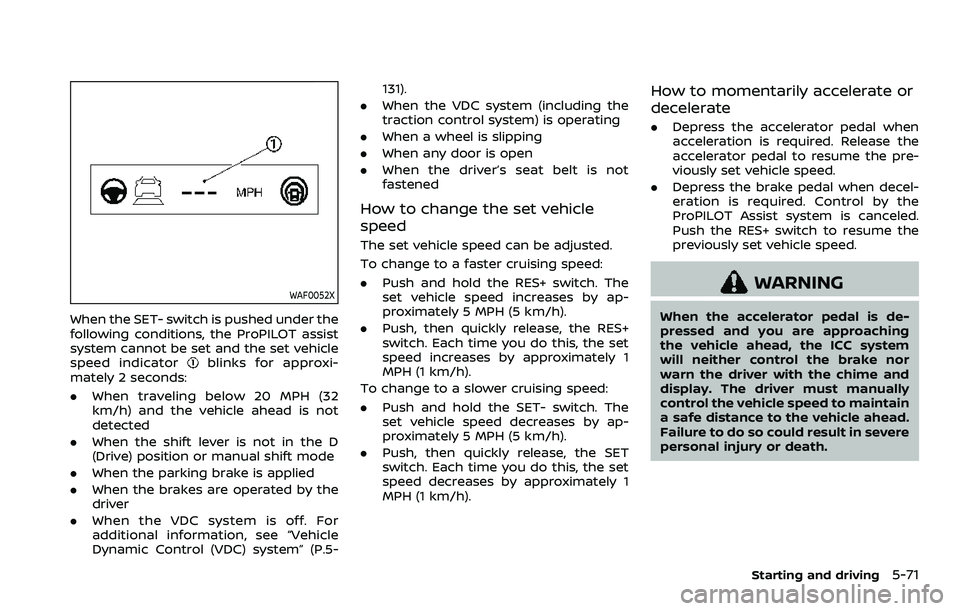
When the SET- switch is pushed under the
following conditions, the ProPILOT assist
system cannot be set and the set vehicle
speed indicator
blinks for approxi-
mately 2 seconds:
. When traveling below 20 MPH (32
km/h) and the vehicle ahead is not
detected
. When the shift lever is not in the D
(Drive) position or manual shift mode
. When the parking brake is applied
. When the brakes are operated by the
driver
. When the VDC system is off. For
additional information, see “Vehicle
Dynamic Control (VDC) system” (P.5- 131).
. When the VDC system (including the
traction control system) is operating
. When a wheel is slipping
. When any door is open
. When the driver’s seat belt is not
fastened
How to change the set vehicle
speed
The set vehicle speed can be adjusted.
To change to a faster cruising speed:
.Push and hold the RES+ switch. The
set vehicle speed increases by ap-
proximately 5 MPH (5 km/h).
. Push, then quickly release, the RES+
switch. Each time you do this, the set
speed increases by approximately 1
MPH (1 km/h).
To change to a slower cruising speed:
. Push and hold the SET- switch. The
set vehicle speed decreases by ap-
proximately 5 MPH (5 km/h).
. Push, then quickly release, the SET
switch. Each time you do this, the set
speed decreases by approximately 1
MPH (1 km/h).
How to momentarily accelerate or
decelerate
. Depress the accelerator pedal when
acceleration is required. Release the
accelerator pedal to resume the pre-
viously set vehicle speed.
. Depress the brake pedal when decel-
eration is required. Control by the
ProPILOT Assist system is canceled.
Push the RES+ switch to resume the
previously set vehicle speed.
WARNING
When the accelerator pedal is de-
pressed and you are approaching
the vehicle ahead, the ICC system
will neither control the brake nor
warn the driver with the chime and
display. The driver must manually
control the vehicle speed to maintain
a safe distance to the vehicle ahead.
Failure to do so could result in severe
personal injury or death.
Starting and driving5-71
Page 315 of 508
HOW TO CANCEL THE PROPILOT
ASSIST SYSTEM
To cancel the ProPILOT assist system, use
one of the following methods:
.Push the CANCEL switch.
. Tap the brake pedal (except at a
standstill).
. Push the ProPILOT assist switch to
turn the system off. The ProPILOT
assist status indicator will turn off.
When the ProPILOT assist system is
canceled while the vehicle is stopped,
the electronic parking brake is automati-
cally activated.
WARNING
To prevent the vehicle from moving
or rolling unexpectedly, which could
result in serious personal injury or
property damage, before exiting the
vehicle make sure to push the Pro-
PILOT assist switch to turn the sys-
tem off, place the shift lever in the P
(Park) position, and turn the engine
off.
INTELLIGENT CRUISE CONTROL
(ICC)
WARNING
Failure to follow the warnings and
instructions for proper use of the ICC
system could result in serious injury
or death.
. The ICC system is only an aid to
assist the driver and is not a
collision warning or avoidance
device. It is recommended for
highway use only and it is not
intended for city driving. It is the
driver’s responsibility to stay
alert, drive safely, and be in con-
trol of the vehicle at all times.
. There are limitations to the ICC
system capability. The ICC system
does not function in all driving,
traffic, weather, and road condi-
tions. It is the driver’s responsi-
bility to stay alert, drive safely,
keep the vehicle in the traveling
lane, and be in control of the
vehicle at all times.
. Always observe posted speed
limits and do not set the speed
over them. .
The ICC system does not react to
stationary and slow moving vehi-
cles.
. Always drive carefully and atten-
tively when using the ICC system.
Read and understand the Owner’s
Manual thoroughly before using
the ICC system. To avoid serious
injury or death, do not rely on the
system to prevent accidents or to
control the vehicle’s speed in
emergency situations. Do not
use the ICC system except in
appropriate road and traffic con-
ditions.
ICC system operation
The ICC system is designed to maintain a
selected distance from the vehicle in front
of you and can reduce the speed to
match a slower vehicle ahead. The sys-
tem decelerates the vehicle as necessary
and if the vehicle ahead comes to a stop,
the vehicle decelerates to a standstill.
However, the ICC system can only apply
up to 40% of the vehicle’s total braking
power. This system should only be used
when traffic conditions allow vehicle
speeds to remain fairly constant or when
vehicle speeds change gradually. If a
vehicle moves into the traveling lane
Starting and driving5-75
Page 323 of 508
.Any door is open.
. The driver’s seat belt is not fastened.
. The vehicle ahead is not detected and
your vehicle is traveling below the
speed of 15 MPH (24 km/h).
. Your vehicle has been stopped by the
ICC system for approximately 3 min-
utes or longer.
. The shift lever is not in the D (Drive)
position or manual shift mode.
. The electronic parking brake is ap-
plied.
. The VDC system is turned off.
. The AEB applies harder braking
. VDC (including the traction control
system) operates.
. A wheel slips.
. When distance measurement be-
comes impaired due to adhesion of
dirt or obstruction to the sensor.
. When the radar signal is temporarily
interrupted.
Action to take:
When the conditions listed above are no
longer present, turn the system off using
the ProPILOT Assist switch. Turn the
ProPILOT Assist system back on to use
the system. NOTE:
When the ICC system is canceled under
the following conditions at a standstill,
the electronic parking brake is automa-
tically activated:
.
Any door is open.
. The driver’s seat belt is not fastened.
. Your vehicle has been stopped by
the ICC system for approximately 3
minutes or longer.
. The shift lever is not in the D (Drive)
position or manual shift mode.
. The VDC system is turned off.
. When distance measurement be-
comes impaired due to adhesion of
dirt or obstruction to the sensor.
. When the radar signal is temporarily
interrupted.
Condition B:
When the radar sensor of the front
bumper is covered with dirt or is ob-
structed, the ICC system will automati-
cally be canceled.
The chime will sound and the “Forward
Driving Aids Temporarily Disabled Front
Sensor Blocked” or “Unavailable: Front
Radar Obstruction” warning message will
appear in the vehicle information display. Action to take:
If the warning message appears, stop the
vehicle in a safe place, place the shift lever
in the P (Park) position, and turn the
engine off. When the radar signal is
temporarily interrupted, clean the sensor
area of the front bumper and restart the
engine. If the “Forward Driving Aids Tem-
porarily Disabled Front Sensor Blocked” or
“Unavailable: Front Radar Obstruction”
warning message continues to be dis-
played, have the system checked. It is
recommended that you visit a NISSAN
dealer for this service.
Condition C:
When driving on roads with limited road
structures or buildings (for example, long
bridges, deserts, snow fields, driving next
to long walls), the system may illuminate
the system warning light and display the
“Forward Driving Aids Temporarily Dis-
abled Front Sensor Blocked” or “Unavail-
able: Front Radar Obstruction” warning
message.
Action to take:
When the above driving conditions no
longer exist, turn the system back on.
Starting and driving5-83