ratio NISSAN SENTRA 1996 B14 / 4.G Owner's Manual
[x] Cancel search | Manufacturer: NISSAN, Model Year: 1996, Model line: SENTRA, Model: NISSAN SENTRA 1996 B14 / 4.GPages: 191, PDF Size: 1.43 MB
Page 50 of 191
WARNING
The automatic locking mode should be
used only for child seat installation.
During normal seat belt use by a pas-
senger, the locking mode should not be
activated. If it is activated it may cause
uncomfortable seat belt tension.
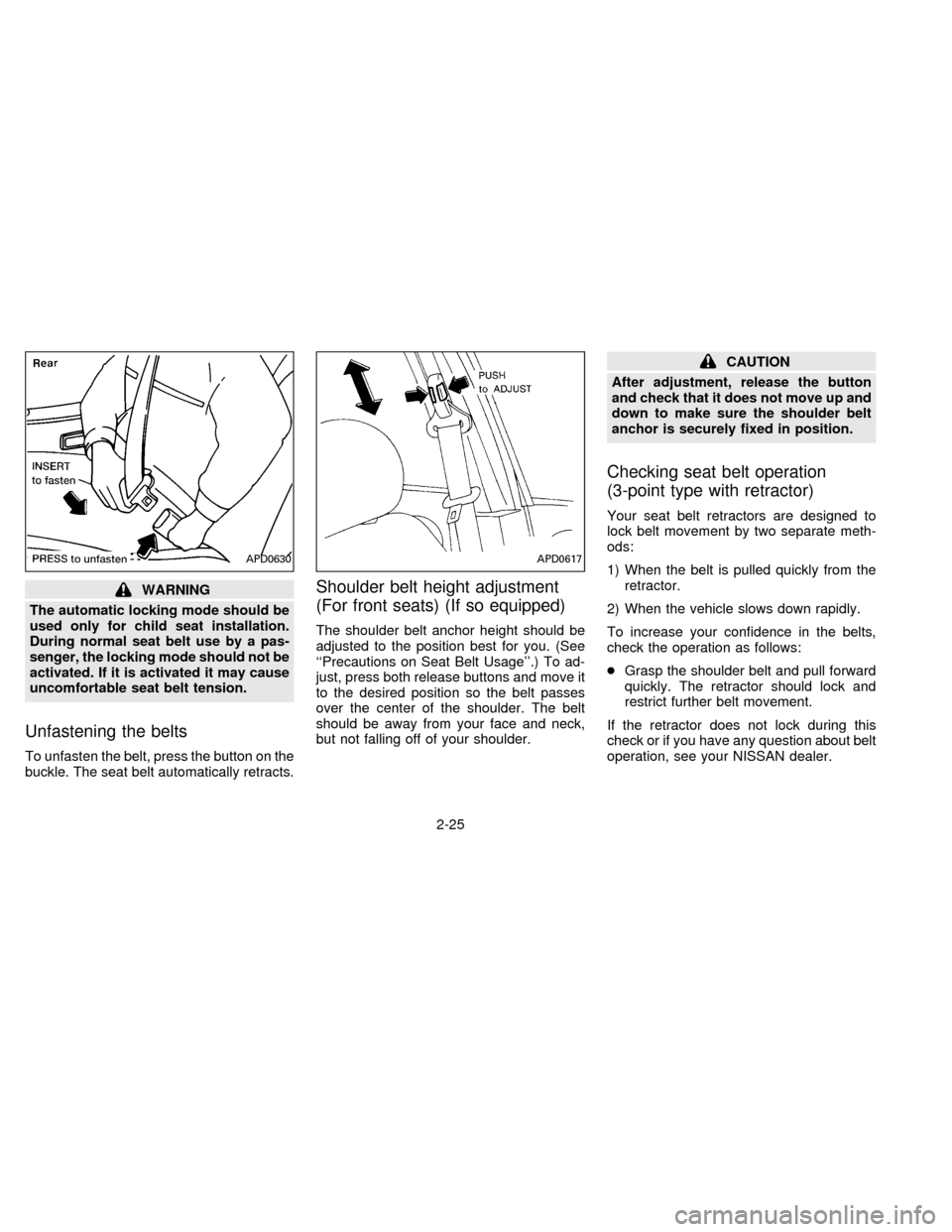
Unfastening the belts
To unfasten the belt, press the button on the
buckle. The seat belt automatically retracts.
Shoulder belt height adjustment
(For front seats) (If so equipped)
The shoulder belt anchor height should be
adjusted to the position best for you. (See
``Precautions on Seat Belt Usage''.) To ad-
just, press both release buttons and move it
to the desired position so the belt passes
over the center of the shoulder. The belt
should be away from your face and neck,
but not falling off of your shoulder.
CAUTION
After adjustment, release the button
and check that it does not move up and
down to make sure the shoulder belt
anchor is securely fixed in position.
Checking seat belt operation
(3-point type with retractor)
Your seat belt retractors are designed to
lock belt movement by two separate meth-
ods:
1) When the belt is pulled quickly from the
retractor.
2) When the vehicle slows down rapidly.
To increase your confidence in the belts,
check the operation as follows:
cGrasp the shoulder belt and pull forward
quickly. The retractor should lock and
restrict further belt movement.
If the retractor does not lock during this
check or if you have any question about belt
operation, see your NISSAN dealer.
APD0630APD0617
2-25
ZX
Page 52 of 191
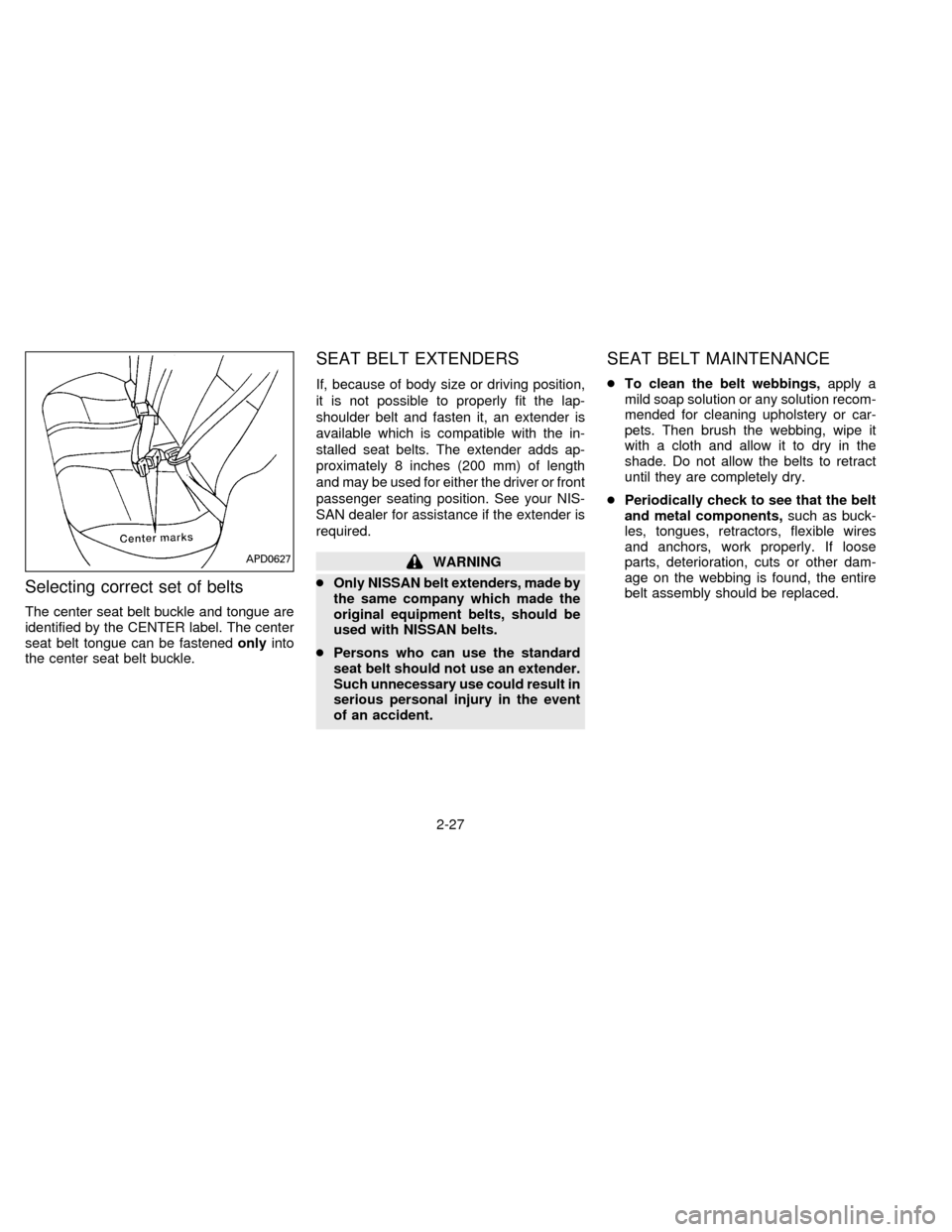
Selecting correct set of belts
The center seat belt buckle and tongue are
identified by the CENTER label. The center
seat belt tongue can be fastenedonlyinto
the center seat belt buckle.
SEAT BELT EXTENDERS
If, because of body size or driving position,
it is not possible to properly fit the lap-
shoulder belt and fasten it, an extender is
available which is compatible with the in-
stalled seat belts. The extender adds ap-
proximately 8 inches (200 mm) of length
and may be used for either the driver or front
passenger seating position. See your NIS-
SAN dealer for assistance if the extender is
required.
WARNING
cOnly NISSAN belt extenders, made by
the same company which made the
original equipment belts, should be
used with NISSAN belts.
cPersons who can use the standard
seat belt should not use an extender.
Such unnecessary use could result in
serious personal injury in the event
of an accident.
SEAT BELT MAINTENANCE
cTo clean the belt webbings,apply a
mild soap solution or any solution recom-
mended for cleaning upholstery or car-
pets. Then brush the webbing, wipe it
with a cloth and allow it to dry in the
shade. Do not allow the belts to retract
until they are completely dry.
cPeriodically check to see that the belt
and metal components,such as buck-
les, tongues, retractors, flexible wires
and anchors, work properly. If loose
parts, deterioration, cuts or other dam-
age on the webbing is found, the entire
belt assembly should be replaced.
APD0627
2-27
ZX
Page 59 of 191
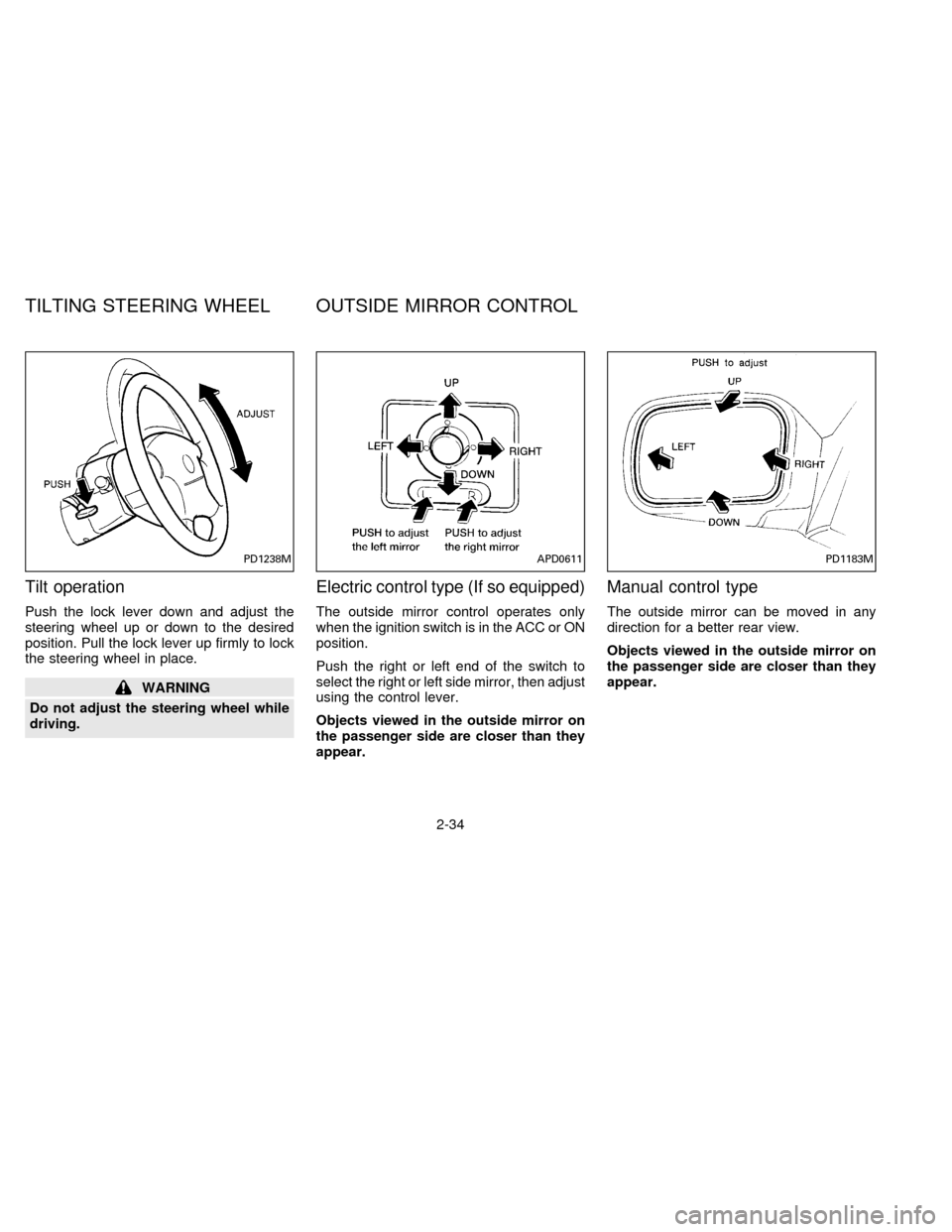
Tilt operation
Push the lock lever down and adjust the
steering wheel up or down to the desired
position. Pull the lock lever up firmly to lock
the steering wheel in place.
WARNING
Do not adjust the steering wheel while
driving.
Electric control type (If so equipped)
The outside mirror control operates only
when the ignition switch is in the ACC or ON
position.
Push the right or left end of the switch to
select the right or left side mirror, then adjust
using the control lever.
Objects viewed in the outside mirror on
the passenger side are closer than they
appear.
Manual control type
The outside mirror can be moved in any
direction for a better rear view.
Objects viewed in the outside mirror on
the passenger side are closer than they
appear.
PD1238MAPD0611PD1183M
TILTING STEERING WHEEL OUTSIDE MIRROR CONTROL
2-34
ZX
Page 64 of 191

CONTROLS
Fan control dial
This dial turns the fan on and off, and
controls fan speed.
Air flow control dial
This dial allows you to select the air flow
outlets.
Ð Air flows from center and side
ventilators.
Ð Air flows from center and side
ventilators and foot outlets.
Ð Air flows mainly from foot outlets.
Ð Air flows from defroster outlets
and foot outlets.
Ð Air flows mainly from defroster
outlets.
Temperature control dial
This dial allows you to adjust the tempera-
ture of the outlet air.
Air recirculation button
(If so equipped)
NOTE:
The air recirculation feature is available
only on those vehicles equipped with air
conditioning.
OFF position (Indicator light OFF):
Outside air is drawn into the passenger
compartment and distributed through the
selected outlets.
Use this position for normal heater or air
conditioner operation.
ON position (Indicator light ON):
Interior air is recirculated inside the vehicle.
Depress the air recirculation button to acti-
vate the recirculation function when driving
on a dusty road or to avoid traffic fumes.
The air recirculation function is also used to
improve A/C performance during extremely
hot or humid conditions.
AHA0604
HEATER AND AIR
CONDITIONER
3-3
ZX
Page 65 of 191
WARNING
Do not use the recirculation mode (if so
equipped) for long periods of time. It
may cause the interior air to become
stale and the windows to fog up.
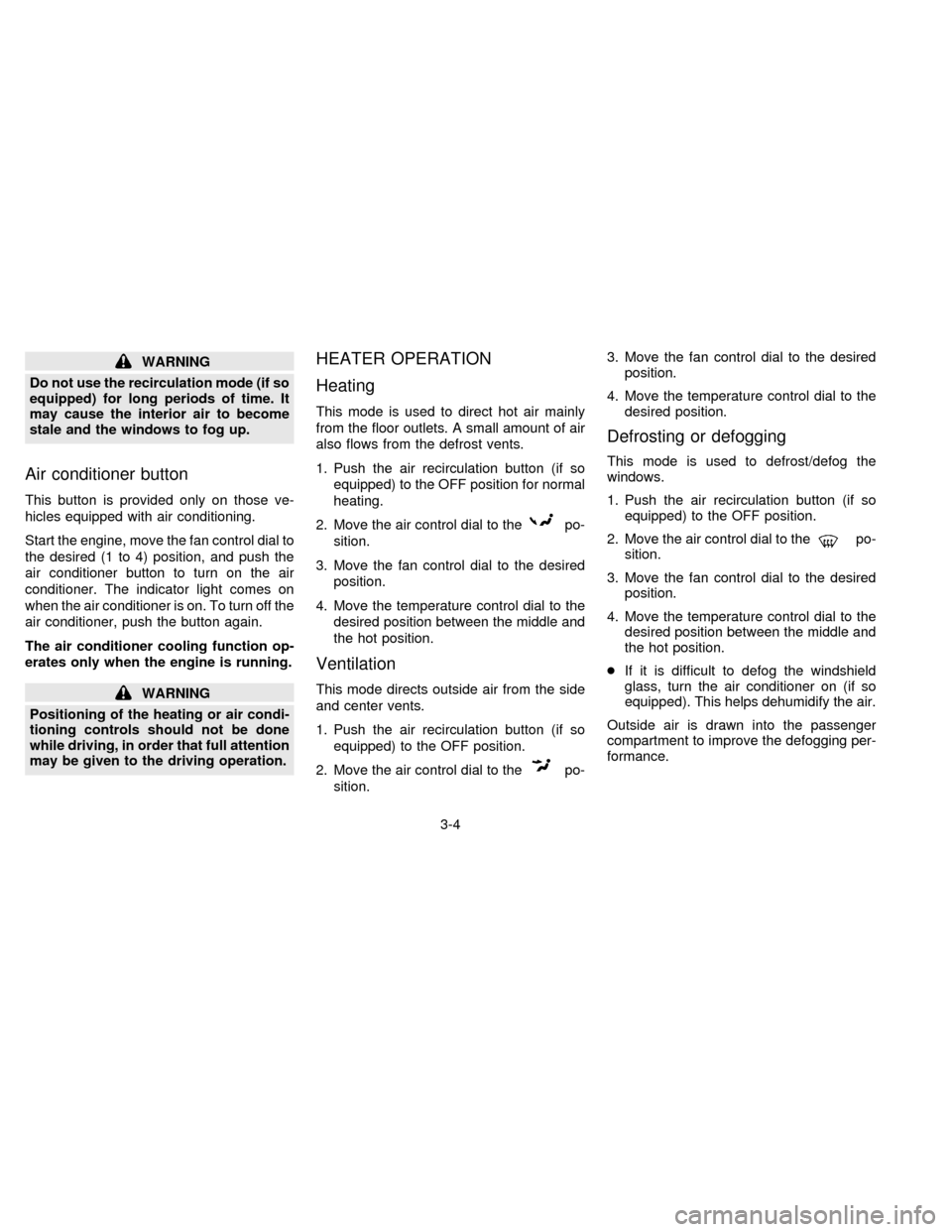
Air conditioner button
This button is provided only on those ve-
hicles equipped with air conditioning.
Start the engine, move the fan control dial to
the desired (1 to 4) position, and push the
air conditioner button to turn on the air
conditioner. The indicator light comes on
when the air conditioner is on. To turn off the
air conditioner, push the button again.
The air conditioner cooling function op-
erates only when the engine is running.
WARNING
Positioning of the heating or air condi-
tioning controls should not be done
while driving, in order that full attention
may be given to the driving operation.
HEATER OPERATION
Heating
This mode is used to direct hot air mainly
from the floor outlets. A small amount of air
also flows from the defrost vents.
1. Push the air recirculation button (if so
equipped) to the OFF position for normal
heating.
2. Move the air control dial to the
po-
sition.
3. Move the fan control dial to the desired
position.
4. Move the temperature control dial to the
desired position between the middle and
the hot position.
Ventilation
This mode directs outside air from the side
and center vents.
1. Push the air recirculation button (if so
equipped) to the OFF position.
2. Move the air control dial to the
po-
sition.3. Move the fan control dial to the desired
position.
4. Move the temperature control dial to the
desired position.
Defrosting or defogging
This mode is used to defrost/defog the
windows.
1. Push the air recirculation button (if so
equipped) to the OFF position.
2. Move the air control dial to the
po-
sition.
3. Move the fan control dial to the desired
position.
4. Move the temperature control dial to the
desired position between the middle and
the hot position.
cIf it is difficult to defog the windshield
glass, turn the air conditioner on (if so
equipped). This helps dehumidify the air.
Outside air is drawn into the passenger
compartment to improve the defogging per-
formance.
3-4
ZX
Page 66 of 191

Bi-level heating
This mode directs cooler air from the side
and center vents and warmer air from the
floor outlets. When the temperature control
dial is moved to the full hot or full cool
position, the air between the vents and the
floor outlets is the same temperature.
1. Push the air recirculation button (if so
equipped) to the OFF position.
2. Move the air control dial to the
po-
sition.
3. Move the fan control dial to the desired
position.
4. Move the temperature control dial to the
the desired position.
Heating and defogging
This mode heats the interior and defogs the
windshield.
1. Push the air recirculation button (if so
equipped) to the OFF position.
2. Move the air control dial to the
po-
sition.
3. Move the fan control dial to the desired
position.4. Move the temperature control dial to the
desired position between the middle and
the hot position.
Operating tips
cClear snow and ice from the wiper
blades and air inlet in front of the
windshield. This improves heater op-
eration.
AIR CONDITIONER OPERATION
(If so equipped)
Start the engine, move the fan control dial to
the desired (1 to 4) position, and push in the
air conditioner button to activate the air
conditioner. When the air conditioner is on,
cooling and dehumidifying functions are
added to the heater operation.
The air conditioner cooling function op-
erates only when the engine is running.
Cooling
This mode is used to cool and dehumidify.
1. Push the air recirculation button to the
OFF position.
2. Move the air control dial to
posi-
tion.3. Move the fan control dial to the desired
position.
4. Push on the air conditioner button. The
indicator light comes on.
5. Move the temperature control dial to the
desired position.
cFor quick cooling when the outside tem-
perature is high, push the air recirculation
button (if so equipped) to the ON posi-
tion. Be sure to return the air recirculation
button to the OFF position for normal
cooling.
Dehumidified heating
This mode is used to heat and dehumidify
the air.
1. Push the air recirculation button to the
OFF position.
2. Move the air control dial to the
po-
sition.
3. Move the fan control dial to the desired
position.
4. Push on the air conditioner button. The
indicator light comes on.
3-5
ZX
Page 67 of 191

5. Move the temperature control dial to the
desired position.
Dehumidified defogging
This mode is used to defog the windows
and dehumidify.
1. Push the air recirculation button to the
OFF position.
2. Move the air control dial to the
po-
sition.
3. Move the fan control dial to the desired
position.
4. Push on the air conditioner button. The
indicator light comes on.
5. Move the temperature control dial to the
desired position.
Operating tips
cKeep windows and sun roof closed while
the air conditioner is in operation.
cAfter parking in the sun, drive for two or
three minutes with the windows open to
vent hot air from the passenger compart-
ment. Then, close the windows. This
allows the air conditioner to cool the
interior more quickly.cThe air conditioning system should be
operated for about ten minutes at
least once a month. This helps pre-
vent damage to the system due to lack
of lubrication.
cIf the engine coolant temperature
gauge indicates engine coolant tem-
perature over the normal range, turn
the air conditioner off. See ``If your
vehicle overheats'' in the ``In case of
emergency'' section for additional in-
formation.
AIR FLOW CHARTS
The following charts show the button and
dial positions forMAXIMUM AND QUICK
heating, cooling or defrosting.The air recir-
culation switch should always be in the
OFF position for heating and defrosting.
3-6
ZX
Page 71 of 191

To turn the radio on, turn the ignition key to
ACC or ON. If you listen to the radio with the
engine not running, turn the key to the ACC
position.
Radio reception is affected by station signal
strength, distance from radio transmitter,
buildings, bridges, mountains and other ex-
ternal influences. Intermittent changes in
reception quality normally are caused by
these external influences.
CLOCK-RADIO (If so equipped)
On vehicles equipped with an AM-FM radio
and cassette player, a clock is integrated
into the audio system. For further details,
refer to Clock Operation later in this section.
AHA0603
RADIO
3-10
ZX
Page 72 of 191
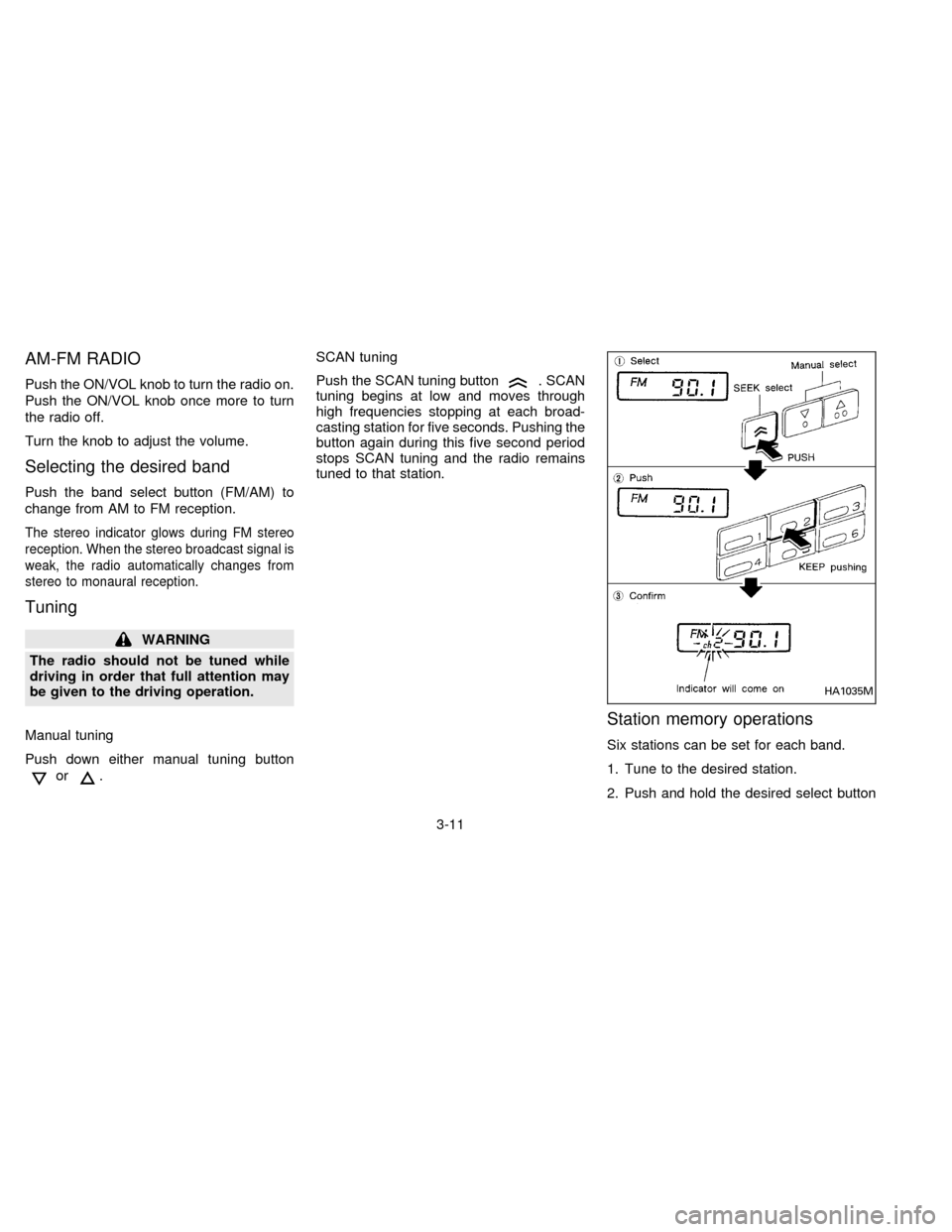
AM-FM RADIO
Push the ON/VOL knob to turn the radio on.
Push the ON/VOL knob once more to turn
the radio off.
Turn the knob to adjust the volume.
Selecting the desired band
Push the band select button (FM/AM) to
change from AM to FM reception.
The stereo indicator glows during FM stereo
reception. When the stereo broadcast signal is
weak, the radio automatically changes from
stereo to monaural reception.
Tuning
WARNING
The radio should not be tuned while
driving in order that full attention may
be given to the driving operation.
Manual tuning
Push down either manual tuning button
or.SCAN tuning
Push the SCAN tuning button
. SCAN
tuning begins at low and moves through
high frequencies stopping at each broad-
casting station for five seconds. Pushing the
button again during this five second period
stops SCAN tuning and the radio remains
tuned to that station.
Station memory operations
Six stations can be set for each band.
1. Tune to the desired station.
2. Push and hold the desired select button
HA1035M
3-11
ZX
Page 74 of 191

AM-FM RADIO WITH CASSETTE
PLAYER
Radio operation
Push the ON-OFF/VOL knob to turn the
radio on. Push the ON-OFF/VOL knob once
more to turn the radio off.
Turn the knob to adjust the volume.
Inserting a cassette tape into the cassette
player while the radio is on turns the radio
off and turns the cassette player on.
Pushing the ON-OFF/VOL knob while the
cassette tape is playing turns the cassette
player off.
Clock Operation
By pressing the CLOCK button, you can
alternate the clock and the radio/cassette
tape options in the display.
Clock Set (Adjustment)
Depressing the CLOCK and thebut-
tons together sets hours. Depressing the
CLOCK and
buttons together sets min-
utes.
AHA0606
3-13
ZX