key NISSAN SENTRA 2000 B15 / 5.G User Guide
[x] Cancel search | Manufacturer: NISSAN, Model Year: 2000, Model line: SENTRA, Model: NISSAN SENTRA 2000 B15 / 5.GPages: 240, PDF Size: 1.94 MB
Page 54 of 240

CHIMES
Key reminder chime
A chime sounds if the driver's side door is
opened while the key is left in the ignition
switch. Remove the key and take it with you
when leaving the vehicle.
Light reminder chime
With the ignition switch in the OFF position,
a chime sounds when the driver's side door
is opened if the headlights or parking lights
are on.
Turn the headlight control switch off before
leaving the vehicle.
Brake pad wear warning
The disc brake pads have an audible wear
warning. When a brake pad requires re-
placement, it makes a high pitched scraping
sound when the vehicle is in motion,
whether or not the brake pedal is de-
pressed. Have the brakes checked as soon
as possible if the warning sound is heard.Your vehicle has two types of security sys-
tems:
cNissan Vehicle Immobilizer System±
NVIS (if so equipped)
cTheft warning (if so equipped)
NISSAN VEHICLE IMMOBILIZER
SYSTEM (NVIS) (if so equipped)
The Nissan Vehicle Immobilizer System
(NVIS) will not allow the engine to start
without the use of a registered NVIS key.
If the engine fails to start using a registered
NVIS key (for example, when interference iscaused by another NVIS key, an automated
toll road device or automated payment de-
vice on the key ring), restart the engine
using the following procedures:
1. Leave the ignition switch in the ON posi-
tion for approximately 5 seconds.
2. Turn the ignition switch to the OFF or
LOCK position, and wait approximately 5
seconds.
3. Repeat step 1 and 2.
4. Restart the engine while holding the de-
vice (which may have caused the inter-
ference) separate from the registered
NVIS key.
If the no start condition re-occurs, Nissan
recommends placing the registered NVIS
key on a separate key ring to avoid interfer-
ence from other devices.
Statement related to section 15 of FCC
rules for Nissan Vehicle Immobilizer
System (CONT ASSY - IMMOBILIZER,
ANT ASSY - IMMOBILIZER)
This device complies with part 15 of the
FCC Rules and RSS-210 of Industry
Canada. Operation is subject to the fol-
lowing two conditions;
IC0005
SECURITY SYSTEMS
Instruments and controls2-11
ZX
Page 55 of 240

(1) This device may not cause harmful
interference, and (2) this device must
accept any interference received, includ-
ing interference that may cause undes-
ired operation of the device.
CHANGES OR MODIFICATIONS NOT EX-
PRESSLY APPROVED BY THE MANU-
FACTURER FOR COMPLIANCE COULD
VOID THE USER'S AUTHORITY TO OP-
ERATE THE EQUIPMENT.
Security indicator light (Nissan Ve-
hicle Immobilizer System)
The security indicator light is located on the
instrument panel near the windshield.
The security indicator light blinks every 3
seconds whenever the ignition switch is in
the LOCK, OFF or ACC position. This func-
tion indicates the Nissan Vehicle Immobi-
lizer System (NVIS) is operational.
If the NVIS is malfunctioning, the light will
remain on while the ignition key is in the ON
position.If the light still remains on and/or the
engine will not start, see your Nissan
dealer for NVIS service as soon as pos-
sible. Please bring all NVIS keys that you
have when visiting your authorized NIS-
SAN dealer for service.
THEFT WARNING (if so equipped)
The theft warning system provides visual
and audio alarm signals if parts of the
vehicle are disturbed.
LIC0047
2-12Instruments and controls
ZX
Page 56 of 240

Security indicator light (Theft warn-
ing)
The security indicator light is located on the
instrument panel near the windshield.
The security indicator light shows the status
of the theft warning system.
The light operates whenever the ignition
switch is in the LOCK, OFF, or ACC posi-
tion.
The theft warning system has four phases.
For each phase the operation of the security
indicator light is different.
How to arm the theft warning sys-
tem
1. Close all windows.(The system can be
armed even if the windows are open).
2. Remove the key from the ignition switch.
3. Close the hood, trunk lid and all doors.
Lock all doors. The doors can be locked
with the key or with the multi-remote
controller.
Multi-remote controller operation:
cPush the LOCK button on the multi-
remote controller. All doors lock. The
hazard lights flash twice and the horn
beeps once to indicate all doors are
locked.
cWhen the LOCK button is pushed with
all doors locked, the hazard lights
flash twice and the horn beeps once
as a reminder that the doors are al-
ready locked.
The horn may or may not beep once.
Refer to ``Silencing the horn beep fea-
ture'' later in this section.
4.
Confirm that the SECURITY indicator light
comes on. The SECURITY light stays on
for about 30 seconds. The theft warning
LIC0047
LIC0053
Instruments and controls2-13
ZX
Page 57 of 240

system is now pre-armed. After about 30
seconds the theft warning system auto-
matically shifts into the armed phase. The
SECURITY light begins to flash once ev-
ery three seconds. If, during the 30-
second pre-arm time period, the door is
unlocked by the key or the multi-remote
controller, or the ignition key is turned to
ACC or ON, the system will not arm.
cIf the key is turned slowly when lock-
ing the door, the system may not arm.
Furthermore, if the key is turned ex-
cessively to the unlock position, the
system may be disarmed when the key
is removed. If the indicator light fails to
glow for 30 seconds, unlock the door
once and lock it again.
cEven when the driver and/or passen-
gers are in the vehicle, the system will
arm with all doors, hood and trunk lid
closed and locked with the ignition
key in the OFF position.
Theft warning system activation
The theft warning system will give the fol-
lowing alarm:
cThe headlights blink and the horn sounds
intermittently.cThe alarm automatically turns off after
about 50 seconds. However, the alarm
reactivates if the vehicle is tampered with
again. The alarm can be shut off by
unlocking a door or trunk lid with the key,
or by pressing the UNLOCK button on
the multi-remote controller.
The alarm is activated by:
copening the door or trunk lid without
using the key or multi-remote controller
(even if the door is unlocked by releasing
the door inside lock switch) or opening
the trunk lid by operating the opener
lever.
copening the hood.
How to stop an activated alarm
The alarm stops only by unlocking a door or
the trunk lid with the key, or by pressing
the UNLOCK button on the multi-remote
controller.
The alarm does not stop if the ignition
switch is turned to ACC or ON.
Silencing the horn beep feature
If desired, the horn beep feature can be
deactivated using the multi-remote control-
ler. The instructions are on the back of the
multi-remote controller.
WIC0036
2-14Instruments and controls
ZX
Page 68 of 240
POWER WINDOWS
(if so equipped)
WARNING
cMake sure that all passengers have
their hands, etc. inside the vehicle
before closing the windows. Use the
window lock switch to prevent unex-
pected use of the power windows.
cDo not leave children unattended in-
side the vehicle. They could un-
knowingly activate switches or con-
trols and become trapped in a
window. Unattended children could
become involved in serious acci-
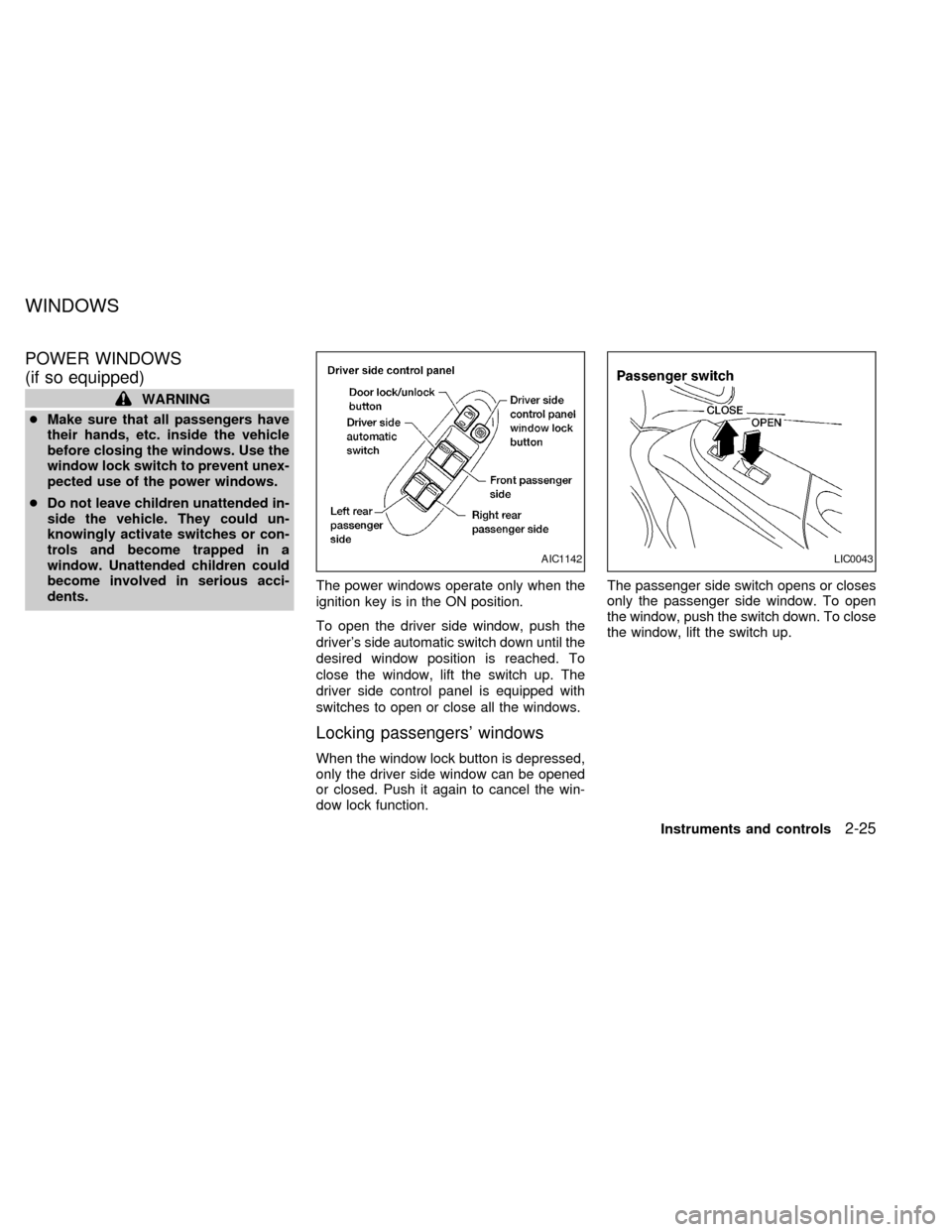
dents.The power windows operate only when the
ignition key is in the ON position.
To open the driver side window, push the
driver's side automatic switch down until the
desired window position is reached. To
close the window, lift the switch up. The
driver side control panel is equipped with
switches to open or close all the windows.
Locking passengers' windows
When the window lock button is depressed,
only the driver side window can be opened
or closed. Push it again to cancel the win-
dow lock function.The passenger side switch opens or closes
only the passenger side window. To open
the window, push the switch down. To close
the window, lift the switch up.
AIC1142LIC0043
WINDOWS
Instruments and controls2-25
ZX
Page 70 of 240
The sunroof only operates with the ignition
key in the ON position.
NOTE:
If the battery is discharged or is discon-
nected, the sunroof may not operate cor-
rectly, and must be reset.
From any sunroof position (full open, par-
tially open, closed, partially vented and
vented), push and hold the button in the
forward position until the sunroof vents in
the full-up position. This resets the sunroof
motor memory and now the sunroof will
operate correctly.
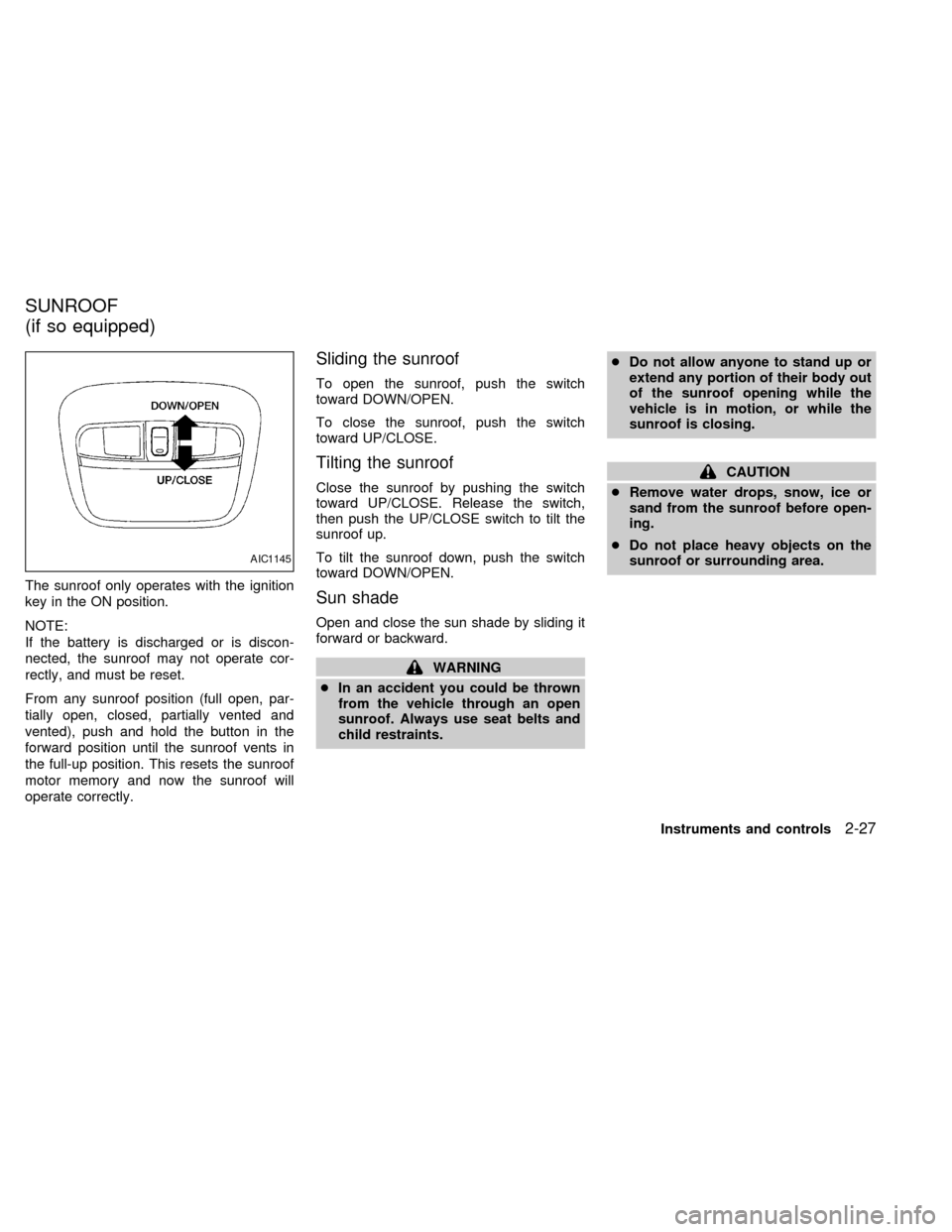
Sliding the sunroof
To open the sunroof, push the switch
toward DOWN/OPEN.
To close the sunroof, push the switch
toward UP/CLOSE.
Tilting the sunroof
Close the sunroof by pushing the switch
toward UP/CLOSE. Release the switch,
then push the UP/CLOSE switch to tilt the
sunroof up.
To tilt the sunroof down, push the switch
toward DOWN/OPEN.
Sun shade
Open and close the sun shade by sliding it
forward or backward.
WARNING
cIn an accident you could be thrown
from the vehicle through an open
sunroof. Always use seat belts and
child restraints.cDo not allow anyone to stand up or
extend any portion of their body out
of the sunroof opening while the
vehicle is in motion, or while the
sunroof is closing.
CAUTION
cRemove water drops, snow, ice or
sand from the sunroof before open-
ing.
cDo not place heavy objects on the
sunroof or surrounding area.
AIC1145
SUNROOF
(if so equipped)
Instruments and controls2-27
ZX
Page 71 of 240
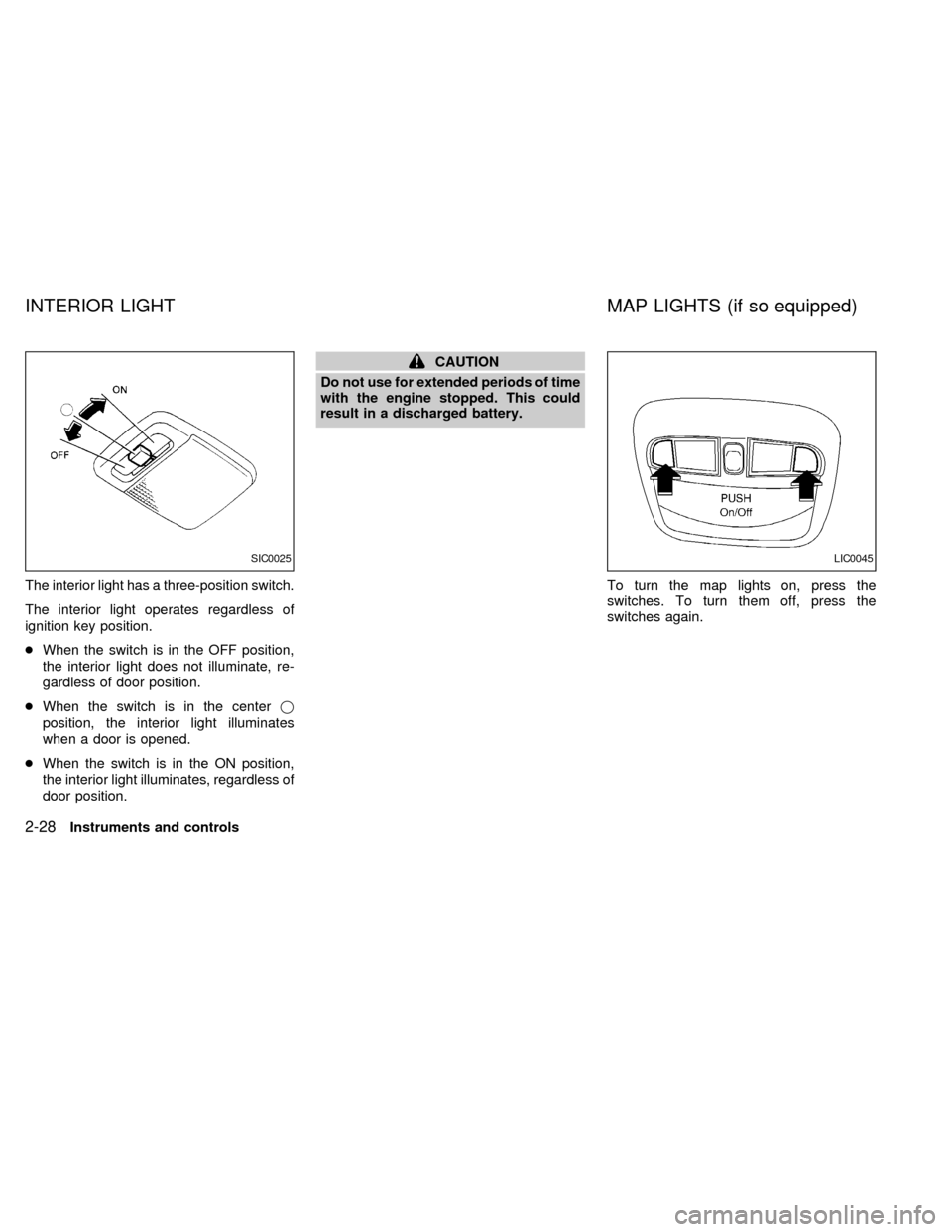
The interior light has a three-position switch.
The interior light operates regardless of
ignition key position.
cWhen the switch is in the OFF position,
the interior light does not illuminate, re-
gardless of door position.
cWhen the switch is in the centerj
position, the interior light illuminates
when a door is opened.
cWhen the switch is in the ON position,
the interior light illuminates, regardless of
door position.
CAUTION
Do not use for extended periods of time
with the engine stopped. This could
result in a discharged battery.
To turn the map lights on, press the
switches. To turn them off, press the
switches again.
SIC0025LIC0045
INTERIOR LIGHT MAP LIGHTS (if so equipped)
2-28Instruments and controls
ZX
Page 74 of 240

3 Pre-driving checks and adjustments
Keys .......................................................................3-2
Nissan vehicle immobilizer system (NVIS)
keys (if so equipped) ..............................................3-2
Doors ......................................................................3-3
Locking with key .....................................................3-3
Locking with inside lock knob ................................3-4
Locking with power door lock (if so equipped) ......3-4
Child safety rear door lock .....................................3-4
Multi-remote control system (if so equipped).........3-5
How to use multi-remote control system ...............3-5
Battery replacement ...............................................3-8
Hood .......................................................................3-9
Trunk lid................................................................3-10Opener operation .................................................3-10
Key operation .......................................................3-11
Fuel filler lid ..........................................................3-12
Opener operation .................................................3-12
Fuel filler cap ........................................................3-12
Steering wheel .....................................................3-13
Tilt operation.........................................................3-13
Sun visors ...........................................................3-14
Vanity mirror .........................................................3-14
Mirrors ..................................................................3-14
Inside mirror .........................................................3-14
Outside mirror remote control ..............................3-15
ZX
Page 75 of 240

A key number plate is supplied with your
keys. Record the key number and keep it in
a safe place (such as your wallet), not in the
vehicle. If you lose your keys, see an autho-
rized NISSAN dealer for duplicates by using
the key number. NISSAN does not record
key numbers so it is very important to keep
track of your key number plate.
A key number is only necessary when you
have lost all keys and do not have one to
duplicate from. If you still have a key, your
authorized NISSAN dealer can duplicate it.
Nissan Vehicle Immobilizer Sys-
tem (NVIS) keys (if so equipped)
You can only start your vehicle using the
keys that are supplied by your NISSAN
dealer. Each key has a transponder chip in
the key head that is electronically registered
to your vehicle's NVIS. These keys can be
used for all of the key locks on your vehicle.
Never leave these keys in the vehicle.
New or duplicate keys can only be ob-
tained from your NISSAN dealer and
must be registered to the Nissan Vehicle
Immobilizer System (NVIS) components
in your vehicle by an authorized NISSAN
dealer.As many as 5 NVIS keys can be used with
one vehicle. At this time, you should bring
all NVIS keys that you have to your autho-
rized NISSAN dealer for registration. This is
because the registration process will erase
the memory of all key codes previously
registered into the Nissan Vehicle Immobi-
lizer System. After the registration process,
these components will only recognize keys
coded into the Nissan Vehicle Immobilizer
System (NVIS) during registration. Any key
that is not given to your dealer at the time of
registration will no longer be able to start
your vehicle.
WPD0034
KEYS
3-2Pre-driving checks and adjustments
ZX
Page 76 of 240
WARNING
cAlways have the doors locked while
driving. Along with the use of seat
belts, this provides greater safety in
the event of an accident by helping
to prevent persons from being
thrown from the vehicle. This also
helps keep children and others from
unintentionally opening the doors,
and will help keep out intruders.
cBefore opening any door, always
look for and avoid oncoming traffic.
c
Do not leave children unattended in-
side the vehicle. They could unknow-
ingly activate switches and controls.
Unattended children could become
involved in serious accidents.
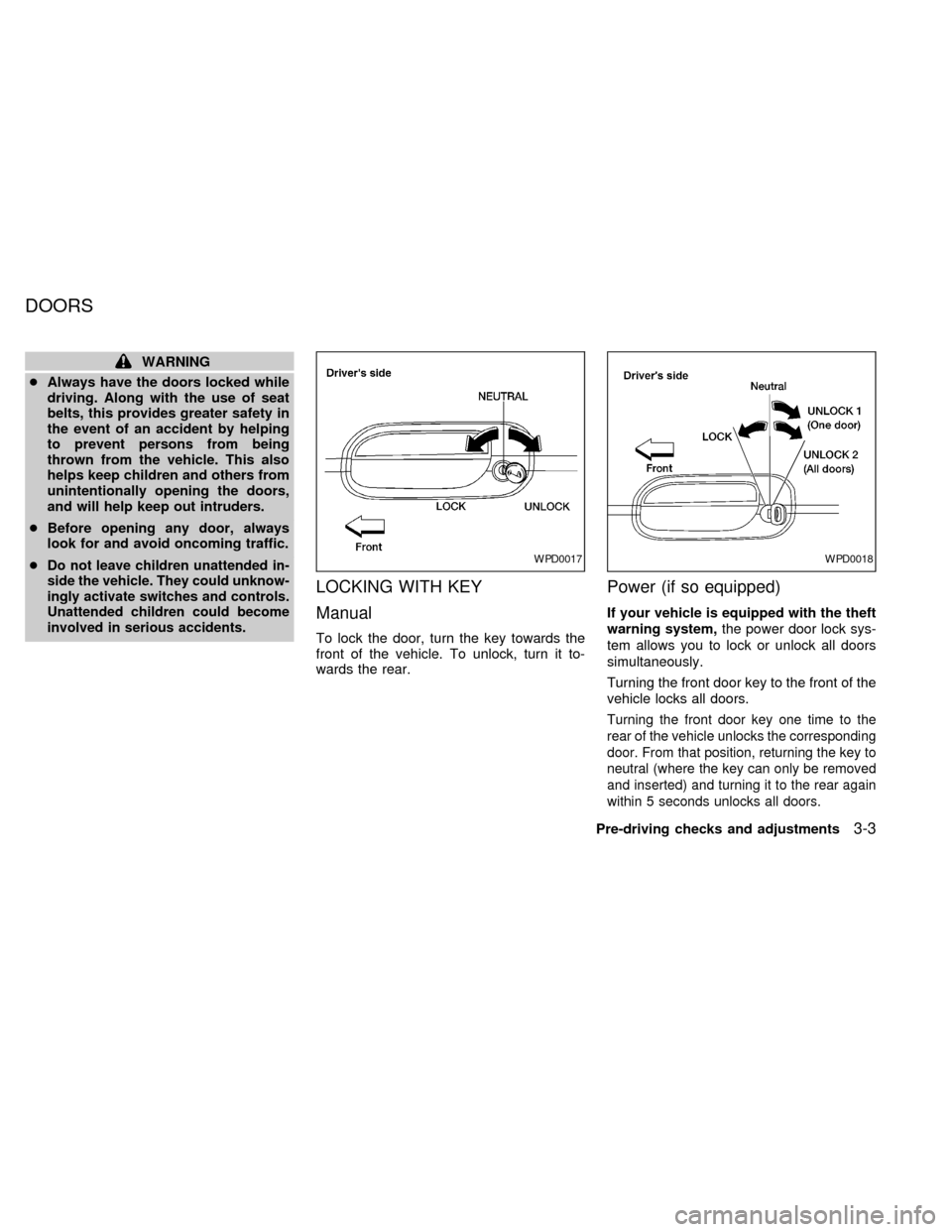
LOCKING WITH KEY
Manual
To lock the door, turn the key towards the
front of the vehicle. To unlock, turn it to-
wards the rear.
Power (if so equipped)
If your vehicle is equipped with the theft
warning system,the power door lock sys-
tem allows you to lock or unlock all doors
simultaneously.
Turning the front door key to the front of the
vehicle locks all doors.
Turning the front door key one time to the
rear of the vehicle unlocks the corresponding
door. From that position, returning the key to
neutral (where the key can only be removed
and inserted) and turning it to the rear again
within 5 seconds unlocks all doors.
WPD0017WPD0018
DOORS
Pre-driving checks and adjustments3-3
ZX