clock NISSAN SENTRA 2008 B16 / 6.G User Guide
[x] Cancel search | Manufacturer: NISSAN, Model Year: 2008, Model line: SENTRA, Model: NISSAN SENTRA 2008 B16 / 6.GPages: 328, PDF Size: 4.36 MB
Page 167 of 328

9. POWER/VOLUME control knob
10.
SCAN button
11. Station select (1 - 6) buttons
12. SEEK (CHANNEL) button
13. RADIO* button
14. CD/AUX button
15. PRESET A·B·C button
*No satellite radio reception is available
when the RADIO button is pressed to
access satellite radio stations unless
optional satellite receiver and antenna
are installed and an XMTsatellite radio
service subscription is active. Satellite
radio is not available in Alaska, Hawaii
and Guam.
FM/AM/SAT RADIO WITH
COMPACT DISC (CD) PLAYER (if so
equipped)
For all operation precautions, see9Audio opera-
tion precautions9earlier in this section.
No satellite radio reception is available when the
RADIO button is pressed to access satellite radio
stations unless optional satellite receiver and an-
tenna are installed and an XMTsatellite radio
service subscription is active. Satellite radio is
not available in Alaska, Hawaii and Guam.
Audio main operation
POWER/VOLUME control:
Turn the ignition key to ACC or ON, and then
push the POWER/VOLUME control knob while
the system is off to call up the mode (radio or CD)
which was playing immediately before the system
was turned off.
To turn the system off, press the
POWER/VOLUME control knob.
Turn the POWER/VOLUME control knob to ad-
just the volume.
This vehicle may be equipped with Speed Sen-
sitive Volume (SSV) for audio. The audio volume
changes as the driving speed changes.
AUDIO button (Bass, Mid, Treble,
Fade, Balance, SSV, Beep and
Language):
Press the
AUDIO button to change the
mode as follows:
Bass!Mid!Treble!Fade!Balance!
Speed Sense Volume (if so equipped)!Beep
ON/OFF!Language!Audio!Bass
To adjust Bass, Treble, Fade and Balance, press
the
AUDIO button until the desired mode
appears in the display. Press the TUNE button to
adjust Bass and Treble to the desired level. Youcan also use the TUNE button to adjust Fader
and Balance modes. Fader adjusts the sound
level between the front and rear speakers and
Balance adjusts the sound between the right and
left speakers.
To change the SSV mode to OFF, LEVEL1 to
LEVEL5 press the TUNE button left or right.
To change the Beep to ON or OFF, press the
TUNE button left or right. This will enable or
disable the beep sound heard during menu se-
lection.
To change the Language to “English”, “Français”
or “Español”, press the TUNE button left or right.
Once you have adjusted the sound quality to the
desired level, press the
AUDIO button re-
peatedly until the radio or CD display reappears.
Otherwise, the radio or CD display will automati-
cally reappear after about 5 seconds.
CLOCK DISP (display) button:
Pressing the CLOCK DISP (display) button will
show text information about CD or SAT (satellite,
if so equipped) in the audio display.
CD display mode
To change the text displayed while playing a CD
with text, press the CLOCK DISP button. The
CLOCK DISP button will allow you to scroll
Display screen, heater, air conditioner, audio and phone systems4-25
ZREVIEW COPYÐ2008 Sentra(sen)
Owners ManualÐUSA_English(nna)
01/22/08Ðdebbie
X
Page 168 of 328

through CD text as follows: Track number and
Track timeÃ!Album titleÃ!Song title.
cTrack number displays the track number se-
lected on the disc.
cTrack time displays the amount of time the
track has played.
cAlbum title displays the title of the CD being
played.
cSong title displays the title of the selected
CD track.
Display satellite radio display mode (if so
equipped)
To change the text displayed when listening to
satellite radio (if so equipped) press the CLOCK
DISP button. The CLOCK DISP button will scroll
through the broadcast information as follows:
Channel numberÃ!Category nameÃ!
Channel nameÃ!Artist nameÃ!Song title.
cChannel number displays the channel num-
ber of the selected satellite radio station.
cCategory name displays the category name
of the selected satellite radio station.
cChannel name displays the channel name of
the selected satellite radio station.cArtist name displays the name of the artist,
host or weather condition of the selected
satellite radio station.
cSong title displays the song title, show
name, or temperature of the selected satel-
lite radio station.
Clock operation
For additional information on setting the clock,
see “Adjusting the time” earlier in this section.
pause/mute button:
To mute or pause the audio sound, press
the
pause/mute button.
Press the
button again to resume the au-
dio sound.
FM/AM/SAT radio operation
FM/AM/SAT band select:
Pressing the RADIO button will change the band
as follows:
AMÃ!FMÃ!SAT (satellite, if so equipped)
When the RADIO button is pressed while the
ignition switch is in the ACC or ON position, the
radio will come on at the station last played.
No satellite radio reception is available when the
RADIO button is pressed to access satellite radiostations unless optional satellite receiver and an-
tenna are installed and an XMTsatellite radio
service subscription is active. Satellite radio can
only be installed in vehicles that were factory
pre-wired for satellite radio. Satellite radio is not
available in Alaska, Hawaii and Guam. If satellite
radio is not operational then the RADIO button is
used to toggle between AM and FM bands.
If a compact disc is playing when the RADIO
button is pressed, the compact disc will auto-
matically be turned off and the last radio station
played will come on.
The FM stereo indicator ST will glow during FM
stereo reception. When the stereo broadcast
signal is weak, the radio will automatically change
from stereo to monaural reception.
TUNE (tuning) button:
To manually tune the radio, press the TUNE
button
or.
To move quickly through the channels, press and
hold either the
orbutton.
SEEK (tuning) button:
Press the SEEK button
orfor less
than 1.5 seconds to tune from high to low or low
to high frequencies and stop at the next broad-
casting station.
4-26Display screen, heater, air conditioner, audio and phone systems
ZREVIEW COPYÐ2008 Sentra(sen)
Owners ManualÐUSA_English(nna)
01/22/08Ðdebbie
X
Page 171 of 328
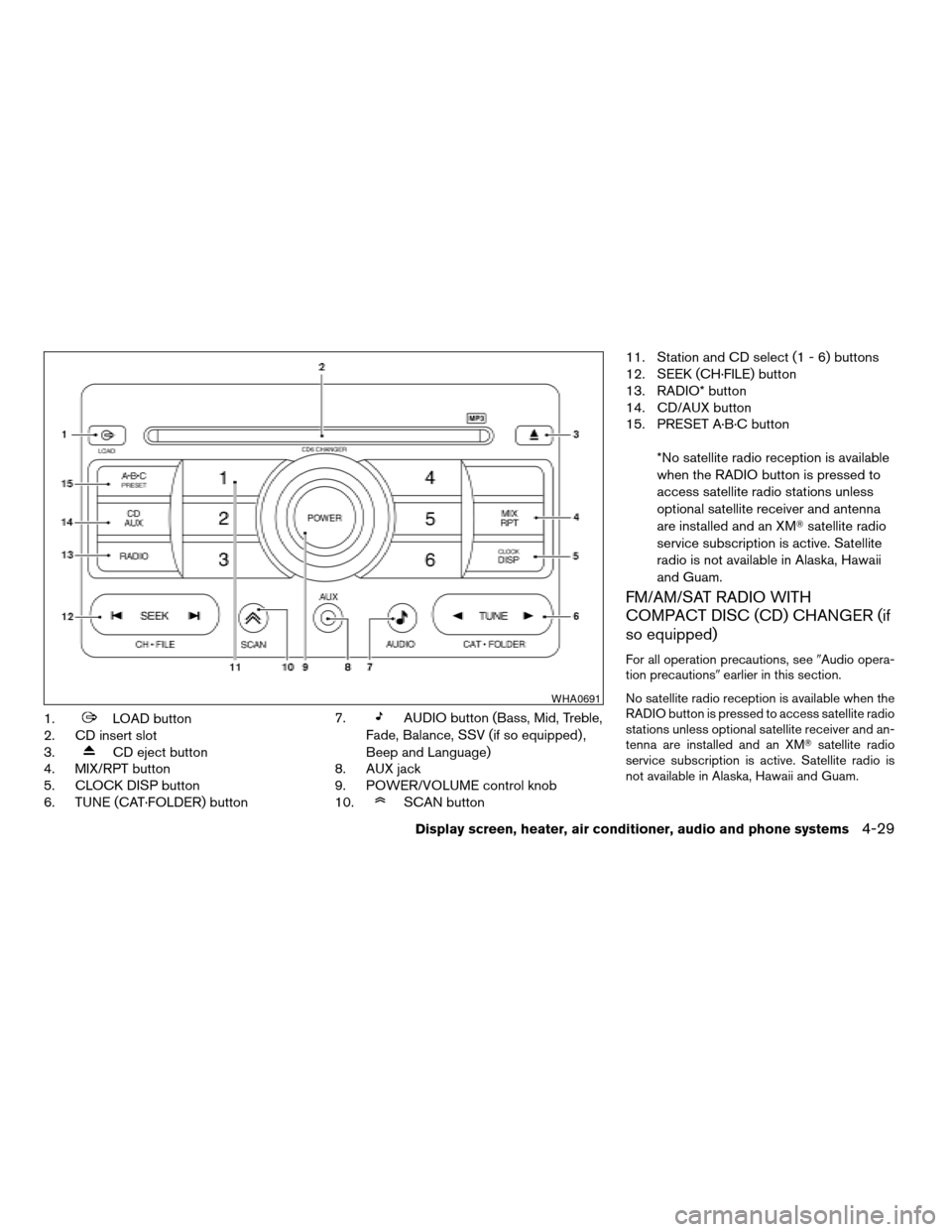
1.LOAD button
2. CD insert slot
3.
CD eject button
4. MIX/RPT button
5. CLOCK DISP button
6. TUNE (CAT·FOLDER) button7.
AUDIO button (Bass, Mid, Treble,
Fade, Balance, SSV (if so equipped) ,
Beep and Language)
8. AUX jack
9. POWER/VOLUME control knob
10.
SCAN button11. Station and CD select (1 - 6) buttons
12. SEEK (CH·FILE) button
13. RADIO* button
14. CD/AUX button
15. PRESET A·B·C button
*No satellite radio reception is available
when the RADIO button is pressed to
access satellite radio stations unless
optional satellite receiver and antenna
are installed and an XMTsatellite radio
service subscription is active. Satellite
radio is not available in Alaska, Hawaii
and Guam.
FM/AM/SAT RADIO WITH
COMPACT DISC (CD) CHANGER (if
so equipped)
For all operation precautions, see9Audio opera-
tion precautions9earlier in this section.
No satellite radio reception is available when the
RADIO button is pressed to access satellite radio
stations unless optional satellite receiver and an-
tenna are installed and an XMTsatellite radio
service subscription is active. Satellite radio is
not available in Alaska, Hawaii and Guam.
WHA0691
Display screen, heater, air conditioner, audio and phone systems4-29
ZREVIEW COPYÐ2008 Sentra(sen)
Owners ManualÐUSA_English(nna)
01/22/08Ðdebbie
X
Page 172 of 328

Audio main operation
POWER/VOLUME control:
Turn the ignition key to ACC or ON, and then
push the POWER/VOLUME control knob while
the system is off to call up the mode (radio or CD)
which was playing immediately before the system
was turned off.
To turn the system off, press the
POWER/VOLUME control knob.
Turn the POWER/VOLUME control knob to ad-
just the volume.
This vehicle may be equipped with Speed Sen-
sitive Volume (SSV) for audio. The audio volume
changes as the driving speed changes.
AUDIO button (Bass, Mid, Treble,
Fade, Balance, SSV, Beep and
Language):
Press the
AUDIO button to change the
mode as follows:
Bass!Mid!Treble!Fade!Balance!
Speed Sense Volume (if so equipped)!Beep
ON/OFF!Language!Audio!Bass
To adjust Bass, Treble, Fade and Balance, press
the
AUDIO button until the desired mode
appears in the display. Press the TUNE button to
adjust Bass and Treble to the desired level. Youcan also use the TUNE button to adjust Fader
and Balance modes. Fader adjusts the sound
level between the front and rear speakers and
Balance adjusts the sound between the right and
left speakers.
To change the SSV mode to OFF, LEVEL1 to
LEVEL5 press the TUNE button left or right.
To change the Beep to ON or OFF, press the
TUNE button left or right. This will enable or
disable the beep sound heard during menu se-
lection.
To change the Language to “English”, “Français”
or “Español”, press the TUNE button left or right.
Once you have adjusted the sound quality to the
desired level, press the
AUDIO button re-
peatedly until the radio or CD display reappears.
Otherwise, the radio or CD display will automati-
cally reappear after about 5 seconds.
CLOCK DISP (display) button:
Pressing the CLOCK DISP (display) button will
show text information about CD or MP3 and SAT
(satellite, if so equipped) in the audio display.
CD display mode
To change the text displayed while playing a CD
with text, press the CLOCK DISP button. The
CLOCK DISP button will allow you to scrollthrough CD text as follows: Track number and
Track timeÃ!Album titleÃ!Song title.
cTrack number displays the track number se-
lected on the disc.
cTrack time displays the amount of time the
track has played.
cAlbum title displays the title of the CD being
played.
cSong title displays the title of the selected
CD track.
MP3 display mode
To change the text displayed when listening to a
CD with MP3s and ID3 tags, press the CLOCK
DISP button. The CLOCK DISP button will scroll
through the CD text as follows: Disc number,
Track number and Folder numberÃ!Folder title
Ã!Album titleÃ!Artist nameÃ!Song title.
cDisc number displays the number of the
current disc playing.
cTrack number displays the number of the
track playing on the selected disc.
cFolder number displays the number of the
current folder on the MP3 CD.
cFolder title displays the title of the folder.
4-30Display screen, heater, air conditioner, audio and phone systems
ZREVIEW COPYÐ2008 Sentra(sen)
Owners ManualÐUSA_English(nna)
01/22/08Ðdebbie
X
Page 173 of 328

cAlbum title displays the title of the album of
the song playing.
cArtist name displays the name of the artist of
the song playing.
cSong title displays the title of the song play-
ing.
Display satellite radio display mode (if so
equipped)
To change the text displayed when listening to
satellite radio (if so equipped) press the CLOCK
DISP button. The CLOCK DISP button will scroll
through the broadcast information as follows:
Channel numberÃ!Category nameÃ!
Channel nameÃ!Artist nameÃ!Song title.
cChannel number displays the channel num-
ber of the selected satellite radio station.
cCategory name displays the category name
of the selected satellite radio station.
cChannel name displays the channel name of
the selected satellite radio station.
cArtist name displays the name of the artist,
host or weather condition of the selected
satellite radio station.
cSong title displays the song title, show
name, or temperature of the selected satel-
lite radio station.Clock operation
For additional information on setting the clock,
see “Adjusting the time” earlier in this section.
FM/AM/SAT radio operation
FM/AM/SAT band select:
Pressing the RADIO button will change the band
as follows:
AMÃ!FMÃ!SAT (satellite, if so equipped)
When the RADIO button is pressed while the
ignition switch is in the ACC or ON position, the
radio will come on at the station last played.
No satellite radio reception is available when the
RADIO button is pressed to access satellite radio
stations unless optional satellite receiver and an-
tenna are installed and an XMTsatellite radio
service subscription is active. Satellite radio can
only be installed in vehicles that were factory
pre-wired for satellite radio. Satellite radio is not
available in Alaska, Hawaii and Guam. If satellite
radio is not operational then the RADIO button is
used to toggle between AM and FM bands.
If a compact disc is playing when the RADIO
button is pressed, the compact disc will auto-
matically be turned off and the last radio station
played will come on.The FM stereo indicator ST will glow during FM
stereo reception. When the stereo broadcast
signal is weak, the radio will automatically change
from stereo to monaural reception.
TUNE (tuning) button:
To manually tune the radio, press the TUNE
button
or.
To move quickly through the channels, press and
hold either the
orbutton.
SEEK (tuning) button:
Press the SEEK button
orfor less
than 1.5 seconds to tune from high to low or low
to high frequencies and stop at the next broad-
casting station.
SCAN (tuning) button:
Press the
SCAN button to stop at each
broadcasting station for 5 seconds. Pressing the
button again during this 5 second period will stop
scan tuning and the radio will remain tuned to that
station. If the
SCAN button is not pressed
within 5 seconds, scan tuning moves to the next
station.
Display screen, heater, air conditioner, audio and phone systems4-31
ZREVIEW COPYÐ2008 Sentra(sen)
Owners ManualÐUSA_English(nna)
01/22/08Ðdebbie
X
Page 178 of 328
Next/Previous track (CD):
Push the tuning switch
orfor less
than 1.5 seconds to return to the beginning of the
present track or skip to the next track. Push
several times to skip back or skip through tracks.
Change disc (CD) (if so equipped):
Push the tuning switch
orfor more
than 1.5 seconds to change the playing disc up
or down.
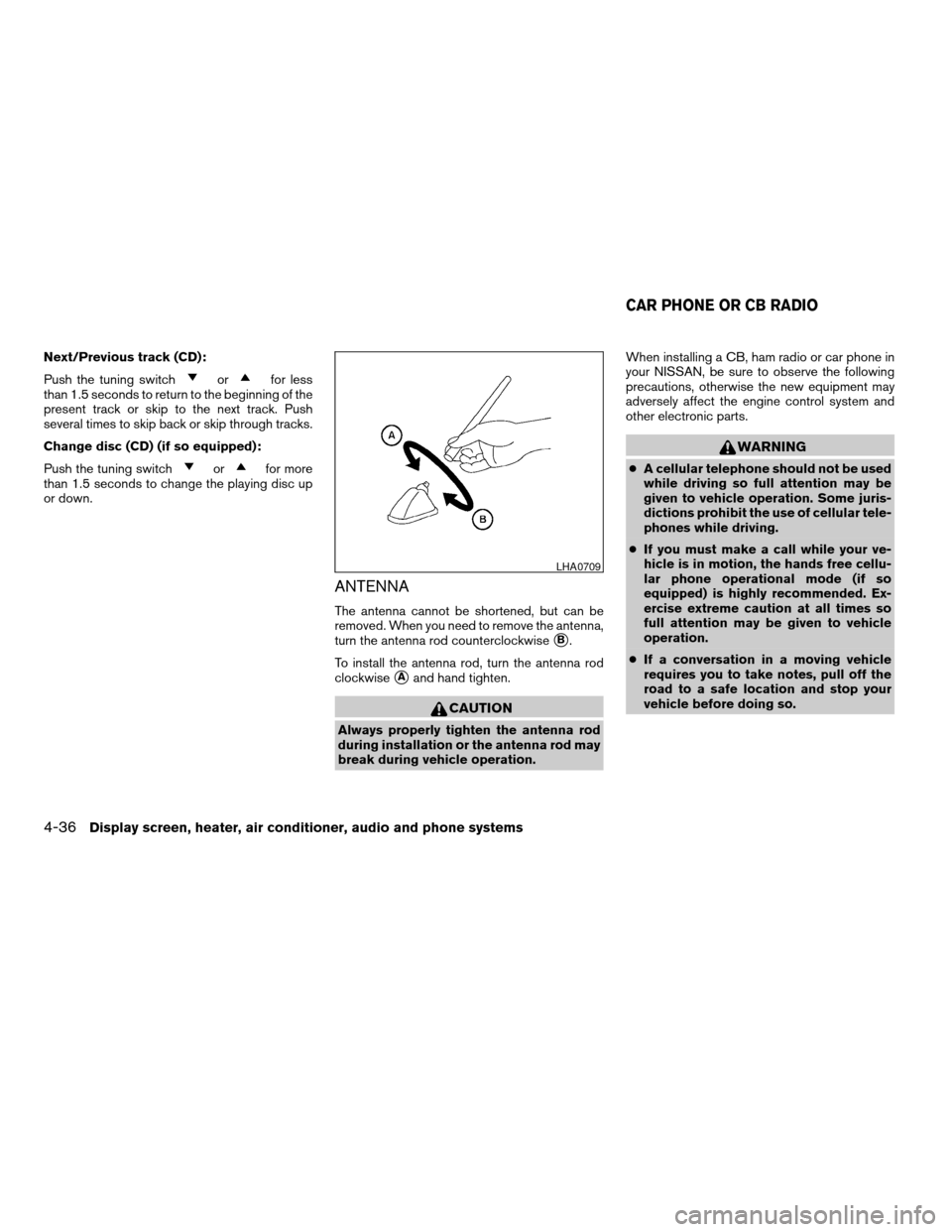
ANTENNA
The antenna cannot be shortened, but can be
removed. When you need to remove the antenna,
turn the antenna rod counterclockwise
sB.
To install the antenna rod, turn the antenna rod
clockwise
sAand hand tighten.
CAUTION
Always properly tighten the antenna rod
during installation or the antenna rod may
break during vehicle operation.When installing a CB, ham radio or car phone in
your NISSAN, be sure to observe the following
precautions, otherwise the new equipment may
adversely affect the engine control system and
other electronic parts.
WARNING
cA cellular telephone should not be used
while driving so full attention may be
given to vehicle operation. Some juris-
dictions prohibit the use of cellular tele-
phones while driving.
cIf you must make a call while your ve-
hicle is in motion, the hands free cellu-
lar phone operational mode (if so
equipped) is highly recommended. Ex-
ercise extreme caution at all times so
full attention may be given to vehicle
operation.
cIf a conversation in a moving vehicle
requires you to take notes, pull off the
road to a safe location and stop your
vehicle before doing so.
LHA0709
CAR PHONE OR CB RADIO
4-36Display screen, heater, air conditioner, audio and phone systems
ZREVIEW COPYÐ2008 Sentra(sen)
Owners ManualÐUSA_English(nna)
01/22/08Ðdebbie
X
Page 202 of 328

To lock the steering wheel:
1. Turn the ignition switch to the LOCK posi-
tion.
2. Remove the key, if it is inserted in the ignition
switch.
3. Turn the steering wheel 1/8 of a turn clock-
wise from the straight up position.
To unlock the steering wheel:
1. Insert the key into the ignition switch, if nec-
essary.
2. Gently turn the ignition switch while rotating
the steering wheel slightly right and left.
MANUAL TRANSMISSION
The ignition switch includes a device that helps
prevent accidental removal of the key while driv-
ing.
The key can only be removed when the ignition
switch is in the LOCK position.
On manual transmission models, to turn the igni-
tion key to LOCK position from ACC or ON
position, turn the key to OFF, push the key in, then
turn the key to LOCK.
In order for the steering wheel to be locked, it
must be turned about 1/8 of a turn clockwise
from the straight up position.To lock the steering wheel, turn the key to
the LOCK position. Remove the key. To
unlock the steering wheel, insert the key
and turn it gently while rotating the steer-
ing wheel slightly right and left.
KEY POSITIONS
LOCK: Normal parking position (0)
Intelligent Key system:
PUSH OFF- The steering lock can only be locked
at this position.
PUSH ON- The ignition switch will be unlocked
while carrying the Intelligent Key.
OFF: (Manual transmission model) (1)
The engine can be turned off without locking the
steering wheel.
ACC: (Accessories) (2)
This position activates electrical accessories
such as the radio when the engine is not running.
ON: Normal operating position (3)
This position turns on the ignition system and the
electrical accessories.
START: (4)
This position starts the engine. As soon as the
engine has started, release the key. It automati-
cally returns to the ON position.
WSD0052
5-8Starting and driving
ZREVIEW COPYÐ2008 Sentra(sen)
Owners ManualÐUSA_English(nna)
01/22/08Ðdebbie
X
Page 203 of 328

NISSAN VEHICLE IMMOBILIZER
SYSTEM
The NISSAN Vehicle Immobilizer System will not
allow the engine to start without the use of the
registered key.
If the engine fails to start using a registered key
(for example, when interference is caused by
another registered key, an automated toll road
device or automatic payment device on the key
ring) , restart the engine using the following pro-
cedures:
1. Leave the ignition switch in the ON position
for approximately 5 seconds.
2. Turn the ignition switch to the OFF or LOCK
position, and wait approximately 10 sec-
onds.
3. Repeat steps 1 and 2.
4. Restart the engine while holding the device
(which may have caused the interference)
separate from the registered key.
If the no start condition re-occurs, NISSAN rec-
ommends placing the registered key on a sepa-
rate key ring to avoid interference from other
devices.cMake sure the area around the vehicle is
clear.
cCheck fluid levels such as engine oil, cool-
ant, brake and clutch fluid, and window
washer fluid as frequently as possible, or at
least whenever you refuel.
cCheck that all windows and lights are clean.
cVisually inspect tires for their appearance
and condition. Also check tires for proper
inflation.
cLock all doors.
cPosition seat and adjust head restraints.
cAdjust inside and outside mirrors.
cFasten seat belts and ask all passengers to
do likewise.
cCheck the operation of warning lights when
the key is turned to the ON (3) position. See
“Warning/indicator lights and audible re-
minders” in the “Instruments and controls”
section of this manual.1. Apply the parking brake.
2.CVT model:
Move the shift selector lever to P (Park) or N
(Neutral) . P (Park) is recommended.
The shift selector lever cannot be
moved out of P (Park) and into any of
the other gear positions if the ignition
key is turned to the OFF position or if
the key is removed from the ignition
switch.
The starter is designed not to operate if
the shift selector lever is in any of the
driving positions.
Manual transmission model:
Move the shift lever to N (Neutral) . Depress
the clutch pedal to the floor while cranking
the engine.
The starter is designed not to operate
unless the clutch pedal is fully de-
pressed.
Intelligent Key system models:Slowly
“PUSH ON” the ignition switch. When the
Intelligent Key system warning light
in
the meter illuminates in green, the ignition
switch can be turned.
BEFORE STARTING THE ENGINE STARTING THE ENGINE
Starting and driving5-9
ZREVIEW COPYÐ2008 Sentra(sen)
Owners ManualÐUSA_English(nna)
01/22/08Ðdebbie
X
Page 224 of 328
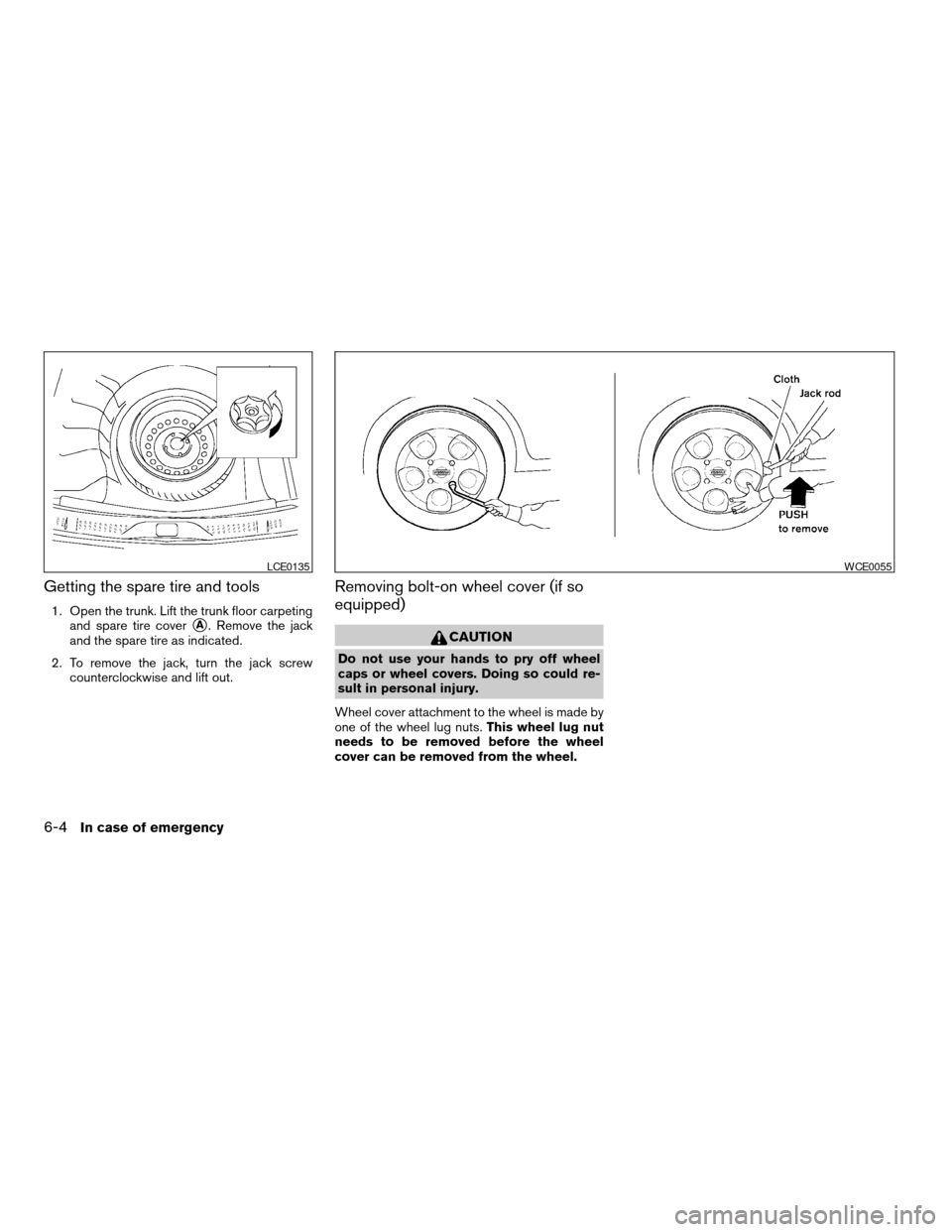
Getting the spare tire and tools
1. Open the trunk. Lift the trunk floor carpeting
and spare tire cover
sA. Remove the jack
and the spare tire as indicated.
2. To remove the jack, turn the jack screw
counterclockwise and lift out.
Removing bolt-on wheel cover (if so
equipped)
CAUTION
Do not use your hands to pry off wheel
caps or wheel covers. Doing so could re-
sult in personal injury.
Wheel cover attachment to the wheel is made by
one of the wheel lug nuts.This wheel lug nut
needs to be removed before the wheel
cover can be removed from the wheel.
LCE0135WCE0055
6-4In case of emergency
ZREVIEW COPYÐ2008 Sentra(sen)
Owners ManualÐUSA_English(nna)
01/22/08Ðdebbie
X
Page 226 of 328

Always refer to the proper illustrations for the
correct placement and jack-up points for your
specific vehicle model and jack type.
Carefully read the caution label attached to
the jack body and the following instruc-
tions.
1. Loosen each wheel nut one or two turns by
turning counterclockwise with the wheel nut
wrench.Do not remove the wheel nuts
until the tire is off the ground.2. Place the jack directly under the jack-up
point as illustrated so the top of the jack
contacts the vehicle at the jack-up point.
Align the jack head between the two
notches in the front or the rear as shown.
Also fit the groove of the jack head between
the notches as shown.
The jack should be used on firm and
level ground.
3. To lift the vehicle, securely hold the jack lever
and rod with both hands. Carefully raise the
vehicle until the tire clears the ground. Re-
move the wheel nuts, and then remove the
tire.Installing the spare tire
The spare tire is designed for emergency
use. See specific instructions under the
heading “Wheels and tires” in the “Mainte-
nance and do-it-yourself” section of this
manual.
1. Clean any mud or dirt from the surface be-
tween the wheel and hub.
2. Carefully put the spare tire on and tighten
the wheel nuts finger tight.
3. With the wheel nut wrench, tighten wheel
nuts alternately and evenly as illustrated until
they are tight.
LCE0020WCE0048
6-6In case of emergency
ZREVIEW COPYÐ2008 Sentra(sen)
Owners ManualÐUSA_English(nna)
01/22/08Ðdebbie
X