phone NISSAN SENTRA 2018 Owner´s Manual
[x] Cancel search | Manufacturer: NISSAN, Model Year: 2018, Model line: SENTRA, Model: NISSAN SENTRA 2018Pages: 507, PDF Size: 5.59 MB
Page 299 of 507
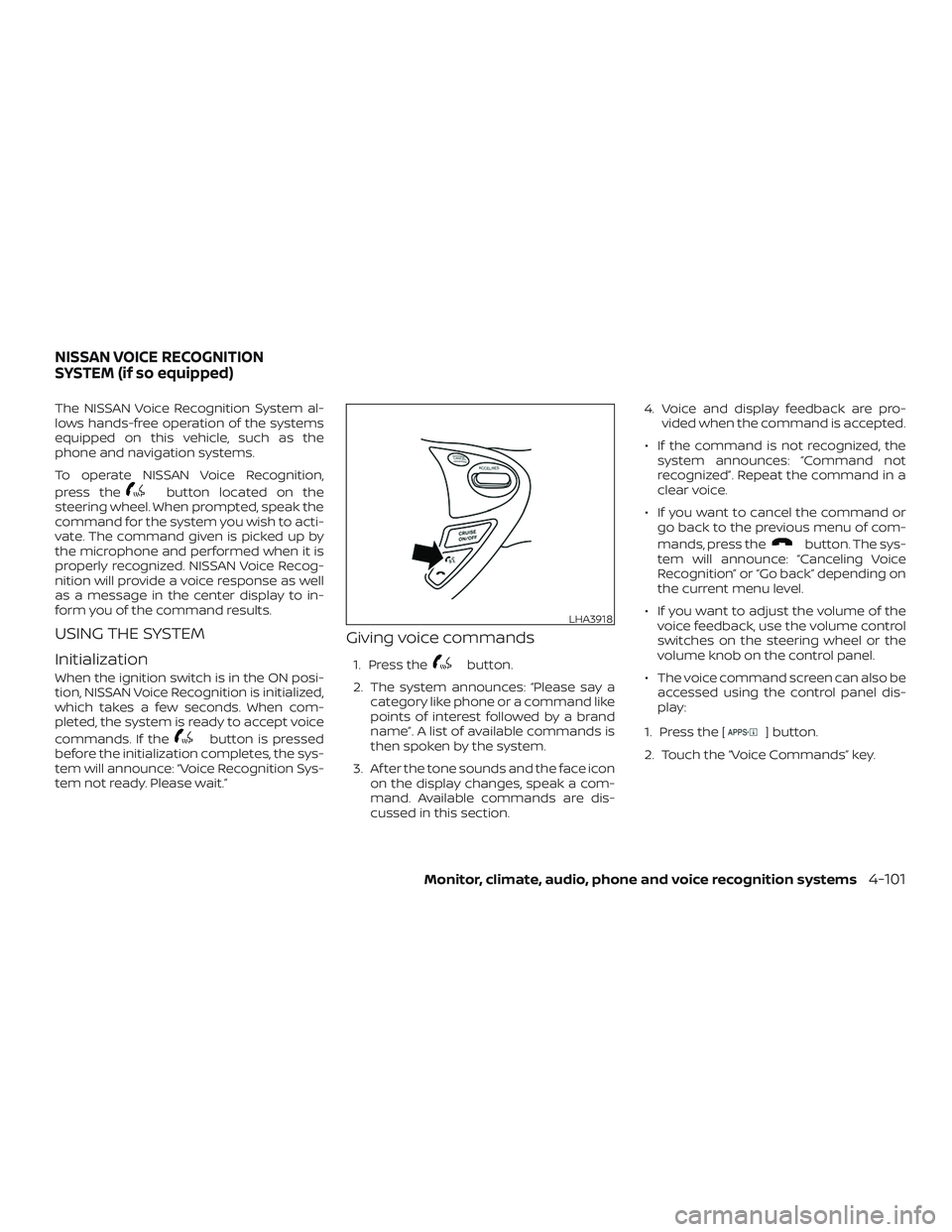
The NISSAN Voice Recognition System al-
lows hands-free operation of the systems
equipped on this vehicle, such as the
phone and navigation systems.
To operate NISSAN Voice Recognition,
press the
button located on the
steering wheel. When prompted, speak the
command for the system you wish to acti-
vate. The command given is picked up by
the microphone and performed when it is
properly recognized. NISSAN Voice Recog-
nition will provide a voice response as well
as a message in the center display to in-
form you of the command results.
USING THE SYSTEM
Initialization
When the ignition switch is in the ON posi-
tion, NISSAN Voice Recognition is initialized,
which takes a few seconds. When com-
pleted, the system is ready to accept voice
commands. If the
button is pressed
before the initialization completes, the sys-
tem will announce: “Voice Recognition Sys-
tem not ready. Please wait.”
Giving voice commands
1. Press thebutton.
2. The system announces: “Please say a category like phone or a command like
points of interest followed by a brand
name”. A list of available commands is
then spoken by the system.
3. Af ter the tone sounds and the face icon on the display changes, speak a com-
mand. Available commands are dis-
cussed in this section. 4. Voice and display feedback are pro-
vided when the command is accepted.
∙ If the command is not recognized, the system announces: “Command not
recognized”. Repeat the command in a
clear voice.
∙ If you want to cancel the command or go back to the previous menu of com-
mands, press the
button. The sys-
tem will announce: “Canceling Voice
Recognition” or “Go back” depending on
the current menu level.
∙ If you want to adjust the volume of the voice feedback, use the volume control
switches on the steering wheel or the
volume knob on the control panel.
∙ The voice command screen can also be accessed using the control panel dis-
play:
1. Press the [
] button.
2. Touch the “Voice Commands” key.
LHA3918
NISSAN VOICE RECOGNITION
SYSTEM (if so equipped)
Monitor, climate, audio, phone and voice recognition systems4-101
Page 300 of 507
Operating tips
To get the best performance out of NISSAN
Voice Recognition, observe the following:∙ Keep the interior of the vehicle as quiet as possible. Close the windows to elimi-
nate the surrounding noises (traffic
noises, vibration sounds, etc.), which
may prevent the system from recogniz-
ing the voice commands correctly.
∙ Wait until a tone sounds before speak- ing a command. Otherwise, the com-
mand will not be received properly.
∙ Start speaking a command within 3.5 seconds af ter the tone sounds.
∙ Speak in a natural voice without paus- ing between words.
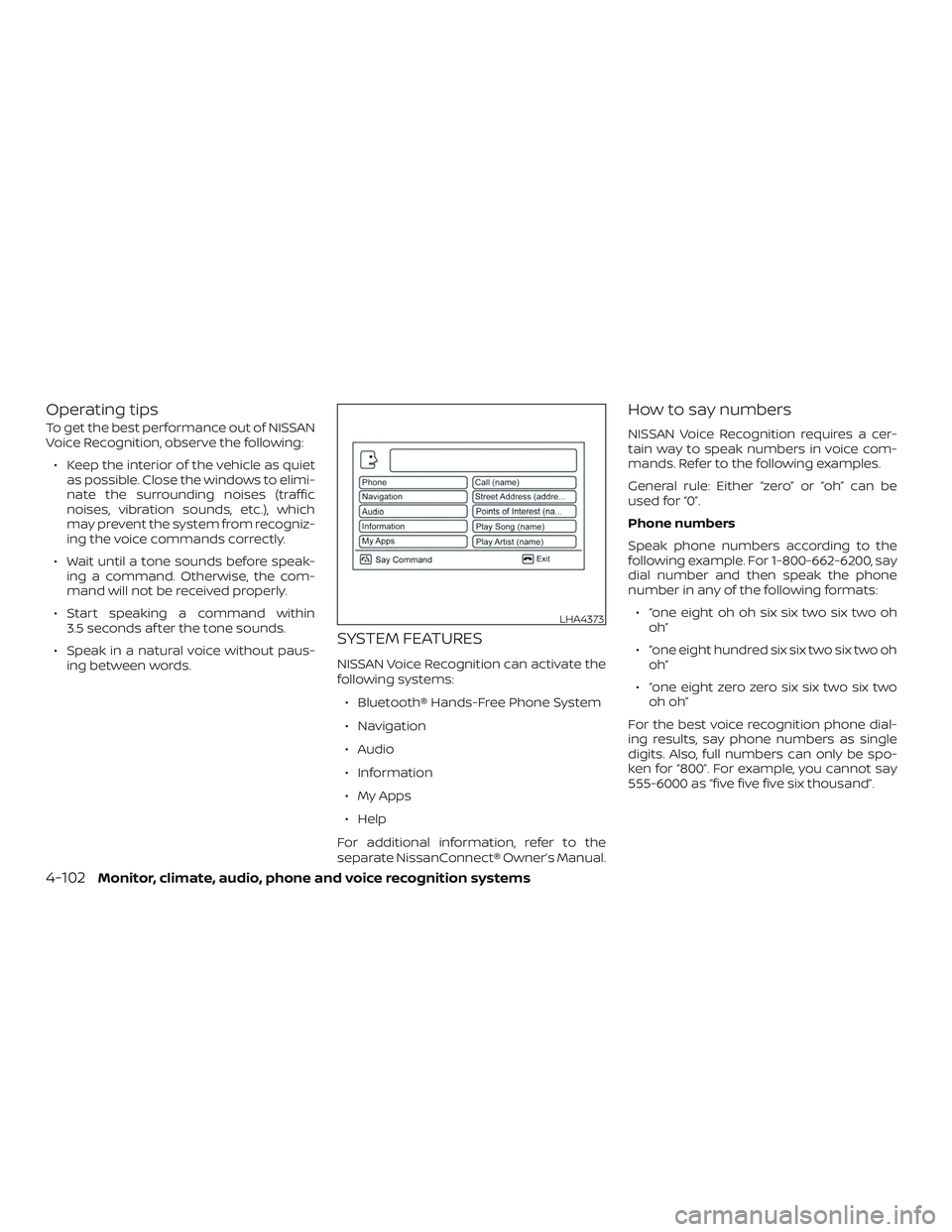
SYSTEM FEATURES
NISSAN Voice Recognition can activate the
following systems:
∙ Bluetooth® Hands-Free Phone System
∙ Navigation
∙ Audio
∙ Information
∙ My Apps
∙ Help
For additional information, refer to the
separate NissanConnect® Owner’s Manual.
How to say numbers
NISSAN Voice Recognition requires a cer-
tain way to speak numbers in voice com-
mands. Refer to the following examples.
General rule: Either “zero” or “oh” can be
used for “0”.
Phone numbers
Speak phone numbers according to the
following example. For 1-800-662-6200, say
dial number and then speak the phone
number in any of the following formats: ∙ “one eight oh oh six six two six two oh oh”
∙ “one eight hundred six six two six two oh oh”
∙ “one eight zero zero six six two six two oh oh”
For the best voice recognition phone dial-
ing results, say phone numbers as single
digits. Also, full numbers can only be spo-
ken for “800”. For example, you cannot say
555-6000 as “five five five six thousand”.
LHA4373
4-102Monitor, climate, audio, phone and voice recognition systems
Page 301 of 507
BLUETOOTH® HANDS-FREE
PHONE SYSTEM VOICE
COMMANDS
To access the Bluetooth® Hands-Free
Phone System voice commands:1. Press the
button.
2. Say “Call” and then a name in the ve- hicle phonebook to call that entry. Oth-
erwise, say “Phone” to access various
phone commands.
If the Bluetooth® has been set to “Off ”, the
system announces: “Bluetooth® is off.
Would you like to turn Bluetooth® on?”
If no phone is connected to the system and
the vehicle is stationary, the system an-
nounces: “There is no phone connected.
Would you like to connect a phone now?”
Say “Yes” to connect a phone. All further
Bluetooth® Hands-Free Phone System
voice commands are only available if a
phone is connected. If a phone is connected and Bluetooth® is
set to “On”, the following voice commands
are available:
∙ Call (a name) Speak the name of the contact in
which you are trying to call. System will
confirm correct contact. Say “Dial” to
initiate dialing.
∙ Dial Number Allows for up to 24 digits to be dialed.
Af ter the number is entered, say “Dial”
to initiate dialing. Say “Correction” to
correct the number entered. Say “Go
Back” to return to the main menu.
∙ List Phonebook Starting with the first alphabetical en-
try in the vehicle phonebook, the sys-
tem prompts for an additional com-
mand. Say “Dial” to call the number of
the phonebook entry. Say “Send Text”
to send a text message to the number
of the phonebook entry. Say “Next En-
try” to skip to the next alphabetical en-
try in the vehicle phonebook, where
the same options will then be available. ∙ Recent Calls
The system prompts for an additional
command. Say “Missed Calls”, “Incom-
ing Calls” or “Outgoing Calls” to display
a list of such calls on the screen.
Speak the number of the entry dis-
played on the screen to dial that num-
ber or say “Next Page” to view entries
on the next page (if available).
∙ Redial Redials the last called number.
∙ Read Text (if so equipped) Reads an incoming text message. For
additional information about text
messaging with the Bluetooth®
Hands-Free Phone System, refer to
“Bluetooth® Hands-Free Phone Sys-
tem with Navigation System” in this
section.
∙ Send Text (if so equipped) Sends a text message. For additional
information about text messaging
with the Bluetooth® Hands-Free Phone
System, refer to “Bluetooth® Hands-
Free Phone System with Navigation
System” in this section.
Monitor, climate, audio, phone and voice recognition systems4-103
Page 302 of 507
∙ Select PhoneThe system replies “Please use manual
controls to continue”. Use manual con-
trols to change the active phone from
among the listed phones connected
to the vehicle.
∙ Siri (if so equipped)
The system replies “Starting Siri”. For
additional information, refer to “Oper-
ating Siri ®Eyes Free” in this section.
For additional information about the
Bluetooth® Hands-Free Phone System, re-
fer to “Bluetooth® Hands-Free Phone Sys-
tem with Navigation System” in this sec-
tion.
NAVIGATION SYSTEM VOICE
COMMANDS
The following voice commands are avail-
able for the navigation system: ∙ Street Address (address)
∙ Points of Interest (name)
∙ POI by Category
∙ Home
∙ Address Book ∙ Previous Destinations
∙ Enter Address in Steps
∙ Cancel Route
For additional information, refer to the
separate NissanConnect® Owner’s Manual.
AUDIO SYSTEM VOICE COMMANDS
To access the audio system voice com-
mands:
1. Press the
button.
2. Say “Audio”
3. Speak a command from the following available commands:
∙ Play (AM, FM, etc.) Allows user to select radio band
∙ Tune AM (number) Allows user to tune directly to a desired
AM frequency
∙ Tune FM (number) Allows user to tune directly to a desired
FM frequency ∙ SXM channel (number)
Allows user to tune directly to a desired
SXM station (if so equipped)
∙ CD Track (number) Allows user to select track to be played
∙ Play Song (name) Allows user to select song name to be
played
∙ Play Artist (name) Allows user to select artist to be played
∙ Play Album (name) Allows user to select album name to
be played
For additional information, refer to “Audio
system” in this section.
4-104Monitor, climate, audio, phone and voice recognition systems
Page 303 of 507
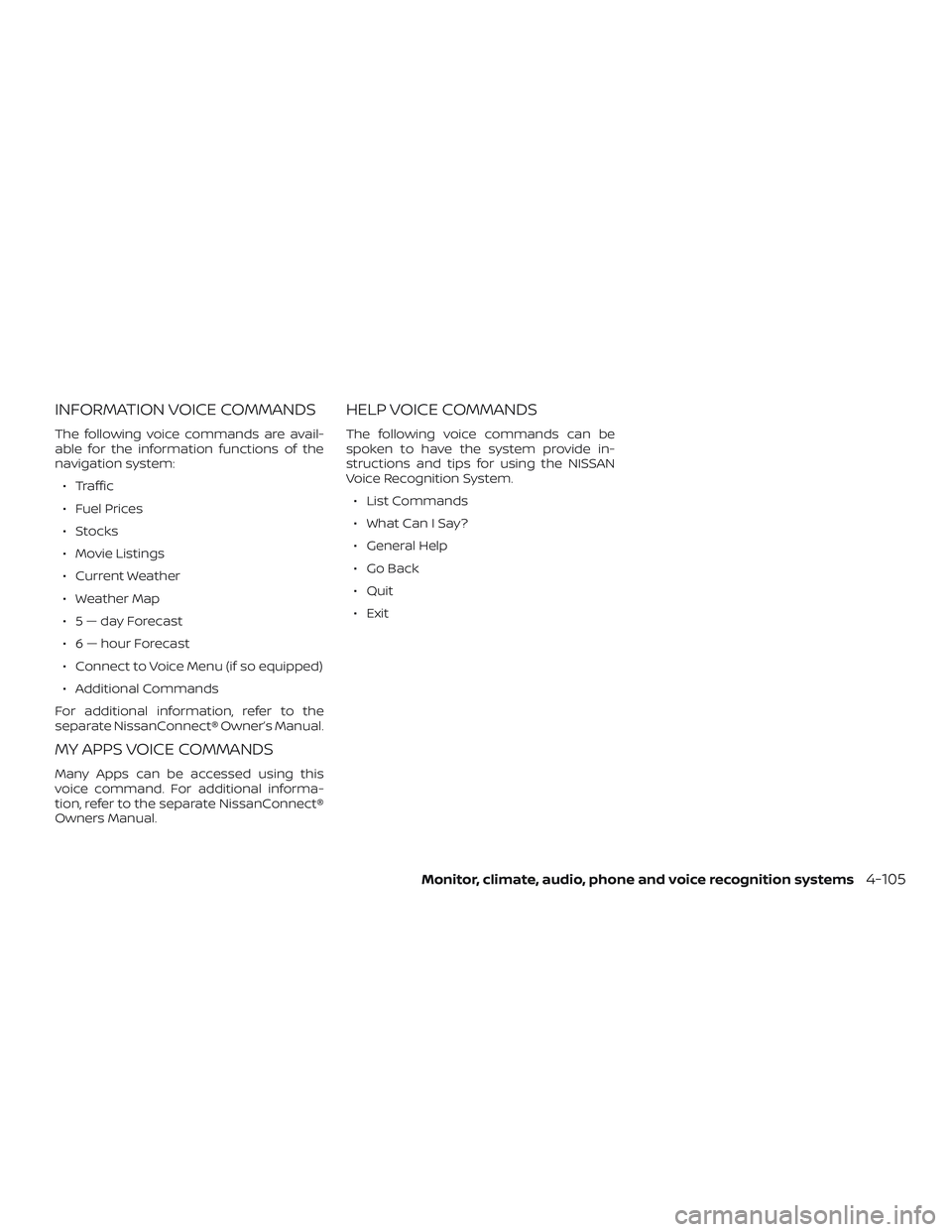
INFORMATION VOICE COMMANDS
The following voice commands are avail-
able for the information functions of the
navigation system:∙ Traffic
∙ Fuel Prices
∙ Stocks
∙ Movie Listings
∙ Current Weather
∙ Weather Map
∙ 5—dayForecast
∙ 6 — hour Forecast
∙ Connect to Voice Menu (if so equipped)
∙ Additional Commands
For additional information, refer to the
separate NissanConnect® Owner’s Manual.
MY APPS VOICE COMMANDS
Many Apps can be accessed using this
voice command. For additional informa-
tion, refer to the separate NissanConnect®
Owners Manual.
HELP VOICE COMMANDS
The following voice commands can be
spoken to have the system provide in-
structions and tips for using the NISSAN
Voice Recognition System. ∙ List Commands
∙ What Can I Say?
∙ General Help
∙ Go Back
∙ Quit
∙ Exit
Monitor, climate, audio, phone and voice recognition systems4-105
Page 304 of 507
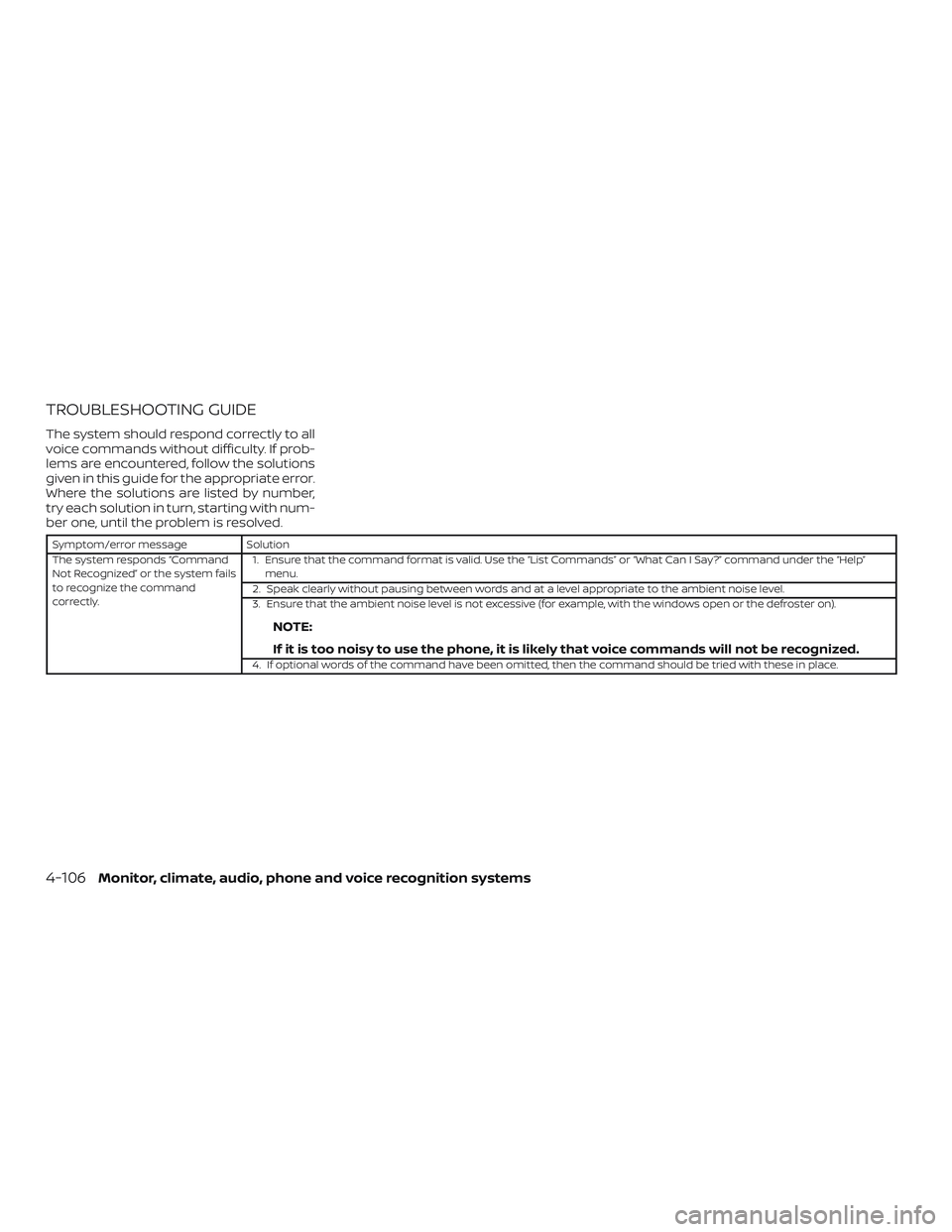
TROUBLESHOOTING GUIDE
The system should respond correctly to all
voice commands without difficulty. If prob-
lems are encountered, follow the solutions
given in this guide for the appropriate error.
Where the solutions are listed by number,
try each solution in turn, starting with num-
ber one, until the problem is resolved.
Symptom/error messageSolution
The system responds “Command
Not Recognized” or the system fails
to recognize the command
correctly. 1. Ensure that the command format is valid. Use the “List Commands” or “What Can I Say?” command under the “Help”
menu.
2. Speak clearly without pausing between words and at a level appropriate to the ambient noise level.
3. Ensure that the ambient noise level is not excessive (for example, with the windows open or the defroster on).
NOTE:
If it is too noisy to use the phone, it is likely that voice commands will not be recognized.
4. If optional words of the command have been omitted, then the command should be tried with these in place.
4-106Monitor, climate, audio, phone and voice recognition systems
Page 305 of 507

MEMO
Monitor, climate, audio, phone and voice recognition systems4-107
Page 321 of 507
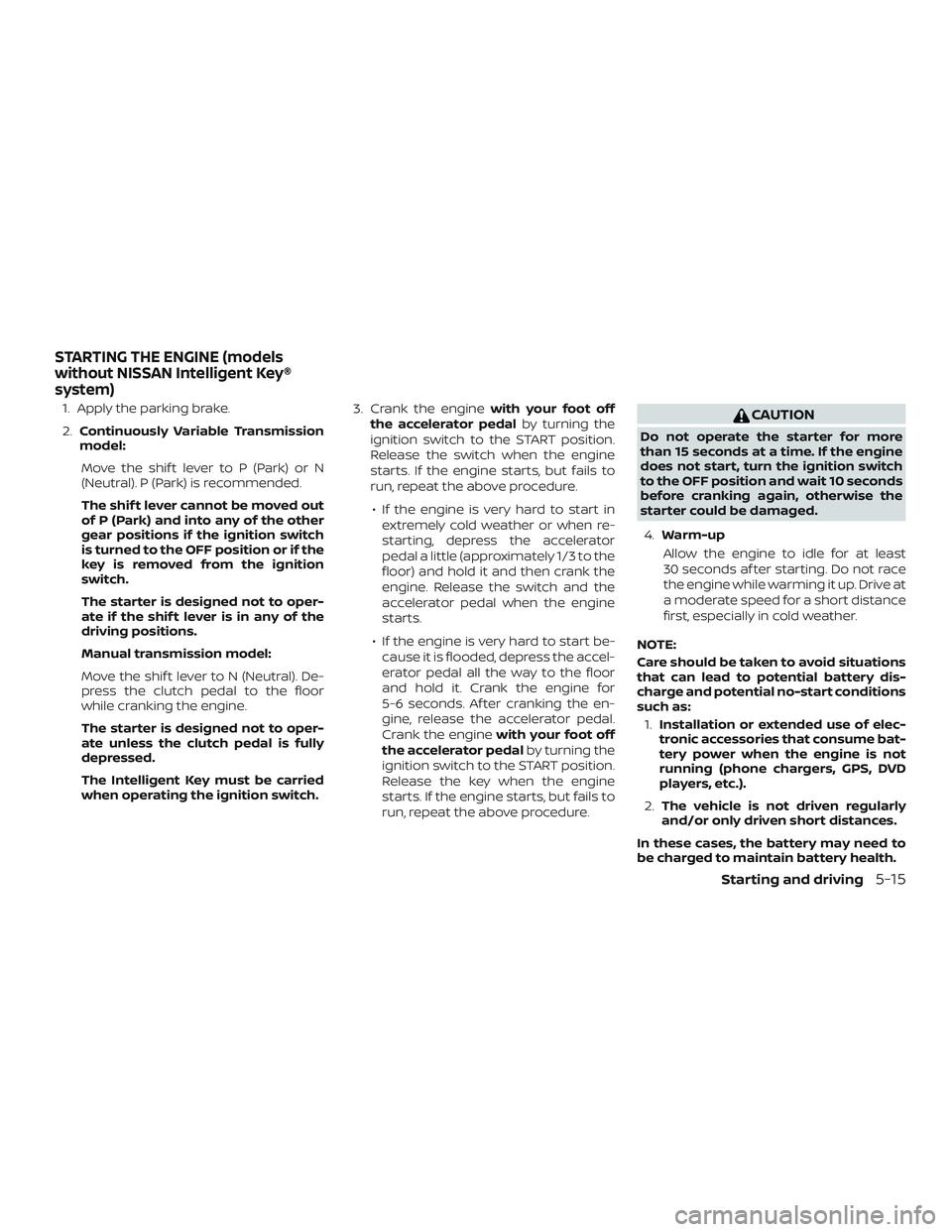
1. Apply the parking brake.
2.Continuously Variable Transmission
model:
Move the shif t lever to P (Park) or N
(Neutral). P (Park) is recommended.
The shif t lever cannot be moved out
of P (Park) and into any of the other
gear positions if the ignition switch
is turned to the OFF position or if the
key is removed from the ignition
switch.
The starter is designed not to oper-
ate if the shif t lever is in any of the
driving positions.
Manual transmission model:
Move the shif t lever to N (Neutral). De-
press the clutch pedal to the floor
while cranking the engine.
The starter is designed not to oper-
ate unless the clutch pedal is fully
depressed.
The Intelligent Key must be carried
when operating the ignition switch. 3. Crank the engine
with your foot off
the accelerator pedal by turning the
ignition switch to the START position.
Release the switch when the engine
starts. If the engine starts, but fails to
run, repeat the above procedure.
∙ If the engine is very hard to start in extremely cold weather or when re-
starting, depress the accelerator
pedal a little (approximately 1/3 to the
floor) and hold it and then crank the
engine. Release the switch and the
accelerator pedal when the engine
starts.
∙ If the engine is very hard to start be- cause it is flooded, depress the accel-
erator pedal all the way to the floor
and hold it. Crank the engine for
5-6 seconds. Af ter cranking the en-
gine, release the accelerator pedal.
Crank the engine with your foot off
the accelerator pedal by turning the
ignition switch to the START position.
Release the key when the engine
starts. If the engine starts, but fails to
run, repeat the above procedure.CAUTION
Do not operate the starter for more
than 15 seconds at a time. If the engine
does not start, turn the ignition switch
to the OFF position and wait 10 seconds
before cranking again, otherwise the
starter could be damaged.
4. Warm-up
Allow the engine to idle for at least
30 seconds af ter starting. Do not race
the engine while warming it up. Drive at
a moderate speed for a short distance
first, especially in cold weather.
NOTE:
Care should be taken to avoid situations
that can lead to potential battery dis-
charge and potential no-start conditions
such as: 1. Installation or extended use of elec-
tronic accessories that consume bat-
tery power when the engine is not
running (phone chargers, GPS, DVD
players, etc.).
2. The vehicle is not driven regularly
and/or only driven short distances.
In these cases, the battery may need to
be charged to maintain battery health.
STARTING THE ENGINE (models
without NISSAN Intelligent Key®
system)
Starting and driving5-15
Page 322 of 507
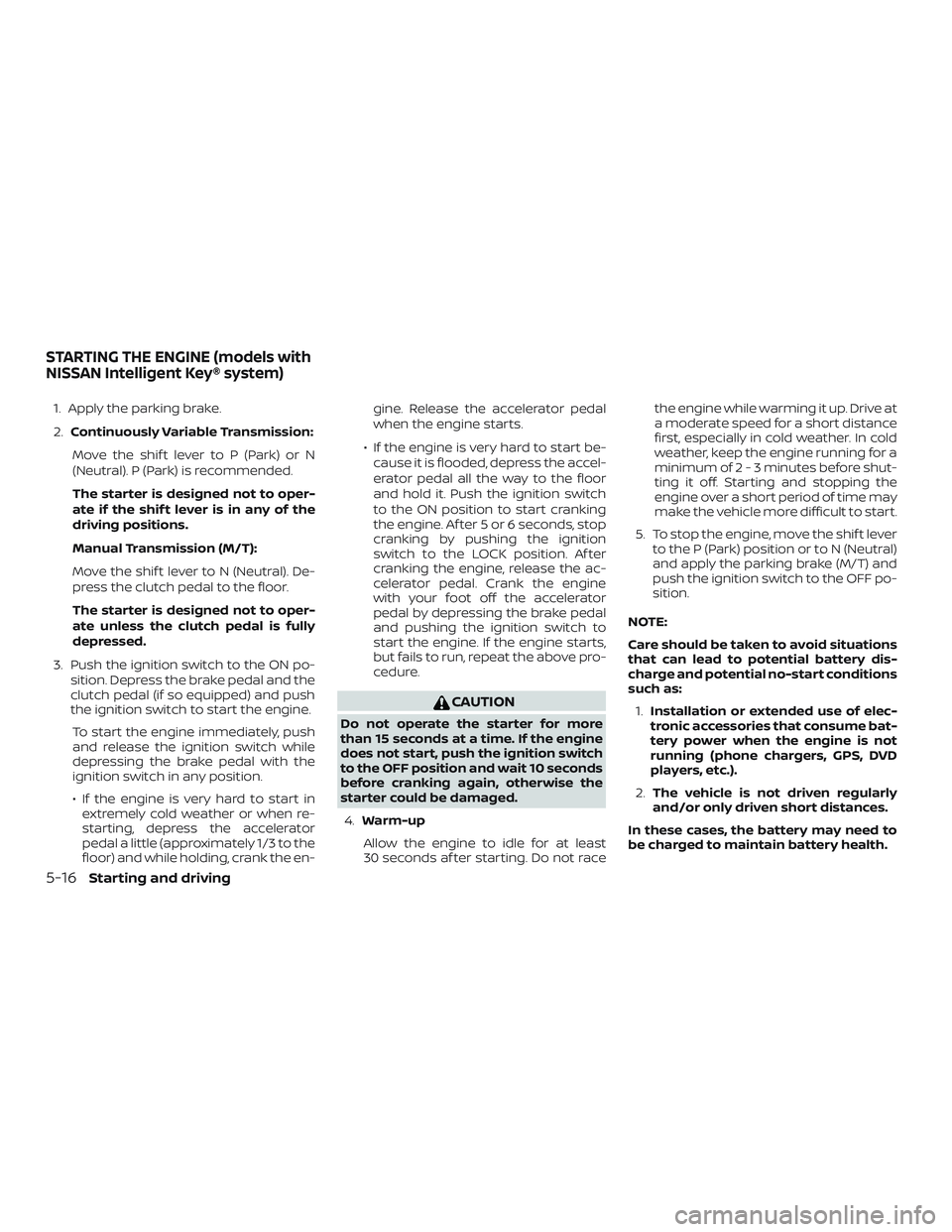
1. Apply the parking brake.
2.Continuously Variable Transmission:
Move the shif t lever to P (Park) or N
(Neutral). P (Park) is recommended.
The starter is designed not to oper-
ate if the shif t lever is in any of the
driving positions.
Manual Transmission (M/T):
Move the shif t lever to N (Neutral). De-
press the clutch pedal to the floor.
The starter is designed not to oper-
ate unless the clutch pedal is fully
depressed.
3. Push the ignition switch to the ON po- sition. Depress the brake pedal and the
clutch pedal (if so equipped) and push
the ignition switch to start the engine.
To start the engine immediately, push
and release the ignition switch while
depressing the brake pedal with the
ignition switch in any position.
∙ If the engine is very hard to start in extremely cold weather or when re-
starting, depress the accelerator
pedal a little (approximately 1/3 to the
floor) and while holding, crank the en- gine. Release the accelerator pedal
when the engine starts.
∙ If the engine is very hard to start be- cause it is flooded, depress the accel-
erator pedal all the way to the floor
and hold it. Push the ignition switch
to the ON position to start cranking
the engine. Af ter 5 or 6 seconds, stop
cranking by pushing the ignition
switch to the LOCK position. Af ter
cranking the engine, release the ac-
celerator pedal. Crank the engine
with your foot off the accelerator
pedal by depressing the brake pedal
and pushing the ignition switch to
start the engine. If the engine starts,
but fails to run, repeat the above pro-
cedure.
CAUTION
Do not operate the starter for more
than 15 seconds at a time. If the engine
does not start, push the ignition switch
to the OFF position and wait 10 seconds
before cranking again, otherwise the
starter could be damaged.
4. Warm-up
Allow the engine to idle for at least
30 seconds af ter starting. Do not race the engine while warming it up. Drive at
a moderate speed for a short distance
first, especially in cold weather. In cold
weather, keep the engine running for a
minimum of2-3minutes before shut-
ting it off. Starting and stopping the
engine over a short period of time may
make the vehicle more difficult to start.
5. To stop the engine, move the shif t lever to the P (Park) position or to N (Neutral)
and apply the parking brake (M/T) and
push the ignition switch to the OFF po-
sition.
NOTE:
Care should be taken to avoid situations
that can lead to potential battery dis-
charge and potential no-start conditions
such as: 1. Installation or extended use of elec-
tronic accessories that consume bat-
tery power when the engine is not
running (phone chargers, GPS, DVD
players, etc.).
2. The vehicle is not driven regularly
and/or only driven short distances.
In these cases, the battery may need to
be charged to maintain battery health.
STARTING THE ENGINE (models with
NISSAN Intelligent Key® system)
5-16Starting and driving
Page 426 of 507
∙ Keep the battery surface clean and dry.Clean the battery with a solution of bak-
ing soda and water.
∙ Make certain the terminal connections are clean and securely tightened.
∙ If the vehicle is not to be used for 30 days or longer, disconnect the nega-
tive (-) battery terminal cable to prevent
discharge.
NOTE:
Care should be taken to avoid situations
that can lead to potential battery dis-
charge and potential no-start conditions
such as: 1. Installation or extended use of elec-
tronic accessories that consume bat-
tery power when the engine is not
running (Phone chargers, GPS, DVD
players, etc).
2. Vehicle is not driven regularly and/or
only driven short distances.
In these cases, the battery may need to
be charged to maintain battery health.WARNING
∙ Do not expose the battery to flames, an electrical spark or a cigarette. Hy-
drogen gas generated by the battery
is explosive. Explosive gases can
cause blindness or injury. Do not allow
battery fluid to contact your skin,
eyes, fabrics or painted surfaces. Sul-
furic acid can cause blindness or in-
jury. Af ter touching a battery or bat-
tery cap, do not touch or rub your
eyes. Thoroughly wash your hands. If
the acid contacts your eyes, skin or
clothing, immediately flush with wa-
ter for at least 15 minutes and seek
medical attention.
∙ Do not operate the vehicle if the fluid in the battery is low. Low battery fluid
can cause a higher load on the battery
which can generate heat, reduce bat-
tery life, and in some cases lead to an
explosion.
∙ When working on or near a battery, always wear suitable eye protection
and remove all jewelry. ∙ Battery posts, terminals and related
accessories contain lead and lead
compounds. Wash hands af ter
handling.
∙ Keep battery out of the reach of children.
∙ Do not tip the battery. Keep the vent caps tight and the battery level.
BATTERY
8-14Do-it-yourself