battery location NISSAN SENTRA 2018 Owner´s Manual
[x] Cancel search | Manufacturer: NISSAN, Model Year: 2018, Model line: SENTRA, Model: NISSAN SENTRA 2018Pages: 507, PDF Size: 5.59 MB
Page 413 of 507
8 Do-it-yourself
Maintenance precautions.......................8-2
Engine compartment check locations ...........8-3
Engine cooling system ..........................8-5
Checking engine coolant level ................8-6
Changing engine coolant .....................8-6
Engine oil ........................................8-7
Checking engine oil level .....................8-7
Changing engine oil ..........................8-8
Changing engine oil filter ....................8-10
Continuously Variable Transmission (CVT)
fluid (if so equipped) ............................. 8-11
Brake and clutch (if so equipped) fluid ..........8-12
Brake fluid ................................... 8-12
Clutch (if so equipped) fluid ..................8-12
Windshield-washer fluid ........................8-13
Windshield-washer fluid reservoir ............8-13
Battery......................................... 8-14
Jump starting ............................... 8-15
Variable voltage control system ................8-16
Drive belt ....................................... 8-16
Spark plugs .................................... 8-17
Replacing spark plugs ....................... 8-17
Air cleaner ...................................... 8-18In-cabin microfilter
.......................... 8-19
Windshield wiper blades ........................8-19
Cleaning .................................... 8-19
Replacing ................................... 8-19
Brakes.......................................... 8-21
Fuses ........................................... 8-22
Engine compartment .......................8-22
Passenger compartment ....................8-24
Battery replacement ........................... 8-25
Key fob (if so equipped) ......................8-26
NISSAN Intelligent Key® (if so equipped) ......8-27
Lights .......................................... 8-29
Headlights ................................... 8-29
Turn signal bulb ............................. 8-31
Fog lights (if so equipped) ...................8-31
Ex
terior and interior lights ...................8-33
Wheels and tires ................................ 8-35
Tire pressure ................................ 8-35
Tire labeling ................................. 8-39
Types of tires ................................ 8-41
Tire chains .................................. 8-42
Changing wheels and tires ..................8-43
Page 415 of 507
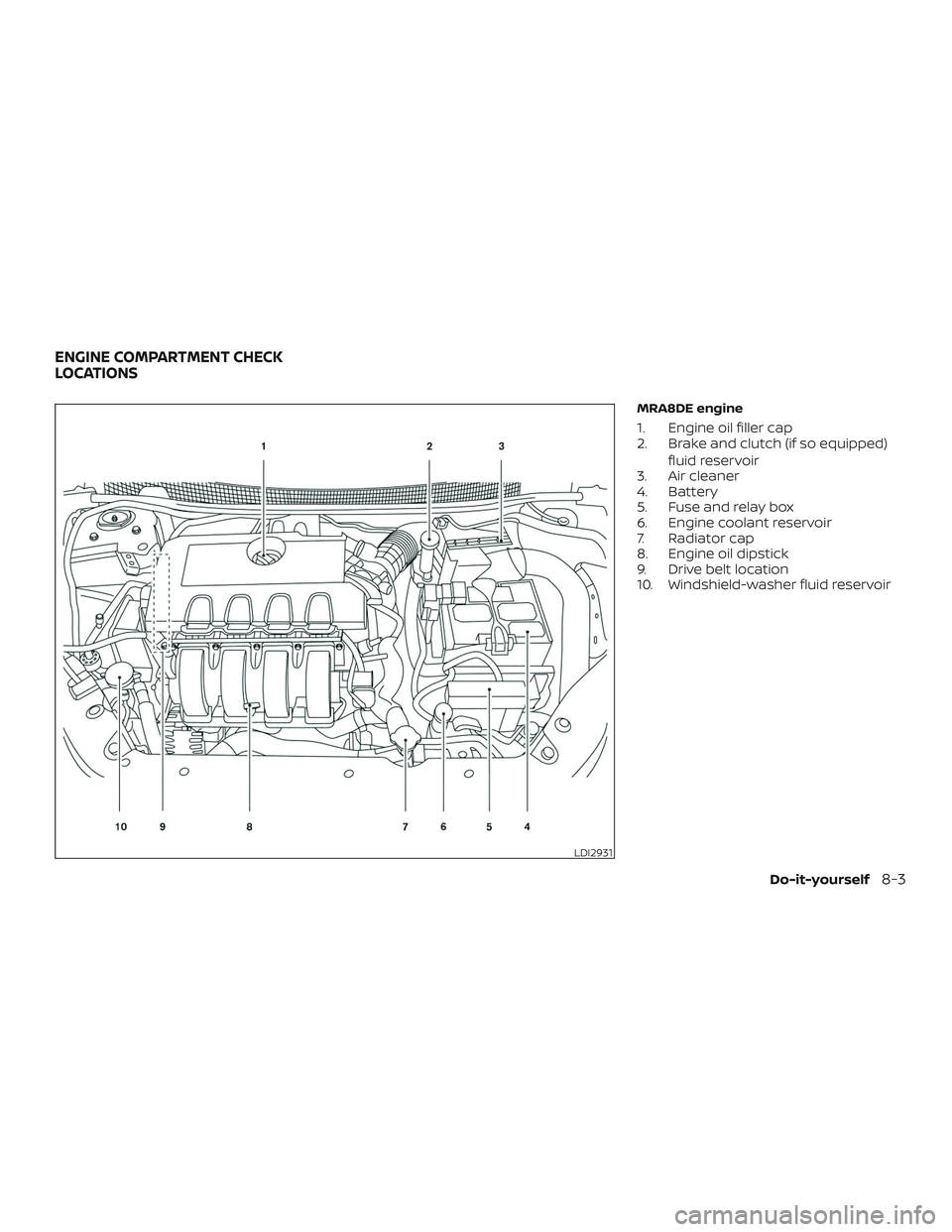
MRA8DE engine
1. Engine oil filler cap
2. Brake and clutch (if so equipped)fluid reservoir
3. Air cleaner
4. Battery
5. Fuse and relay box
6. Engine coolant reservoir
7. Radiator cap
8. Engine oil dipstick
9. Drive belt location
10. Windshield-washer fluid reservoir
LDI2931
ENGINE COMPARTMENT CHECK
LOCATIONS
Do-it-yourself8-3
Page 416 of 507
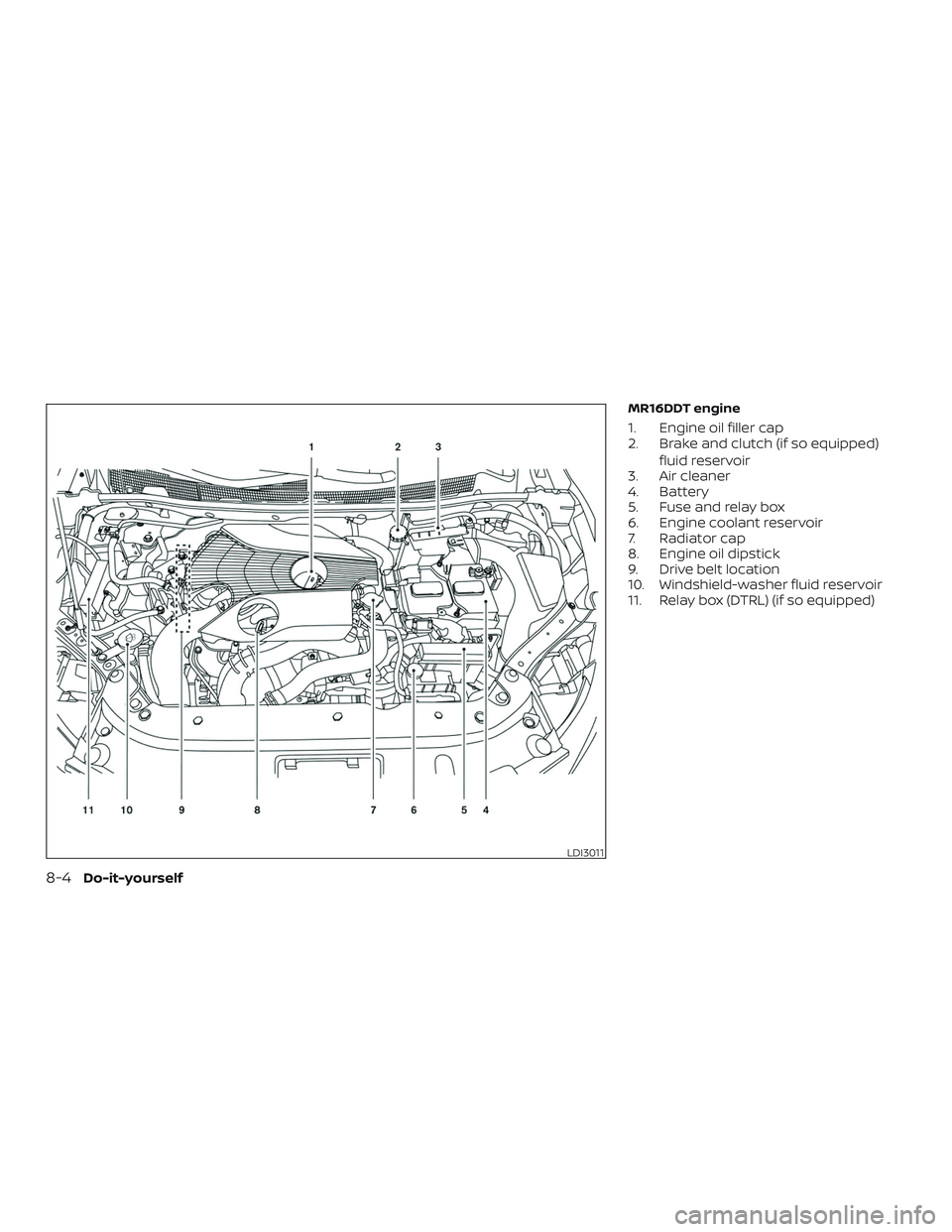
MR16DDT engine
1. Engine oil filler cap
2. Brake and clutch (if so equipped)fluid reservoir
3. Air cleaner
4. Battery
5. Fuse and relay box
6. Engine coolant reservoir
7. Radiator cap
8. Engine oil dipstick
9. Drive belt location
10. Windshield-washer fluid reservoir
11. Relay box (DTRL) (if so equipped)
LDI3011
8-4Do-it-yourself
Page 495 of 507
Due to legal requirements in some states
and Canadian Provinces, your vehicle may
be required to be in what is called the
“ready condition” for an
Inspection/Maintenance (I/M) test of the
emission control system.
The vehicle is set to the “ready condition”
when it is driven through certain driving
patterns. Usually, the ready condition can
be obtained by ordinary usage of the ve-
hicle.
If a powertrain system component is re-
paired or the battery is disconnected, the
vehicle may be reset to a “not ready” condi-
tion. Before taking the I/M test, check the
vehicle’s inspection/maintenance test
readiness condition. Place the ignition
switch in the ON position without starting
the engine. If the Malfunction Indicator
Light (MIL) comes on steady for 20 seconds
and then blinks for 10 seconds , the I/M test
condition is “not ready”. If the MIL does not
blink af ter 20 seconds, the I/M test condi-
tion is “ready”. It is recommended that you
visit a NISSAN dealer to set the “ready con-
dition” or to prepare the vehicle for testing.This vehicle is equipped with an Event Data
Recorder (EDR). The main purpose of an
EDR is to record, in certain crash or near
crash-like situations, such as an air bag
deployment or hitting a road obstacle, data
that will assist in understanding how a ve-
hicle’s systems performed. The EDR is de-
signed to record data related to vehicle dy-
namics and safety systems for a short
period of time, typically 30 seconds or less.
The EDR in this vehicle is designed to re-
cord such data as:
∙ How various systems in your vehicle were operating;
∙ Whether or not the driver and passen- ger safety belts were buckled/fastened;
∙ How far (if at all) the driver was depress- ing the accelerator and/or brake pedal;
and,
∙ How fast the vehicle was traveling.
∙ Sounds are not recorded. These data can help provide a better un-
derstanding of the circumstances in which
crashes and injuries occur. NOTE: EDR data
are recorded by your vehicle only if a non-
trivial crash situation occurs; no data are
recorded by the EDR under normal driving
conditions and no personal data (e.g.
name, gender, age and crash location) are
recorded. However, other parties, such as
law enforcement, could combine the EDR
data with the type of personally identif ying
data routinely acquired during a crash in-
vestigation.
To read data recorded by an EDR, special
equipment is required and access to the
vehicle or the EDR is needed. In addition to
the vehicle manufacturer and NISSAN
dealer, other parties, such as law enforce-
ment, that have the special equipment, can
read the information if they have access to
the vehicle or the EDR. EDR data will only be
accessed with the consent of the vehicle
owner or lessee or as otherwise required or
permitted by law.
READINESS FOR INSPECTION/
MAINTENANCE (I/M) TEST
EVENT DATA RECORDERS (EDR)
Technical and consumer information10-21
Page 497 of 507
11 Index
A
Air bag (See supplemental restraint
system) .................... .1-44
Air bag system Front (See supplemental front impact air
bagsystem)................1-51
Side and curtain (See supplemental side
air bag and curtain side-impact
airbagsystem)..............1-59
Air bag warning labels ............1-62
Airbagwarninglight..........1-63, 2-19
Air bag warning light,
supplemental ..............1-63, 2-19
Air cleaner ...................8-18
Air cleaner housing filter ..........8-18
Air conditioner Air conditioner operation ....4-26,4-32
Air conditioner service ..........4-34
Air conditioner specification label . .10-13
Air conditioner system refrigerant and oil
recommendations ............10-8
Air conditioner system refrigerant
recommendations ............10-8
Heater and air conditioner (automatic)
(if so equipped) ..............4-31
Heater and air conditioner
controls...............4-24,4-32
Heater and air conditioner
(manual) ..................4-23
Servicing air conditioner ........4-34
Air flow charts .............4-20,4-27 Alarm system
(See vehicle security system)
.......2-36
Anchor point locations ...........1-28
Antenna ....................4-73
Antifreeze ...................5-77
Anti-lock brake warning light ........2-14
Anti-lock Braking System (ABS) ......5-73
Apps .......................4-74
APPS button ...................4-7
Armrests.................... .1-7
Audible reminders ..............2-22
Audiosystem.................4-34 AMradioreception............4-35
Bluetooth® audio .........4-69,4-70
Bluetooth® streaming audio ......4-70
Compact disc (CD)
player.............4-46,4-51,4-58
FM/AM radio with compact disc (CD)
player....................4-43
FM/AM/SAT radio with compact disc (CD)
player ................4-48,4-53
FMradioreception............4-35
iPod®Player.............4-63,4-66
iPod® player operation ......4-63,4-66
Radio ....................4-34
Steering wheel audio control
switch....................4-72
USBinterface............4-59,4-61
USB (Universal Serial Bus) Connection
Port..................4-59,4-61
Autolightswitch ...............2-42
Automatic Automatic power window switch . . .2-58 Automatic anti-glare inside mirror
....3-32
Automatic door locks .............3-7
Automatic Emergency Braking
(AEB) ...................2-14,5-62
AUXjack....................4-59
B
Back button ...................4-7
Battery..................5-77,8-14 Charge warning light ...........2-15
Battery replacement ............8-25
Keyfob................8-25,8-26
NISSAN Intelligent Key® .........8-27
Before starting the engine .........5-14
Belt(Seedrivebelt)..............8-16
Blind Spot Warning (BSW) ..........5-27
Bluetooth® audio ...........4-69,4-70
Bluetooth® hands-free phone
system .....................4-79
Bluetooth® Hands-Free Phone System with
N
avigationSystem..............4-91
Bluetooth® streaming audio with
NavigationSystem..............4-70
Bluetooth® streaming audio without
Navigation System (if so equipped) . . .4-69
Booster seats .................1-41
Brake Anti-lock Braking System (ABS) ....5-73
Brakefluid.................8-12
Brakelight(Seestoplight).......8-33
Brakesystem...............5-72