headrest NISSAN SENTRA 2018 Owner´s Manual
[x] Cancel search | Manufacturer: NISSAN, Model Year: 2018, Model line: SENTRA, Model: NISSAN SENTRA 2018Pages: 507, PDF Size: 5.59 MB
Page 67 of 507
Follow these steps to install a forward-
facing child restraint using the vehicle seat
belt in the rear seats or in the front passen-
ger seat:1. If you must install a child restraint in
the front seat, it should be placed in a
forward-facing direction only. Move
the seat to the rearmost position.
Child restraints for infants must be
used in the rear-facing direction and,
therefore, must not be used in the
front seat.
2. Position the child restraint on the seat. Always follow the child restraint manu-
facturer’s instructions.
The back of the child restraint should
be secured against the vehicle seat-
back.
If necessary, adjust or remove the head
restraint/headrest to obtain the cor-
rect child restraint fit. If the head
restraint/headrest is removed, store it
in a secure place. Be sure to reinstall
the head restraint/headrest when
the child restraint is removed. For ad-
ditional information, refer to “Head
restraints/headrests” in this section. If the seating position does not have
an adjustable head restraint/headrest
and it is interfering with the proper
child restraint fit, try another seating
position or a different child restraint.
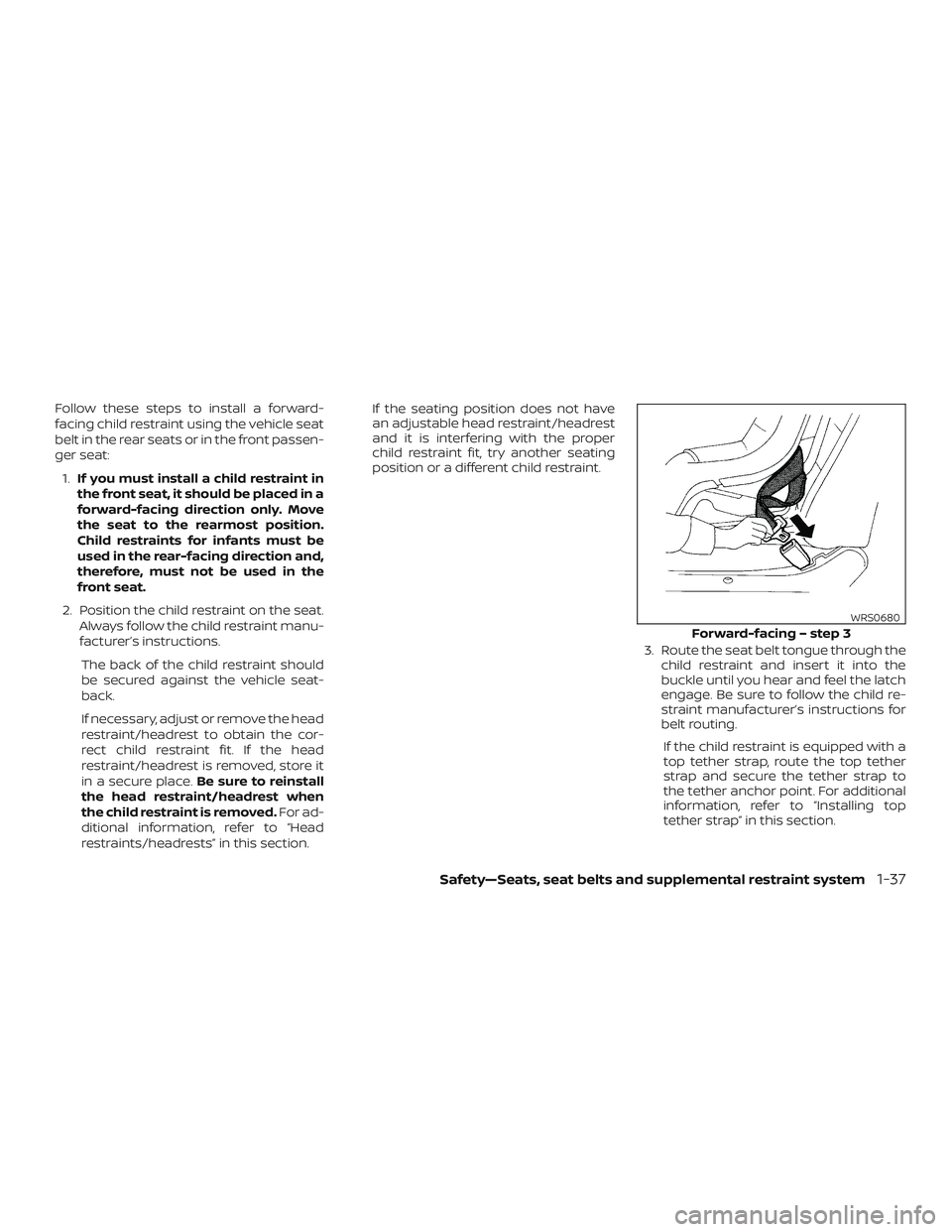
3. Route the seat belt tongue through thechild restraint and insert it into the
buckle until you hear and feel the latch
engage. Be sure to follow the child re-
straint manufacturer’s instructions for
belt routing.
If the child restraint is equipped with a
top tether strap, route the top tether
strap and secure the tether strap to
the tether anchor point. For additional
information, refer to “Installing top
tether strap” in this section.
Forward-facing – step 3
WRS0680
Safety—Seats, seat belts and supplemental restraint system1-37
Page 73 of 507
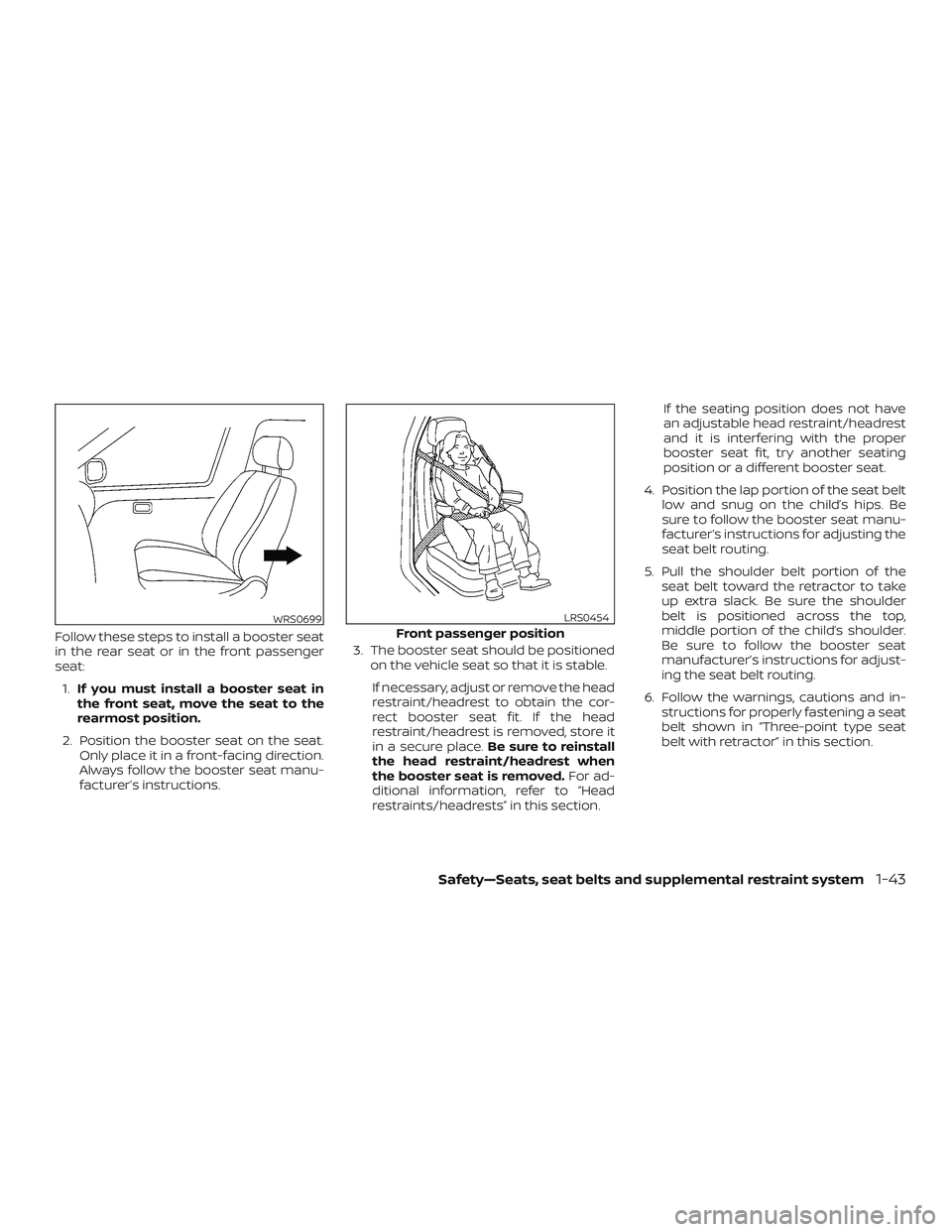
Follow these steps to install a booster seat
in the rear seat or in the front passenger
seat:1. If you must install a booster seat in
the front seat, move the seat to the
rearmost position.
2. Position the booster seat on the seat. Only place it in a front-facing direction.
Always follow the booster seat manu-
facturer’s instructions. 3. The booster seat should be positioned
on the vehicle seat so that it is stable.
If necessary, adjust or remove the head
restraint/headrest to obtain the cor-
rect booster seat fit. If the head
restraint/headrest is removed, store it
in a secure place. Be sure to reinstall
the head restraint/headrest when
the booster seat is removed. For ad-
ditional information, refer to “Head
restraints/headrests” in this section. If the seating position does not have
an adjustable head restraint/headrest
and it is interfering with the proper
booster seat fit, try another seating
position or a different booster seat.
4. Position the lap portion of the seat belt low and snug on the child’s hips. Be
sure to follow the booster seat manu-
facturer’s instructions for adjusting the
seat belt routing.
5. Pull the shoulder belt portion of the seat belt toward the retractor to take
up extra slack. Be sure the shoulder
belt is positioned across the top,
middle portion of the child’s shoulder.
Be sure to follow the booster seat
manufacturer’s instructions for adjust-
ing the seat belt routing.
6. Follow the warnings, cautions and in- structions for properly fastening a seat
belt shown in “Three-point type seat
belt with retractor” in this section.
WRS0699Front passenger position
LRS0454
Safety—Seats, seat belts and supplemental restraint system1-43
Page 81 of 507
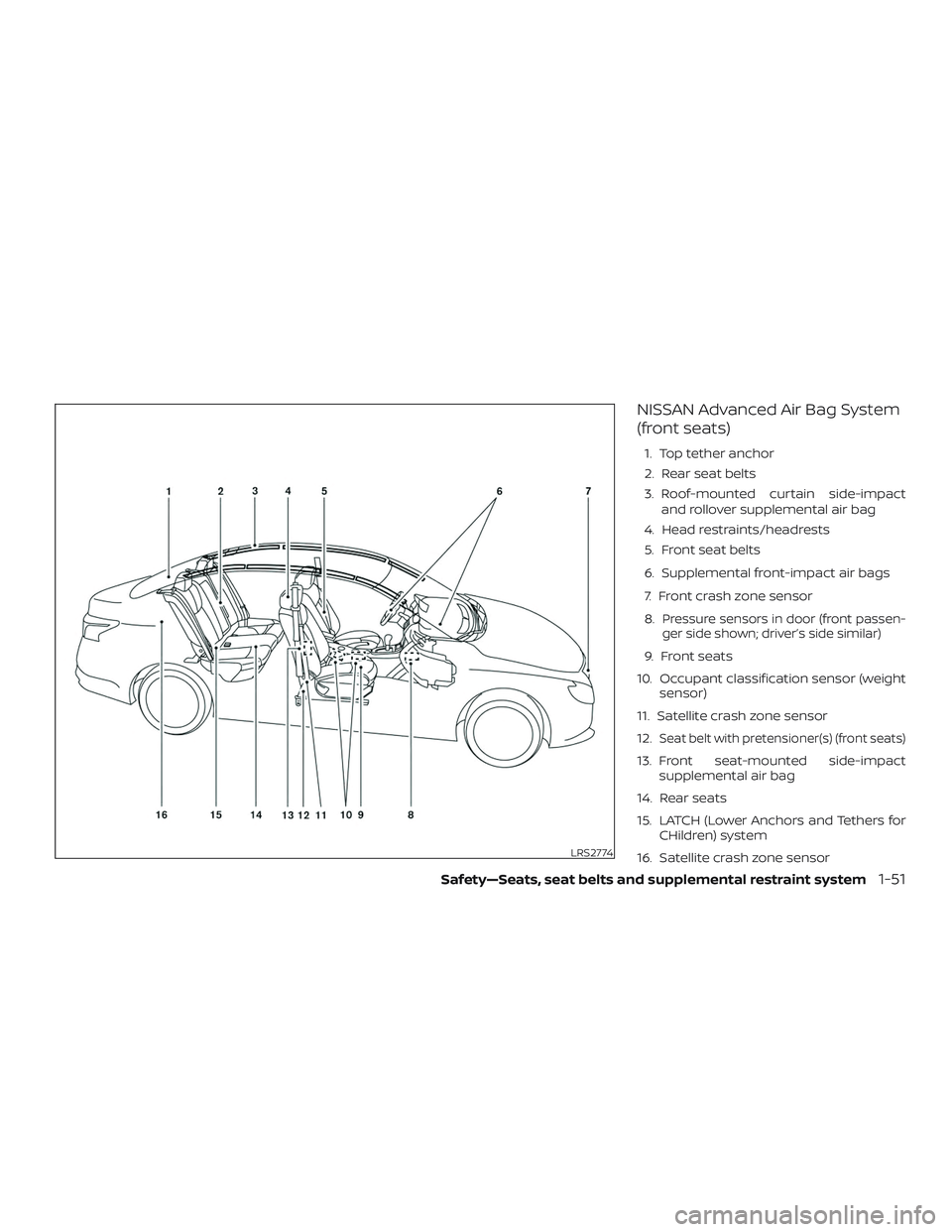
NISSAN Advanced Air Bag System
(front seats)
1. Top tether anchor
2. Rear seat belts
3. Roof-mounted curtain side-impactand rollover supplemental air bag
4. Head restraints/headrests
5. Front seat belts
6. Supplemental front-impact air bags
7. Front crash zone sensor
8.
Pressure sensors in door (front passen-
ger side shown; driver’s side similar)
9. Front seats
10. Occupant classification sensor (weight sensor)
11. Satellite crash zone sensor
12.
Seat belt with pretensioner(s) (front seats)
13. Front seat-mounted side-impact supplemental air bag
14. Rear seats
15. LATCH (Lower Anchors and Tethers for CHildren) system
16. Satellite crash zone sensor
LRS2774
Safety—Seats, seat belts and supplemental restraint system1-51
Page 82 of 507
WARNING
To ensure proper operation of the pas-
senger’s NISSAN Advanced Air bag Sys-
tem, please observe the following
items.
∙ Do not allow a passenger in the rearseat to push or pull on the seatback
pocket.
∙ Do not place heavy loads heavier than 9.1 lbs. (4 kg) on the seatback, head
restraint/headrest or in the seatback
pocket.
∙ Make sure that there is nothing press- ing against the rear of the seatback,
such as a child restraint installed in
the rear seat or an object stored on
the floor.
∙ Make sure that there is no object placed between the seat cushion and
center console or between the seat
cushion and the door. ∙ If a forward-facing child restraint is
installed in the front passenger seat,
do not position the front passenger
seat so the child restraint contacts the
instrument panel. If the child restraint
does contact the instrument panel,
the system may determine the seat is
occupied and the passenger air bag
may deploy in a collision. Also the
front passenger air bag status light
may not illuminate. For additional in-
formation, refer to “Child restraints” in
this section.
∙ Confirm the operating condition with the front passenger air bag status
light.
∙ If you notice that the front passenger air bag status light is not operating as
described in this section, get the oc-
cupant classification system checked.
It is recommended that you visit a
NISSAN dealer for this service.
∙ Until you have confirmed with a dealer that your passenger seat occu-
pant classification system is working
properly, position the occupants in
the rear seating positions. ∙ Do not position the front passenger
seat so it contacts the rear seat. If the
front seat does contact the rear seat,
the air bag system may determine a
sensor malfunction has occurred and
the front passenger air bag status
light may illuminate and the supple-
mental air bag warning light may
flash.
This vehicle is equipped with the NISSAN
Advanced Air Bag System for the driver and
front passenger seats. This system is de-
signed to meet certification requirements
under U.S. regulations. It is also permitted in
Canada. All of the information, cautions
and warnings in this manual must be fol-
lowed.
The driver supplemental front-impact air
bag is located in the center of the steering
wheel. The front passenger supplemental
front-impact air bag is mounted in the
dashboard above the glove box. The front
air bags are designed to inflate in higher
severity frontal collisions, although they
may inflate if the forces in another type of
collision are similar to those of a higher
severity frontal impact. They may not in-
flate in certain frontal collisions. Vehicle
1-52Safety—Seats, seat belts and supplemental restraint system
Page 147 of 507
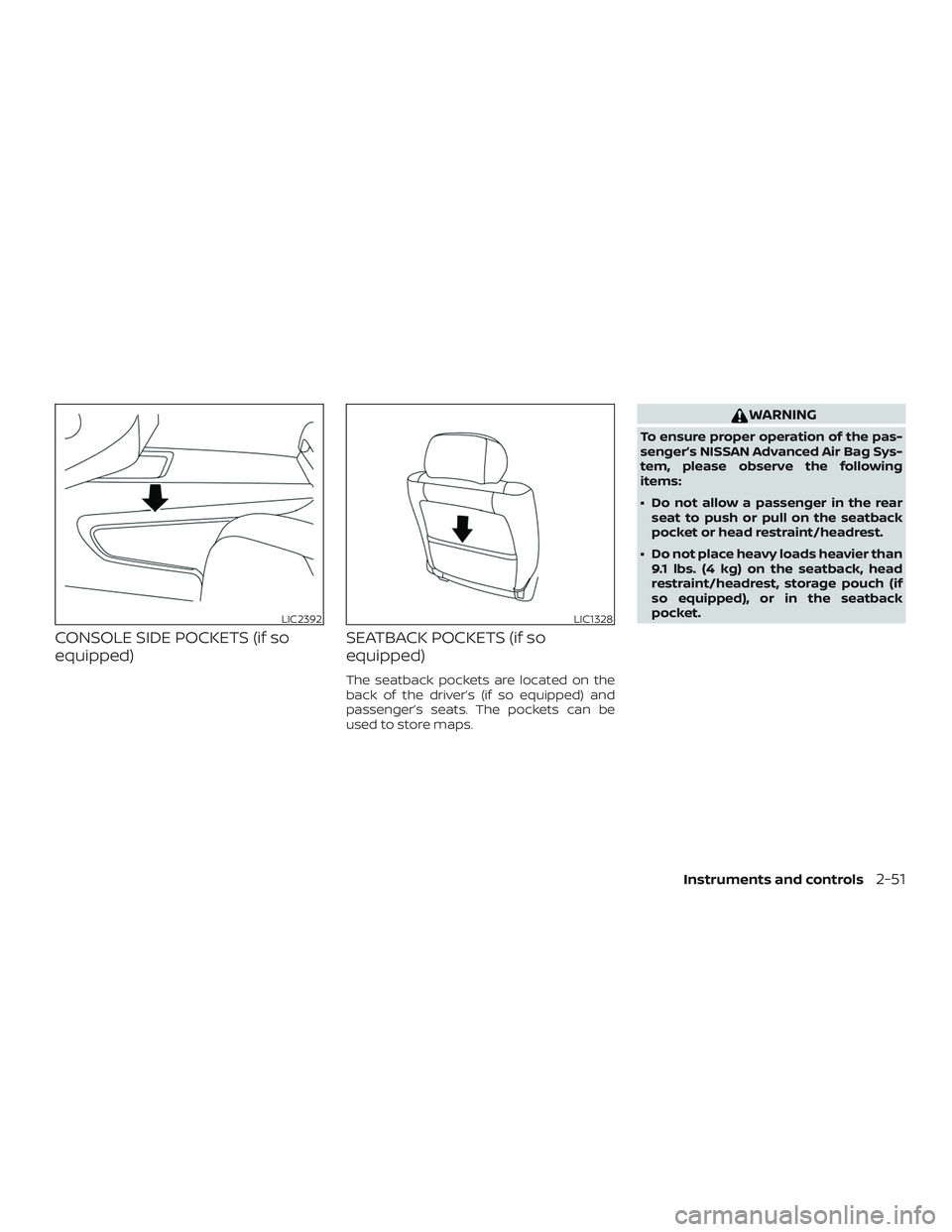
CONSOLE SIDE POCKETS (if so
equipped)SEATBACK POCKETS (if so
equipped)
The seatback pockets are located on the
back of the driver’s (if so equipped) and
passenger’s seats. The pockets can be
used to store maps.
WARNING
To ensure proper operation of the pas-
senger’s NISSAN Advanced Air Bag Sys-
tem, please observe the following
items:
∙ Do not allow a passenger in the rear
seat to push or pull on the seatback
pocket or head restraint/headrest.
∙ Do not place heavy loads heavier than 9.1 lbs. (4 kg) on the seatback, head
restraint/headrest, storage pouch (if
so equipped), or in the seatback
pocket.
LIC2392LIC1328
Instruments and controls2-51
Page 320 of 507
Af ter Step 3 is performed, when the
ignition switch is pushed without de-
pressing the brake pedal, the ignition
switch position will change to the ACC
position.
4. Push the ignition switch while depress- ing the brake pedal within 10 seconds
af ter the chime sounds. The engine will
start.
NOTE: ∙ When the ignition switch is pushed to
the ACC or ON position or the engine
is started by the above procedure, the
Intelligent Key battery discharge in-
dicator appears in the vehicle infor-
mation display even when the Intelli-
gent Key is inside the vehicle. This is
not a malfunction. To turn off the In-
telligent Key battery discharge indi-
cator, touch the ignition switch with
the Intelligent Key again.
∙ If the Intelligent Key battery dis-
charge indicator appears, replace the
battery as soon as possible. For addi-
tional information, refer to “Battery
replacement” in the “Do-it-yourself ”
section of this manual.NISSAN VEHICLE IMMOBILIZER
SYSTEM
The NISSAN Vehicle Immobilizer System
will not allow the engine to start without
the use of the registered key.
If the engine fails to start using a registered
key (for example, when interference is
caused by another registered key, an auto-
mated toll road device or automatic pay-
ment device on the key ring), restart the
engine using the following procedure:
1. Leave the ignition switch in the ON po- sition for approximately 5 seconds.
2. Place the ignition switch in the OFF or LOCK position, and wait approximately
10 seconds.
3. Repeat steps 1 and 2.
4. Restart the engine while holding the device (which may have caused the in-
terference) separate from the regis-
tered key.
If the no start condition re-occurs, NISSAN
recommends placing the registered key on
a separate key ring to avoid interference
from other devices. ∙ Make sure the area around the vehicle is
clear.
∙ Check fluid levels such as engine oil, coolant, brake and clutch fluid (if so
equipped), and windshield-washer fluid
as frequently as possible, or at least
whenever you refuel.
∙ Check that all windows and lights are clean.
∙ Visually inspect tires for their appear- ance and condition. Also check tires for
proper inflation.
∙ Lock all doors.
∙ Position seat and adjust head restraints/headrests.
∙ Adjust inside and outside mirrors.
∙ Fasten seat belts and ask all passen- gers to do likewise.
∙ Check the operation of warning lights when the ignition switch is placed in the
ON position. For additional information,
refer to “Warning lights, indicator lights
and audible reminders” in the “Instru-
ments and controls” section of this
manual.
BEFORE STARTING THE ENGINE
5-14Starting and driving
Page 462 of 507
Parking brake:Check the parking brake
operation regularly. The vehicle should be
securely held on a fairly steep hill with only
the parking brake applied. If the parking
brake needs adjustment, it is recom-
mended that you visit a NISSAN dealer for
this service.
Seats: Check seat position controls such
as seat adjusters, seatback recliner, etc., to
ensure they operate smoothly and all
latches lock securely in every position.
Check that the head restraints/headrests
move up and down smoothly and the locks
(if so equipped) hold securely in all latched
positions.
Seat belts: Check that all parts of the seat
belt system (for example, buckles, anchors,
adjusters and retractors) operate properly
and smoothly, and are installed securely.
Check the belt webbing for cuts, fraying,
wear or damage.
Steering wheel: Check for changes in the
steering system, such as excessive free
play, hard steering or strange noises.
Warning lights and chimes: Make sure all
warning lights and chimes are operating
properly. Windshield defroster:
Check that the air
comes out of the defroster outlets properly
and in sufficient quantity when operating
the heater or air conditioner.
Windshield wiper and washer*: Check
that the wipers and washer operate prop-
erly and that the wipers do not streak.
Under the hood and vehicle
The maintenance items listed here should
be checked periodically (for example, each
time you check the engine oil or refuel).
Battery* (for serviceable batteries):
Check the fluid level in each cell. The fluid
should be at the bottom of the filler open-
ing. Vehicles operated in high tempera-
tures or under severe conditions require
frequent checks of the battery fluid level.
NOTE:
Care should be taken to avoid situations
that can lead to potential battery dis-
charge and potential no-start conditions
such as:
1. Installation or extended use of elec-
tronic accessories that consume bat-
tery power when the engine is not
running (Phone chargers, GPS, DVD
players, etc.). 2.
Vehicle is not driven regularly and/or
only driven short distances.
In these cases, the battery may need to
be charged to maintain battery health.
Brake and clutch (if so equipped) fluid
level*: Make sure that the brake and clutch
fluid levels are between the MIN and MAX
lines on the reservoir.
Engine coolant level*: Check the coolant
level when the engine is cold.
Engine drive belt*: Make sure the drive belt
is not frayed, worn, cracked or oily.
Engine oil level*: Check the level af ter
parking the vehicle on a level surface with
the engine off. Wait more than 15 minutes
for the oil to drain back into the oil pan.
Exhaust system: Make sure there are no
loose supports, cracks or holes. If the
sound of the exhaust seems unusual or
there is a smell of exhaust fumes, immedi-
ately have the exhaust system inspected. It
is recommended that you visit a NISSAN
dealer for this service. For additional infor-
mation, refer to “Exhaust gas (carbon mon-
oxide)” in the “Starting and driving” section
of this manual.
9-4Maintenance and schedules
Page 499 of 507
E
E-CALL (SOS) SWITCH .............2-49
ECO mode switch ...............5-26
Economy - fuel .................5-70
Emergency engine shutoff ..........5-13
Emission control information label . . . .10-12
Emission control system warranty . . . .10-19
Engine Before starting the engine ........5-14
Capacities and recommended
fuel/lubricants...............10-2
Changing engine coolant .........8-6
Changing engine oil ............8-8
Changing engine oil filter .........8-10
Checking engine coolant level ......8-6
Checking engine oil level .........8-7
Engine compartment check
locations...................8-3
Engine coolant temperature gauge. . .2-7
Engine cooling system ..........8-5
Engine oil ...................8-7
Engine oil and oil filter
recommendation .............10-7
Engine oil pressure warning light ....2-15
Engine oil viscosity .............10-7
Engine serial number ..........10-12
Engine specifications ...........10-9
Starting the engine ............5-15
Engine Block Heater .............5-78
Engine coolant temperature gauge .....2-7
Enterbutton...................4-4
EventDatarecorders ............10-21
Exhaust gas (Carbon monoxide) .......5-2
Explanation of maintenance items .....9-2Explanation of scheduled maintenance
items .......................9-5
Extended storage switch
..........8-25
Eyeglasscase.................2-54
F
Flashers
(See hazard warning flasher switch) ....6-2
Flattire....................6-3,6-3
Floormatpositioningaid...........7-7
Fluid Brakefluid..................8-12
Capacities and recommended
fuel/lubricants...............10-2
Clutchfluid.................8-12
Continuously Variable Transmission (CVT)
fluid......................8-11
Engine coolant ...............8-5
Engine oil ...................8-7
F.M.V.S.S. certification label .........10-12
Foglightswitch................2-46
Front air bag system
(See supplemental restraint system) . . . .1-51
Front-door pocket ..............2-50
Front power seat adjustment ........1-5
Frontseats....................1-2
Fuel Capacities and recommended
fuel/lubricants...............10-2
Fuel economy ...............5-70
Fuel-filler cap ................3-28
Fuel-filler door lock opener lever ....3-27
Fuel-filler lid .................3-28
Fuel gauge ..................2-8 Fueloctanerating.............10-6
Fuel recommendation
..........10-4
Loose fuel cap warning .......2-6, 2-33
Fuelefficientdrivingtips...........5-68
Fuel-filler door .................3-27
Fuel gauge ....................2-8
Fuses.......................8-22
Fusiblelinks...................8-23
G
Gar
age door opener, HomeLink® Universal
Transceiver . .2-63, 2-64, 2-65, 2-66, 2-66, 2-67
Gascap.....................3-28
Gauge Engine coolant temperature gauge. . .2-7
Fuel gauge ..................2-8
Odometer ..................2-5
Speedometer ..............2-4,2-5
Tachometer .................2-7
Trip computer ................2-9
Trip odometer .............2-4, 2-5
General maintenance .............9-2
Glovebox................... .2-53
H
Hands-free phone system, Bluetooth® . .4-79
Hazardwarningflasherswitch........6-2
Headlight and turn signal switch ......2-41
Headlightcontrolswitch...........2-41
Headlights ...................8-29
Headrestraints..................1-7
Heatedseats..................2-47
11-3