Text NISSAN SENTRA 2019 Owner´s Manual
[x] Cancel search | Manufacturer: NISSAN, Model Year: 2019, Model line: SENTRA, Model: NISSAN SENTRA 2019Pages: 461, PDF Size: 5.79 MB
Page 249 of 461
RECEIVING A CALL
When a call is received by the phone con-
nected to the vehicle’s Bluetooth® Hands-
Free Phone System, the call information is
displayed on the control panel display.
Press the
button on the steering
wheel or touch the “
Answer” key on
the screen to accept the call. To reject the
call touch the “
Decline” key on the
screen.
If the user is not able to answer the call
right away, touch the “Hold Call” key dis-
played on the screen. A message will be
played for the caller: “I’m not able to take a
call right now.” The user may then accept
the call when available or reject the call.
To reject a call, press and hold the
button on the steering wheel.
DURING A CALL
While a call is active the following options
will appear on the control panel display:
∙ Mute Touch this key to mute or unmute the
system.
∙ Dial Number Touch this key to dial digits during the
phone call. ∙ Use Handset
Touch this key to transfer the call to the
handset. To transfer the call back from
the handset to the Bluetooth® Hands-
Free Phone System, press the
but-
ton on the control panel then select the
“Transfer Hands-free” key on the screen.
∙ Switch Call This option will only be available when a
second call is active.
If supported by the phone, the
Bluetooth® Hands-Free Phone System
allows for call waiting functionality. If a
call is received while another call is al-
ready active, a message will be dis-
played on the screen. Press the
button on the steering wheel or touch
the “
Answer” key on screen to ac-
cept the incoming call. Touch the
“
Decline” key on the screen to re-
ject the second call.
While a call is active, press the
button
on the steering wheel to access additional
options. Speak one of the following com-
mands:
∙ “Send Digits” Speak this command followed by the
digits to enter digits during the phone
call. ∙ “Switch call”
Speak this command to hold the sec-
ond call and switch back to the original
call.
ENDING A CALL
To end an active call, press thebutton
on the steering wheel or touch the
“
Hang up” key on the screen.
TEXT MESSAGING (if so equipped)
WARNING
∙ Laws in some jurisdictions may re- strict the use of “Text-to-Speech”.
Check local regulations before using
this feature.
∙ Laws in some jurisdictions may re- strict the use of some of the applica-
tions and features, such as social net-
working and texting. Check local
regulations for any requirements.
∙ Use the text messaging feature af ter stopping your vehicle in a safe loca-
tion. If you have to use the feature
while driving, exercise extreme cau-
tion at all times so full attention may
be given to vehicle operation.
Monitor, climate, audio, phone and voice recognition systems4-65
Page 250 of 461
∙ If you are unable to devote full atten-tion to vehicle operation while using
the text messaging feature, pull off
the road to a safe location and stop
your vehicle.
NOTE:
This feature is automatically disabled if
the connected device does not support
the Message Access Profile (MAP). For
additional information, refer to the
phone’s owner’s manual for details and
instructions. NOTE:
Many phones may require special per-
mission to enable text messaging. Check
the phone’s screen during Bluetooth®
pairing. For some phones, you may need
to enable ‘Notifications’ in the phone’s
Bluetooth® menu for text messages to
appear on the head unit. For additional
information, refer to your phone’s own-
er’s manual. Text message integration
requires that the phone support MAP
(Message Access Profile) for both receiv-
ing and sending text messages. Some
phones may not support all text mes-
saging features. Please refer to
www.nissanusa.com/bluetooth or
www.nissan.ca/bluetooth for compat-
ibility information, as well as your de-
vice’s owner’s manual.
The system allows for the sending and re-
ceiving of text messages through the ve-
hicle interface.
The availability of the text message func-
tion may vary depending on the cellular
phone.
When the cellular phone connected to the
vehicle receives a text message, a notifica-
tion will appear on the control panel dis-
play. To check the message, touch the“Read” key. Touch the “Ignore” key to save
the message to be checked later.
Access text messaging through the ve-
hicles Bluetooth® Hands-Free Phone or
through the vehicles control panel.
Text messaging using Bluetooth®
Hands-Free Phone System (if so
equipped)
Sending a text message (if so equipped)
1. Press and hold the
button on the
steering wheel for less than 1.5 sec-
onds.
2. Say “Send Text” af ter the tone.
3. The system will provide a list of avail- able commands in order to determine
the recipient of the text message.
Choose from the following:
∙ Phonebook
∙ Quick Dial
∙ Incoming Calls
∙ Outgoing Calls
∙ Missed Calls
∙ Dial
4-66Monitor, climate, audio, phone and voice recognition systems
Page 251 of 461
4. Once a recipient is chosen, the systemprompts for which message to send.
Nine predefined messages are avail-
able. To choose one of the predefined
messages, speak one of the following
af ter the tone:
∙ “Driving, can’t text”
∙ “Call me”
∙ “On my way ”
∙ “Running late”
∙ “Okay ”
∙ “Yes”
∙ “No”
∙ “Where are you?”
∙ “When?”
Reading a received text message
1. Press and hold the
button on the
steering wheel for less than 1.5 sec-
onds.
2. Say “Read Text” af ter the tone.
The display will show a list of 20 messages
with the sender and delivery time. Touch
the “Next” key on the screen to view all mes-
sages. To view a text message press the
button on the steering wheel and
speak the number item list on the screen.
The following options will be available:
∙ Play Speak this command to have the sys-
tem say the message.
∙ Reply Speak this command to send a text
message response to the sender of the
text message.
∙ Call Speak this command to call the sender.
∙ Previous Speak this command to move to the
previous text message (if available).
∙Next Speak this command to move to the
next text message (if available).
Siri® Eyes Free (if so equipped)
If a connected phone is equipped with Siri®,
it can also be used to create custom mes-
sages that are sent through the phone. For
additional information, refer to “Siri® Eyes
Free” in this section. NOTE:
Text messages are only displayed if the
vehicle speed is less than 5 mph
(8 km/h).
NOTE:
For Apple iPhones®, text messages can
only be sent through Siri.
Text messaging using the control
panel
Display received message list
1. Press the
button on the control
panel.
2. Touch the “Text Message” key on the screen
3. Touch an item on the list to read or reply to the message.
Up to 100 messages can be stored in the
message list.
Monitor, climate, audio, phone and voice recognition systems4-67
Page 252 of 461
Received message screen
Touching the “Read” key on the incoming
message notification screen or selecting a
message from the message list will show
the details of the received message on the
display.
Available actions:∙Prev. Touch this key to read the previous
message.
∙Next Touch this key to read the next mes-
sage. ∙ Play/Stop
Touch the “Play” key to have the hands-
free phone system read out the re-
ceived message. Touch the “Stop” key to
stop reading.
∙ Call If the sender of the message is regis-
tered in the phonebook, touch the “Call”
key to make a call to the sender.
∙ Reply A reply message can be selected from
the predefined list. Sending a text message (if so equipped)
This function may not be supported de-
pending on the cellular phone.
1. Press the
button on the control
panel.
2. Touch the “Text Message” key on the screen.
3. Touch the “Create Message” key on the screen.
The following items are available:
Available item Action
To Enter Number by Keypad Enter the phone number of the recipient using the keypad. Touch the “OK” key to confirm.
Quick Dial Select a recipient from the quick dial list.
Phonebook Select a recipient from the phonebook.
Call History Select a recipient/phone number from call history.
Select Text Touch to display a list of predefined text messages.
Send Touch to send the message.
4-68Monitor, climate, audio, phone and voice recognition systems
Page 255 of 461
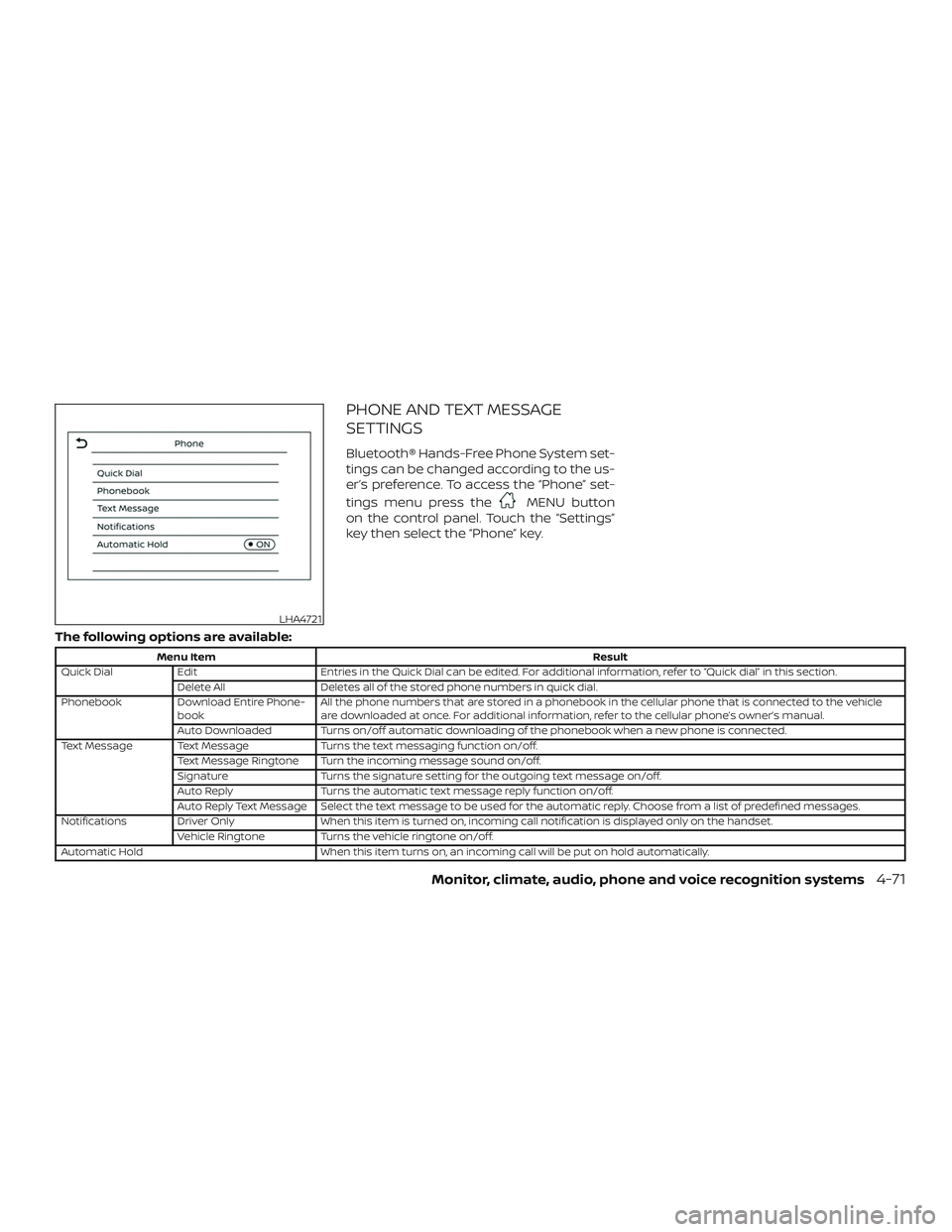
PHONE AND TEXT MESSAGE
SETTINGS
Bluetooth® Hands-Free Phone System set-
tings can be changed according to the us-
er’s preference. To access the “Phone” set-
tings menu press the
MENU button
on the control panel. Touch the “Settings”
key then select the “Phone” key.
The following options are available:
Menu Item Result
Quick Dial Edit Entries in the Quick Dial can be edited. For additional information, refer to “Quick dial” in this section.
Delete All Deletes all of the stored phone numbers in quick dial.
Phonebook Download Entire Phone-
book All the phone numbers that are stored in a phonebook in the cellular phone that is connected to the vehicle
are downloaded at once. For additional information, refer to the cellular phone’s owner’s manual.
Auto Downloaded Turns on/off automatic downloading of the phonebook when a new phone is connected.
Text Message Text Message Turns the text messaging function on/off.
Text Message Ringtone Turn the incoming message sound on/off.
Signature Turns the signature setting for the outgoing text message on/off.
Auto Reply Turns the automatic text message reply function on/off.
Auto Reply Text Message Select the text message to be used for the automatic reply. Choose from a list of predefined messages.
Notifications Driver Only When this item is turned on, incoming call notification is displayed only on the handset.
Vehicle Ringtone Turns the vehicle ringtone on/off.
Automatic Hold When this item turns on, an incoming call will be put on hold automatically.
LHA4721
Monitor, climate, audio, phone and voice recognition systems4-71
Page 256 of 461
Volume & beeps
There are several methods to customize
the volume settings.
Volume & Beeps
The Volume & Beeps screen can be found
by pressing the
MENU button on the
control panel, touching the “Settings” key
on the screen and selecting “Volume &
Beeps”. To adjust the volume of the follow-
ing options, touch the “–” and “+” keys on the
screen.
The available settings are:
∙ Ringtone Adjust the volume level of the ringtone
of incoming calls.
∙ Outgoing Call Adjust the volume level of the outgoing
calls.
∙ Voice Prompt Vol. Adjust the volume level of the system
voice.
∙ Text-to-speech Vol. Adjust the volume of the replay voice for
text messaging.
∙ Button Beeps Turns on/off the button beep sounds
and alarm for prohibited operations. Volume Settings
The Volume settings screen can be found
by pressing the
button on the control
panel then touching the “Volume” key on
the screen. To adjust the volume of the
following options, touch the “–” and “+” keys
on the screen.
The available settings are:
∙ Ringtone Adjust the volume level of the ringtone
of incoming calls.
∙ Outgoing Call Adjust the volume level of the outgoing
calls.
4-72Monitor, climate, audio, phone and voice recognition systems
Page 449 of 461
11 Index
A
Air bag
(See supplemental restraint system) . . .1-43
Air bag system Front (See supplemental front
impact air bag system) .........1-50
Side and curtain (See supplemental
side air bag and curtain side-impact
airbagsystem)............. .1-58
Air bag warning labels ............1-61
Airbagwarninglight..........1-62, 2-19
Air bag warning light, supplemental . . .1-62, 2-19
Air cleaner ...................8-18
Air cleaner housing filter ..........8-18
Air conditioner Air conditioner operation ....4-23,4-29
Air conditioner service ..........4-31
Air conditioner specification label . .10-13
Air conditioner system refrigerant
and oil recommendations .......10-8
Air conditioner system refrigerant
recommendations ............10-8
Heater and air conditioner
(automatic) (if so equipped) ......4-28
Heater and air conditioner
controls ...............4-21,4-29
Heater and air conditioner
(manual) ..................4-20
Servicing air conditioner ........4-31
Air flow charts .............4-18,4-24 Alarm system
(See vehicle security system)
.......2-35
Anchor point locations ............1-27
Antenna ....................4-51
Antifreeze ...................5-77
Anti-lock brake warning light ........2-14
Anti-lock Braking System (ABS) ......5-73
Armrests.................... .1-7
Audible reminders ..............2-23
Audiosystem.................4-31 AM/FMradio............4-36,4-38
AM radio operation ............4-38
AMradioreception............4-32
Auxiliary (AUX) devices operation . . .4-39
Bluetooth® audio .............4-46
FM radio operation ............4-39
FMradioreception............4-32
iPod®Player................4-43
iPod® player operation .........4-43
Radio ....................4-31
Steering wheel audio control switch. .4-49
USB Connections .............4-41
USBinterface...............4-40
USB (Universal Serial Bus)
Connection Port .............4-40
Autolightswitch................2-41
Automatic Automatic power window switch . . .2-56
Automatic anti-glare inside mirror ....3-31
Automatic door locks .............3-7
Automatic Emergency Braking
(AEB) ...................2-14,5-62 B
Battery..................5-77,8-14 Charge warning light ...........2-15
Battery replacement ............8-25
Keyfob................8-25,8-26
NISSAN Intelligent Key® .........8-27
Before starting the engine .........5-14
Belt(Seedrivebelt)..............8-16
Blind Spot Warning (BSW) ..........5-27
Bluetooth® audio ...............4-46
Bluetooth® hands-free phone system . .4-54 Bluetooth® connections ........4-69
Connecting procedure .........4-60
Phone indicators .............4-58
Text messaging ..............4-65
Voice commands .............4-61
Booster seats .................1-40
Brake Anti-lock Braking System (ABS) ....5-73
Brakefluid.................8-12
Brakelight(Seestoplight)....... 8-32
Brakesystem...............5-72
Brakewarninglight............2-14
Brakewearindicators.......2-23,8-21
Self-adjustingbrakes ..........8-21
Brakeandclutchfluid............8-12
Brake Assist ..................5-74
Brakefluid...................8-12
Brakes......................8-21
Brakesystem.................5-72
Break-in schedule ..............5-68