trunk NISSAN SENTRA 2020 Owner´s Manual
[x] Cancel search | Manufacturer: NISSAN, Model Year: 2020, Model line: SENTRA, Model: NISSAN SENTRA 2020Pages: 528, PDF Size: 3.56 MB
Page 4 of 528
When the Rear Door Alert system is acti-
vated:
• When the driver puts the vehicle in the P
(Park) position, a notification message
appears in the vehicle information dis-
play with the options to “Dismiss Mes-
sage” or “Disable Alert” if desired.
– Select “Disable Alert” to temporarily
disable for that stop.
– No selection or ‘Dismiss Message” will
keep the alert enabled for that stop.
• If the alert is enabled when a driver exits
the vehicle, a message will appear in the
vehicle information display that states
“Check Rear Seat for All Articles.”
If “Horn & Alert” setting is selected:
–– An audible horn sound will occur af ter
a short time unless a rear door is
opened and closed within a short time
to deactivate the alert.
–– If the doors are locked before the alert
is deactivated by opening a rear door,
the horn will sound.
–– If the trunk is opened before a rear door
is opened, the horn will be delayed until
af ter the trunk is closed.NOTE:
If “Alert Only ” setting is selected, the
message alert will still be shown in the
vehicle information display but the horn
will not sound.
WARNING
•If the driver selects “Disable Alert”, no
audible alert will be provided regard-
less of rear door open/close status.
•There may be times when there is an
object or passenger in the rear
seat(s) but the audible alert does not
sound. For example, this may occur if
rear seat passengers enter or exit the
vehicle during a trip.
•The system does not directly detect
objects or passengers in the rear
seat(s). Instead, it can detect when a
rear door is opened and closed, indi-
cating that there may be something
in the rear seat(s).
NOTE:
There may be times when the horn
sounds but there are no objects or pas-
sengers in the rear seat(s).
For additional information, refer to “Rear
Door Alert is activated” in this section.
Page 16 of 528
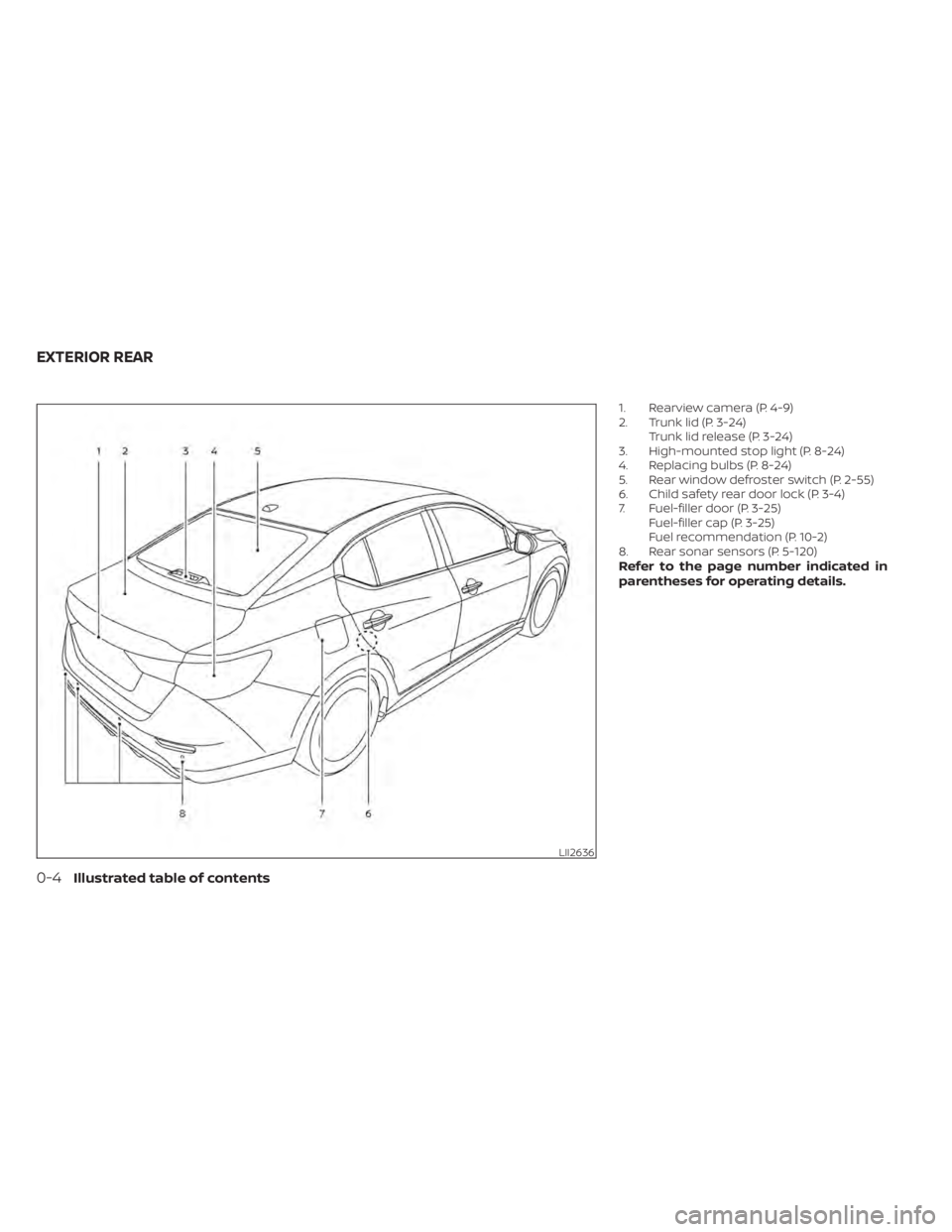
1. Rearview camera (P. 4-9)
2. Trunk lid (P. 3-24)Trunk lid release (P. 3-24)
3. High-mounted stop light (P. 8-24)
4. Replacing bulbs (P. 8-24)
5. Rear window defroster switch (P. 2-55)
6. Child safety rear door lock (P. 3-4)
7. Fuel-filler door (P. 3-25) Fuel-filler cap (P. 3-25)
Fuel recommendation (P. 10-2)
8. Rear sonar sensors (P. 5-120)
Refer to the page number indicated in
parentheses for operating details.
LII2636
EXTERIOR REAR
0-4Illustrated table of contents
Page 19 of 528
17. Driver supplemental knee air bag(P. 1-44)
18. Tilt/Telescopic steering (P. 3-28)
19. Hood release (P. 3-23)
20. Fuel filler door release (P. 3-25)
21. ECO mode switch (P. 5-25) Instrument brightness control (P. 2-55)
Trunk release (P. 3-24)
Power mirror switch (P. 3-29)
For additional information, refer to the
separate NissanConnect® Owner’s Manual.
Refer to the page number indicated in
parentheses for operating details.
Illustrated table of contents0-7
Page 29 of 528
•Properly secure all cargo with ropes
or straps to help prevent it from slid-
ing or shif ting. Do not place cargo
higher than the seatbacks. In a sud-
den stop or collision, unsecured
cargo could cause personal injury.
• When returning the seatbacks to the
upright position, be certain they are
completely secured in the latched
position. If they are not completely
secured, passengers may be injured
in an accident or sudden stop.
• Closely supervise children when they
are around cars to prevent them
from playing and becoming locked in
the trunk where they could be seri-
ously injured. Keep the car locked,
with the rear seatback and trunk lid
securely latched when not in use, and
prevent children's access to car keys.
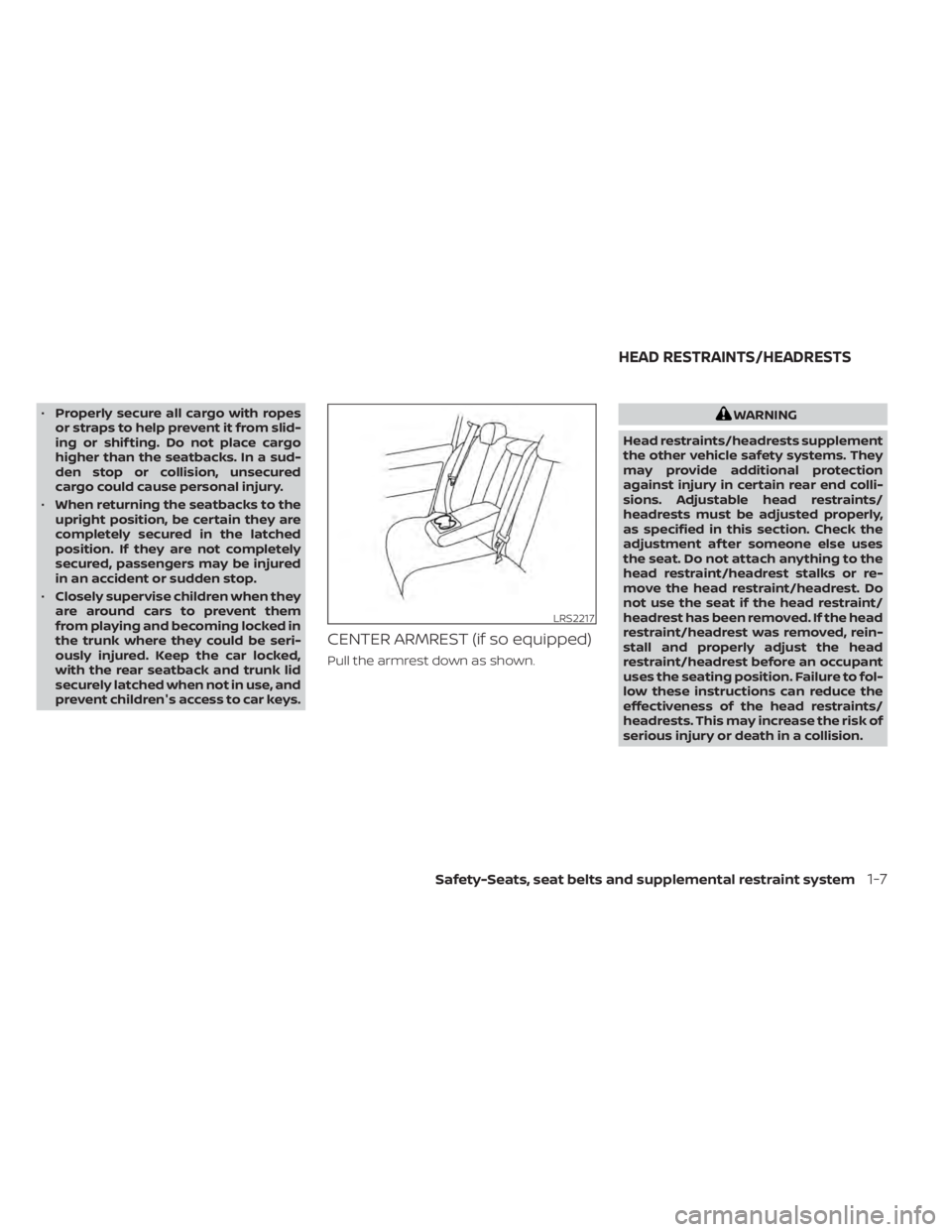
CENTER ARMREST (if so equipped)
Pull the armrest down as shown.
WARNING
Head restraints/headrests supplement
the other vehicle safety systems. They
may provide additional protection
against injury in certain rear end colli-
sions. Adjustable head restraints/
headrests must be adjusted properly,
as specified in this section. Check the
adjustment af ter someone else uses
the seat. Do not attach anything to the
head restraint/headrest stalks or re-
move the head restraint/headrest. Do
not use the seat if the head restraint/
headrest has been removed. If the head
restraint/headrest was removed, rein-
stall and properly adjust the head
restraint/headrest before an occupant
uses the seating position. Failure to fol-
low these instructions can reduce the
effectiveness of the head restraints/
headrests. This may increase the risk of
serious injury or death in a collision.
LRS2217
HEAD RESTRAINTS/HEADRESTS
Safety-Seats, seat belts and supplemental restraint system1-7
Page 91 of 528
Storage ........................................2-66
Front-door pockets ......................... 2-66
Seatback pockets (if so equipped) ...........2-66
Storagetrays................................ 2-67
Glovebox ................................... 2-67
Console box ................................. 2-68
Overhead sunglasses storage ...............2-68
Cup holders ................................. 2-69
Windows ....................................... 2-70
Power windows ............................. 2-70
Moonroof (if so equipped) ......................2-73
Power moonroof ............................ 2-73
Interior lights ...................................2-74
Map lights ................................... 2-75Personal lights
.............................. 2-75
Trunk light ...................................... 2-76
HomeLink® Universal Transceiver
(if so equipped) ................................. 2-76
Programming HomeLink® ...................2-77
Programming HomeLink® for Canadian
customers and gate openers ...............2-78
Operating the HomeLink® Universal
Transceiver .................................. 2-79
Programming trouble-diagnosis ............2-79
Clearing the programmed information ......2-79
Reprogramming a single HomeLink®
button ...................................... 2-80
If your vehicle is stolen ......................2-80
Page 93 of 528
17. Driver supplemental knee air bag(P. 1-44)
18. Tilt/Telescopic steering (P. 3-28)
19. Hood release (P. 3-23)
20. Fuel filler door release (P. 3-25)
21. ECO mode switch (P. 5-25) Instrument brightness control (P. 2-55)
Trunk release (P. 3-24)
Power mirror switch (P. 3-29)
For additional information, refer to the
separate NissanConnect® Owner’s Manual.
Refer to the page number indicated in
parentheses for operating details.
Instruments and controls2-3
Page 118 of 528
8. Engine start operation for Intelligent Keysystem (if I-Key battery level is low)
9. Release Parking Brake
10. Low Fuel
11. Loose Fuel Cap
12. Low Oil Pressure: See Owner’s Manual
13. Low Washer Fluid
14. Tire Pressure Low — Add Air
15. TPMS Error: See Owner’s Manual
16. Door/Trunk Open
17. Power will turn off to save the battery
18. Power turned off to save the battery
19. Reminder: Turn OFF Headlights
20. Headlight System Error: See Owner’s Manual (if so equipped)
21. Engine Oil Service due in---km
22. BSW/RCTA System Malfunction: See Owner’s Manual
23. Side Radar Obstruction
24. Check Rear Seat for All Articles
25. Rear Door Alert is activated
26. Shipping Mode On Push Storage Fuse 27. Not Available Poor Road Conditions (if
so equipped)
28. CVT Malfunction Service now
29. Illumination indicator
30. Outside Temperature Display
31. Low Outside Temperature (if so equipped)
32. Unavailable: Front Radar Obstruction
33. ECO mode indicator
34. Parking Sensor Error-See Owner’s Manual
35. Not Available System Malfunction (if so equipped)
36. Unavailable High Cabin Temperature
37. Currently not available (if so equipped)
38. Rear seat belt reminder
39. Rotate Steering Wheel and Push Start Switch
40. No Key Press and hold to Stop Engine
41. Speed Limit Sign (if so equipped)
42. Driver Attention Alert —Take a Break?
43. Driver Attention Alert MalfunctionNo Key Detected
This warning appears when the Intelligent
Key is lef t outside the vehicle with the igni-
tion switch in the ON position. Make sure
the Intelligent Key is inside the vehicle.
For additional information, refer to “NISSAN
Intelligent Key®” in the “Pre-driving checks
and adjustments” section of this manual.
Key ID Incorrect
This warning appears when the ignition
switch is placed from the OFF position and
the Intelligent Key is not recognized by the
system. You cannot start the engine with
an unregistered key.
For additional information, refer to “NISSAN
Intelligent Key®” in the “Pre-driving checks
and adjustments” section of this manual.
Key Battery Low
This indicator illuminates when the Intelli-
gent Key battery is running out of power.
If this indicator illuminates, replace the bat-
tery with a new one. For additional infor-
mation, refer to “Battery replacement” in
the “Do-it-yourself ” section of this manual.
2-28Instruments and controls
Page 120 of 528
Low Oil Pressure: See Owner’s Manual
This warning appears in the message area
of the vehicle information display if low oil
pressure is detected. This gauge is not de-
signed to indicate low oil level.The low oil
pressure warning is not designed to indi-
cate a low oil level. Use the dipstick to
check the oil level. For additional informa-
tion, refer to “Engine oil” in the “Do-it-
yourself ” section of this manual.
Low Washer Fluid
This warning illuminates when the
windshield-washer fluid is at a low level.
Add windshield-washer fluid as necessary.
For additional information, refer to
“Windshield-washer fluid” in the “Do-it-
yourself ” section of this manual.
Tire Pressure Low - Add Air
This warning appears when the low tire
pressure warning light in the meter illumi-
nates and low tire pressure is detected. The
warning appears each time the ignition
switch is placed in the ON position as long
as the low tire pressure warning light re-
mains illuminated. If this warning appears,
stop the vehicle and adjust the tire pres-
sures of all four tires to the recommended
COLD tire pressure shown on the Tire and
Loading Information label. For additional information, refer to “Low tire pressure
warning light” in this section and “Tire Pres-
sure Monitoring System (TPMS)” in the
“Starting and driving” section of this
manual.
TPMS Error: See Owner’s Manual
This warning appears when there is an er-
ror with your TPMS. If this warning comes
on, have the system checked. It is recom-
mended that you visit a NISSAN dealer for
this service.
Door/Trunk Open
This warning illuminates when a door has
been opened.
Power will turn off to save the battery
This message appears in the vehicle infor-
mation display af ter a period of time if the
ignition switch is in the ON position and if
the vehicle is in P (Park). For additional infor-
mation, refer to “Push-button ignition
switch positions” in the “Starting and driv-
ing” section of this manual.
Power turned off to save the battery
This message appears af ter the ignition
switch is automatically turned off. For addi-
tional information, refer to “Push-button ig-
nition switch positions” in the “Starting and
driving” section of this manual.
Reminder: Turn OFF Headlights
This warning appears when the headlights
are lef t in the ON position when exiting the
vehicle. Place the headlight switch in the
OFF or AUTO position. For additional infor-
mation, refer to “Headlight and turn signal
switch” in this section.
Headlight System Error: See Owner’s
Manual (if so equipped)
This warning appears when the LED head-
lights are not functioning properly.
If this warning appears, have your system
checked. It is recommended that you visit a
NISSAN dealer for this service.
Engine Oil Service due i
n–––km
This distance to oil change is displayed if
the distance to oil change is less than 100
km (62 miles).
BSW/RCTA System Malfunction: See
Owner’s Manual
This warning appears when the Blind Spot
Warning/Rear Cross Traffic Alert systems
are not functioning properly. For additional
information, refer to “Blind Spot Warning
(BSW)” and “Rear Cross Traffic Alert (RCTA)”
in the “Starting and driving” section of this
manual.
2-30Instruments and controls
Page 135 of 528
10. Release Parking Brake
11. Low Fuel
12. Loose Fuel Cap
13. Engine Oil Service due in–––km
14. Low Washer Fluid (if so equipped)
15. Tire Pressure Low - Add Air
16. Door/ Trunk Open
17. Timer Alert —Time for a break?
18. Low outside temperature indicator
19. Power will turn off to save the battery
20. Power turned off to save the battery
21. Reminder: Turn OFF Headlights
22. Headlight System Error See Owner’sManual (if so equipped)
23. Parking Sensor Error: See Owner’s Manual
24. Driver Attention Alert— Take a Break?
25. Driver Attention Alert Malfunction
26. Malfunction: See Owner’s Manual
27. Unavailable: Side Radar Obstruction
28. Malfunction (if so equipped) 29. Shipping Mode On Push Storage Fuse
30. Intelligent Cruise Control (ICC) indica-
tors (if so equipped)
31. CVT (AT) Malfunction Service now (if so equipped)
32. CVT (AT) hot Power reduced (if so equipped)
33. Chassis Control System Error: See Owner’s Manual (if so equipped)
34. Not Available System Malfunction
35. Not Available Front Radar Blocked
36. Currently not available (if so equipped)
37. Not Available Poor Road Conditions (if so equipped)
38. Unavailable: High Cabin Temperature
39. Rear Door Alert is activated
40. Check Rear Seat For All Articles
41. Rear seat belt reminder
42. Rotate Steering Wheel and Push Start Switch
43. No Key Press and hold to Stop Engine
44. Speed Limit Sign (if so equipped)
45. Brightness indicator 46. Engine Stalled Stop safely
47. Engine Malfunction Power reduced Ser-
vice now
48. Engine Malfunction Service now
49. Engine hot Power reduced
No Key Detected
This warning appears when the Intelligent
Key is lef t outside the vehicle with the igni-
tion switch in the ON position. Make sure
the Intelligent Key is inside the vehicle.
For additional information, refer to “NISSAN
Intelligent Key®” in the “Pre-driving checks
and adjustments” section of this manual.
Key ID Incorrect
This warning appears when the ignition
switch is placed from the OFF position and
the Intelligent Key is not recognized by the
system. You cannot start the engine with
an unregistered key.
For additional information, refer to “NISSAN
Intelligent Key®” in the “Pre-driving checks
and adjustments” section of this manual.
Instruments and controls2-45
Page 137 of 528
will be a small reserve of fuel in the tank
when the fuel gauge needle reaches 0
(Empty).
Loose Fuel Cap
This warning appears when the fuel-filler
cap is not tightened correctly af ter the ve-
hicle has been refueled. For additional in-
formation, refer to “Fuel-filler cap” in the
“Pre-driving checks and adjustments” sec-
tion of this manual.
EngineOilServiceduein–––km
This distance to oil change is displayed if
the distance to oil change is less than 100
km (62 miles).
Low Washer Fluid (if so equipped)
This warning illuminates when the
windshield-washer fluid is at a low level.
Add windshield-washer fluid as necessary.
For additional information, refer to
“Windshield-washer fluid” in the “Do-it-
yourself ” section of this manual.
Tire Pressure Low - Add Air
This warning appears when the low tire
pressure warning light in the meter illumi-
nates and low tire pressure is detected. The
warning appears each time the ignition
switch is placed in the ON position as long
as the low tire pressure warning light re-mains illuminated. If this warning appears,
stop the vehicle and adjust the tire pres-
sures of all four tires to the recommended
COLD tire pressure shown on the Tire and
Loading Information label. For additional
information, refer to “Low tire pressure
warning light” in this section and “Tire Pres-
sure Monitoring System (TPMS)” in the
“Starting and driving” section of this
manual.
Door/Trunk Open
This warning illuminates when a door or
the trunk has been opened.
Timer Alert — Time for a break?
This indicator appears when the set time is
reached. The time can be set up to six
hours. For additional information, refer to
“Settings” in this section.
Low outside temperature indicator
This indicator appears if the outside tem-
perature is below 3°C (37°F). The tempera-
ture can be changed to display in Celsius or
Fahrenheit. For additional information, re-
fer to “Settings” in this section.
Power will turn off to save the battery
This message appears in the vehicle infor-
mation display af ter a period of time if the
ignition switch is in the AUTO ACC or the ON
position and if the vehicle is in P (Park). For
additional information, refer to “Push-
button ignition switch positions” in the
“Starting and driving” section of this
manual.
Power turned off to save the battery
This message appears af ter the ignition
switch is automatically turned off. For addi-
tional information, refer to “Push-button ig-
nition switch positions” in the “Starting and
driving” section of this manual.
Reminder: Turn OFF Headlights
This warning appears when the headlights
are lef t in the ON position when exiting the
vehicle. Place the headlight switch in the
OFF or AUTO position. For additional infor-
mation, refer to “Headlight and turn signal
switch” in this section.
Headlight System Error See Owner’s
Manual (if so equipped)
This warning illuminates when there is an
error with the system. For additional infor-
mation, refer to “Headlight and turn signal
switch” in this section.
Instruments and controls2-47