check engine light NISSAN SENTRA 2021 User Guide
[x] Cancel search | Manufacturer: NISSAN, Model Year: 2021, Model line: SENTRA, Model: NISSAN SENTRA 2021Pages: 528, PDF Size: 3.51 MB
Page 137 of 528
will be a small reserve of fuel in the tank
when the fuel gauge needle reaches 0
(Empty).
Loose Fuel Cap
This warning appears when the fuel-filler
cap is not tightened correctly af ter the ve-
hicle has been refueled. For additional in-
formation, refer to “Fuel-filler cap” in the
“Pre-driving checks and adjustments” sec-
tion of this manual.
EngineOilServiceduein–––km
This distance to oil change is displayed if
the distance to oil change is less than 100
km (62 miles).
Low Washer Fluid (if so equipped)
This warning illuminates when the
windshield-washer fluid is at a low level.
Add windshield-washer fluid as necessary.
For additional information, refer to
“Windshield-washer fluid” in the “Do-it-
yourself ” section of this manual.
Tire Pressure Low - Add Air
This warning appears when the low tire
pressure warning light in the meter illumi-
nates and low tire pressure is detected. The
warning appears each time the ignition
switch is placed in the ON position as long
as the low tire pressure warning light re-mains illuminated. If this warning appears,
stop the vehicle and adjust the tire pres-
sures of all four tires to the recommended
COLD tire pressure shown on the Tire and
Loading Information label. For additional
information, refer to “Low tire pressure
warning light” in this section and “Tire Pres-
sure Monitoring System (TPMS)” in the
“Starting and driving” section of this
manual.
Door/Trunk Open
This warning illuminates when a door or
the trunk has been opened.
Timer Alert — Time for a break?
This indicator appears when the set time is
reached. The time can be set up to six
hours. For additional information, refer to
“Settings” in this section.
Low outside temperature indicator
This indicator appears if the outside tem-
perature is below 3°C (37°F). The tempera-
ture can be changed to display in Celsius or
Fahrenheit. For additional information, re-
fer to “Settings” in this section.
Power will turn off to save the battery
This message appears in the vehicle infor-
mation display af ter a period of time if the
ignition switch is in the AUTO ACC or the ON
position and if the vehicle is in P (Park). For
additional information, refer to “Push-
button ignition switch positions” in the
“Starting and driving” section of this
manual.
Power turned off to save the battery
This message appears af ter the ignition
switch is automatically turned off. For addi-
tional information, refer to “Push-button ig-
nition switch positions” in the “Starting and
driving” section of this manual.
Reminder: Turn OFF Headlights
This warning appears when the headlights
are lef t in the ON position when exiting the
vehicle. Place the headlight switch in the
OFF or AUTO position. For additional infor-
mation, refer to “Headlight and turn signal
switch” in this section.
Headlight System Error See Owner’s
Manual (if so equipped)
This warning illuminates when there is an
error with the system. For additional infor-
mation, refer to “Headlight and turn signal
switch” in this section.
Instruments and controls2-47
Page 141 of 528
If this indicator appears, push the ignition
switch while lightly turning the steering
wheel right and lef t.
No Key Press and hold to Stop Engine
This message appears when the Intelligent
key is not detected and the engine should
be turned off.
Speed Limit Sign indicator (if so
equipped)
This message may appear when the Traffic
Sign Recognition system is engaged.
For additional information, refer to “Traffic
Sign Recognition (TSR)” in the “Starting and
driving” section of this manual.
Brightness indicator
This indicator appears when the vehicle
information display screen brightness is
being adjusted.
Engine Stalled: Stop safely (if so
equipped)
This message appears 30 seconds before
the vehicle is shutdown due to an above
normal operating exhaust temperature.
The Malfunction Indicator Light (MIL) and
malfunction warning (red) will illuminate.
Have the system checked. It is recom-mended that you visit a NISSAN dealer im-
mediately for this service.
Engine Malfunction: Power Reduced
Service now (if so equipped)
This warning appears when the engine is
not operating under normal conditions. If
this warning comes on, have the system
checked. It is recommended that you visit a
NISSAN dealer for this service.
Engine Malfunction Service now (if so
equipped)
This warning illuminates when there is a
problem with the engine. If this warning
comes on, have the system checked. It is
recommended that you visit a NISSAN
dealer for this service.
Engine hot Power reduced (if so
equipped)
This engine has a high fluid temperature
protection mode. If the fluid temperature
becomes too high (for example, climbing
steep grades in high temperatures with
heavy loads, such as when towing a trailer),
engine power and, under some conditions,
vehicle speed will be decreased automati-
cally to reduce the chance of engine dam-
age. Vehicle speed can be controlled with
the accelerator pedal, but the engine and
vehicle speed may be reduced.
Page 188 of 528
TROUBLESHOOTING GUIDE
(Continuously Variable
Transmission only)
SymptomPossible CauseRemedy
When pushing the ignition switch to
stop the engine The P (Park) warning light in the instru-
ment panel illuminates and the inside
chime sounds continuously. The shif t lever is not in the P (Park) po-
sition.
Make sure that the shif t lever is in the
P (Park) position.
When opening the driver's door A warning chime sounds continuously. The ignition switch is in the ACC posi-
tion.Place the ignition switch in the OFF
position.
When pushing the door handle re-
quest switch (if so equipped) to lock
the door The outside chime sounds for a few
seconds.
The Intelligent Key is inside the vehicle
or the trunk.Be sure to carry the Intelligent Key with
you.
When closing the doors The P (Park) warning light in the instru-
ment panel illuminates and the outside
chime sounds continuously.
The ignition switch is in the ACC or OFF
position and the shif t lever is not in the
P (Park) position.Make sure that the shif t lever is in the
P (Park) position and place the ignition
switch in the OFF position.
The Rear Door Alert warning message
appears on the display, the horn
sounds three times, or a Check Rear
Seat for All Articles warning appears on
the display. The Rear Door Alert is activated.
Check the back seat for all articles,
press the ENTER button to clear the
Rear Door Alert warning message.
The outside chime sounds for approxi-
mately 3 seconds and all doors unlock. The Intelligent Key is in the vehicle or
trunk.Be sure to carry the Intelligent Key with
you.
When opening the driver's door A warning chime sounds continuously. The ignition switch is in the ACC posi-
tion.Place the ignition switch in the OFF
position.
When closing the trunk lid The outside chime sounds for approxi-
mately 10 seconds and the trunk lid
opens. The Intelligent Key is inside the trunk.
Be sure to carry the Intelligent Key with
you.
When pressing the
button on
the Intelligent Key to the lock the door The outside chime sounds for a few
seconds and all the doors unlock. The Intelligent Key is inside the vehicle
or the trunk.
Be sure to carry the Intelligent Key with
you.
A door is not closed securely. Close the doors securely.
3-18Pre-driving checks and adjustments
Page 189 of 528
TROUBLESHOOTING GUIDE (Manual Transmission only)
SymptomPossible CauseRemedy
When the parking brake is fully applied The inside warning chime sounds con-
tinuously. The ignition switch is in the ACC or ON
position.Place the ignition switch in the OFF
position.
When opening the driver's door A warning chime sounds continuously. The ignition switch is in the ON posi-
tion.Place the ignition switch in the OFF
position.
When pushing the door handle re-
quest switch (if so equipped) to lock
the door The outside chime sounds for a few
seconds.
The Intelligent Key is inside the vehicle
or the trunk.Be sure to carry the Intelligent Key with
you.
When closing the doors The key warning light in the instrument
panel illuminates, the outside chime
sounds three times and the inside
warning chime sounds for approxi-
mately 3 seconds.
The ignition switch is in the ACC posi-
tion.
Place the ignition switch in the OFF
position.
The outside chime sounds for approxi-
mately 3 seconds and all doors unlock. The Intelligent Key is in the vehicle or
trunk.Be sure to carry the Intelligent Key with
you.
When pushing the ignition switch to
start the engine The key warning shows in the vehicle
information display.
The battery charge is low.Replace the battery with a new one.
For additional information, refer to
“Battery replacement” in the “Do-it-
yourself ” section of this manual.
Pre-driving checks and adjustments3-19
Page 191 of 528
The Remote Engine Start operating range
is approximately 197 f t (60 m) from the ve-
hicle.
REMOTE STARTING THE VEHICLE
To use the Remote Engine Start feature to
start the engine perform the following:
1. Aim the Intelligent Key at the vehicle.
2. Press the
button to lock all doors.
3. Within 5 seconds press and hold the
button until the turn signal lights
flash and the tail lamps turn on. If the
vehicle is not within view press and hold
the
button for at least 2 seconds.
The following events will occur when the
engine starts:
• The parking lights will turn on and remain on as long as the engine is running.
• The doors will be locked and the climate control system may come on.
• The engine will continue to run for 10 min- utes. Repeat the steps to extend the time
for an additional 10 minutes. For addi-
tional information, refer to “Extending en-
gine run time” in this section.
Depress and hold the brake then push the
push-button ignition switch to the ON po-
sition before driving. For additional infor- mation, refer to “Driving the vehicle” in the
“Starting and driving” section of this
manual.
EXTENDING ENGINE RUN TIME
The Remote Engine Start feature can be
extended one time by performing the
steps listed in “Remote starting the vehicle”
in this section. Run time will be calculated
as follows:
• The first 10 minute run time will start
when the Remote Engine Start function is
performed.
• The second 10 minutes will start immedi- ately when the Remote Engine Start
function is performed again. For example,
if the engine has been running for 5 min-
utes, and 10 minutes are added, the en-
gine will run for a total of 15 minutes.
• Extending engine run time will bring you to the two Remote Engine Start limit.
A maximum of two Remote Engine Starts,
or a single start with an extension, are al-
lowed between ignition cycles.
The ignition switch must be cycled to the
ON position and then back to the OFF po-
sition before the Remote Engine Start pro-
cedure can be used again.
CANCELING A REMOTE ENGINE
START
To cancel a Remote Engine Start, perform
one of the following:
• Aim the Intelligent Key at the vehicle and press
until the parking lights turn off.
• Turn on the hazard warning flashers.
• Cycle the ignition switch on and then off.
• The extended engine run time has ex- pired.
• The first 10 minute timer has expired.
• The engine hood has been opened.
• The shif t lever is moved out of park.
• The alarm sounds due to illegal entry into the vehicle.
• The ignition switch is pushed without an Intelligent Key in the vehicle.
• The ignition switch is pushed with an In- telligent Key in the vehicle but the brake
pedal is not depressed.
Pre-driving checks and adjustments3-21
Page 192 of 528
CONDITIONS THE REMOTE ENGINE
START WILL NOT WORK
The Remote Engine Start will not operate if
any of the following conditions are present:
• “Remote Engine Start” is turned off in the“Vehicle Settings” menu of the vehicle in-
formation display.
• The ignition switch is placed in the ON position.
• The hood is not securely closed.
• The hazard indicator lights are on.
• The engine is still running. The engine must be completely stopped. Wait at
least 6 seconds if the engine goes from
running to off. This is not applicable when
extending engine run time.
• The
button is not pressed and held
for at least 2 seconds.
• The
button is not pressed and held
within 5 seconds of pressing the lock but-
ton.
• The brake is pressed.
• The doors are not closed and locked.
• The trunk is open.
• The Key System Error warning shows in the vehicle information display.
• The alarm sounds due to illegal entry into the vehicle. • Two Remote Engine Starts, or a single
Remote Engine Start with an extension,
have already been used.
• The vehicle is not in P (Park).
• There is a detected registered key already inside of the vehicle.
• The Remote Engine Start function has been switched to the OFF position in “Ve-
hicle Settings” of the vehicle information
display. For additional information, refer
to “Vehicle information display” in the “In-
struments and controls” section of this
manual.
The Remote Engine Start may display a
warning or indicator in the vehicle informa-
tion display. For additional information, re-
fer to “Vehicle information display” in the
“Instruments and controls” section of this
manual.
3-22Pre-driving checks and adjustments
Page 193 of 528
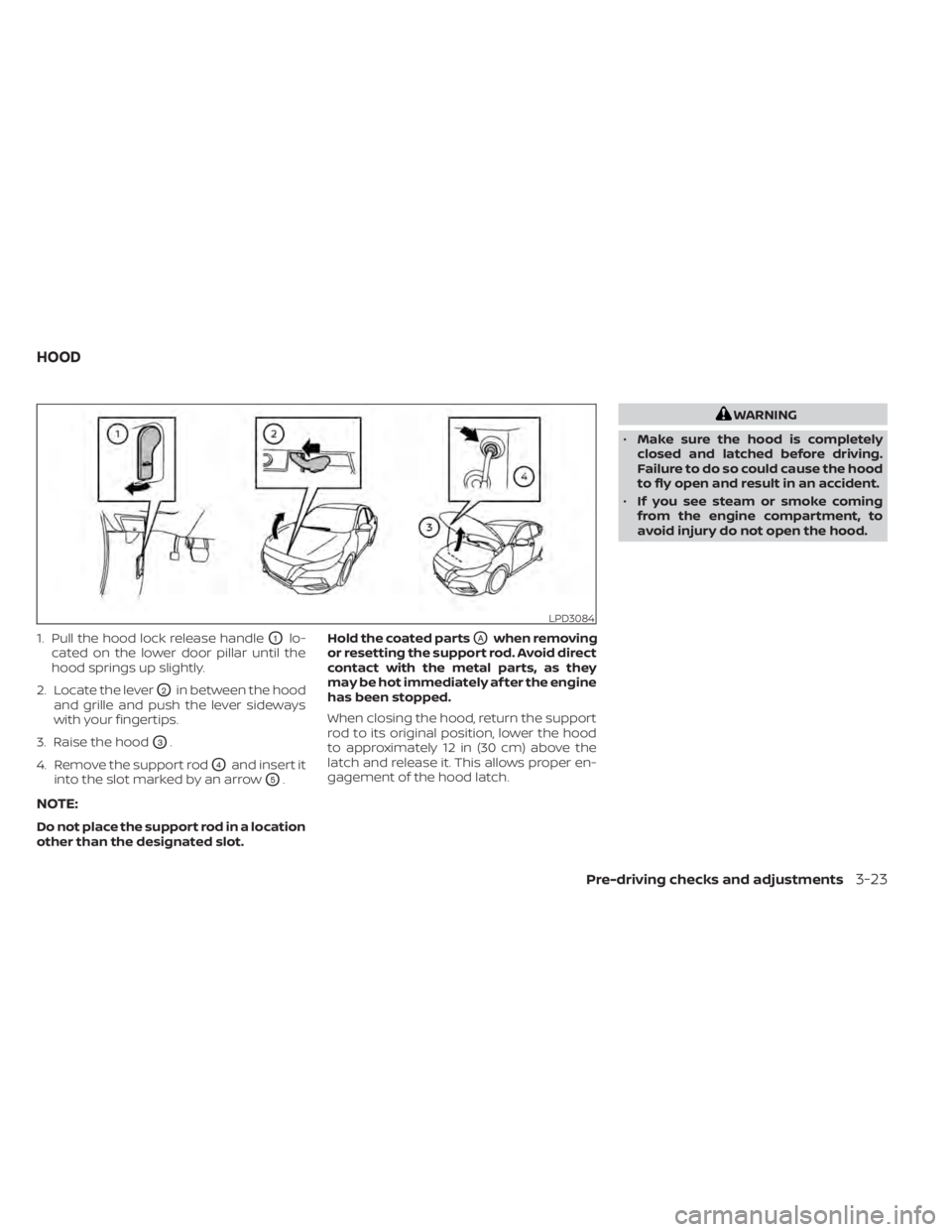
1. Pull the hood lock release handleO1lo-
cated on the lower door pillar until the
hood springs up slightly.
2. Locate the lever
O2in between the hood
and grille and push the lever sideways
with your fingertips.
3. Raise the hood
O3.
4. Remove the support rod
O4and insert it
into the slot marked by an arrow
O5.
NOTE:
Do not place the support rod in a location
other than the designated slot. Hold the coated parts
OAwhen removing
or resetting the support rod. Avoid direct
contact with the metal parts, as they
may be hot immediately af ter the engine
has been stopped.
When closing the hood, return the support
rod to its original position, lower the hood
to approximately 12 in (30 cm) above the
latch and release it. This allows proper en-
gagement of the hood latch.
Pre-driving checks and adjustments3-23
Page 300 of 528
NISSAN VEHICLE IMMOBILIZER
SYSTEM
The NISSAN Vehicle Immobilizer System
will not allow the engine to start without
the use of the registered key.
If the engine fails to start using a registered
key (for example, when interference is
caused by another registered key, an auto-
mated toll road device or automatic pay-
ment device on the key ring), restart the
engine using the following procedure:
1. Leave the ignition switch in the ON posi-tion for approximately 5 seconds.
2. Place the ignition switch in the OFF or LOCK position, and wait approximately
10 seconds.
3. Repeat steps 1 and 2.
4. Restart the engine while holding the de- vice (which may have caused the inter-
ference) separate from the registered
key.
If the no start condition re-occurs, NISSAN
recommends placing the registered key on
a separate key ring to avoid interference
from other devices. • Make sure the area around the vehicle is
clear.
• Check fluid levels such as engine oil, cool- ant, brake and clutch fluid (if so equipped),
and windshield-washer fluid as fre-
quently as possible, or at least whenever
you refuel.
• Check that all windows and lights are clean.
• Visually inspect tires for their appearance and condition. Also check tires for proper
inflation.
• Lock all doors.
• Position seat and adjust head restraints/ headrests.
• Adjust inside and outside mirrors.
• Fasten seat belts and ask all passengers to do likewise.
• Check the operation of warning lights when the ignition switch is placed in the
ON position. For additional information,
refer to “Warning lights, indicator lights
and audible reminders” in the “Instru-
ments and controls” section of this
manual. 1. Apply the parking brake.
2.
Continuously Variable Transmission
model:
Move the shif t lever to P (Park) or N (Neu-
tral). P (Park) is recommended.
The starter is designed not to operate
if the shif t lever is in any of the driving
positions.
Manual Transmission (M/T) model:
Move the shif t lever to N (Neutral). De-
press the clutch pedal to the floor.
The starter is designed not to operate
unless the clutch pedal is fully de-
pressed.
3. Push the ignition switch to the ON posi- tion. Depress the brake pedal and the
clutch pedal (if so equipped) and push
the ignition switch to start the engine.
To start the engine immediately, push
and release the ignition switch while de-
pressing the brake pedal with the igni-
tion switch in any position.
• If the engine is very hard to start in extremely cold weather or when re-
starting, depress the accelerator
pedal a little (approximately 1/3 to the
BEFORE STARTING THE ENGINE STARTING THE ENGINE
5-14Starting and driving
Page 307 of 528
OFF position:
For normal driving and fuel economy, use
the OFF position.
ON position:
For driving up or down long slopes where
engine braking is necessary, or for powerful
acceleration, use the ON position. The
transmission will automatically select a dif-
ferent gear ratio, allowing the engine to
provide high output.
Remember not to drive at high speeds for
extended periods of time with the drive
sport mode in the ON position. This re-
duces fuel economy.
Accelerator downshif t
— in D (Drive) position —
For passing or hill climbing, depress the
accelerator pedal to the floor. This shif ts
the transmission down into a lower gear,
depending on the vehicle speed.
Fail-safe
If the vehicle is driven under extreme
conditions, such as excessive wheel
spinning and subsequent hard braking,
the fail-safe system may be activated.
The Malfunction Indicator Light (MIL)may come on to indicate the fail-safe
mode is activated. For additional infor-
mation, refer to “Malfunction Indicator
Light (MIL)” in the “Instruments and con-
trols” section of this manual. This will oc-
cur even if all electrical circuits are func-
tioning properly. In this case, place the
ignition switch in the OFF position and
wait for 10 seconds. Then push the
switch back to the ON position. The ve-
hicle should return to its normal operat-
ing condition. If it does not return to its
normal operating condition, have the
transmission checked and repaired, if
necessary. It is recommended that you
visit a NISSAN dealer for this service.
WARNING
When the high fluid temperature pro-
tection mode or fail-safe operation oc-
curs, vehicle speed may be gradually
reduced. The reduced speed may be
lower than other traffic, which could in-
crease the chance of a collision. Be es-
pecially careful when driving. If neces-
sary, pull to the side of the road at a safe
place and allow the transmission to re-
turn to normal operation, or have it re-
paired if necessary.
MANUAL TRANSMISSION (if so
equipped)
CAUTION
• Do not rest your foot on the clutch
pedal while driving. This may cause
clutch damage.
• Fully depress the clutch pedal before
shif ting to help prevent transmission
damage.
• Stop your vehicle completely before
shif ting into R (Reverse).
Starting and driving5-21
Page 320 of 528
•The system may not function prop-
erly under the following conditions:
– On roads where there are multiple
parallel lane markers; lane mark-
ers that are faded or not painted
clearly; yellow painted lane mark-
ers; non-standard lane markers;
or lane markers covered with wa-
ter, dirt, snow, etc.
– On roads where the discontinued
lane markers are still detectable.
– On roads where there are sharp
curves.
– On roads where there are sharply
contrasting objects, such as shad-
ows, snow, water, wheel ruts,
seams or lines remaining af ter
road repairs. (The LDW system
could detect these items as lane
markers.)
– On roads where the traveling lane
merges or separates.
– When the vehicle’s traveling direc-
tion does not align with the lane
marker.
– When traveling close to the ve-
hicle in front of you, which ob-
structs the lane camera unit de-
tection range. –
When rain, snow, dirt or an object
adheres to the windshield in front
of the lane camera unit.
– When the headlights are not
bright due to dirt on the lens or if
the aiming is not adjusted
properly.
– When strong light enters the lane
camera unit. (For example, the
light directly shines on the front of
the vehicle at sunrise or sunset.)
– When a sudden change in bright-
ness occurs. (For example, when
the vehicle enters or exits a tunnel
or under a bridge.)
SYSTEM TEMPORARILY
UNAVAILABLE
If the vehicle is parked in direct sunlight
under high temperature conditions (over
approximately 104°F [40°C]) and then
started, the LDW system may be deacti-
vated automatically and the following
message will appear in the vehicle infor-
mation display: “Unavailable: High Cabin
Temperature.”
When the interior temperature is reduced,
the LDW system will resume operating au-
tomatically. The LDW system is not designed to warn
under the following conditions:
• When you operate the lane change signal
and change traveling lanes in the direc-
tion of the signal. (The LDW system will
become operable again approximately 2
seconds af ter the lane change signal is
turned off.)
• When the vehicle speed lowers to less than approximately 37 mph (60 km/h).
Af ter the above conditions have finished
and the necessary operating conditions
are satisfied, the LDW functions will resume.
SYSTEM MALFUNCTION
If the LDW system malfunctions, it will can-
cel automatically and “Not Available Sys-
tem Malfunction” will appear in the vehicle
information display. If “Not Available Sys-
tem Malfunction” appears in the vehicle in-
formation display, pull off the road to a safe
location and stop the vehicle. Place the
shif t lever in the P (Park) position and the
ignition switch in the OFF position and re-
start the engine/motor. If “Not Available
System Malfunction” continues to appear
in the vehicle information display, have the
system checked. It is recommended that
you visit a NISSAN dealer for this service.
5-34Starting and driving