fuel NISSAN SENTRA 2022 User Guide
[x] Cancel search | Manufacturer: NISSAN, Model Year: 2022, Model line: SENTRA, Model: NISSAN SENTRA 2022Pages: 528, PDF Size: 3.51 MB
Page 119 of 528
Key System Error: See Owner’s
Manual
Af ter the ignition switch is pushed to the
ON position, this light comes on for a period
of time and then turns off.
The Key System Error message warns of a
malfunction with the Intelligent Key sys-
tem. If the light comes on while the engine
is stopped, it may be impossible to start
the engine.
If the light comes on while the engine is
running, you can drive the vehicle. However,
in these cases, have the system checked. It
is recommended that you visit a NISSAN
dealer for this service.
Shif t to Park (if so equipped)
This warning illuminates when the ignition
switch is in the AUTO ACC or OFF position
and the shif t lever is not in the P (Park)
position. Also, a chime sounds when the
ignition switch is in the AUTO ACC or OFF
position.
If this warning illuminates, move the shif t
lever to the P (Park) position and start the
engine.
Push brake and start switch to drive
(if so equipped)
This indicator appears when the shif t lever
is in the P (Park) position.
This indicator means that the engine will
start by pushing the ignition switch with
the brake pedal depressed. You can start
the engine from any position of the ignition
switch.
Push clutch and start switch to drive
(if so equipped)
This indicator appears when the shif t lever
is in the N (Neutral) position.
This indicator means that the engine will
start by pushing the ignition switch with
the clutch and brake pedal depressed. You
can start the engine from any position of
the ignition switch.
Engine start operation for Intelligent
Key system (if I-Key battery level is
low)
This indicator appears when the battery of
the Intelligent Key is low and when the In-
telligent Key system and the vehicle are not
communicating normally.If this appears, touch the ignition switch
with the Intelligent Key while depressing
the brake pedal. For additional information,
refer to “NISSAN Intelligent Key® battery dis-
charge” in the “Starting and driving” section
of this manual.
Release Parking Brake
This warning illuminates in the message
area of the vehicle information display
when the parking brake is set and the ve-
hicle is driven.
Low Fuel
This warning illuminates when the fuel level
in the fuel tank is getting low. Refuel as
soon as it is convenient, preferably before
the fuel gauge reaches 0 (Empty).
There
will be a small reserve of fuel in the tank
when the fuel gauge needle reaches 0
(Empty).
Loose Fuel Cap
This warning appears when the fuel-filler
cap is not tightened correctly af ter the ve-
hicle has been refueled. For additional in-
formation, refer to “Fuel-filler cap” in the
“Pre-driving checks and adjustments” sec-
tion of this manual.
Instruments and controls2-29
Page 125 of 528
The OK,andbuttons also
control audio and control panel functions
in some conditions. Most screens and
menus offer instruction prompts of the
steering switch buttons to indicate how to
control the vehicle information display.
Dots on the right side of the vehicle infor-
mation display may appear if there is more
than one page of menu items or warning
messages, depending on the type of me-
ter. The OK button changes the audio
source and the
buttons also con-
trol voice recognition manual mode. The
OK button can be used to change the au-
dio source when the audio screen is dis-
played. The
buttons can be used
when controlling voice recognition
prompts manually. For additional informa-
tion, refer to the separate NissanConnect®
Owner’s Manual.
STARTUP DISPLAY
When the vehicle in placed in the ON posi-
tion the vehicle information display may
display the following screens (if so
equipped):
• Home
• Drive Computer — Speed, Fuel Economy, Trip Distance & Time
• Convenience • Digital speed and average speed
• Instant fuel economy/ average fuel
economy
• Tire Pressure
• Audio/telephone
• Intelligent Cruise Control (ICC)
• Driving Aids
• Settings
• Warnings*
*Warnings will only display if there are any
present. For additional information, refer to
“Vehicle information display warnings and
indicators” in this section.
To control what items display in the vehicle
information display, refer to “How to use the
vehicle information display” in this section.
RESETTING THE DRIVE COMPUTER
The drive computer is divided across three
screens:
• Average Speed
• Average Fuel Economy
• Trip Distance & Time
1. Press the
buttons
until you reach the desired drive com-
puter mode. 2. Press and hold the OK button for ap-
proximately 1 second to reset the infor-
mation on the currently displayed
screen.
NOTE:
If you wish to reset all drive computer
values at once, press and hold the OK
button for approximately 3 seconds until
a reset menu appears; and follow the
instructions.
SETTINGS
The setting mode allows you to change the
information displayed in the vehicle infor-
mation display. It also allows you to change
vehicle functions:
• VDC Setting
• ECO Mode Setting
• Driver Assistance
• TPMS Settings
• Clock
• Vehicle Settings
• Maintenance
• Customize Display
• Unit/Language
• Factory Reset
Instruments and controls2-35
Page 135 of 528
10. Release Parking Brake
11. Low Fuel
12. Loose Fuel Cap
13. Engine Oil Service due in–––km
14. Low Washer Fluid (if so equipped)
15. Tire Pressure Low - Add Air
16. Door/ Trunk Open
17. Timer Alert —Time for a break?
18. Low outside temperature indicator
19. Power will turn off to save the battery
20. Power turned off to save the battery
21. Reminder: Turn OFF Headlights
22. Headlight System Error See Owner’sManual (if so equipped)
23. Parking Sensor Error: See Owner’s Manual
24. Driver Attention Alert— Take a Break?
25. Driver Attention Alert Malfunction
26. Malfunction: See Owner’s Manual
27. Unavailable: Side Radar Obstruction
28. Malfunction (if so equipped) 29. Shipping Mode On Push Storage Fuse
30. Intelligent Cruise Control (ICC) indica-
tors (if so equipped)
31. CVT (AT) Malfunction Service now (if so equipped)
32. CVT (AT) hot Power reduced (if so equipped)
33. Chassis Control System Error: See Owner’s Manual (if so equipped)
34. Not Available System Malfunction
35. Not Available Front Radar Blocked
36. Currently not available (if so equipped)
37. Not Available Poor Road Conditions (if so equipped)
38. Unavailable: High Cabin Temperature
39. Rear Door Alert is activated
40. Check Rear Seat For All Articles
41. Rear seat belt reminder
42. Rotate Steering Wheel and Push Start Switch
43. No Key Press and hold to Stop Engine
44. Speed Limit Sign (if so equipped)
45. Brightness indicator 46. Engine Stalled Stop safely
47. Engine Malfunction Power reduced Ser-
vice now
48. Engine Malfunction Service now
49. Engine hot Power reduced
No Key Detected
This warning appears when the Intelligent
Key is lef t outside the vehicle with the igni-
tion switch in the ON position. Make sure
the Intelligent Key is inside the vehicle.
For additional information, refer to “NISSAN
Intelligent Key®” in the “Pre-driving checks
and adjustments” section of this manual.
Key ID Incorrect
This warning appears when the ignition
switch is placed from the OFF position and
the Intelligent Key is not recognized by the
system. You cannot start the engine with
an unregistered key.
For additional information, refer to “NISSAN
Intelligent Key®” in the “Pre-driving checks
and adjustments” section of this manual.
Instruments and controls2-45
Page 136 of 528

Key Battery Low
This indicator illuminates when the Intelli-
gent Key battery is running out of power.
If this indicator illuminates, replace the bat-
tery with a new one. For additional infor-
mation, refer to “Battery replacement” in
the “Do-it-yourself ” section of this manual.
Key System Error: See Owner’s
Manual
Af ter the ignition switch is pushed to the
ON position, this light comes on for a period
of time and then turns off.
The Key System Error message warns of a
malfunction with the Intelligent Key sys-
tem. If the light comes on while the engine
is stopped, it may be impossible to start
the engine.
If the light comes on while the engine is
running, you can drive the vehicle. However,
in these cases, have the system checked. It
is recommended that you visit a NISSAN
dealer for this service.
Key Registration Complete
This appears when a new Intelligent Key is
registered to the vehicle.
Shif t to Park
This warning illuminates when the ignition
switch is in the AUTO ACC or OFF position
and the shif t lever is not in the P (Park)
position. Also, a chime sounds when the
ignition switch is in the AUTO ACC or OFF
position.
If this warning illuminates, move the shif t
lever to the P (Park) position and start the
engine.
Push Ignition to OFF
Af ter the Push Ignition to OFF warning illu-
minates, the warning will illuminate if the
ignition switch is placed in the AUTO ACC
position when the shif t lever is moved to
the P (Park) position.
To turn off the Push warning, place the ig-
nition switch in the ON position and then in
the LOCK position.
Push brake and start switch to drive
This indicator appears when the shif t lever
is in the P (Park) position.
This indicator also appears when the ve-
hicle has been started using the Remote
Engine Start (if so equipped) function.
This indicator means that the engine will
start by pushing the ignition switch withthe brake pedal depressed. You can start
the engine from any position of the ignition
switch.
Engine start operation for Intelligent
Key system (if I-Key battery level is
low)
This indicator appears when the battery of
the Intelligent Key is low and when the In-
telligent Key system and the vehicle are not
communicating normally.
If this appears, touch the ignition switch
with the Intelligent Key while depressing
the brake pedal. For additional information,
refer to “NISSAN Intelligent Key® battery dis-
charge” in the “Starting and driving” section
of this manual.
Release Parking Brake
This warning illuminates in the message
area of the vehicle information display
when the parking brake is set and the ve-
hicle is driven.
Low Fuel
This warning illuminates when the fuel level
in the fuel tank is getting low. Refuel as
soon as it is convenient, preferably before
the fuel gauge reaches 0 (Empty).
There
2-46Instruments and controls
Page 137 of 528
will be a small reserve of fuel in the tank
when the fuel gauge needle reaches 0
(Empty).
Loose Fuel Cap
This warning appears when the fuel-filler
cap is not tightened correctly af ter the ve-
hicle has been refueled. For additional in-
formation, refer to “Fuel-filler cap” in the
“Pre-driving checks and adjustments” sec-
tion of this manual.
EngineOilServiceduein–––km
This distance to oil change is displayed if
the distance to oil change is less than 100
km (62 miles).
Low Washer Fluid (if so equipped)
This warning illuminates when the
windshield-washer fluid is at a low level.
Add windshield-washer fluid as necessary.
For additional information, refer to
“Windshield-washer fluid” in the “Do-it-
yourself ” section of this manual.
Tire Pressure Low - Add Air
This warning appears when the low tire
pressure warning light in the meter illumi-
nates and low tire pressure is detected. The
warning appears each time the ignition
switch is placed in the ON position as long
as the low tire pressure warning light re-mains illuminated. If this warning appears,
stop the vehicle and adjust the tire pres-
sures of all four tires to the recommended
COLD tire pressure shown on the Tire and
Loading Information label. For additional
information, refer to “Low tire pressure
warning light” in this section and “Tire Pres-
sure Monitoring System (TPMS)” in the
“Starting and driving” section of this
manual.
Door/Trunk Open
This warning illuminates when a door or
the trunk has been opened.
Timer Alert — Time for a break?
This indicator appears when the set time is
reached. The time can be set up to six
hours. For additional information, refer to
“Settings” in this section.
Low outside temperature indicator
This indicator appears if the outside tem-
perature is below 3°C (37°F). The tempera-
ture can be changed to display in Celsius or
Fahrenheit. For additional information, re-
fer to “Settings” in this section.
Power will turn off to save the battery
This message appears in the vehicle infor-
mation display af ter a period of time if the
ignition switch is in the AUTO ACC or the ON
position and if the vehicle is in P (Park). For
additional information, refer to “Push-
button ignition switch positions” in the
“Starting and driving” section of this
manual.
Power turned off to save the battery
This message appears af ter the ignition
switch is automatically turned off. For addi-
tional information, refer to “Push-button ig-
nition switch positions” in the “Starting and
driving” section of this manual.
Reminder: Turn OFF Headlights
This warning appears when the headlights
are lef t in the ON position when exiting the
vehicle. Place the headlight switch in the
OFF or AUTO position. For additional infor-
mation, refer to “Headlight and turn signal
switch” in this section.
Headlight System Error See Owner’s
Manual (if so equipped)
This warning illuminates when there is an
error with the system. For additional infor-
mation, refer to “Headlight and turn signal
switch” in this section.
Instruments and controls2-47
Page 195 of 528
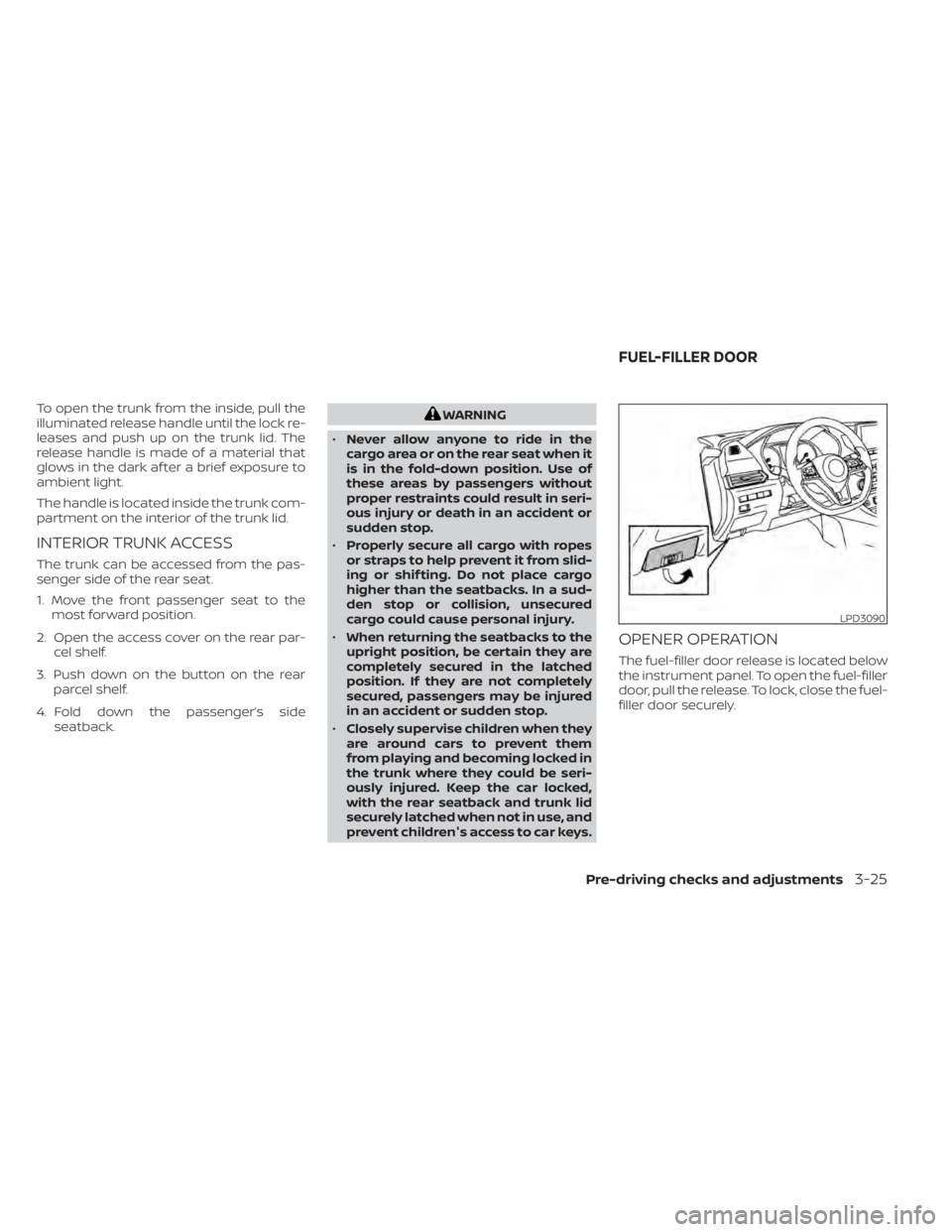
To open the trunk from the inside, pull the
illuminated release handle until the lock re-
leases and push up on the trunk lid. The
release handle is made of a material that
glows in the dark af ter a brief exposure to
ambient light.
The handle is located inside the trunk com-
partment on the interior of the trunk lid.
INTERIOR TRUNK ACCESS
The trunk can be accessed from the pas-
senger side of the rear seat.
1. Move the front passenger seat to themost forward position.
2. Open the access cover on the rear par- cel shelf.
3. Push down on the button on the rear parcel shelf.
4. Fold down the passenger’s side seatback.
LPD3090
FUEL-FILLER DOOR
Pre-driving checks and adjustments3-25
Page 196 of 528
FUEL-FILLER CAP
Malfunc-
tion Indicator Light (MIL) to come on.
• Never pour fuel into the throttle body
to attempt to start your vehicle. •
Do not fill a portable fuel container in
the vehicle or trailer. Static electricity
can cause an explosion of flammable
liquid, vapor or gas in any vehicle or
trailer. To reduce the risk of serious
injury or death when filling portable
fuel containers:
– Always place the container on the
ground when filling.
– Do not use electronic devices
when filling.
– Keep the pump nozzle in contact
with the container while you are
filling it.
– Use only approved portable fuel
containers for flammable liquid.
CAUTION
• Do not use E–15 or E–85 fuel in your
vehicle. For additional information,
refer to “Fuel recommendation” in
the “Technical and consumer infor-
mation” section of this manual. •
The LOOSE FUEL CAP warning mes-
sage will appear if the fuel-filler cap
is not properly tightened. It may take
a few driving trips for the message to
be displayed. Failure to tighten the
fuel-filler cap properly af ter the
LOOSE FUEL CAP warning message
appears may cause the
Mal-
function Indicator Light (MIL) to
illuminate.
• Failure to tighten the fuel-filler cap
properly may cause the
Mal-
function Indicator Light (MIL) to illu-
minate. If the
light illuminates
because the fuel-filler cap is loose or
missing, tighten or install the cap and
continue to drive the vehicle. The
light should turn off af ter a few
driving trips. If thelight does not
turn off af ter a few driving trips, have
the vehicle inspected. It is recom-
mended that you visit a NISSAN
dealer for this service.
• For additional information, refer to
“Malfunction Indicator Light (MIL)” in
the “Instruments and controls” sec-
tion of this manual.
• If fuel is spilled on the vehicle body,
flush it away with water to avoid
paint damage.
3-26Pre-driving checks and adjustments
Page 197 of 528
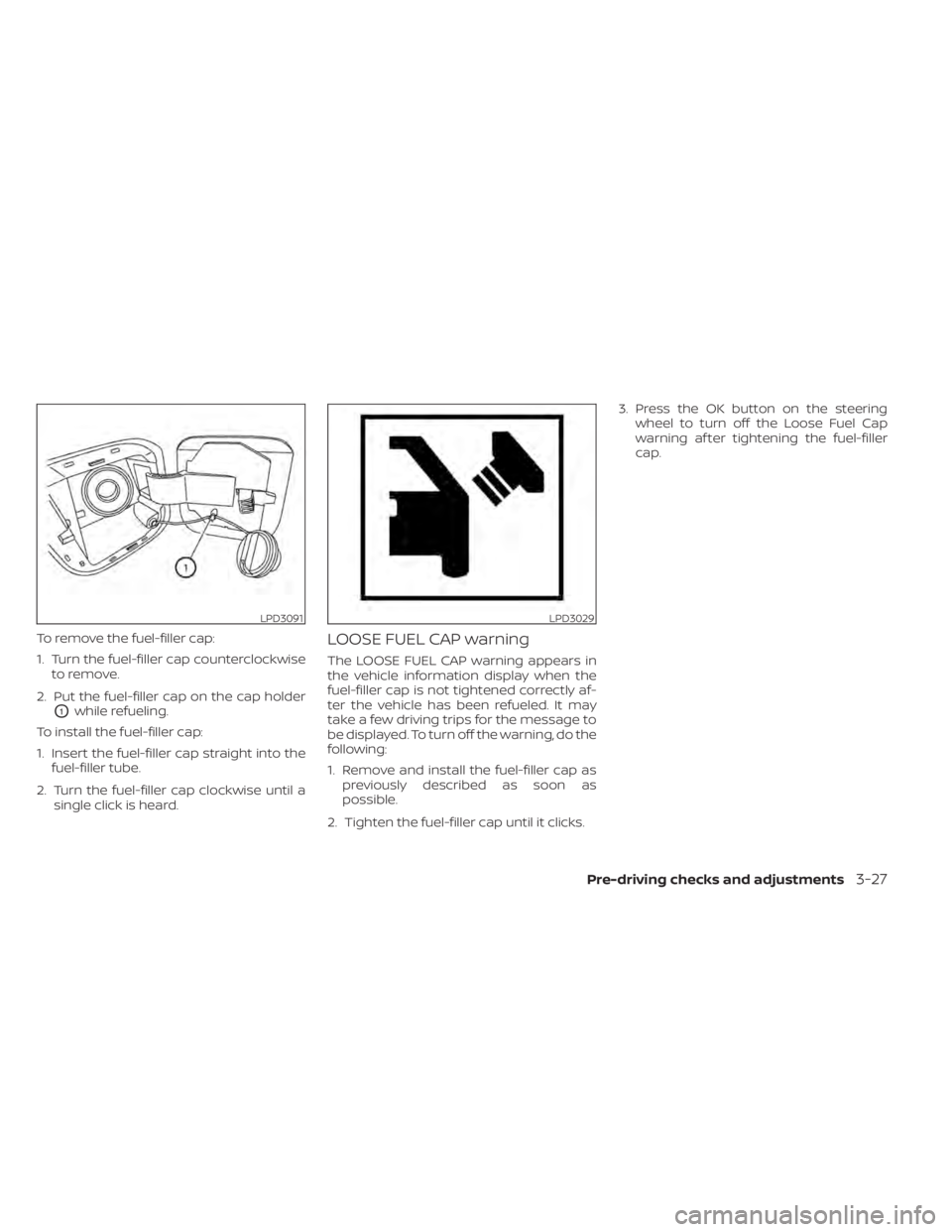
To remove the fuel-filler cap:
1. Turn the fuel-filler cap counterclockwiseto remove.
2. Put the fuel-filler cap on the cap holder
O1while refueling.
To install the fuel-filler cap:
1. Insert the fuel-filler cap straight into the fuel-filler tube.
2. Turn the fuel-filler cap clockwise until a single click is heard.
LOOSE FUEL CAP warning
The LOOSE FUEL CAP warning appears in
the vehicle information display when the
fuel-filler cap is not tightened correctly af-
ter the vehicle has been refueled. It may
take a few driving trips for the message to
be displayed. To turn off the warning, do the
following:
1. Remove and install the fuel-filler cap aspreviously described as soon as
possible.
2. Tighten the fuel-filler cap until it clicks. 3. Press the OK button on the steering
wheel to turn off the Loose Fuel Cap
warning af ter tightening the fuel-filler
cap.
LPD3091LPD3029
Page 288 of 528
System maintenance.......................5-47
RearCrossTrafficAlert(RCTA) .................. 5-48
RCTA system operation .....................5-48
How to enable/disable the RCTA
system ...................................... 5-51
RCTA system limitations .....................5-53
System temporarily unavailable .............5-55
System maintenance .......................5-57
Cruise control (if so equipped) ..................5-58
Precautions on cruise control ...............5-58
Cruise control operations ...................5-58
Intelligent Cruise Control (ICC) (if so equipped) . . 5-59 ICC system operation ....................... 5-61
The ICC switch .............................. 5-62
ICC system limitations ......................5-68
System temporarily unavailable .............5-71
System maintenance .......................5-73
Rear Automatic Braking (RAB) ..................5-74
RAB system operation .......................5-75
Turning the RAB system on/off ..............5-77
RAB system limitations ......................5-77
System malfunction ......................... 5-80
System maintenance .......................5-80
Automatic Emergency Braking (AEB) with
Pedestrian Detection ........................... 5-81AEB with Pedestrian Detection system
operation
................................... 5-82
Turning the AEB with Pedestrian
Detection system ON/OFF ..................5-85
AEB with Pedestrian Detection system
limitations .................................. 5-86
System temporarily unavailable .............5-88
System malfunction ......................... 5-90
System maintenance .......................5-90
Intelligent Forward Collision Warning (I-FCW) . . . 5-92 I-FCW system operation .....................5-95
Turning the I-FCW system on/off ............5-96
I-FCW system limitations ....................5-97
System temporarily unavailable ............5-102
System malfunction ........................ 5-104
System maintenance ......................5-104
Intelligent
Driver Alertness (I-DA) ...............5-105
Intelligent Driver Alertness system
operation .................................. 5-106
How to enable/disable the Intelligent
Driver Alertness (I-DA) system ..............5-107
Intelligent Driver Alertness (I-DA)
system limitations ......................... 5-108
Break-in schedule ............................. 5-109
Fuel efficient driving tips .......................5-110
Page 289 of 528
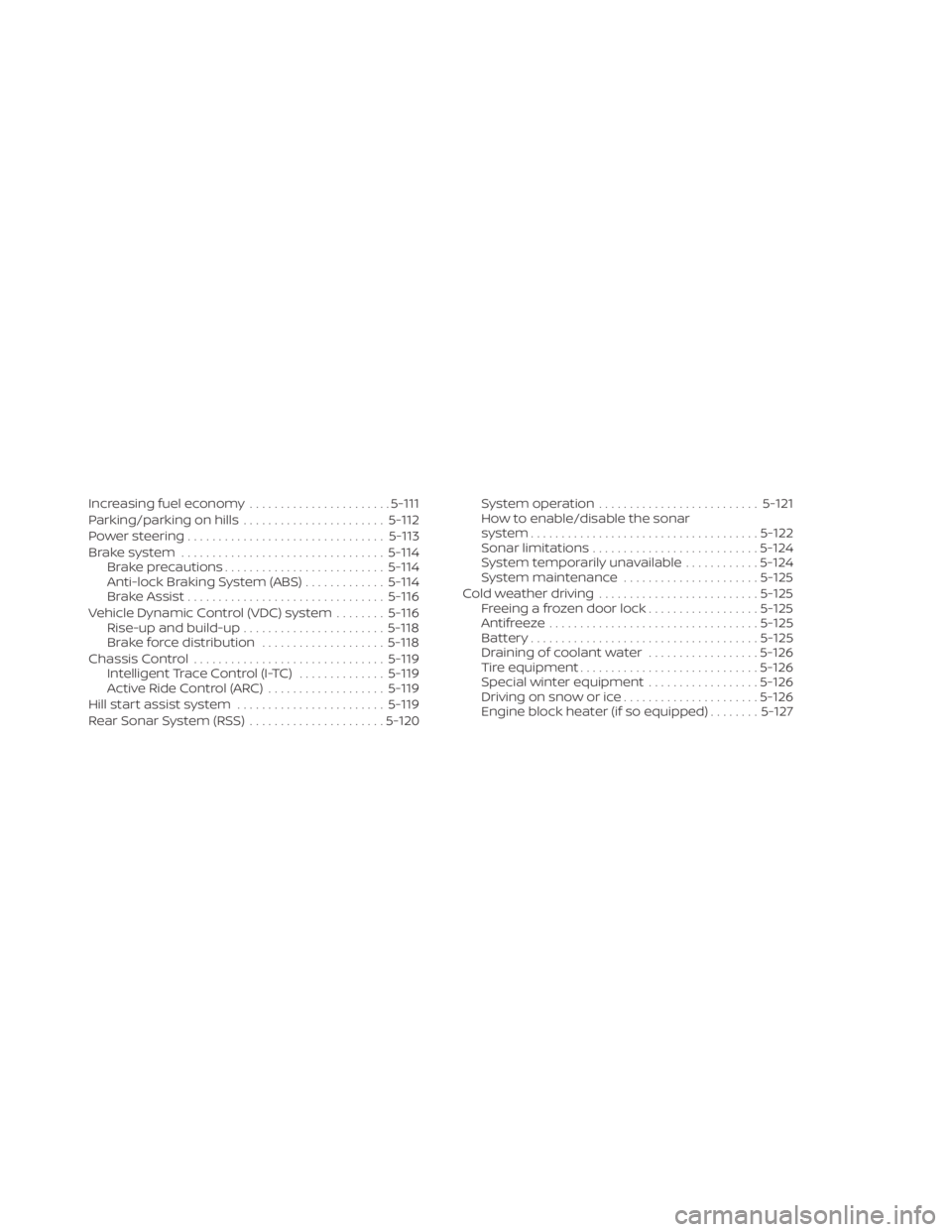
Increasing fuel economy.......................5-111
Parking/parking on hills .......................5-112
Power steering ................................ 5-113
Brake system ................................. 5-114
Brake precautions .......................... 5-114
Anti-lock Braking System (ABS) .............5-114
Brake Assist ................................ 5-116
Vehicle Dynamic Control (VDC) system ........5-116
Rise-up and build-up ....................... 5-118
Brake force distribution ....................5-118
Chassis Control ............................... 5-119
Intelligent Trace Control (I-TC) ..............5-119
Active Ride Control (ARC) ...................5-119
Hill start assist system ........................ 5-119
Rear Sonar System (RSS) ......................5-120System operation
.......................... 5-121
How to enable/disable the sonar
system ..................................... 5-122
Sonar limitations ........................... 5-124
System temporarily unavailable ............5-124
System maintenance ......................5-125
Cold weather driving .......................... 5-125
Freeing a frozen door lock ..................5-125
Antifreeze .................................. 5-125
Battery..................................... 5-125
Draining of coolant water ..................5-126
Tire equipment ............................. 5-126
Special winter equipment ..................5-126
Driving on snow or ice ......................5-126
Engine block heater (if so equipped) ........5-127