trunk NISSAN SENTRA 2022 Owner's Manual
[x] Cancel search | Manufacturer: NISSAN, Model Year: 2022, Model line: SENTRA, Model: NISSAN SENTRA 2022Pages: 528, PDF Size: 3.51 MB
Page 192 of 528
CONDITIONS THE REMOTE ENGINE
START WILL NOT WORK
The Remote Engine Start will not operate if
any of the following conditions are present:
• “Remote Engine Start” is turned off in the“Vehicle Settings” menu of the vehicle in-
formation display.
• The ignition switch is placed in the ON position.
• The hood is not securely closed.
• The hazard indicator lights are on.
• The engine is still running. The engine must be completely stopped. Wait at
least 6 seconds if the engine goes from
running to off. This is not applicable when
extending engine run time.
• The
button is not pressed and held
for at least 2 seconds.
• The
button is not pressed and held
within 5 seconds of pressing the lock but-
ton.
• The brake is pressed.
• The doors are not closed and locked.
• The trunk is open.
• The Key System Error warning shows in the vehicle information display.
• The alarm sounds due to illegal entry into the vehicle. • Two Remote Engine Starts, or a single
Remote Engine Start with an extension,
have already been used.
• The vehicle is not in P (Park).
• There is a detected registered key already inside of the vehicle.
• The Remote Engine Start function has been switched to the OFF position in “Ve-
hicle Settings” of the vehicle information
display. For additional information, refer
to “Vehicle information display” in the “In-
struments and controls” section of this
manual.
The Remote Engine Start may display a
warning or indicator in the vehicle informa-
tion display. For additional information, re-
fer to “Vehicle information display” in the
“Instruments and controls” section of this
manual.
3-22Pre-driving checks and adjustments
Page 194 of 528
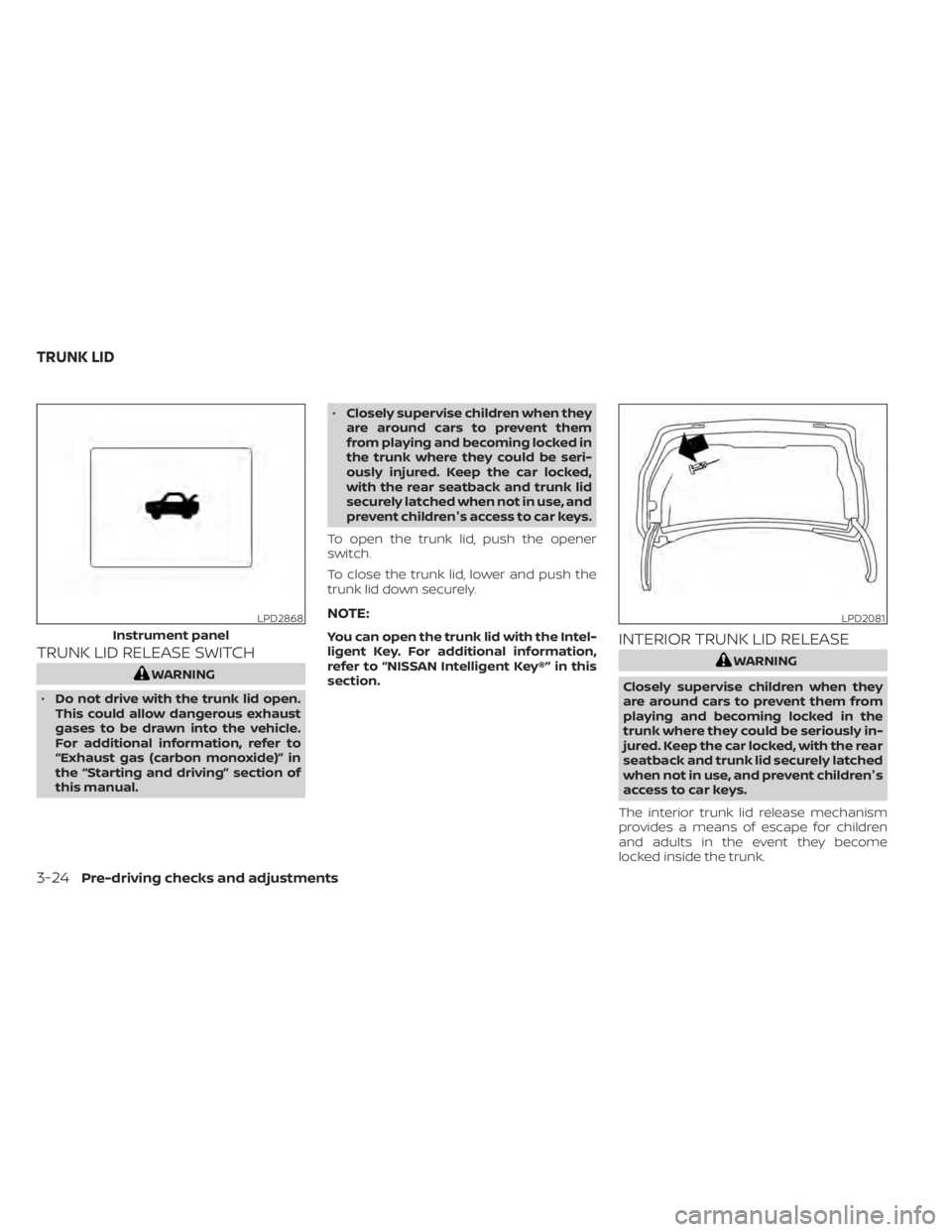
TRUNK LID RELEASE SWITCH
LPD2868
Instrument panel
Page 195 of 528
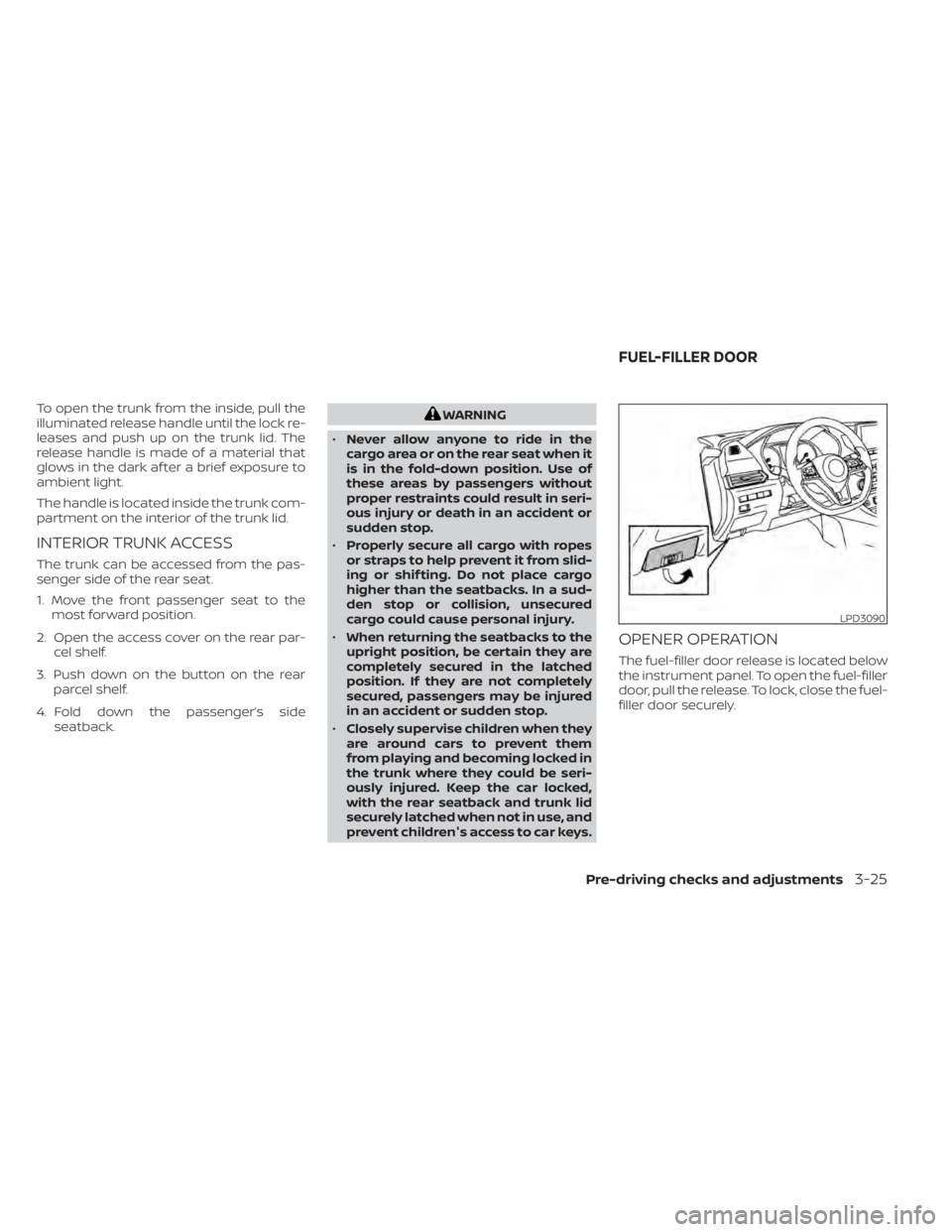
To open the trunk from the inside, pull the
illuminated release handle until the lock re-
leases and push up on the trunk lid. The
release handle is made of a material that
glows in the dark af ter a brief exposure to
ambient light.
The handle is located inside the trunk com-
partment on the interior of the trunk lid.
INTERIOR TRUNK ACCESS
The trunk can be accessed from the pas-
senger side of the rear seat.
1. Move the front passenger seat to themost forward position.
2. Open the access cover on the rear par- cel shelf.
3. Push down on the button on the rear parcel shelf.
4. Fold down the passenger’s side seatback.
LPD3090
FUEL-FILLER DOOR
Pre-driving checks and adjustments3-25
Page 232 of 528
• When the shif t lever is in the D (Drive)position and the vehicle speed is below
approximately 6 mph (10 km/h), the MOD
system detects moving objects in the
front view.
• When the shif t lever is in the R (Reverse) position and the vehicle speed is below
approximately 6 mph (10 km/h), the MOD
system detects moving objects in the
rear view. The MOD system will not oper-
ate if the trunk is open. The MOD system does not detect moving
objects in the front-side view. The MOD
icon is not displayed on the screen when in
this view.
When the MOD system detects moving ob-
jects near the vehicle, a chime will be heard
when in front or rear view and a yellow
frame will be displayed on the view where
the objects are detected. While the MOD
system continues to detect moving ob-
jects, the yellow frame continues to be dis-
played.
NOTE:
While the RCTA chime is beeping, the
MOD system does not chime.
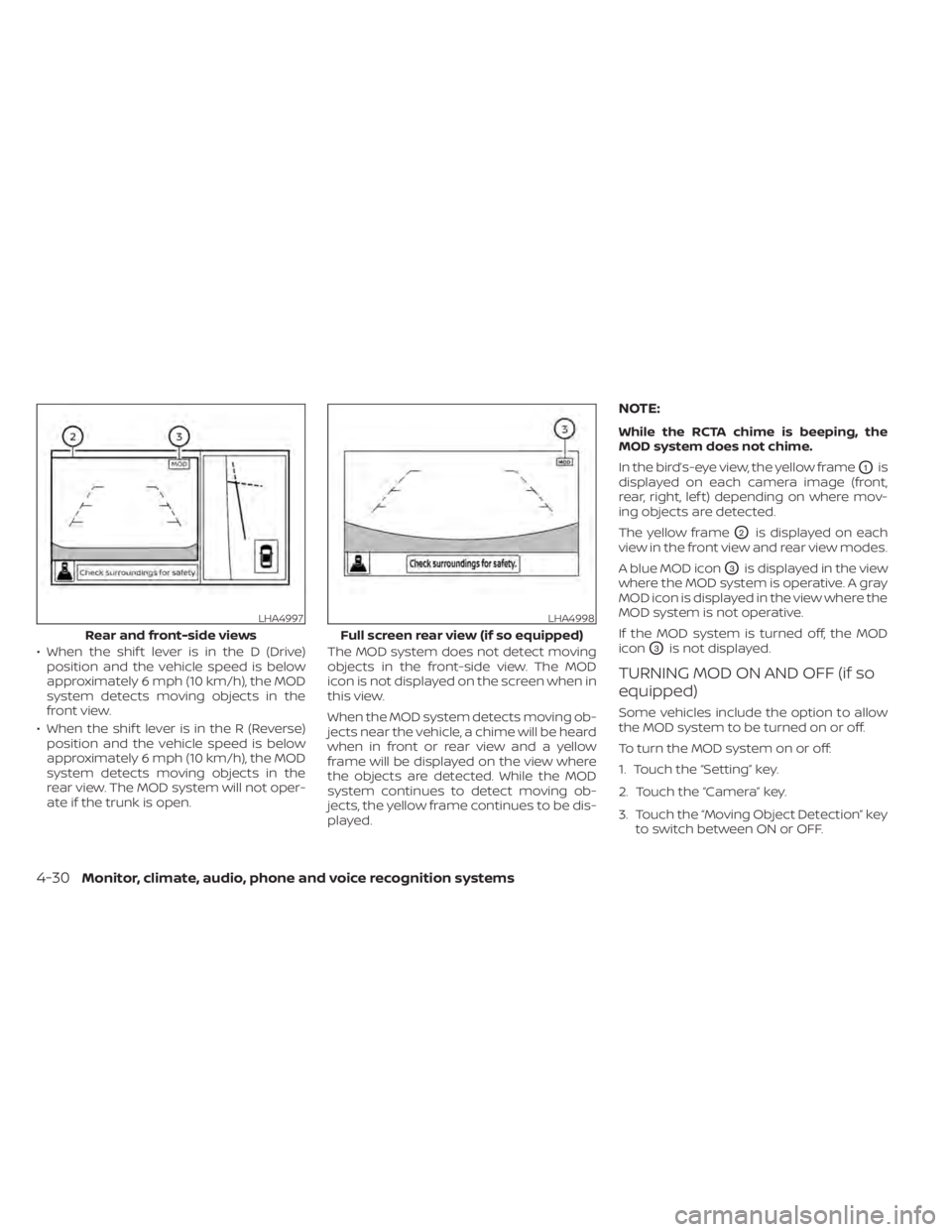
In the bird’s-eye view, the yellow frame
O1is
displayed on each camera image (front,
rear, right, lef t) depending on where mov-
ing objects are detected.
The yellow frame
O2is displayed on each
view in the front view and rear view modes.
A blue MOD icon
O3is displayed in the view
where the MOD system is operative. A gray
MOD icon is displayed in the view where the
MOD system is not operative.
If the MOD system is turned off, the MOD
icon
O3is not displayed.
TURNING MOD ON AND OFF (if so
equipped)
Some vehicles include the option to allow
the MOD system to be turned on or off.
To turn the MOD system on or off:
1. Touch the “Setting” key.
2. Touch the “Camera” key.
3. Touch the “Moving Object Detection” key to switch between ON or OFF.
LHA4997
Rear and front-side views
Page 290 of 528
WARNING
• Do not leave children or adults who
would normally require the assis-
tance of others alone in your vehicle.
Pets should also not be lef t alone.
They could accidentally injure them-
selves or others through inadvertent
operation of the vehicle. Also, on hot,
sunny days, temperatures in a closed
vehicle could quickly become high
enough to cause severe or possibly
fatal injuries to people or animals.
• Closely supervise children when they
are around cars to prevent them
from playing and becoming locked in
the trunk where they could be seri-
ously injured. Keep the car locked,
with the rear seatback and trunk lid
securely latched when not in use, and
prevent children's access to car keys.
EXHAUST GAS (carbon monoxide)
air recirculation but-
ton to off and the fan control dial
to high to circulate the air.
• If electrical wiring or other cable con-
nections must pass to a trailer
through the seal on the trunk lid or
the body, follow the manufacturer's
recommendation to prevent carbon
monoxide entry into the vehicle. •
The exhaust system and body should
be inspected by a qualified mechanic
whenever:
a. The vehicle is raised for service.
b. You suspect that exhaust fumes are entering into the passenger
compartment.
c. You notice a change in the sound of the exhaust system.
d. You have had an accident involv- ing damage to the exhaust sys-
tem, underbody, or rear of the
vehicle.
THREE-WAY CATALYST
The three-way catalyst is an emission con-
trol device installed in the exhaust system.
Exhaust gases in the three-way catalyst
are burned at high temperatures to help
reduce pollutants.
Page 355 of 528
•The system may not detect the ve-
hicle in front of you in certain road or
weather conditions. To avoid acci-
dents, never use the ICC system un-
der the following conditions:
– On roads where the traffic is heavy
or there are sharp curves
– On slippery road surfaces such as
on ice or snow, etc.
– During bad weather (rain, fog,
snow, etc.)
– When rain, snow or dirt adhere to
the bumper around the distance
sensor
– On steep downhill roads (the ve-
hicle may go beyond the set ve-
hicle speed and frequent braking
may result in overheating the
brakes)
– On repeated uphill and downhill
roads
– When traffic conditions make it
difficult to keep a proper distance
between vehicles because of fre-
quent acceleration or
deceleration
– Interference by other radar
sources •
Do not use the ICC system if you are
towing a trailer. The system may not
detect a vehicle ahead.
• In some road or traffic conditions, a
vehicle or object can unexpectedly
come into the sensor detection zone
and cause automatic braking. Al-
ways stay alert and avoid using the
ICC system where not recommended
in this warning section.
The radar sensor will not detect the follow-
ing objects:
• Stationary and slow moving vehicles
• Pedestrians or objects in the roadway
• Oncoming vehicles in the same lane
• Motorcycles traveling offset in the travel lane
The following are some conditions in which
the sensor cannot properly detect a ve-
hicle ahead and the system may not oper-
ate properly:
• When snow or road spray from traveling vehicles reduces the sensor’s detection.
• When excessively heavy baggage is loaded in the rear seat or the trunk of
your vehicle. The ICC system is designed to automati-
cally check the sensor’s operation within
the limitations of the system.
The detection zone of the ICC sensor is
limited. A vehicle ahead must be in the de-
tection zone for the vehicle-to-vehicle dis-
tance detection mode to maintain the se-
lected distance from the vehicle ahead.
A vehicle ahead may move outside of the
detection zone due to its position within
the same lane of travel. Motorcycles may
not be detected in the same lane ahead if
they are traveling offset from the centerline
of the lane. A vehicle that is entering the
lane ahead may not be detected until the
vehicle has completely moved into the
lane.
If this occurs, the ICC system may warn
you by blinking the system indicator and
sounding the chime. The driver may
have to manually control the proper dis-
tance away from the vehicle traveling
ahead.
Starting and driving5-69
Page 373 of 528
–Pedestrians in wheelchairs or us-
ing mobile transport such as
scooters, child-operated toys, or
skateboards.
– Pedestrians who are seated or
otherwise not in a full upright
standing or walking position.
– Oncoming vehicles
– Crossing vehicles
– Obstacles on the roadside
• The AEB with Pedestrian Detection
system has some performance
limitations.
– If a stationary vehicle is in the ve-
hicle’s path, the AEB with Pedes-
trian Detection system will not
function when the vehicle is
driven at speeds over approxi-
mately 50 mph (80 km/h).
– For pedestrian detection, the AEB
with Pedestrian Detection system
will not function when the vehicle
is driven at speeds over approxi-
mately 37 mph (60 km/h) or below
approximately 6 mph (10 km/h).
• The AEB with Pedestrian Detection
system will not function for pedestri-
ans in darkness or in tunnels, even if
there is street lighting in the area. •
The AEB with Pedestrian Detection
system may not function if the ve-
hicle ahead is narrow (for example, a
motorcycle).
• The AEB with Pedestrian Detection
system may not function if the speed
difference between the two vehicles
is too small.
• The radar sensor AEB with Pedes-
trian Detection system may not
function properly or detect a vehicle
ahead in the following conditions:
– Poor visibility (conditions such as
rain, snow, fog, dust storms, sand-
storms, and road spray from other
vehicles)
– Driving on a steep downhill slope
or roads with sharp curves.
– Driving on a bumpy road surface,
such as an uneven dirt road.
– If dirt, ice, snow or other material
is covering the radar sensor area.
– Interference by other radar
sources.
– The camera area of the windshield
is fogged up, or covered with dirt,
water drops, ice, snow, etc. –
Strong light (for example, sunlight
or high beams from oncoming ve-
hicles) enters the front camera.
Strong light causes the area
around the pedestrian to be cast
in a shadow, making it difficult to
see.
– A sudden change in brightness
occurs. (For example, when the
vehicle enters or exits a tunnel or a
shaded area or lightning flashes.)
– The poor contrast of a person to
the background, such as having
clothing color or pattern which is
similar to the background.
– The pedestrian’s profile is partially
obscured or unidentifiable due to
the pedestrian transporting lug-
gage, wearing bulky or very loose-
fitting clothing or accessories.
• The system performance may de-
grade in the following conditions:
– The vehicle is driven on a slippery
road.
– The vehicle is driven on a slope.
– Excessively heavy baggage is
loaded in the rear seat or the trunk
room of your vehicle.
Starting and driving5-87
Page 419 of 528
Getting the spare tire and tools
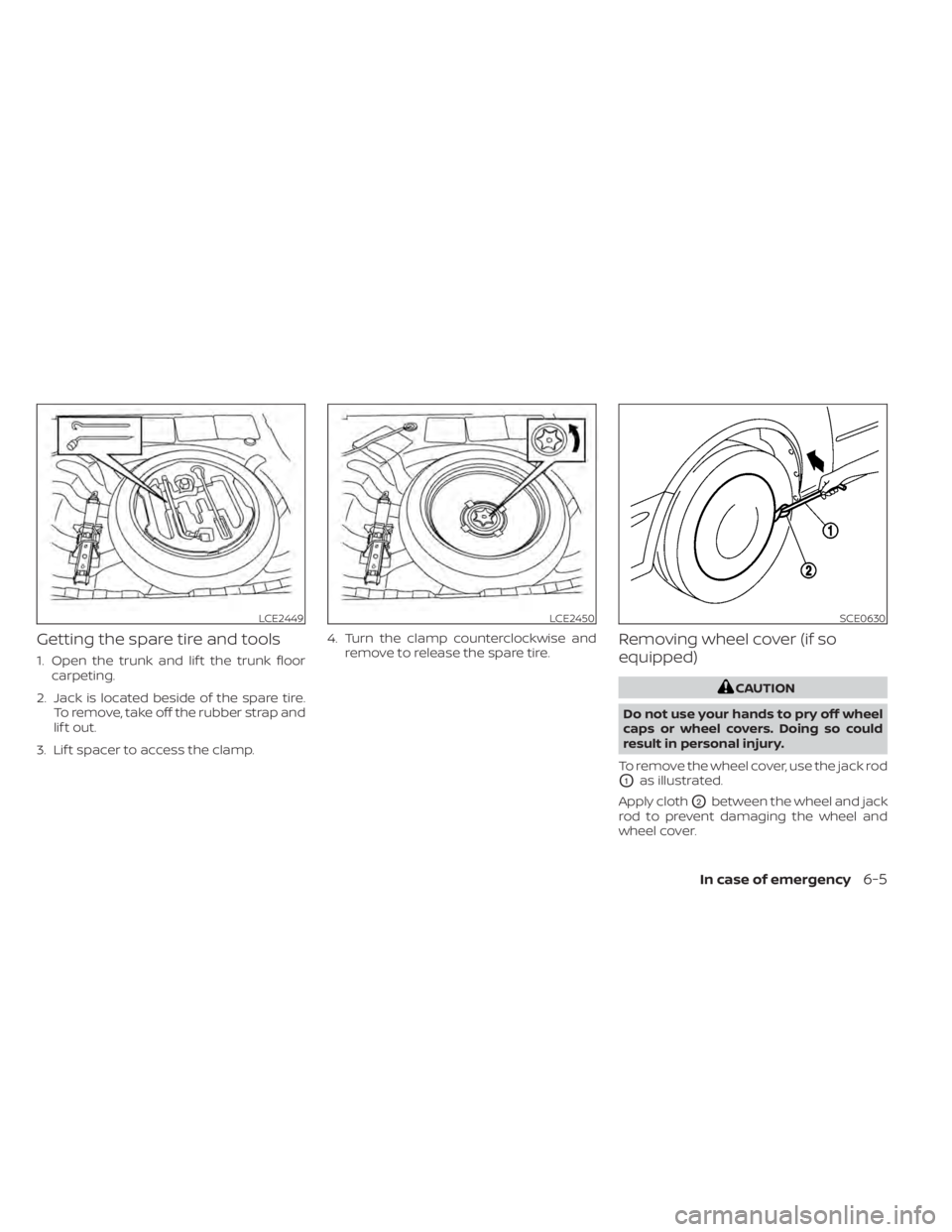
1. Open the trunk and lif t the trunk floorcarpeting.
2. Jack is located beside of the spare tire. To remove, take off the rubber strap and
lif t out.
3. Lif t spacer to access the clamp. 4. Turn the clamp counterclockwise and
remove to release the spare tire.
Removing wheel cover (if so
equipped)
LCE2449LCE2450SCE0630
Page 466 of 528
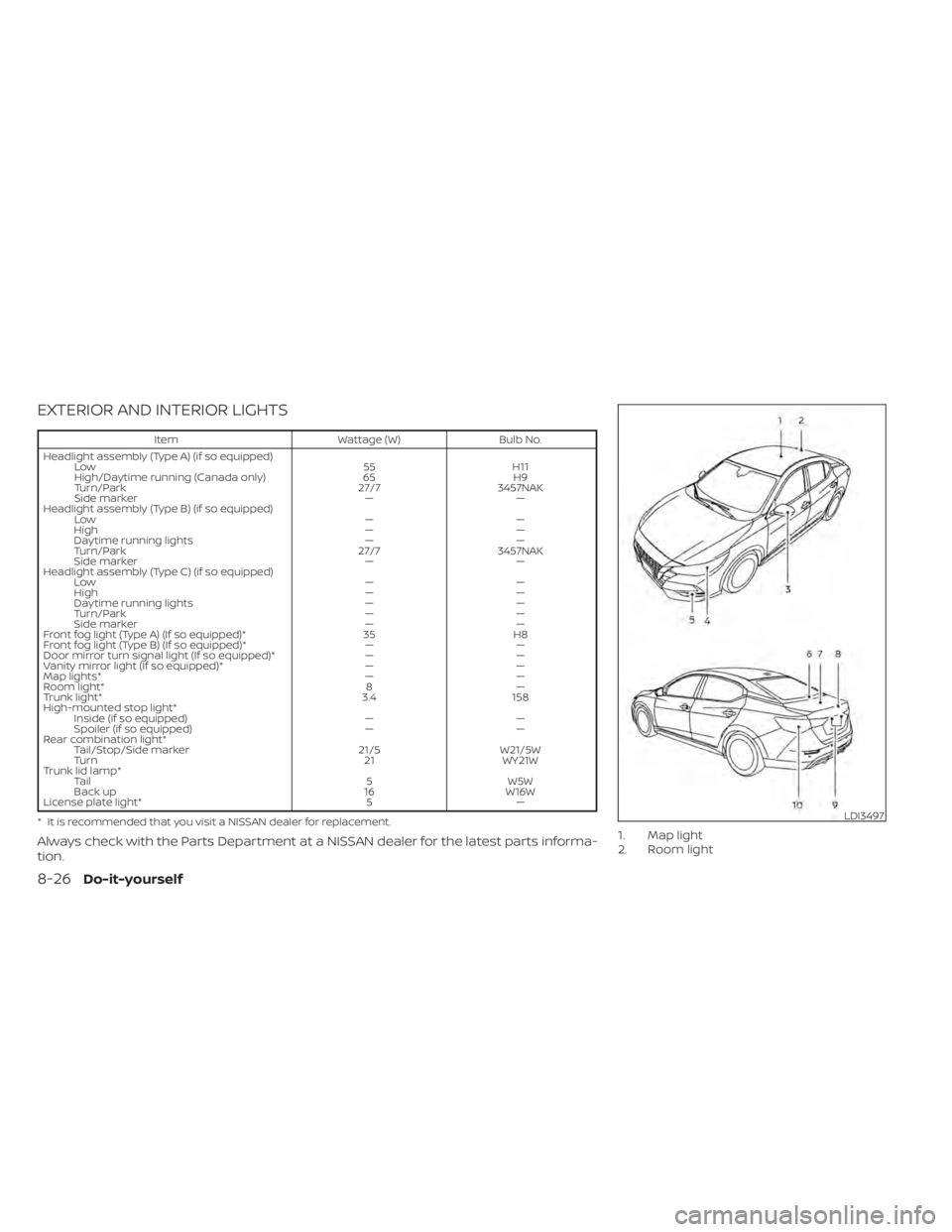
EXTERIOR AND INTERIOR LIGHTS
ItemWattage (W)Bulb No.
Headlight assembly (Type A) (if so equipped) Low 55H11
High/Daytime running (Canada only) 65H9
Turn/Park 27/73457NAK
Side marker ——
Headlight assembly (Type B) (if so equipped) Low ——
High ——
Daytime running lights ——
Turn/Park 27/73457NAK
Side marker ——
Headlight assembly (Type C) (if so equipped) Low ——
High ——
Daytime running lights ——
Turn/Park ——
Side marker ——
Front fog light (Type A) (If so equipped)* 35H8
Front fog light (Type B) (If so equipped)* ——
Door mirror turn signal light (If so equipped)* ——
Vanity mirror light (If so equipped)* ——
Map lights* ——
Room light* 8—
Trunk light* 3.4158
High-mounted stop light* Inside (if so equipped) ——
Spoiler (if so equipped) ——
Rear combination light* Tail/Stop/Side marker 21/5W21/5W
Turn 21WY21W
Trunk lid lamp* Tail 5W5W
Back up 16W16W
License plate light* 5—
* It is recommended that you visit a NISSAN dealer for replacement.
Always check with the Parts Department at a NISSAN dealer for the latest parts informa-
tion.1. Map light
2. Room light
LDI3497
8-26Do-it-yourself
Page 467 of 528
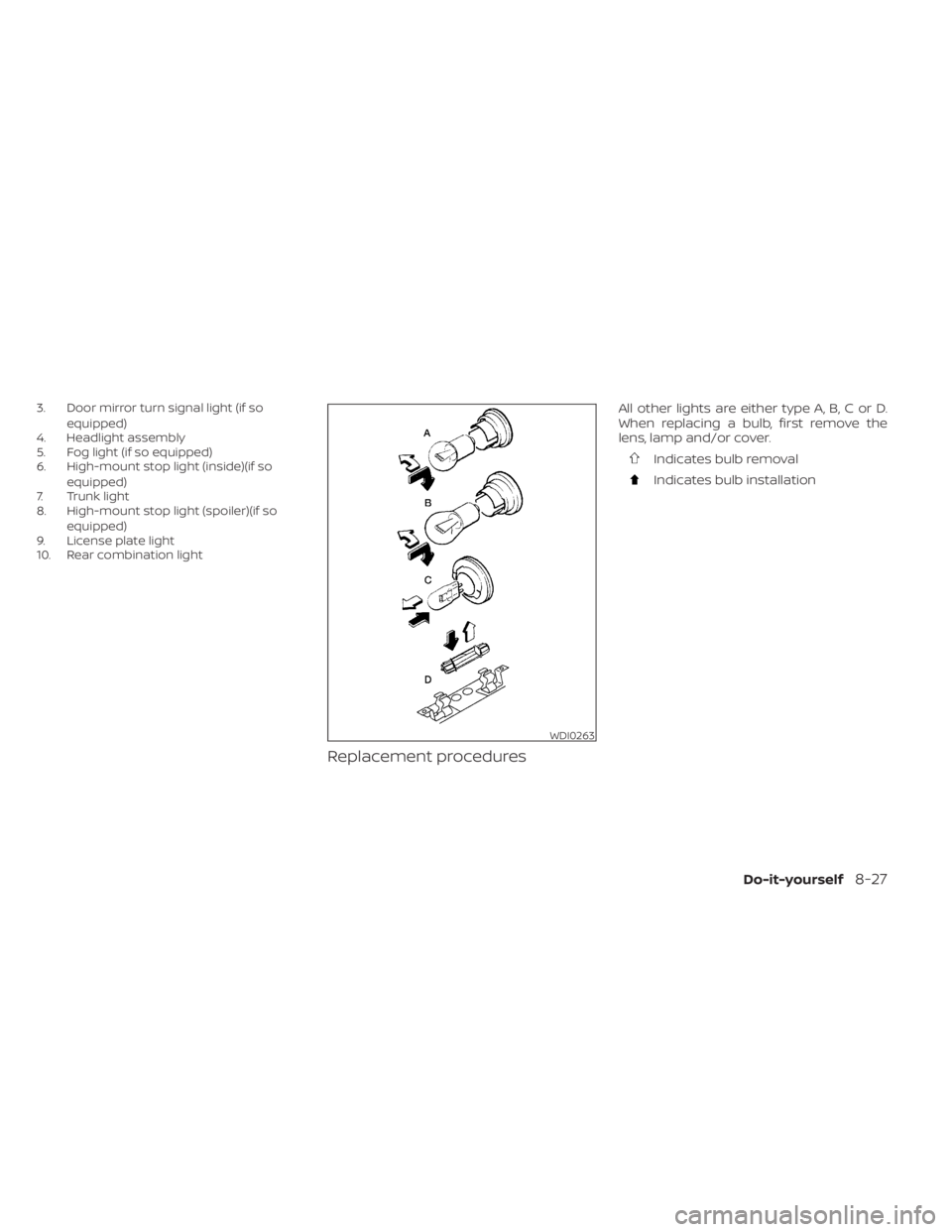
3. Door mirror turn signal light (if soequipped)
4. Headlight assembly
5. Fog light (if so equipped)
6. High-mount stop light (inside)(if so
equipped)
7. Trunk light
8. High-mount stop light (spoiler)(if so
equipped)
9. License plate light
10. Rear combination light
Replacement procedures
All other lights are either type A, B, C or D.
When replacing a bulb, first remove the
lens, lamp and/or cover.
Indicates bulb removal
Indicates bulb installation
WDI0263