warning NISSAN SENTRA 2022 Repair Manual
[x] Cancel search | Manufacturer: NISSAN, Model Year: 2022, Model line: SENTRA, Model: NISSAN SENTRA 2022Pages: 528, PDF Size: 3.51 MB
Page 134 of 528

VEHICLE INFORMATION DISPLAY
WARNINGS
1. No Key Detected
2. Key ID Incorrect3. Key Battery Low
4. Key System Error: See Owner’s Manual
5. Key Registration Complete
6. Shif t to Park7. Push Ignition to OFF
8. Push brake and start switch to drive
9. Engine start operation for Intelligent Key
system (if I-Key battery level is low)
LIC4287
2-44Instruments and controls
Page 135 of 528
10. Release Parking Brake
11. Low Fuel
12. Loose Fuel Cap
13. Engine Oil Service due in–––km
14. Low Washer Fluid (if so equipped)
15. Tire Pressure Low - Add Air
16. Door/ Trunk Open
17. Timer Alert —Time for a break?
18. Low outside temperature indicator
19. Power will turn off to save the battery
20. Power turned off to save the battery
21. Reminder: Turn OFF Headlights
22. Headlight System Error See Owner’sManual (if so equipped)
23. Parking Sensor Error: See Owner’s Manual
24. Driver Attention Alert— Take a Break?
25. Driver Attention Alert Malfunction
26. Malfunction: See Owner’s Manual
27. Unavailable: Side Radar Obstruction
28. Malfunction (if so equipped) 29. Shipping Mode On Push Storage Fuse
30. Intelligent Cruise Control (ICC) indica-
tors (if so equipped)
31. CVT (AT) Malfunction Service now (if so equipped)
32. CVT (AT) hot Power reduced (if so equipped)
33. Chassis Control System Error: See Owner’s Manual (if so equipped)
34. Not Available System Malfunction
35. Not Available Front Radar Blocked
36. Currently not available (if so equipped)
37. Not Available Poor Road Conditions (if so equipped)
38. Unavailable: High Cabin Temperature
39. Rear Door Alert is activated
40. Check Rear Seat For All Articles
41. Rear seat belt reminder
42. Rotate Steering Wheel and Push Start Switch
43. No Key Press and hold to Stop Engine
44. Speed Limit Sign (if so equipped)
45. Brightness indicator 46. Engine Stalled Stop safely
47. Engine Malfunction Power reduced Ser-
vice now
48. Engine Malfunction Service now
49. Engine hot Power reduced
No Key Detected
This warning appears when the Intelligent
Key is lef t outside the vehicle with the igni-
tion switch in the ON position. Make sure
the Intelligent Key is inside the vehicle.
For additional information, refer to “NISSAN
Intelligent Key®” in the “Pre-driving checks
and adjustments” section of this manual.
Key ID Incorrect
This warning appears when the ignition
switch is placed from the OFF position and
the Intelligent Key is not recognized by the
system. You cannot start the engine with
an unregistered key.
For additional information, refer to “NISSAN
Intelligent Key®” in the “Pre-driving checks
and adjustments” section of this manual.
Instruments and controls2-45
Page 136 of 528

Key Battery Low
This indicator illuminates when the Intelli-
gent Key battery is running out of power.
If this indicator illuminates, replace the bat-
tery with a new one. For additional infor-
mation, refer to “Battery replacement” in
the “Do-it-yourself ” section of this manual.
Key System Error: See Owner’s
Manual
Af ter the ignition switch is pushed to the
ON position, this light comes on for a period
of time and then turns off.
The Key System Error message warns of a
malfunction with the Intelligent Key sys-
tem. If the light comes on while the engine
is stopped, it may be impossible to start
the engine.
If the light comes on while the engine is
running, you can drive the vehicle. However,
in these cases, have the system checked. It
is recommended that you visit a NISSAN
dealer for this service.
Key Registration Complete
This appears when a new Intelligent Key is
registered to the vehicle.
Shif t to Park
This warning illuminates when the ignition
switch is in the AUTO ACC or OFF position
and the shif t lever is not in the P (Park)
position. Also, a chime sounds when the
ignition switch is in the AUTO ACC or OFF
position.
If this warning illuminates, move the shif t
lever to the P (Park) position and start the
engine.
Push Ignition to OFF
Af ter the Push Ignition to OFF warning illu-
minates, the warning will illuminate if the
ignition switch is placed in the AUTO ACC
position when the shif t lever is moved to
the P (Park) position.
To turn off the Push warning, place the ig-
nition switch in the ON position and then in
the LOCK position.
Push brake and start switch to drive
This indicator appears when the shif t lever
is in the P (Park) position.
This indicator also appears when the ve-
hicle has been started using the Remote
Engine Start (if so equipped) function.
This indicator means that the engine will
start by pushing the ignition switch withthe brake pedal depressed. You can start
the engine from any position of the ignition
switch.
Engine start operation for Intelligent
Key system (if I-Key battery level is
low)
This indicator appears when the battery of
the Intelligent Key is low and when the In-
telligent Key system and the vehicle are not
communicating normally.
If this appears, touch the ignition switch
with the Intelligent Key while depressing
the brake pedal. For additional information,
refer to “NISSAN Intelligent Key® battery dis-
charge” in the “Starting and driving” section
of this manual.
Release Parking Brake
This warning illuminates in the message
area of the vehicle information display
when the parking brake is set and the ve-
hicle is driven.
Low Fuel
This warning illuminates when the fuel level
in the fuel tank is getting low. Refuel as
soon as it is convenient, preferably before
the fuel gauge reaches 0 (Empty).
There
2-46Instruments and controls
Page 137 of 528
will be a small reserve of fuel in the tank
when the fuel gauge needle reaches 0
(Empty).
Loose Fuel Cap
This warning appears when the fuel-filler
cap is not tightened correctly af ter the ve-
hicle has been refueled. For additional in-
formation, refer to “Fuel-filler cap” in the
“Pre-driving checks and adjustments” sec-
tion of this manual.
EngineOilServiceduein–––km
This distance to oil change is displayed if
the distance to oil change is less than 100
km (62 miles).
Low Washer Fluid (if so equipped)
This warning illuminates when the
windshield-washer fluid is at a low level.
Add windshield-washer fluid as necessary.
For additional information, refer to
“Windshield-washer fluid” in the “Do-it-
yourself ” section of this manual.
Tire Pressure Low - Add Air
This warning appears when the low tire
pressure warning light in the meter illumi-
nates and low tire pressure is detected. The
warning appears each time the ignition
switch is placed in the ON position as long
as the low tire pressure warning light re-mains illuminated. If this warning appears,
stop the vehicle and adjust the tire pres-
sures of all four tires to the recommended
COLD tire pressure shown on the Tire and
Loading Information label. For additional
information, refer to “Low tire pressure
warning light” in this section and “Tire Pres-
sure Monitoring System (TPMS)” in the
“Starting and driving” section of this
manual.
Door/Trunk Open
This warning illuminates when a door or
the trunk has been opened.
Timer Alert — Time for a break?
This indicator appears when the set time is
reached. The time can be set up to six
hours. For additional information, refer to
“Settings” in this section.
Low outside temperature indicator
This indicator appears if the outside tem-
perature is below 3°C (37°F). The tempera-
ture can be changed to display in Celsius or
Fahrenheit. For additional information, re-
fer to “Settings” in this section.
Power will turn off to save the battery
This message appears in the vehicle infor-
mation display af ter a period of time if the
ignition switch is in the AUTO ACC or the ON
position and if the vehicle is in P (Park). For
additional information, refer to “Push-
button ignition switch positions” in the
“Starting and driving” section of this
manual.
Power turned off to save the battery
This message appears af ter the ignition
switch is automatically turned off. For addi-
tional information, refer to “Push-button ig-
nition switch positions” in the “Starting and
driving” section of this manual.
Reminder: Turn OFF Headlights
This warning appears when the headlights
are lef t in the ON position when exiting the
vehicle. Place the headlight switch in the
OFF or AUTO position. For additional infor-
mation, refer to “Headlight and turn signal
switch” in this section.
Headlight System Error See Owner’s
Manual (if so equipped)
This warning illuminates when there is an
error with the system. For additional infor-
mation, refer to “Headlight and turn signal
switch” in this section.
Instruments and controls2-47
Page 138 of 528
Parking Sensor Error: See Owner’s
Manual
This warning illuminates when there is an
error with the system. For additional infor-
mation, refer to “Rear Sonar System (RSS)”
in the “Starting and driving” section of this
manual.
Driver Attention Alert— Take a Break?
This alert appears when the system has
detected that the driver may be displaying
fatigue or a lack of attention.
Driver Attention Alert Malfunction
This warning appears when the Intelligent
Driver Alertness system is not functioning
properly. For additional information, refer to
“Intelligent Driver Alertness (I-DA)” in the
“Starting and driving” section of this
manual.
Malfunction: See Owner’s Manual
This warning appears when one or more of
the following systems are not functioning
properly:
• Rear Cross Traffic Alert (RCTA)
• Blind Spot Warning (BSW)If one or more of these warnings appear,
have the system checked. It is recom-
mended that you visit a NISSAN dealer for
this service.
Unavailable: Side Radar Obstruction
This message appears when the Blind
Spot Warning (BSW)/Rear Cross Traffic Alert
(RCTA) systems become unavailable be-
cause a radar blockage is detected. For
additional information, refer to “Blind Spot
Warning (BSW)” or “Rear Cross Traffic Alert
(RCTA)” in the “Starting and driving” section
of this manual.
Malfunction
This warning appears when the Automatic
Emergency Braking with Pedestrian Detec-
tion system or Intelligent Forward Collision
Warning (I-FCW) system is not functioning
properly.
If one or more of these warnings appears,
have the system checked. It is recom-
mended that you visit a NISSAN dealer for
this service.
For additional information, refer to “Auto-
matic Emergency Braking with Pedestrian
Detection” or “Intelligent Forward Collision
Warning (I-FCW)” in the “Starting and driv-
ing” section of this manual.
Shipping Mode On Push Storage Fuse
This warning may appear if the extended
storage switch is not pushed in. When this
warning appears, push in the extended
storage switch to turn off the warning. For
additional information, refer to “Extended
storage switch” in this section.
Intelligent Cruise Control (ICC)
indicators (if so equipped)
These indicators show the Intelligent
Cruise Control (ICC) system status. The sta-
tus is shown by color. For additional infor-
mation, refer to “Intelligent Cruise Control
(ICC)” in the “Starting and driving” section of
this manual.
CVT (AT) Malfunction Service now (if
so equipped)
This warning illuminates when there is a
problem with the CVT system. If this warn-
ing comes on, have the system checked. It
is recommended that you visit a NISSAN
dealer for this service.
CVT (AT) hot Power reduced (if so
equipped)
This transmission has a high fluid tem-
perature protection mode. If the fluid tem-
perature becomes too high (for example,
2-48Instruments and controls
Page 140 of 528

Under the following conditions, the ICC sys-
tem is automatically canceled:
• When the VDC operates
• When a wheel slips
The above system cannot be used in some
situations (VDC operates and wheel slip.)
Unavailable: High Cabin Temperature
This message appears when the camera
detects an interior temperature of more
than approximately 104°F (40°C). For addi-
tional information, refer to “Lane Departure
Warning (LDW)” in the “Starting and driving”
section of this manual.
Rear Door Alert is activated
When the system is enabled, this message
appears when the Rear Door Alert system
is active and can remind the driver to check
the back seat.
• Using the steering wheel switch, a drivercan select “Dismiss Message” to clear the
display for a period of time. If no selection
is made, this message automatically
turns off af ter a period of time.
• Using the steering wheel switch, a driver can select “Disable Alert” to disable the
horn alert for the remainder of the cur-
rent trip.
Page 141 of 528

If this indicator appears, push the ignition
switch while lightly turning the steering
wheel right and lef t.
No Key Press and hold to Stop Engine
This message appears when the Intelligent
key is not detected and the engine should
be turned off.
Speed Limit Sign indicator (if so
equipped)
This message may appear when the Traffic
Sign Recognition system is engaged.
For additional information, refer to “Traffic
Sign Recognition (TSR)” in the “Starting and
driving” section of this manual.
Brightness indicator
This indicator appears when the vehicle
information display screen brightness is
being adjusted.
Engine Stalled: Stop safely (if so
equipped)
This message appears 30 seconds before
the vehicle is shutdown due to an above
normal operating exhaust temperature.
The Malfunction Indicator Light (MIL) and
malfunction warning (red) will illuminate.
Have the system checked. It is recom-mended that you visit a NISSAN dealer im-
mediately for this service.
Engine Malfunction: Power Reduced
Service now (if so equipped)
This warning appears when the engine is
not operating under normal conditions. If
this warning comes on, have the system
checked. It is recommended that you visit a
NISSAN dealer for this service.
Engine Malfunction Service now (if so
equipped)
This warning illuminates when there is a
problem with the engine. If this warning
comes on, have the system checked. It is
recommended that you visit a NISSAN
dealer for this service.
Engine hot Power reduced (if so
equipped)
This engine has a high fluid temperature
protection mode. If the fluid temperature
becomes too high (for example, climbing
steep grades in high temperatures with
heavy loads, such as when towing a trailer),
engine power and, under some conditions,
vehicle speed will be decreased automati-
cally to reduce the chance of engine dam-
age. Vehicle speed can be controlled with
the accelerator pedal, but the engine and
vehicle speed may be reduced.
Page 152 of 528
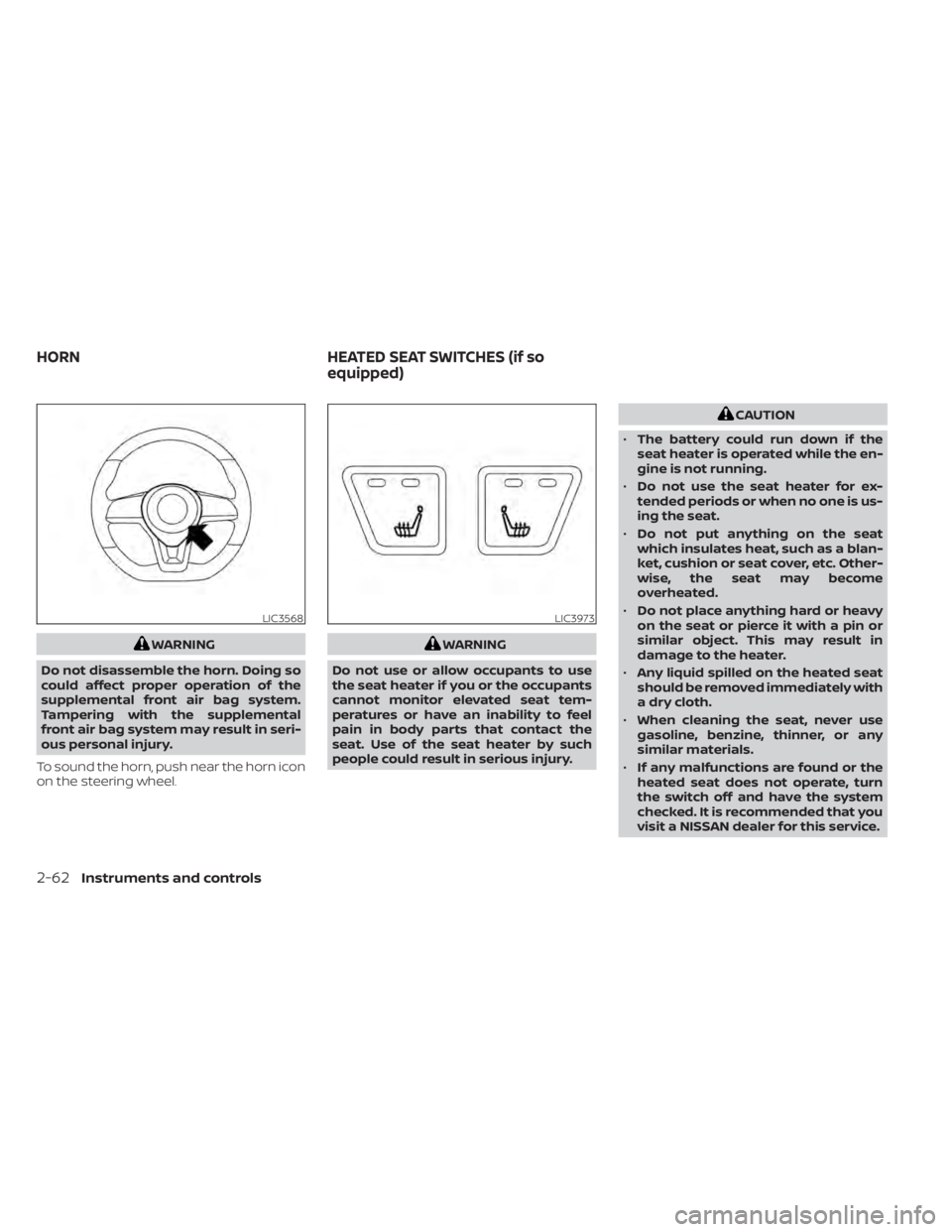
WARNING
Do not disassemble the horn. Doing so
could affect proper operation of the
supplemental front air bag system.
Tampering with the supplemental
front air bag system may result in seri-
ous personal injury.
To sound the horn, push near the horn icon
on the steering wheel.
CAUTION
• The battery could run down if the
seat heater is operated while the en-
gine is not running.
• Do not use the seat heater for ex-
tended periods or when no one is us-
ing the seat.
• Do not put anything on the seat
which insulates heat, such as a blan-
ket, cushion or seat cover, etc. Other-
wise, the seat may become
overheated.
• Do not place anything hard or heavy
on the seat or pierce it with a pin or
similar object. This may result in
damage to the heater.
• Any liquid spilled on the heated seat
should be removed immediately with
a dry cloth.
• When cleaning the seat, never use
gasoline, benzine, thinner, or any
similar materials.
• If any malfunctions are found or the
heated seat does not operate, turn
the switch off and have the system
checked. It is recommended that you
visit a NISSAN dealer for this service.
LIC3973
HORN HEATED SEAT SWITCHES (if so
equipped)
Page 154 of 528
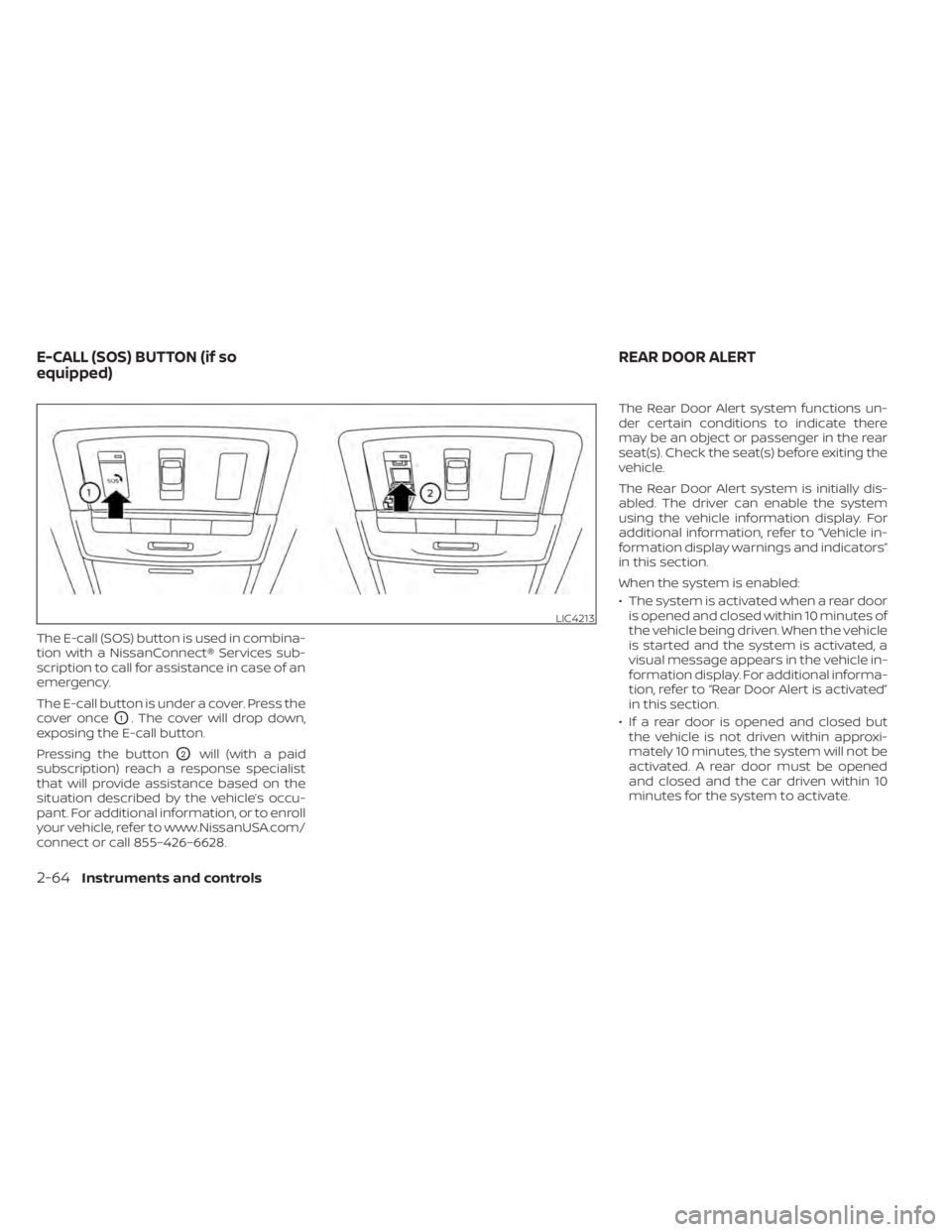
The E-call (SOS) button is used in combina-
tion with a NissanConnect® Services sub-
scription to call for assistance in case of an
emergency.
The E-call button is under a cover. Press the
cover once
O1. The cover will drop down,
exposing the E-call button.
Pressing the button
O2will (with a paid
subscription) reach a response specialist
that will provide assistance based on the
situation described by the vehicle’s occu-
pant. For additional information, or to enroll
your vehicle, refer to www.NissanUSA.com/
connect or call 855–426–6628. The Rear Door Alert system functions un-
der certain conditions to indicate there
may be an object or passenger in the rear
seat(s). Check the seat(s) before exiting the
vehicle.
The Rear Door Alert system is initially dis-
abled. The driver can enable the system
using the vehicle information display. For
additional information, refer to “Vehicle in-
formation display warnings and indicators”
in this section.
When the system is enabled:
• The system is activated when a rear door
is opened and closed within 10 minutes of
the vehicle being driven. When the vehicle
is started and the system is activated, a
visual message appears in the vehicle in-
formation display. For additional informa-
tion, refer to “Rear Door Alert is activated”
in this section.
• If a rear door is opened and closed but the vehicle is not driven within approxi-
mately 10 minutes, the system will not be
activated. A rear door must be opened
and closed and the car driven within 10
minutes for the system to activate.
LIC4213
E-CALL (SOS) BUTTON (if so
equipped) REAR DOOR ALERT
Page 155 of 528
When the Rear Door Alert system is acti-
vated:
• When the driver puts the vehicle in the P(Park) position, a notification message
appears in the vehicle information dis-
play with the options to “Dismiss Mes-
sage” or “Disable Alert” if desired.– Select “Disable Alert” to temporarily disable for that stop.
– No selection or ‘Dismiss Message” will keep the alert enabled for that stop.
• If the alert is enabled when a driver exits the vehicle, a message will appear in the
vehicle information display that states
“Check Rear Seat for All Articles.”
If “Horn & Alert” setting is selected:
– – An audible horn sound will occur af ter
a short time unless a rear door is
opened and closed within a short time
to deactivate the alert.
–– If the doors are locked before the alert is deactivated by opening a rear door,
the horn will sound.
–– If the trunk is opened before a rear door is opened, the horn will be delayed until
af ter the trunk is closed.NOTE:
If “Alert Only ” setting is selected, the
message alert will still be shown in the
vehicle information display but the horn
will not sound.
WARNING
• If the driver selects “Disable Alert”, no
audible alert will be provided regard-
less of rear door open/close status.
• There may be times when there is an
object or passenger in the rear
seat(s) but the audible alert does not
sound. For example, this may occur if
rear seat passengers enter or exit the
vehicle during a trip.
• The system does not directly detect
objects or passengers in the rear
seat(s). Instead, it can detect when a
rear door is opened and closed, indi-
cating that there may be something
in the rear seat(s).
NOTE:
There may be times when the horn
sounds but there are no objects or pas-
sengers in the rear seat(s). For additional information, refer to “Rear
Door Alert is activated” in this section.
Instruments and controls2-65