bluetooth NISSAN SENTRA 2023 Owner's Guide
[x] Cancel search | Manufacturer: NISSAN, Model Year: 2023, Model line: SENTRA, Model: NISSAN SENTRA 2023Pages: 556, PDF Size: 6.11 MB
Page 273 of 556
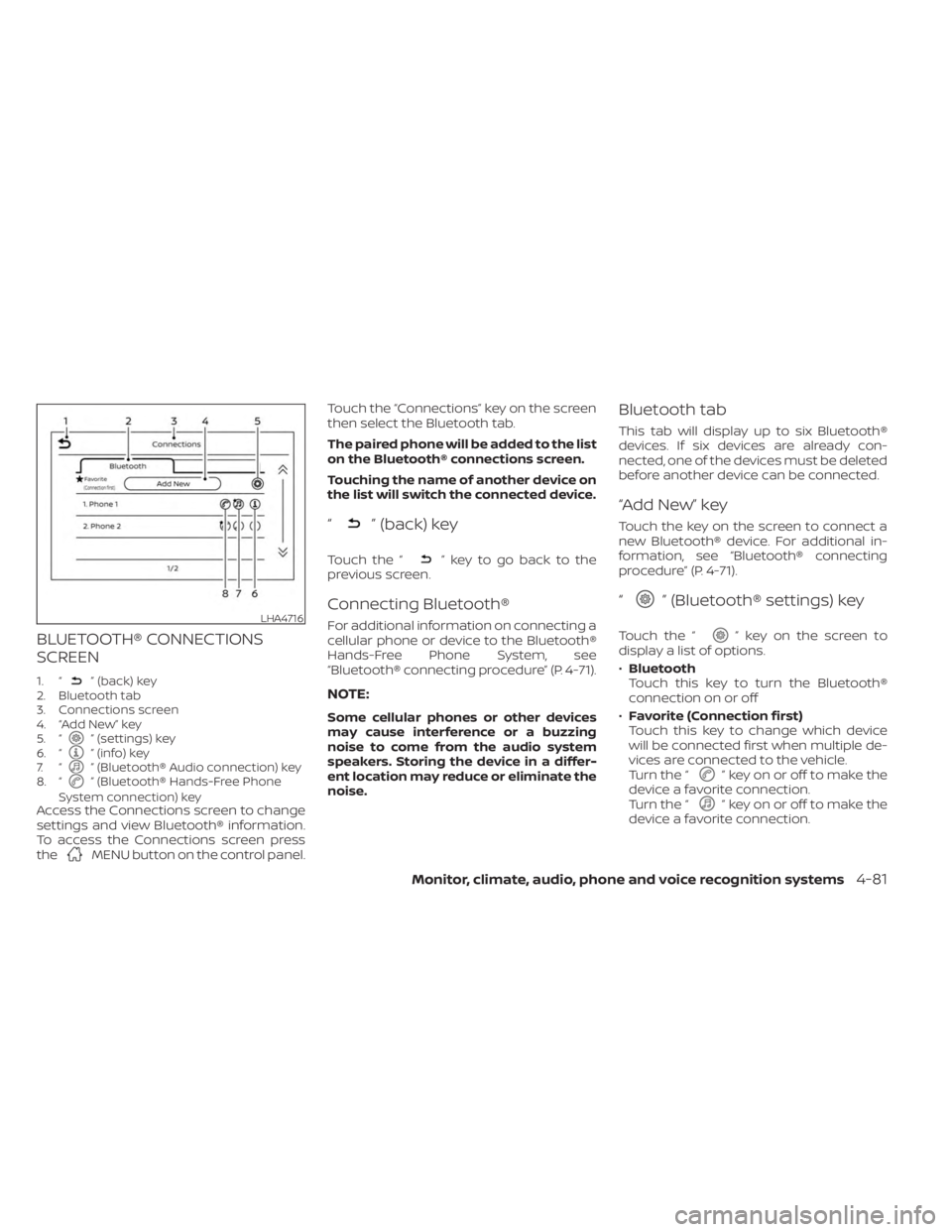
BLUETOOTH® CONNECTIONS
SCREEN
1. “” (back) key
2. Bluetooth tab
3. Connections screen
4. “Add New” key
5. “
” (settings) key
6. “” (info) key
7. “” (Bluetooth® Audio connection) key
8. “” (Bluetooth® Hands-Free Phone
System connection) key
Access the Connections screen to change
settings and view Bluetooth® information.
To access the Connections screen press
the
MENU button on the control panel. Touch the “Connections” key on the screen
then select the Bluetooth tab.
The paired phone will be added to the list
on the Bluetooth® connections screen.
Touching the name of another device on
the list will switch the connected device.
“” (back) key
Touch the “” key to go back to the
previous screen.
Connecting Bluetooth®
For additional information on connecting a
cellular phone or device to the Bluetooth®
Hands-Free Phone System, see
“Bluetooth® connecting procedure” (P. 4-71).
NOTE:
Some cellular phones or other devices
may cause interference or a buzzing
noise to come from the audio system
speakers. Storing the device in a differ-
ent location may reduce or eliminate the
noise.
Bluetooth tab
This tab will display up to six Bluetooth®
devices. If six devices are already con-
nected, one of the devices must be deleted
before another device can be connected.
“Add New” key
Touch the key on the screen to connect a
new Bluetooth® device. For additional in-
formation, see “Bluetooth® connecting
procedure” (P. 4-71).
“” (Bluetooth® settings) key
Touch the “” key on the screen to
display a list of options.
• Bluetooth
Touch this key to turn the Bluetooth®
connection on or off
• Favorite (Connection first)
Touch this key to change which device
will be connected first when multiple de-
vices are connected to the vehicle.
Turn the “
” key on or off to make the
device a favorite connection.
Turn the “
” key on or off to make the
device a favorite connection.
LHA4716
Monitor, climate, audio, phone and voice recognition systems4-81
Page 274 of 556
•Pin
Touch this key to customize the PIN code.
Input a four digit number then touch the
“OK” key. The new PIN will be set.
“” (info) key
Touch the “” key on the screen to
display the information of the cellular
phone or to delete the device.
Touch the “Delete” key to remove a paired
device then select “Yes” when a message
appears.
“” (Bluetooth® Hands-Free
Phone System connection) key
A list of connected devices will be displayed
on the screen. Touch the “” key next to
the name to connect a device to the
Hands-Free Phone System. If the phone is
listed as a favorite, a star will appear on the
icon. Touch the key again to disconnect the
device. The device will not be removed
from the list. For additional information on
removing a device, see “
(info) key”
(P. 4-82).
“” (Bluetooth® Audio
connection) key
A list of connected devices will be displayed
on the screen. Touch the “” key next to
the name to connect a device to
Bluetooth® Audio. If the device is listed as a
favorite, a star will appear on the icon.
Touch the key again to disconnect the de-
vice. The device will not be removed from
the list. For additional information on re-
moving a device, see “
(info) key”
(P. 4-82).
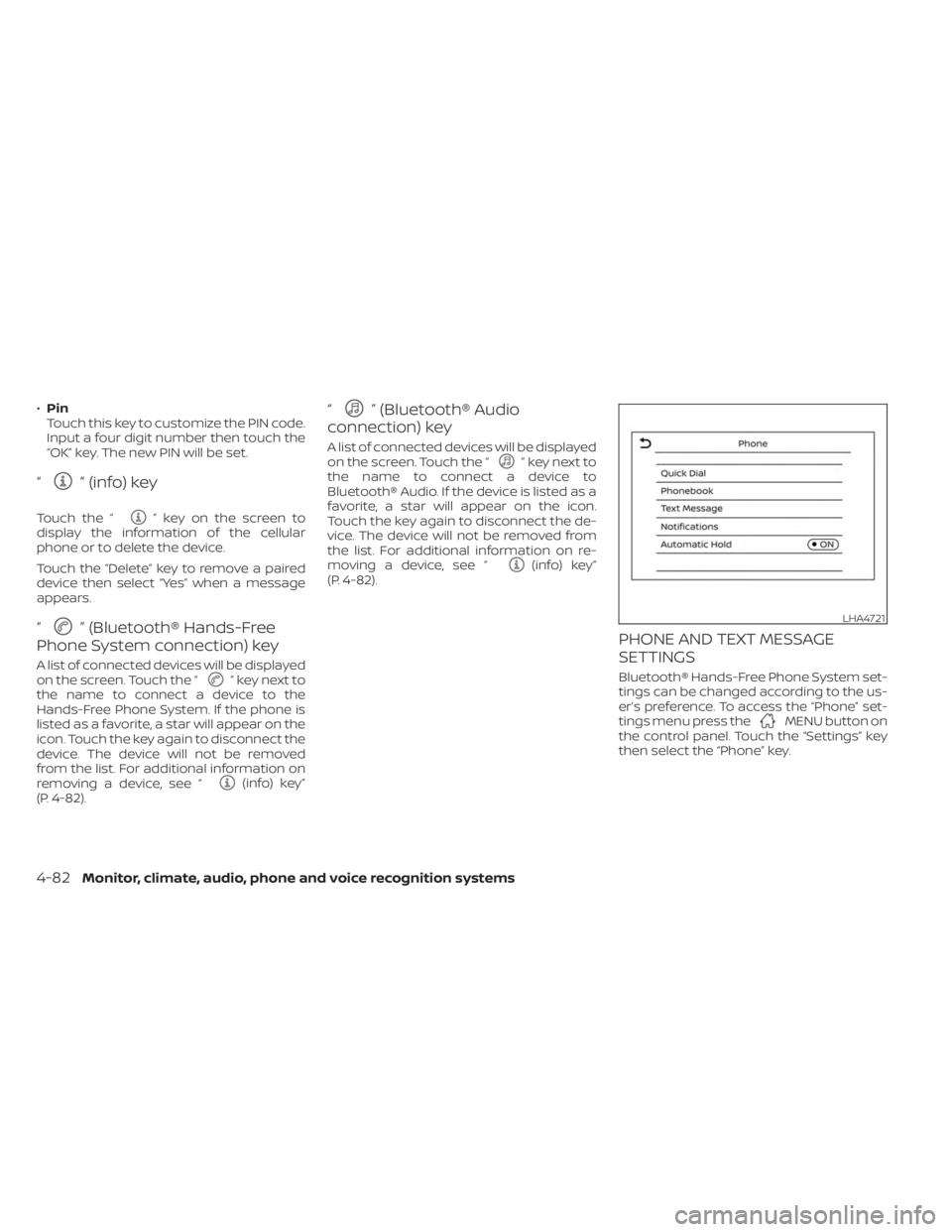
PHONE AND TEXT MESSAGE
SETTINGS
Bluetooth® Hands-Free Phone System set-
tings can be changed according to the us-
er’s preference. To access the “Phone” set-
tings menu press the
MENU button on
the control panel. Touch the “Settings” key
then select the “Phone” key.
LHA4721
4-82Monitor, climate, audio, phone and voice recognition systems
Page 289 of 556
OFF
The ignition switch is in the OFF position
when the engine is turned off using the
ignition switch. No lights will illuminate on
the ignition switch.
AUTO ACC:
With the vehicle in the P (Park) position, the
Intelligent Key with you, and the ignition
switch placed from the ON to the OFF po-
sition, the radio can still be used for a period
of time, or until the driver’s door is opened.
Af ter a period of time, functions such as
radio, navigation, and Bluetooth® Hands-
Free Phone System may be restarted by
pressing the “POWER button/VOLUME con-
trol knob” or the key fob unlock button. For
additional information, see the “Monitor, cli-
mate, audio, phone and voice recognition
systems” section of this manual.
EMERGENCY ENGINE SHUT OFF
To shut off the engine in an emergency
situation while driving, perform the follow-
ing procedure:
• Rapidly push the ignition switch threeconsecutive times in less than 1.5 sec-
onds, or
• Push and hold the ignition switch for more than 2 seconds.
NISSAN INTELLIGENT KEY®
BATTERY DISCHARGE
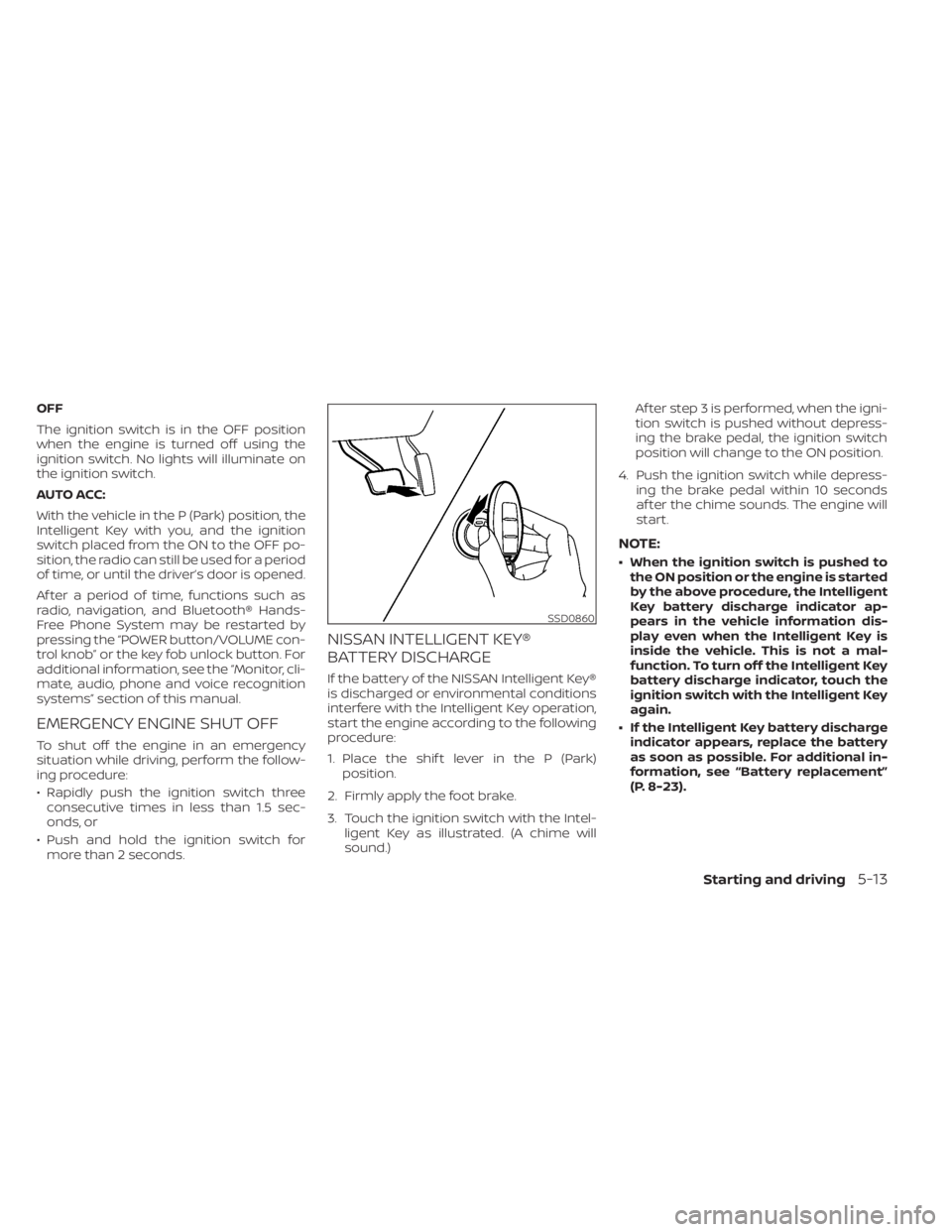
If the battery of the NISSAN Intelligent Key®
is discharged or environmental conditions
interfere with the Intelligent Key operation,
start the engine according to the following
procedure:
1. Place the shif t lever in the P (Park) position.
2. Firmly apply the foot brake.
3. Touch the ignition switch with the Intel- ligent Key as illustrated. (A chime will
sound.) Af ter step 3 is performed, when the igni-
tion switch is pushed without depress-
ing the brake pedal, the ignition switch
position will change to the ON position.
4. Push the ignition switch while depress- ing the brake pedal within 10 seconds
af ter the chime sounds. The engine will
start.
NOTE:
• When the ignition switch is pushed tothe ON position or the engine is started
by the above procedure, the Intelligent
Key battery discharge indicator ap-
pears in the vehicle information dis-
play even when the Intelligent Key is
inside the vehicle. This is not a mal-
function. To turn off the Intelligent Key
battery discharge indicator, touch the
ignition switch with the Intelligent Key
again.
• If the Intelligent Key battery discharge indicator appears, replace the battery
as soon as possible. For additional in-
formation, see “Battery replacement”
(P. 8-23).
SSD0860
Starting and driving5-13
Page 539 of 556
11 Index
A
Active Ride Control.............5-134Air bag (See supplemental restraint
system).....................1-44Air bag system
Front (See supplemental front impact
air bag system)
..............1-52Air bag warning labels............1-65Air bag warning light.........1-65, 2-12Air bag warning light,
supplemental..............1-65, 2-12Air cleaner...................8-17Air cleaner housing filter..........8-17Air conditionerAir conditioner operation. . . .4-35, 4-40Air conditioner service..........4-43Air conditioner specification label. .10-14Air conditioner system refrigerant
recommendations............10-8Air conditioner system refrigerant
and oil recommendations.......10-8Heater and air conditioner
controls...............4-32, 4-40Servicing air conditioner........4-43Air flow charts................4-36Alarm system (See vehicle security
system)................... .2-48Anchor point locations...........1-28Antenna....................4-63Anti-lock Braking System (ABS).....5-129
Antifreeze...................5-141Armrests.....................1-7Audio system.................4-44AM radio operation............4-50AM radio reception............4-44AM/FM radio............4-48, 4-50Auxiliary (AUX) devices operation. . .4-52Bluetooth® audio.............4-59FM radio operation............4-51FM radio reception............4-44iPod® Player................4-56iPod® player operation.........4-56Radio................... .4-44USB (Universal Serial Bus) Connection
Port.................... .4-53USB Connections.............4-54USB interface...............4-53Autolight switch...............2-53Automatic
Automatic power window switch. . .2-71Automatic anti-glare inside mirror. . . .3-28Automatic door locks.............3-6Automatic Emergency Braking (AEB)
with Pedestrian Detection......2-13, 5-92
B
Battery.................5- 141, 8-13Charge warning light...........2-11Battery replacement............8-23
Key fob...................8-23NISSAN Intelligent Key®.........8-23Before starting the engine.........5-14Belt (See drive belt)..............8-15Blind Spot Warning (BSW)..........5-36Bluetooth® audio..............4-59Bluetooth® hands-free phone
system.................... .4-66Bluetooth® connections.........4-81Connecting procedure..........4-71Phone indicators.............4-70Text messaging..............4-77Voice commands.............4-73Booster seats.................1-40Brake
Anti-lock Braking System (ABS). . . .5-129Brake fluid.................8-10Brake light (See stop light).......8-27Brake system...............5-129Brake warning light............2-10Brake wear indicators.......2-17,8-19Self-adjusting brakes...........8-19Brake and clutch fluid............8-10Brake Assist..................5-131Brake fluid...................8-10Brake system................5-129Brakes.....................8-19Break-in schedule.............5-125Brightness controlInstrument panel.............2-58Brightness/contrast button.........4-7
Page 541 of 556
Engine Block Heater.............5-142Engine coolant temperature gauge. . . .2-6Event Data recorders............10-24Exhaust gas (Carbon monoxide)......5-4Explanation of maintenance items.....9-2Explanation of scheduled maintenance
items.......................9-5Extended storage switch..........2-65Eyeglass case.................2-68
F
F.M.V.S.S. certification label.........10-13Flashers (See hazard warning flasher
switch)......................6-2Flat tire..................... .6-3Floor mat positioning aid...........7-6Fluid
Brake fluid..................8-10Capacities and recommended
fuel/lubricants...............10-2Clutch fluid..................8-11Continuously Variable Transmission
(CVT) fluid..................8-10Engine coolant................8-4Engine oil.................. .8-6Windshield-washer fluid..........8-11Fog light switch................2-59Front air bag system
(See supplemental restraint system). . .1-52Front power seat adjustment........1-5Front seats....................1-2Front-door pocket..............2-66
Fuel
Capacities and recommended
fuel/lubricants
...............10-2Fuel economy...............5-126Fuel gauge..................2-7Fuel octane rating.............10-6Fuel recommendation..........10-4Fuel-filler cap................3-24Fuel-filler door lock opener lever. . . .3-23Fuel-filler lid.................3-24Loose fuel cap warning......2-28, 2-42Fuel efficient driving tips..........5-125Fuel gauge....................2-7Fuel-filler door.................3-23Fuses......................8-20Fusible links...................8-21
G
Gas cap.....................3-24Gauge
Engine coolant temperature gauge. . .2-6Fuel gauge..................2-7Speedometer..............2-4, 2-5Tachometer................ .2-6Trip odometer................2-5General maintenance.............9-2Glove box................... .2-67
H
Hands-free phone system, Bluetooth®. .4-66Hazard warning flasher switch........6-2
Head restraints.................1-8Headlight and turn signal switch.....2-52Headlight control switch...........2-52Headlights...................8-25Heated seat switches............2-60Heated steering wheel switch.......2-61Heater
Heater and air conditioner
controls
................4-32, 4-40Heater operation..........4-33, 4-41Hill start assist system...........5-135Hood.......................3-21Horn...................... .2-59
I
Ignition switch
Push-button ignition switch.......5-11Immobilizer system..........2-49, 5-14Important vehicle information label. . .10-13In-cabin microfilter..............8-17Increasing fuel economy..........5-126IndicatorNISSAN Intelligent Key® battery
discharge indicator
............5-13Inside automatic anti-glare mirror. . . .3-28Instrument brightness control.......2-58Instrument panel.............0-6, 2-2Instrument panel dimmer switch.....2-58Intelligent Around View® Monitor......4-16Intelligent Cruise Control (ICC).......5-61Intelligent Driver Alertness (I-DA).....5-121Intelligent Engine Brake...........5-134
11-3
Page 543 of 556
Map lights....................2-75Menu button...................4-5Meters and gauges..............2-4Instrument brightness control.....2-58Mirror
Automatic anti-glare inside mirror. . .3-28Outside mirror control..........3-29Outside mirrors..............3-29Rearview...................3-28Vanity mirror................3-27Mirrors......................3-28Moonroof.................2-73,7-5Moving Object Detection (MOD)......4-27
N
NISSAN Intelligent Key®..........3-2,3-7NISSAN Intelligent Key® battery
discharge indicator..............5-13NISSAN Vehicle Immobilizer
System................. .2-49, 5-14NissanConnect® Owner's Manual......4-2
O
Octane rating (See fuel octane rating). .10-6Oil
Capacities and recommended
fuel/lubricants
...............10-2Changing engine oil............8-6Changing engine oil filter.........8-6Checking engine oil level.........8-6Engine oil.................. .8-6
Engine oil and oil filter
recommendation.............10-7Engine oil viscosity.............10-7Outside mirror control............3-29Outside mirrors................3-29Overhead sunglasses holder........2-68Overheat
If your vehicle overheats.........6-11Owner's manual order form........10-25Owner's manual/service manual
order information..............10-25
P
ParkingParking/parking on hills.........5-127Parking brake.................5-22Phone, Bluetooth® hands-free system. .4-66PowerPower door locks...........3-5, 3-6Power outlet................2-64Powerrearwindows............2-71Power steering system.........5-128Power windows..............2-70Rear power windows...........2-71Power outlet................. .2-64Power steering................5-128Precautions
Maintenance precautions.........8-2Precautions on booster
seats...............1-30, 1-36, 1-40Precautions on child
restraints............1-30, 1-36, 1-40
Precautions on seat belt usage.....1-12Precautions on supplemental
restraint system..............1-44Precautions when starting and
driving.................... .5-4Push starting..................6-11
R
Radio
Car phone or CB radio..........4-66FM/AM radio................4-48Readiness for inspection maintenance
(I/M) test................... .10-24Rear Automatic Braking (RAB). . . .2-15, 5-85Rear Cross Traffic Alert (RCTA).......5-48Rear Door Alert.........2-27,2-42, 2-62Rear power windows.............2-71Rear seat.....................1-7Rear Sonar System (RSS)..........5-135Rear window and outside mirror
defroster switch................2-51Rearview mirror................3-28RearView Monitor................4-8Recommended Fluids............10-2Recorders
Event Data................ .10-24Refrigerant recommendation.......10-8Registering a vehicle in another
country.................... .10-12Remote Engine Start..........3-18,5-15Reporting safety defects (US only). . . .10-22
11-5