stop start NISSAN SENTRA 2023 Workshop Manual
[x] Cancel search | Manufacturer: NISSAN, Model Year: 2023, Model line: SENTRA, Model: NISSAN SENTRA 2023Pages: 556, PDF Size: 6.11 MB
Page 406 of 556
•Tire type and condition may also af-
fect braking effectiveness.
– When replacing tires, install the
specified size of tires on all four
wheels.
– When installing a spare tire, make
sure that it is the proper size and
type as specified on the Tire and
Loading Information label. For ad-
ditional information, see “Tire and
Loading Information label”
(P. 8-31).
– For additional information, see
“Wheels and tires” (P. 8-29).
The ABS controls the brakes so the wheels
do not lock during hard braking or when
braking on slippery surfaces. The system
detects the rotation speed at each wheel
and varies the brake fluid pressure to pre-
vent each wheel from locking and sliding.
By preventing each wheel from locking, the
system helps the driver maintain steering
control and helps to minimize swerving
and spinning on slippery surfaces.Using the system
Depress the brake pedal and hold it down.
Depress the brake pedal with firm steady
pressure, but do not pump the brakes. The
Anti-lock Braking System will operate to
prevent the wheels from locking up. Steer
the vehicle to avoid obstacles.
WARNING
Do not pump the brake pedal. Doing so
may result in increased stopping
distances.
Self-test feature
The Anti-lock Braking System (ABS) in-
cludes electronic sensors, electric pumps,
hydraulic solenoids and a computer. The
computer has a built-in diagnostic feature
that tests the system each time you start
the engine and move the vehicle at a low
speed in forward or reverse. When the self-
test occurs, you may hear a “clunk” noise
and/or feel a pulsation in the brake pedal.
This is normal and does not indicate a mal-
function. If the computer senses a mal-
function, it switches the ABS off and illumi-
nates the ABS warning light on the instrument panel. The brake system then
operates normally, but without anti-lock
assistance.
If the ABS warning light illuminates during
the self-test or while driving, have the ve-
hicle checked. It is recommended that you
visit a NISSAN dealer for this service.
Normal operation
The Anti-lock Braking System (ABS) oper-
ates at speeds abov
e3-6mph(5-10
km/h). The speed varies according to road
conditions.
When the ABS senses that one or more
wheels are close to locking up, the actuator
rapidly applies and releases hydraulic pres-
sure. This action is similar to pumping the
brakes very quickly. You may feel a pulsa-
tion in the brake pedal and hear a noise
from under the hood or feel a vibration
from the actuator when it is operating. This
is normal and indicates that the ABS is op-
erating properly. However, the pulsation
may indicate that road conditions are haz-
ardous and extra care is required while
driving.
5-130Starting and driving
Page 411 of 556
WARNING
• Never rely solely on the hill start as-
sist system to prevent the vehicle
from moving backward on a hill. Al-
ways drive carefully and attentively.
Depress the brake pedal when the
vehicle is stopped on a steep hill. Be
especially careful when stopped on a
hill on frozen or muddy roads. Failure
to prevent the vehicle from rolling
backwards may result in a loss of
control of the vehicle and possible
serious injury or death.
• The hill start assist system is not de-
signed to hold the vehicle at a stand-
still on a hill. Depress the brake pedal
when the vehicle is stopped on a
steep hill. Failure to do so may cause
the vehicle to roll backwards and
may result in a collision or serious
personal injury.
• The hill start assist system may not
prevent the vehicle from rolling
backwards on a hill under all load or
road conditions. Always be prepared
to depress the brake pedal to prevent
the vehicle from rolling backwards.
Failure to do so may result in a colli-
sion or serious personal injury. When the vehicle is stopped on a hill, the hill
start assist system automatically keeps
the brakes applied to help prevent the ve-
hicle from rolling backward in the time it
takes the driver to release the brake pedal
and apply the accelerator.
The hill start assist system will operate au-
tomatically under the following conditions:
• The transmission is shif ted to a forward
or reverse gear.
• The vehicle is stopped completely on a hill by applying the brake. The maximum
holding time is 2 seconds. Af ter 2 sec-
onds the vehicle will begin to roll back and
the hill start assist system will stop oper-
ating completely.
The hill start assist system will not operate
when the shif t lever is placed in the N (Neu-
tral) or P (Park) position or on a flat and level
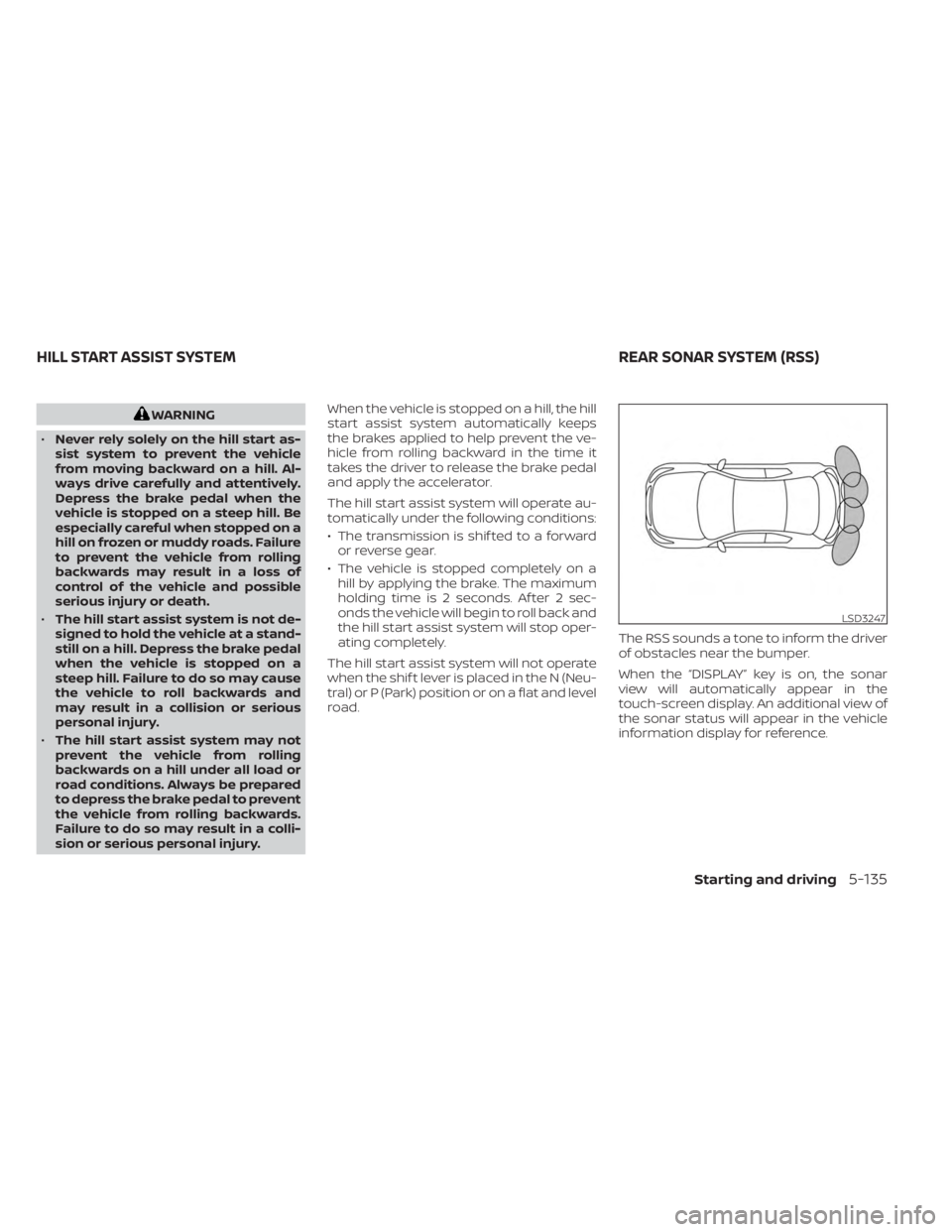
road. The RSS sounds a tone to inform the driver
of obstacles near the bumper.
When the “DISPLAY” key is on, the sonar
view will automatically appear in the
touch-screen display. An additional view of
the sonar status will appear in the vehicle
information display for reference.
LSD3247
HILL START ASSIST SYSTEM
REAR SONAR SYSTEM (RSS)
Starting and driving5-135
Page 412 of 556
WARNING
• The RSS is a convenience but it is not
a substitute for proper parking.
• The driver is always responsible for
safety during parking and other ma-
neuvers. Always look around and
check that it is safe to do so before
parking.
• Read and understand the limitations
of the RSS as contained in this sec-
tion. The colors of the corner sonar
indicator and the distance guide
lines in the rear view indicate differ-
ent distances to the object.
• Inclement weather or ultrasonic
sources such as an automatic car
wash, a truck's compressed-air
brakes or a pneumatic drill may af-
fect the function of the system; this
may include reduced performance or
a false activation.
• This function is designed as an aid to
the driver in detecting large station-
ary objects to help avoid damaging
the vehicle. •The system is not designed to prevent
contact with small or moving objects.
Always move slowly. The system will
not detect small objects below the
bumper, and may not detect objects
close to the bumper or on the ground.
• The system may not detect the fol-
lowing objects: fluff y objects such as
snow, cloth, cotton, glass, wool, etc.;
thin objects such as rope, wire and
chain, etc.; or wedge-shaped objects.
If your vehicle sustains damage to the
bumper fascia, leaving it misaligned or
bent, the sensing zone may be altered
causing inaccurate measurement of ob-
stacles or false alarms.
CAUTION
• Excessive noise (such as audio sys-
tem volume or an open vehicle win-
dow) will interfere with the tone and
it may not be heard.
• Keep the sonar sensors (located on
the bumper fascia) free from snow,
ice and large accumulations of dirt.
Do not clean the sensors with sharp
objects. If the sensors are covered,
the accuracy of the sonar function
will be diminished.
SYSTEM OPERATION
The system informs with a visual and au-
dible alert of rear obstacles when the shif t
lever is in the R (Reverse) position.
The system is deactivated at speeds above
6 mph (10 km/h). It is reactivated at lower
speeds.
The intermittent tone will stop af ter 3 sec-
onds when an obstacle is detected by only
the corner sensor and the distance does
not change. The tone will stop when the
obstacle moves away from the vehicle or if
the vehicle moves away from the obstacle.
When the object is detected, the indicator
(green) appears and blinks and the tone
sounds intermittently. When the vehicle
moves closer to the object, the color of the
indicator turns yellow and the rate of the
blinking increases. When the vehicle is very
close to the object, the indicator stops
blinking and turns red, and the tone
sounds continuously.
5-136Starting and driving
Page 418 of 556
SPECIAL WINTER EQUIPMENT
It is recommended that the following items
be carried in the vehicle during winter:
• A scraper and stiff-bristled brush to re-move ice and snow from the windows
and wiper blades.
• A sturdy, flat board to be placed under the jack to give it firm support.
• A shovel to dig the vehicle out of snowdrif ts.
• Extra washer fluid to refill the windshield- washer fluid reservoir.
DRIVING ON SNOW OR ICE
WARNING
• Wet ice (32°F, 0°C and freezing rain),
very cold snow or ice can be slick and
very hard to drive on. The vehicle will
have much less traction or “grip” un-
der these conditions. Try to avoid
driving on wet ice until the road is
salted or sanded.
• Whatever the condition, drive with
caution. Accelerate and slow down
with care. If accelerating or down-
shif ting too fast, the drive wheels will
lose even more traction. •
Allow more stopping distance under
these conditions. Braking should be
started sooner than on dry
pavement.
• Allow greater following distances on
slippery roads.
• Watch for slippery spots (glare ice).
These may appear on an otherwise
clear road in shaded areas. If a patch
of ice is seen ahead, brake before
reaching it. Try not to brake while on
the ice, and avoid any sudden steer-
ing maneuvers.
• Do not use the cruise control (if so
equipped) on slippery roads.
• Snow can trap dangerous exhaust
gases under your vehicle. Keep snow
clear of the exhaust pipe and from
around your vehicle.
ENGINE BLOCK HEATER (if so
equipped)
Engine block heaters are used to assist
with cold temperature starting.
The engine block heater should be used
when the outside temperature is 20°F (-7°C)
or lower.
WARNING
• Do not use your engine block heater
with an ungrounded electrical sys-
tem or a 2-pronged adapter. You can
be seriously injured by an electrical
shock if you use an ungrounded
connection.
• Disconnect and properly store the
engine block heater cord before
starting the engine. Damage to the
cord could result in an electrical
shock and can cause serious injury.
• Use a heavy-duty 3-wire, 3-pronged
extension cord rated for at least 10 A.
Plug the extension cord into a
Ground Fault Interrupt (GFI) pro-
tected, grounded 110-VAC outlet.
Failure to use the proper extension
cord or a grounded outlet can result
in a fire or electrical shock and cause
serious personal injury.
5-142Starting and driving
Page 431 of 556
CAUTION
• Do not push start this vehicle. The
three-way catalyst may be
damaged.
• Continuously Variable Transmission
(CVT) models and Manual Transmis-
sion (M/T) cannot be push-started or
tow-started. Attempting to do so
may cause transmission damage.
• For Manual Transmission (M/T) mod-
els, never try to start the vehicle by
towing it. When the engine starts, the
forward surge could cause the ve-
hicle to collide with the tow vehicle. If your vehicle is overheating (indicated by
an extremely high temperature gauge
reading), or if you feel a lack of engine
power, detect abnormal noise, etc., take the
following steps.
WARNING
• Do not continue to drive if your ve-
hicle overheats. Doing so could cause
engine damage or a vehicle fire.
• To avoid the danger of being scalded,
never remove the coolant reservoir
cap while the engine is still hot. When
the coolant reservoir cap is removed,
pressurized hot water will spurt out,
possibly causing serious injury.
• Do not open the hood if steam is
coming out.
1. Move the vehicle safely off the road, ap- ply the parking brake and move the shif t
lever to N (Neutral) (manual transmis-
sion) or to P (Park) (CVT).
Do not stop the engine.
2. Turn off the air conditioner (if so equipped). Open all the windows, move
the heater or air conditioner tempera-
ture control to maximum hot and fan
control to high speed. 3. Get out of the vehicle. Look and listen for
steam or coolant escaping from the ra-
diator before opening the hood. (If
steam or coolant is escaping, turn off
the engine.) Do not open the hood fur-
ther until no steam or coolant can be
seen.
4. Open the engine hood.
WARNING
If steam or water is coming from the
engine, stand clear to prevent getting
burned.
5. Visually check drive belts for damage or looseness. Also check if the cooling fan
is running. The radiator hoses and radia-
tor should not leak water. If coolant is
leaking, the water pump belt is missing
or loose, or the cooling fan does not run,
stop the engine.
WARNING
Be careful not to allow your hands, hair,
jewelry or clothing to come into con-
tact with, or get caught in, engine belts
or the engine cooling fan. The engine
cooling fan can start at any time.
PUSH STARTING IF YOUR VEHICLE OVERHEATS
In case of emergency6-11
Page 452 of 556
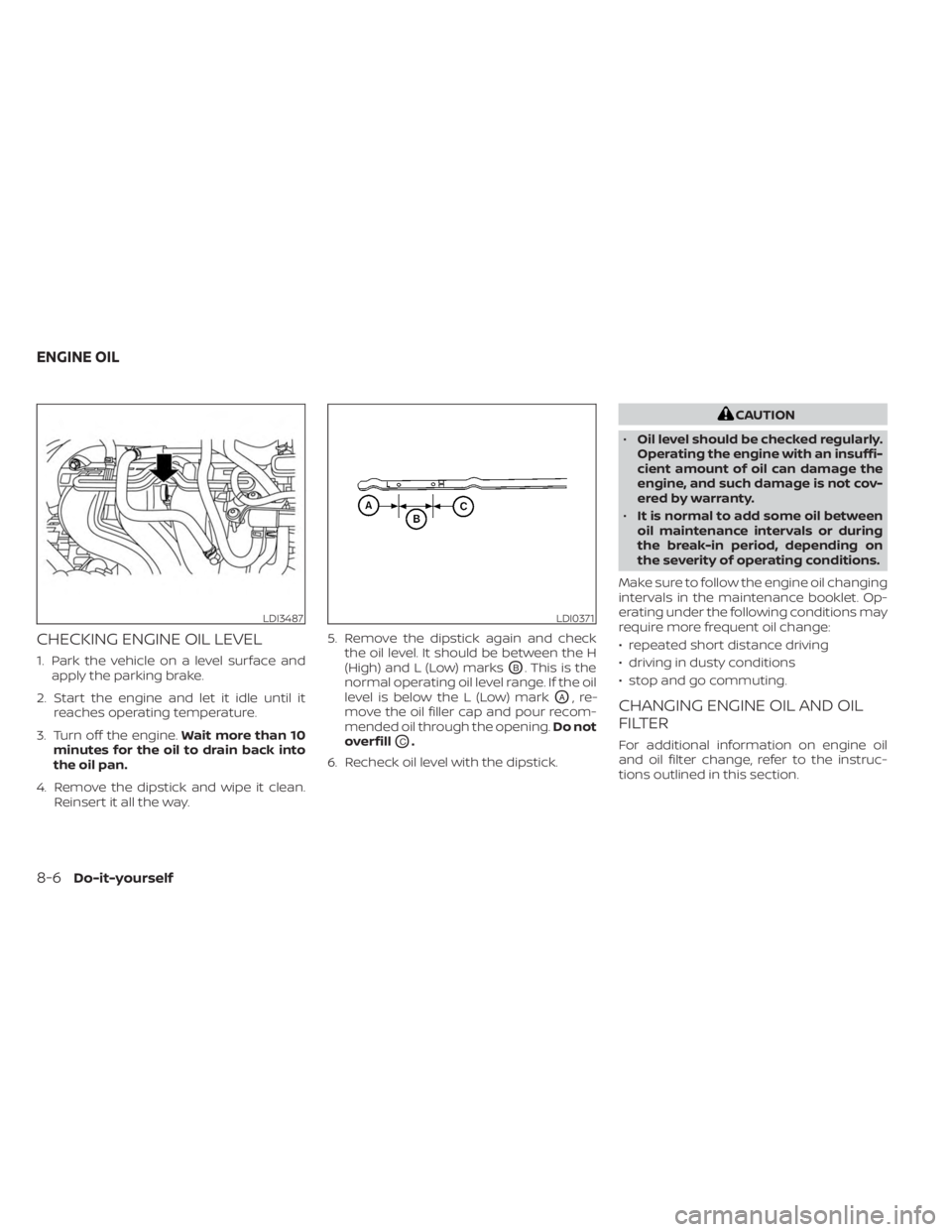
CHECKING ENGINE OIL LEVEL
1. Park the vehicle on a level surface andapply the parking brake.
2. Start the engine and let it idle until it reaches operating temperature.
3. Turn off the engine. Wait more than 10
minutes for the oil to drain back into
the oil pan.
4. Remove the dipstick and wipe it clean. Reinsert it all the way. 5. Remove the dipstick again and check
the oil level. It should be between the H
(High) and L (Low) marksOB. This is the
normal operating oil level range. If the oil
level is below the L (Low) mark
OA,re-
move the oil filler cap and pour recom-
mended oil through the opening. Do not
overfill
OC.
6. Recheck oil level with the dipstick.
CAUTION
• Oil level should be checked regularly.
Operating the engine with an insuffi-
cient amount of oil can damage the
engine, and such damage is not cov-
ered by warranty.
• It is normal to add some oil between
oil maintenance intervals or during
the break-in period, depending on
the severity of operating conditions.
Make sure to follow the engine oil changing
intervals in the maintenance booklet. Op-
erating under the following conditions may
require more frequent oil change:
• repeated short distance driving
• driving in dusty conditions
• stop and go commuting.
CHANGING ENGINE OIL AND OIL
FILTER
For additional information on engine oil
and oil filter change, refer to the instruc-
tions outlined in this section.
LDI3487LDI0371
ENGINE OIL
8-6Do-it-yourself
Page 463 of 556
The viscous paper type filter element
should not be cleaned and reused. Replace
it according to the maintenance log shown
in the “Maintenance and schedules” sec-
tion of this manual.
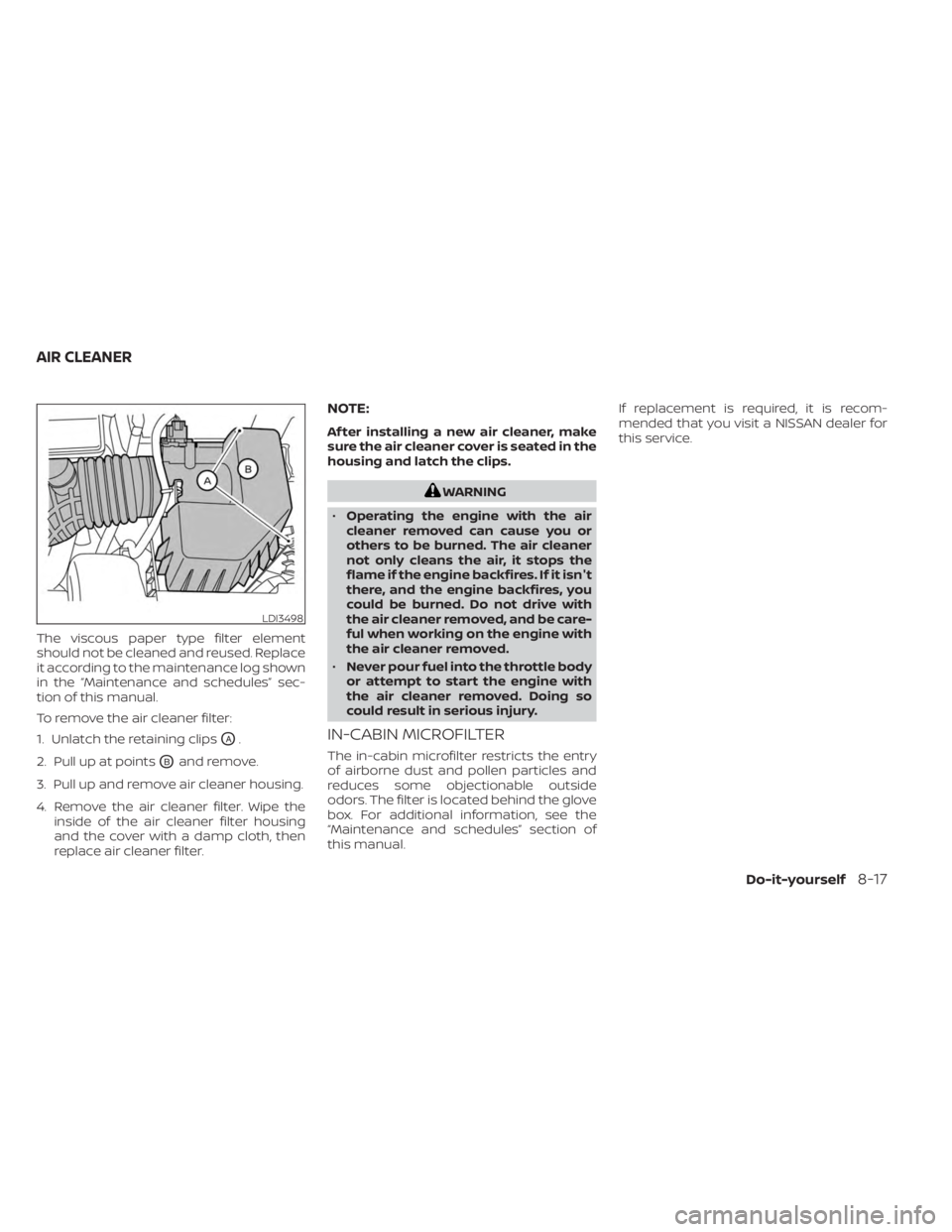
To remove the air cleaner filter:
1. Unlatch the retaining clips
OA.
2. Pull up at points
OBand remove.
3. Pull up and remove air cleaner housing.
4. Remove the air cleaner filter. Wipe the inside of the air cleaner filter housing
and the cover with a damp cloth, then
replace air cleaner filter.
NOTE:
Af ter installing a new air cleaner, make
sure the air cleaner cover is seated in the
housing and latch the clips.
WARNING
• Operating the engine with the air
cleaner removed can cause you or
others to be burned. The air cleaner
not only cleans the air, it stops the
flame if the engine backfires. If it isn't
there, and the engine backfires, you
could be burned. Do not drive with
the air cleaner removed, and be care-
ful when working on the engine with
the air cleaner removed.
• Never pour fuel into the throttle body
or attempt to start the engine with
the air cleaner removed. Doing so
could result in serious injury.
IN-CABIN MICROFILTER
The in-cabin microfilter restricts the entry
of airborne dust and pollen particles and
reduces some objectionable outside
odors. The filter is located behind the glove
box. For additional information, see the
“Maintenance and schedules” section of
this manual. If replacement is required, it is recom-
mended that you visit a NISSAN dealer for
this service.
LDI3498
AIR CLEANER
Do-it-yourself8-17
Page 533 of 556
Manual Transmission (if so
equipped)
• Always tow with the manual transmis-sion in N (Neutral).
• Af ter towing 500 miles (805 km), start and idle the engine with the transmission in N
(Neutral) for two minutes. Failure to idle
the engine af ter every 500 miles (805 km)
of towing may cause damage to internal
transmission parts.
Continuously Variable
Transmission (if so equipped)
To tow a vehicle equipped with a continu-
ously variable transmission, an appropriate
vehicle dolly MUSTbe placed under the
towed vehicle's drive wheels. Alwaysfollow
the dolly manufacturer's recommenda-
tions when using their product. DOT (Department of Transportation) Qual-
ity Grades: All passenger car tires must
conform to federal safety requirements in
addition to these grades.
Quality grades can be found where appli-
cable on the tire sidewall between tread
shoulder and maximum section width. For
example:
Treadwear 200 Traction AA Temperature
A
Treadwear
The treadwear grade is a comparative rat-
ing based on the wear rate of the tire when
tested under controlled conditions on a
specified government test course. For ex-
ample, a tire graded 150 would wear one
and one-half (1 1/2) times as well on the
government course as a tire graded 100.
The relative performance of tires depends
upon the actual conditions of their use,
however, and may depart significantly from
the norm due to variations in driving habits,
service practices and differences in road
characteristics and climate.
Traction AA, A, B and C
The traction grades, from highest to low-
est, are AA, A, B, and C. Those grades repre-
sent the tire's ability to stop on wet pave-ment as measured under controlled
conditions on specified government test
surfaces of asphalt and concrete. A tire
marked C may have poor traction
performance.
WARNING
The traction grade assigned to this tire
is based on straight-ahead braking
traction tests, and does not include ac-
celeration, cornering, hydroplaning, or
peak traction characteristics.
Temperature A, B and C
The temperature grades are A (the high-
est), B, and C, representing the tire’s resis-
tance to the generation of heat, and its
ability to dissipate heat when tested under
controlled conditions on a specified indoor
laboratory test wheel. Sustained high tem-
perature can cause the material of the tire
to degenerate and reduce tire life, and ex-
cessive temperature can lead to sudden
tire failure. The grade C corresponds to a
level of performance which all passenger
car tires must meet under the Federal Mo-
tor Safety Standard No. 109. Grades B and A
represent higher levels of performance on
the laboratory test wheel than the mini-
mum required by law.
UNIFORM TIRE QUALITY GRADING
Technical and consumer information10-21
Page 539 of 556
11 Index
A
Active Ride Control.............5-134Air bag (See supplemental restraint
system).....................1-44Air bag system
Front (See supplemental front impact
air bag system)
..............1-52Air bag warning labels............1-65Air bag warning light.........1-65, 2-12Air bag warning light,
supplemental..............1-65, 2-12Air cleaner...................8-17Air cleaner housing filter..........8-17Air conditionerAir conditioner operation. . . .4-35, 4-40Air conditioner service..........4-43Air conditioner specification label. .10-14Air conditioner system refrigerant
recommendations............10-8Air conditioner system refrigerant
and oil recommendations.......10-8Heater and air conditioner
controls...............4-32, 4-40Servicing air conditioner........4-43Air flow charts................4-36Alarm system (See vehicle security
system)................... .2-48Anchor point locations...........1-28Antenna....................4-63Anti-lock Braking System (ABS).....5-129
Antifreeze...................5-141Armrests.....................1-7Audio system.................4-44AM radio operation............4-50AM radio reception............4-44AM/FM radio............4-48, 4-50Auxiliary (AUX) devices operation. . .4-52Bluetooth® audio.............4-59FM radio operation............4-51FM radio reception............4-44iPod® Player................4-56iPod® player operation.........4-56Radio................... .4-44USB (Universal Serial Bus) Connection
Port.................... .4-53USB Connections.............4-54USB interface...............4-53Autolight switch...............2-53Automatic
Automatic power window switch. . .2-71Automatic anti-glare inside mirror. . . .3-28Automatic door locks.............3-6Automatic Emergency Braking (AEB)
with Pedestrian Detection......2-13, 5-92
B
Battery.................5- 141, 8-13Charge warning light...........2-11Battery replacement............8-23
Key fob...................8-23NISSAN Intelligent Key®.........8-23Before starting the engine.........5-14Belt (See drive belt)..............8-15Blind Spot Warning (BSW)..........5-36Bluetooth® audio..............4-59Bluetooth® hands-free phone
system.................... .4-66Bluetooth® connections.........4-81Connecting procedure..........4-71Phone indicators.............4-70Text messaging..............4-77Voice commands.............4-73Booster seats.................1-40Brake
Anti-lock Braking System (ABS). . . .5-129Brake fluid.................8-10Brake light (See stop light).......8-27Brake system...............5-129Brake warning light............2-10Brake wear indicators.......2-17,8-19Self-adjusting brakes...........8-19Brake and clutch fluid............8-10Brake Assist..................5-131Brake fluid...................8-10Brake system................5-129Brakes.....................8-19Break-in schedule.............5-125Brightness controlInstrument panel.............2-58Brightness/contrast button.........4-7
Page 542 of 556
Intelligent Forward Collision Warning
(I-FCW).....................5-106Intelligent Key systemKey operating range............3-9Key operation................3-10Mechanical key................3-3Remote keyless entry operation. . . .3-13Troubleshooting guide.......3-16,3-17Warning signals...........3-16,3-17Intelligent Trace Control..........5-133Interior light...............2-74,2-75Interior trunk lid release...........3-22iPod® Player................. .4-56ISOFIX child restraints.............1-25
J
Jump starting..............6-9, 8-14
K
Key.........................3-2Key fob battery replacement........8-23Keyless entry
With Intelligent Key system
(See Intelligent Key system)
.......3-13KeysNISSAN Intelligent Key®........3-2,3-7NISSAN Vehicle Immobilizer System
keys..................... .3-3
L
Labels
Air conditioner specification label. . .10-14C.M.V.S.S. certification label.......10-13Emission control information label. .10-13Engine serial number..........10-13F.M.V.S.S. certification label........10-13Tire and Loading Information label. .10-14Vehicle identification number (VIN)
plate.................... .10-12Warning labels (for SRS)..........1-65Lane Departure Warning (LDW).......5-29LATCH (Lower Anchors and Tethers for
CHildren) System...............1-25Launch bar menu................4-7License plate
Installing the license plate........10-15LightAir bag warning light........1-65, 2-12Brake light (See stop light)........8-27Bulb check/instrument panel......2-10Bulb replacement.............8-27Charge warning light............2-11Exterior and Interior lights........8-27Fog light switch..............2-59Fog lights..................8-26Headlight and turn signal switch. . . .2-52Headlight control switch.........2-52Headlights..................8-25Interior light..............2-74,2-75Light bulbs.................8-25Low tire pressure warning light.....2-13
Low windshield-washer fluid
warning light.............2-28, 2-43Spotlights (See map light)........2-75Trunk light..................2-76Lights......................8-25Map lights..................2-75Lock
Child safety rear door lock.........3-7Door locks................. .3-4Fuel-filler door lock opener lever. . . .3-23Power door locks...........3-5, 3-6Trunk lid lock opener lever........3-22Loose fuel cap warning........2-28,2-42Low fuel warning light.........2-28, 2-43Low tire pressure warning light.......2-13Low windshield-washer fluid
warning light..............2-28, 2-43Luggage (See vehicle loading
information)................. .10-16
M
Maintenance
General maintenance...........9-2Inside the vehicle..............9-3Maintenance precautions.........8-2Outside the vehicle.............9-2Seat belt maintenance..........1-20Under the hood and vehicle.......9-4Maintenance requirements..........9-2Maintenance schedules............9-7Malfunction indicator light..........2-11Manual front seat adjustment........1-3
11-4