horn NISSAN SENTRA 2023 Owners Manual
[x] Cancel search | Manufacturer: NISSAN, Model Year: 2023, Model line: SENTRA, Model: NISSAN SENTRA 2023Pages: 556, PDF Size: 6.11 MB
Page 14 of 556
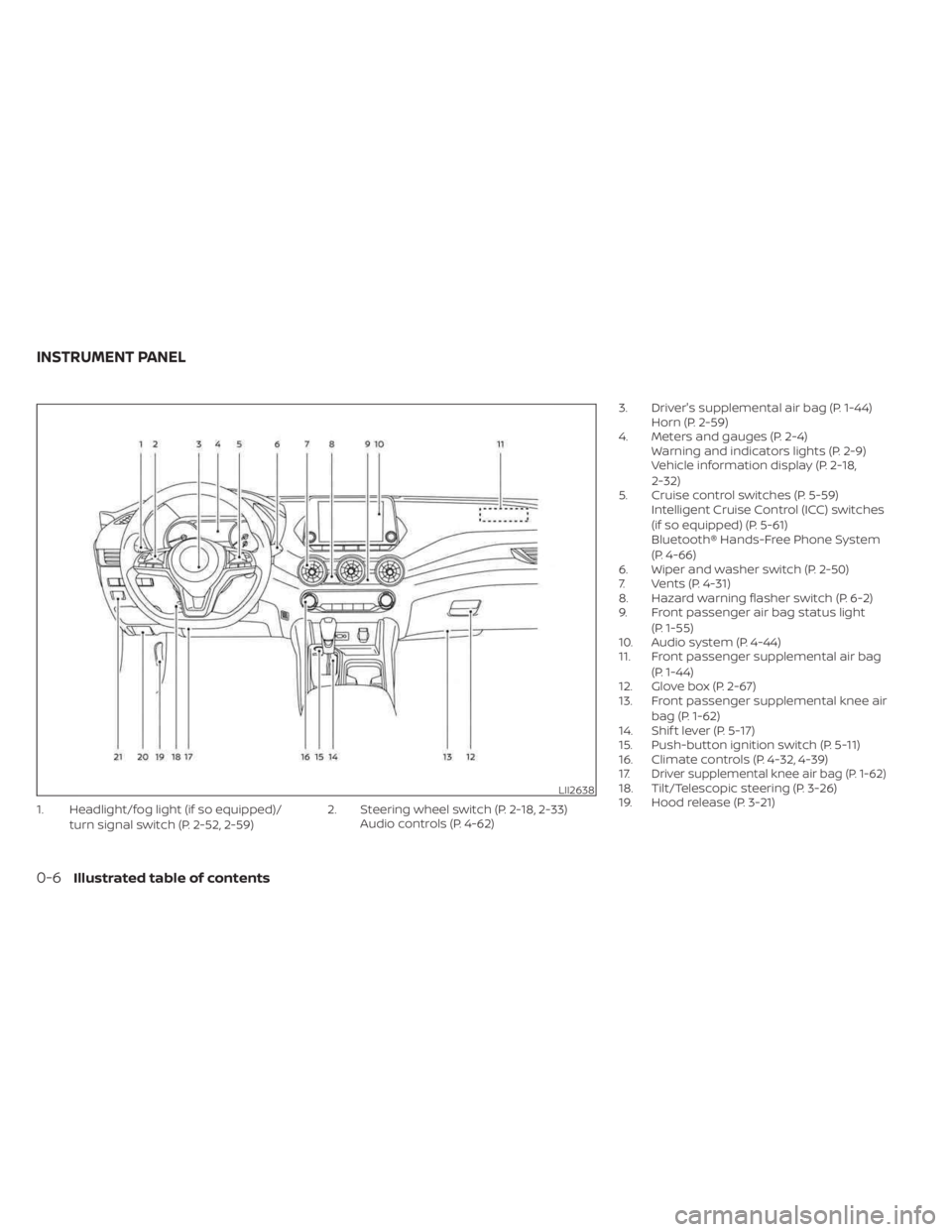
1. Headlight/fog light (if so equipped)/turn signal switch (P. 2-52, 2-59) 2. Steering wheel switch (P. 2-18, 2-33)
Audio controls (P. 4-62) 3. Driver's supplemental air bag (P. 1-44)
Horn (P. 2-59)
4. Meters and gauges (P. 2-4) Warning and indicators lights (P. 2-9)
Vehicle information display (P. 2-18,
2-32)
5. Cruise control switches (P. 5-59) Intelligent Cruise Control (ICC) switches
(if so equipped) (P. 5-61)
Bluetooth® Hands-Free Phone System
(P. 4-66)
6. Wiper and washer switch (P. 2-50)
7. Vents (P. 4-31)
8. Hazard warning flasher switch (P. 6-2)
9. Front passenger air bag status light
(P. 1-55)
10. Audio system (P. 4-44)
11. Front passenger supplemental air bag
(P. 1-44)
12. Glove box (P. 2-67)
13. Front passenger supplemental knee air
bag (P. 1-62)
14. Shif t lever (P. 5-17)
15. Push-button ignition switch (P. 5-11)
16. Climate controls (P. 4-32, 4-39)
17.
Driver supplemental knee air bag (P. 1-62)18. Tilt/Telescopic steering (P. 3-26)
19. Hood release (P. 3-21)LII2638
INSTRUMENT PANEL
0-6Illustrated table of contents
Page 86 of 556
2 Instruments and controls
Instrument panel................................2-2
Meters and gauges .............................2-4
Speedometer and odometer .................2-4
Tachometer ..................................2-6
Engine coolant temperature gauge ..........2-6
Fuel gauge ................................... 2-7
Distance To Empty (DTE) .....................2-8
Warning lights, indicator lights and audible
reminders .......................................2-9
Checking lights .............................. 2-10
Warning/Indicator lights (red) ...............2-10
Warning/Indicator lights (yellow) ............2-12
Warning/Indicator lights (other) .............2-16
Audible reminders ........................... 2-17
Vehicle information display 4.2 inch (11 cm)
TYPE A (if so equipped) ......................... 2-18
How to use the vehicle information
display ...................................... 2-18
Startup display .............................. 2-18
Settings ..................................... 2-19
Vehicle information display warnings
and indicators ............................... 2-26
Vehicle information display– 7 inch (18 cm)
Type B (if so equipped) ......................... 2-32
How to use the vehicle information
display ...................................... 2-33
Startup display .............................. 2-33Resetting the drive computer
...............2-34
Settings ..................................... 2-34
Vehicle information display warnings
and indicators ............................... 2-41
Security systems ............................... 2-48
Vehicle security system (if so equipped) .....2-48
NISSAN Vehicle Immobilizer System .........2-49
Wiper and washer switch .......................2-50
Switch operation ............................ 2-50
Rear window and outside mirror
(if so equipped) defroster switch ...............2-51
Headlight and turn signal switch ...............2-52
Headlight control switch ....................2-52
LED Daytime Running Lights (DRL)
system (if so equipped) ......................2-57
Instrument brightness control ..............2-58
Turn signal switch ........................... 2-58
Fog light switch (if so equipped) .............2-59
Horn ........................................... 2-59
He
ated seat switches (if so equipped) ..........2-60
Heated steering wheel switch (if so equipped) . . . 2-61
Emergency call (SOS) button (if so equipped) . . . 2-62
Rear Door Alert ................................. 2-62
Power outlet ................................... 2-64
USB/iPod® charging port (if so equipped) .......2-64
Extended storage switch .......................2-65
Page 88 of 556
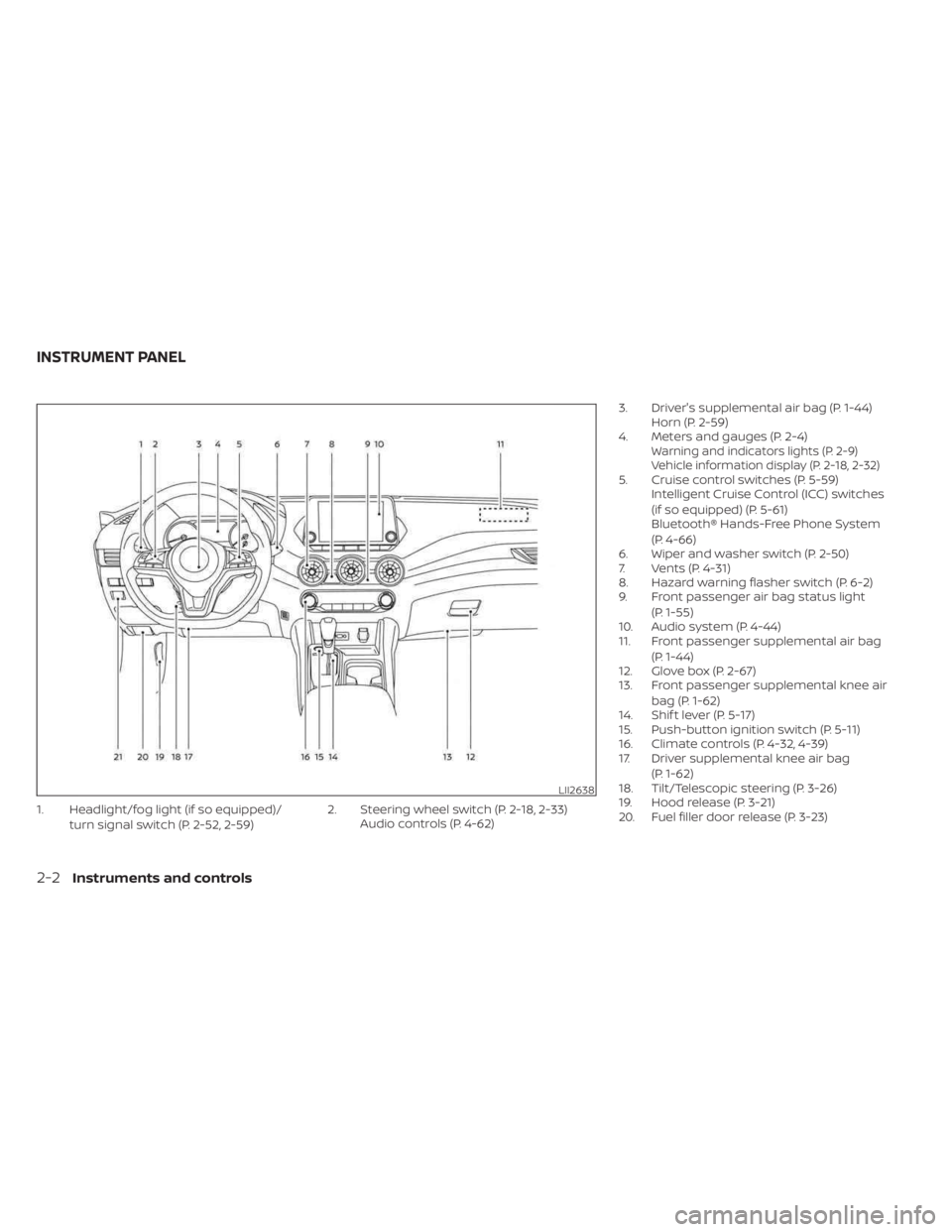
1. Headlight/fog light (if so equipped)/turn signal switch (P. 2-52, 2-59) 2. Steering wheel switch (P. 2-18, 2-33)
Audio controls (P. 4-62) 3. Driver's supplemental air bag (P. 1-44)
Horn (P. 2-59)
4. Meters and gauges (P. 2-4)
Warning and indicators lights (P. 2-9)
Vehicle information display (P. 2-18, 2-32)
5. Cruise control switches (P. 5-59) Intelligent Cruise Control (ICC) switches
(if so equipped) (P. 5-61)
Bluetooth® Hands-Free Phone System
(P. 4-66)
6. Wiper and washer switch (P. 2-50)
7. Vents (P. 4-31)
8. Hazard warning flasher switch (P. 6-2)
9. Front passenger air bag status light
(P. 1-55)
10. Audio system (P. 4-44)
11. Front passenger supplemental air bag
(P. 1-44)
12. Glove box (P. 2-67)
13. Front passenger supplemental knee air
bag (P. 1-62)
14. Shif t lever (P. 5-17)
15. Push-button ignition switch (P. 5-11)
16. Climate controls (P. 4-32, 4-39)
17. Driver supplemental knee air bag
(P. 1-62)
18. Tilt/Telescopic steering (P. 3-26)
19. Hood release (P. 3-21)
20. Fuel filler door release (P. 3-23)
LII2638
INSTRUMENT PANEL
2-2Instruments and controls
Page 108 of 556
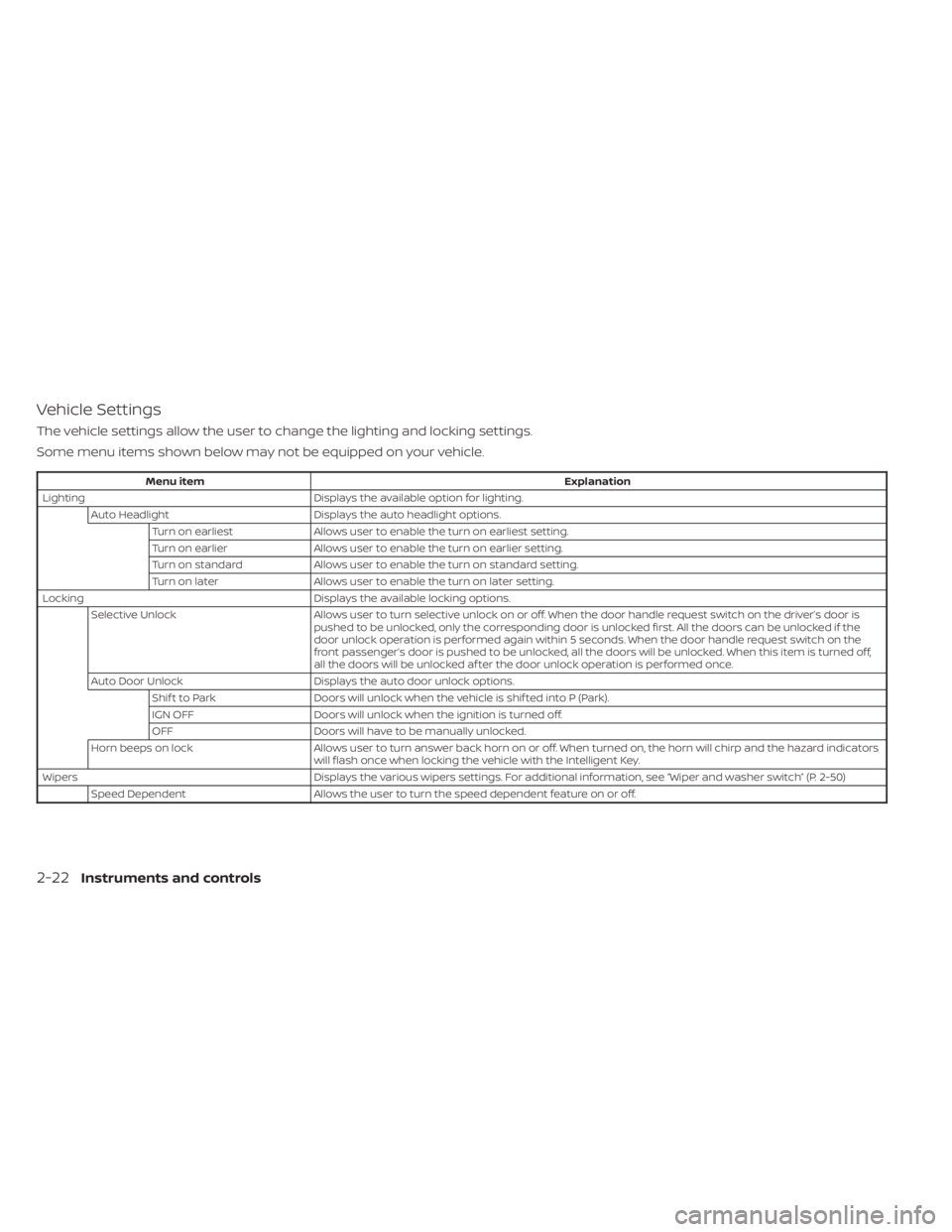
Vehicle Settings
The vehicle settings allow the user to change the lighting and locking settings.
Some menu items shown below may not be equipped on your vehicle.
Menu itemExplanation
Lighting Displays the available option for lighting.
Auto Headlight Displays the auto headlight options.
Turn on earliest Allows user to enable the turn on earliest setting.
Turn on earlier Allows user to enable the turn on earlier setting.
Turn on standard Allows user to enable the turn on standard setting.
Turn on later Allows user to enable the turn on later setting.
Locking Displays the available locking options.
Selective Unlock Allows user to turn selective unlock on oroff. When the door handle request switch on the driver’s door is
pushed to be unlocked, only the corresponding door is unlocked first. All the doors can be unlocked if the
door unlock operation is performed again within 5 seconds. When the door handle request switch on the
front passenger’s door is pushed to be unlocked, all the doors will be unlocked. When this item is turned off,
all the doors will be unlocked af ter the door unlock operation is performed once.
Auto Door Unlock Displays the auto door unlock options.
Shif t to Park Doors will unlock when the vehicle is shif ted into P (Park).
IGN OFF Doors will unlock when the ignition is turned off.
OFF Doors will have to be manually unlocked.
Horn beeps on lock Allows user to turn answer back horn on or off. When turned on, the horn will chirp and the hazard indicators
will flash once when locking the vehicle with the Intelligent Key.
Wipers Displays the various wipers settings. For additional information, see “Wiper and washer switch” (P. 2-50)
Speed Dependent Allows the user to turn the speed dependent feature on or off.
2-22Instruments and controls
Page 109 of 556
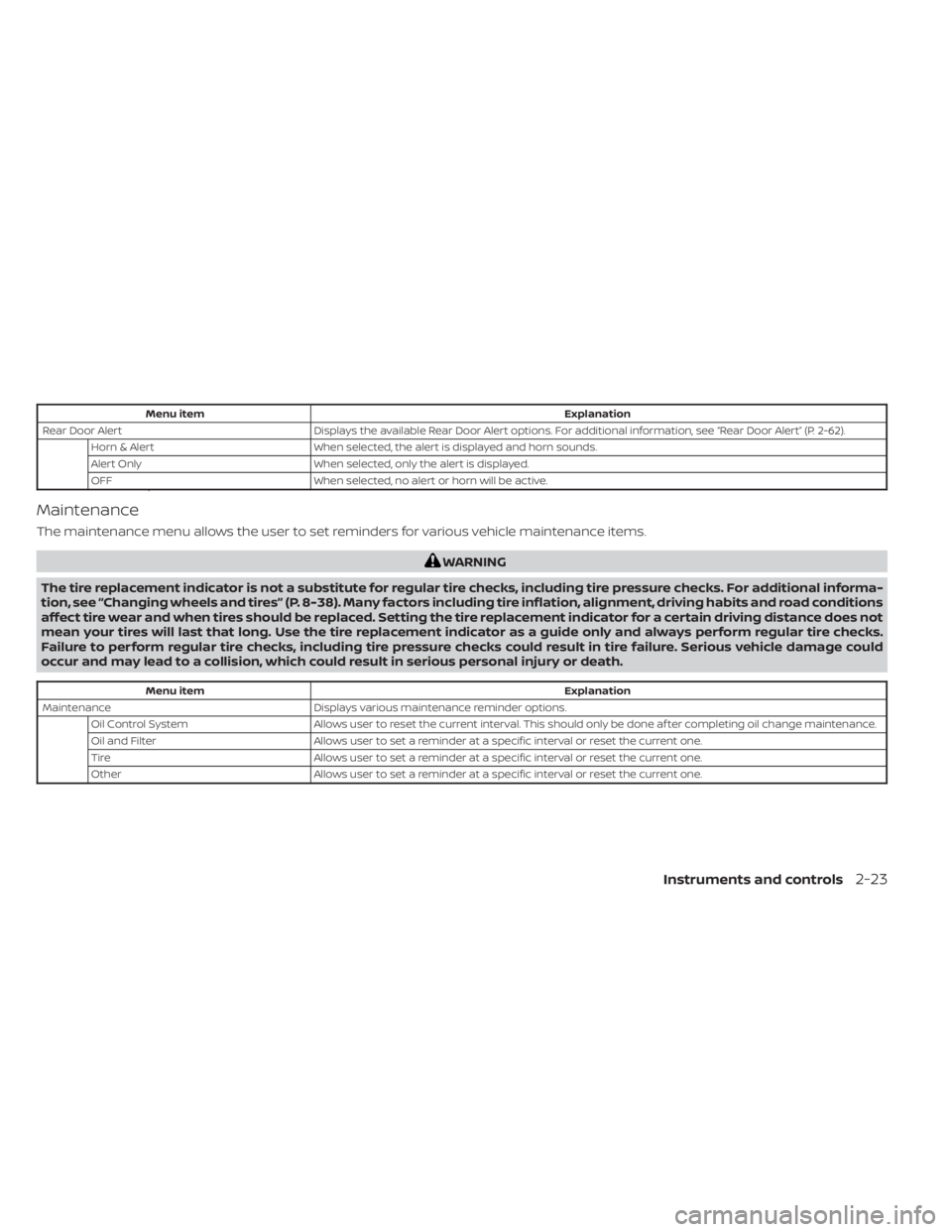
Menu itemExplanation
Rear Door Alert Displays the available Rear Door Alert options. For additional information, see “Rear Door Alert” (P. 2-62).
Horn & Alert When selected, the alert is displayed and horn sounds.
Alert Only When selected, only the alert is displayed.
OFF When selected, no alert or horn will be active.
Maintenance
The maintenance menu allows the user to set reminders for various vehicle maintenance items.
WARNING
The tire replacement indicator is not a substitute for regular tire checks, including tire pressure checks. For additional informa-
tion, see “Changing wheels and tires” (P. 8-38). Many factors including tire inflation, alignment, driving habits and road conditions
affect tire wear and when tires should be replaced. Setting the tire replacement indicator for a certain driving distance does not
mean your tires will last that long. Use the tire replacement indicator as a guide only and always perform regular tire checks.
Failure to perform regular tire checks, including tire pressure checks could result in tire failure. Serious vehicle damage could
occur and may lead to a collision, which could result in serious personal injury or death.
Menu item Explanation
Maintenance Displays various maintenance reminder options.
Oil Control System Allows user to reset the current interval. This should only be done af ter completing oil change maintenance.
Oil and Filter Allows user to set a reminder at a specific interval or reset the current one.
Tire Allows user to set a reminder at a specific interval or reset the current one.
Other Allows user to set a reminder at a specific interval or reset the current one.
Instruments and controls2-23
Page 124 of 556
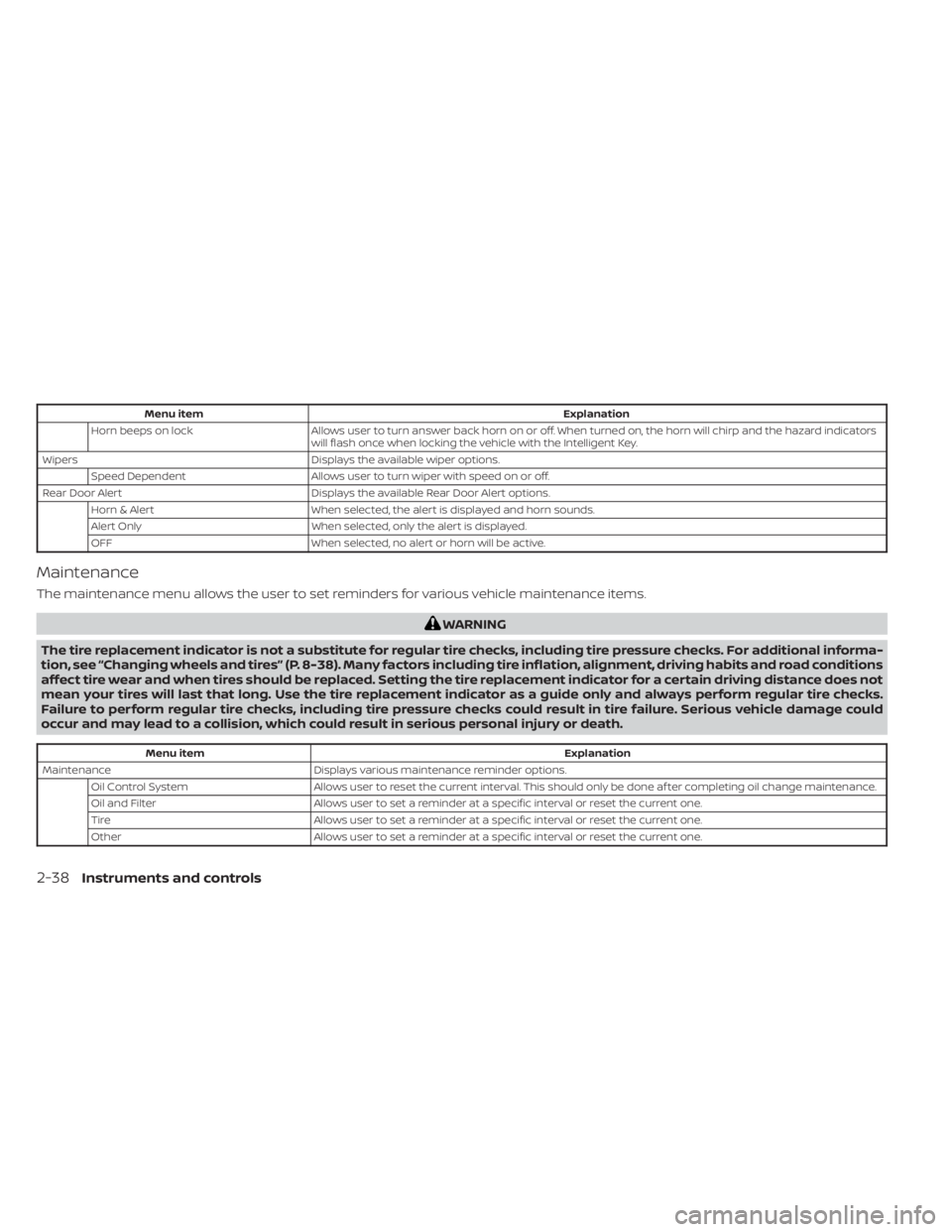
Menu itemExplanation
Horn beeps on lock Allows user to turn answer back horn on or off. When turned on, the horn will chirp and the hazard indicators
will flash once when locking the vehicle with the Intelligent Key.
Wipers Displays the available wiper options.
Speed Dependent Allows user to turn wiper with speed on or off.
Rear Door Alert Displays the available Rear Door Alert options.
Horn & Alert When selected, the alert is displayed and horn sounds.
Alert Only When selected, only the alert is displayed.
OFF When selected, no alert or horn will be active.
Maintenance
The maintenance menu allows the user to set reminders for various vehicle maintenance items.
WARNING
The tire replacement indicator is not a substitute for regular tire checks, including tire pressure checks. For additional informa-
tion, see “Changing wheels and tires” (P. 8-38). Many factors including tire inflation, alignment, driving habits and road conditions
affect tire wear and when tires should be replaced. Setting the tire replacement indicator for a certain driving distance does not
mean your tires will last that long. Use the tire replacement indicator as a guide only and always perform regular tire checks.
Failure to perform regular tire checks, including tire pressure checks could result in tire failure. Serious vehicle damage could
occur and may lead to a collision, which could result in serious personal injury or death.
Menu item Explanation
Maintenance Displays various maintenance reminder options.
Oil Control System Allows user to reset the current interval. This should only be done af ter completing oil change maintenance.
Oil and Filter Allows user to set a reminder at a specific interval or reset the current one.
Tire Allows user to set a reminder at a specific interval or reset the current one.
Other Allows user to set a reminder at a specific interval or reset the current one.
2-38Instruments and controls
Page 135 of 556
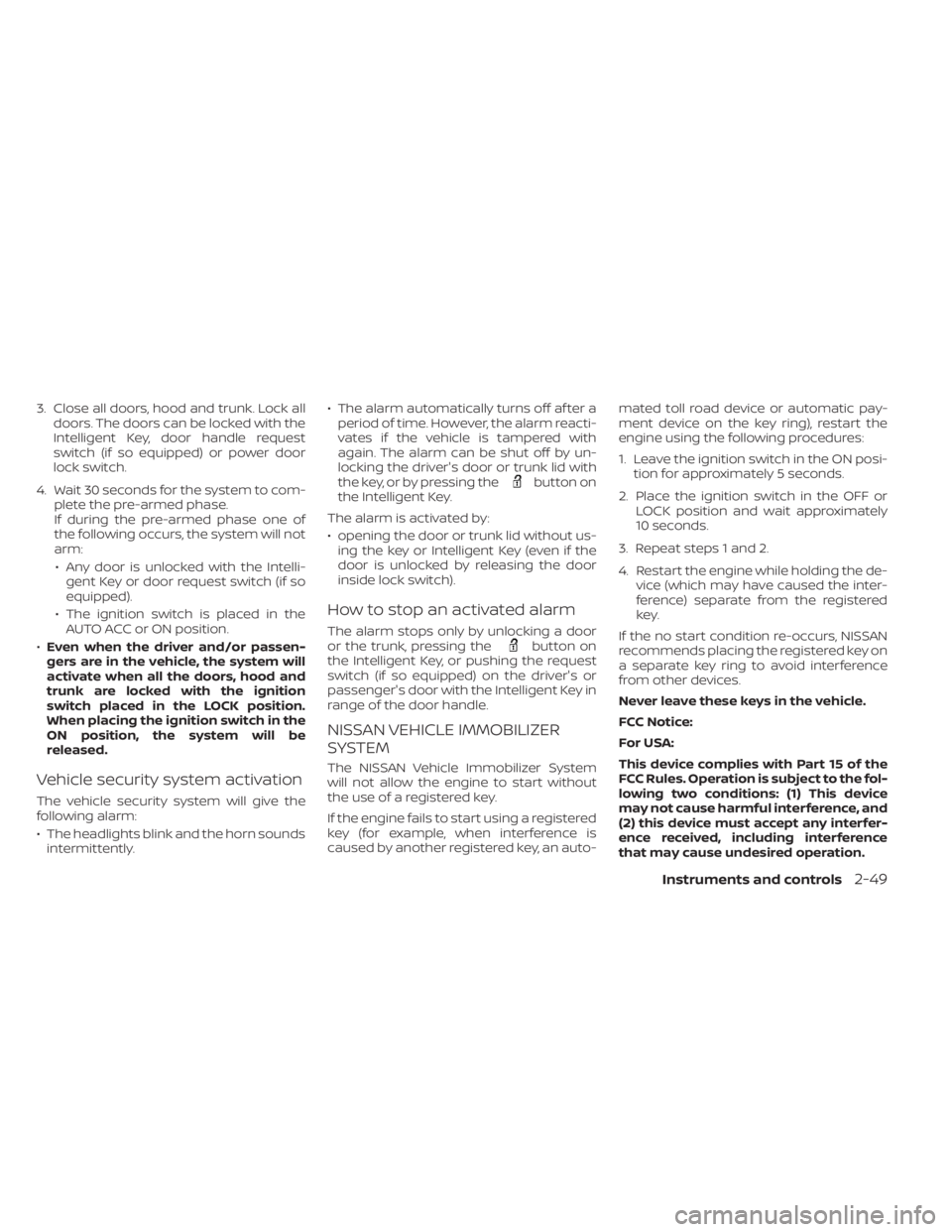
3. Close all doors, hood and trunk. Lock alldoors. The doors can be locked with the
Intelligent Key, door handle request
switch (if so equipped) or power door
lock switch.
4. Wait 30 seconds for the system to com- plete the pre-armed phase.
If during the pre-armed phase one of
the following occurs, the system will not
arm:
• Any door is unlocked with the Intelli- gent Key or door request switch (if so
equipped).
• The ignition switch is placed in the AUTO ACC or ON position.
• Even when the driver and/or passen-
gers are in the vehicle, the system will
activate when all the doors, hood and
trunk are locked with the ignition
switch placed in the LOCK position.
When placing the ignition switch in the
ON position, the system will be
released.
Vehicle security system activation
The vehicle security system will give the
following alarm:
• The headlights blink and the horn sounds intermittently. • The alarm automatically turns off af ter a
period of time. However, the alarm reacti-
vates if the vehicle is tampered with
again. The alarm can be shut off by un-
locking the driver's door or trunk lid with
the key, or by pressing the
button on
the Intelligent Key.
The alarm is activated by:
• opening the door or trunk lid without us- ing the key or Intelligent Key (even if the
door is unlocked by releasing the door
inside lock switch).
How to stop an activated alarm
The alarm stops only by unlocking a door
or the trunk, pressing thebutton on
the Intelligent Key, or pushing the request
switch (if so equipped) on the driver's or
passenger's door with the Intelligent Key in
range of the door handle.
NISSAN VEHICLE IMMOBILIZER
SYSTEM
The NISSAN Vehicle Immobilizer System
will not allow the engine to start without
the use of a registered key.
If the engine fails to start using a registered
key (for example, when interference is
caused by another registered key, an auto- mated toll road device or automatic pay-
ment device on the key ring), restart the
engine using the following procedures:
1. Leave the ignition switch in the ON posi-
tion for approximately 5 seconds.
2. Place the ignition switch in the OFF or LOCK position and wait approximately
10 seconds.
3. Repeat steps 1 and 2.
4. Restart the engine while holding the de- vice (which may have caused the inter-
ference) separate from the registered
key.
If the no start condition re-occurs, NISSAN
recommends placing the registered key on
a separate key ring to avoid interference
from other devices.
Never leave these keys in the vehicle.
FCC Notice:
For USA:
This device complies with Part 15 of the
FCC Rules. Operation is subject to the fol-
lowing two conditions: (1) This device
may not cause harmful interference, and
(2) this device must accept any interfer-
ence received, including interference
that may cause undesired operation.
Instruments and controls2-49
Page 145 of 556
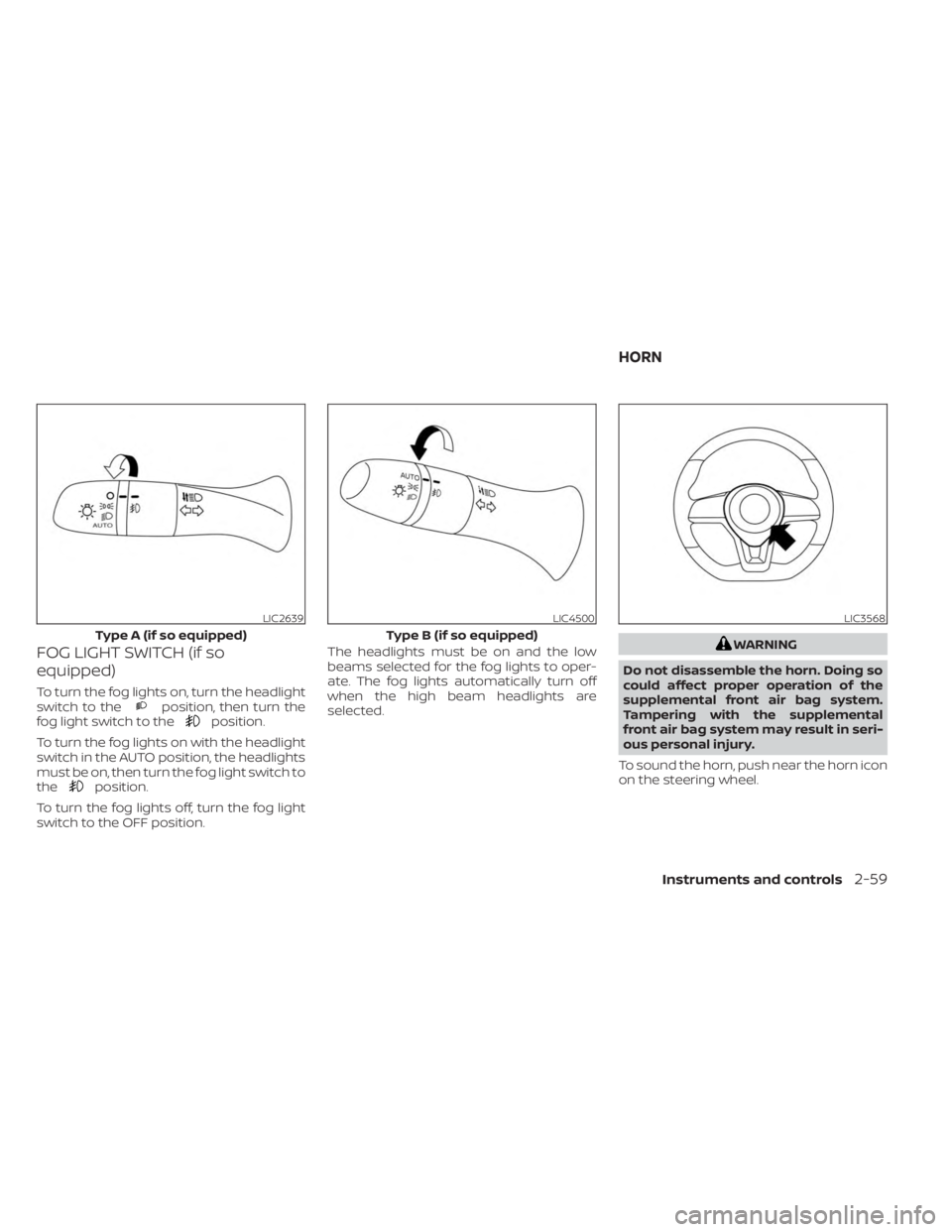
FOG LIGHT SWITCH (if so
equipped)
To turn the fog lights on, turn the headlight
switch to theposition, then turn the
fog light switch to theposition.
To turn the fog lights on with the headlight
switch in the AUTO position, the headlights
must be on, then turn the fog light switch to
the
position.
To turn the fog lights off, turn the fog light
switch to the OFF position. The headlights must be on and the low
beams selected for the fog lights to oper-
ate. The fog lights automatically turn off
when the high beam headlights are
selected.
WARNING
Do not disassemble the horn. Doing so
could affect proper operation of the
supplemental front air bag system.
Tampering with the supplemental
front air bag system may result in seri-
ous personal injury.
To sound the horn, push near the horn icon
on the steering wheel.
LIC2639
Type A (if so equipped)
LIC4500
Type B (if so equipped)
LIC3568
HORN
Instruments and controls2-59
Page 149 of 556
When the Rear Door Alert system is acti-
vated:
• When the driver puts the vehicle in the P(Park) position, a notification message
appears in the vehicle information dis-
play with the options to “Dismiss Mes-
sage” or “Disable Alert” if desired.• Select “Disable Alert” to temporarily disable for that stop.
• No selection or ‘Dismiss Message” will keep the alert enabled for that stop.
• If the alert is enabled when a driver exits the vehicle, a message will appear in the
vehicle information display that states
“Check Back Seat For All Articles.”
If “Horn & Alert” setting is selected:
• An audible horn sound will occur af ter a short time unless a rear door is
opened and closed within a short time
to deactivate the alert.
• If the doors are locked before the alert is deactivated by opening a rear door,
the horn will sound.
• If the trunk is opened before a rear door is opened, the horn will be de-
layed until af ter the trunk is closed.NOTE:
If “Alert Only ” setting is selected, the
message alert will still be shown in the
vehicle information display but the horn
will not sound.
WARNING
• If the driver selects “Disable Alert”, no
audible alert will be provided regard-
less of rear door open/close status.
• There may be times when there is an
object or passenger in the rear
seat(s) but the audible alert does not
sound. For example, this may occur if
rear seat passengers enter or exit the
vehicle during a trip.
• The system does not directly detect
objects or passengers in the rear
seat(s). Instead, it can detect when a
rear door is opened and closed, indi-
cating that there may be something
in the rear seat(s).
NOTE:
There may be times when the horn
sounds but there are no objects or pas-
sengers in the rear seat(s). For additional information, see “Rear Door
Alert is activated (P. 2-26) or “Rear Door Alert
is activated (P. 2-42)
Instruments and controls2-63
Page 176 of 556
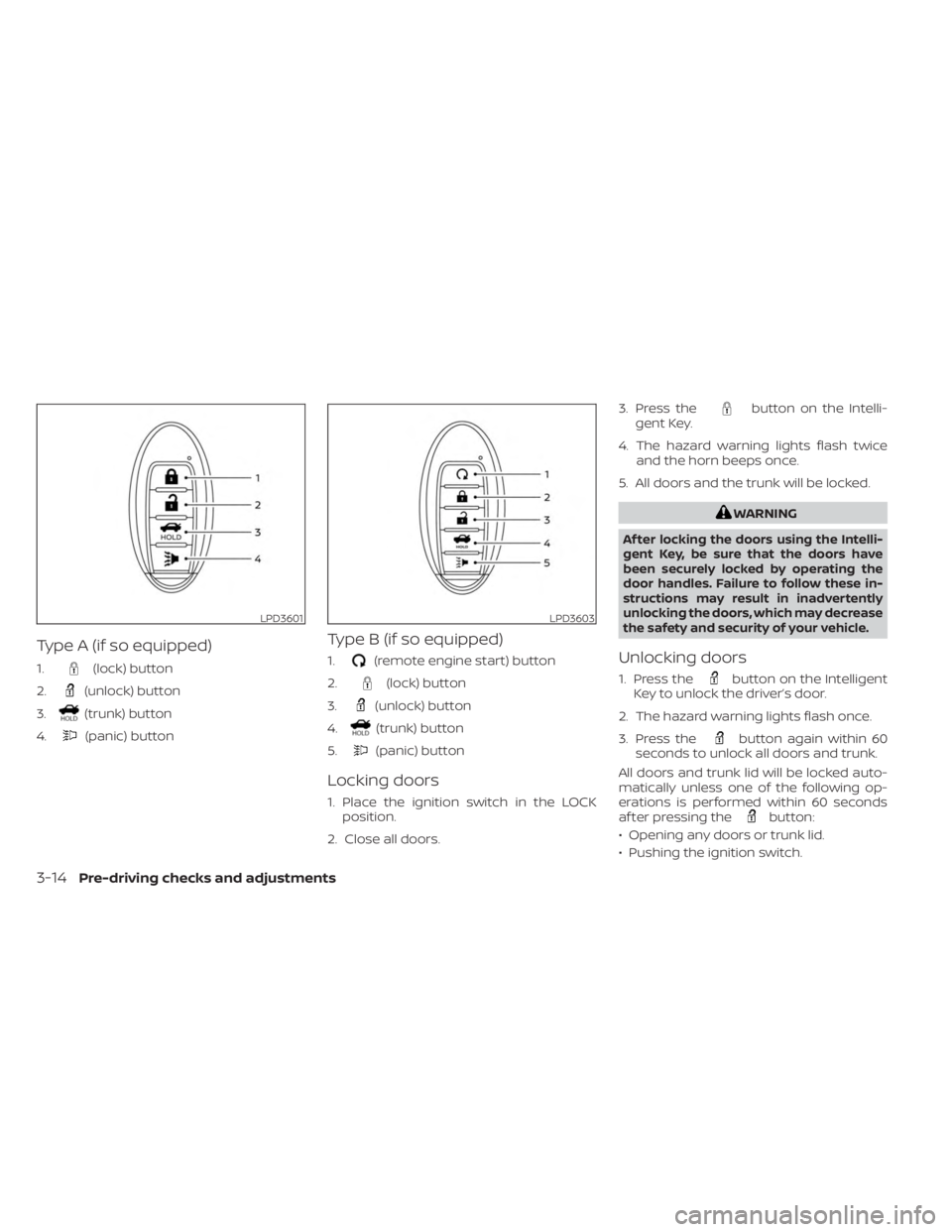
Type A (if so equipped)
1.(lock) button
2.
(unlock) button
3.
(trunk) button
4.
(panic) button
Type B (if so equipped)
1.(remote engine start) button
2.
(lock) button
3.
(unlock) button
4.
(trunk) button
5.
(panic) button
Locking doors
1. Place the ignition switch in the LOCK position.
2. Close all doors. 3. Press the
button on the Intelli-
gent Key.
4. The hazard warning lights flash twice and the horn beeps once.
5. All doors and the trunk will be locked.
WARNING
Af ter locking the doors using the Intelli-
gent Key, be sure that the doors have
been securely locked by operating the
door handles. Failure to follow these in-
structions may result in inadvertently
unlocking the doors, which may decrease
the safety and security of your vehicle.
Unlocking doors
1. Press thebutton on the Intelligent
Key to unlock the driver’s door.
2. The hazard warning lights flash once.
3. Press the
button again within 60
seconds to unlock all doors and trunk.
All doors and trunk lid will be locked auto-
matically unless one of the following op-
erations is performed within 60 seconds
af ter pressing the
button:
• Opening any doors or trunk lid.
• Pushing the ignition switch.
LPD3601LPD3603
3-14Pre-driving checks and adjustments