trunk release NISSAN SENTRA 2023 Owners Manual
[x] Cancel search | Manufacturer: NISSAN, Model Year: 2023, Model line: SENTRA, Model: NISSAN SENTRA 2023Pages: 556, PDF Size: 6.11 MB
Page 12 of 556
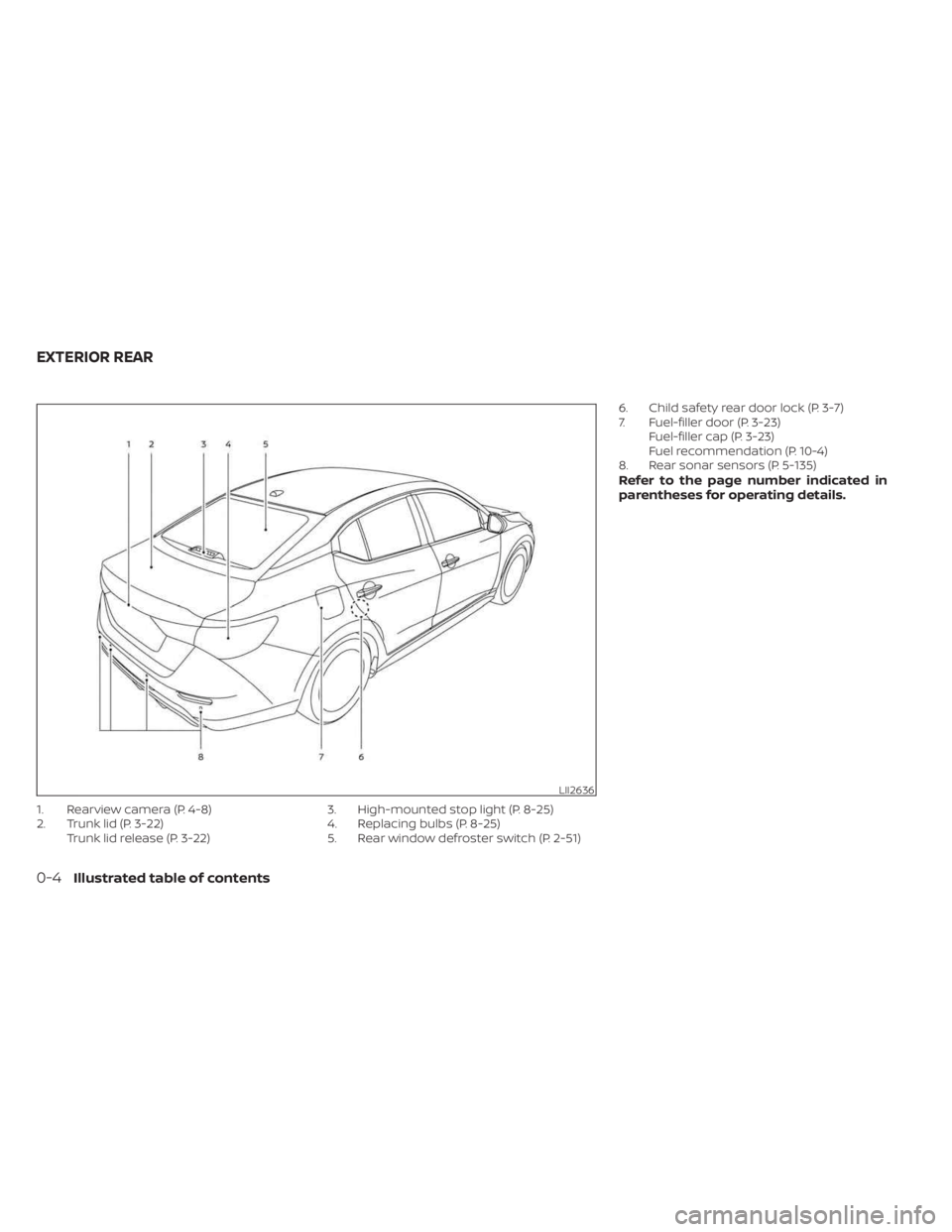
1. Rearview camera (P. 4-8)
2. Trunk lid (P. 3-22)Trunk lid release (P. 3-22) 3. High-mounted stop light (P. 8-25)
4. Replacing bulbs (P. 8-25)
5. Rear window defroster switch (P. 2-51) 6. Child safety rear door lock (P. 3-7)
7. Fuel-filler door (P. 3-23)
Fuel-filler cap (P. 3-23)
Fuel recommendation (P. 10-4)
8. Rear sonar sensors (P. 5-135)
Refer to the page number indicated in
parentheses for operating details.
LII2636
EXTERIOR REAR
0-4Illustrated table of contents
Page 15 of 556
20. Fuel filler door release (P. 3-23)
21. ECO mode switch (P. 5-24)Instrument brightness control (P. 2-58)
Trunk release (P. 3-22)
Trip reset switch (P. 2-5)
For additional information, refer to the sepa-
rate NissanConnect® Owner’s Manual.
Refer to the page number indicated in
parentheses for operating details.
Illustrated table of contents0-7
Page 89 of 556
21. ECO mode switch (P. 5-24)Instrument brightness control (P. 2-58)
Trunk release (P. 3-22)
Trip reset switch (P. 2-5)
For additional information, refer to the
separate NissanConnect® Owner’s Manual.
Refer to the page number indicated in
parentheses for operating details.
Instruments and controls2-3
Page 103 of 556
High Beam Assist indicator
light (green) (if so equipped)
This indicator light illuminates when the
headlights come on while the headlight
switch is in the AUTO position with the high
beams selected. This indicates that the
high beam assist is operational.
For additional information, see “Headlight
and turn signal switch” (P. 2-52).
High beam indicator light
(blue)
This blue light comes on when the head-
light high beams are on and goes out when
the low beams are selected.
The high beam indicator light also comes
on when the passing signal is activated.
Side light and headlight
indicator light (green)
The side light and headlight indicator light
illuminates when the side light or headlight
position is selected. For additional informa-
tion, see “Headlight and turn signal switch”
(P. 2-52).
Turn signal/hazard
indicator lights (green)
The appropriate light flashes when the turn
signal switch is activated.
Both lights flash when the hazard switch is
turned on.
AUDIBLE REMINDERS
Brake pad wear warning
The disc brake pads have audible wear
warnings. When a disc brake pad requires
replacement, it makes a high pitched
scraping sound when the vehicle is in mo-
tion, whether or not the brake pedal is de-
pressed. Have the brakes checked as soon
as possible if the warning sound is heard.
Light reminder chime
With the ignition switch placed in the OFF
position, a chime sounds when the driver's
door is opened if the headlights or parking
lights are on.
Turn the headlight control switch off before
leaving the vehicle.
NISSAN Intelligent Key® door
buzzer
The Intelligent Key door buzzer sounds if
any one of the following improper opera-
tions is found.
• The Intelligent Key is lef t inside the vehiclewhen locking the doors and trunk.
• The Intelligent Key is taken outside the vehicle when operating the vehicle.
• Any doors are not closed securely when locking the doors.
When the buzzer sounds, be sure to check
both the vehicle and the Intelligent Key.
For additional information, see “NISSAN In-
telligent Key®” (P. 3-2).
Parking brake reminder chime
A chime sounds if the parking brake is set
and the vehicle is driven. The chime will
stop if the parking brake is released or the
vehicle speed returns to zero.
Instruments and controls2-17
Page 135 of 556
3. Close all doors, hood and trunk. Lock alldoors. The doors can be locked with the
Intelligent Key, door handle request
switch (if so equipped) or power door
lock switch.
4. Wait 30 seconds for the system to com- plete the pre-armed phase.
If during the pre-armed phase one of
the following occurs, the system will not
arm:
• Any door is unlocked with the Intelli- gent Key or door request switch (if so
equipped).
• The ignition switch is placed in the AUTO ACC or ON position.
• Even when the driver and/or passen-
gers are in the vehicle, the system will
activate when all the doors, hood and
trunk are locked with the ignition
switch placed in the LOCK position.
When placing the ignition switch in the
ON position, the system will be
released.
Vehicle security system activation
The vehicle security system will give the
following alarm:
• The headlights blink and the horn sounds intermittently. • The alarm automatically turns off af ter a
period of time. However, the alarm reacti-
vates if the vehicle is tampered with
again. The alarm can be shut off by un-
locking the driver's door or trunk lid with
the key, or by pressing the
button on
the Intelligent Key.
The alarm is activated by:
• opening the door or trunk lid without us- ing the key or Intelligent Key (even if the
door is unlocked by releasing the door
inside lock switch).
How to stop an activated alarm
The alarm stops only by unlocking a door
or the trunk, pressing thebutton on
the Intelligent Key, or pushing the request
switch (if so equipped) on the driver's or
passenger's door with the Intelligent Key in
range of the door handle.
NISSAN VEHICLE IMMOBILIZER
SYSTEM
The NISSAN Vehicle Immobilizer System
will not allow the engine to start without
the use of a registered key.
If the engine fails to start using a registered
key (for example, when interference is
caused by another registered key, an auto- mated toll road device or automatic pay-
ment device on the key ring), restart the
engine using the following procedures:
1. Leave the ignition switch in the ON posi-
tion for approximately 5 seconds.
2. Place the ignition switch in the OFF or LOCK position and wait approximately
10 seconds.
3. Repeat steps 1 and 2.
4. Restart the engine while holding the de- vice (which may have caused the inter-
ference) separate from the registered
key.
If the no start condition re-occurs, NISSAN
recommends placing the registered key on
a separate key ring to avoid interference
from other devices.
Never leave these keys in the vehicle.
FCC Notice:
For USA:
This device complies with Part 15 of the
FCC Rules. Operation is subject to the fol-
lowing two conditions: (1) This device
may not cause harmful interference, and
(2) this device must accept any interfer-
ence received, including interference
that may cause undesired operation.
Instruments and controls2-49
Page 163 of 556
3 Pre-driving checks and adjustments
Keys.............................................3-2NISSAN Intelligent Key® .......................3-2
NISSAN Vehicle Immobilizer System
keys..........................................3-3
Doors ...........................................3-4
Locking with key .............................3-5
Locking with inside lock knob ................3-5
Locking with power door lock switch .........3-6
Automatic door locks ........................3-6
Child safety rear door lock .................... 3-7
NISSAN Intelligent Key® .......................... 3-7
Operating range .............................3-9
Door locks/unlocks precaution ...............3-9
NISSAN Intelligent Key® Operation ...........3-10
How to use the remote keyless entry
function ..................................... 3-13
Warning signals ............................. 3-15
Troubleshooting guide (Continuously
Variable Transmission only) .................3-16
Troubleshooting guide (Manual
Transmission only) .......................... 3-17
Remote Engine Start (if so equipped) ...........3-18
Remote Engine Start operating range .......3-18
Remote starting the vehicle .................3-19
Extending engine run time ..................3-19Canceling a Remote Engine Start
...........3-19
Conditions the Remote Engine Start will
notwork .................................... 3-20
Hood ........................................... 3-21
Trunk lid ........................................ 3-22
Trunk lid release switch .....................3-22
Interior trunk lid release .....................3-22
Interior trunk access ........................ 3-23
Fuel-filler door .................................. 3-23
Opener operation ........................... 3-23
Fuel-filler cap ................................ 3-24
Steering wheel ................................. 3-26
Tilt operation ................................ 3-26
Telescopic operation ........................ 3-26
Sun visors ...................................... 3-26
Vanity mirrors ............................... 3-27
Card holder ................................. 3-27
Mirrors ......................................... 3-28
Manual anti-glare rearview mirror
(if so equipped) ..............................
3-28
Automatic
anti-glare rearview mirror
(if so equipped) .............................. 3-28
Outside mirrors ............................. 3-29
Page 172 of 556
• To prevent the Intelligent Key from beinglef t inside the vehicle, make sure you
carry the Intelligent Key with you and then
lock the doors.
• Do not pull the door handle before push- ing the door handle request switch (if so
equipped). The door will be unlocked but
will not open. Release the door handle
once and pull it again to open the door.
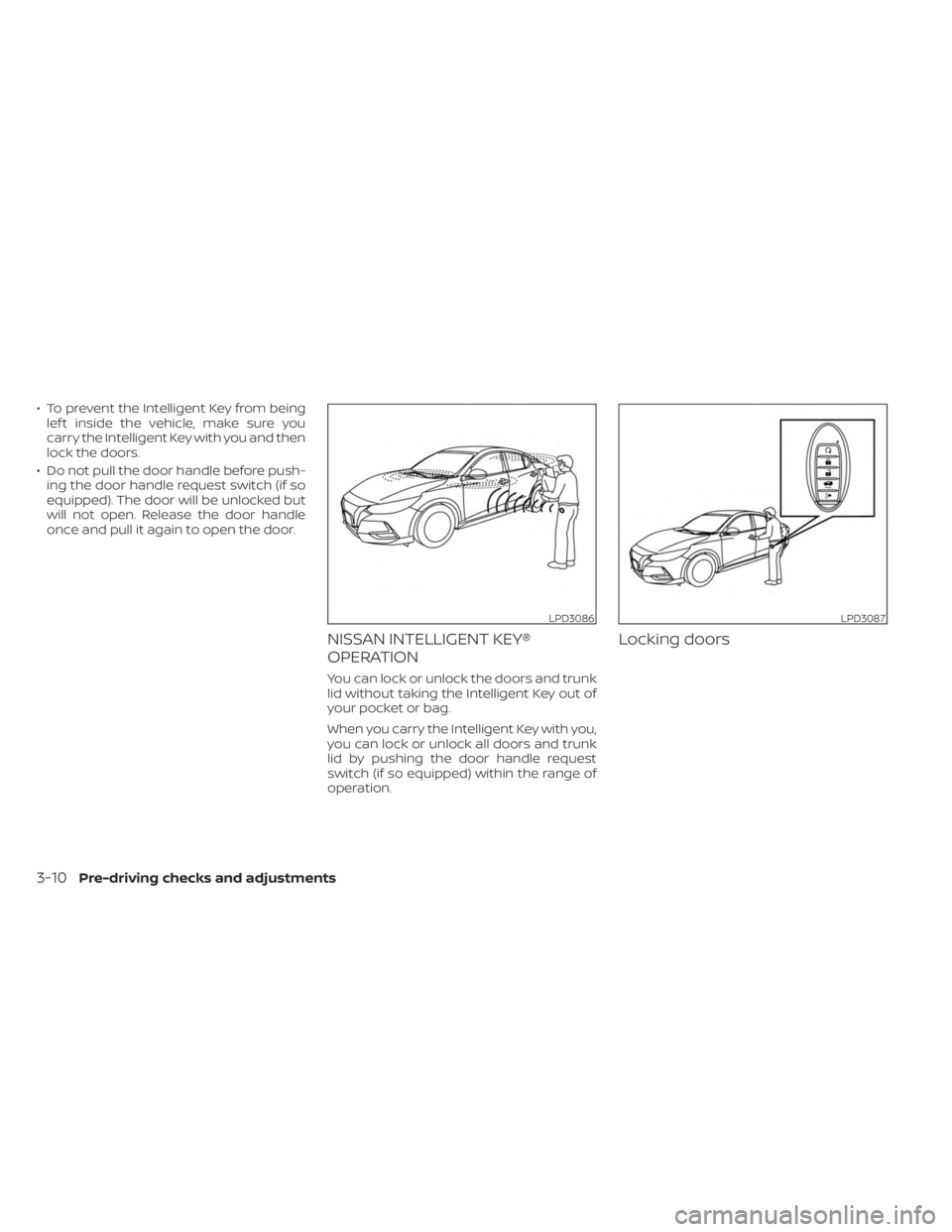
NISSAN INTELLIGENT KEY®
OPERATION
You can lock or unlock the doors and trunk
lid without taking the Intelligent Key out of
your pocket or bag.
When you carry the Intelligent Key with you,
you can lock or unlock all doors and trunk
lid by pushing the door handle request
switch (if so equipped) within the range of
operation.
Locking doors
LPD3086LPD3087
3-10Pre-driving checks and adjustments
Page 177 of 556
Using the interior lights
The interior lights illuminate for a period of
time when a door is unlocked and the inte-
rior lights switch is not in the OFF position.
The interior lights can be turned off without
waiting by performing one of the following
operations:
• Placing the ignition switch in the ONposition.
• Locking the doors with the request switch (if so equipped) or the Intelligent
Key.
• Switching the interior light switch to the OFF position.
For additional information, see “Interior
lights” (P. 2-74).
Releasing the trunk lid
Press thebutton for 0.5 seconds to
open the trunk lid. The trunk release button
will not operate when the ignition switch is
placed in the ON position.
Using the panic alarm
If you are near your vehicle and feel threat-
ened, you may activate the panic alarm to
call attention by pressing and holding the
button on the Intelligent Key for lon-
ger than 0.5 seconds.
The panic alarm and headlights will stay on
for a period of time.
The panic alarm stops when:
• It has run for a period of time.
•
(unlock) button is pressed on the
Intelligent Key.
Silencing the horn beep feature
If desired, the horn beep feature can be
deactivated using the Intelligent Key.
To deactivate: Press and hold the
andbuttonsfor at least 4 seconds.
The hazard warning lights will flash three
times to confirm that the horn beep fea-
ture has been deactivated.
To activate: Press and hold the
andbuttonsfor at least 4 seconds once
more.
The hazard warning lights will flash once
and the horn will sound once to confirm
that the horn beep feature has been
reactivated.
Deactivating the horn beep feature does
not silence the horn if the alarm is
triggered.
WARNING SIGNALS
To help prevent the vehicle from moving
unexpectedly by erroneous operation of
the Intelligent Key or to help prevent the
vehicle from being stolen, a chime or
buzzer sounds from inside and outside the
vehicle and a warning is displayed in the
instrument panel.
When a chime or beep sounds or a warning
is displayed, be sure to check the vehicle
and the Intelligent Key.
For additional information, see “Trouble-
shooting guide” (P. 3-16) and “Vehicle infor-
mation display 4.2 inch (11 cm) Type A”
(P. 2-18) or “Vehicle information display 7
inch (18 cm) Type B” (P. 2-32)
Pre-driving checks and adjustments3-15
Page 184 of 556
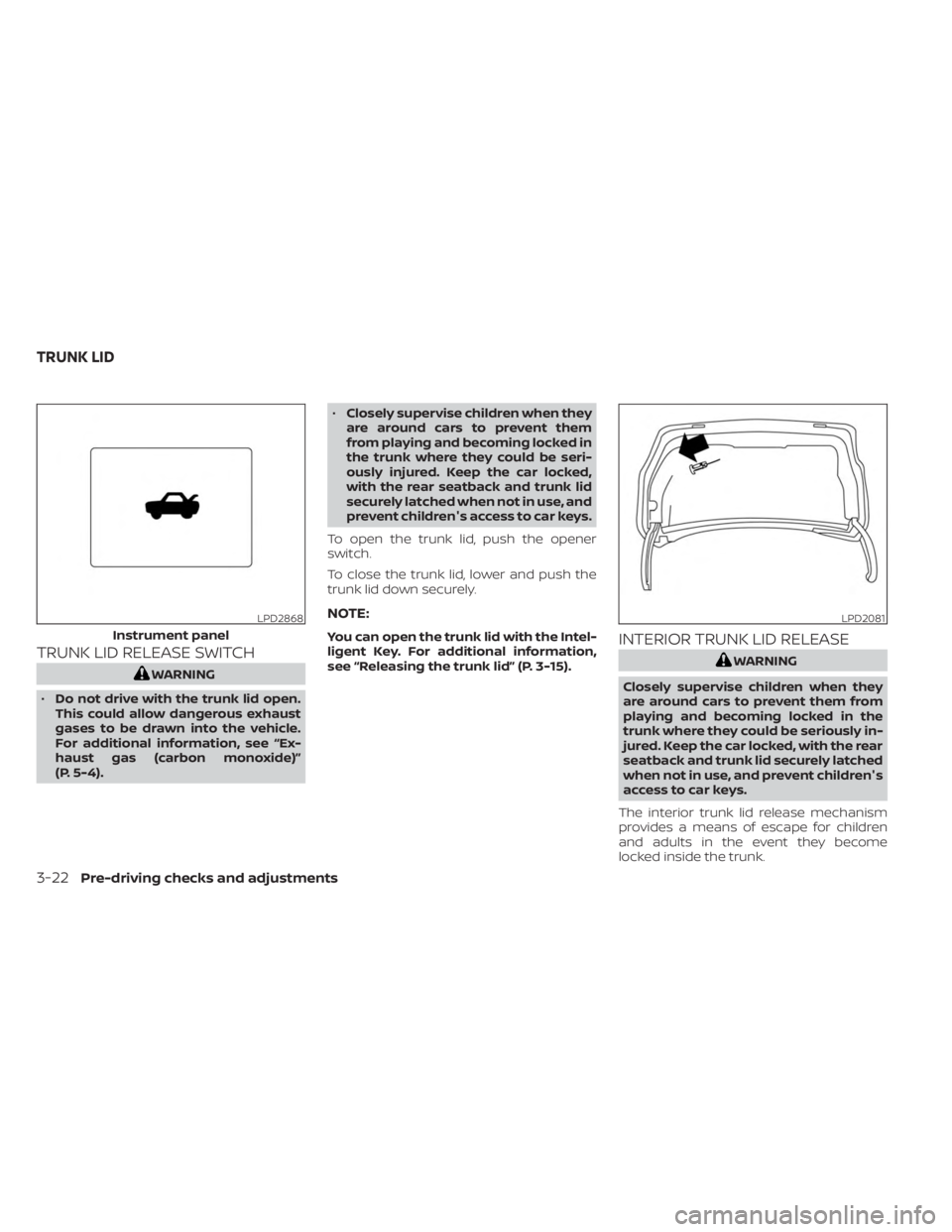
TRUNK LID RELEASE SWITCH
WARNING
• Do not drive with the trunk lid open.
This could allow dangerous exhaust
gases to be drawn into the vehicle.
For additional information, see “Ex-
haust gas (carbon monoxide)”
(P. 5-4). •
Closely supervise children when they
are around cars to prevent them
from playing and becoming locked in
the trunk where they could be seri-
ously injured. Keep the car locked,
with the rear seatback and trunk lid
securely latched when not in use, and
prevent children's access to car keys.
To open the trunk lid, push the opener
switch.
To close the trunk lid, lower and push the
trunk lid down securely.
NOTE:
You can open the trunk lid with the Intel-
ligent Key. For additional information,
see “Releasing the trunk lid” (P. 3-15).INTERIOR TRUNK LID RELEASE
WARNING
Closely supervise children when they
are around cars to prevent them from
playing and becoming locked in the
trunk where they could be seriously in-
jured. Keep the car locked, with the rear
seatback and trunk lid securely latched
when not in use, and prevent children's
access to car keys.
The interior trunk lid release mechanism
provides a means of escape for children
and adults in the event they become
locked inside the trunk.
LPD2868
Instrument panel
LPD2081
TRUNK LID
3-22Pre-driving checks and adjustments
Page 185 of 556
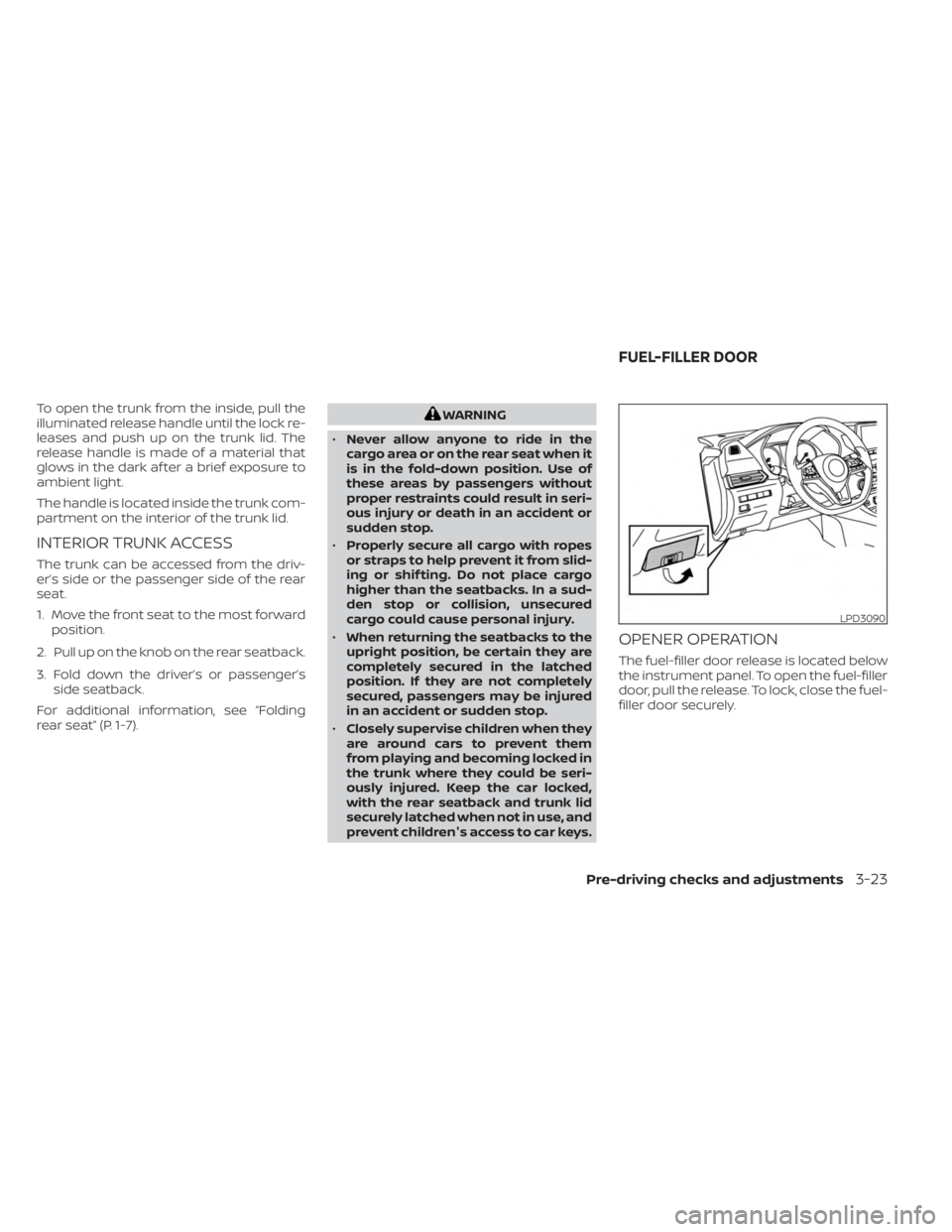
To open the trunk from the inside, pull the
illuminated release handle until the lock re-
leases and push up on the trunk lid. The
release handle is made of a material that
glows in the dark af ter a brief exposure to
ambient light.
The handle is located inside the trunk com-
partment on the interior of the trunk lid.
INTERIOR TRUNK ACCESS
The trunk can be accessed from the driv-
er’s side or the passenger side of the rear
seat.
1. Move the front seat to the most forwardposition.
2. Pull up on the knob on the rear seatback.
3. Fold down the driver’s or passenger’s side seatback.
For additional information, see “Folding
rear seat” (P. 1-7).
WARNING
• Never allow anyone to ride in the
cargo area or on the rear seat when it
is in the fold-down position. Use of
these areas by passengers without
proper restraints could result in seri-
ous injury or death in an accident or
sudden stop.
• Properly secure all cargo with ropes
or straps to help prevent it from slid-
ing or shif ting. Do not place cargo
higher than the seatbacks. In a sud-
den stop or collision, unsecured
cargo could cause personal injury.
• When returning the seatbacks to the
upright position, be certain they are
completely secured in the latched
position. If they are not completely
secured, passengers may be injured
in an accident or sudden stop.
• Closely supervise children when they
are around cars to prevent them
from playing and becoming locked in
the trunk where they could be seri-
ously injured. Keep the car locked,
with the rear seatback and trunk lid
securely latched when not in use, and
prevent children's access to car keys.
OPENER OPERATION
The fuel-filler door release is located below
the instrument panel. To open the fuel-filler
door, pull the release. To lock, close the fuel-
filler door securely.
LPD3090
FUEL-FILLER DOOR
Pre-driving checks and adjustments3-23