Connector NISSAN TEANA 2003 Service Manual
[x] Cancel search | Manufacturer: NISSAN, Model Year: 2003, Model line: TEANA, Model: NISSAN TEANA 2003Pages: 3502, PDF Size: 74.56 MB
Page 484 of 3502
ATC-106
TROUBLE DIAGNOSIS
3. CHECK INTAKE SENSOR
Refer to ATC-106, "
Intake Sensor" .
OK or NG
OK >> 1. Replace unified meter and A/C amp.
2. Go to self-diagnosis AT C - 4 7 , "
FUNCTION CONFIRMATION PROCEDURE" and perform self-
diagnosis STEP-2. Confirm that code No. 20 is displayed.
NG >> 1. Replace intake sensor.
2. Go to self-diagnosis AT C - 4 7 , "
FUNCTION CONFIRMATION PROCEDURE" and perform self-
diagnosis STEP-2. Confirm that code No. 20 is displayed.
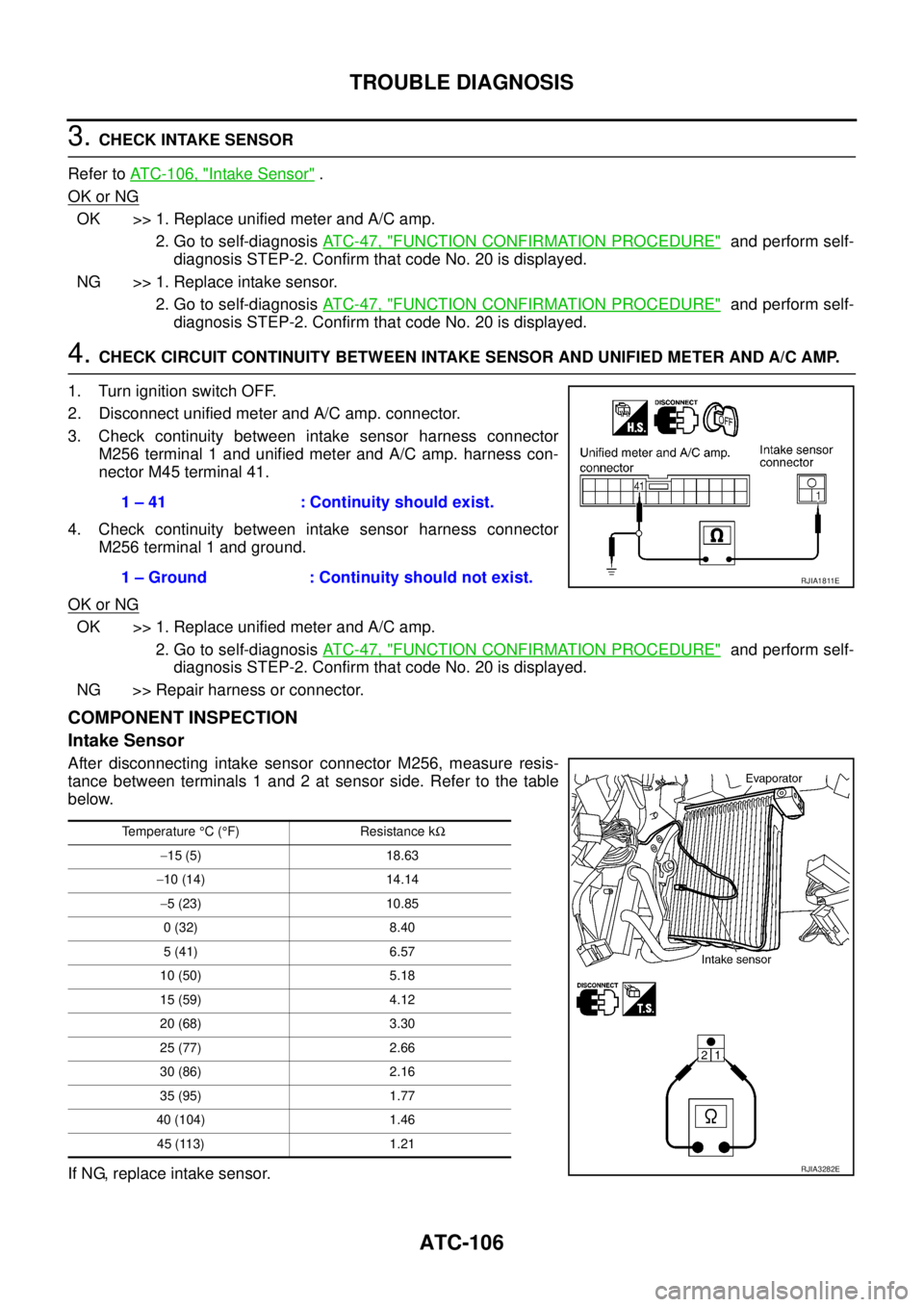
4. CHECK CIRCUIT CONTINUITY BETWEEN INTAKE SENSOR AND UNIFIED METER AND A/C AMP.
1. Turn ignition switch OFF.
2. Disconnect unified meter and A/C amp. connector.
3. Check continuity between intake sensor harness connector
M256 terminal 1 and unified meter and A/C amp. harness con-
nector M45 terminal 41.
4. Check continuity between intake sensor harness connector
M256 terminal 1 and ground.
OK or NG
OK >> 1. Replace unified meter and A/C amp.
2. Go to self-diagnosis AT C - 4 7 , "
FUNCTION CONFIRMATION PROCEDURE" and perform self-
diagnosis STEP-2. Confirm that code No. 20 is displayed.
NG >> Repair harness or connector.
COMPONENT INSPECTION
Intake Sensor
After disconnecting intake sensor connector M256, measure resis-
tance between terminals 1 and 2 at sensor side. Refer to the table
below.
If NG, replace intake sensor.1 – 41 : Continuity should exist.
1 – Ground : Continuity should not exist.
RJIA1811E
Temperature °C (°F) Resistance kΩ
−15 (5) 18.63
−10 (14) 14.14
−5 (23) 10.85
0 (32) 8.40
5 (41) 6.57
10 (50) 5.18
15 (59) 4.12
20 (68) 3.30
25 (77) 2.66
30 (86) 2.16
35 (95) 1.77
40 (104) 1.46
45 (113) 1.21
RJIA3282E
Page 487 of 3502
AMBIENT SENSOR
ATC-109
C
D
E
F
G
H
I
K
L
MA
B
AT C
AMBIENT SENSORPFP:27722
Removal and InstallationBJS000H7
REMOVAL
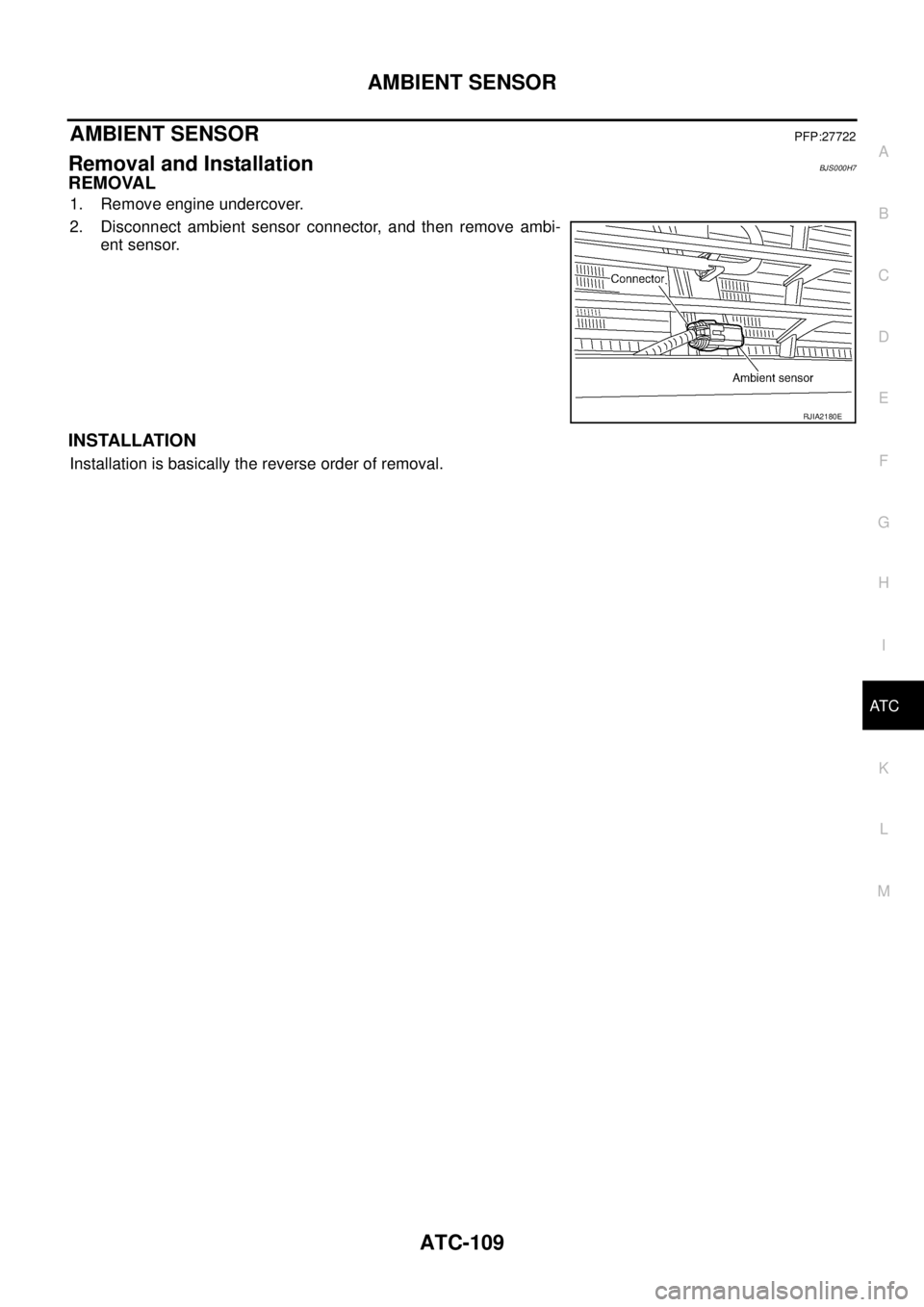
1. Remove engine undercover.
2. Disconnect ambient sensor connector, and then remove ambi-
ent sensor.
INSTALLATION
Installation is basically the reverse order of removal.
RJIA2180E
Page 489 of 3502

SUNLOAD SENSOR
ATC-111
C
D
E
F
G
H
I
K
L
MA
B
AT C
SUNLOAD SENSORPFP:27721
Removal and InstallationBJS000H9
REMOVAL
1. Remove sunload sensor garnish.
2. Disconnect sunload sensor connector, and then remove sunload
sensor.
INSTALLATION
Installation is basically the reverse order of removal.
RJIA3279E
Page 491 of 3502
BLOWER UNIT
ATC-113
C
D
E
F
G
H
I
K
L
MA
B
AT C
BLOWER UNITPFP:27200
Removal and InstallationBJS000HB
REMOVAL
1. Remove instrument passenger lower panel. Refer to IP-10, "INSTRUMENT PANEL ASSEMBLY" .
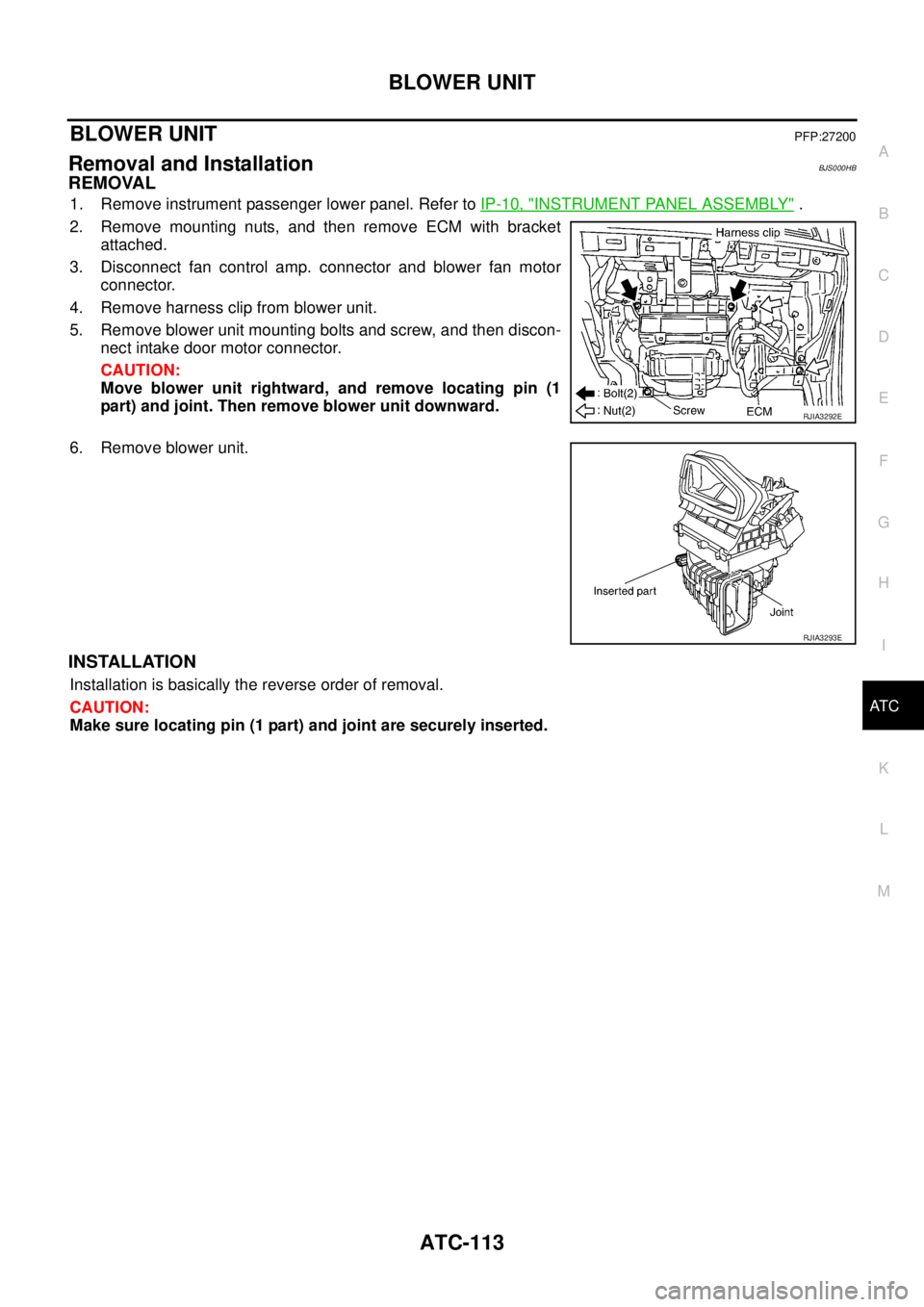
2. Remove mounting nuts, and then remove ECM with bracket
attached.
3. Disconnect fan control amp. connector and blower fan motor
connector.
4. Remove harness clip from blower unit.
5. Remove blower unit mounting bolts and screw, and then discon-
nect intake door motor connector.
CAUTION:
Move blower unit rightward, and remove locating pin (1
part) and joint. Then remove blower unit downward.
6. Remove blower unit.
INSTALLATION
Installation is basically the reverse order of removal.
CAUTION:
Make sure locating pin (1 part) and joint are securely inserted.
RJIA3292E
RJIA3293E
Page 493 of 3502
BLOWER MOTOR
ATC-115
C
D
E
F
G
H
I
K
L
MA
B
AT C
BLOWER MOTORPFP:27226
Removal and InstallationBJS000HD
REMOVAL
1. Remove instrument passenger lower panel. Refer to IP-10, "INSTRUMENT PANEL ASSEMBLY" .
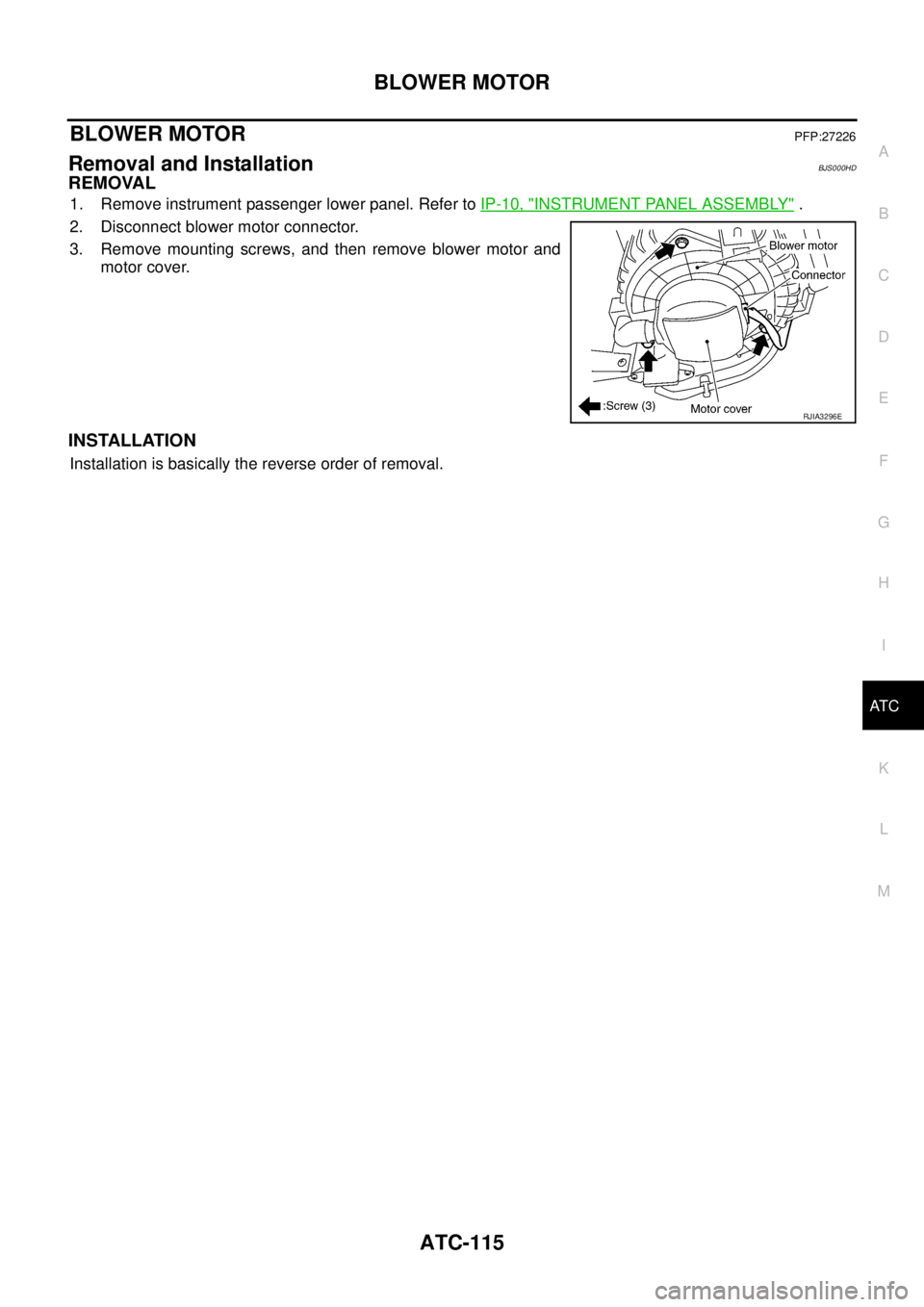
2. Disconnect blower motor connector.
3. Remove mounting screws, and then remove blower motor and
motor cover.
INSTALLATION
Installation is basically the reverse order of removal.
RJIA3296E
Page 494 of 3502
ATC-116
FAN CONTROL AMPLIFIER
FAN CONTROL AMPLIFIERPFP:27761
Removal and InstallationBJS000HE
REMOVAL
1. Remove instrument passenger lower panel. Refer to IP-10, "INSTRUMENT PANEL ASSEMBLY" .
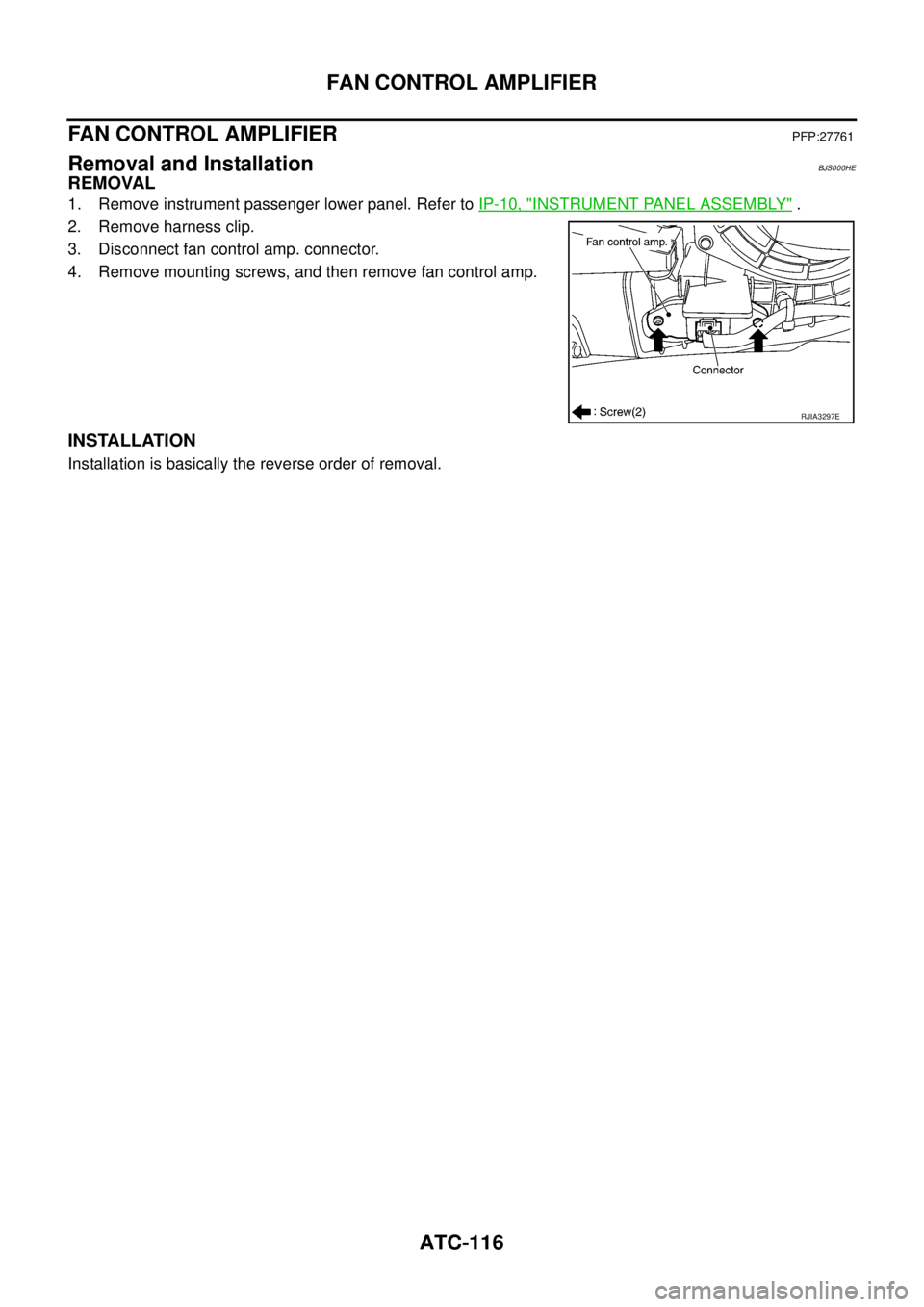
2. Remove harness clip.
3. Disconnect fan control amp. connector.
4. Remove mounting screws, and then remove fan control amp.
INSTALLATION
Installation is basically the reverse order of removal.
RJIA3297E
Page 497 of 3502
HEATER & COOLING UNIT ASSEMBLY
ATC-119
C
D
E
F
G
H
I
K
L
MA
B
AT C
HEATER & COOLING UNIT ASSEMBLYPFP:27110
Removal and InstallationBJS000HH
REMOVAL
1. Use a refrigerant collecting equipment (for HFC-134a) to discharge the refrigerant.
2. Drain coolant from cooling system. Refer to CO-10, "
Changing Engine Coolant" (QR engine) or CO-34,
"Changing Engine Coolant" (VQ engine).
3. Remove extension cowl top lower panel. Refer to EI-21, "
COWL TOP" .
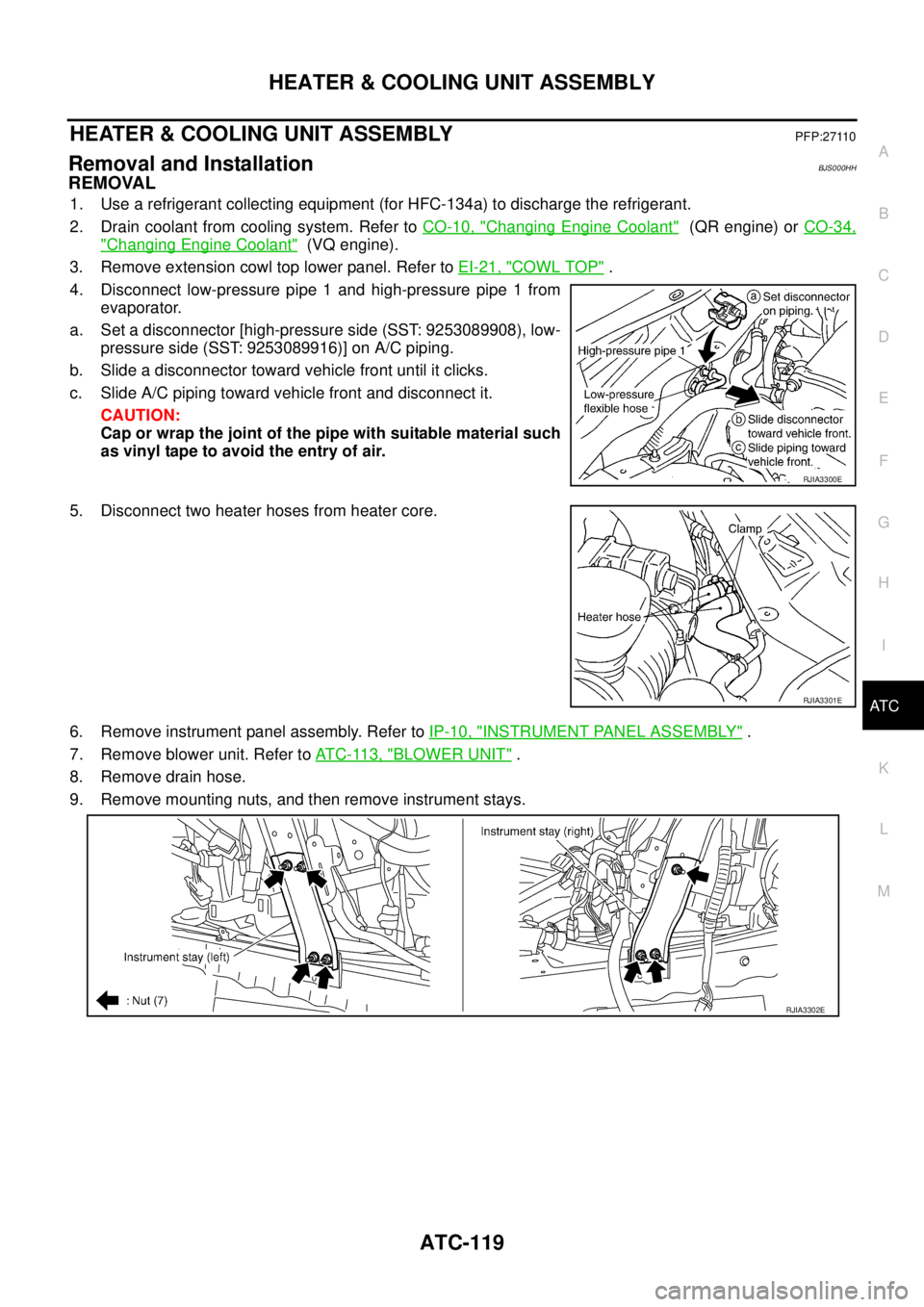
4. Disconnect low-pressure pipe 1 and high-pressure pipe 1 from
evaporator.
a. Set a disconnector [high-pressure side (SST: 9253089908), low-
pressure side (SST: 9253089916)] on A/C piping.
b. Slide a disconnector toward vehicle front until it clicks.
c. Slide A/C piping toward vehicle front and disconnect it.
CAUTION:
Cap or wrap the joint of the pipe with suitable material such
as vinyl tape to avoid the entry of air.
5. Disconnect two heater hoses from heater core.
6. Remove instrument panel assembly. Refer to IP-10, "
INSTRUMENT PANEL ASSEMBLY" .
7. Remove blower unit. Refer to AT C - 11 3 , "
BLOWER UNIT" .
8. Remove drain hose.
9. Remove mounting nuts, and then remove instrument stays.
RJIA3300E
RJIA3301E
RJIA3302E
Page 501 of 3502
MODE DOOR MOTOR
ATC-123
C
D
E
F
G
H
I
K
L
MA
B
AT C
MODE DOOR MOTORPFP:27731
Removal and InstallationBJS000HJ
REMOVAL
1. Remove instrument driver lower panel. Refer to IP-10, "INSTRUMENT PANEL ASSEMBLY" .
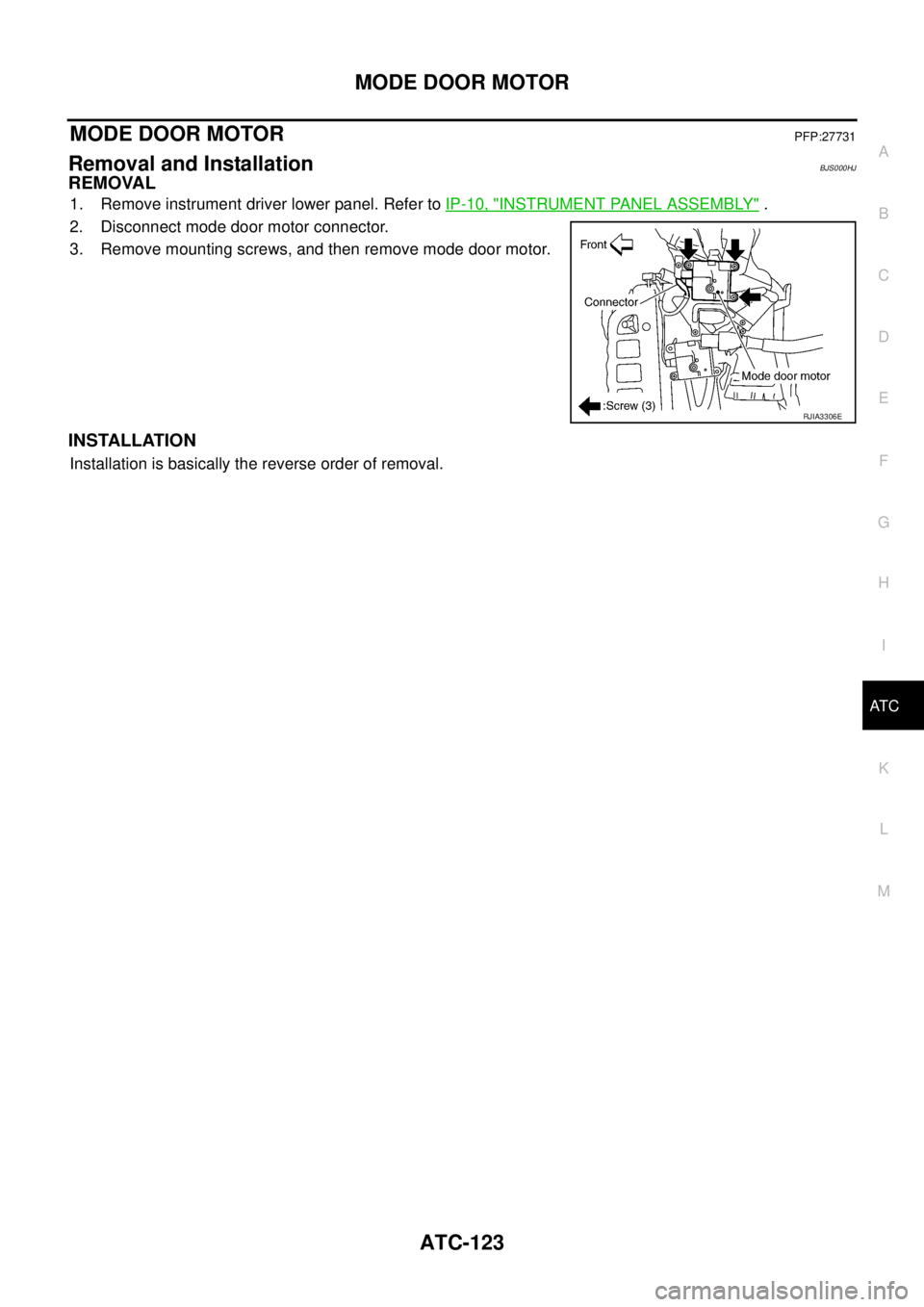
2. Disconnect mode door motor connector.
3. Remove mounting screws, and then remove mode door motor.
INSTALLATION
Installation is basically the reverse order of removal.
RJIA3306E
Page 502 of 3502
ATC-124
AIR MIX DOOR MOTOR
AIR MIX DOOR MOTOR PFP:27732
Removal and InstallationBJS000HK
REMOVAL
Driver Side
1. Set the temperature (driver side) at 18°C, and then disconnect the battery cable from the negative termi-
nal.
2. Remove instrument driver lower panel. Refer to IP-10, "
INSTRUMENT PANEL ASSEMBLY" .
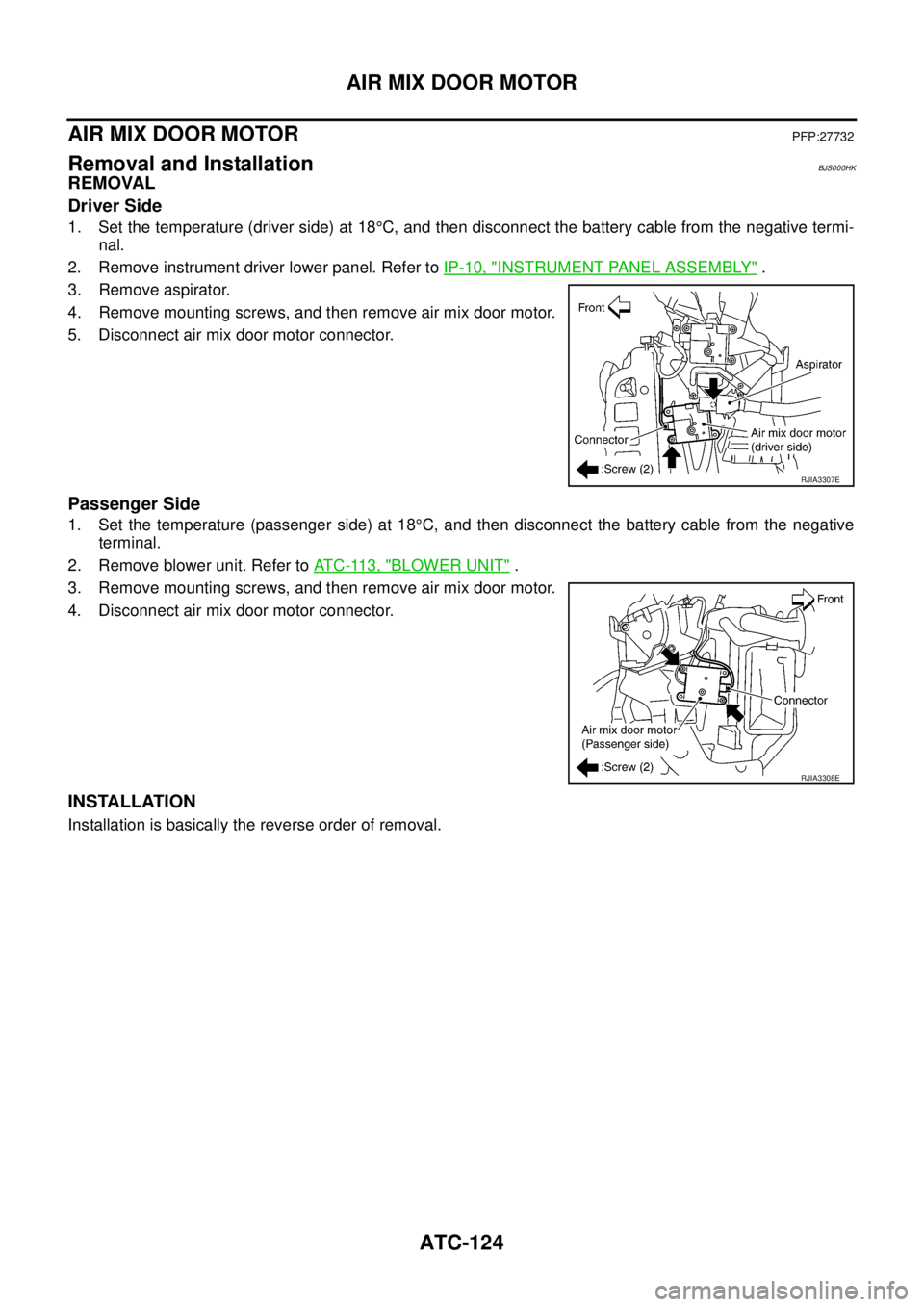
3. Remove aspirator.
4. Remove mounting screws, and then remove air mix door motor.
5. Disconnect air mix door motor connector.
Passenger Side
1. Set the temperature (passenger side) at 18°C, and then disconnect the battery cable from the negative
terminal.
2. Remove blower unit. Refer to AT C - 11 3 , "
BLOWER UNIT" .
3. Remove mounting screws, and then remove air mix door motor.
4. Disconnect air mix door motor connector.
INSTALLATION
Installation is basically the reverse order of removal.
RJIA3307E
RJIA3308E
Page 503 of 3502
HEATER CORE
ATC-125
C
D
E
F
G
H
I
K
L
MA
B
AT C
HEATER COREPFP:27140
Removal and InstallationBJS000HL
REMOVAL
1. Set the temperature (passenger side) at 18°C, and then disconnect the battery cable from the negative
terminal.
2. Remove heater & cooling unit assembly. Refer to AT C - 11 9 , "
HEATER & COOLING UNIT ASSEMBLY" .
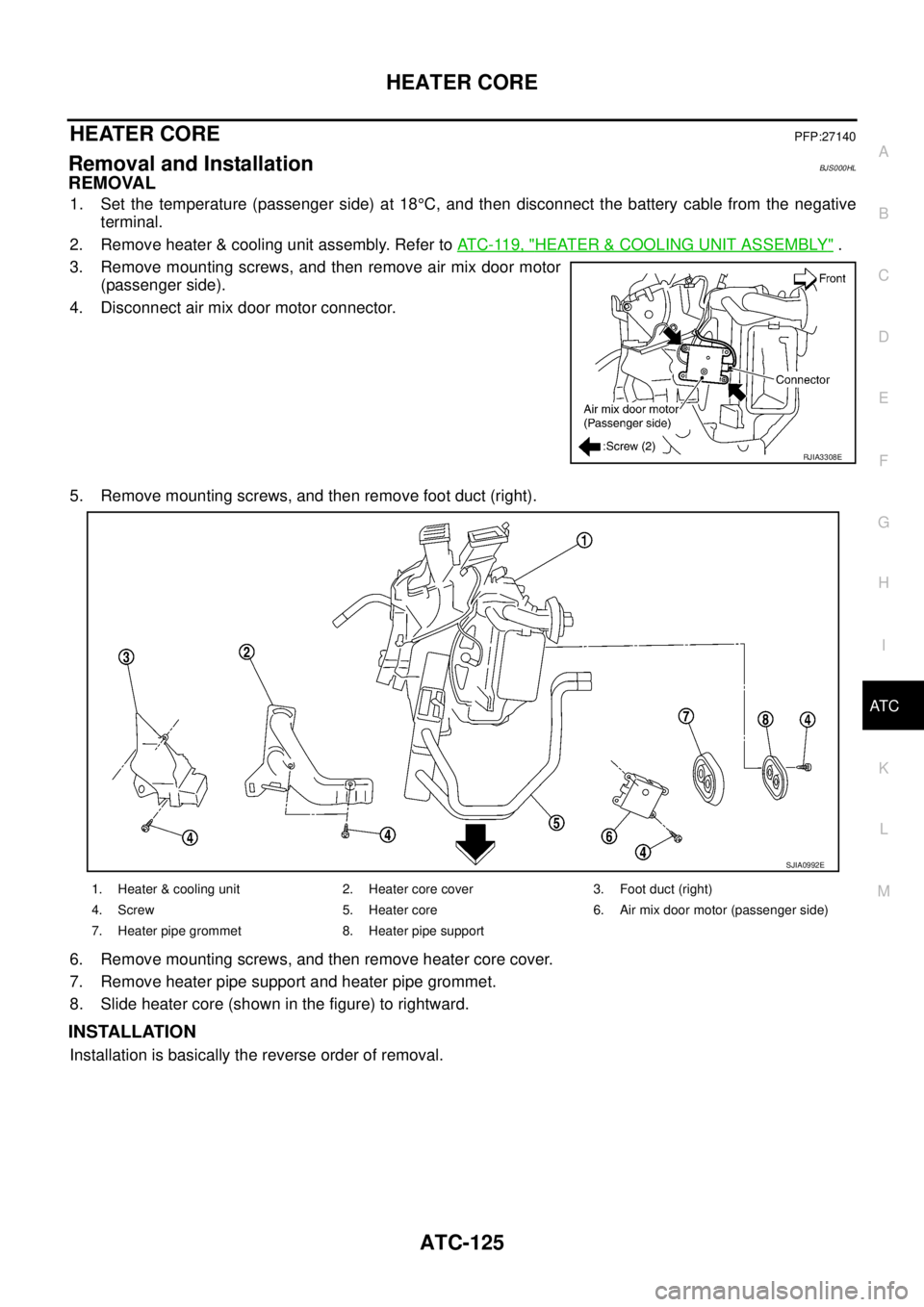
3. Remove mounting screws, and then remove air mix door motor
(passenger side).
4. Disconnect air mix door motor connector.
5. Remove mounting screws, and then remove foot duct (right).
6. Remove mounting screws, and then remove heater core cover.
7. Remove heater pipe support and heater pipe grommet.
8. Slide heater core (shown in the figure) to rightward.
INSTALLATION
Installation is basically the reverse order of removal.
RJIA3308E
1. Heater & cooling unit 2. Heater core cover 3. Foot duct (right)
4. Screw 5. Heater core 6. Air mix door motor (passenger side)
7. Heater pipe grommet 8. Heater pipe support
SJIA0992E