ignition NISSAN TEANA 2008 Service Manual
[x] Cancel search | Manufacturer: NISSAN, Model Year: 2008, Model line: TEANA, Model: NISSAN TEANA 2008Pages: 5121, PDF Size: 69.03 MB
Page 739 of 5121
![NISSAN TEANA 2008 Service Manual AV
DVD PLAYER
AV-595
< ECU DIAGNOSIS >[BOSE AUDIO WITH NAVIGATION]
C
D
E
F
G
H
I
J
K
L
MB A
O
P13
(B)11
(G)AUX sound signal LH InputIgnition
switch
ONAUX sound output.
14
(W)12
(R)AUX sound signal R](/img/5/57391/w960_57391-738.png "NISSAN TEANA 2008 Service Manual AV
DVD PLAYER
AV-595
< ECU DIAGNOSIS >[BOSE AUDIO WITH NAVIGATION]
C
D
E
F
G
H
I
J
K
L
MB A
O
P13
(B)11
(G)AUX sound signal LH InputIgnition
switch
ONAUX sound output.
14
(W)12
(R)AUX sound signal R")
AV
DVD PLAYER
AV-595
< ECU DIAGNOSIS >[BOSE AUDIO WITH NAVIGATION]
C
D
E
F
G
H
I
J
K
L
MB A
O
P13
(B)11
(G)AUX sound signal LH InputIgnition
switch
ONAUX sound output.
14
(W)12
(R)AUX sound signal RH InputIgnition
switch
ONAUX sound output.
15 — AUX sound signal shield — — — —
21
(B)22
(G)Stereo (DVD and AUX
sound) sound signal LH OutputIgnition
switch
ONDVD
*1 or AUX sound out-
put.
23
(R)24
(W)Stereo (DVD and AUX
sound) sound signal RH OutputIgnition
switch
ONDVD
*1 or AUX sound out-
put.
25 — Stereo sound signal shield — — — —
29
(R)—AV communication signal
(L)Input/
Output—— —
30
(L)—AV communication signal
(H)Input/
Output—— —
31
(P)—AV communication signal
(L)Input/
Output—— —
32
(L)—AV communication signal
(H)Input/
Output—— —
34 — Shield — — — —
36
(W)35
(B)Surround sound signal front
RHOutputIgnition
switch
ONDVD sound output.
*2
Te r m i n a l
(Wire color)Description
ConditionReference value
(Approx.)
+ – Signal nameInput/
Output
SKIB3609E
SKIB3609E
SKIB3609E
SKIB3609E
SKIB3609E
Page 740 of 5121
![NISSAN TEANA 2008 Service Manual AV-596
< ECU DIAGNOSIS >[BOSE AUDIO WITH NAVIGATION]
DVD PLAYER
*1: Stereo sounds are input only when the 2 channel stereo sound is played.
*2: All surround sounds are input only when the 5.1 chan](/img/5/57391/w960_57391-739.png "NISSAN TEANA 2008 Service Manual AV-596
< ECU DIAGNOSIS >[BOSE AUDIO WITH NAVIGATION]
DVD PLAYER
*1: Stereo sounds are input only when the 2 channel stereo sound is played.
*2: All surround sounds are input only when the 5.1 chan")
AV-596
< ECU DIAGNOSIS >[BOSE AUDIO WITH NAVIGATION]
DVD PLAYER
*1: Stereo sounds are input only when the 2 channel stereo sound is played.
*2: All surround sounds are input only when the 5.1 channel surround sound is played.38
(W)37
(B)Surround sound signal front
LHOutputIgnition
switch
ONDVD sound output.
*2
40
(W)39
(B)Surround sound signal cen-
terOutputIgnition
switch
ONDVD sound output.*2
42
(L)41
(R)Surround sound signal
wooferOutputIgnition
switch
ONDVD sound output.*2
43 — Shield — — — —
44 — Shield — — — —
46
(W)45
(B)Surround sound signal rear
RHOutputIgnition
switch
ONDVD sound output.
*2
48
(W)47
(B)Surround sound signal rear
LHOutputIgnition
switch
ONDVD sound output.*2
Terminal
(Wire color)Description
ConditionReference value
(Approx.)
+ – Signal nameInput/
Output
SKIB3609E
SKIB3609E
SKIB3609E
SKIB3609E
SKIB3609E
Page 761 of 5121
![NISSAN TEANA 2008 Service Manual AV
CAMERA CONTROL UNIT
AV-617
< ECU DIAGNOSIS >[BOSE AUDIO WITH NAVIGATION]
C
D
E
F
G
H
I
J
K
L
MB A
O
P
CAMERA CONTROL UNIT
Reference ValuesINFOID:0000000003793611
TERMINAL LAYOUT
PHYSICAL VALUES
JPN](/img/5/57391/w960_57391-760.png "NISSAN TEANA 2008 Service Manual AV
CAMERA CONTROL UNIT
AV-617
< ECU DIAGNOSIS >[BOSE AUDIO WITH NAVIGATION]
C
D
E
F
G
H
I
J
K
L
MB A
O
P
CAMERA CONTROL UNIT
Reference ValuesINFOID:0000000003793611
TERMINAL LAYOUT
PHYSICAL VALUES
JPN")
AV
CAMERA CONTROL UNIT
AV-617
< ECU DIAGNOSIS >[BOSE AUDIO WITH NAVIGATION]
C
D
E
F
G
H
I
J
K
L
MB A
O
P
CAMERA CONTROL UNIT
Reference ValuesINFOID:0000000003793611
TERMINAL LAYOUT
PHYSICAL VALUES
JPNIA0007ZZ
Te r m i n a l
(Wire color)Description
ConditionReference value
(Approx.)
+ – Signal nameInput/
Output
5—Shield —— — —
6
(B)Ground Camera image signal InputIgnition
switch
ONWhen rear view camera im-
age is displayed.
7
(W)Ground Rear view camera ground —Ignition
switch
ON—0 V
8
(R)Ground Camera power supply OutputIgnition
switch
ON Selector lever in R position. 6.0 V
Other than selector lever in
R position.0 V
11 — S h i e l d — — — —
12
(BR)Ground Camera image signal OutputIgnition
switch
ONWhen rear view camera im-
age is displayed.
14
(GR)GroundCamera connection recog-
nition signalOutputIgnition
switch
ONConnected to camera con-
trol unit connector.0 V
Not connected to camera
control unit connector.5.0 V
17
(L/G)—AV communication signal
(L)Input/
Output—— —
18
(L/R)—AV communication signal
(H)Input/
Output—— —
19
(P)—AV communication signal
(L)Input/
Output—— —
SKIB2251J
SKIB2251J
Page 762 of 5121
![NISSAN TEANA 2008 Service Manual AV-618
< ECU DIAGNOSIS >[BOSE AUDIO WITH NAVIGATION]
CAMERA CONTROL UNIT
20
(L)—AV communication signal
(H)Input/
Output—— —
22
(W)Ground Reverse signal InputIgnition
switch
ONSelector leve](/img/5/57391/w960_57391-761.png "NISSAN TEANA 2008 Service Manual AV-618
< ECU DIAGNOSIS >[BOSE AUDIO WITH NAVIGATION]
CAMERA CONTROL UNIT
20
(L)—AV communication signal
(H)Input/
Output—— —
22
(W)Ground Reverse signal InputIgnition
switch
ONSelector leve")
AV-618
< ECU DIAGNOSIS >[BOSE AUDIO WITH NAVIGATION]
CAMERA CONTROL UNIT
20
(L)—AV communication signal
(H)Input/
Output—— —
22
(W)Ground Reverse signal InputIgnition
switch
ONSelector lever in R position. 12.0 V
Other than selector lever in
R position.0 V
23
(G)Ground Sensor signal 1 InputIgnition
switch
ONTurn the steering to the
right.
A: Sensor signal 1
B: Sensor signal 2
Turn the steering to the left.
A: Sensor signal 1
B: Sensor signal 2
24
(SB)Ground Sensor signal 2 InputIgnition
switch
ONTurn the steering to the
right.
A: Sensor signal 1
B: Sensor signal 2
Turn the steering to the left.
A: Sensor signal 1
B: Sensor signal 2
25
(O)Ground Sensor signal 3 InputIgnition
switch
ONTurn the steering around
the neutral position.
A: Sensor signal 3
B: Sensor signal 1 Terminal
(Wire color)Description
ConditionReference value
(Approx.)
+ – Signal nameInput/
Output
SKIB3827E
SKIB3828E
SKIB3827E
SKIB3828E
SKIB3829E
Page 763 of 5121
![NISSAN TEANA 2008 Service Manual AV
CAMERA CONTROL UNIT
AV-619
< ECU DIAGNOSIS >[BOSE AUDIO WITH NAVIGATION]
C
D
E
F
G
H
I
J
K
L
MB A
O
P
26
(O)GroundVehicle speed signal
(8-pulse)InputIgnition
switch
ONWhen vehicle speed is ap-
pr](/img/5/57391/w960_57391-762.png "NISSAN TEANA 2008 Service Manual AV
CAMERA CONTROL UNIT
AV-619
< ECU DIAGNOSIS >[BOSE AUDIO WITH NAVIGATION]
C
D
E
F
G
H
I
J
K
L
MB A
O
P
26
(O)GroundVehicle speed signal
(8-pulse)InputIgnition
switch
ONWhen vehicle speed is ap-
pr")
AV
CAMERA CONTROL UNIT
AV-619
< ECU DIAGNOSIS >[BOSE AUDIO WITH NAVIGATION]
C
D
E
F
G
H
I
J
K
L
MB A
O
P
26
(O)GroundVehicle speed signal
(8-pulse)InputIgnition
switch
ONWhen vehicle speed is ap-
prox. 40 km/h (25 MPH).NOTE:
The maximum voltage varies de-
pending on the specification
(destination unit).
30
(V)Ground ACC power supply InputIgnition
switch
ACC— Battery voltage
31
(B/R)Ground Ground —Ignition
switch
ON—0 V
32
(Y)Ground Battery power supply InputIgnition
switch
OFF— Battery voltage Te r m i n a l
(Wire color)Description
ConditionReference value
(Approx.)
+ – Signal nameInput/
Output
JSNIA0012GB
Page 784 of 5121
![NISSAN TEANA 2008 Service Manual AV-640
< SYMPTOM DIAGNOSIS >[BOSE AUDIO WITH NAVIGATION]
MULTI AV SYSTEM SYMPTOMS
SYMPTOM DIAGNOSIS
MULTI AV SYSTEM SYMPTOMS
Symptom TableINFOID:0000000003765976
RELATED TO BASIC OPERATION
RELATED TO](/img/5/57391/w960_57391-783.png "NISSAN TEANA 2008 Service Manual AV-640
< SYMPTOM DIAGNOSIS >[BOSE AUDIO WITH NAVIGATION]
MULTI AV SYSTEM SYMPTOMS
SYMPTOM DIAGNOSIS
MULTI AV SYSTEM SYMPTOMS
Symptom TableINFOID:0000000003765976
RELATED TO BASIC OPERATION
RELATED TO")
AV-640
< SYMPTOM DIAGNOSIS >[BOSE AUDIO WITH NAVIGATION]
MULTI AV SYSTEM SYMPTOMS
SYMPTOM DIAGNOSIS
MULTI AV SYSTEM SYMPTOMS
Symptom TableINFOID:0000000003765976
RELATED TO BASIC OPERATION
RELATED TO HANDS FREE PHONE
Check that the cellular phone is corresponding type (Bluetooth™ correspond) when the hands free related
malfunction vehicle is in service before performing a diagnosis,.
There is a case that malfunction occurs due to the version change of the phone type, etc. even though it is a
corresponding type. Therefore, confirm it by changing the cellular phone to another corresponding type
phone, and check that it operates normally. It is necessary to distinguish whether the cause is the vehicle or
cellular phone.
Simple check for Bluetooth™ communication
If cellular phone and NAVI control unit cannot be connected with Bluetooth™ communication, following proce-
dure allows the technician to judge which device has malfunction.
1. Turn on a cellular phone, not connecting Bluetooth
™ communication.
2. Start CONSULT-III, then start Windows
®.
3. Set CONSULT-III near a cellular phone.
4. When operated Bluetooth
™ registration by cellular phone, check
if CONSULT-III
* would be displayed on the device name.
(If other Bluetooth
™ device is located near cellular phone, a
name of the device would be displayed also.)
NOTE:
*:Displayed device name is “NISSAN- ”.
If no device name is displayed, cellular phone is malfunction.
Repair the cellular phone first, then perform diagnosis.
If CONSULT-III is displayed on device name, cellular phone is nor-
mal. Perform diagnosis as per the following table.
Symptoms Check items Possible malfunction location / Action to take
Multifunction switch and preset
switch operation does not work. All switches cannot be operated
“MULTI AV” is displayed on system
selection screen when the CON-
SULT-III is started.Perform CONSULT-III self-diagnosis. Refer to AV- 4 3 4 ,
"CONSULT-III Function (MULTI AV)".
All switches cannot be operated
“MULTI AV” is not displayed on sys-
tem selection screen when the CON-
SULT-III is started.AV control unit power supply and ground circuit malfunc-
tion. Refer to AV- 4 6 4 , "
AV CONTROL UNIT : Diagnosis
Procedure".
Only specified switch cannot be operat-
ed.Multifunction switch or preset switch malfunction.
Replace multifunction switch or preset switch.
For multifunction switch, refer to AV- 6 5 9 , "
Removal and
Installation".
For preset switch, refer to AV- 6 6 0 , "
Removal and Instal-
lation".
Fuel economy display, vehicle set-
ting operation is abnormal.There is malfunction in the CONSULT-
III self-diagnosis result.Perform detected DTC diagnosis.
There is no malfunction in the self-diag-
nosis results.Ignition signal circuit malfunction.
Refer to AV- 4 6 4 , "
AV CONTROL UNIT : Diagnosis Pro-
cedure".
Guide sound is not heard.On the setting display select “system
sound (guide sound volume, etc.),” and
confirm that guide sound is ON.Voice guidance signal circuit malfunction.
JPNIA0441GB
Page 789 of 5121
![NISSAN TEANA 2008 Service Manual AV
NORMAL OPERATING CONDITION
AV-645
< SYMPTOM DIAGNOSIS >[BOSE AUDIO WITH NAVIGATION]
C
D
E
F
G
H
I
J
K
L
MB A
O
P
NORMAL OPERATING CONDITION
DescriptionINFOID:0000000003765977
NOTE:
For Navigation s](/img/5/57391/w960_57391-788.png "NISSAN TEANA 2008 Service Manual AV
NORMAL OPERATING CONDITION
AV-645
< SYMPTOM DIAGNOSIS >[BOSE AUDIO WITH NAVIGATION]
C
D
E
F
G
H
I
J
K
L
MB A
O
P
NORMAL OPERATING CONDITION
DescriptionINFOID:0000000003765977
NOTE:
For Navigation s")
AV
NORMAL OPERATING CONDITION
AV-645
< SYMPTOM DIAGNOSIS >[BOSE AUDIO WITH NAVIGATION]
C
D
E
F
G
H
I
J
K
L
MB A
O
P
NORMAL OPERATING CONDITION
DescriptionINFOID:0000000003765977
NOTE:
For Navigation system operation information, refer to Navigation system Owner's Manual.
BASIC OPERATIONS
RELATED TO AUDIO
The majority of the audio malfunctions are the result of outside causes (bad CD/cassette, electromagnetic
interference, etc.). Check the symptoms below to diagnose the malfunction.
The vehicle itself can be a source of noise if noise prevention parts or electrical equipment is malfunctioning.
Check if noise is caused and/or changed by engine speed, ignition switch turned to each position, and oper-
ation of each piece of electrical equipment, and then determine the cause.
NOTE:
CD-R is not guaranteed to play because they can contain compressed audio (MP3, WMA) or could be incor-
rectly mastered by the customer on a computer.
Check if the CDs carry the Compact Disc Logo. If not, the disc is not mastered to the red book Compact Disc
Standard and may not play.
Symptom Possible cause Possible solution
No image is displayed.The brightness is at the lowest setting. Adjust the brightness of the display.
The system in the video mode. Push
The display is turned off.
Push <> to turn on the display.
The screen is too dim. The move-
ment is slow.The temperature in the interior of the vehicle is low. Wait until the interior of the vehicle has
warmed up.
Some pixels in the display are dark-
er or brighter than others.This condition is an inherent characteristic of liquid
crystal displays.This is not a malfunction.
Some menu items cannot be se-
lected.Some menu items become unavailable while the ve-
hicle is driven.Park the vehicle in a safe location, and
then operate the multi AV system.
Symptom Cause and Counter measure
Cannot play.Check if the CD was inserted correctly.
Check if the CD is scratched or dirty.
Check if there is condensation inside the player, and if there is, wait until the condensation is gone
(about 1 hour) before using the player.
If there is a temperature increase error, the player will play correctly after it returns to the normal
temperature.
If there is a mixture of music CD files (CD-DA data) and MP3/WMA files on a CD, only the music
CD files (CD-DA data) will be played.
Files with extensions other than “.MP3”, “.WMA”, “.mp3”, or “.wma” cannot be played. In addition,
the character codes and number of characters for folder names and file names should be in com-
pliance with the specifications.
Check if the disc or the file is generated in an irregular format, This may occur depending on the
variation or the setting of MP3/WMA writing applications or other text editing applications.
Check if the finalization process, such as session close and disc close, is done for the disc.
Check if the CD is protected by copyright.
Poor sound quality. Check if the CD is scratched or dirty.
It takes a relatively long time before
the music starts playing.If there are many folder or file levels on the MP3/WMA disc, some time may be required before
the music starts playing.
Music cuts off or skips.The writing software and hardware combination might not match, or the writing speed, writing
depth, writing width might not match the specifications. Try using the slowest writing speed.
Skipping with high bit rate files. Skipping may occur with large quantities if data such as for high bit rate data.
Page 790 of 5121
![NISSAN TEANA 2008 Service Manual AV-646
< SYMPTOM DIAGNOSIS >[BOSE AUDIO WITH NAVIGATION]
NORMAL OPERATING CONDITION
Noise resulting from variations in field strength, such as fading noise and multi-path noise, or external noise from](/img/5/57391/w960_57391-789.png "NISSAN TEANA 2008 Service Manual AV-646
< SYMPTOM DIAGNOSIS >[BOSE AUDIO WITH NAVIGATION]
NORMAL OPERATING CONDITION
Noise resulting from variations in field strength, such as fading noise and multi-path noise, or external noise from")
AV-646
< SYMPTOM DIAGNOSIS >[BOSE AUDIO WITH NAVIGATION]
NORMAL OPERATING CONDITION
Noise resulting from variations in field strength, such as fading noise and multi-path noise, or external noise from trains and other
sources, is not a malfunction.
NOTE:
Fading noise: This noise occurs because of variations in the field strength in a narrow range due to mountains or buildings blocking
the signal.
Multi-path noise: This noise results from a time difference between the broadcast waves directly from the station arriving at the
antenna and the waves reflected by mountains or buildings.
RELATED TO NAVIGATION
As a result of a slight operating error, a normal symptom might be taken as a malfunction. Therefore, at first,
please check for yourself as per the following table.
Move immediately to the next song
when playing.When a non-MP3/WMA file has been given an extension of “.MP3”, “.WMA”, “.mp3”, or “.wma”,
or when play is prohibited by copyright protection, the player will skip to the next song.
The songs do not play back in the
desired order.The playback order is the order in which the files were written by the software, so the files might
not play in the desired order. Symptom Cause and Counter measure
Symptom Possible cause Possible solution
The map does not scroll even when
the vehicle is moving.The display is not set to the current location map. Set the display to the current location map.
The vehicle icon is not displayed. The display is not set to the current location map. Set the display to the current location map.
The GPS icon is not displayed. GPS signal cannot be received.Move the vehicle to an open area without
obstacle. If an object is placed on the up-
per area of GPS antenna, remove it.
No voice guidance is available.The route guidance was cancelled.If the route destination guidance has been
cancelled, reactivate the route guidance.
The volume is set very low. Adjust the volume of your voice guidance.
Some pixels in the display are dark-
er or brighter than others.This is an inherent characteristic of liquid crystal dis-
plays. Although the liquid crystal display is manufac-
tured with a technology of very high accuracy and it
has more than 99.99% effective pixels, a chip or a
permanent lighting of pixels might occur at 0.01% or
less.Please continue using the NAVI system,
as it is not a malfunction.
A mottle remains for a while after
turning the ignition switch ON.When it is cold, due to the characteristics of the liq-
uid crystal display backlight, a brightness mottle
might occur.It will disappear a few minutes later when
the backlight is warmed-up.
The screen is not clear.The adjustment of the contrast or the brightness is
inadequate.Adjust the contrast and the brightness of
the display.
The vehicle icon is not displayed in
the correct location. (The location
of the vehicle icon is misaligned
from the actual position.) The vehicle icon might be misaligned from the actual
position due to the satellite condition, the vehicle
condition (driving location or driving condition), etc.
Also, when the vehicle is traveling on a road whose
information is not stored in the map data, a new road
for example, the vehicle icon might be misaligned
from the actual position.Drive the vehicle for a while. The current
location is automatically corrected using
the map-matching and GPS information.
(It may take a few minutes.) If the GPS in-
formation is not used and the current loca-
tion is not corrected automatically, park the
vehicle in a safe location, and then correct
the current vehicle location.
Page 791 of 5121
![NISSAN TEANA 2008 Service Manual AV
PRECAUTIONS
AV-647
< PRECAUTION >[BOSE AUDIO WITH NAVIGATION]
C
D
E
F
G
H
I
J
K
L
MB A
O
P
PRECAUTION
PRECAUTIONS
Precaution for Supplemental Restraint System (SRS) "AIR BAG" and "SEAT BELT
PRE-TE](/img/5/57391/w960_57391-790.png "NISSAN TEANA 2008 Service Manual AV
PRECAUTIONS
AV-647
< PRECAUTION >[BOSE AUDIO WITH NAVIGATION]
C
D
E
F
G
H
I
J
K
L
MB A
O
P
PRECAUTION
PRECAUTIONS
Precaution for Supplemental Restraint System (SRS) \"AIR BAG\" and \"SEAT BELT
PRE-TE")
AV
PRECAUTIONS
AV-647
< PRECAUTION >[BOSE AUDIO WITH NAVIGATION]
C
D
E
F
G
H
I
J
K
L
MB A
O
P
PRECAUTION
PRECAUTIONS
Precaution for Supplemental Restraint System (SRS) "AIR BAG" and "SEAT BELT
PRE-TENSIONER"
INFOID:0000000003960544
The Supplemental Restraint System such as “AIR BAG” and “SEAT BELT PRE-TENSIONER”, used along
with a front seat belt, helps to reduce the risk or severity of injury to the driver and front passenger for certain
types of collision. Information necessary to service the system safely is included in the “SRS AIRBAG” and
“SEAT BELT” of this Service Manual.
WARNING:
To avoid rendering the SRS inoperative, which could increase the risk of personal injury or death in
the event of a collision which would result in air bag inflation, all maintenance must be performed by
an authorized NISSAN/INFINITI dealer.
Improper maintenance, including incorrect removal and installation of the SRS, can lead to personal
injury caused by unintentional activation of the system. For removal of Spiral Cable and Air Bag
Module, see the “SRS AIRBAG”.
Never use electrical test equipment on any circuit related to the SRS unless instructed to in this Ser-
vice Manual. SRS wiring harnesses can be identified by yellow and/or orange harnesses or harness
connectors.
Precaution for Trouble DiagnosisINFOID:0000000003765979
AV COMMUNICATION SYSTEM
Do not apply voltage of 7.0 V or higher to the measurement terminals.
Use the tester with its open terminal voltage being 7.0 V or less.
Be sure to turn ignition switch OFF and disconnect the battery cable from the negative terminal before
checking the circuit.
Precaution for Harness RepairINFOID:0000000003765980
AV COMMUNICATION SYSTEM
Solder the repaired parts, and wrap with tape. [Frays of twisted line
must be within 110 mm (4.33 in).]
Do not perform bypass wire connections for the repair parts. (The
spliced wire will become separated and the characteristics of
twisted line will be lost.)
PKIA0306E
PKIA0307E
Page 823 of 5121
BCS-6
< FUNCTION DIAGNOSIS >
BODY CONTROL SYSTEM
FUNCTION DIAGNOSIS
BODY CONTROL SYSTEM
System DescriptionINFOID:0000000003809584
OUTLINE
BCM (Body Control Module) controls the various electrical components. It inputs the information required to
the control from CAN communication and the signal received from each switch and sensor.
BCM has combination switch reading function for reading the operation status of combination switches (light,
turn signal, wiper and washer) in addition to a function for controlling the operation of various electrical com-
ponents. It also has the signal transmission function as the passed point of signal and the power saving con-
trol function that reduces the power consumption with the ignition switch OFF.
BCM is equipped with the diagnosis function that performs the diagnosis with CONSULT-III and various set-
tings.
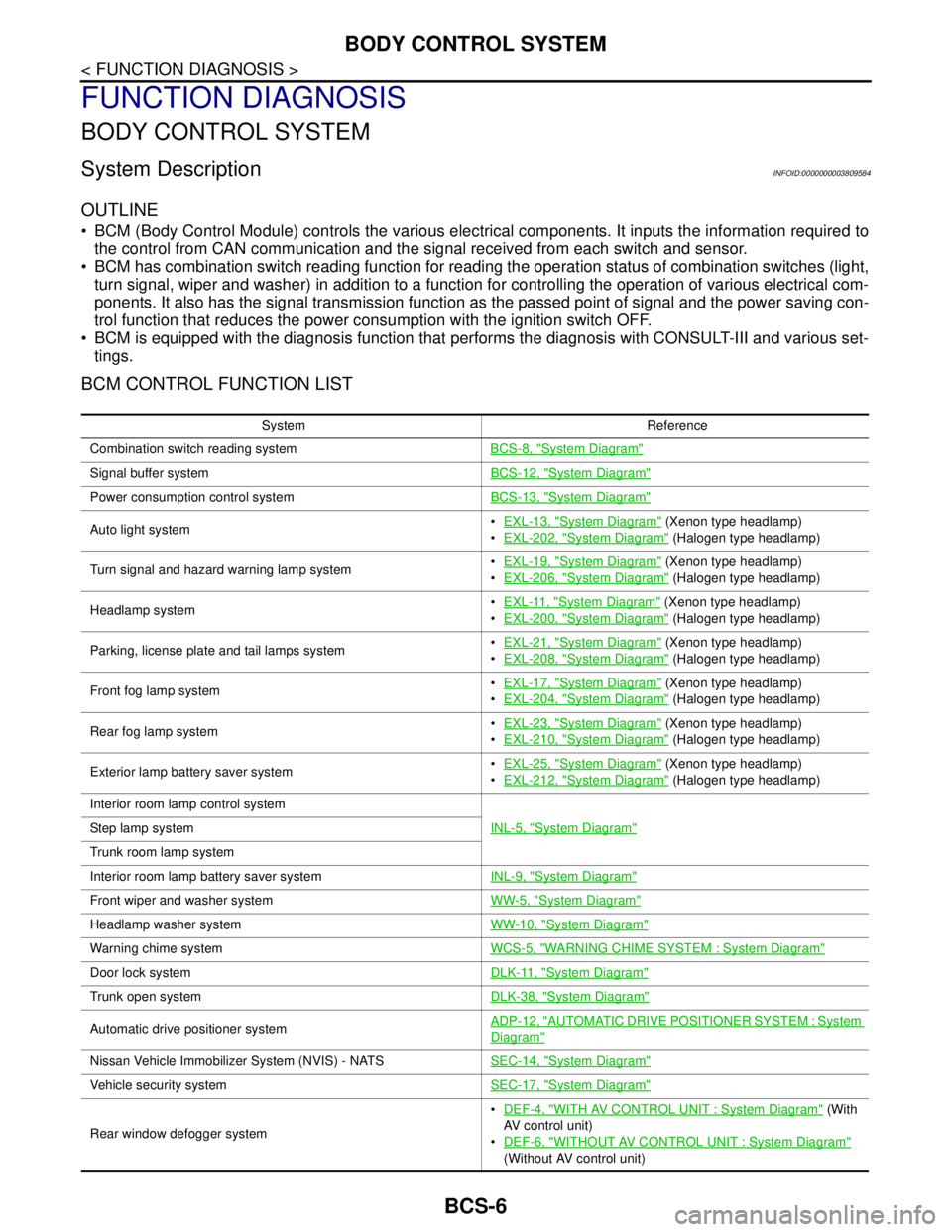
BCM CONTROL FUNCTION LIST
System Reference
Combination switch reading systemBCS-8, "
System Diagram"
Signal buffer systemBCS-12, "System Diagram"
Power consumption control systemBCS-13, "System Diagram"
Auto light systemEXL-13, "System Diagram" (Xenon type headlamp)
EXL-202, "
System Diagram" (Halogen type headlamp)
Turn signal and hazard warning lamp systemEXL-19, "
System Diagram" (Xenon type headlamp)
EXL-206, "
System Diagram" (Halogen type headlamp)
Headlamp systemEXL-11, "
System Diagram" (Xenon type headlamp)
EXL-200, "
System Diagram" (Halogen type headlamp)
Parking, license plate and tail lamps systemEXL-21, "
System Diagram" (Xenon type headlamp)
EXL-208, "
System Diagram" (Halogen type headlamp)
Front fog lamp systemEXL-17, "
System Diagram" (Xenon type headlamp)
EXL-204, "
System Diagram" (Halogen type headlamp)
Rear fog lamp systemEXL-23, "
System Diagram" (Xenon type headlamp)
EXL-210, "
System Diagram" (Halogen type headlamp)
Exterior lamp battery saver systemEXL-25, "
System Diagram" (Xenon type headlamp)
EXL-212, "
System Diagram" (Halogen type headlamp)
Interior room lamp control system
INL-5, "
System Diagram"Step lamp system
Trunk room lamp system
Interior room lamp battery saver systemINL-9, "
System Diagram"
Front wiper and washer systemWW-5, "System Diagram"
Headlamp washer systemWW-10, "System Diagram"
Warning chime systemWCS-5, "WARNING CHIME SYSTEM : System Diagram"
Door lock systemDLK-11, "System Diagram"
Trunk open systemDLK-38, "System Diagram"
Automatic drive positioner systemADP-12, "AUTOMATIC DRIVE POSITIONER SYSTEM : System
Diagram"
Nissan Vehicle Immobilizer System (NVIS) - NATSSEC-14, "System Diagram"
Vehicle security systemSEC-17, "System Diagram"
Rear window defogger systemDEF-4, "
WITH AV CONTROL UNIT : System Diagram" (With
AV control unit)
DEF-6, "
WITHOUT AV CONTROL UNIT : System Diagram"
(Without AV control unit)