fuse NISSAN TEANA 2014 Service Manual
[x] Cancel search | Manufacturer: NISSAN, Model Year: 2014, Model line: TEANA, Model: NISSAN TEANA 2014Pages: 4801, PDF Size: 51.2 MB
Page 3648 of 4801
![NISSAN TEANA 2014 Service Manual
PRE-INSPECTION FOR DIAGNOSTICPWC-141
< PERIODIC MAINTENANCE > [LH & RH FRONT ANTI-PINCH]
C
D E
F
G H
I
J
L
M A
B
PWC
N
O P
PERIODIC MAINTENANCE
PRE-INSPECTION FOR DIAGNOSTIC
Basic InspectionINFOID:](/img/5/57390/w960_57390-3647.png "NISSAN TEANA 2014 Service Manual
PRE-INSPECTION FOR DIAGNOSTICPWC-141
< PERIODIC MAINTENANCE > [LH & RH FRONT ANTI-PINCH]
C
D E
F
G H
I
J
L
M A
B
PWC
N
O P
PERIODIC MAINTENANCE
PRE-INSPECTION FOR DIAGNOSTIC
Basic InspectionINFOID:")
PRE-INSPECTION FOR DIAGNOSTICPWC-141
< PERIODIC MAINTENANCE > [LH & RH FRONT ANTI-PINCH]
C
D E
F
G H
I
J
L
M A
B
PWC
N
O P
PERIODIC MAINTENANCE
PRE-INSPECTION FOR DIAGNOSTIC
Basic InspectionINFOID:0000000009460981
BASIC INSPECTION
1.INSPECTION START
1. Check the service history.
2. Check the following parts.
• Fuse/circuit breaker blown.
• Poor connection, open or short circuit of harness connector.
• Battery voltage.
Is the inspection result normal?
YES >> Inspection End.
NO >> Repair or replace the malfunctioning parts.
Revision: November 20132014 Altima NAMRevision: November 20132014 Altima NAM
Page 3657 of 4801
PWO-6
< REMOVAL AND INSTALLATION >
POWER SOCKET
REMOVAL AND INSTALLATION
POWER SOCKET
Removal and InstallationINFOID:0000000009460698
FRONT POWER SOCKET OR FRONT CONSOLE POWER SOCKET
NOTE:
If unable to use the Tool because of the power socke t location or access to the harness connector, then
removal of interior components may be required. Refer to IP-18, "Removal and Installation"
(Front Power
Socket) or IP-18, "Removal and Installation"
(Front Console Power Socket).
Removal
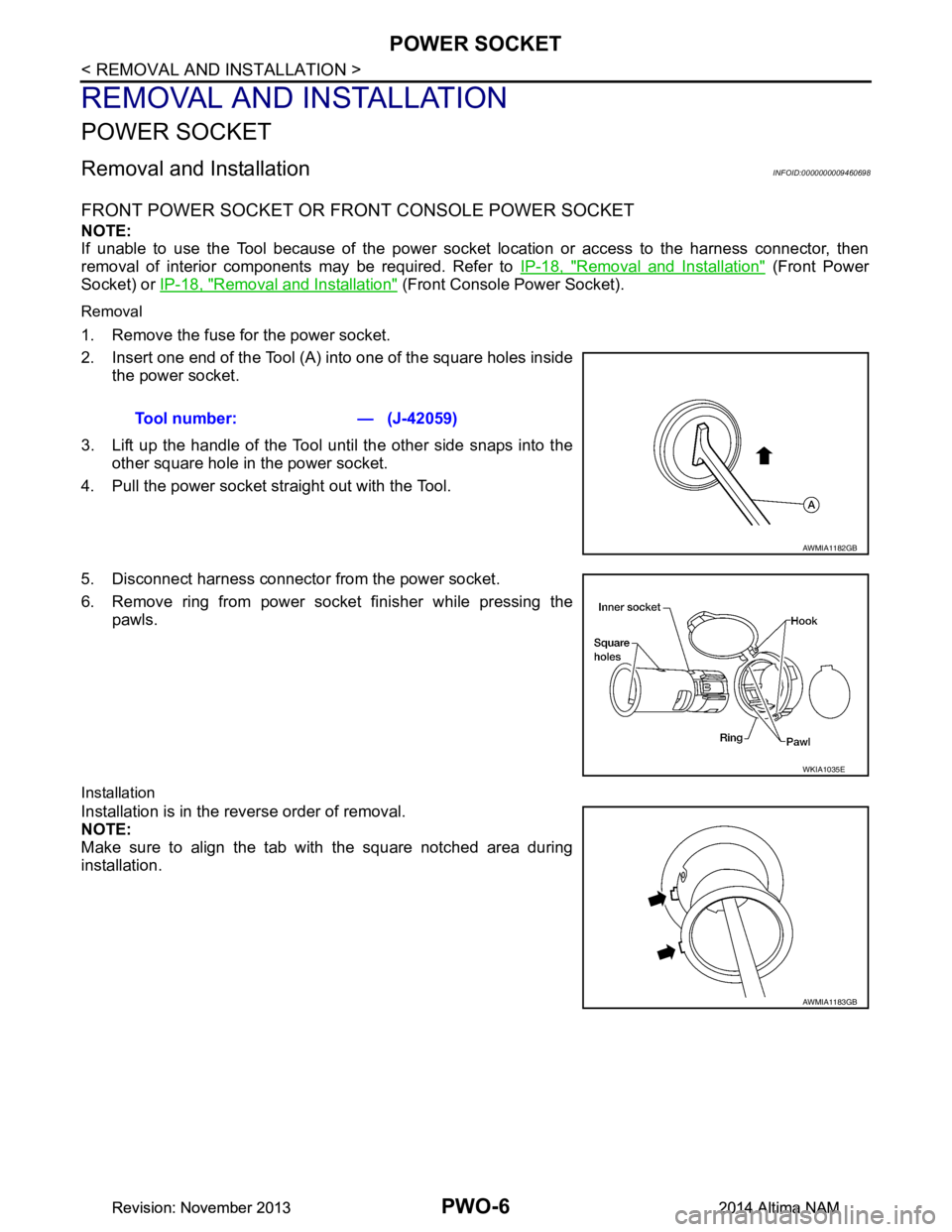
1. Remove the fuse for the power socket.
2. Insert one end of the Tool (A) into one of the square holes inside the power socket.
3. Lift up the handle of the Tool until the other side snaps into the other square hole in the power socket.
4. Pull the power socket straight out with the Tool.
5. Disconnect harness connector from the power socket.
6. Remove ring from power socket finisher while pressing the pawls.
Installation
Installation is in the reverse order of removal.
NOTE:
Make sure to align the tab with the square notched area during
installation. Tool number: — (J-42059)
AWMIA1182GB
WKIA1035E
AWMIA1183GB
Revision: November 20132014 Altima NAMRevision: November 20132014 Altima NAM
Page 3686 of 4801
POWER SUPPLY AND GROUND CIRCUITRF-21
< DTC/CIRCUIT DIAGNOSIS >
C
D E
F
G H
I
J
L
M A
B
RF
N
O P
DTC/CIRCUIT DIAGNOSIS
POWER SUPPLY AND GROUND CIRCUIT
BCM
BCM : Diagnosis ProcedureINFOID:0000000009941205
Regarding Wiring Diagram information, refer to BCS-55, "Wiring Diagram".
1. CHECK FUSE AND FUSIBLE LINK
Check that the following fuse and fusible link are not blown.
Is the fuse or fusible link blown?
YES >> Replace the blown fuse or fusible link after repairing the affected circuit.
NO >> GO TO 2
2. CHECK POWER SUPPLY CIRCUIT
1. Disconnect BCM connector M21.
2. Check voltage between BCM connector M21 terminals 131, 139 and ground.
Is the inspection result normal?
YES >> GO TO 3
NO >> Repair or replace harness or connectors.
3. CHECK GROUND CIRCUIT
Check continuity between BCM connector M21 terminals 134, 143 and ground.
Is the inspection result normal?
YES >> Inspection End.
NO >> Repair or replace harness or connectors.
MOONROOF MOTOR ASSEMBLY
MOONROOF MOTOR ASSEMBLY : DescriptionINFOID:0000000009461304
• BCM supplies power.
• CPU is integrated in moonroof motor assembly.
• Tilts up/down & slides open/close by moonroof switch operation.
• In order to close moonroof lid certainly with the signal from combination meter at the time of high speed run,
the moonroof motor torque at the time of tilt-down operation is controlled.
Terminal No. Signal name Fuse and fusible link No.
139 Fusible link battery power I (40A)
131 BCM battery fuse 1 (10A)
BCM GroundVo l ta g e
(Approx.)
Connector Terminal
M21 131
—Batteryvoltage
139
BCM Ground Continuity
Connector Terminal
M21 134
—Yes
143
Revision: November 20132014 Altima NAMRevision: November 20132014 Altima NAM
Page 3775 of 4801
SE-26
< REMOVAL AND INSTALLATION >
FRONT SEAT
DRIVER SIDE : Removal and In stallation - Seat Assembly
INFOID:0000000009462934
REMOVAL
WARNING:
Do not leave any objects (screwdriver s, tools, etc.) on the seat during seat repair. It can lead to per-
sonal injury if the side air bag module should accidentally deploy.
CAUTION:
• When removing or installing the seat trim, handle it carefully to keep dirt out and to avoid damage.
• When checking the power seat circuit for continuity using a circuit tester, do not confuse its connec-
tor with the side air bag module connector. Such an error may cau se the air bag module to deploy.
• Do not drop, tilt, or bump the si de air bag module while installing the seat. Always handle it with
care.
• After front side air bag module inflates, the front seatback assembly must be replaced.
• When removing and installing the seat, use shop cloths to protect components from damage.
• Before removing the front seat, turn the ignition switch OFF, disconnect both battery cables and wait
at least three minutes.
1. Remove the headrest.
2. Raise seat to the highest position.
3. Slide the seat to the full rearward position.
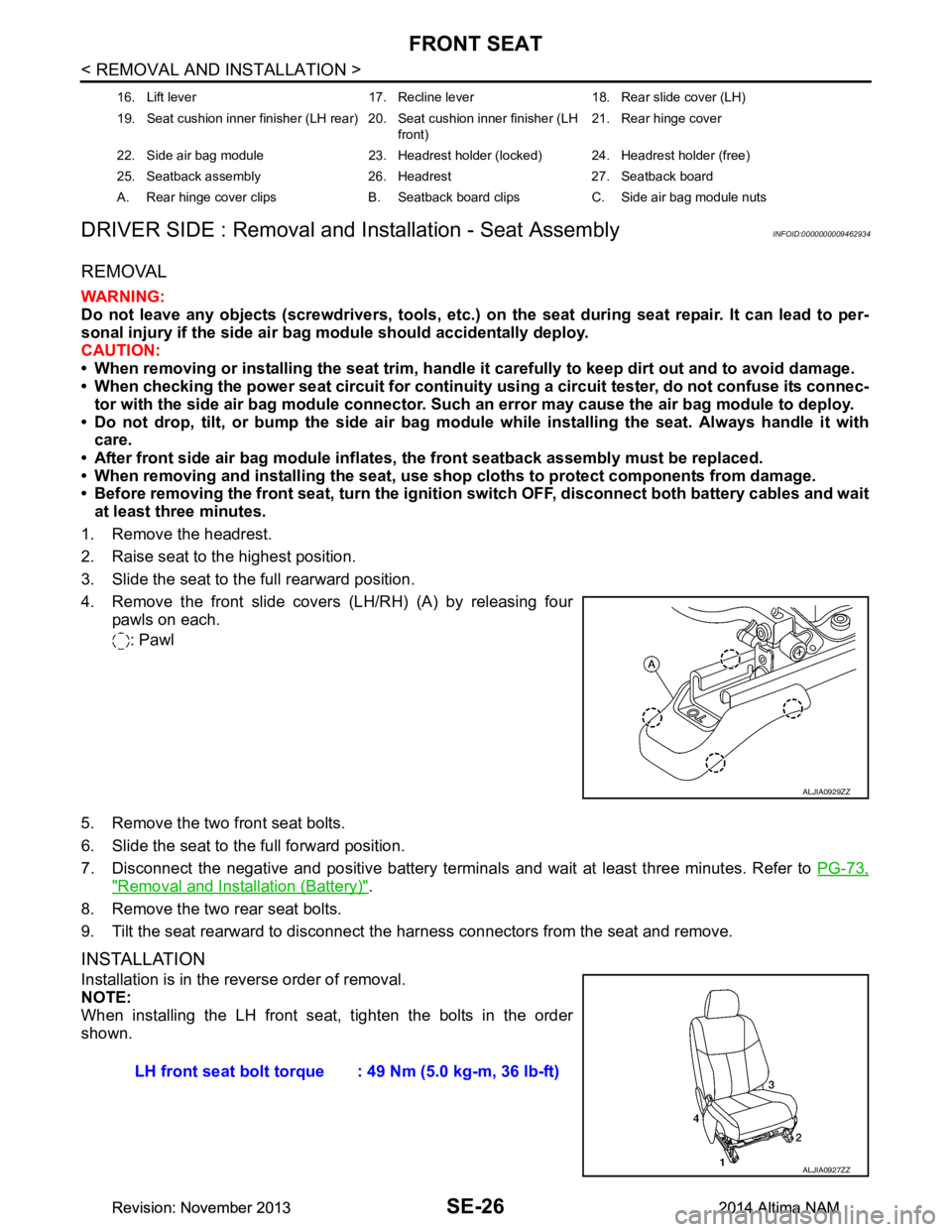
4. Remove the front slide covers (LH/RH) (A) by releasing four pawls on each.
: Pawl
5. Remove the two front seat bolts.
6. Slide the seat to the full forward position.
7. Disconnect the negative and positive battery terminal s and wait at least three minutes. Refer to PG-73,
"Removal and Installation (Battery)".
8. Remove the two rear seat bolts.
9. Tilt the seat rearward to disconnect the harness connectors from the seat and remove.
INSTALLATION
Installation is in the reverse order of removal.
NOTE:
When installing the LH front seat , tighten the bolts in the order
shown.
16. Lift lever 17. Recline lever 18. Rear slide cover (LH)
19. Seat cushion inner finisher (LH rear) 20. Seat cushion inner finisher (LH front)21. Rear hinge cover
22. Side air bag module 23. Headrest holder (locked) 24. Headrest holder (free)
25. Seatback assembly 26. Headrest 27. Seatback board
A. Rear hinge cover clips B. Seatback board clips C. Side air bag module nuts
ALJIA0929ZZ
LH front seat bolt torque : 49 Nm (5.0 kg-m, 36 lb-ft)
ALJIA0927ZZ
Revision: November 20132014 Altima NAMRevision: November 20132014 Altima NAM
Page 3779 of 4801
SE-30
< REMOVAL AND INSTALLATION >
FRONT SEAT
PASSENGER SIDE : Removal and Installation - Seat Assembly
INFOID:0000000009462938
REMOVAL
WARNING:
Do not leave any objects (screwdriver s, tools, etc.) on the seat during seat repair. It can lead to per-
sonal injury if the side air bag module should accidentally deploy.
CAUTION:
• When removing or installing the seat trim, handle it carefully to keep dirt out and to avoid damage.
• When checking the power seat circuit for continuity using a circuit tester, do not confuse its connec-
tor with the side air bag module connector. Such an error may cau se the air bag module to deploy.
• Do not drop, tilt, or bump the si de air bag module while installing the seat. Always handle it with
care.
• After front side air bag module inflates, the front seatback assembly must be replaced.
• When removing and installing the seat, use shop cloths to protect components from damage.
• Before removing the front seat, turn the ignition switch OFF, disconnect both battery cables and wait
at least three minutes.
1. Disconnect the negative and positive battery terminal s and wait at least three minutes. Refer to PG-73,
"Removal and Installation (Battery)".
2. Remove the headrest.
3. Slide the seat to the full rearward position.
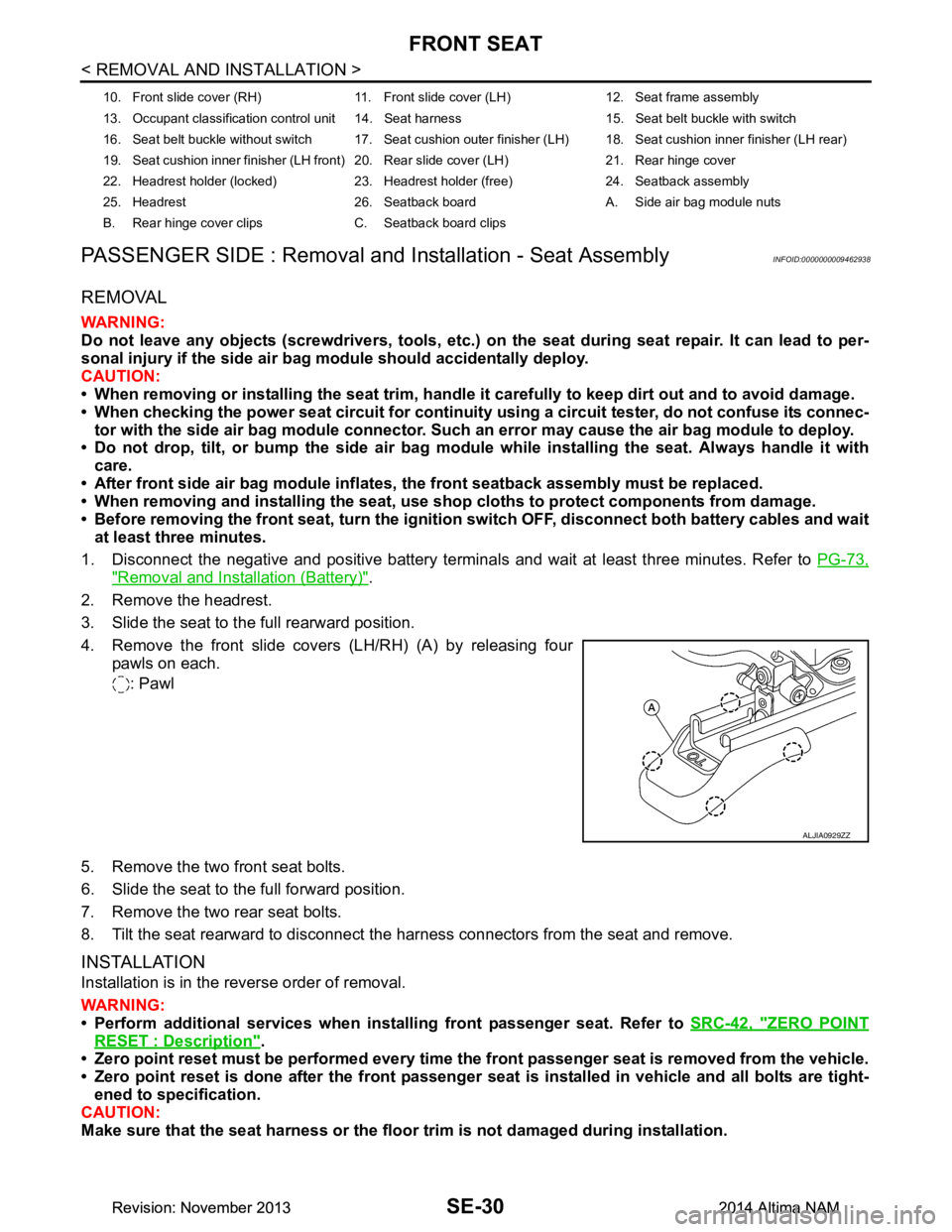
4. Remove the front slide covers (LH/RH) (A) by releasing four pawls on each.
: Pawl
5. Remove the two front seat bolts.
6. Slide the seat to the full forward position.
7. Remove the two rear seat bolts.
8. Tilt the seat rearward to disconnect the harness connectors from the seat and remove.
INSTALLATION
Installation is in the reverse order of removal.
WARNING:
• Perform additional services when instal ling front passenger seat. Refer to SRC-42, "ZERO POINT
RESET : Description".
• Zero point reset must be performed every time th e front passenger seat is removed from the vehicle.
• Zero point reset is done after the front passenger seat is installed in vehicle and all bolts are tight-
ened to specification.
CAUTION:
Make sure that the seat harness or the floor trim is not damaged during installation.
10. Front slide cover (RH) 11. Front sl ide cover (LH) 12. Seat frame assembly
13. Occupant classification control unit 14. Seat harness 15. Seat belt buckle with switch
16. Seat belt buckle without switch 17. Seat cushion outer finisher (LH) 18. Seat cushion inner finisher (LH rear)
19. Seat cushion inner finisher (LH front) 20. Rear slide cover (LH) 21. Rear hinge cover
22. Headrest holder (locked) 23. Headrest holder (free) 24. Seatback assembly
25. Headrest 26. Seatback board A. Side air bag module nuts
B. Rear hinge cover clips C. Seatback board clips
ALJIA0929ZZ
Revision: November 20132014 Altima NAMRevision: November 20132014 Altima NAM
Page 3919 of 4801
SEC-94
< DTC/CIRCUIT DIAGNOSIS >
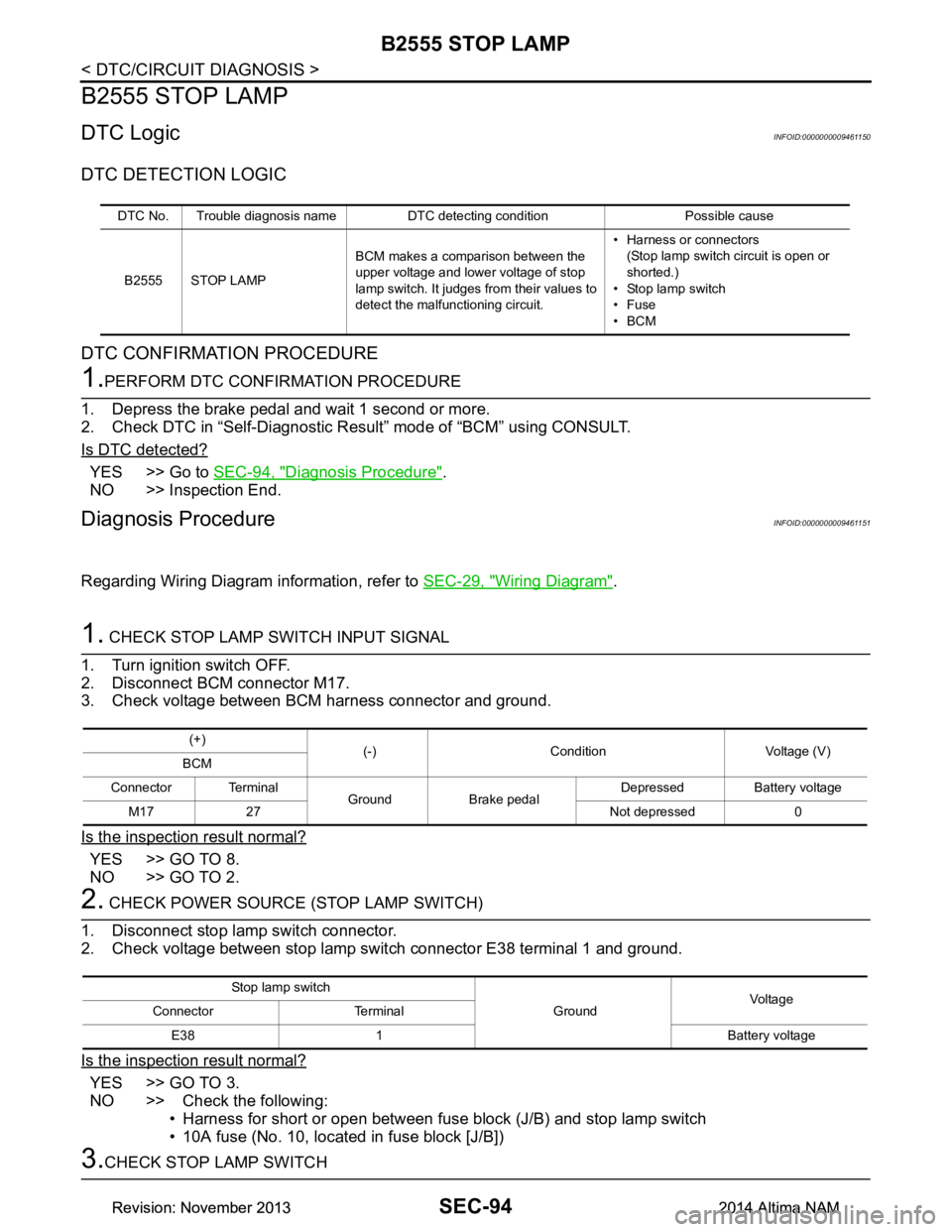
B2555 STOP LAMP
B2555 STOP LAMP
DTC LogicINFOID:0000000009461150
DTC DETECTION LOGIC
DTC CONFIRMATION PROCEDURE
1.PERFORM DTC CONFIRMATION PROCEDURE
1. Depress the brake pedal and wait 1 second or more.
2. Check DTC in “Self-Diagnostic Result” mode of “BCM” using CONSULT.
Is DTC detected?
YES >> Go to SEC-94, "Diagnosis Procedure".
NO >> Inspection End.
Diagnosis ProcedureINFOID:0000000009461151
Regarding Wiring Diagram information, refer to SEC-29, "Wiring Diagram".
1. CHECK STOP LAMP SWITCH INPUT SIGNAL
1. Turn ignition switch OFF.
2. Disconnect BCM connector M17.
3. Check voltage between BCM harness connector and ground.
Is the inspection result normal?
YES >> GO TO 8.
NO >> GO TO 2.
2. CHECK POWER SOURCE (STOP LAMP SWITCH)
1. Disconnect stop lamp switch connector.
2. Check voltage between stop lamp switch connector E38 terminal 1 and ground.
Is the inspection result normal?
YES >> GO TO 3.
NO >> Check the following: • Harness for short or open between fuse block (J/B) and stop lamp switch
• 10A fuse (No. 10, located in fuse block [J/B])
3.CHECK STOP LAMP SWITCH
DTC No. Trouble diagnosis name DTC detecting condition Possible cause
B2555 STOP LAMP BCM makes a comparison between the
upper voltage and lower voltage of stop
lamp switch. It judges from their values to
detect the malfunctioning circuit. • Harness or connectors
(Stop lamp switch circuit is open or
shorted.)
• Stop lamp switch
•Fuse
•BCM
(+) (-) Condition Voltage (V)
BCM
Connector Terminal Ground Brake pedal Depressed Battery voltage
M17 27 Not depressed 0
Stop lamp switch GroundVoltage
Connector Terminal
E38 1 Battery voltage
Revision: November 20132014 Altima NAMRevision: November 20132014 Altima NAM
Page 3947 of 4801

SEC-122
< DTC/CIRCUIT DIAGNOSIS >
POWER SUPPLY AND GROUND CIRCUIT
POWER SUPPLY AND GROUND CIRCUIT
Diagnosis ProcedureINFOID:0000000009956232
Regarding Wiring Diagram information, refer to BCS-55, "Wiring Diagram".
1. CHECK FUSE AND FUSIBLE LINK
Check that the following fuse and fusible link are not blown.
Is the fuse or fusible link blown?
YES >> Replace the blown fuse or fusible link after repairing the affected circuit.
NO >> GO TO 2
2. CHECK POWER SUPPLY CIRCUIT
1. Disconnect BCM connector M21.
2. Check voltage between BCM connector M21 terminals 131, 139 and ground.
Is the inspection result normal?
YES >> GO TO 3
NO >> Repair or replace harness or connectors.
3. CHECK GROUND CIRCUIT
Check continuity between BCM connector M21 terminals 134, 143 and ground.
Is the inspection result normal?
YES >> Inspection End.
NO >> Repair or replace harness or connectors.
Terminal No. Signal name Fuse and fusible link No.
139 Fusible link battery power I (40A)
131 BCM battery fuse 1 (10A)
BCM GroundVo l ta g e
(Approx.)
Connector Terminal
M21 131
— Battery voltage
139
BCM Ground Continuity
Connector Terminal
M21 134
—Yes
143
Revision: November 20132014 Altima NAMRevision: November 20132014 Altima NAM
Page 3952 of 4801
SECURITY INDICATOR LAMPSEC-127
< DTC/CIRCUIT DIAGNOSIS >
C
D E
F
G H
I
J
L
M A
B
SEC
N
O P
SECURITY INDICATOR LAMP
Component Function CheckINFOID:0000000009461192
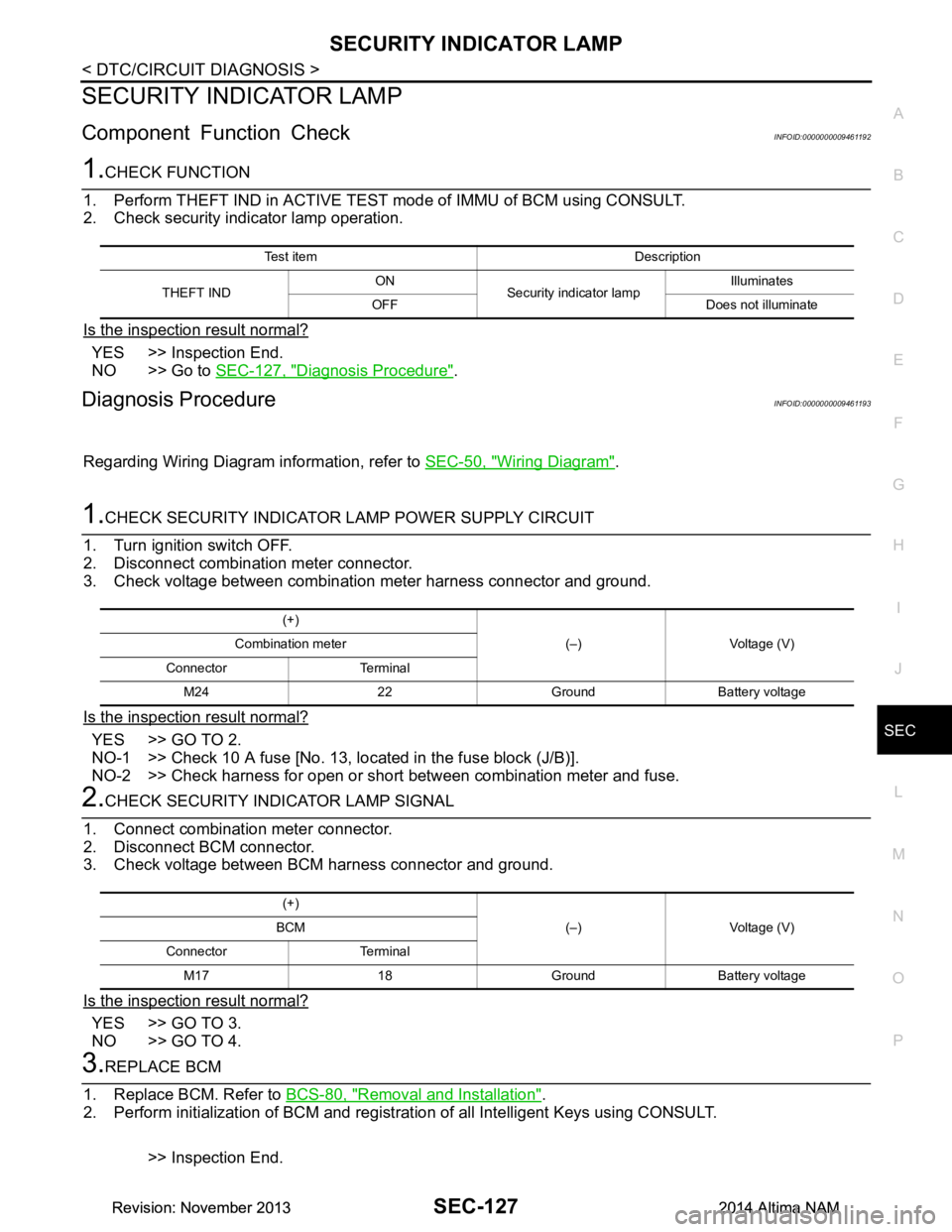
1.CHECK FUNCTION
1. Perform THEFT IND in ACTIVE TEST mode of IMMU of BCM using CONSULT.
2. Check security indicator lamp operation.
Is the inspection result normal?
YES >> Inspection End.
NO >> Go to SEC-127, "Diagnosis Procedure"
.
Diagnosis ProcedureINFOID:0000000009461193
Regarding Wiring Diagram information, refer to SEC-50, "Wiring Diagram".
1.CHECK SECURITY INDICATOR LAMP POWER SUPPLY CIRCUIT
1. Turn ignition switch OFF.
2. Disconnect combination meter connector.
3. Check voltage between combination meter harness connector and ground.
Is the inspection result normal?
YES >> GO TO 2.
NO-1 >> Check 10 A fuse [No. 13, lo cated in the fuse block (J/B)].
NO-2 >> Check harness for open or short between combination meter and fuse.
2.CHECK SECURITY INDICATOR LAMP SIGNAL
1. Connect combination meter connector.
2. Disconnect BCM connector.
3. Check voltage between BCM harness connector and ground.
Is the inspection result normal?
YES >> GO TO 3.
NO >> GO TO 4.
3.REPLACE BCM
1. Replace BCM. Refer to BCS-80, "Removal and Installation"
.
2. Perform initialization of BCM and registration of all Intelligent Keys using CONSULT.
>> Inspection End.
Test item Description
THEFT IND ON
Security indicator lamp Illuminates
OFF Does not illuminate
(+) (–) Voltage (V)
Combination meter
Connector Terminal M24 22 Ground Battery voltage
(+) (–) Voltage (V)
BCM
Connector Terminal M17 18 Ground Battery voltage
Revision: November 20132014 Altima NAMRevision: November 20132014 Altima NAM
Page 4008 of 4801
DIAGNOSIS SYSTEM (AIR BAG)SRC-15
< SYSTEM DESCRIPTION >
C
D E
F
G
I
J
K L
M A
B
SRC
N
O P
DIAGNOSIS SYSTEM (AIR BAG)
Diagnosis DescriptionINFOID:0000000009460723
CAUTION:
• Do not use electrical test equipment on any circui t related to the SRS unless instructed to do so in
this Service Manual. SRS wiring harnesses can be id entified by yellow and/or orange harness con-
nectors.
• Do not attempt to repair, splice or modify SRS wiring harnesses. If a harness is damaged, replace it
with a new one.
• Keep ground connections clean.
HOW TO PERFORM TROUBLE DIAGNOSES FOR QUICK AND ACCURATE REPAIR
1. Obtain information about the symptom.
- WHAT - vehicle model
- WHEN - date, frequencies
- WHERE - road conditions
- HOW - operating conditions, symptoms, passengers
2. Perform Preliminary Check.
-Battery
- Fuses
- Harness connections
DIAGNOSIS METHODS
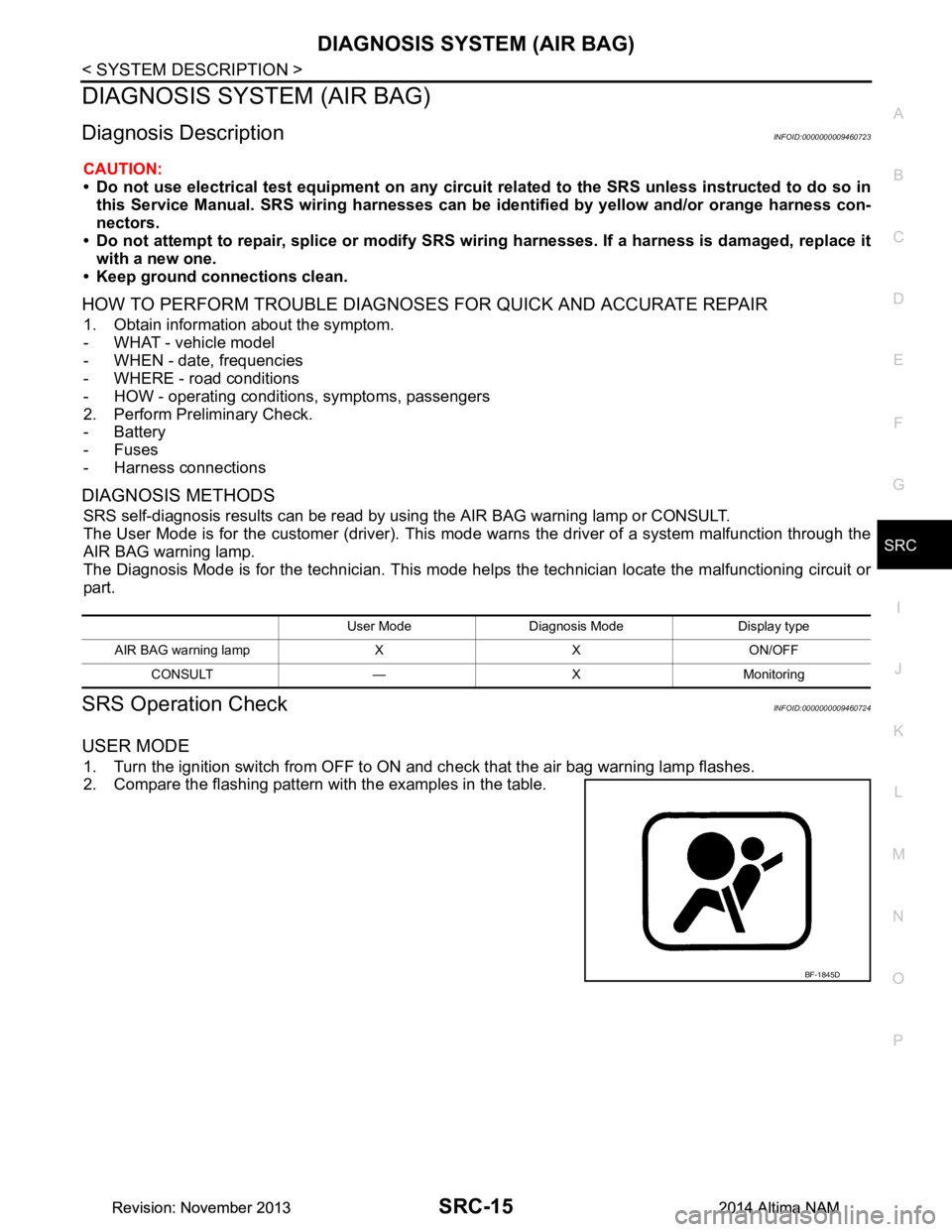
SRS self-diagnosis results can be read by using the AIR BAG warning lamp or CONSULT.
The User Mode is for the customer (driver). This m ode warns the driver of a system malfunction through the
AIR BAG warning lamp.
The Diagnosis Mode is for the technician. This mode hel ps the technician locate the malfunctioning circuit or
part.
SRS Operation CheckINFOID:0000000009460724
USER MODE
1. Turn the ignition switch from OFF to ON and check that the air bag warning lamp flashes.
2. Compare the flashing pattern with the examples in the table.
User Mode Diagnosis Mode Display type
AIR BAG warning lamp X X ON/OFF CONSULT — X Monitoring
BF-1845D
Revision: November 20132014 Altima NAMRevision: November 20132014 Altima NAM
Page 4090 of 4801
B1428 SEAT BELT BUCKLE SWITCH LHSRC-97
< DTC/CIRCUIT DIAGNOSIS >
C
D E
F
G
I
J
K L
M A
B
SRC
N
O P
YES >> Refer to SRC-97, "Diagnosis Procedure".
NO >> Inspection End.
Diagnosis ProcedureINFOID:0000000009460794
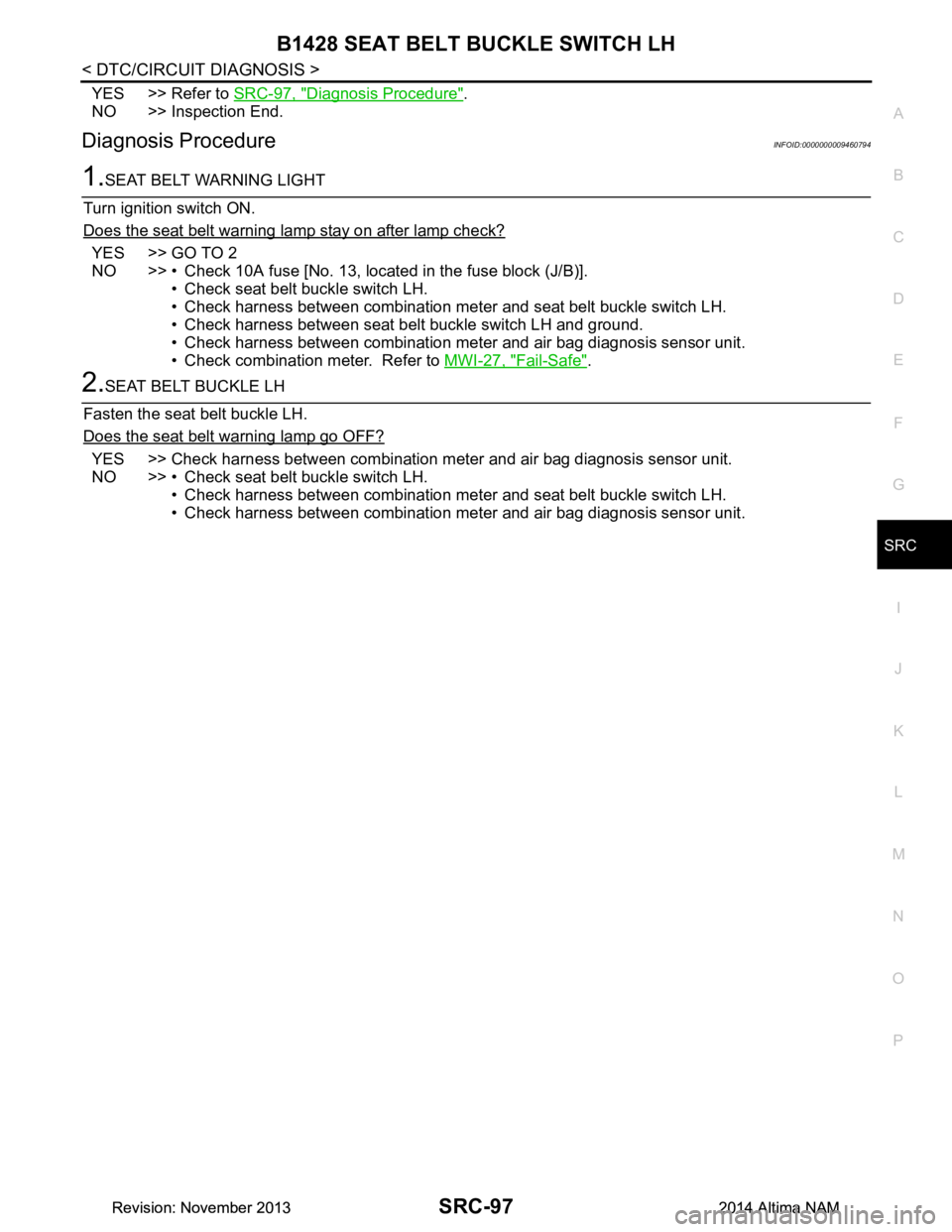
1.SEAT BELT WARNING LIGHT
Turn ignition switch ON.
Does the seat belt warning lamp stay on after lamp check?
YES >> GO TO 2
NO >> • Check 10A fuse [No. 13, loca ted in the fuse block (J/B)].
• Check seat belt buckle switch LH.
• Check harness between combination meter and seat belt buckle switch LH.
• Check harness between seat belt buckle switch LH and ground.
• Check harness between combination meter and air bag diagnosis sensor unit.
• Check combination meter. Refer to MWI-27, "Fail-Safe"
.
2.SEAT BELT BUCKLE LH
Fasten the seat belt buckle LH.
Does the seat belt warning lamp go OFF?
YES >> Check harness between combination meter and air bag diagnosis sensor unit.
NO >> • Check seat belt buckle switch LH. • Check harness between combination meter and seat belt buckle switch LH.
• Check harness between combination meter and air bag diagnosis sensor unit.
Revision: November 20132014 Altima NAMRevision: November 20132014 Altima NAM