lights NISSAN TEANA 2014 User Guide
[x] Cancel search | Manufacturer: NISSAN, Model Year: 2014, Model line: TEANA, Model: NISSAN TEANA 2014Pages: 4801, PDF Size: 51.2 MB
Page 2384 of 4801
EXL-118
< SYMPTOM DIAGNOSIS >
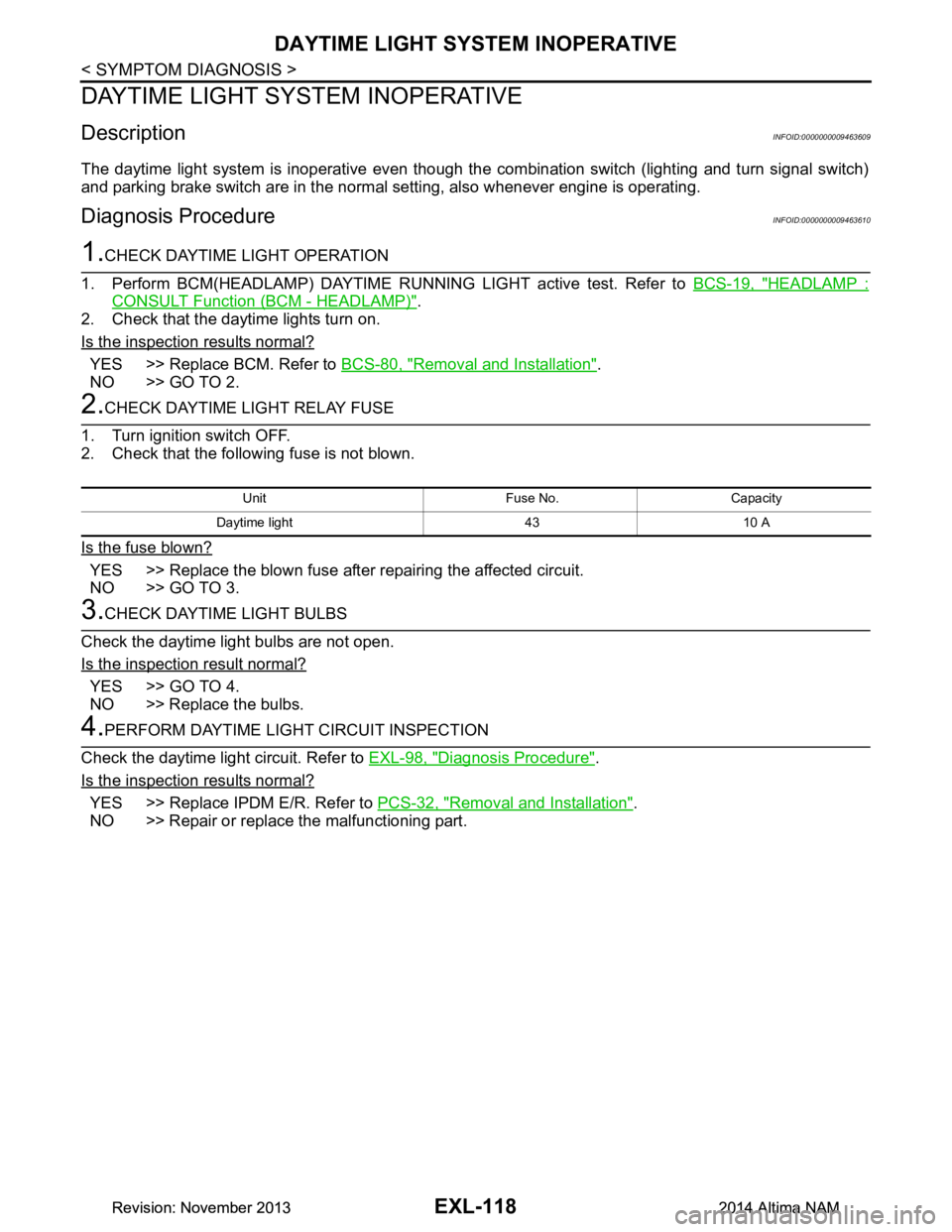
DAYTIME LIGHT SYSTEM INOPERATIVE
DAYTIME LIGHT SYSTEM INOPERATIVE
DescriptionINFOID:0000000009463609
The daytime light system is inoperative even though the combination switch (lighting and turn signal switch)
and parking brake switch are in the normal setting, also whenever engine is operating.
Diagnosis ProcedureINFOID:0000000009463610
1.CHECK DAYTIME LIGHT OPERATION
1. Perform BCM(HEADLAMP) DAYTIME RUNNING LIGHT active test. Refer to BCS-19, "HEADLAMP :
CONSULT Function (BCM - HEADLAMP)".
2. Check that the daytime lights turn on.
Is the inspection results normal?
YES >> Replace BCM. Refer to BCS-80, "Removal and Installation".
NO >> GO TO 2.
2.CHECK DAYTIME LIGHT RELAY FUSE
1. Turn ignition switch OFF.
2. Check that the following fuse is not blown.
Is the fuse blown?
YES >> Replace the blown fuse after repairing the affected circuit.
NO >> GO TO 3.
3.CHECK DAYTIME LIGHT BULBS
Check the daytime light bulbs are not open.
Is the inspection result normal?
YES >> GO TO 4.
NO >> Replace the bulbs.
4.PERFORM DAYTIME LIGH T CIRCUIT INSPECTION
Check the daytime light circuit. Refer to EXL-98, "Diagnosis Procedure"
.
Is the inspection results normal?
YES >> Replace IPDM E/R. Refer to PCS-32, "Removal and Installation".
NO >> Repair or replace the malfunctioning part.
Unit Fuse No. Capacity
Daytime light 43 10 A
Revision: November 20132014 Altima NAMRevision: November 20132014 Altima NAM
Page 2577 of 4801
SERVICE INFORMATION FOR ELECTRICAL INCIDENTGI-49
< BASIC INSPECTION >
C
D E
F
G H
I
J
K L
M B
GI
N
O P
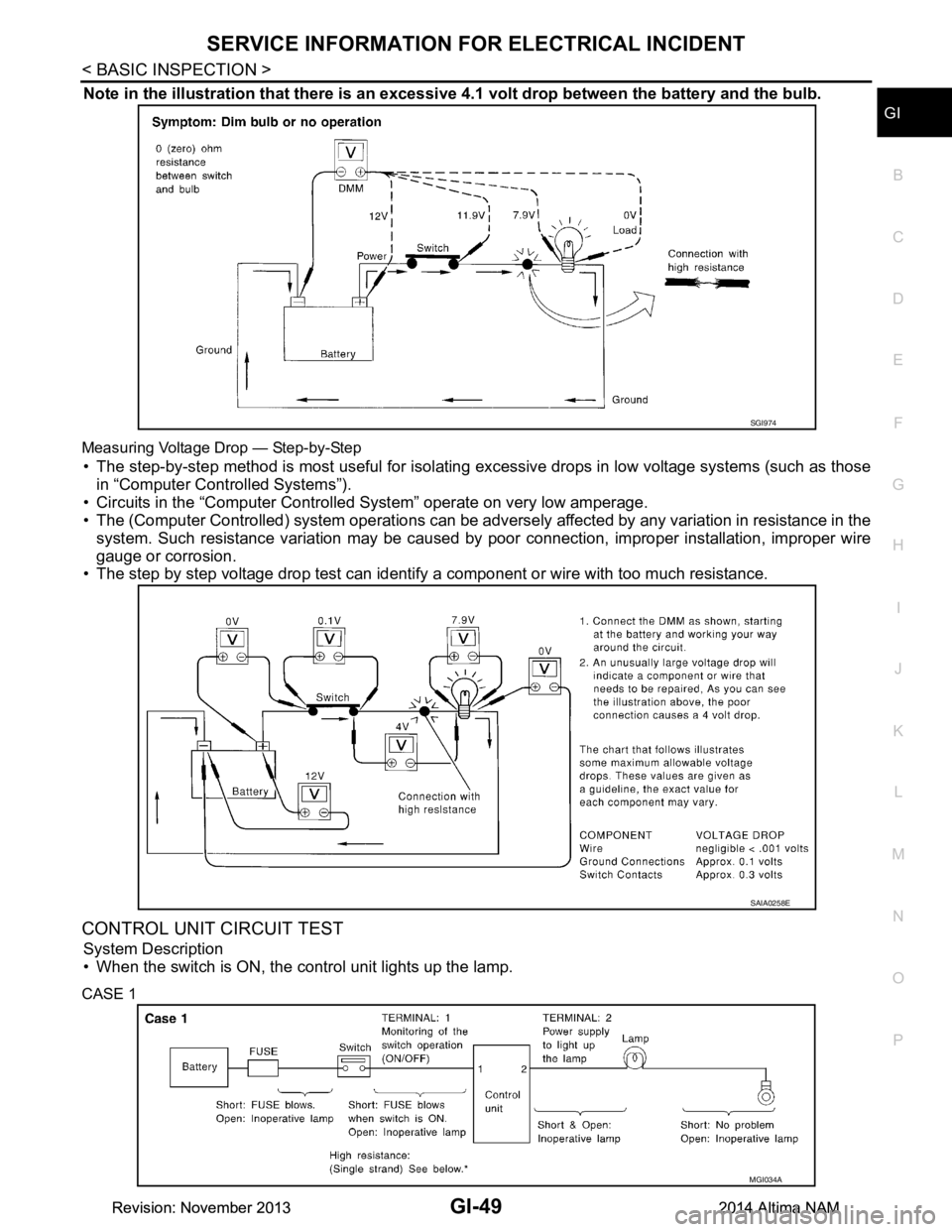
Note in the illustration that there is an excessi ve 4.1 volt drop between the battery and the bulb.
Measuring Voltage Drop — Step-by-Step
• The step-by-step method is most useful for isolating excessive drops in low voltage systems (such as those
in “Computer Controlled Systems”).
• Circuits in the “Computer Controll ed System” operate on very low amperage.
• The (Computer Controlled) system operations can be adversely affected by any variation in resistance in the
system. Such resistance variation may be caused by poor connection, improper installation, improper wire
gauge or corrosion.
• The step by step voltage drop test can identify a component or wire with too much resistance.
CONTROL UNIT CIRCUIT TEST
System Description
• When the switch is ON, the control unit lights up the lamp.
CASE 1
SGI974
SAIA0258E
MGI034A
Revision: November 20132014 Altima NAMRevision: November 20132014 Altima NAM
Page 2830 of 4801
ILLUMINATION CONTROL SYSTEMINL-9
< SYSTEM DESCRIPTION >
C
D E
F
G H
I
J
K
M A
B
INL
N
O P
ILLUMINATION CONTROL SYSTEM
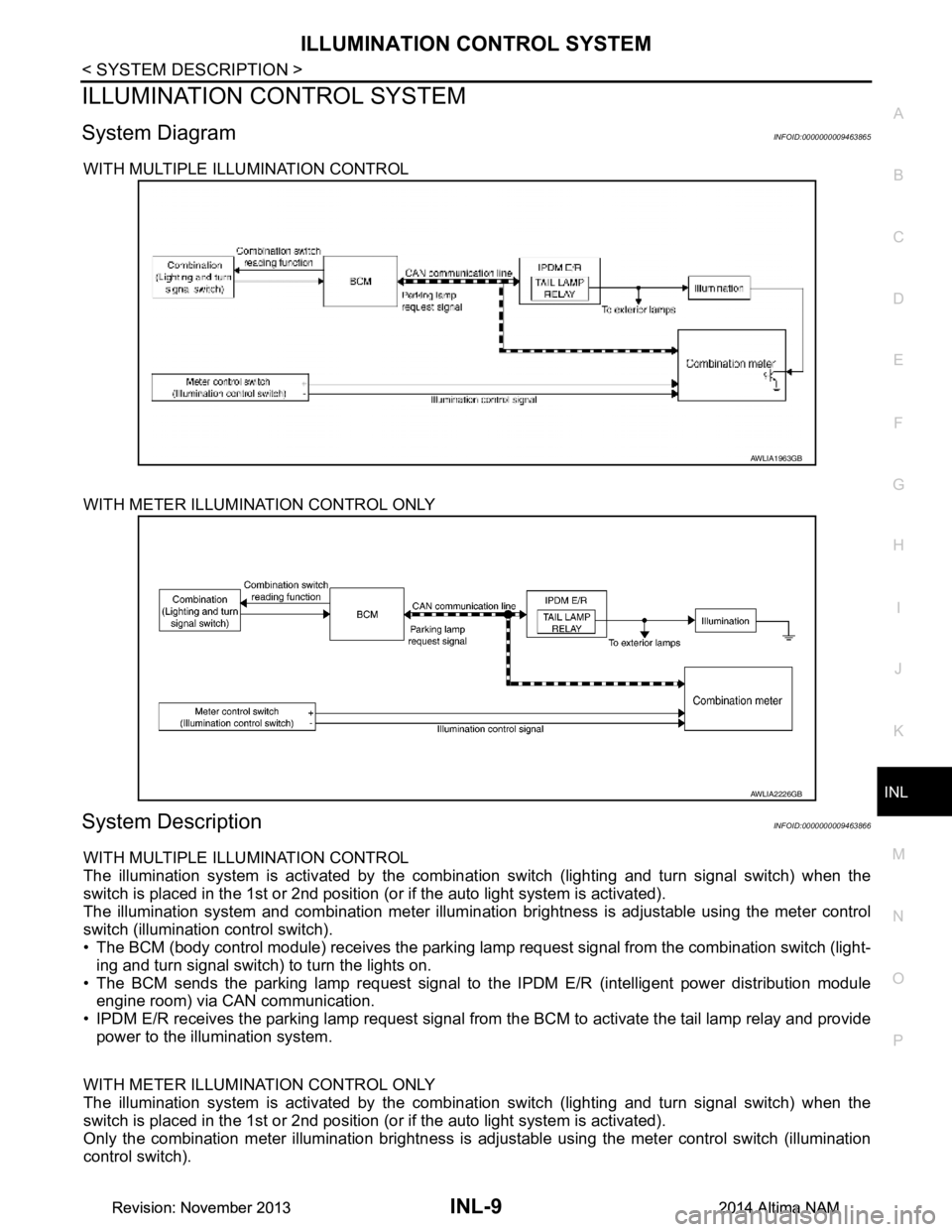
System DiagramINFOID:0000000009463865
WITH MULTIPLE ILLUMINATION CONTROL
WITH METER ILLUMINATION CONTROL ONLY
System DescriptionINFOID:0000000009463866
WITH MULTIPLE ILLUMINATION CONTROL
The illumination system is activated by the combinat ion switch (lighting and turn signal switch) when the
switch is placed in the 1st or 2nd position (or if the auto light system is activated).
The illumination system and combination meter illuminati on brightness is adjustable using the meter control
switch (illumination control switch).
• The BCM (body control module) receives the parking lamp request signal from the combination switch (light-
ing and turn signal switch) to turn the lights on.
• The BCM sends the parking lamp request signal to t he IPDM E/R (intelligent power distribution module
engine room) via CAN communication.
• IPDM E/R receives the parking lamp request signal from the BCM to activate the tail lamp relay and provide
power to the illumination system.
WITH METER ILLUMINATION CONTROL ONLY
The illumination system is activated by the combinat ion switch (lighting and turn signal switch) when the
switch is placed in the 1st or 2nd position (or if the auto light system is activated).
Only the combination meter illumination brightness is adjustable using the meter control switch (illumination
control switch).
AWLIA1963GB
AWLIA2226GB
Revision: November 20132014 Altima NAMRevision: November 20132014 Altima NAM
Page 2831 of 4801

INL-10
< SYSTEM DESCRIPTION >
ILLUMINATION CONTROL SYSTEM
• The BCM (body control module) receives the parking lamp request signal from the combination switch (light-
ing and turn signal switch) to turn the lights on.
• The BCM sends the parking lamp request signal to t he IPDM E/R (intelligent power distribution module
engine room) via CAN communication.
• IPDM E/R receives the parking lamp request signal from the BCM to activate the tail lamp relay and provide power to the illumination system.
BATTERY SAVER CONTROL
When the combination switch (lighting and turn signal switch) is in the 1st or 2nd position and the ignition
switch is set from ON or ACC to OFF, the battery save r control feature is activated. Under this condition, the
illumination system remains on for 15 minutes unless the combination switch (lighting and turn signal switch)
position is changed. If the combination switch (light ing and turn signal switch) position is changed, then the
illumination system is turned off after a 30 second delay . When the combination switch (lighting and turn signal
switch) is turned from OFF to 1st or 2nd position (or if auto light system is activated) after illumination system
has been turned off by the battery saver control, the illumination lights illuminate again.
Revision: November 20132014 Altima NAMRevision: November 20132014 Altima NAM
Page 3273 of 4801
MWI-18
< SYSTEM DESCRIPTION >
DIAGNOSIS SYSTEM (METER)
DIAGNOSIS SYSTEM (METER)
DescriptionINFOID:0000000009461692
COMBINATION METER SELF-DIAGNOSIS MODE
The following meter functions can be checked during Combination Meter Self-Diagnosis Mode:
• Pointer sweep of speedometer, tachometer and gauges.
• Illumination of all LCD segments and color patterns for meter displays.
• Illumination of all lamps/LEDs that are controlled by the combination meter (regardless of switch status).
STARTING COMBINATION METER SELF-DIAGNOSIS MODE
NOTE:
• Check combination meter power supply and ground circuits if self-diagnosis mode does not start. Refer to
MWI-58, "COMBINATION METER : Diagnosis Procedure"
. Replace combination meter if power supply and
ground circuits are found to be normal and self-diagnosis mode does not start. Refer to MWI-82, "Removal
and Installation".
• Combination meter self-diagnosis mode will function with t he ignition switch in ON. Combination meter self-
diagnosis mode will exit upon turning the ignition switch to OFF.
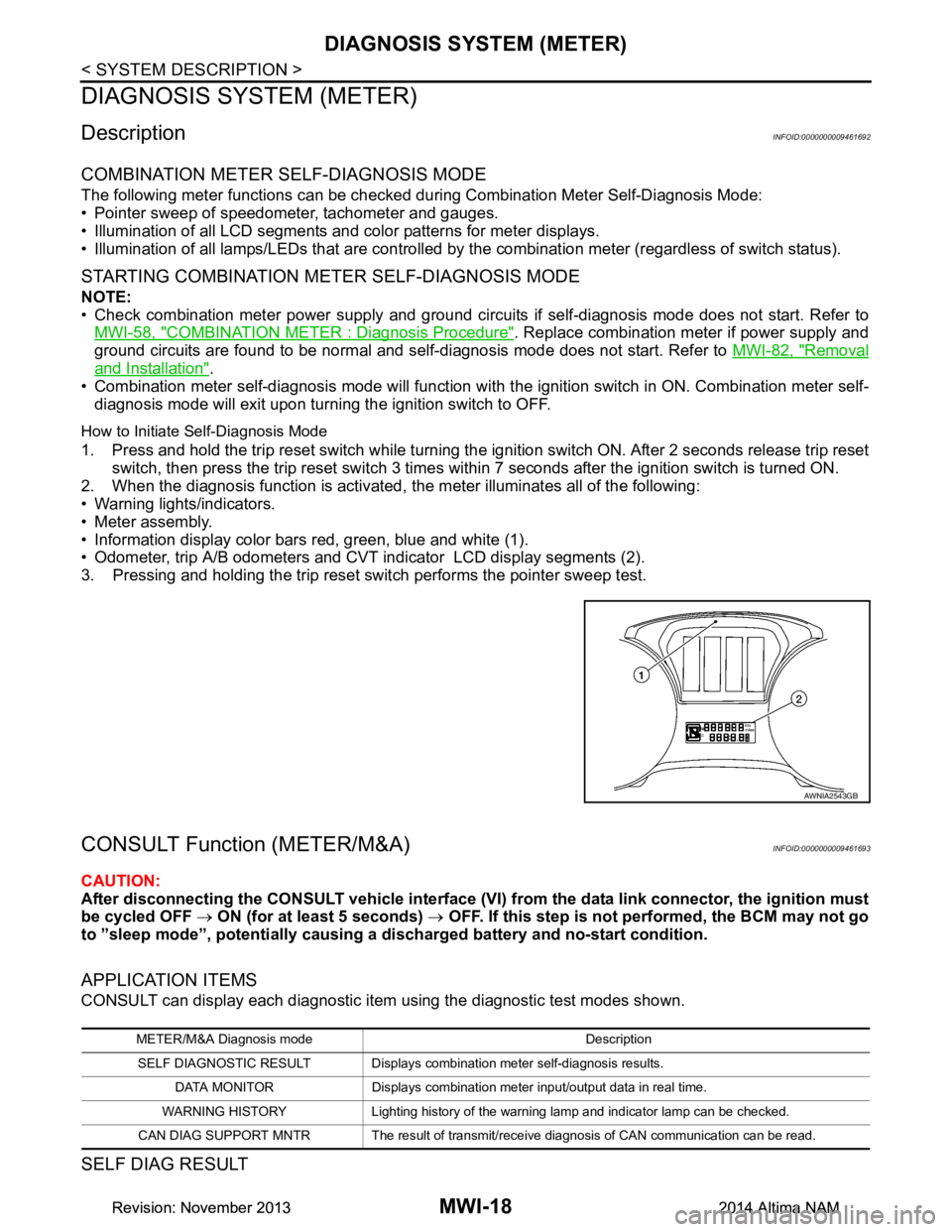
How to Initiate Self-Diagnosis Mode
1. Press and hold the trip reset switch while turning the ignition switch ON. After 2 seconds release trip reset switch, then press the trip reset switch 3 times within 7 seconds after the ignition switch is turned ON.
2. When the diagnosis function is activated, the meter illuminates all of the following:
• Warning lights/indicators.
• Meter assembly.
• Information display color bars red, green, blue and white (1).
• Odometer, trip A/B odometers and CVT indicator LCD display segments (2).
3. Pressing and holding the trip reset switch performs the pointer sweep test.
CONSULT Function (METER/M&A)INFOID:0000000009461693
CAUTION:
After disconnecting the CONSULT vehicle interface (VI) from the data link connector, the ignition must
be cycled OFF → ON (for at least 5 seconds) → OFF. If this step is not performed, the BCM may not go
to ”sleep mode”, potentially causing a di scharged battery and no-start condition.
APPLICATION ITEMS
CONSULT can display each diagnostic item using the diagnostic test modes shown.
SELF DIAG RESULT
AWNIA2543GB
METER/M&A Diagnosis mode Description
SELF DIAGNOSTIC RESULT Displays combin ation meter self-diagnosis results.
DATA MONITOR Displays combination meter input/output data in real time.
WARNING HISTORY Lighting history of the warning lamp and indicator lamp can be checked.
CAN DIAG SUPPORT MNTR The result of transmit/receive diagnosis of CAN communication can be read.
Revision: November 20132014 Altima NAMRevision: November 20132014 Altima NAM
Page 4010 of 4801
DIAGNOSIS SYSTEM (AIR BAG)SRC-17
< SYSTEM DESCRIPTION >
C
D E
F
G
I
J
K L
M A
B
SRC
N
O P
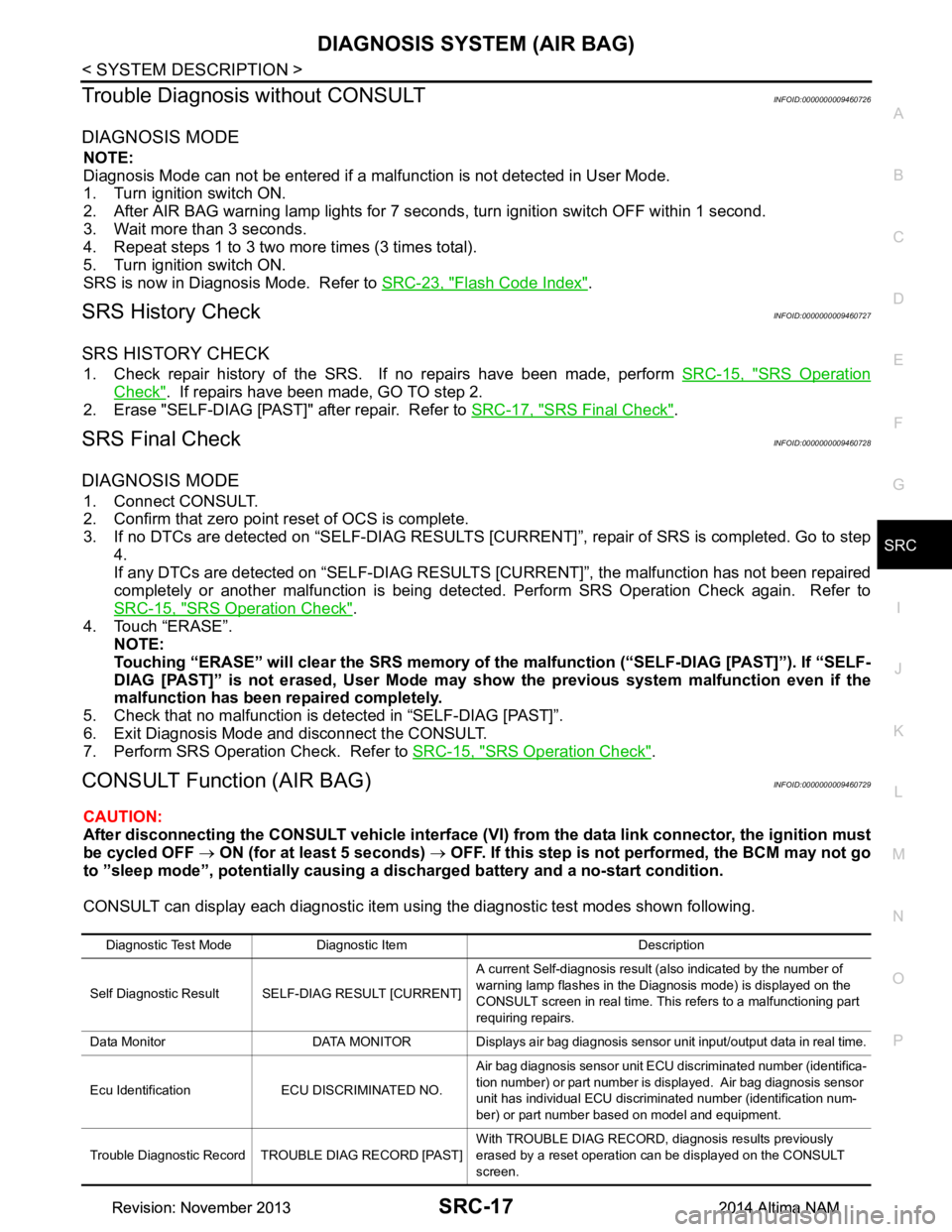
Trouble Diagnosis without CONSULTINFOID:0000000009460726
DIAGNOSIS MODE
NOTE:
Diagnosis Mode can not be entered if a malfunction is not detected in User Mode.
1. Turn ignition switch ON.
2. After AIR BAG warning lamp lights for 7 seconds, turn ignition switch OFF within 1 second.
3. Wait more than 3 seconds.
4. Repeat steps 1 to 3 two more times (3 times total).
5. Turn ignition switch ON.
SRS is now in Diagnosis Mode. Refer to SRC-23, "Flash Code Index"
.
SRS History CheckINFOID:0000000009460727
SRS HISTORY CHECK
1. Check repair history of the SRS. If no repairs have been made, perform SRC-15, "SRS Operation
Check". If repairs have been made, GO TO step 2.
2. Erase "SELF-DIAG [PAST]" after repair. Refer to SRC-17, "SRS Final Check"
.
SRS Final CheckINFOID:0000000009460728
DIAGNOSIS MODE
1. Connect CONSULT.
2. Confirm that zero point reset of OCS is complete.
3. If no DTCs are detected on “SELF- DIAG RESULTS [CURRENT]”, repair of SRS is completed. Go to step
4.
If any DTCs are detected on “SEL F-DIAG RESULTS [CURRENT]”, t he malfunction has not been repaired
completely or another malfunction is being detected. Perform SRS Operation Check again. Refer to
SRC-15, "SRS Operation Check"
.
4. Touch “ERASE”. NOTE:
Touching “ERASE” will clear the SRS memory of the malfunction (“SELF-DIAG [PAST]”). If “SELF-
DIAG [PAST]” is not erased, User Mode may s how the previous system malfunction even if the
malfunction has been repaired completely.
5. Check that no malfunction is detected in “SELF-DIAG [PAST]”.
6. Exit Diagnosis Mode and disconnect the CONSULT.
7. Perform SRS Operation Check. Refer to SRC-15, "SRS Operation Check"
.
CONSULT Function (AIR BAG)INFOID:0000000009460729
CAUTION:
After disconnecting the CONSULT vehicle interface (VI) from the data link connector, the ignition must
be cycled OFF → ON (for at least 5 seconds) → OFF. If this step is not performed, the BCM may not go
to ”sleep mode”, potentiall y causing a discharged battery and a no-start condition.
CONSULT can display each diagnostic item using the diagnostic test modes shown following.
Diagnostic Test Mode Diagnostic Item Description
Self Diagnostic Result SEL F-DIAG RESULT [CURRENT]A current Self-diagnosis result (also indicated by the number of
warning lamp flashes in the Diagnosis mode) is displayed on the
CONSULT screen in real time. This refers to a malfunctioning part
requiring repairs.
Data Monitor DATA MONITOR Displays air bag diagnosis sensor unit input/output data in real time.
Ecu Identification ECU DISCRIMINATED NO. Air bag diagnosis sensor unit ECU discriminated number (identifica-
tion number) or part number is displayed. Air bag diagnosis sensor
unit has individual ECU discriminated number (identification num-
ber) or part number based on model and equipment.
Trouble Diagnostic Record TROUBLE DIAG RECORD [PAST] With TROUBLE DIAG RECORD, diagnosis results previously
erased by a reset operation can be displayed on the CONSULT
screen.
Revision: November 20132014 Altima NAMRevision: November 20132014 Altima NAM
Page 4186 of 4801
STEERING WHEEL TURNING FORCE IS HEAVY OR LIGHTSTC-35
< SYMPTOM DIAGNOSIS >
C
D E
F
H I
J
K L
M A
B
STC
N
O P
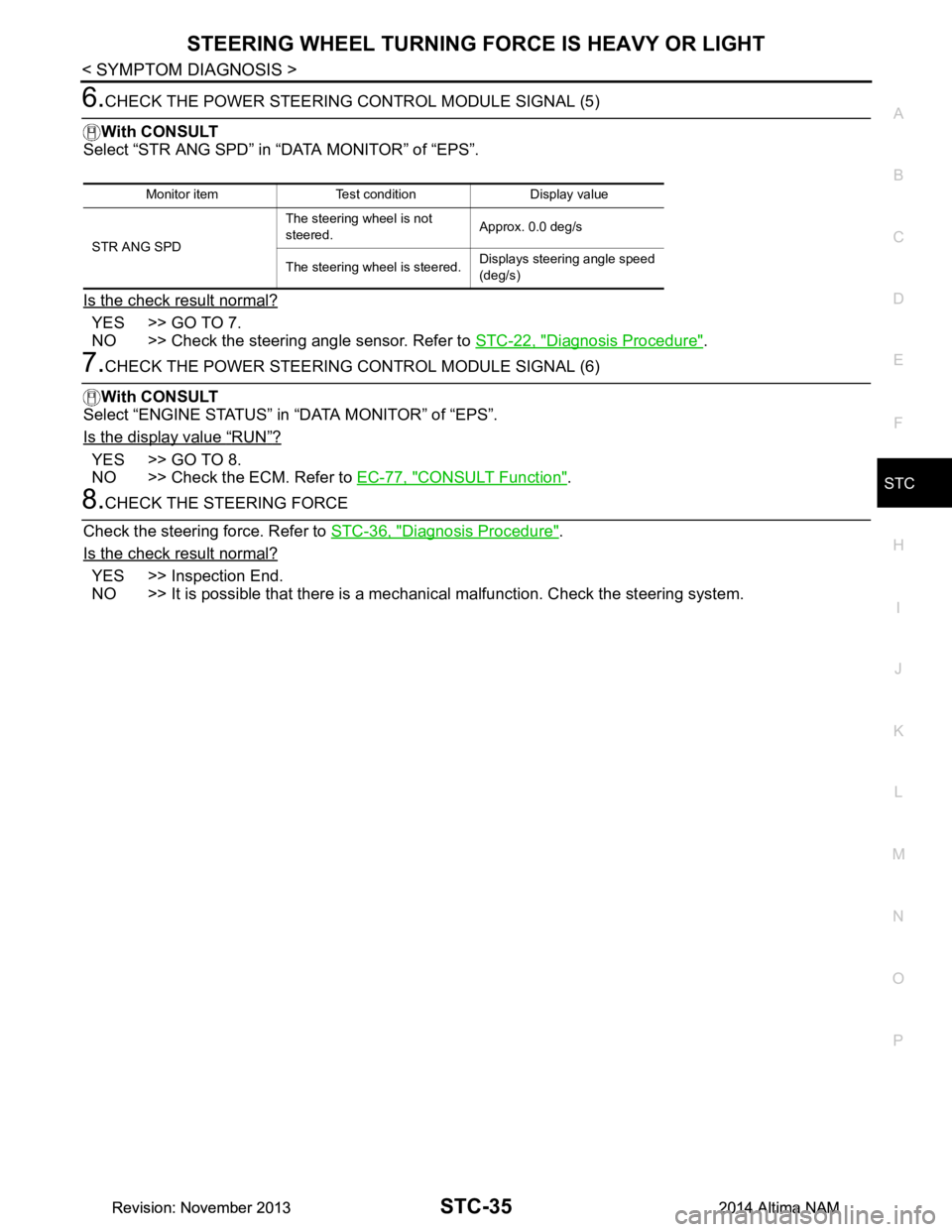
6.CHECK THE POWER STEERING CONTROL MODULE SIGNAL (5)
With CONSULT
Select “STR ANG SPD” in “DATA MONITOR” of “EPS”.
Is the check result normal?
YES >> GO TO 7.
NO >> Check the steering angle sensor. Refer to STC-22, "Diagnosis Procedure"
.
7.CHECK THE POWER STEERING CONTROL MODULE SIGNAL (6)
With CONSULT
Select “ENGINE STATUS” in “DATA MONITOR” of “EPS”.
Is the display value
“RUN”?
YES >> GO TO 8.
NO >> Check the ECM. Refer to EC-77, "CONSULT Function"
.
8.CHECK THE STEERING FORCE
Check the steering force. Refer to STC-36, "Diagnosis Procedure"
.
Is the check result normal?
YES >> Inspection End.
NO >> It is possible that there is a mechani cal malfunction. Check the steering system.
Monitor item Test condition Display value
STR ANG SPD The steering wheel is not
steered. Approx. 0.0 deg/s
The steering wheel is steered. Displays steering angle speed
(deg/s)
Revision: November 20132014 Altima NAMRevision: November 20132014 Altima NAM
Page 4256 of 4801
![NISSAN TEANA 2014 User Guide
DIAGNOSIS SYSTEM (TCM)TM-41
< SYSTEM DESCRIPTION > [CVT: RE0F10D]
C
EF
G H
I
J
K L
M A
B
TM
N
O P
DIAGNOSIS SYSTEM (TCM)
DIAGNOSIS DESCRIPTION
DIAGNOSIS DESCRIPTION : 1 Tr ip Detection Diagnosis and](/img/5/57390/w960_57390-4255.png "NISSAN TEANA 2014 User Guide
DIAGNOSIS SYSTEM (TCM)TM-41
< SYSTEM DESCRIPTION > [CVT: RE0F10D]
C
EF
G H
I
J
K L
M A
B
TM
N
O P
DIAGNOSIS SYSTEM (TCM)
DIAGNOSIS DESCRIPTION
DIAGNOSIS DESCRIPTION : 1 Tr ip Detection Diagnosis and")
DIAGNOSIS SYSTEM (TCM)TM-41
< SYSTEM DESCRIPTION > [CVT: RE0F10D]
C
EF
G H
I
J
K L
M A
B
TM
N
O P
DIAGNOSIS SYSTEM (TCM)
DIAGNOSIS DESCRIPTION
DIAGNOSIS DESCRIPTION : 1 Tr ip Detection Diagnosis and 2 Trip Detection Diagno-
sis
INFOID:0000000009463996
NOTE:
“Start the engine and turn OFF the ignition switch after warm-up.” This is defined as 1 trip.
1 TRIP DETECTION DIAGNOSIS
When initial malfunction is detected, TCM memorize s DTC. In these diagnoses, some illuminate MIL and
some do not. Refer to TM-60, "DTC Index"
.
2 TRIP DETECTION DIAGNOSIS
When initial malfunction is detected, TCM memorizes DTC of the 1st trip. MIL does not light at this stage. <1
trip>
If the same malfunction is detected again in next drivi ng, TCM memorizes DTC. When DTC is memorized, MIL
lights. <2 trip>
“Trip” of the “2 trip detection diagnosis” indicates the driving mode that executes self-diagnosis during driving.
×: Check possible —: Check not possible
DIAGNOSIS DESCRIPTION : DTC and DTC of 1st TripINFOID:0000000009463997
2 TRIP DETECTION DIAGNOSIS THAT ILLUMINATES MIL
• The DTC number of the 1st trip is the same as the DTC number.
• When a malfunction is detected at the 1st trip, TCM memo rizes DTC of the 1st trip. MIL does not light at this
stage. If the same malfunction is not detected at t he 2nd trip (conforming to necessary driving conditions),
DTC at the 1st trip is erased from TCM. If the same malfunction is detected at the 2nd trip, TCM memorizes
DTC and MIL lights at the same time.
• The DTC of the 1st trip is specified in Service $01 of SAE J1979/ISO 15031-5. Since detection of DTC at the
1st trip does not illuminate MIL, warning for a problem is not given to a driver.
• For procedure to delete DTC and 1st trip DTC from TCM, refer to TM-43, "CONSULT Function"
.
• If DTC of the 1st trip is detected, it is necessary to check the cause according to the “Diagnosis flow”. Refer
to TM-77, "Flowchart of Trouble Diagnosis"
.
DIAGNOSIS DESCRIPTION : Malf unction Indicator Lamp (MIL)INFOID:0000000009463998
• TCM not only detects DTC, but also sends the MI L signal to ECM through CAN communication. ECM sends
the MIL signal to the combination meter through CAN communication according to the signal, and illumi-
nates MIL.
• For malfunction indicator lamp (MIL) description, refer to EC-74, "DIAGNOSIS DESCRIPTION : Malfunction
Indicator Lamp (MIL)".
DIAGNOSIS DESCRIPTION : Counter SystemINFOID:0000000009463999
RELATION BETWEEN DTC AT 1ST TRIP/DTC/MIL AND DRIVING CONDITIONS (FOR 2 TRIP DE-
TECTION DIAGNOSIS THAT ILLUMINATES MIL)
• When initial malfunction is detected, TCM memorizes DT C of the 1st trip. MIL does not light at this stage.
• If the same malfunction is detect ed at the 2nd trip, TCM memorizes DTC and MIL lights at the same time.
• Then, MIL goes after driving the vehicle for 3 tr ips under “Driving condition B” without malfunction.
• DTC is displayed until 40 trips of “Driving condition A” are satisfied without detecting the same malfunction.
DTC is erased when 40 trips are satisfied.
Item DTC at the 1st trip DTC MIL
Display at the 1st trip Display at the
2nd trip Display at the
1st trip Display at the
2nd trip Illumination at
the 1st trip Illumination at
the 2nd trip
1 trip detection diagnosis
(Refer to TM-60, "DTC Index"
) ——
×— ×—
2 trip detection diagnosis
(Refer to TM-60, "DTC Index"
) ×
—— ×— ×
Revision: November 20132014 Altima NAMRevision: November 20132014 Altima NAM
Page 4458 of 4801
![NISSAN TEANA 2014 User Guide
DIAGNOSIS SYSTEM (TCM)TM-243
< SYSTEM DESCRIPTION > [CVT: RE0F10E]
C
EF
G H
I
J
K L
M A
B
TM
N
O P
DIAGNOSIS SYSTEM (TCM)
DIAGNOSIS DESCRIPTION
DIAGNOSIS DESCRIPTION : 1 Tr ip Detection Diagnosis an](/img/5/57390/w960_57390-4457.png "NISSAN TEANA 2014 User Guide
DIAGNOSIS SYSTEM (TCM)TM-243
< SYSTEM DESCRIPTION > [CVT: RE0F10E]
C
EF
G H
I
J
K L
M A
B
TM
N
O P
DIAGNOSIS SYSTEM (TCM)
DIAGNOSIS DESCRIPTION
DIAGNOSIS DESCRIPTION : 1 Tr ip Detection Diagnosis an")
DIAGNOSIS SYSTEM (TCM)TM-243
< SYSTEM DESCRIPTION > [CVT: RE0F10E]
C
EF
G H
I
J
K L
M A
B
TM
N
O P
DIAGNOSIS SYSTEM (TCM)
DIAGNOSIS DESCRIPTION
DIAGNOSIS DESCRIPTION : 1 Tr ip Detection Diagnosis and 2 Trip Detection Diagno-
sis
INFOID:0000000009464213
NOTE:
“Start the engine and turn OFF the ignition switch after warm-up.” This is defined as 1 trip.
1 TRIP DETECTION DIAGNOSIS
When initial malfunction is detected, TCM memorize s DTC. In these diagnoses, some illuminate MIL and
some do not. Refer to TM-263, "DTC Index"
.
2 TRIP DETECTION DIAGNOSIS
When initial malfunction is detected, TCM memorizes DTC of the 1st trip. MIL does not light at this stage. <1
trip>
If the same malfunction is detected again in next drivi ng, TCM memorizes DTC. When DTC is memorized, MIL
lights. <2 trip>
“Trip” of the “2 trip detection diagnosis” indicates the driving mode that executes self-diagnosis during driving.
×: Check possible —: Check not possible
DIAGNOSIS DESCRIPTION : DTC and DTC of 1st TripINFOID:0000000009464214
2 TRIP DETECTION DIAGNOSIS THAT ILLUMINATES MIL
• The DTC number of the 1st trip is the same as the DTC number.
• When a malfunction is detected at the 1st trip, TCM memo rizes DTC of the 1st trip. MIL does not light at this
stage. If the same malfunction is not detected at t he 2nd trip (conforming to necessary driving conditions),
DTC at the 1st trip is erased from TCM. If the same malfunction is detected at the 2nd trip, TCM memorizes
DTC and MIL lights at the same time.
• The DTC of the 1st trip is specified in Service $01 of SAE J1979/ISO 15031-5. Since detection of DTC at the
1st trip does not illuminate MIL, warning for a problem is not given to a driver.
• For procedure to delete DTC and 1st trip DTC from TCM, refer to TM-245, "CONSULT Function"
.
• If DTC of the 1st trip is detected, it is necessary to check the cause according to the “Diagnosis flow”. Refer
to TM-279, "Work Flow"
.
DIAGNOSIS DESCRIPTION : Malf unction Indicator Lamp (MIL)INFOID:0000000009464215
• TCM not only detects DTC, but also sends the MI L signal to ECM through CAN communication. ECM sends
the MIL signal to the combination meter through CAN communication according to the signal, and illumi-
nates MIL.
• For malfunction indicator lamp (MIL) description, refer to EC-598, "DIAGNOSIS DESCRIPTION : Malfunc-
tion Indicator Lamp (MIL)".
DIAGNOSIS DESCRIPTION : Counter SystemINFOID:0000000009464216
RELATION BETWEEN DTC AT 1ST TRIP/DTC/MIL AND DRIVING CONDITIONS (FOR 2 TRIP DE-
TECTION DIAGNOSIS THAT ILLUMINATES MIL)
• When initial malfunction is detected, TCM memorizes DT C of the 1st trip. MIL does not light at this stage.
• If the same malfunction is detect ed at the 2nd trip, TCM memorizes DTC and MIL lights at the same time.
• Then, MIL goes after driving the vehicle for 3 tr ips under “Driving condition B” without malfunction.
• DTC is displayed until 40 trips of “Driving condition A” are satisfied without detecting the same malfunction.
DTC is erased when 40 trips are satisfied.
Item DTC at the 1st trip DTC MIL
Display at the 1st trip Display at the
2nd trip Display at the
1st trip Display at the
2nd trip Illumination at
the 1st trip Illumination at
the 2nd trip
1 trip detection diagnosis
(Refer to TM-263, "DTC Index"
) ——
×— ×—
2 trip detection diagnosis
(Refer to TM-263, "DTC Index"
) ×
—— ×— ×
Revision: November 20132014 Altima NAMRevision: November 20132014 Altima NAM
Page 4651 of 4801
WCS
DIAGNOSIS SYSTEM (METER)WCS-9
< SYSTEM DESCRIPTION >
C
D E
F
G H
I
J
K L
M B
A
O P
DIAGNOSIS SYSTEM (METER)
DescriptionINFOID:0000000009941189
COMBINATION METER SE LF-DIAGNOSIS MODE
The following meter functions can be checked during Combination Meter Self-Diagnosis Mode:
• Pointer sweep of speedometer, tachometer and gauges.
• Illumination of all LCD segments and color patterns for meter displays.
• Illumination of all lamps/LEDs that are controlled by the combination meter (regardless of switch status).
STARTING COMBINATION METER SELF-DIAGNOSIS MODE
NOTE:
• Check combination meter power supply and ground circuits if self-diagnosis mode does not start. Refer to
MWI-58, "COMBINATION METER : Diagnosis Procedure"
. Replace combination meter if power supply and
ground circuits are found to be normal and self-diagnosis mode does not start. Refer to MWI-82, "Removal
and Installation".
• Combination meter self-diagnosis mode will function with the ignition switch in ON. Combination meter self-
diagnosis mode will exit upon turning the ignition switch to OFF.
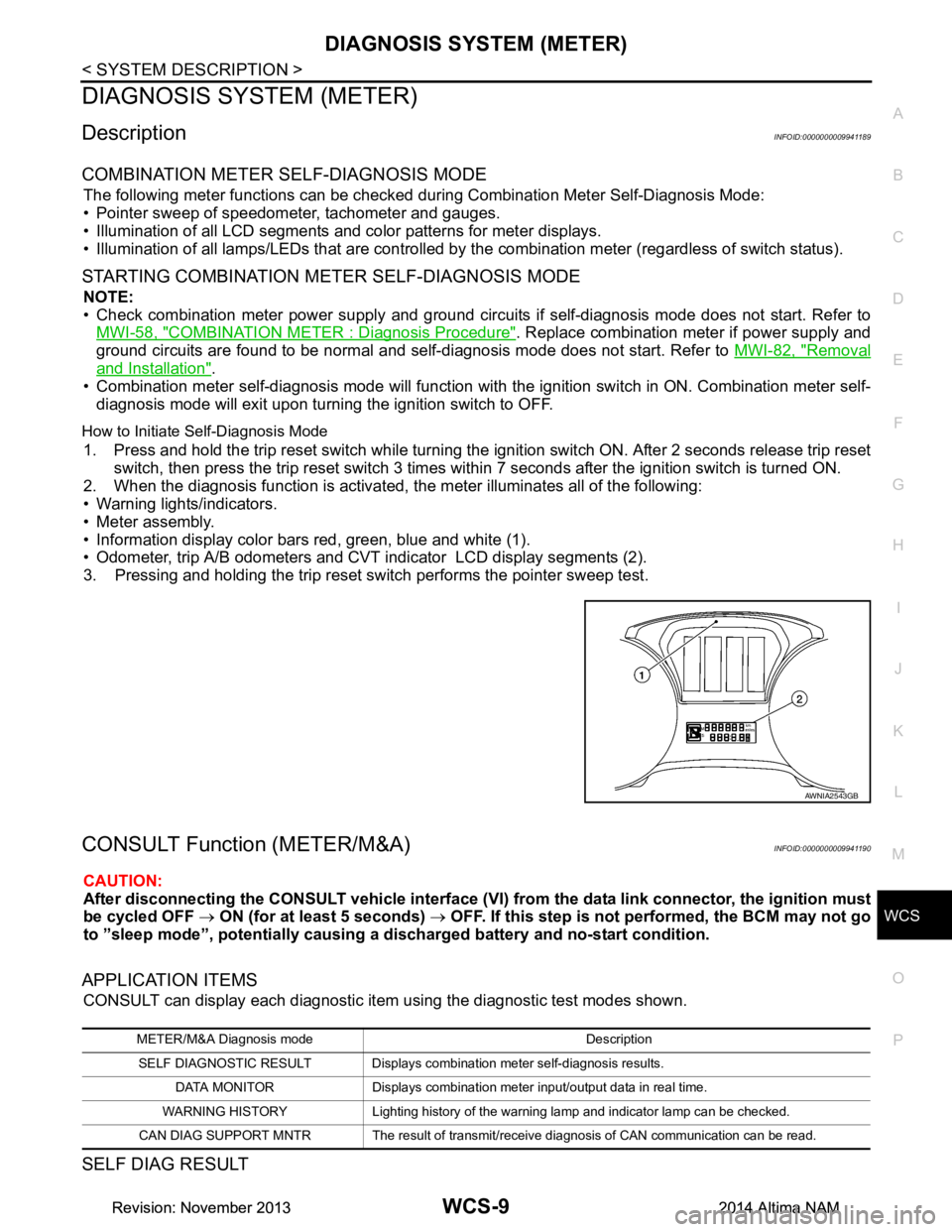
How to Initiate Se lf-Diagnosis Mode
1. Press and hold the trip reset switch while turning the ignition switch ON. After 2 seconds release trip reset
switch, then press the trip reset switch 3 times withi n 7 seconds after the ignition switch is turned ON.
2. When the diagnosis function is activated, the meter illuminates all of the following:
• Warning lights/indicators.
• Meter assembly.
• Information display color bars red, green, blue and white (1).
• Odometer, trip A/B odometers and CVT indicator LCD display segments (2).
3. Pressing and holding the trip reset switch performs the pointer sweep test.
CONSULT Function (METER/M&A)INFOID:0000000009941190
CAUTION:
After disconnecting the CONSULT vehicle interface (VI) from the data link connector, the ignition must
be cycled OFF → ON (for at least 5 seconds) → OFF. If this step is not performed, the BCM may not go
to ”sleep mode”, potentiall y causing a discharged battery and no-start condition.
APPLICATION ITEMS
CONSULT can display each diagnostic item using the diagnostic test modes shown.
SELF DIAG RESULT
AWNIA2543GB
METER/M&A Diagnosis mode Description
SELF DIAGNOSTIC RESULT Displays combination meter self-diagnosis results. DATA MONITOR Displays combination meter input/output data in real time.
WARNING HISTORY Lighting history of the warning lamp and indicator lamp can be checked.
CAN DIAG SUPPORT MNTR The result of transmit/receive diagnosis of CAN communication can be read.
Revision: November 20132014 Altima NAMRevision: November 20132014 Altima NAM