ECU NISSAN TIIDA 2010 Service Owner's Guide
[x] Cancel search | Manufacturer: NISSAN, Model Year: 2010, Model line: TIIDA, Model: NISSAN TIIDA 2010Pages: 3745, PDF Size: 73.67 MB
Page 579 of 3745

BL-70
< SERVICE INFORMATION >
REMOTE KEYLESS ENTRY SYSTEM
CONSULT-III APPLICATION ITEMS
Work Support
PANIC ALARM SET
HAZARD LAMP BACK SET
AUTO LOCK SET
TRUNK OPEN
Data Monitor
Diagnostic modeDescription
WORK SUPPORT Supports inspections and adjustments. Commands are transmitted to the BCM for setting
the status suitable for required operation, input/output signals are received from the BCM
and received date is displayed.
DATA MONITOR Displays BCM input/output data in real time.
ACTIVE TEST Operation of electrical loads can be checked by sending drive signal to them.
SELF DIAGNOSTIC RESULT Displays BCM self-diagnosis results.
CAN DIAG SUPPORT MNTR The result of transmit/receive diagnosis of CAN communication can be read. ECU IDENTIFICATION BCM part number can be read.CONFIGURATION Performs BCM configuration read/write functions.
Test Item Description
REMO CONT ID REGIST Keyfob ID code can be registered.
REMO CONT ID ERASER Keyfob ID code can be erased.
REMO CONT ID CONFIR It can be checked whether keyfob ID code is registered or not in this mode.
PANIC ALRM SET Panic alarm operation mode can be changed in this mode. The operation mode will be
changed when
“CURRENT SETTING” on CONSUL T-III screen is touched.
HAZARD LAMP SET Hazard reminder mode can be changed in this mode. The hazard reminder mode will be
changed when
“CURRENT SETTING” on CONSUL T-III screen is touched.
AUTO LOCK SET Auto locking function mode can be changed in this mode. The function mode will be changed
when “CURRENT SETTING” on CONS
ULT-III screen is touched.
TRUNK OPEN Keyless trunk open operation mode can be changed in this mode. The operation mode will
be changed when “CURRENT SETTING” on CONSULT-III screen is touched.
MODE 1
MODE 2MODE 3
Keyfob operation 0.5 secondsNothing1.5 seconds
MODE 1 MODE 2MODE 3 MODE 4
Hazard lamp operation mode NothingUnlock only Lock only Lock and Unlock
MODE 1 MODE 2MODE 3
Auto locking function 30 secondsNothing1 minutes
MODE 1 MODE 2MODE 3
Keyfob operation 0.5 secondsNothing1.5 seconds
Monitored Item Description
IGN ON SW Indicates [ON/OFF] condition of ignition switch in ON position.
KEY ON SW Indicates [ON/OFF] condition of key switch.
ACC ON SW Indicates [ON/OFF] condition of ignition switch in ACC position.
KEYLESS LOCK Indicates [ON/OFF] condition of lock signal from keyfob.
KEYLESS UNLOCK Indicates [ON/OFF] condition of unlock signal from keyfob.
DOOR SW-DR Indicates [ON/OFF] condition of front door switch driver side.
DOOR SW-AS Indicates [ON/OFF] condition of front door switch passenger side.
Revision: January 20102010 Versa
Page 583 of 3745
BL-74
< SERVICE INFORMATION >
REMOTE KEYLESS ENTRY SYSTEM
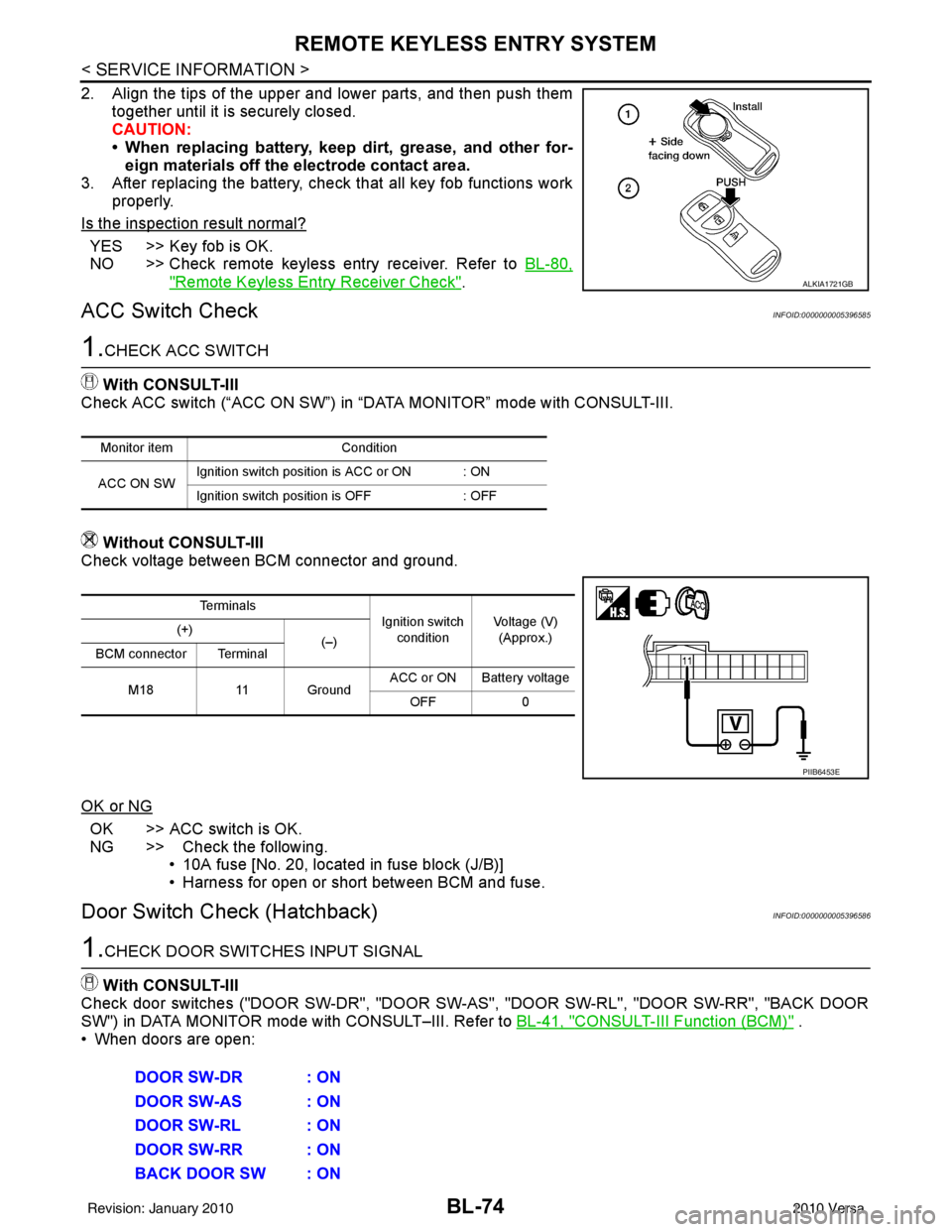
2. Align the tips of the upper and lower parts, and then push themtogether until it is securely closed.
CAUTION:
• When replacing battery, keep dirt, grease, and other for-eign materials off the electrode contact area.
3. After replacing the battery, check that all key fob functions work
properly.
Is the inspection result normal?
YES >> Key fob is OK.
NO >> Check remote keyless entry receiver. Refer to BL-80,
"Remote Keyless Entry Receiver Check".
ACC Switch CheckINFOID:0000000005396585
1.CHECK ACC SWITCH
With CONSULT-III
Check ACC switch (“ACC ON SW”) in “DATA MONITOR” mode with CONSULT-III.
Without CONSULT-III
Check voltage between BCM connector and ground.
OK or NG
OK >> ACC switch is OK.
NG >> Check the following. • 10A fuse [No. 20, located in fuse block (J/B)]
• Harness for open or short between BCM and fuse.
Door Switch Check (Hatchback)INFOID:0000000005396586
1.CHECK DOOR SWITCHES INPUT SIGNAL
With CONSULT-III
Check door switches ("DOOR SW-DR", "DOOR SW-AS", "DOOR SW-RL", "DOOR SW-RR", "BACK DOOR
SW") in DATA MONITOR mode with CONSULT–III. Refer to BL-41, "
CONSULT-III Function (BCM)" .
• When doors are open:
ALKIA1721GB
Monitor item Condition
ACC ON SW Ignition switch position is ACC or ON : ON
Ignition switch position is OFF
: OFF
Te r m i n a l s
Ignition switch
condition Voltage (V)
(Approx.)
(+)
(–)
BCM connector Terminal
M18 11 Ground ACC or ON Battery voltage
OFF 0
PIIB6453E
DOOR SW-DR : ON
DOOR SW-AS : ON
DOOR SW-RL : ON
DOOR SW-RR : ON
BACK DOOR SW : ON
Revision: January 20102010 Versa
Page 621 of 3745
BL-112
< SERVICE INFORMATION >
INTELLIGENT KEY SYSTEM
15 WTire pressure warning
check connector
Input OFF
—5V
18 V Remote keyless entry
receiver (ground) Output OFF
—0V
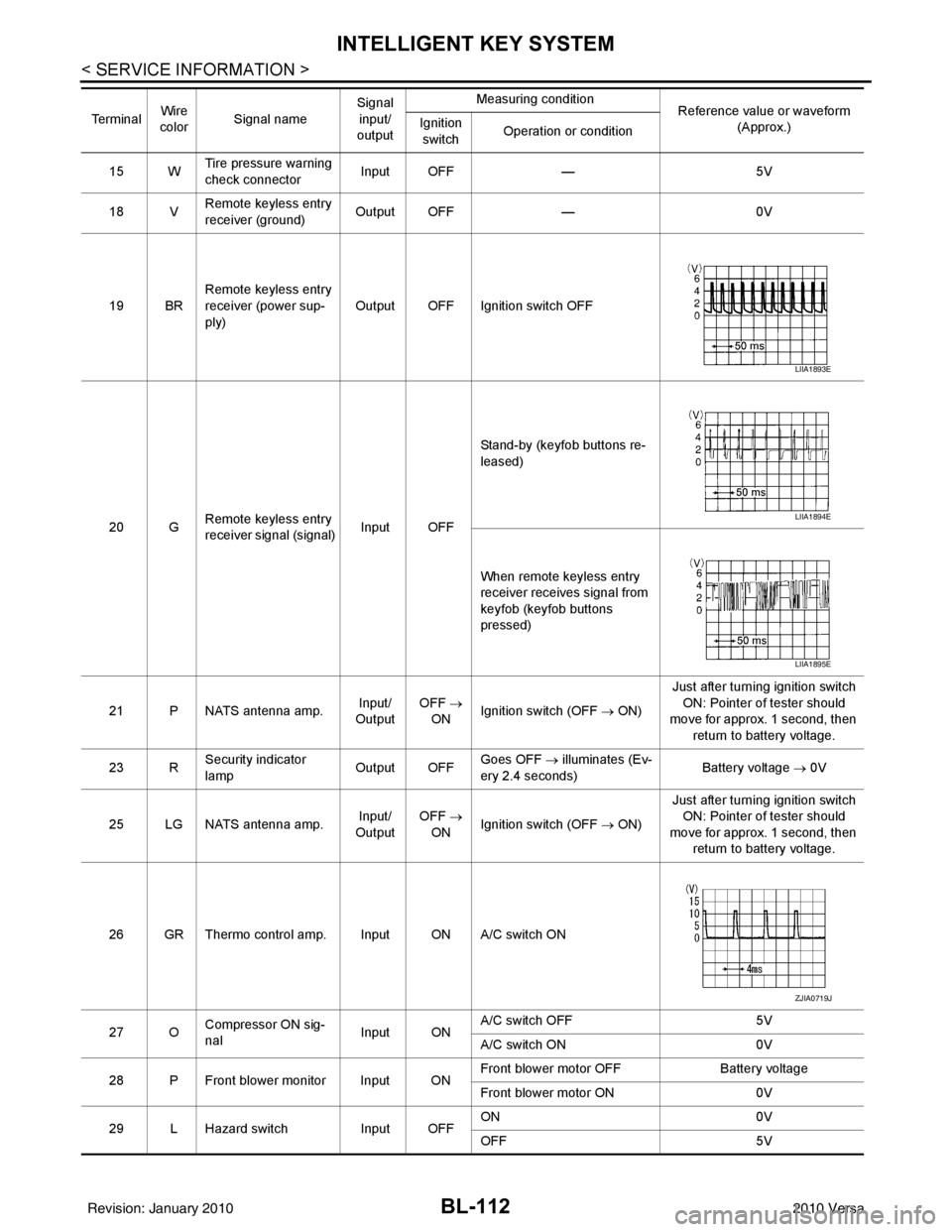
19 BR Remote keyless entry
receiver (power sup-
ply) Output OFF Ignition switch OFF
20 G Remote keyless entry
receiver signal (signal)
Input OFFStand-by (keyfob buttons re-
leased)
When remote keyless entry
receiver receives signal from
keyfob (keyfob buttons
pressed)
21 P NATS antenna amp. Input/
Output OFF
→
ON Ignition switch (OFF
→ ON)Just after turning ignition switch
ON: Pointer of tester should
move for approx. 1 second, then
return to battery voltage.
23 R Security indicator
lamp Output OFF
Goes OFF
→ illuminates (Ev-
ery 2.4 seconds) Battery voltage
→ 0V
25 LG NATS antenna amp. Input/
Output OFF
→
ON Ignition switch (OFF
→ ON)Just after turning ignition switch
ON: Pointer of tester should
move for approx. 1 second, then return to battery voltage.
26 GR Thermo control amp. Input ON A/C switch ON
27 O Compressor ON sig-
nal Input ONA/C switch OFF
5V
A/C switch ON 0V
28 P Front blower monitor Input ON Front blower motor OFF
Battery voltage
Front blower motor ON 0V
29 L Hazard switch Input OFFON
0V
OFF 5V
Te r m i n a l
Wire
color Signal name Signal
input/
output Measuring condition
Reference value or waveform
(Approx.)
Ignition
switch Operation or condition
LIIA1893E
LIIA1894E
LIIA1895E
ZJIA0719J
Revision: January 20102010 Versa
Page 626 of 3745
INTELLIGENT KEY SYSTEMBL-117
< SERVICE INFORMATION >
C
DE
F
G H
J
K L
M A
B
BL
N
O P
• Intelligent Key button
OK or NG
OK >> GO TO 6
NG >> Refer to BL-119, "
Trouble Diagnosis Symptom Chart".
6.CHECK WARNING CHIME FUNCTION
Check if warning chime function operates normally according to system description. Refer to BL-88, "
System
Description".
OK or NG
OK >> GO TO 7
NG >> Refer to BL-119, "
Trouble Diagnosis Symptom Chart".
7.CHECK WARNING LAMP FUNCTION
Check if warning lamp could be turn on normally according to system description. Refer to BL-88, "
System
Description".
OK or NG
OK >> Inspection End.
NG >> Refer to BL-119, "
Trouble Diagnosis Symptom Chart".
CONSULT-III Functions (INTELLIGENT KEY)INFOID:0000000005396609
CONSULT-III can display each diagnostic item using the diagnostic test modes as shown below.
CONSULT-III Application ItemINFOID:0000000005396610
SELF-DIAGNOSTIC RESULTS
DATA MONITOR
Diagnostic mode Description
WORK SUPPORT Changes settings for each function.
SELF DIAGNOSTIC RESULT Intelligent Key unit performs CAN communication diagnosis. DATA MONITOR Displays Intelligent Key unit input data in real time.
CAN DIAG SUPPORT MNTR The results of transmit/receive diagnosis of CAN Communication can be read. ACTIVE TEST Operation of electrical loads can be checked by sending driving signal to them.
ECU IDENTIFICATION Displays In telligent Key unit part No.
Self-diag resultsDescription Diagnosis procedureReference page
CAN COMM Malfunction is detected in CAN co mmunication. Check CAN communication system. BL-126
CAN COMM2 Intelligent Key unit internal malfunction Check CAN communication system.BL-126
STRG COMMMalfunction is detected in communication of Intelli-
gent Key unit and steering lock solenoid.
Check steering lock solenoid.
BL-147
I-KEY C/UIntelligent Key unit internal ma lfunctionReplace Intelligent Key unit. BL-158
IMMUNATS malfunction Check NATS.BL-248
Monitor item Content
PUSH SW Indicates [ON/OFF] condition of ignition knob switch.
KEY SW Indicates [ON/OFF] condition of key switch.
DR REQ SW Indicates [ON/OFF] condition of door request switch (driver side).
AS REQ SW Indicates [ON/OFF] condition of door request switch (passenger side).
BD/TR REQ SW Indicates [ON/OFF] condition of back door request switch.
IGN SW Indicates [ON/OFF] condition of ignition switch in ON position.
ACC SW Indicates [ON/OFF] condition of ignition switch in ACC position.
Revision: January 20102010 Versa
Page 685 of 3745
BL-176
< SERVICE INFORMATION >
BACK DOOR LOCK
15 WTire pressure warning
check connector
Input OFF
—5V
18 V Remote keyless entry
receiver (ground) Output OFF
—0V
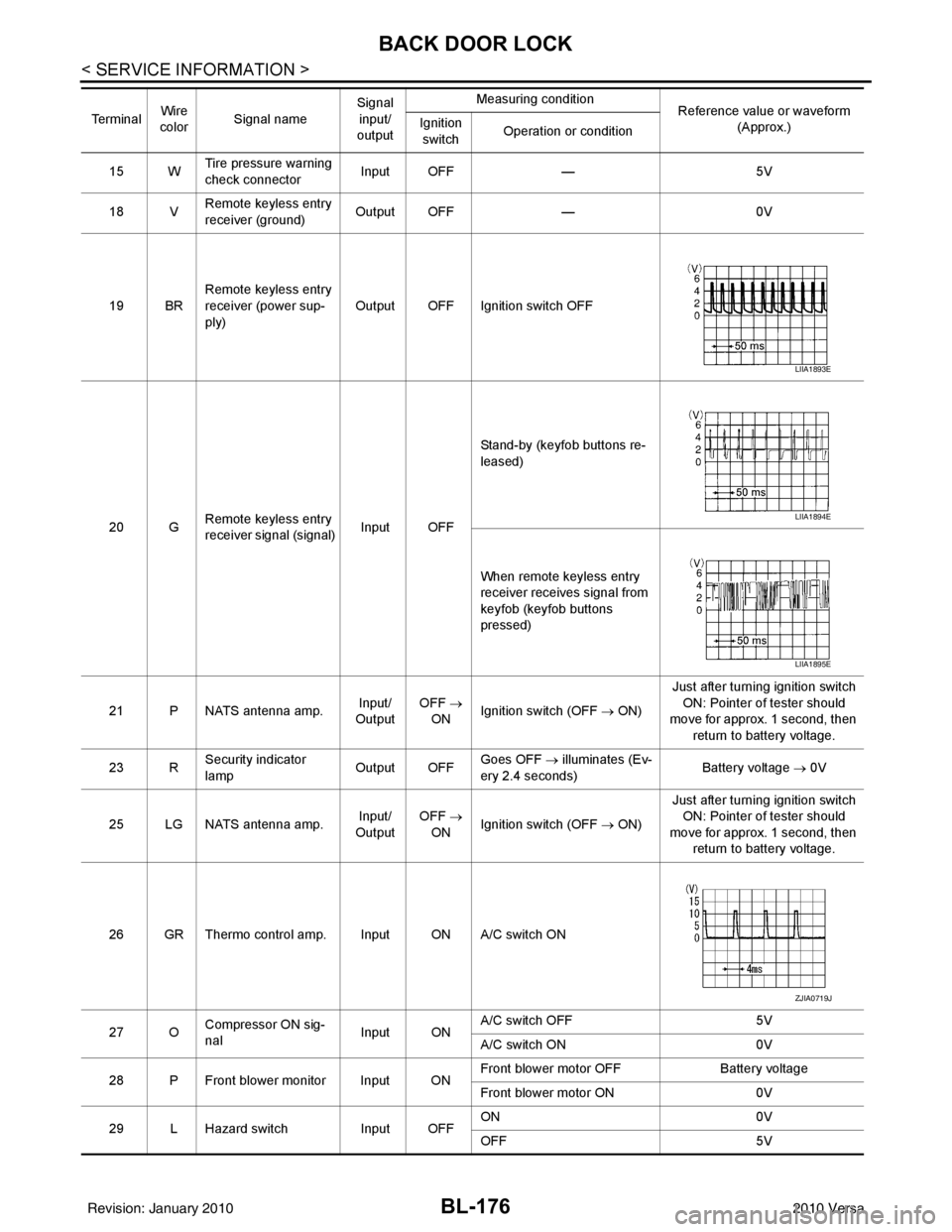
19 BR Remote keyless entry
receiver (power sup-
ply) Output OFF Ignition switch OFF
20 G Remote keyless entry
receiver signal (signal)
Input OFFStand-by (keyfob buttons re-
leased)
When remote keyless entry
receiver receives signal from
keyfob (keyfob buttons
pressed)
21 P NATS antenna amp. Input/
Output OFF
→
ON Ignition switch (OFF
→ ON)Just after turning ignition switch
ON: Pointer of tester should
move for approx. 1 second, then
return to battery voltage.
23 R Security indicator
lamp Output OFF
Goes OFF
→ illuminates (Ev-
ery 2.4 seconds) Battery voltage
→ 0V
25 LG NATS antenna amp. Input/
Output OFF
→
ON Ignition switch (OFF
→ ON)Just after turning ignition switch
ON: Pointer of tester should
move for approx. 1 second, then return to battery voltage.
26 GR Thermo control amp. Input ON A/C switch ON
27 O Compressor ON sig-
nal Input ONA/C switch OFF
5V
A/C switch ON 0V
28 P Front blower monitor Input ON Front blower motor OFF
Battery voltage
Front blower motor ON 0V
29 L Hazard switch Input OFFON
0V
OFF 5V
Te r m i n a l
Wire
color Signal name Signal
input/
output Measuring condition
Reference value or waveform
(Approx.)
Ignition
switch Operation or condition
LIIA1893E
LIIA1894E
LIIA1895E
ZJIA0719J
Revision: January 20102010 Versa
Page 690 of 3745
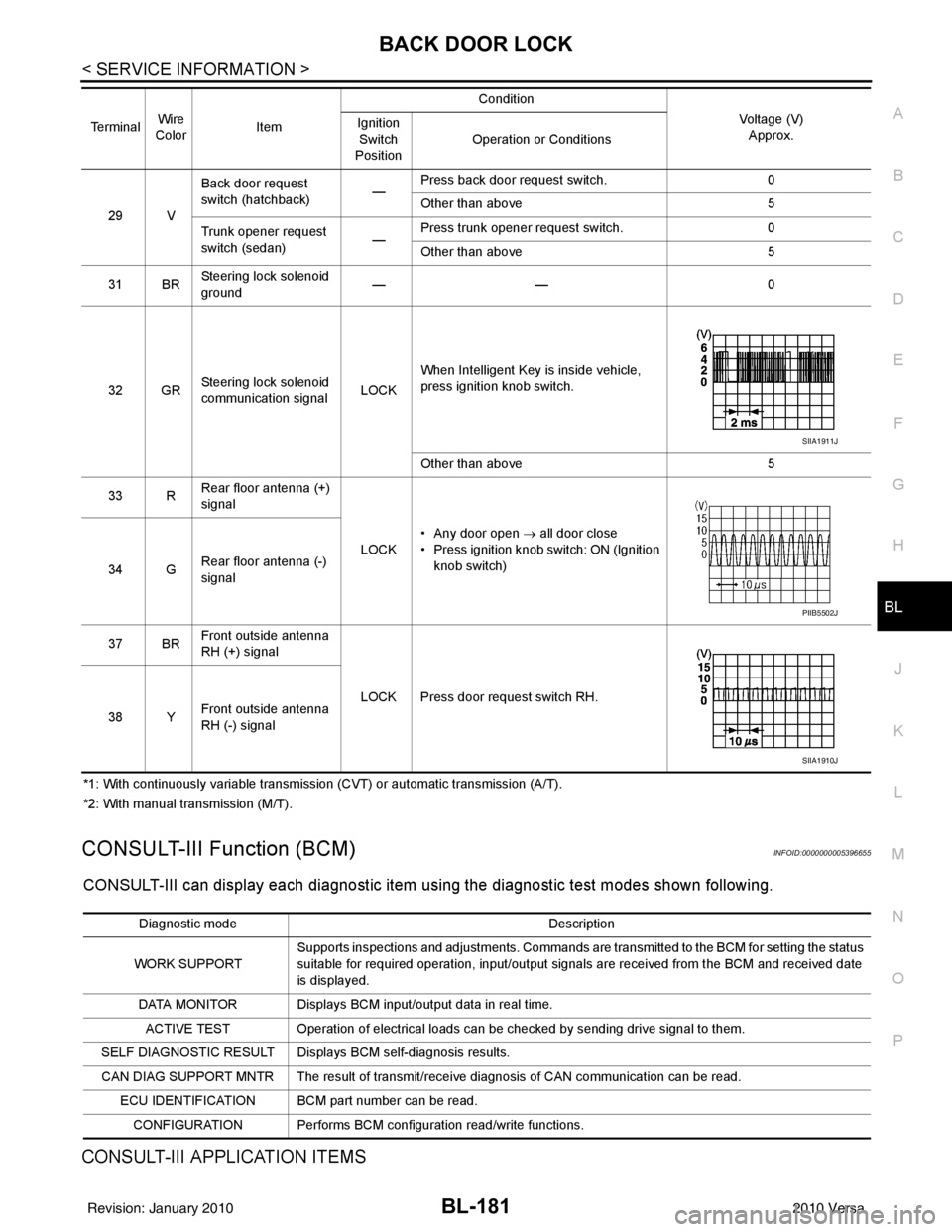
BACK DOOR LOCKBL-181
< SERVICE INFORMATION >
C
DE
F
G H
J
K L
M A
B
BL
N
O P
*1: With continuously variable transmission (CVT) or automatic transmission (A/T).
*2: With manual transmission (M/T).
CONSULT-III Function (BCM)INFOID:0000000005396655
CONSULT-III can display each diagnostic item using the diagnostic test modes shown following.
CONSULT-III APPLICATION ITEMS
29 V Back door request
switch (hatchback)
—Press back door request switch.
0
Other than above 5
Trunk opener request
switch (sedan) —Press trunk opener request switch.
0
Other than above 5
31 BR Steering lock solenoid
ground ——
0
32 GR Steering lock solenoid
communication signal LOCKWhen Intelligent Key is inside vehicle,
press ignition knob switch.
Other than above
5
33 R Rear floor antenna (+)
signal
LOCK• Any door open
→ all door close
• Press ignition knob switch: ON (Ignition
knob switch)
34 G Rear floor antenna (-)
signal
37 BR Front outside antenna
RH (+) signal
LOCK Press door request switch RH.
38 Y Front outside antenna
RH (-) signal
Terminal
Wire
Color Item Condition
Voltage (V)Approx.
Ignition
Switch
Position Operation or Conditions
SIIA1911J
PIIB5502J
SIIA1910J
Diagnostic mode
Description
WORK SUPPORT Supports inspections and adjustments. Commands are transmitted to the BCM for setting the status
suitable for required operation, input/output signals are received from the BCM and received date
is displayed.
DATA MONITOR Displays BCM input/output data in real time. ACTIVE TEST Operation of electrical loads can be checked by sending drive signal to them.
SELF DIAGNOSTIC RESULT Displays BCM self-diagnosis results.
CAN DIAG SUPPORT MNTR The result of transmit/receive diagnosis of CAN communication can be read. ECU IDENTIFICATION BCM part number can be read.CONFIGURATION Performs BCM configuration read/write functions.
Revision: January 20102010 Versa
Page 704 of 3745
TRUNK LIDBL-195
< SERVICE INFORMATION >
C
DE
F
G H
J
K L
M A
B
BL
N
O P
4. Remove the bolts (a) and the trunk lid striker (1).
INSTALLATION
Installation is in the reverse order of removal.
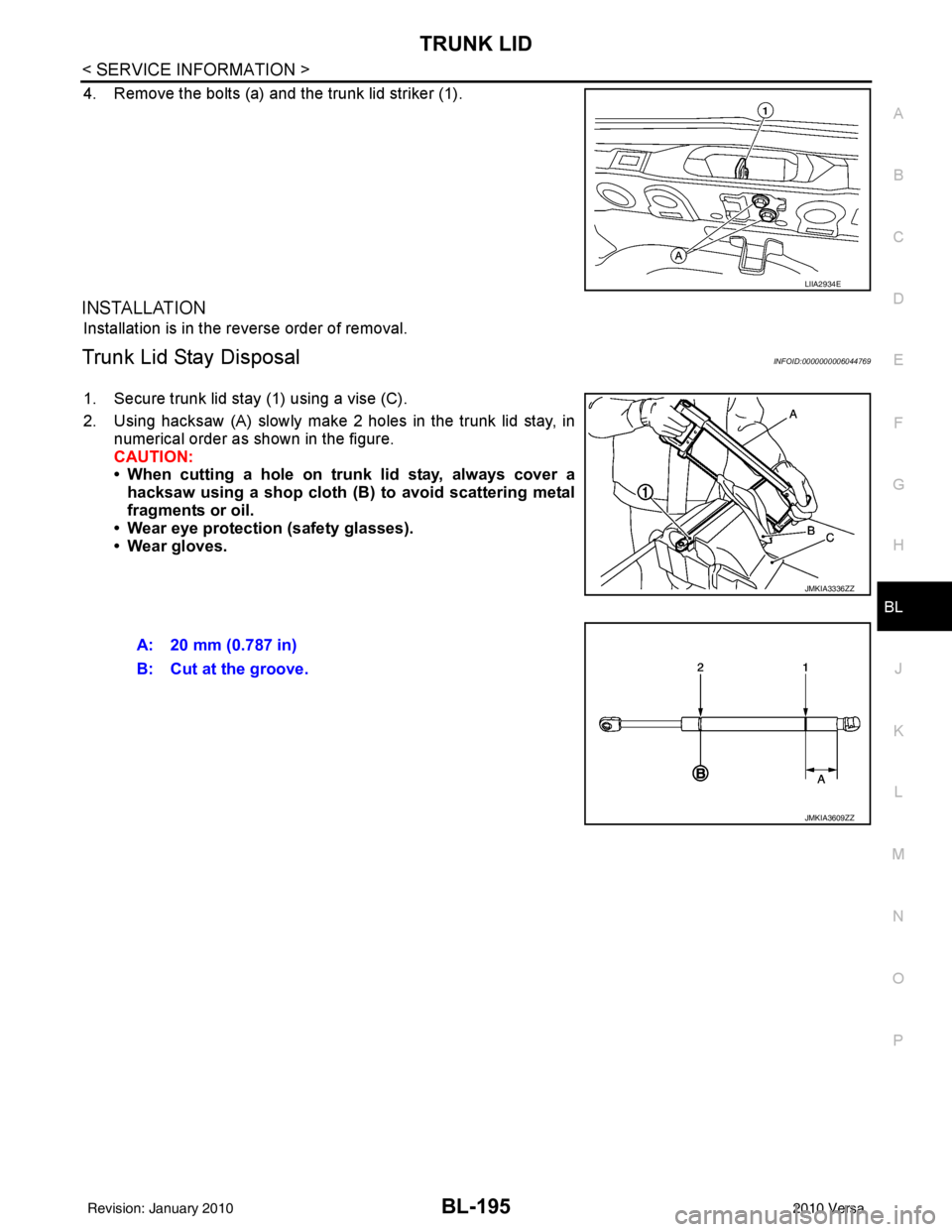
Trunk Lid Stay DisposalINFOID:0000000006044769
1. Secure trunk lid stay (1) using a vise (C).
2. Using hacksaw (A) slowly make 2 holes in the trunk lid stay, in numerical order as shown in the figure.
CAUTION:
• When cutting a hole on trunk lid stay, always cover ahacksaw using a shop cloth (B) to avoid scattering metal
fragments or oil.
• Wear eye protection (safety glasses).
• Wear gloves.
LIIA2934E
JMKIA3336ZZ
A: 20 mm (0.787 in)
B: Cut at the groove.
JMKIA3609ZZ
Revision: January 20102010 Versa
Page 709 of 3745
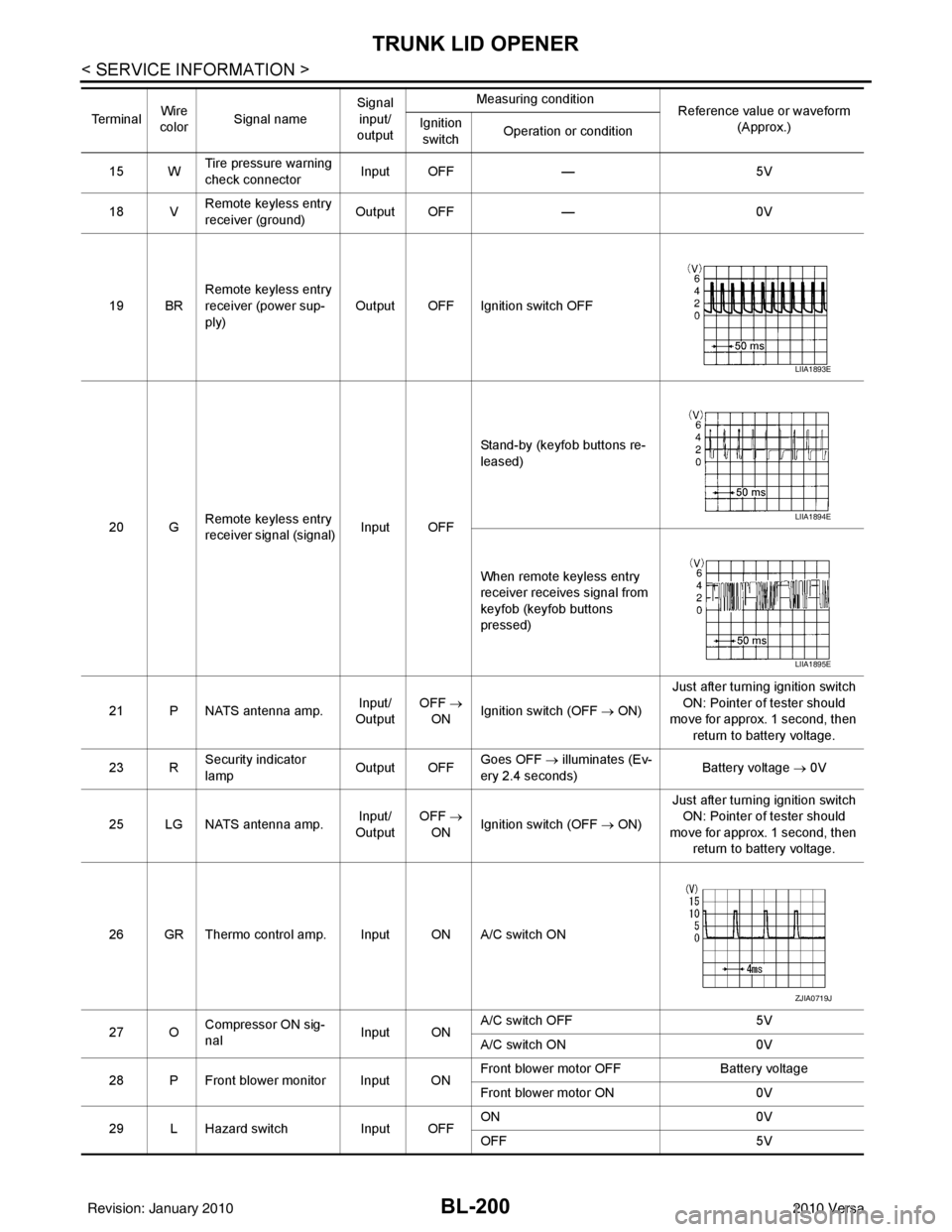
BL-200
< SERVICE INFORMATION >
TRUNK LID OPENER
15 WTire pressure warning
check connector
Input OFF
—5V
18 V Remote keyless entry
receiver (ground) Output OFF
—0V
19 BR Remote keyless entry
receiver (power sup-
ply) Output OFF Ignition switch OFF
20 G Remote keyless entry
receiver signal (signal)
Input OFFStand-by (keyfob buttons re-
leased)
When remote keyless entry
receiver receives signal from
keyfob (keyfob buttons
pressed)
21 P NATS antenna amp. Input/
Output OFF
→
ON Ignition switch (OFF
→ ON)Just after turning ignition switch
ON: Pointer of tester should
move for approx. 1 second, then
return to battery voltage.
23 R Security indicator
lamp Output OFF
Goes OFF
→ illuminates (Ev-
ery 2.4 seconds) Battery voltage
→ 0V
25 LG NATS antenna amp. Input/
Output OFF
→
ON Ignition switch (OFF
→ ON)Just after turning ignition switch
ON: Pointer of tester should
move for approx. 1 second, then return to battery voltage.
26 GR Thermo control amp. Input ON A/C switch ON
27 O Compressor ON sig-
nal Input ONA/C switch OFF
5V
A/C switch ON 0V
28 P Front blower monitor Input ON Front blower motor OFF
Battery voltage
Front blower motor ON 0V
29 L Hazard switch Input OFFON
0V
OFF 5V
Te r m i n a l
Wire
color Signal name Signal
input/
output Measuring condition
Reference value or waveform
(Approx.)
Ignition
switch Operation or condition
LIIA1893E
LIIA1894E
LIIA1895E
ZJIA0719J
Revision: January 20102010 Versa
Page 714 of 3745
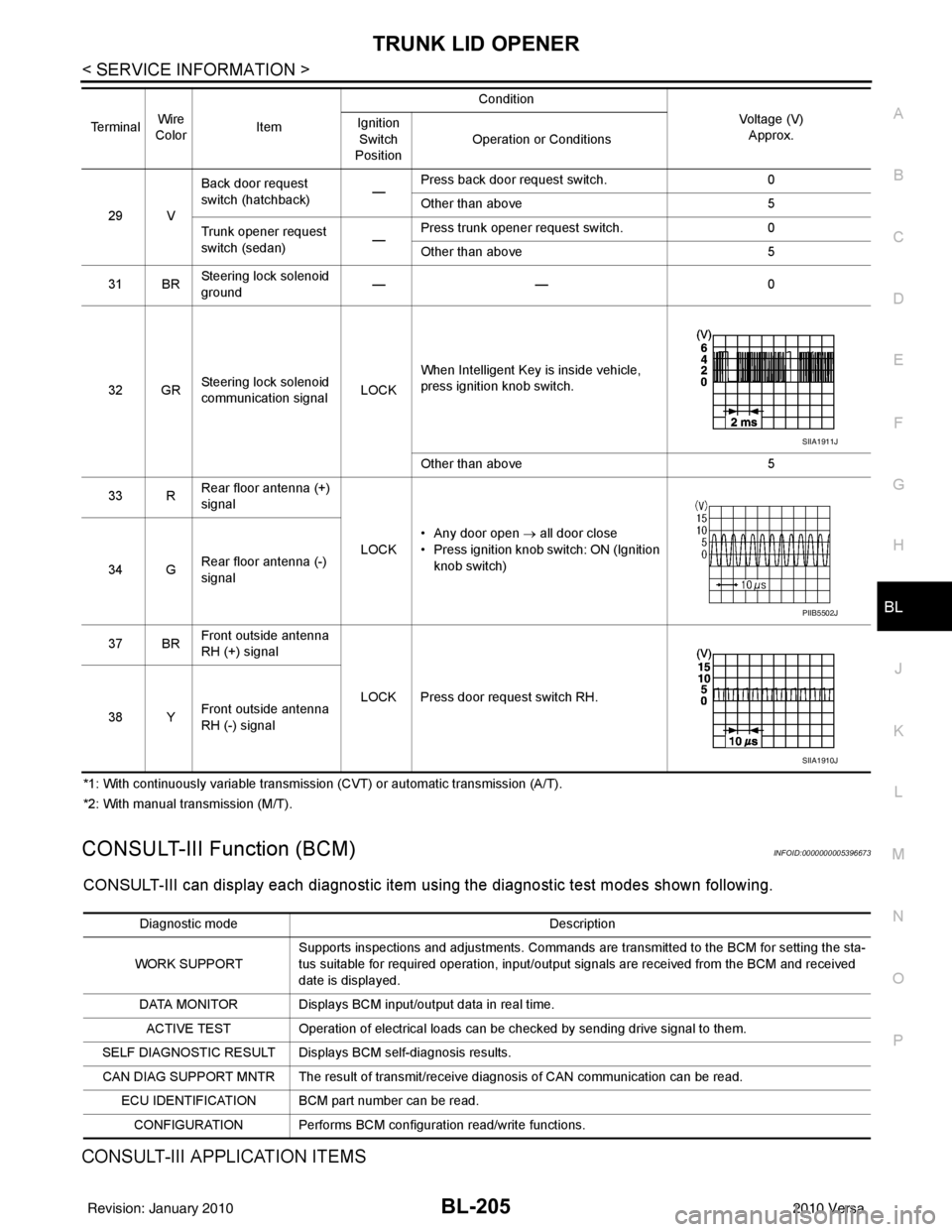
TRUNK LID OPENERBL-205
< SERVICE INFORMATION >
C
DE
F
G H
J
K L
M A
B
BL
N
O P
*1: With continuously variable transmission (CVT) or automatic transmission (A/T).
*2: With manual transmission (M/T).
CONSULT-III Function (BCM)INFOID:0000000005396673
CONSULT-III can display each diagnostic item using the diagnostic test modes shown following.
CONSULT-III APPLICATION ITEMS
29 V Back door request
switch (hatchback)
—Press back door request switch.
0
Other than above 5
Trunk opener request
switch (sedan) —Press trunk opener request switch.
0
Other than above 5
31 BR Steering lock solenoid
ground ——
0
32 GR Steering lock solenoid
communication signal LOCKWhen Intelligent Key is inside vehicle,
press ignition knob switch.
Other than above
5
33 R Rear floor antenna (+)
signal
LOCK• Any door open
→ all door close
• Press ignition knob switch: ON (Ignition
knob switch)
34 G Rear floor antenna (-)
signal
37 BR Front outside antenna
RH (+) signal
LOCK Press door request switch RH.
38 Y Front outside antenna
RH (-) signal
Terminal
Wire
Color Item Condition
Voltage (V)Approx.
Ignition
Switch
Position Operation or Conditions
SIIA1911J
PIIB5502J
SIIA1910J
Diagnostic mode
Description
WORK SUPPORT Supports inspections and adjustments. Commands are transmitted to the BCM for setting the sta-
tus suitable for required operation, input/output signals are received from the BCM and received
date is displayed.
DATA MONITOR Displays BCM input/output data in real time. ACTIVE TEST Operation of electrical loads can be checked by sending drive signal to them.
SELF DIAGNOSTIC RESULT Displays BCM self-diagnosis results.
CAN DIAG SUPPORT MNTR The result of transmit/receive diagnosis of CAN communication can be read. ECU IDENTIFICATION BCM part number can be read.CONFIGURATION Performs BCM configuration read/write functions.
Revision: January 20102010 Versa
Page 727 of 3745
BL-218
< SERVICE INFORMATION >
VEHICLE SECURITY (THEFT WARNING) SYSTEM
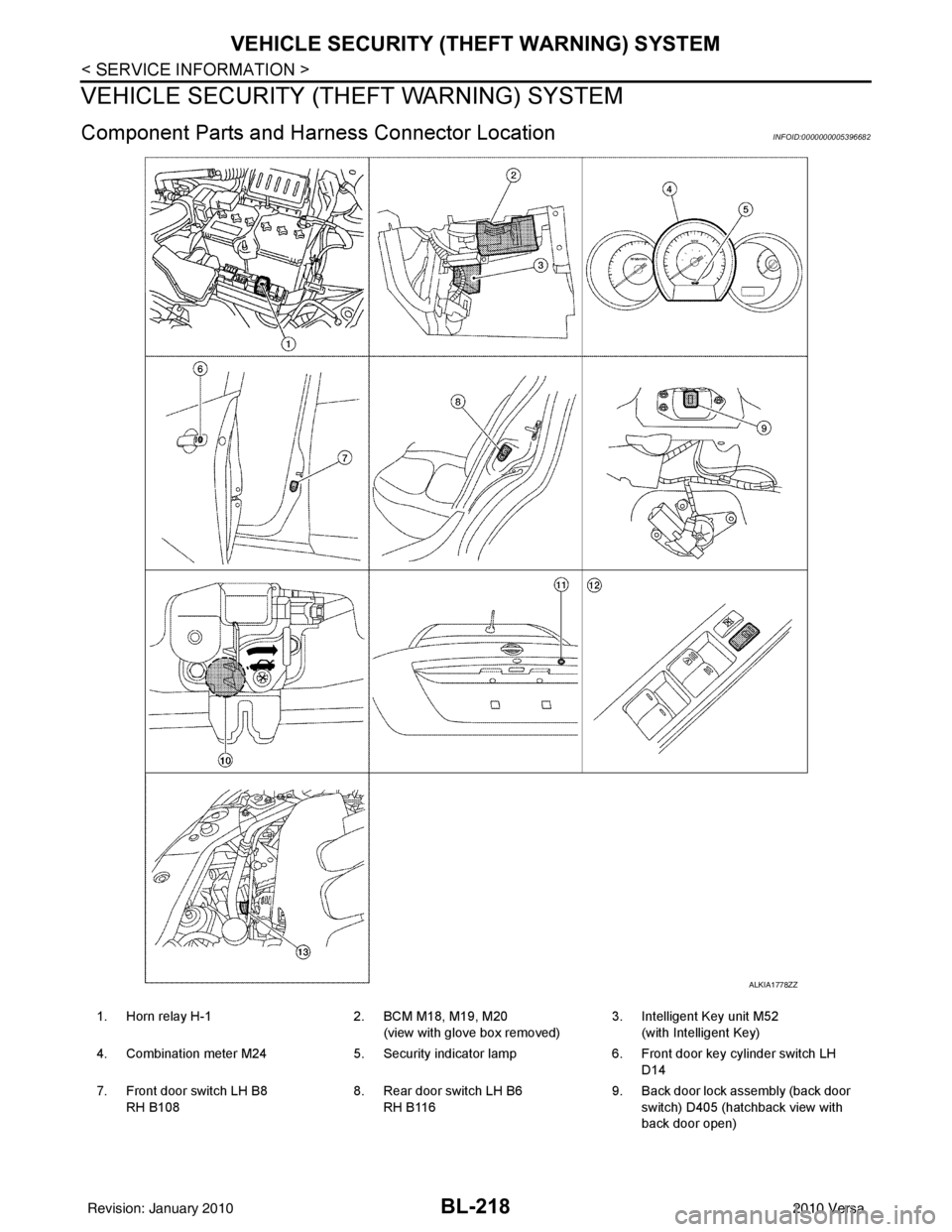
VEHICLE SECURITY (THEFT WARNING) SYSTEM
Component Parts and Harn ess Connector LocationINFOID:0000000005396682
ALKIA1778ZZ
1. Horn relay H-1 2. BCM M18, M19, M20
(view with glove box removed) 3. Intelligent Key unit M52
(with Intelligent Key)
4. Combination meter M24 5. Security indicator lamp 6. Front door key cylinder switch LH
D14
7. Front door switch LH B8 RH B108 8. Rear door switch LH B6
RH B116 9. Back door lock assembly (back door
switch) D405 (hatchback view with
back door open)
Revision: January 20102010 Versa