BL-1 NISSAN TIIDA 2011 Service Repair Manual
[x] Cancel search | Manufacturer: NISSAN, Model Year: 2011, Model line: TIIDA, Model: NISSAN TIIDA 2011Pages: 3787, PDF Size: 78.35 MB
Page 2886 of 3787
![NISSAN TIIDA 2011 Service Repair Manual LAN-40
< SERVICE INFORMATION >[CAN]
I-KEY BRANCH LINE CIRCUIT
I-KEY BRANCH LINE CIRCUIT
Diagnosis ProcedureINFOID:0000000005928547
1.CHECK CONNECTOR
1. Turn the ignition switch OFF.
2. Disconnect the](/img/5/57396/w960_57396-2885.png "NISSAN TIIDA 2011 Service Repair Manual LAN-40
< SERVICE INFORMATION >[CAN]
I-KEY BRANCH LINE CIRCUIT
I-KEY BRANCH LINE CIRCUIT
Diagnosis ProcedureINFOID:0000000005928547
1.CHECK CONNECTOR
1. Turn the ignition switch OFF.
2. Disconnect the")
LAN-40
< SERVICE INFORMATION >[CAN]
I-KEY BRANCH LINE CIRCUIT
I-KEY BRANCH LINE CIRCUIT
Diagnosis ProcedureINFOID:0000000005928547
1.CHECK CONNECTOR
1. Turn the ignition switch OFF.
2. Disconnect the battery cable from the negative terminal.
3. Check the terminals and connectors of the Inte lligent Key unit for damage, bend and loose connection
(unit side and connector side).
Is the inspection result normal?
YES >> GO TO 2.
NO >> Repair the terminal and connector.
2.CHECK HARNESS FOR OPEN CIRCUIT
1. Disconnect the connector of Intelligent Key unit.
2. Check the resistance between the Intelligent Key unit harness connector terminals.
Is the measurement value within the specification?
YES >> GO TO 3.
NO >> Repair the Intelligent Key unit branch line.
3.CHECK POWER SUPPLY AND GROUND CIRCUIT
Check the power supply and the ground circuit of the Intelligent Key unit. Refer to BL-126, "
Power Supply and
Ground Circuit Inspection".
Is the inspection result normal?
YES (Present error)>>Replace the Intelligent Key unit. Refer to BL-158, "Removal and Installation of Intelli-
gent Key Unit".
YES (Past error)>>Error was detected in the Intelligent Key unit branch line.
NO >> Repair the power supply and the ground circuit.
Intelligent Key unit harness connector Resistance (Ω)
Connector No. Terminal No.
M52 23Approx. 54 – 66
Revision: May 2010 2011 Versa
Page 3000 of 3787
![NISSAN TIIDA 2011 Service Repair Manual LAN-154
< SERVICE INFORMATION >[CAN SYSTEM (TYPE 11)]
I-KEY BRANCH LINE CIRCUIT
I-KEY BRANCH LINE CIRCUIT
Diagnosis ProcedureINFOID:0000000005928650
1.CHECK CONNECTOR
1. Turn the ignition switch OFF.](/img/5/57396/w960_57396-2999.png "NISSAN TIIDA 2011 Service Repair Manual LAN-154
< SERVICE INFORMATION >[CAN SYSTEM (TYPE 11)]
I-KEY BRANCH LINE CIRCUIT
I-KEY BRANCH LINE CIRCUIT
Diagnosis ProcedureINFOID:0000000005928650
1.CHECK CONNECTOR
1. Turn the ignition switch OFF.")
LAN-154
< SERVICE INFORMATION >[CAN SYSTEM (TYPE 11)]
I-KEY BRANCH LINE CIRCUIT
I-KEY BRANCH LINE CIRCUIT
Diagnosis ProcedureINFOID:0000000005928650
1.CHECK CONNECTOR
1. Turn the ignition switch OFF.
2. Disconnect the battery cable from the negative terminal.
3. Check the terminals and connectors of the Inte lligent Key unit for damage, bend and loose connection
(unit side and connector side).
Is the inspection result normal?
YES >> GO TO 2.
NO >> Repair the terminal and connector.
2.CHECK HARNESS FOR OPEN CIRCUIT
1. Disconnect the connector of Intelligent Key unit.
2. Check the resistance between the Intelligent Key unit harness connector terminals.
Is the measurement value within the specification?
YES >> GO TO 3.
NO >> Repair the Intelligent Key unit branch line.
3.CHECK POWER SUPPLY AND GROUND CIRCUIT
Check the power supply and the ground circuit of the Intelligent Key unit. Refer to BL-126, "
Power Supply and
Ground Circuit Inspection".
Is the inspection result normal?
YES (Present error)>>Replace the Intelligent Key unit. Refer to BL-158, "Removal and Installation of Intelli-
gent Key Unit".
YES (Past error)>>Error was detected in the Intelligent Key unit branch line.
NO >> Repair the power supply and the ground circuit.
Intelligent Key unit harness connector Resistance (Ω)
Connector No. Terminal No.
M52 23Approx. 54 – 66
Revision: May 2010 2011 Versa
Page 3025 of 3787
![NISSAN TIIDA 2011 Service Repair Manual I-KEY BRANCH LINE CIRCUITLAN-179
< SERVICE INFORMATION > [CAN SYSTEM (TYPE 13)]
C
D
E
F
G H
I
J
L
M A
B
LAN
N
O P
I-KEY BRANCH LINE CIRCUIT
Diagnosis ProcedureINFOID:0000000005928673
1.CHECK CONNECTOR](/img/5/57396/w960_57396-3024.png "NISSAN TIIDA 2011 Service Repair Manual I-KEY BRANCH LINE CIRCUITLAN-179
< SERVICE INFORMATION > [CAN SYSTEM (TYPE 13)]
C
D
E
F
G H
I
J
L
M A
B
LAN
N
O P
I-KEY BRANCH LINE CIRCUIT
Diagnosis ProcedureINFOID:0000000005928673
1.CHECK CONNECTOR")
I-KEY BRANCH LINE CIRCUITLAN-179
< SERVICE INFORMATION > [CAN SYSTEM (TYPE 13)]
C
D
E
F
G H
I
J
L
M A
B
LAN
N
O P
I-KEY BRANCH LINE CIRCUIT
Diagnosis ProcedureINFOID:0000000005928673
1.CHECK CONNECTOR
1. Turn the ignition switch OFF.
2. Disconnect the battery cabl e from the negative terminal.
3. Check the terminals and connectors of the Intelligent Key unit for damage, bend and loose connection (unit side and connector side).
Is the inspection result normal?
YES >> GO TO 2.
NO >> Repair the terminal and connector.
2.CHECK HARNESS FOR OPEN CIRCUIT
1. Disconnect the connector of Intelligent Key unit.
2. Check the resistance between the Intelli gent Key unit harness connector terminals.
Is the measurement value within the specification?
YES >> GO TO 3.
NO >> Repair the Intelligent Key unit branch line.
3.CHECK POWER SUPPLY AND GROUND CIRCUIT
Check the power supply and the ground circuit of the Intelligent Key unit. Refer to BL-126, "
Power Supply and
Ground Circuit Inspection".
Is the inspection result normal?
YES (Present error)>>Replace the Intelligent Key unit. Refer to BL-158, "Removal and Installation of Intelli-
gent Key Unit".
YES (Past error)>>Error was detected in the Intelligent Key unit branch line.
NO >> Repair the power supply and the ground circuit.
Intelligent Key unit harness connector Resistance (Ω)
Connector No. Terminal No.
M52 2 3 Approx. 54 – 66
Revision: May 2010 2011 Versa
Page 3405 of 3787
REFRIGERANT LINESMTC-89
< SERVICE INFORMATION >
C
DE
F
G H
I
K L
M A
B
MTC
N
O P
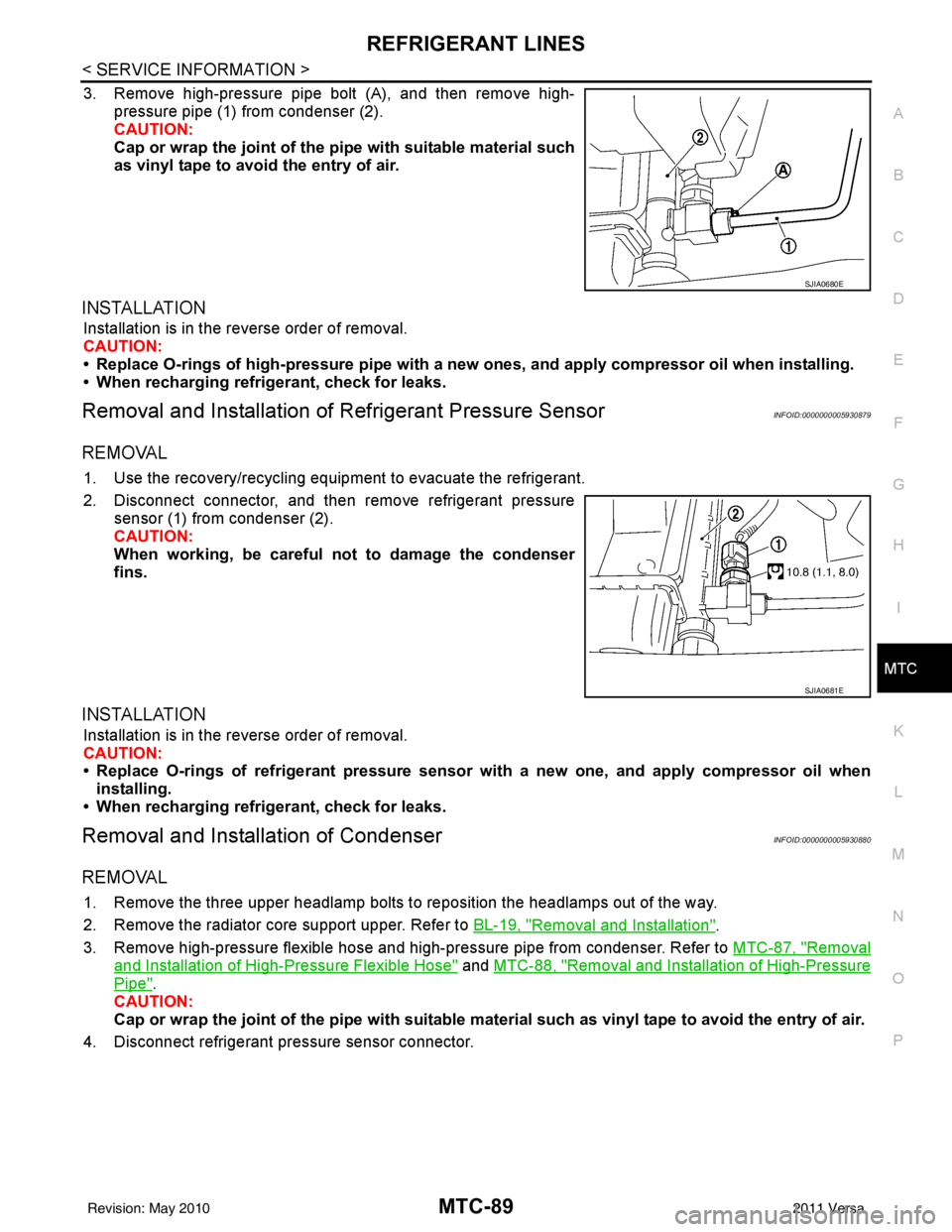
3. Remove high-pressure pipe bolt (A), and then remove high- pressure pipe (1) from condenser (2).
CAUTION:
Cap or wrap the joint of the pi pe with suitable material such
as vinyl tape to avoid the entry of air.
INSTALLATION
Installation is in the reverse order of removal.
CAUTION:
• Replace O-rings of high-pressure pipe with a new ones, and apply compr essor oil when installing.
• When recharging refrigerant, check for leaks.
Removal and Installation of Refrigerant Pressure SensorINFOID:0000000005930879
REMOVAL
1. Use the recovery/recycling equipment to evacuate the refrigerant.
2. Disconnect connector, and then remove refrigerant pressure
sensor (1) from condenser (2).
CAUTION:
When working, be careful not to damage the condenser
fins.
INSTALLATION
Installation is in the reverse order of removal.
CAUTION:
• Replace O-rings of refrigerant pressure senso r with a new one, and apply compressor oil when
installing.
• When recharging refrigerant, check for leaks.
Removal and Installation of CondenserINFOID:0000000005930880
REMOVAL
1. Remove the three upper headlamp bolts to reposition the headlamps out of the way.
2. Remove the radiator core support upper. Refer to BL-19, "
Removal and Installation".
3. Remove high-pressure flexible hose and high-pressure pipe from condenser. Refer to MTC-87, "
Removal
and Installation of High-Pressure Flexible Hose" and MTC-88, "Removal and Installation of High-Pressure
Pipe".
CAUTION:
Cap or wrap the joint of the pipe with suitable ma terial such as vinyl tape to avoid the entry of air.
4. Disconnect refrigerant pr essure sensor connector.
SJIA0680E
SJIA0681E
Revision: May 2010 2011 Versa