Remove NISSAN TIIDA 2011 Service Repair Manual
[x] Cancel search | Manufacturer: NISSAN, Model Year: 2011, Model line: TIIDA, Model: NISSAN TIIDA 2011Pages: 3787, PDF Size: 78.35 MB
Page 384 of 3787
ASSEMBLYAT-367
< SERVICE INFORMATION >
DE
F
G H
I
J
K L
M A
B
AT
N
O P
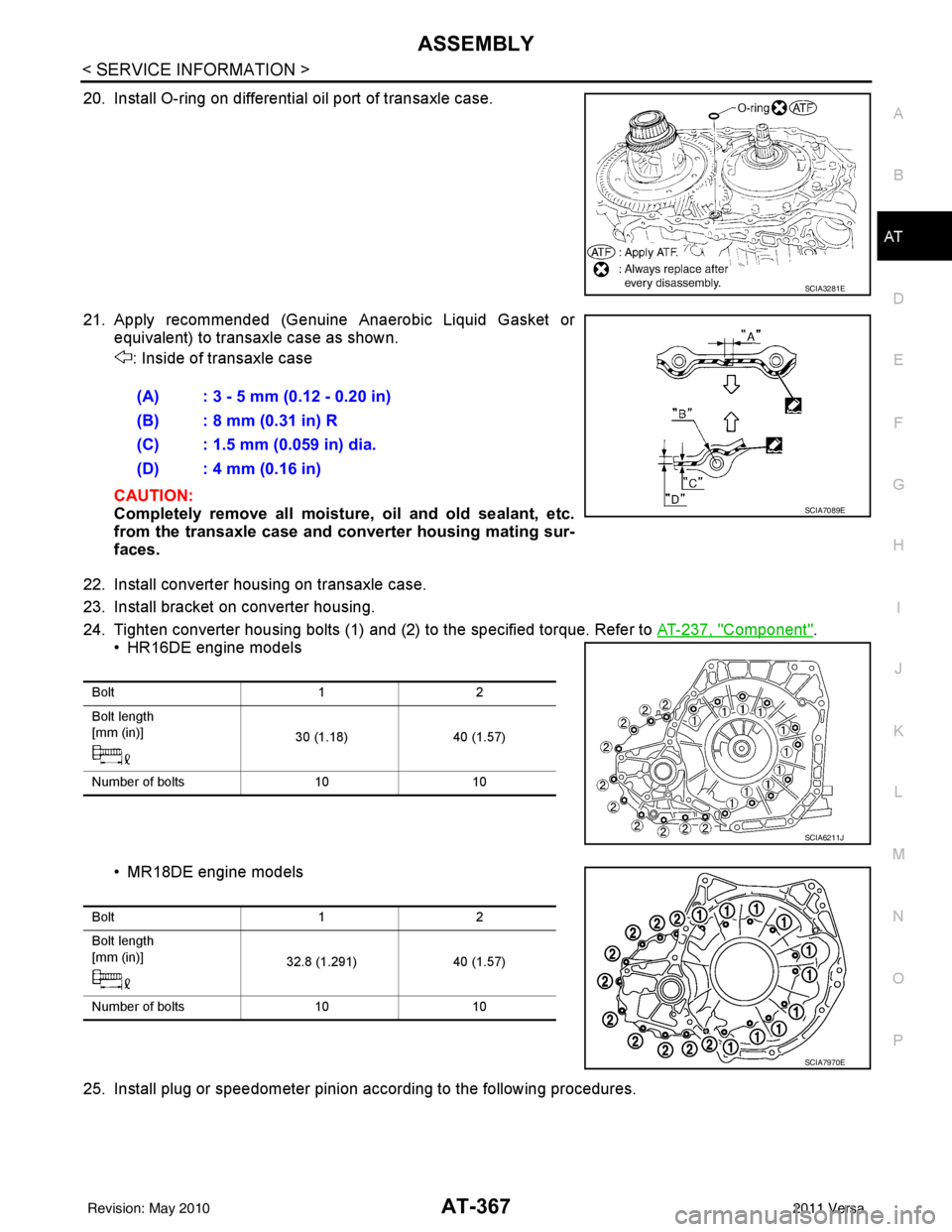
20. Install O-ring on differential oil port of transaxle case.
21. Apply recommended (Genuine Anaerobic Liquid Gasket or equivalent) to transaxle case as shown.
: Inside of transaxle case
CAUTION:
Completely remove all moisture, oil and old sealant, etc.
from the transaxle case and converter housing mating sur-
faces.
22. Install converter housing on transaxle case.
23. Install bracket on converter housing.
24. Tighten converter housing bolts (1) and (2) to the specified torque. Refer to AT-237, "
Component".
• HR16DE engine models
• MR18DE engine models
25. Install plug or speedometer pinion according to the following procedures.
SCIA3281E
(A) : 3 - 5 mm (0.12 - 0.20 in)
(B) : 8 mm (0.31 in) R
(C) : 1.5 mm (0.059 in) dia.
(D) : 4 mm (0.16 in)
SCIA7089E
Bolt 12
Bolt length
[mm (in)] 30 (1.18)40 (1.57)
Number of bolts 1010
SCIA6211J
Bolt 12
Bolt length
[mm (in)] 32.8 (1.291)40 (1.57)
Number of bolts 1010
SCIA7970E
Revision: May 2010 2011 Versa
Page 387 of 3787
AT-370
< SERVICE INFORMATION >
ASSEMBLY
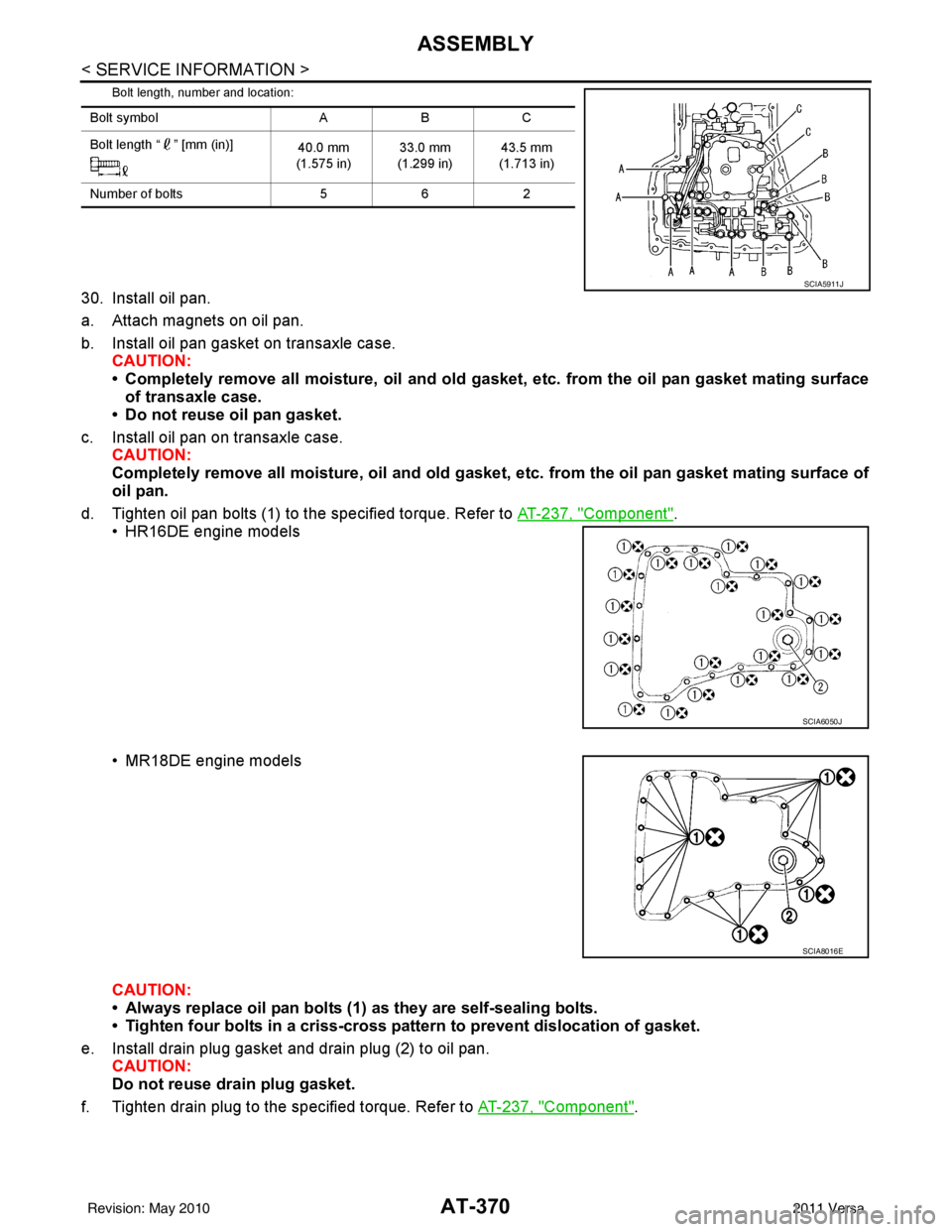
Bolt length, number and location:
30. Install oil pan.
a. Attach magnets on oil pan.
b. Install oil pan gasket on transaxle case.CAUTION:
• Completely remove all moisture, oil and old gasket , etc. from the oil pan gasket mating surface
of transaxle case.
• Do not reuse oil pan gasket.
c. Install oil pan on transaxle case. CAUTION:
Completely remove all moisture, oil and old gasket , etc. from the oil pan gasket mating surface of
oil pan.
d. Tighten oil pan bolts (1) to the specified torque. Refer to AT-237, "
Component".
• HR16DE engine models
• MR18DE engine models
CAUTION:
• Always replace oil pan bolts (1) as they are self-sealing bolts.
• Tighten four bolts in a criss-cross pattern to prevent dislocation of gasket.
e. Install drain plug gasket and drain plug (2) to oil pan. CAUTION:
Do not reuse drain plug gasket.
f. Tighten drain plug to the specified torque. Refer to AT-237, "
Component".
Bolt symbolABC
Bolt length “ ” [mm (in)] 40.0 mm
(1.575 in) 33.0 mm
(1.299 in) 43.5 mm
(1.713 in)
Number of bolts 562
SCIA5911J
SCIA6050J
SCIA8016E
Revision: May 2010 2011 Versa
Page 388 of 3787
ASSEMBLYAT-371
< SERVICE INFORMATION >
DE
F
G H
I
J
K L
M A
B
AT
N
O P
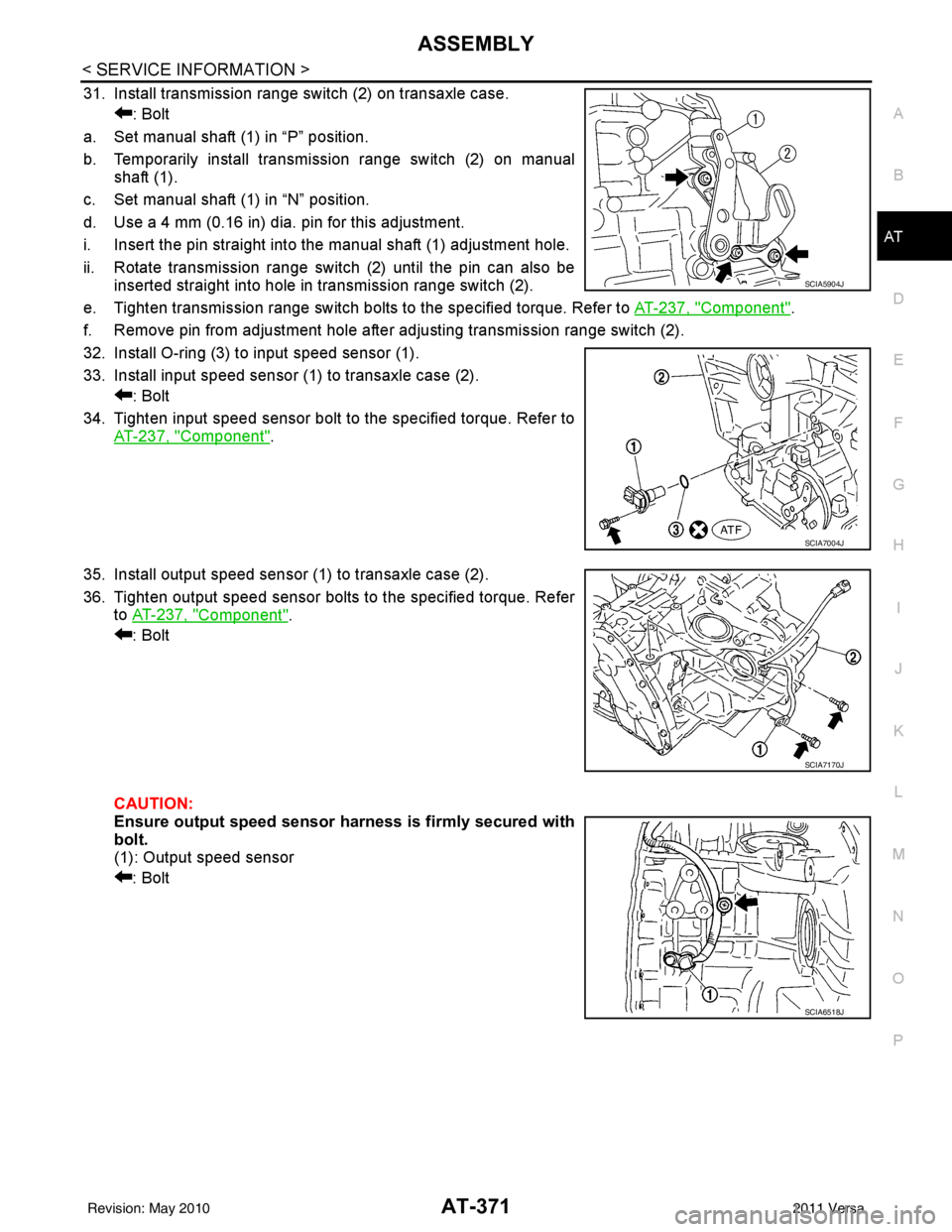
31. Install transmission range switch (2) on transaxle case. : Bolt
a. Set manual shaft (1) in “P” position.
b. Temporarily install transmission range switch (2) on manual shaft (1).
c. Set manual shaft (1) in “N” position.
d. Use a 4 mm (0.16 in) dia. pin for this adjustment.
i. Insert the pin straight into the manual shaft (1) adjustment hole.
ii. Rotate transmission range switch (2) until the pin can also be inserted straight into hole in transmission range switch (2).
e. Tighten transmission range switch bolts to the specified torque. Refer to AT-237, "
Component".
f. Remove pin from adjustment hole after adjusting transmission range switch (2).
32. Install O-ring (3) to input speed sensor (1).
33. Install input speed sensor (1) to transaxle case (2). : Bolt
34. Tighten input speed sensor bolt to the specified torque. Refer to AT-237, "
Component".
35. Install output speed sensor (1) to transaxle case (2).
36. Tighten output speed sensor bolts to the specified torque. Refer to AT-237, "
Component".
: Bolt
CAUTION:
Ensure output speed sensor harness is firmly secured with
bolt.
(1): Output speed sensor
: Bolt
SCIA5904J
SCIA7004J
SCIA7170J
SCIA6518J
Revision: May 2010 2011 Versa
Page 400 of 3787
![NISSAN TIIDA 2011 Service Repair Manual PRECAUTIONSAV-3
< SERVICE INFORMATION > [AUDIO WITHOUT NAVIGATION]
C
D
E
F
G H
I
J
L
M A
B
AV
N
O P
SERVICE INFORMATION
PRECAUTIONS
Precaution for Supplemental Restraint System (SRS) "AIR BAG" and "S](/img/5/57396/w960_57396-399.png "NISSAN TIIDA 2011 Service Repair Manual PRECAUTIONSAV-3
< SERVICE INFORMATION > [AUDIO WITHOUT NAVIGATION]
C
D
E
F
G H
I
J
L
M A
B
AV
N
O P
SERVICE INFORMATION
PRECAUTIONS
Precaution for Supplemental Restraint System (SRS) \"AIR BAG\" and \"S")
PRECAUTIONSAV-3
< SERVICE INFORMATION > [AUDIO WITHOUT NAVIGATION]
C
D
E
F
G H
I
J
L
M A
B
AV
N
O P
SERVICE INFORMATION
PRECAUTIONS
Precaution for Supplemental Restraint System (SRS) "AIR BAG" and "SEAT BELT
PRE-TENSIONER"
INFOID:0000000006412032
The Supplemental Restraint System such as “AIR BAG” and “SEAT BELT PRE-TENSIONER”, used along
with a front seat belt, helps to reduce the risk or severi ty of injury to the driver and front passenger for certain
types of collision. This system includes seat belt switch inputs and dual stage front air bag modules. The SRS
system uses the seat belt switches to determine the front air bag deployment, and may only deploy one front
air bag, depending on the severity of a collision and w hether the front occupants are belted or unbelted.
Information necessary to service the system safely is included in the SRS and SB section of this Service Man-
ual.
WARNING:
• To avoid rendering the SRS inoper ative, which could increase the risk of personal injury or death in
the event of a collision which would result in air bag inflation, all maintenance must be performed by
an authorized NISSAN/INFINITI dealer.
• Improper maintenance, including in correct removal and installation of the SRS can lead to personal
injury caused by unintentional act ivation of the system. For removal of Spiral Cable and Air Bag
Module, see the SRS section.
• Do not use electrical test equipm ent on any circuit related to the SRS unless instructed to in this
Service Manual. SRS wiring harnesses can be identi fied by yellow and/or orange harnesses or har-
ness connectors.
PRECAUTIONS WHEN USING POWER TOOLS (AIR OR ELECTRIC) AND HAMMERS
WARNING:
• When working near the Airbag Diagnosis Sensor Un it or other Airbag System sensors with the Igni-
tion ON or engine running, DO NOT use air or el ectric power tools or strike near the sensor(s) with a
hammer. Heavy vibration could activate the sensor( s) and deploy the air bag(s), possibly causing
serious injury.
• When using air or electric power tools or hammers, always switch the Ignition OFF, disconnect the battery, and wait at least 3 minutes before performing any service.
Precaution Necessary for Steering Wheel Rotation After Battery Disconnect
INFOID:0000000006412033
NOTE:
• This Procedure is applied only to models with Intelligent Key system and NATS (NISSAN ANTI-THEFT SYS-
TEM).
• Remove and install all control units after disconnecti ng both battery cables with the ignition knob in the
″ LOCK ″ position.
• Always use CONSULT-III to perform self-diagnosis as a part of each function inspection after finishing work.
If DTC is detected, perform trouble diagnosis according to self-diagnostic results.
For models equipped with the Intelligent Key system and NATS , an electrically controlled steering lock mech-
anism is adopted on the key cylinder.
For this reason, if the battery is disconnected or if the battery is discharged, the steering wheel will lock and
steering wheel rotation will become impossible.
If steering wheel rotation is required when battery power is interrupted, follow the procedure below before
starting the repair operation.
OPERATION PROCEDURE
1. Connect both battery cables. NOTE:
Supply power using jumper cables if battery is discharged.
2. Use the Intelligent Key or mechanical key to turn the ignition switch to the ″ACC ″ position. At this time, the
steering lock will be released.
3. Disconnect both battery cables. The steering lock will remain released and the steering wheel can be
rotated.
4. Perform the necessary repair operation.
Revision: May 2010 2011 Versa
Page 403 of 3787
![NISSAN TIIDA 2011 Service Repair Manual AV-6
< SERVICE INFORMATION >[AUDIO WITHOUT NAVIGATION]
AUDIO
AUDIO
Component Parts LocationINFOID:0000000006217254
iPod® is a trademark of Apple inc., registered in the U.S. and other countries.
Syst](/img/5/57396/w960_57396-402.png "NISSAN TIIDA 2011 Service Repair Manual AV-6
< SERVICE INFORMATION >[AUDIO WITHOUT NAVIGATION]
AUDIO
AUDIO
Component Parts LocationINFOID:0000000006217254
iPod® is a trademark of Apple inc., registered in the U.S. and other countries.
Syst")
AV-6
< SERVICE INFORMATION >[AUDIO WITHOUT NAVIGATION]
AUDIO
AUDIO
Component Parts LocationINFOID:0000000006217254
iPod® is a trademark of Apple inc., registered in the U.S. and other countries.
System DescriptionINFOID:0000000005931275
BASE SYSTEM
Refer to Owner's Manual for audio system operating instructions.
Power is supplied at all times
• through 20A fuse (No. 27, located in the fuse and fusible link box)
1. Combination meter M24
2. Steering wheel audio control switch-
es (with Bluetooth) 3. iPod® adapter M49 (premium sys-
tem)
4. iPod® side M50 (premium system) 5. Audio unit M43 (base system) Audio unit M40, M43, M44 (premium
system)6. Front door speaker LH D12, RH
D112
7. Rear door speaker LH D207, RH D307 8. Front tweeter LH M46, RH M47 (pre-
mium system) (view with front pillar
garnish removed) 9. Bluetooth antenna (hatchback) [view
with luggage side lower finisher (RH)
removed]
10. Bluetooth control unit B121, B122 (hatchback) 11. Bluetooth antenna (sedan) (view
with trunk side finisher RH removed) 12. Bluetooth control unit B121, B122
(sedan)
AWNIA2088ZZ
Revision: May 2010 2011 Versa
Page 426 of 3787
![NISSAN TIIDA 2011 Service Repair Manual AUDIOAV-29
< SERVICE INFORMATION > [AUDIO WITHOUT NAVIGATION]
C
D
E
F
G H
I
J
L
M A
B
AV
N
O P
Removal and InstallationINFOID:0000000005931292
AUDIO UNIT
Removal
1. Disconnect the battery negative ter](/img/5/57396/w960_57396-425.png "NISSAN TIIDA 2011 Service Repair Manual AUDIOAV-29
< SERVICE INFORMATION > [AUDIO WITHOUT NAVIGATION]
C
D
E
F
G H
I
J
L
M A
B
AV
N
O P
Removal and InstallationINFOID:0000000005931292
AUDIO UNIT
Removal
1. Disconnect the battery negative ter")
AUDIOAV-29
< SERVICE INFORMATION > [AUDIO WITHOUT NAVIGATION]
C
D
E
F
G H
I
J
L
M A
B
AV
N
O P
Removal and InstallationINFOID:0000000005931292
AUDIO UNIT
Removal
1. Disconnect the battery negative terminal.
2. Remove cluster lid C. Refer to IP-11
.
3. Remove the audio unit screws (A), disconnect the connectors and remove the audio unit (1).
4. Remove the audio unit bracket.
Installation
Installation is in the reverse order of removal.
FRONT DOOR SPEAKER
Removal
1. Remove the front door finisher. Refer to EI-36.
2. Remove the front door speaker screws (A), disconnect the con- nector and remove the front door speaker (1).
Installation
Installation is in the reverse order of removal.
REAR DOOR SPEAKER
Removal
1. Remove the rear door finisher. Refer to EI-36.
2. Remove the rear door finisher screws (A), disconnect the con- nector and remove the rear door speaker (1).
Installation
Installation is in the reverse order of removal.
TWEETER
SKIB4726E
SKIB4728E
SKIB4729E
Revision: May 2010 2011 Versa
Page 427 of 3787
![NISSAN TIIDA 2011 Service Repair Manual AV-30
< SERVICE INFORMATION >[AUDIO WITHOUT NAVIGATION]
AUDIO
Removal
1. Remove the front pillar garnish. Refer to
EI-41.
2. Remove the tweeter screw (A), disconnect the connector and remove the twee](/img/5/57396/w960_57396-426.png "NISSAN TIIDA 2011 Service Repair Manual AV-30
< SERVICE INFORMATION >[AUDIO WITHOUT NAVIGATION]
AUDIO
Removal
1. Remove the front pillar garnish. Refer to
EI-41.
2. Remove the tweeter screw (A), disconnect the connector and remove the twee")
AV-30
< SERVICE INFORMATION >[AUDIO WITHOUT NAVIGATION]
AUDIO
Removal
1. Remove the front pillar garnish. Refer to
EI-41.
2. Remove the tweeter screw (A), disconnect the connector and remove the tweeter (1).
Installation
Installation is in the reverse order of removal.
STEERING WHEEL AUDIO CONTROL SWITCHES
Removal
1. Remove the steering wheel. Refer to PS-7, "Removal and Installation".
2. Remove the steering wheel finisher cover.
3. Remove the screws and the steering wheel audio control switches.
Installation
Installation is in the reverse order of removal.
SKIB4730E
1. Steering wheel finisher cover 2. Steering wheel 3. Steering wheel audio control switch-
es
A. Screws
LKIA0769E
Revision: May 2010 2011 Versa
Page 428 of 3787
![NISSAN TIIDA 2011 Service Repair Manual IPOD® CONNECTORAV-31
< SERVICE INFORMATION > [AUDIO WITHOUT NAVIGATION]
C
D
E
F
G H
I
J
L
M A
B
AV
N
O P
IPOD® CONNECTOR
Removal and InstallationINFOID:0000000005931293
REMOVAL
1. Remove the cluster](/img/5/57396/w960_57396-427.png "NISSAN TIIDA 2011 Service Repair Manual IPOD® CONNECTORAV-31
< SERVICE INFORMATION > [AUDIO WITHOUT NAVIGATION]
C
D
E
F
G H
I
J
L
M A
B
AV
N
O P
IPOD® CONNECTOR
Removal and InstallationINFOID:0000000005931293
REMOVAL
1. Remove the cluster")
IPOD® CONNECTORAV-31
< SERVICE INFORMATION > [AUDIO WITHOUT NAVIGATION]
C
D
E
F
G H
I
J
L
M A
B
AV
N
O P
IPOD® CONNECTOR
Removal and InstallationINFOID:0000000005931293
REMOVAL
1. Remove the cluster lid C. Refer to IP-11, "Component Parts".
2. Push the pawl from the back of the cluster lid C to remove the iPod® connector (1).
INSTALLATION
Installation is in the reverse order of removal.
ALNIA1245ZZ
Revision: May 2010 2011 Versa
Page 429 of 3787
![NISSAN TIIDA 2011 Service Repair Manual AV-32
< SERVICE INFORMATION >[AUDIO WITHOUT NAVIGATION]
IPOD® ADAPTER
IPOD® ADAPTER
Removal and InstallationINFOID:0000000005931294
REMOVAL
1. Disconnect the battery negative terminal.
2. Remove the](/img/5/57396/w960_57396-428.png "NISSAN TIIDA 2011 Service Repair Manual AV-32
< SERVICE INFORMATION >[AUDIO WITHOUT NAVIGATION]
IPOD® ADAPTER
IPOD® ADAPTER
Removal and InstallationINFOID:0000000005931294
REMOVAL
1. Disconnect the battery negative terminal.
2. Remove the")
AV-32
< SERVICE INFORMATION >[AUDIO WITHOUT NAVIGATION]
IPOD® ADAPTER
IPOD® ADAPTER
Removal and InstallationINFOID:0000000005931294
REMOVAL
1. Disconnect the battery negative terminal.
2. Remove the audio unit. Refer to
AV-29, "
Removal and Installation".
3. Disconnect the iPod® adapter connector, then remove the iPod® adapter.
INSTALLATION
Installation is in the reverse order of removal.
Revision: May 2010 2011 Versa
Page 430 of 3787
![NISSAN TIIDA 2011 Service Repair Manual AUDIO ANTENNAAV-33
< SERVICE INFORMATION > [AUDIO WITHOUT NAVIGATION]
C
D
E
F
G H
I
J
L
M A
B
AV
N
O P
AUDIO ANTENNA
Location of AntennaINFOID:0000000005931295
Removal and Installati on of Roof Antenn](/img/5/57396/w960_57396-429.png "NISSAN TIIDA 2011 Service Repair Manual AUDIO ANTENNAAV-33
< SERVICE INFORMATION > [AUDIO WITHOUT NAVIGATION]
C
D
E
F
G H
I
J
L
M A
B
AV
N
O P
AUDIO ANTENNA
Location of AntennaINFOID:0000000005931295
Removal and Installati on of Roof Antenn")
AUDIO ANTENNAAV-33
< SERVICE INFORMATION > [AUDIO WITHOUT NAVIGATION]
C
D
E
F
G H
I
J
L
M A
B
AV
N
O P
AUDIO ANTENNA
Location of AntennaINFOID:0000000005931295
Removal and Installati on of Roof AntennaINFOID:0000000005931296
REMOVAL
1. For hatchback, remove the luggage side upper finisher (LH). Refer to EI-56.
2. For sedan, remove the rear pillar finisher. Refer to EI-54, "
Removal and Installation - Sedan".
3. Remove rear assist grip (LH). Refer to EI-50
.
4. Remove three clips of headlining (rear side). Pull down headlining (rear side) and obtain space for work between vehicle and headlining.
5. Disconnect the roof antenna harness connectors.
6. Remove nut (A) and clips (B).
LKIA0934E
1. Roof antenna 2. Roof antenna base3. Audio unit
A. Audio antenna harness connector B. Harness clips C. Roof antenna harness connectors
Revision: May 2010 2011 Versa