air controller NISSAN TIIDA 2011 Service Repair Manual
[x] Cancel search | Manufacturer: NISSAN, Model Year: 2011, Model line: TIIDA, Model: NISSAN TIIDA 2011Pages: 3787, PDF Size: 78.35 MB
Page 104 of 3787
U1000 CAN COMM CIRCUITAT-87
< SERVICE INFORMATION >
DE
F
G H
I
J
K L
M A
B
AT
N
O P
U1000 CAN COMM CIRCUIT
DescriptionINFOID:0000000005928107
CAN (Controller Area Network) is a serial communication line for real time application. It is an on-vehicle mul-
tiplex communication line with high data communica tion speed and excellent malfunction detection ability.
Many electronic control units are equipped onto a vehicle, and each control unit shares information and links
with other control units during operation (not independent). In CAN communication, control units are con-
nected with 2 communication lines (CAN H line, CAN L li ne) allowing a high rate of information transmission
with less wiring. Each control unit transmits/recei ves data but selectively reads required data only.
On Board Diagnosis LogicINFOID:0000000005928108
• This is an OBD-II self-diagnostic item.
• Diagnostic trouble code “U1000 CAN COMM CIRCUIT” wit h CONSULT-III or 12th judgement flicker without
CONSULT-III is detected when TCM cannot communicate to other control units.
Possible CauseINFOID:0000000005928109
Harness or connector
(CAN communication line is open or shorted.)
DTC Confirmation ProcedureINFOID:0000000005928110
CAUTION:
If performing this “DTC Confirmation Procedure” again, always turn ignition switch OFF and wait at
least 10 seconds before continuing.
After the repair, perform the following procedure to confirm the malfunction is eliminated.
WITH CONSULT-III
1. Turn ignition switch ON.
2. Select “DATA MONITOR” mode for “TRANSMISSION” with CONSULT-III.
3. Touch “START”.
4. Wait at least 6 seconds or start engine and wait for at least 6 seconds.
5. If DTC is detected, go to AT-89, "
Diagnosis Procedure".
WITH GST
Follow the procedure “WITH CONSULT-III”.
WITHOUT CONSULT-III
1. Turn ignition switch ON.
2. Wait at least 6 seconds or start engine and wait at least 6 seconds.
3. Perform self-diagnosis. Refer to AT-82, "
Diagnosis Procedure without CONSULT-III".
4. If DTC is detected, go to AT-89, "
Diagnosis Procedure".
Revision: May 2010 2011 Versa
Page 915 of 3787
![NISSAN TIIDA 2011 Service Repair Manual BRC-26
< SERVICE INFORMATION >[ABS]
TROUBLE DIAGNOSIS FOR
SELF-DIAGNOSTIC ITEMS
Check continuity between ABS actuator and electric unit (control unit) harness connector and wheel sensor
harness conn](/img/5/57396/w960_57396-914.png "NISSAN TIIDA 2011 Service Repair Manual BRC-26
< SERVICE INFORMATION >[ABS]
TROUBLE DIAGNOSIS FOR
SELF-DIAGNOSTIC ITEMS
Check continuity between ABS actuator and electric unit (control unit) harness connector and wheel sensor
harness conn")
BRC-26
< SERVICE INFORMATION >[ABS]
TROUBLE DIAGNOSIS FOR
SELF-DIAGNOSTIC ITEMS
Check continuity between ABS actuator and electric unit (control unit) harness connector and wheel sensor
harness connector.
OK or NG
OK >> Replace the ABS actuator and electric unit (control unit). Refer to BRC-36, "Removal and Installa-
tion".
NG >> Repair the circuit.
ABS Control Unit InspectionINFOID:0000000005928447
INSPECTION PROCEDURE
1.SELF-DIAGNOSIS RESULT CHECK
Check self-diagnosis results.
Is the above displayed in the self-diagnosis display items?
YES >> Replace ABS actuator and electric unit (control unit). Refer to BRC-36, "Removal and Installa-
tion".
NO >> Inspection End.
Solenoid Valve System InspectionINFOID:0000000005928448
INSPECTION PROCEDURE
1.SELF-DIAGNOSIS RESULT CHECK
Check self-diagnosis results.
Is the above displayed in the self-diagnosis display items?
YES >> GO TO 2.
NO >> Inspection End.
Wheel sensor ABS actuator and
electric unit (control unit) Wheel sensor
Continuity
Connector Terminals Connector Terminals
Front LH
E335
E51 1
Ye s
16
2
Front RH 10
E52 1
92
Rear LH 17
B123 1
62
Rear RH 19
B124 1
82
Self-diagnosis results
CONTROLLER FAILURE
Self-diagnosis results FR LH IN ABS SOL
FR LH OUT ABS SOL FR RH IN ABS SOL
FR RH OUT ABS SOL RR LH IN ABS SOL
RR LH OUT ABS SOL RR RH IN ABS SOL
RR RH OUT ABS SOL
Revision: May 2010 2011 Versa
Page 950 of 3787
![NISSAN TIIDA 2011 Service Repair Manual TROUBLE DIAGNOSISBRC-61
< SERVICE INFORMATION > [VDC/TCS/ABS]
C
D
E
G H
I
J
K L
M A
B
BRC
N
O P
6. The self-diagnostic results are displayed. • When “NO DTC IS DETECTED” is displayed, check the](/img/5/57396/w960_57396-949.png "NISSAN TIIDA 2011 Service Repair Manual TROUBLE DIAGNOSISBRC-61
< SERVICE INFORMATION > [VDC/TCS/ABS]
C
D
E
G H
I
J
K L
M A
B
BRC
N
O P
6. The self-diagnostic results are displayed. • When “NO DTC IS DETECTED” is displayed, check the")
TROUBLE DIAGNOSISBRC-61
< SERVICE INFORMATION > [VDC/TCS/ABS]
C
D
E
G H
I
J
K L
M A
B
BRC
N
O P
6. The self-diagnostic results are displayed. • When “NO DTC IS DETECTED” is displayed, check the ABS warning lamp, SLIP indicator lamp and
VDC OFF indicator lamp.
7. Conduct the appropriate inspection from the display item list, and repair or replace the malfunctioning
component.
8. Start engine and drive at approximately 30 km /h (19 MPH) for approximately 1 minute.
CAUTION:
• When a wheel sensor “short-circuit” is detected, if the vehicle is not driven at 30 km/h (19 MPH)
for at least 1 minute, the ABS warn ing lamp will not turn off even if the malfunction is repaired.
9. Turn ignition switch OFF to prepare for erasing the memory.
10. Start the engine and touch “ABS”, “SELF-DIAG RESULTS”, “ERASE” in order on the CONSULT-III screen to erase the error memory.
If “ABS” is not indicated, go to GI-36, "
CONSULT-III Data Link Connector (DLC) Circuit".
CAUTION:
If the error memory is not erased, re -conduct the operation from step 5.
11. For the final inspection, drive at approximately 30 km/h (19 MPH) for approximately 1 minute and confirm
that the ABS warning lamp, SLIP indicator lamp, and VDC OFF indicator lamp are off.
Display Item List
Self-diagnostic item Malfunction detecting condition Check system
RR RH SENSOR 1
[C1101] Circuit of rear RH wheel sensor is open.
BRC-67, "
Wheel Sensor
System Inspection"
(Note 1)
RR LH SENSOR 1
[C1102]
Circuit of rear LH wheel sensor is open.
FR RH SENSOR 1
[C1103] Circuit of front RH wheel sensor is open.
FR LH SENSOR 1
[C1104] Circuit of front LH wheel sensor is open.
RR RH SENSOR 2
[C1105] Circuit of rear RH wheel sensor is shorted, or sensor power volt-
age is unusua
l. ABS actuator and electric unit (control unit) cannot
identify sensor pulses, because of large gap between wheel sen-
sor and sensor rotor.
RR LH SENSOR 2
[C1106] Circuit of rear LH wheel sensor is shorted, or sensor power volt-
age is unusua
l. ABS actuator and electric unit (control unit) cannot
identify sensor pulses, because of large gap between wheel sen-
sor and sensor rotor.
FR RH SENSOR 2
[C1107] Circuit of front RH wheel sensor is shorted, or sensor power volt-
age is unusua
l. ABS actuator and electric unit (control unit) cannot
identify sensor pulses, because of large gap between wheel sen-
sor and sensor rotor.
FR LH SENSOR 2
[C1108] Circuit of front LH wheel sensor is shorted, or sensor power volt-
age is unusua
l. ABS actuator and electric unit (control unit) cannot
identify sensor pulses, because of large gap between wheel sen-
sor and sensor rotor.
BATTERY VOLTAGE
[ABNORMAL]
[C1109] ABS actuator and electric unit (con
trol unit) power voltage is too
low. BRC-75, "
ABS/TCS/VDC
Control Unit
Power and
Ground Systems Inspec-
tion"
CONTROLLER FAILURE
[ C 111 0 ] Internal malfunction of ABS actuat
or and electric unit (control
unit). BRC-68, "ABS/TCS/VDC
Control Unit Inspection"
PUMP MOTOR
[ C 1111 ]During actuator motor operation with ON, when actuator motor
turns OFF or when control line fo
r actuator motor relay is open. BRC-73, "Actuator Mo-
tor, Motor Relay, and Cir-
cuit Inspection"During actuator motor operation with OFF, when actuator motor
turns ON or when control line for relay is shorted to ground.
Revision: May 2010
2011 Versa
Page 957 of 3787
![NISSAN TIIDA 2011 Service Repair Manual BRC-68
< SERVICE INFORMATION >[VDC/TCS/ABS]
TROUBLE DIAGNOSIS FOR
SELF-DIAGNOSTIC ITEMS
Check continuity between ABS actuator and electric unit (control unit) harness connector and wheel sensor
harn](/img/5/57396/w960_57396-956.png "NISSAN TIIDA 2011 Service Repair Manual BRC-68
< SERVICE INFORMATION >[VDC/TCS/ABS]
TROUBLE DIAGNOSIS FOR
SELF-DIAGNOSTIC ITEMS
Check continuity between ABS actuator and electric unit (control unit) harness connector and wheel sensor
harn")
BRC-68
< SERVICE INFORMATION >[VDC/TCS/ABS]
TROUBLE DIAGNOSIS FOR
SELF-DIAGNOSTIC ITEMS
Check continuity between ABS actuator and electric unit (control unit) harness connector and wheel sensor
harness connector.
OK or NG
OK >> Replace the ABS actuator and electric unit (control unit). Refer to BRC-89, "Removal and Installa-
tion".
NG >> Repair the circuit.
Engine System InspectionINFOID:0000000005928485
INSPECTION PROCEDURE
1.SELF-DIAGNOSIS RESULT CHECK
Check self-diagnosis results.
Is the above displayed in the self-diagnosis display items?
YES >> GO TO 2.
NO >> Inspection End.
2.ENGINE SYSTEM INSPECTION
1. Perform ECM self-diagnosis and repair as necessary.
2. Perform ABS actuator and electric unit (control unit) self-diagnosis again.
OK or NG
OK >> Inspection End.
NG >> Repair as necessary.
ABS/TCS/VDC Control Unit InspectionINFOID:0000000005928486
INSPECTION PROCEDURE
1.SELF-DIAGNOSIS RESULT CHECK
Check self-diagnosis results.
Wheel sensor ABS actuator and
electric unit (control unit) Wheel sensor
Continuity
Connector Terminals Connector Terminals
Front LH
E335
E51 1
Ye s
16
2
Front RH 10
E52 1
92
Rear LH 17
B123 1
62
Rear RH 19
B124 1
82
Self-diagnosis results ENGINE SIGNAL 1
ENGINE SIGNAL 2
ENGINE SIGNAL 3
ENGINE SIGNAL 4
ENGINE SIGNAL 6
Self-diagnosis results
CONTROLLER FAILURE
Revision: May 2010 2011 Versa
Page 1111 of 3787
![NISSAN TIIDA 2011 Service Repair Manual CVT-56
< SERVICE INFORMATION >[RE0F08B]
U1000 CAN COMM CIRCUIT
U1000 CAN COMM CIRCUIT
DescriptionINFOID:0000000005928762
CAN (Controller Area Network) is a serial communication line for real time appl](/img/5/57396/w960_57396-1110.png "NISSAN TIIDA 2011 Service Repair Manual CVT-56
< SERVICE INFORMATION >[RE0F08B]
U1000 CAN COMM CIRCUIT
U1000 CAN COMM CIRCUIT
DescriptionINFOID:0000000005928762
CAN (Controller Area Network) is a serial communication line for real time appl")
CVT-56
< SERVICE INFORMATION >[RE0F08B]
U1000 CAN COMM CIRCUIT
U1000 CAN COMM CIRCUIT
DescriptionINFOID:0000000005928762
CAN (Controller Area Network) is a serial communication line for real time application. It is an on-vehicle mul-
tiplex communication line with high data communication speed and excellent malfunction detection ability.
Many electronic control units are equipped onto a vehi
cle, and each control unit shares information and links
with other control units during operation (not independent). In CAN communication, control units are con-
nected with 2 communication lines (CAN-H line, CAN-L li ne) allowing a high rate of information transmission
with less wiring. Each control unit transmits/recei ves data but selectively reads required data only.
On Board Diagnosis LogicINFOID:0000000005928763
• This is an OBD-II self-diagnostic item.
• Diagnostic trouble code “U1000” with CONSULT-III is detected when TCM cannot communicate to other
control units.
Possible CauseINFOID:0000000005928764
Harness or connectors
(CAN communication line is open or shorted.)
DTC Confirmation ProcedureINFOID:0000000005928765
NOTE:
If “DTC Confirmation Procedure” has been previously performed, alw ays turn ignition switch OFF and
wait at least 10 seconds before performing the next test.
After the repair, touch “ERASE” on “SELF-DIAG RESULTS” and then perform the following procedure to con-
firm the malfunction is eliminated.
WITH CONSULT-III
1. Turn ignition switch ON. (Do not start engine.)
2. Select “DATA MONITOR” mode fo r “TRANSMISSION” with CONSULT-III.
3. Start engine and wait for at least 6 seconds.
4. If DTC is detected, go to CVT-58, "
Diagnosis Procedure" .
WITH GST
Follow the procedure “WITH CONSULT-III”.
Revision: May 2010 2011 Versa
Page 1114 of 3787
![NISSAN TIIDA 2011 Service Repair Manual U1010 CONTROL UNIT (CAN)CVT-59
< SERVICE INFORMATION > [RE0F08B]
D
E
F
G H
I
J
K L
M A
B
CVT
N
O P
U1010 CONTROL UNIT (CAN)
DescriptionINFOID:0000000005928768
CAN (Controller Area Network) is a serial](/img/5/57396/w960_57396-1113.png "NISSAN TIIDA 2011 Service Repair Manual U1010 CONTROL UNIT (CAN)CVT-59
< SERVICE INFORMATION > [RE0F08B]
D
E
F
G H
I
J
K L
M A
B
CVT
N
O P
U1010 CONTROL UNIT (CAN)
DescriptionINFOID:0000000005928768
CAN (Controller Area Network) is a serial")
U1010 CONTROL UNIT (CAN)CVT-59
< SERVICE INFORMATION > [RE0F08B]
D
E
F
G H
I
J
K L
M A
B
CVT
N
O P
U1010 CONTROL UNIT (CAN)
DescriptionINFOID:0000000005928768
CAN (Controller Area Network) is a serial communication line for real time application. It is an on-vehicle mul-
tiplex communication line with high data communica tion speed and excellent malfunction detection ability.
Many electronic control units are equipped onto a vehicle, and each control unit shares information and links
with other control units during operation (not independent). In CAN communication, control units are con-
nected with 2 communication lines (CAN-H line, CAN-L line) allowing a high rate of information transmission
with less wiring. Each control unit transmits/receives data but selectively reads required data only.
On Board Diagnosis LogicINFOID:0000000005928769
• This is an OBD-II self-diagnostic item.
• Diagnostic trouble code “U1010” with CONSULT-III is detected when TCM cannot communicate to other control units.
Possible CauseINFOID:0000000005928770
Harness or connectors
(CAN communication line is open or shorted.)
DTC Confirmation ProcedureINFOID:0000000005928771
NOTE:
If “DTC Confirmation Procedure” has been previously performed, always turn ignition switch OFF and
wait at least 10 seconds before performing the next test.
After the repair, touch “ERASE” on “SELF-DIAG RESULTS” and then perform the following procedure to con-
firm the malfunction is eliminated.
WITH CONSULT-III
1. Turn ignition switch ON. (Do not start engine.)
2. Select “DATA MONITOR” mode for “TRANSMISSION” with CONSULT-III.
3. Start engine and wait for at least 6 seconds.
4. If DTC is detected, go to CVT-59, "
Diagnosis Procedure".
WITH GST
Follow the procedure “WITH CONSULT-III”.
Diagnosis ProcedureINFOID:0000000005928772
1.CHECK DTC
With CONSULT-III
1. Turn ignition switch ON. (Do not start engine.)
2. Select “SELF-DIAG RESULTS” mode for “TRANSMISSION” with CONSULT-III.
3. Touch “ERASE”.
4. Turn ignition switch OFF and wait for at least 10 seconds.
5. Perform “DTC confirmation procedure”. Refer to CVT-59, "
DTC Confirmation Procedure".
Is any malfunction of the
“U1010” indicated?
YES >> Replace the TCM. Refer to CVT-159, "Removal and Installation".
NO >> INSPECTION END
Revision: May 2010 2011 Versa
Page 1655 of 3787
![NISSAN TIIDA 2011 Service Repair Manual P0607 ECMEC-361
< COMPONENT DIAGNOSIS > [HR16DE]
C
D
E
F
G H
I
J
K L
M A
EC
NP
O
P0607 ECM
DescriptionINFOID:0000000006141011
CAN (Controller Area Network) is a serial communication line for real time](/img/5/57396/w960_57396-1654.png "NISSAN TIIDA 2011 Service Repair Manual P0607 ECMEC-361
< COMPONENT DIAGNOSIS > [HR16DE]
C
D
E
F
G H
I
J
K L
M A
EC
NP
O
P0607 ECM
DescriptionINFOID:0000000006141011
CAN (Controller Area Network) is a serial communication line for real time")
P0607 ECMEC-361
< COMPONENT DIAGNOSIS > [HR16DE]
C
D
E
F
G H
I
J
K L
M A
EC
NP
O
P0607 ECM
DescriptionINFOID:0000000006141011
CAN (Controller Area Network) is a serial communication line for real time application. It is an on-vehicle mul-
tiplex communication line with high data communication speed and excellent error detection ability. Many elec-
tronic control units are equipped onto a vehicle, and each
control unit shares information and links with other
control units during operation (not independent). In CAN communication, control units are connected with 2
communication lines (CAN H line, CAN L line) allowing a high rate of information transmission with less wiring.
Each control unit transmits/receives data but selectively reads required data only.
DTC LogicINFOID:0000000005930030
DTC DETECTION LOGIC
DTC CONFIRMATION PROCEDURE
1.PERFORM DTC CONFIRMATION PROCEDURE
1. Turn ignition switch ON.
2. Check DTC.
Is DTC detected?
YES >> Go to EC-361, "Diagnosis Procedure".
NO >> INSPECTION END
Diagnosis ProcedureINFOID:0000000005930031
1.INSPECTION START
1. Turn ignition switch ON.
2. Erase DTC. Refer to “SELF-DIAGNOSTIC RESULTS MODE”, “How to Erase Self diagnostic Results” in
EC-103, "
On Board Diagnosis Function" (Without CONSULT-III) or EC-106, "CONSULT-III Function" (With
CONSULT-III).
3. Perform DTC CONFIRMATION PROCEDURE. Refer to EC-361, "
DTC Logic".
4. Check DTC.
Is the DTC P0607 displayed again?
YES >> GO TO 2.
NO >> INSPECTION END
2.REPLACE ECM
1. Replace ECM.
2. Perform EC-23, "
ADDITIONAL SERVICE WHEN REPLACING CONTROL UNIT : Special Repair Require-
ment".
>> INSPECTION END
DTC No. Trouble diagnosis name DTC detecting conditionPossible cause
P0607 CAN communication bus When detecting error during the initial diagnosis
of CAN controller of ECM.
•ECM
Revision: May 2010
2011 Versa
Page 2191 of 3787
![NISSAN TIIDA 2011 Service Repair Manual DTC P0607 ECMEC-897
< SERVICE INFORMATION > [MR18DE]
C
D
E
F
G H
I
J
K L
M A
EC
NP
O
DTC P0607 ECM
DescriptionINFOID:0000000006342076
CAN (Controller Area Network) is a serial communication line for r](/img/5/57396/w960_57396-2190.png "NISSAN TIIDA 2011 Service Repair Manual DTC P0607 ECMEC-897
< SERVICE INFORMATION > [MR18DE]
C
D
E
F
G H
I
J
K L
M A
EC
NP
O
DTC P0607 ECM
DescriptionINFOID:0000000006342076
CAN (Controller Area Network) is a serial communication line for r")
DTC P0607 ECMEC-897
< SERVICE INFORMATION > [MR18DE]
C
D
E
F
G H
I
J
K L
M A
EC
NP
O
DTC P0607 ECM
DescriptionINFOID:0000000006342076
CAN (Controller Area Network) is a serial communication line for real time application. It is an on-vehicle mul-
tiplex communication line with high data communication speed and excellent error detection ability. Many elec-
tronic control units are equipped onto a vehicle, and each
control unit shares information and links with other
control units during operation (not independent). In CAN communication, control units are connected with 2
communication lines (CAN H line, CAN L line) allowing a high rate of information transmission with less wiring.
Each control unit transmits/receives data but selectively reads required data only.
On Board Diagnosis LogicINFOID:0000000006342077
This self-diagnosis has the one trip detection logic (A/T and CVT).
The MIL will not light up for this self-diagnosis (M/T).
DTC Confirmation ProcedureINFOID:0000000006342078
1. Turn ignition switch ON.
2. Check 1st trip DTC.
3. If 1st trip DTC is detected, go to EC-897, "
Diagnosis Procedure".
Diagnosis ProcedureINFOID:0000000006342079
1.INSPECTION START
1. Erase DTC.
2. Perform DTC Confirmation Procedure. See EC-897, "
DTC Confirmation Procedure".
3. Is the 1st trip DTC P0607 displayed again?
Ye s o r N o
Yes >> GO TO 2.
No >> INSPECTION END
2.REPLACE ECM
1. Replace ECM.
2. Perform initialization of NVIS (NATS) system and registration of all NVIS (NATS) ignition key IDs.
Refer to BL-247, "
ECM Re-communicating Function".
3. Perform EC-580, "
VIN Registration".
4. Perform EC-580, "
Accelerator Pedal Released Position Learning".
5. Perform EC-580, "
Throttle Valve Closed Position Learning".
6. Perform EC-580, "
Idle Air Volume Learning".
>> INSPECTION END
DTC No. Trouble diagnosis name DTC detecting conditionPossible cause
P0607
0607 CAN communication bus
When detecting error during the initial diagno-
sis for CAN controller of each control unit. •ECM
Revision: May 2010
2011 Versa
Page 2473 of 3787
![NISSAN TIIDA 2011 Service Repair Manual ENGINE ASSEMBLYEM-83
< REMOVAL AND INSTALLATION > [HR16DE]
C
D
E
F
G H
I
J
K L
M A
EM
NP
O
• If items or work required are not covered by the engine section, follow the procedures in the applica-
bl](/img/5/57396/w960_57396-2472.png "NISSAN TIIDA 2011 Service Repair Manual ENGINE ASSEMBLYEM-83
< REMOVAL AND INSTALLATION > [HR16DE]
C
D
E
F
G H
I
J
K L
M A
EM
NP
O
• If items or work required are not covered by the engine section, follow the procedures in the applica-
bl")
ENGINE ASSEMBLYEM-83
< REMOVAL AND INSTALLATION > [HR16DE]
C
D
E
F
G H
I
J
K L
M A
EM
NP
O
• If items or work required are not covered by the engine section, follow the procedures in the applica-
ble sections.
• Always use the support poin t specified for lifting.
• Use either 2-pole lift type or separate type lift as best you can. If board-on type is used for unavoid-
able reasons, support at the rear axle jacking point with a transmission jack or similar tool before
starting work, in preparation for the backward shif t of center of gravity.
• For supporting points fo r lifting and jacking point at rear axle, refer to GI-38, "
Garage Jack and
Safety Stand and 2-Pole Lift".
REMOVAL
Outline
Remove the engine and the transaxle assembly from t he vehicle downward. Separate the engine and the tran-
saxle.
Preparation
1. Remove the hood assembly. Refer to BL-14, "Removal and Installation".
2. Remove the cowl top cover and cowl top extension assembly. Refer to EI-24, "
Removal and Installation".
3. Release fuel pressure. Refer to EC-499, "
Inspection".
4. Drain engine coolant from radiator. Refer to CO-11, "
Changing Engine Coolant".
CAUTION:
• Perform this step when the engine is cold.
• Never spill engine coolant on drive belt.
5. Remove the following parts. • Engine under cover. Refer to EI-15, "
Removal and Installation".
• Front road wheels and tires. Refer to WT-7, "
Adjustment".
• Front fender protector (RH and LH). Refer to EI-26, "
Removal and Installation".
• Battery and battery tray. Refer to SC-7, "
Removal and Installation".
• Drive belt. Refer to EM-14, "
Removal and Installation".
• Air duct and air cleaner case assembly. Refer to EM-25, "
Exploded View".
• Radiator hose (upper and lower). Refer to CO-16, "
Component".
• Disconnect cooling fan controller wiring harness.
• Remove coolant reservoir tank.
• Remove fan shroud and cooling fan assembly. Refer to CO-18, "
Component (Models with A/C)" or CO-
18, "Component (Models without A/C)".
Engine Room LH
1. Disconnect all connections of engine harness around the engine mounting insulator (LH), and then tem-
porarily secure the engine harness into the engine side.
CAUTION:
Protect connectors using a resin bag against foreign materials.
2. Remove ground cable at transaxle side.
3. Disconnect fuel feed hose at engine side. Refer to EM-33, "
Exploded View".
4. Disconnect EVAP purge hose and brake booster vacuum hose.
5. Disconnect heater hoses, and install plugs them to prevent engine coolant from draining. Refer to CO-16,
"Component".
6. Disconnect control linkage from transaxle. Refer to AT-213, "
A/T Shift Selector Removal and Installation"
(A/T), MT-14, "Exploded View" (M/T).
7. Disconnect the clutch tube at tr ansmission side (if equipped). Refer to CL-15, "
Removal and Installation".
Engine Room RH
1. Remove ground cable between front cover and vehicle.
2. Remove generator and generator br acket (A/C models). Refer to SC-25, "
Removal and Installation".
3. Remove A/C compressor with piping connected from t he engine. Temporarily secure it on the vehicle side
with a rope to avoid putting load on it (if equipped). Refer to MTC-78, "
Removal and Installation of Com-
pressor - HR16DE".
Vehicle Underbody
1. Remove front wheel sensor (LH and RH) for ABS from steering knuckle (if equipped). Refer to BRC-33,
"Removal and Installation" (ABS) or BRC-86, "Removal and Installation" (VDC/TCS/ABS).
Revision: May 2010 2011 Versa
Page 2833 of 3787
IP-12
< ON-VEHICLE REPAIR >
INSTRUMENT PANEL ASSEMBLY
Removal and Installation
INFOID:0000000005929593
CAUTION:
• Disconnect both the negative and positive battery terminals, then wait at least three minutes.
• Never tamper with or force air bag lid open, as this may adversely affect air bag performance.
• Be careful not to scratch pad and other parts.
INSTRUMENT PANEL ASSEMBLY
Removal
1. Disconnect both the negative and positive battery terminals, then wait at least three minutes.
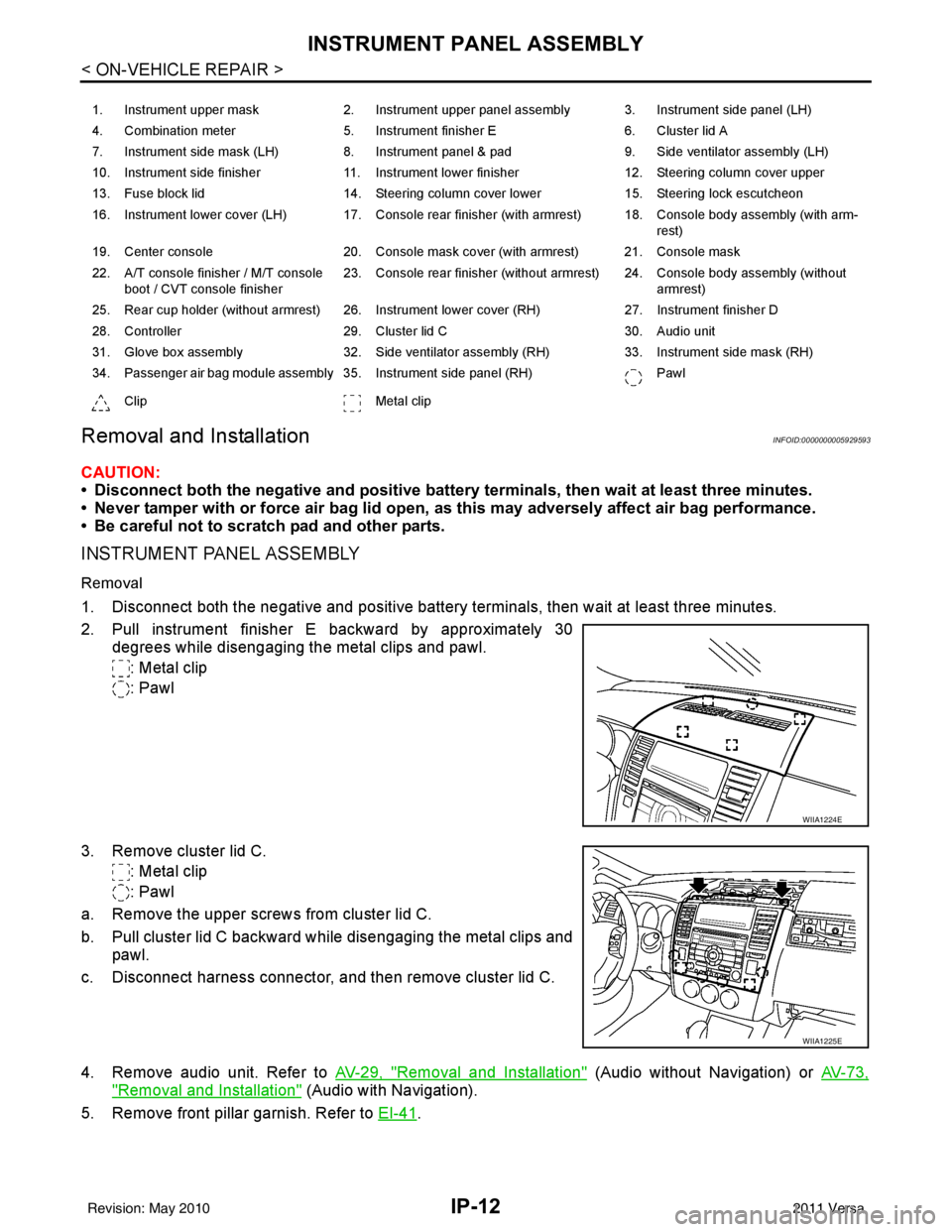
2. Pull instrument finisher E backward by approximately 30
degrees while disengaging the metal clips and pawl.
: Metal clip
: Pawl
3. Remove cluster lid C. : Metal clip
: Pawl
a. Remove the upper screws from cluster lid C.
b. Pull cluster lid C backward while disengaging the metal clips and pawl.
c. Disconnect harness connector, and then remove cluster lid C.
4. Remove audio unit. Refer to AV-29, "
Removal and Installation" (Audio without Navigation) or AV-73,
"Removal and Installation" (Audio with Navigation).
5. Remove front pillar garnish. Refer to EI-41
.
1. Instrument upper mask 2. Instrument upper panel assembly 3. Instrument side panel (LH)
4. Combination meter 5. Instrument finisher E 6. Cluster lid A
7. Instrument side mask (LH) 8. Instrument panel & pad 9. Side ventilator assembly (LH)
10. Instrument side finisher 11. Instrument lower finisher 12. Steering column cover upper
13. Fuse block lid 14. Steering column cover lower 15. Steering lock escutcheon
16. Instrument lower cover (LH) 17. Console rear finisher (with armrest) 18. Console body assembly (with arm- rest)
19. Center console 20. Console mask cover (with armrest) 21. Console mask
22. A/T console finisher / M/T console boot / CVT console finisher 23. Console rear finisher (without armrest) 24. Console body assembly (without
armrest)
25. Rear cup holder (without armrest) 26. Instrument lower cover (RH) 27. Instrument finisher D
28. Controller 29. Cluster lid C 30. Audio unit
31. Glove box assembly 32. Side ventilator assembly (RH) 33. Instrument side mask (RH)
34. Passenger air bag module assembly 35. Instrument side panel (RH) Pawl
Clip Metal clip
WIIA1224E
WIIA1225E
Revision: May 2010 2011 Versa