warning lights NISSAN TITAN 2006 1.G Owner's Manual
[x] Cancel search | Manufacturer: NISSAN, Model Year: 2006, Model line: TITAN, Model: NISSAN TITAN 2006 1.GPages: 360, PDF Size: 6.15 MB
Page 218 of 360
cIf the engine is very hard to start because
it is flooded, depress the accelerator
pedal all the way to the floor and hold it.
Crank the engine for 5-6 seconds. After
cranking the engine, release the accel-
erator pedal. Crank the enginewith your
foot off the accelerator pedalby turn-
ing the ignition key to START. Release the
key when the engine starts. If the engine
starts, but fails to run, repeat the above
procedure.
CAUTION
Do not operate the starter for more than
15 seconds at a time. If the engine does
not start, turn the key off and wait 10
seconds before cranking again, otherwise
the starter could be damaged.
4. Allow the engine to idle for at least 30 sec-
onds after starting. Do not race the engine
while warming it up. Drive at moderate
speed for a short distance first, especially in
cold weather.
In cold weather, keep the engine running for
a minimum of 2–3 minutes before shutting it
off. Starting and stopping the engine over a
short period of time may make the vehicle
more difficult to start.
ENGINE PROTECTION MODE
The engine has an engine protection mode to
reduce the chance of damage if the coolant tem-
perature becomes too high (for example, when
climbing steep grades in high temperature with
heavy loads, such as when towing a trailer) .
When the engine temperature reaches a certain
level:
cThe engine coolant temperature gauge will
move toward the H position.
cEngine power may be reduced.
cThe air conditioning cooling function may be
automatically turned OFF for a short time
(the blower will continue to operate) .
Engine power and, under some conditions, ve-
hicle speed will decrease. Vehicle speed can be
controlled with the accelerator pedal, but the
vehicle may not accelerate at the desired speed.
The transmission will downshift or upshift as it
reaches prescribed shift points. You can also
shift manually.
As driving conditions change and engine coolant
temperature is reduced, vehicle speed can be
increased using the accelerator pedal, and air
conditioning cooling function will automatically
be turned back ON.If:
1. The engine coolant temperature is not re-
duced.
2. The air conditioning cooling function does
not turn back ON.
3. The engine oil pressure warning/engine
coolant temperature high indicator
il-
luminates, this may indicate a malfunction.
Move the vehicle off the road in a safe area
and allow the engine to cool. If after check-
ing the oil and coolant, the
remains
on, do not continue to drive and call a
NISSAN dealer.
The malfunction indicator lamp may also come
ON. Ifonlyit remains on, you do not need to have
your vehicle towed, but have it inspected soon by
a NISSAN dealer. See “Malfunction indicator
lamp” in the “Warning and indicator lights” sec-
tion of this manual.
DRIVING THE VEHICLE
5-10Starting and driving
ZREVIEW COPYÐ2006 Titan(tzw)
Owners ManualÐUSA_English(nna)
06/15/05Ðdebbie
X
Page 224 of 360
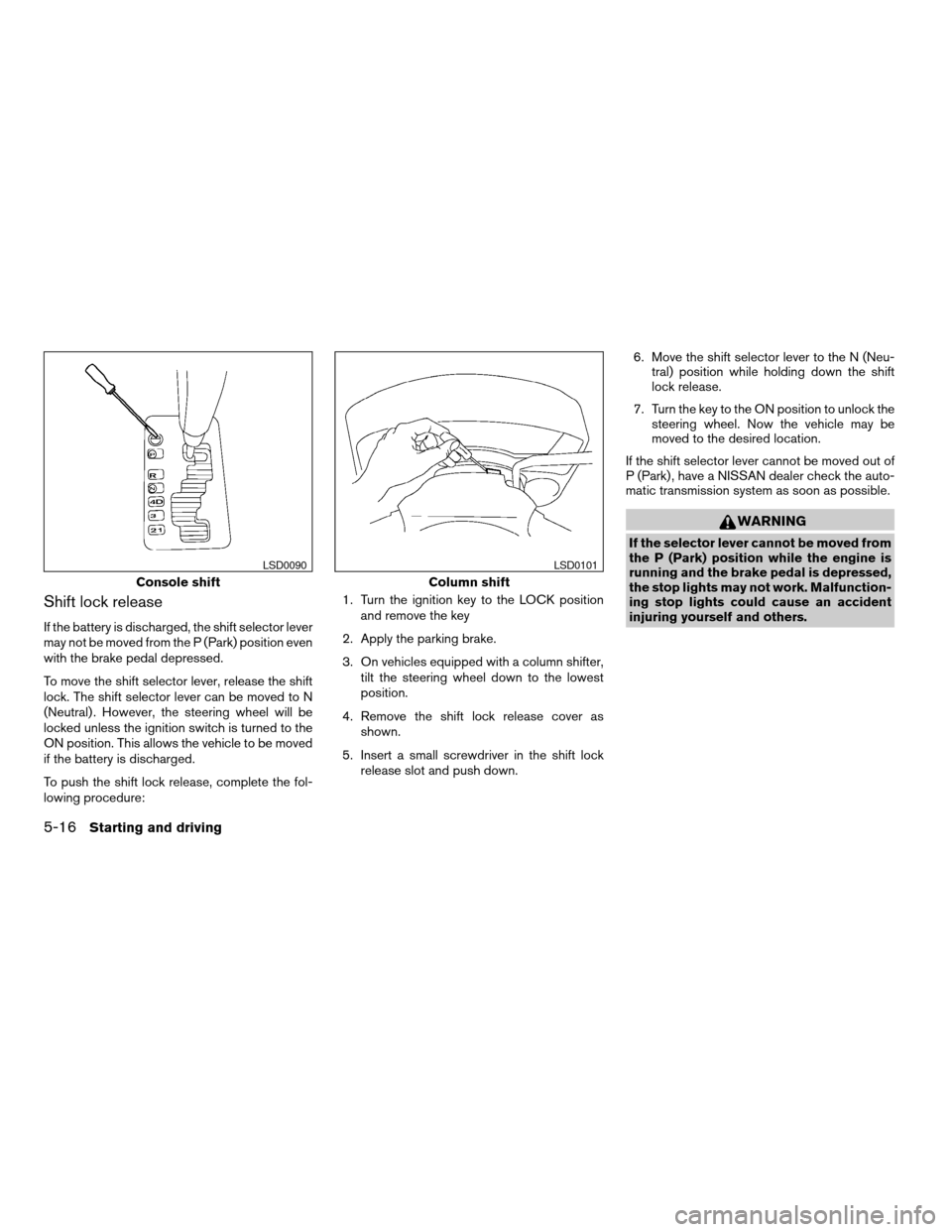
Shift lock release
If the battery is discharged, the shift selector lever
may not be moved from the P (Park) position even
with the brake pedal depressed.
To move the shift selector lever, release the shift
lock. The shift selector lever can be moved to N
(Neutral) . However, the steering wheel will be
locked unless the ignition switch is turned to the
ON position. This allows the vehicle to be moved
if the battery is discharged.
To push the shift lock release, complete the fol-
lowing procedure:1. Turn the ignition key to the LOCK position
and remove the key
2. Apply the parking brake.
3. On vehicles equipped with a column shifter,
tilt the steering wheel down to the lowest
position.
4. Remove the shift lock release cover as
shown.
5. Insert a small screwdriver in the shift lock
release slot and push down.6. Move the shift selector lever to the N (Neu-
tral) position while holding down the shift
lock release.
7. Turn the key to the ON position to unlock the
steering wheel. Now the vehicle may be
moved to the desired location.
If the shift selector lever cannot be moved out of
P (Park) , have a NISSAN dealer check the auto-
matic transmission system as soon as possible.
WARNING
If the selector lever cannot be moved from
the P (Park) position while the engine is
running and the brake pedal is depressed,
the stop lights may not work. Malfunction-
ing stop lights could cause an accident
injuring yourself and others.
Console shift
LSD0090
Column shift
LSD0101
5-16Starting and driving
ZREVIEW COPYÐ2006 Titan(tzw)
Owners ManualÐUSA_English(nna)
06/15/05Ðdebbie
X
Page 229 of 360
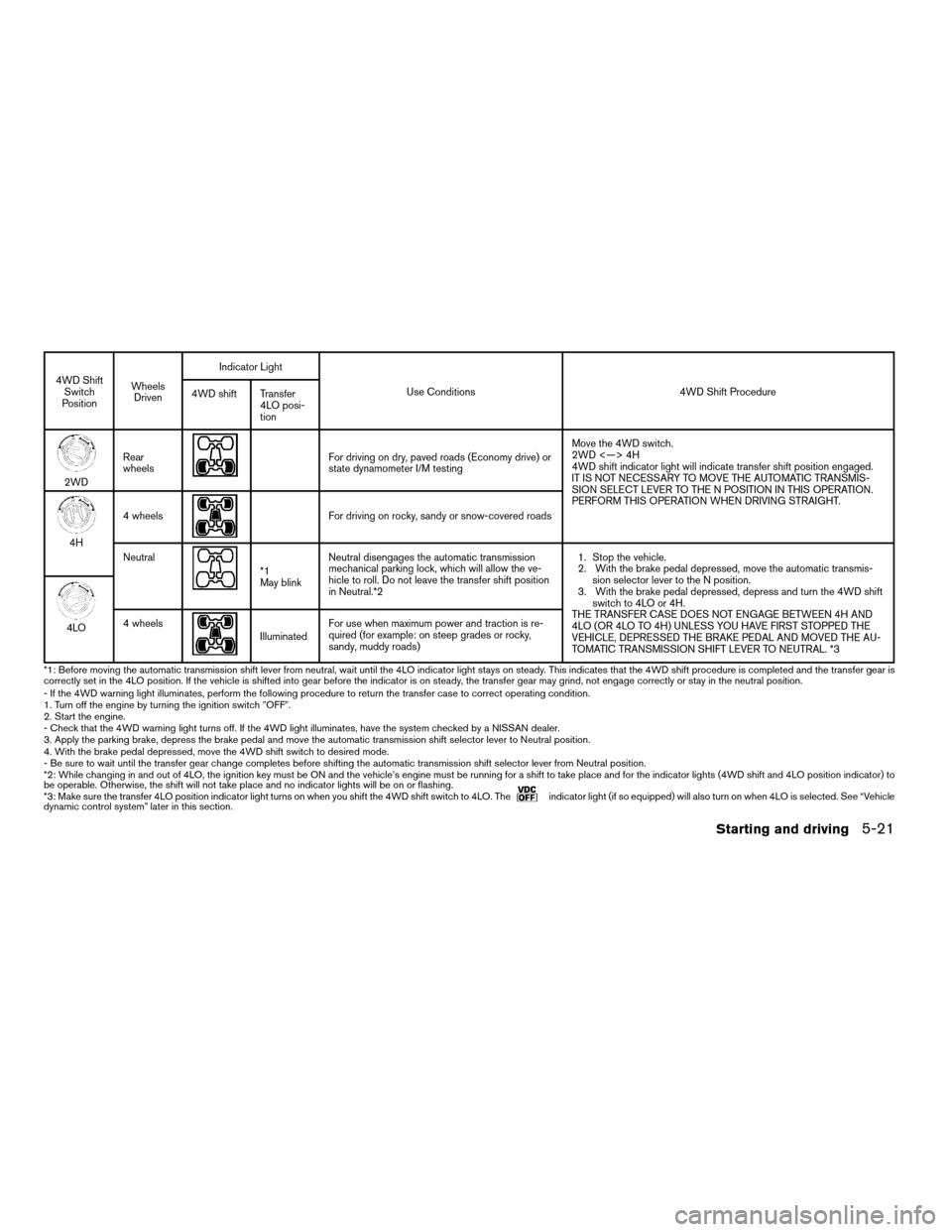
4WD Shift
Switch
PositionWheels
DrivenIndicator Light
Use Conditions 4WD Shift Procedure
4WD shift Transfer
4LO posi-
tion
2WDRear
wheels
For driving on dry, paved roads (Economy drive) or
state dynamometer I/M testingMove the 4WD switch.
2WD <—> 4H
4WD shift indicator light will indicate transfer shift position engaged.
IT IS NOT NECESSARY TO MOVE THE AUTOMATIC TRANSMIS-
SION SELECT LEVER TO THE N POSITION IN THIS OPERATION.
PERFORM THIS OPERATION WHEN DRIVING STRAIGHT.
4H4 wheels
For driving on rocky, sandy or snow-covered roads
Neutral
*1
May blinkNeutral disengages the automatic transmission
mechanical parking lock, which will allow the ve-
hicle to roll. Do not leave the transfer shift position
in Neutral.*21. Stop the vehicle.
2. With the brake pedal depressed, move the automatic transmis-
sion selector lever to the N position.
3. With the brake pedal depressed, depress and turn the 4WD shift
switch to 4LO or 4H.
THE TRANSFER CASE DOES NOT ENGAGE BETWEEN 4H AND
4LO (OR 4LO TO 4H) UNLESS YOU HAVE FIRST STOPPED THE
VEHICLE, DEPRESSED THE BRAKE PEDAL AND MOVED THE AU-
TOMATIC TRANSMISSION SHIFT LEVER TO NEUTRAL. *3
4LO4 wheelsIlluminatedFor use when maximum power and traction is re-
quired (for example: on steep grades or rocky,
sandy, muddy roads)
*1: Before moving the automatic transmission shift lever from neutral, wait until the 4LO indicator light stays on steady. This indicates that the 4WDshift procedure is completed and the transfer gear is
correctly set in the 4LO position. If the vehicle is shifted into gear before the indicator is on steady, the transfer gear may grind, not engage correctly or stay in the neutral position.
- If the 4WD warning light illuminates, perform the following procedure to return the transfer case to correct operating condition.
1. Turn off the engine by turning the ignition switch9OFF9.
2. Start the engine.
- Check that the 4WD warning light turns off. If the 4WD light illuminates, have the system checked by a NISSAN dealer.
3. Apply the parking brake, depress the brake pedal and move the automatic transmission shift selector lever to Neutral position.
4. With the brake pedal depressed, move the 4WD shift switch to desired mode.
- Be sure to wait until the transfer gear change completes before shifting the automatic transmission shift selector lever from Neutral position.
*2: While changing in and out of 4LO, the ignition key must be ON and the vehicle’s engine must be running for a shift to take place and for the indicator lights (4WD shift and 4LO position indicator) to
be operable. Otherwise, the shift will not take place and no indicator lights will be on or flashing.
*3: Make sure the transfer 4LO position indicator light turns on when you shift the 4WD shift switch to 4LO. The
indicator light (if so equipped) will also turn on when 4LO is selected. See “Vehicle
dynamic control system” later in this section.
Starting and driving5-21
ZREVIEW COPYÐ2006 Titan(tzw)
Owners ManualÐUSA_English(nna)
06/15/05Ðdebbie
X
Page 238 of 360
When accelerating or driving on slippery sur-
faces, the tires may spin or slide. With the Vehicle
Dynamic Control (VDC) system, sensors detect
these movements and control the braking and
engine output to help improve vehicle stability.
cWhen the vehicle dynamic control (VDC)
system is operating, the slip indicator in the
instrument panel blinks.
cIf the slip indicator blinks, the road condi-
tions are slippery. Be sure to adjust your
speed and driving to these conditions. See
“Slip indicator light”, and “Vehicle dynamic
control (VDC) off indicator light” in the “In-
struments and controls” section.
cIndicator light
– If malfunction occurs in the system,
the
andindicator lights
come on in the instrument panel.
– If the 4WD transfer case is shifted into
4LO the
indicator light will come
on and the VDC system will be turned off.
See “Transfer case shifting procedures”
earlier in this section.
– As long as these indicator lights are on,
the traction control function is canceled.
If the vehicle is operated with the vehicle dynamic
control system OFF using the VDC OFF switch,VDC functions will be turned off. The VDC sys-
tem will still try to transfer power from a slipping
drive wheel to one with more traction when the
VDC system switch is OFF. The Slip indicator will
flash if wheel spin is detected. The ABS will still
operate with the VDC system off.
When the VDC system is operating, you may feel
a pulsation in the brake pedal and hear a noise or
vibration from under the hood. This is normal and
indicates that the VDC system is working prop-
erly.
The computer has a built in diagnostic feature
that tests the system each time you start the
engine and move the vehicle forward or in reverse
at a slow speed. When the self-test occurs, you
may hear a clunk noise and/or feel a pulsation in
the brake pedal. This is normal and is not an
indication of a malfunction.
WARNING
cThe vehicle dynamic control system is
designed to help improve driving stabil-
ity but does not prevent accidents due
to abrupt steering operation at high
speeds or by careless or dangerous
driving techniques. Reduce vehicle
speed and be especially careful when
driving and cornering on slippery sur-
faces and always drive carefully.cIf brake related parts such as brake
pads, rotors and calipers are not stan-
dard equipment or are extremely dete-
riorated, the vehicle dynamic control
system may not operate properly and
the vehicle dynamic control off indica-
tor light may come on.
cDo not modify the vehicle’s suspension.
If suspension parts such as shock ab-
sorbers, struts, springs, stabilizer bars
and bushings are not NISSAN approved
for your vehicle or are extremely dete-
riorated the vehicle dynamic control
system may not operate properly. This
could adversely affect vehicle handling
performance, and the VDC OFF indica-
tor light may come on.
cWhen driving on extremely inclined sur-
faces such as higher banked corners,
the vehicle dynamic control system may
not operate properly and the VDC OFF
indicator light may come on. Do not
drive on these types of roads.
cWhen driving on an unstable surface
such as a turntable, ferry, elevator or
ramp, the vehicle dynamic control off
indicator light may illuminate. This is
not a malfunction. Restart the engine
after driving onto a stable surface
VEHICLE DYNAMIC CONTROL (VDC)
SYSTEM (if so equipped)
5-30Starting and driving
ZREVIEW COPYÐ2006 Titan(tzw)
Owners ManualÐUSA_English(nna)
07/01/05Ðarosenma
X
Page 244 of 360
LOW TIRE PRESSURE WARNING
SYSTEM
This vehicle is equipped with the low tire pres-
sure warning system. It monitors tire pressure of
all tires except the spare. When the low tire
pressure warning light is lit, one or more of your
tires is significantly underinflated. If equipped, the
system also displays pressure of all tires (except
the spare tire) on the display screen by sending a
signal from a sensor that is installed in each
wheel. If the vehicle is being driven with low tire
pressure, the low tire pressure warning system
will activate and warn you of it by the low tire
pressure warning light. This system will activate
only when the vehicle is driven at speeds above
20 MPH (32 km/h) . For more details, refer to
“Warning/indicator lights and audible reminders”
in the “Instruments and controls” section, “Tire
pressure information” in the “Display screen,
heater, air conditioner and audio systems” sec-
tion and “Low tire pressure warning system” in
the “Starting and driving” section.
WARNING
cIf the low tire pressure warning light
illuminates while driving, avoid sudden
steering maneuvers or abrupt braking,
reduce vehicle speed, pull off the road
to a safe location and stop the vehicle
as soon as possible. Serious vehicle
damage could occur and may lead to an
accident and could result in serious
personal injury. Check the tire pressure
for all four tires. Adjust the tire pressure
to the recommended COLD tire pres-
sure shown on the Tire and Loading
Information label to turn the low tire
pressure warning light OFF. If you have
a flat tire, replace it with a spare tire as
soon as possible.
cWhen a spare tire is mounted or a wheel
is replaced, tire pressure will not be
indicated and the low tire pressure
warning system will not function. Con-
tact your NISSAN dealer as soon as
possible for tire replacement and/or
system resetting.
cDo not inject any tire liquid or aerosol
tire sealant into the tires, as this may
cause a malfunction of the tire pressure
sensors.
CHANGING A FLAT TIRE
If you have a flat tire, follow the instructions be-
low.
Stopping the vehicle
1. Safely move the vehicle off the road and
away from traffic.
2. Turn on the hazard warning flashers.
3. Park on a level surface and apply the parking
brake. Shift the transmission into P (Park) .
4. Turn off the engine.
5. Raise the hood to warn other traffic and to
signal professional road assistance person-
nel that you need assistance.
6. Have all passengers get out of the vehicle
and stand in a safe place, away from traffic
and clear of the vehicle.
WARNING
cMake sure the parking brake is securely
applied and the automatic transmission
is shifted into P (Park) .
cNever change tires when the vehicle is
on a slope, ice or slippery areas. This is
hazardous.
FLAT TIRE
6-2In case of emergency
ZREVIEW COPYÐ2006 Titan(tzw)
Owners ManualÐUSA_English(nna)
06/15/05Ðdebbie
X
Page 251 of 360
WARNING
Always follow the instructions below.
Failure to do so could result in damage to
the charging system and cause personal
injury.
1. If the booster battery is in another vehicle,
position the two vehicles to bring their bat-
teries near each other.
Do not allow the two vehicles to touch.
2. Apply the parking brake. Shift the transmis-
sion into P (Park) . Switch off all unnecessary
electrical systems (lights, heater, air condi-
tioner, etc.) .3. Remove vent caps on the battery (if so
equipped) . Cover the battery with an old
cloth to reduce explosion hazard.
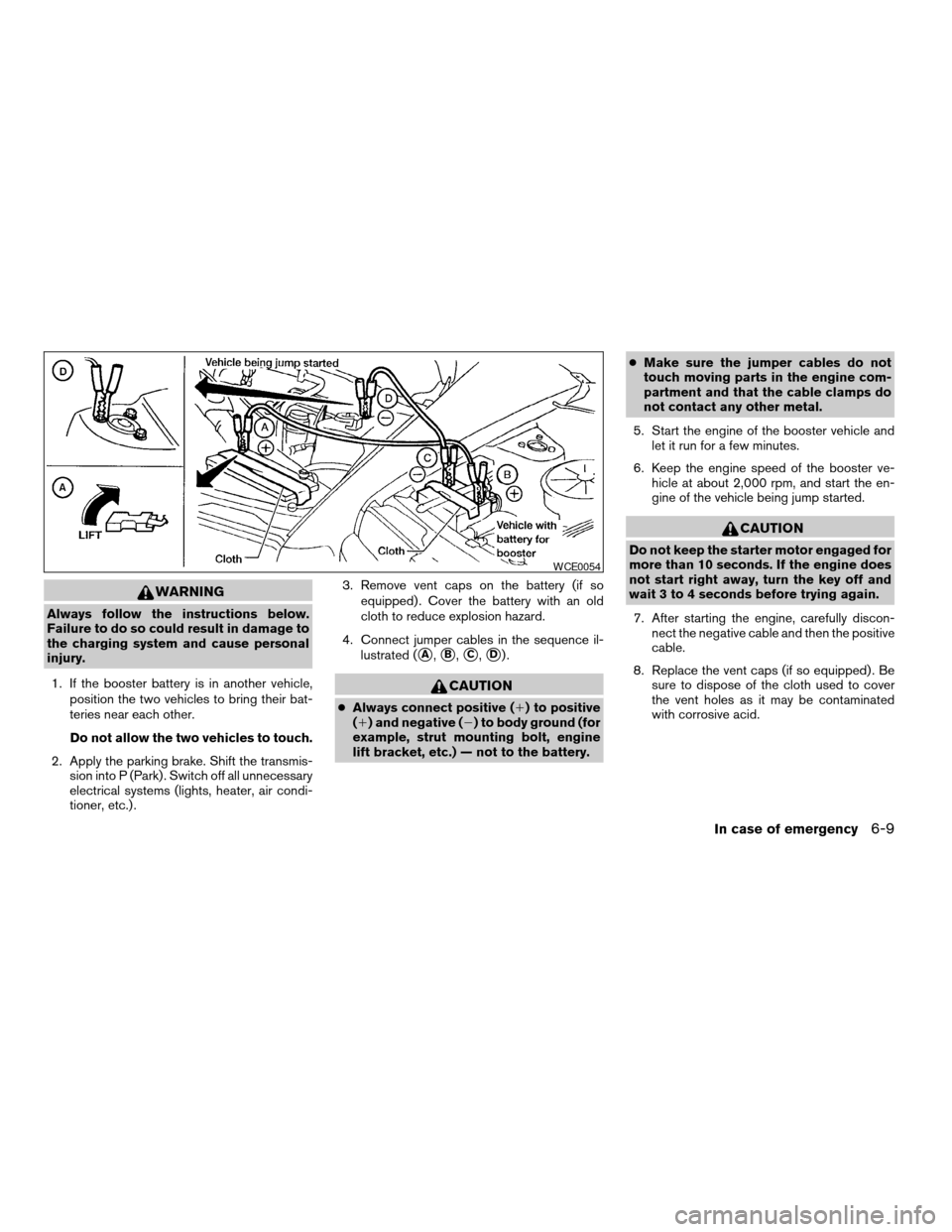
4. Connect jumper cables in the sequence il-
lustrated (
sA,sB,sC,sD).
CAUTION
cAlways connect positive (1) to positive
(1) and negative (2) to body ground (for
example, strut mounting bolt, engine
lift bracket, etc.) — not to the battery.cMake sure the jumper cables do not
touch moving parts in the engine com-
partment and that the cable clamps do
not contact any other metal.
5. Start the engine of the booster vehicle and
let it run for a few minutes.
6. Keep the engine speed of the booster ve-
hicle at about 2,000 rpm, and start the en-
gine of the vehicle being jump started.
CAUTION
Do not keep the starter motor engaged for
more than 10 seconds. If the engine does
not start right away, turn the key off and
wait 3 to 4 seconds before trying again.
7. After starting the engine, carefully discon-
nect the negative cable and then the positive
cable.
8. Replace the vent caps (if so equipped) . Be
sure to dispose of the cloth used to cover
the vent holes as it may be contaminated
with corrosive acid.
WCE0054
In case of emergency6-9
ZREVIEW COPYÐ2006 Titan(tzw)
Owners ManualÐUSA_English(nna)
06/15/05Ðdebbie
X
Page 265 of 360

When driving in areas using road salt or other
corrosive materials, check lubrication frequently.
Lights*Clean the headlights on a regular basis.
Make sure that the headlights, stop lights, tail
lights, turn signal lights, and other lights are all
operating properly and installed securely. Also
check headlight aim.
Road wheel nuts*When checking the tires,
make sure no wheel nuts are missing, and check
for any loose wheel nuts. Tighten if necessary.
Tire rotation*Tires should be rotated every
7,500 miles (12,000 km) .
Tires*Check the pressure with a gauge often
and always prior to long distance trips. If neces-
sary, adjust the pressure in all tires, including the
spare, to the pressure specified. Check carefully
for damage, cuts or excessive wear.
Wheel alignment and balanceIf the vehicle
should pull to either side while driving on a
straight and level road, or if you detect uneven or
abnormal tire wear, there may be a need for wheel
alignment. If the steering wheel or seat vibrates at
normal highway speeds, wheel balancing may be
needed.
cFor additional information regarding tires,
refer to “Important Tire Safety Information”
(US) or “Tire Safety Information” (Canada) in
the Warranty Information Booklet .WindshieldClean the windshield on a regular
basis. Check the windshield at least every six
months for cracks or other damage. Have a dam-
aged windshield repaired by a qualified repair
facility.
Windshield wiper blades*Check for cracks or
wear if they do not wipe properly.
Inside the vehicle
The maintenance items listed here should be
checked on a regular basis, such as when per-
forming periodic maintenance, cleaning the ve-
hicle, etc.
Additional information on the following
items with an “*” is found later in this sec-
tion.
Accelerator pedalCheck the pedal for smooth
operation and make sure the pedal does not bind
or require uneven effort. Keep the floor mat away
from the pedal.
Automatic transmission P (Park) position
mechanismOn a fairly steep hill check that your
vehicle is held securely with the selector lever in
the P (Park) position without applying any brakes.
Brake pedal and booster*Check the pedal for
smooth operation and make sure it has the proper
distance under it when depressed fully. Checkthe brake booster function. Be certain to keep the
floor mat away from the pedal.
BrakesCheck that the brakes do not pull the
vehicle to one side when applied.
Parking brake*Check that the lever/pedal has
the proper travel and confirm that your vehicle is
held securely on a fairly steep hill with only the
parking brake applied.
SeatsCheck seat position controls such as seat
adjusters, seatback recliner, etc. to ensure they
operate smoothly and all latches lock securely in
every position. Check that the head restraints
move up and down smoothly and the locks (if so
equipped) hold securely in all latched positions.
Seat beltsCheck that all parts of the seat belt
system (for example, buckles, anchors, adjusters
and retractors) operate properly and smoothly,
and are installed securely. Check the belt web-
bing for cuts, fraying, wear or damage.
Steering wheelCheck for changes in the steer-
ing system, such as excessive freeplay, hard
steering or strange noises.
Warning lights and chimesMake sure all
warning lights and chimes are operating properly.
Windshield wiper and washer*Check that
the wipers and washer operate properly and that
the wipers do not streak.
Maintenance and do-it-yourself8-3
ZREVIEW COPYÐ2006 Titan(tzw)
Owners ManualÐUSA_English(nna)
06/15/05Ðdebbie
X
Page 335 of 360
Trailer lights
CAUTION
When splicing into the vehicle electrical
system, a commercially available power-
type module/converter must be used to
provide power for all trailer lighting. This
unit uses the vehicle battery as a direct
power source for all trailer lights while
using the vehicle tail light, stoplight and
turn signal circuits as a signal source. The
module/converter must draw no more
that 15 milliamps from the stop and tail
lamp circuits. Using a module/converter
that exceeds these power requirements
may damage the vehicle’s electrical sys-
tem. See a reputable trailer dealer to ob-
tain the proper equipment and to have it
installed.
Trailer lights should comply with federal and/or
local regulations. For assistance in hooking up
trailer lights, contact a NISSAN dealer or repu-
table trailer dealer. Vehicles equipped with the
optional trailer tow package are equipped with a
7-pin trailer harness connector. If your trailer is
equipped with a flat 4-pin connector, an adapter
will be needed to connect the trailer lights to the
vehicle. Adapters are available at auto parts
stores and hitch retailers.
Trailer brakes
If your trailer is equipped with a braking system,
make sure it conforms to federal and/or local
regulations and that it is properly installed.
WARNING
Never connect a trailer brake system di-
rectly to the vehicle brake system.
Electric trailer brake controller
Trailers equipped with electric brakes may re-
quire the installation of an aftermarket trailer
brake controller.
Your vehicle is equipped with a connector and
jumper harness that is specifically designed to be
used when installing an aftermarket brake con-
troller.
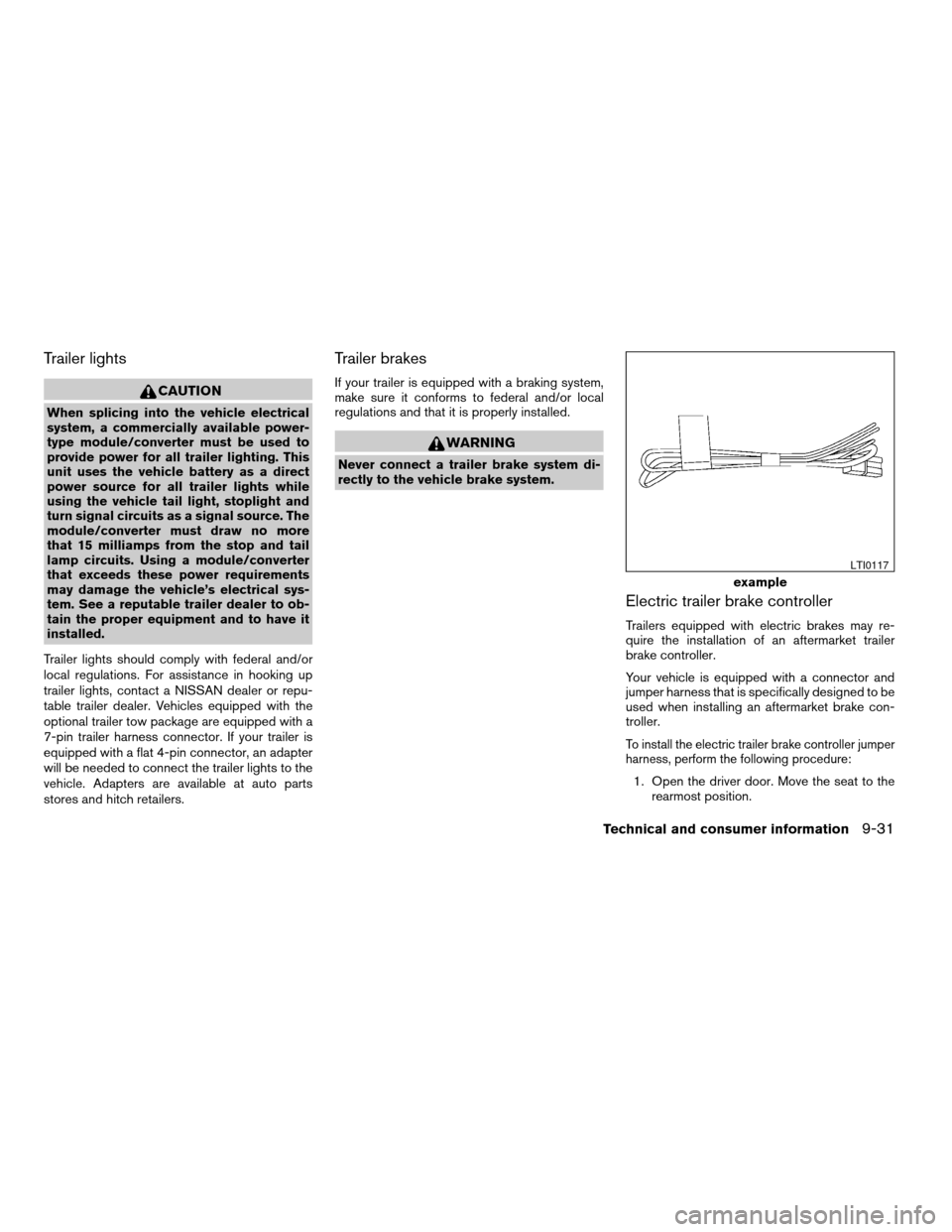
To install the electric trailer brake controller jumper
harness, perform the following procedure:
1. Open the driver door. Move the seat to the
rearmost position.
example
LTI0117
Technical and consumer information9-31
ZREVIEW COPYÐ2006 Titan(tzw)
Owners ManualÐUSA_English(nna)
06/15/05Ðdebbie
X
Page 347 of 360

Power steering fluid.............8-11
Window washer fluid............8-12
F.M.V.S.S. certification label..........9-12
Fog light switch.................2-28
Front air bag system
(See supplemental restraint system).....1-50
Front seats....................1-2
Fuel
Capacities and recommended
fuel/lubricants.................9-2
Fuel economy................5-20
Fuel gauge..................2-6
Fuel octane rating..............9-4
Fuel recommendation............9-3
Fuel-filler door and cap...........3-10
FUEL ECON button...............4-4
Fuel Econ button
Control panel buttons............4-4
Fuses......................8-20
Fusible links...................8-22
G
Garage door opener, HomeLinkTUniversal
Transceiver...................2-51
Gascap.....................3-10
Gauge
Automatic transmission fluid temperature
gauge.....................2-8
Engine coolant temperature gauge.....2-6
Engine oil pressure gauge..........2-7
Fuel gauge..................2-6
Odometer...................2-5
Speedometer.................2-4
Tachometer..................2-5Trip odometer.................2-5
Voltmeter...................2-8
General maintenance..............8-2
Glove box....................2-38
Grocery hooks.................2-43
H
Hazard warning flasher switch.........2-28
Head restraints..................1-6
Active head restraint.............1-7
Headlight and turn signal switch........2-24
Headlight control switch............2-24
Headphones
(See NISSAN mobile entertainment system). .4-46
Heated seats..................2-30
Heater
Heater and air conditioner
controls................4-13, 4-20
Heater operation...........4-14, 4-21
HomeLinkTUniversal Transceiver.......2-51
Hood release..................3-10
Horn.......................2-29
I
Ignition switch..................5-7
Immobilizer system..........2-22, 3-2, 5-8
Important vehicle information label.......9-12
In-cabin microfilter...............8-16
Increasing fuel economy............5-20
Indicator lights and audible reminders
(See warning/indicator lights and audible
reminders)....................2-12Inside mirror...................3-14
Instrument brightness control.........2-27
Instrument panel..............0-6, 2-2
Interior light...................2-49
ISOFIX child restraints.............1-30
J
Jump starting...................6-8
K
Key ........................3-2
Keyfob battery replacement..........8-23
Keyless entry system
(See remote keyless entry system).......3-7
L
Labels
Air conditioner specification label.....9-13
C.M.V.S.S. certification label........9-12
Emission control information label.....9-12
Engine serial number............9-12
F.M.V.S.S. certification label........9-12
Vehicle identification number (VIN)
plate.....................9-11
Warning labels (for SRS)..........1-57
LATCH (Lower Anchors and Tethers
for CHildren) System..............1-30
License plate
Installing the license plate.........9-13
10-3
ZREVIEW COPYÐ2006 Titan(tzw)
Owners ManualÐUSA_English(nna)
06/15/05Ðdebbie
X
Page 348 of 360

Light
Air bag warning light.........1-58, 2-16
Brake light (See stop light).........8-26
Bulb check/instrument panel........2-12
Bulb replacement..............8-26
Charge warning light............2-14
Fog light switch...............2-28
Headlight and turn signal switch......2-24
Headlight control switch..........2-24
Interior light.................2-49
Light bulbs..................8-24
Low tire pressure warning light......2-15
Low washer fluid warning light.......2-16
Passenger air bag and status light.....1-52
Personal lights...............2-50
Security indicator light...........2-19
Warning/indicator lights and audible
reminders..................2-12
Lights
Map lights..................2-50
Lock
Child safety rear door lock..........3-6
Door locks..................3-3
Power door locks...............3-4
Low fuel warning light.............2-15
Low tire pressure warning light........2-15
Low washer fluid warning light.........2-16
Luggage (See vehicle loading information) . .9-14
M
Maint (maintenance) button
Control panel buttons............4-4
Maint (Maintenance) button, control panel
display.......................4-4Maintenance
General maintenance............8-2
Inside the vehicle...............8-3
Maintenance precautions..........8-5
Outside the vehicle..............8-2
Seat belt maintenance...........1-22
Under the hood and vehicle.........8-4
Malfunction indicator light...........2-18
Manual front seat adjustment.......1-2, 1-3
Manual windows................2-46
Map lights....................2-50
Map pocket...................2-39
Meters and gauges................2-4
Instrument brightness control.......2-27
Mirror
Inside mirror.................3-14
Outside mirrors...............3-15
Vanity mirror.................3-14
N
NISSAN mobile entertainment system
(MES)......................4-43
NISSAN vehicle immobilizer
system................2-22, 3-2, 5-8
O
Octane rating (See fuel octane rating).....9-4
Odometer.....................2-5
Oil
Capacities and recommended
fuel/lubricants.................9-2
Changing engine oil.............8-9Changing engine oil filter..........8-10
Checking engine oil level..........8-8
Engine oil...................8-8
Engine oil and oil filter recommendation . .9-6
Engine oil pressure low/engine coolant
temperature high warning light.......2-14
Engine oil viscosity..............9-7
Outside mirrors.................3-15
Overheat
If your vehicle overheats..........6-10
Owner’s manual order form..........9-38
Owner’s manual/service manual order
information....................9-38
P
Parking
Parking brake check............8-19
Parking brake operation..........5-17
Parking/parking on hills...........5-26
Pedal position adjustment...........3-12
Personal lights.................2-50
Power
Front seat adjustment............1-5
Power door locks...............3-4
Power outlet.................2-33
Power rear windows............2-45
Power steering fluid.............8-11
Power steering system...........5-27
Power windows...............2-44
Rear power windows............2-45
Precautions
Maintenance precautions..........8-5
On-pavement and off-road driving
precautions..................5-3
10-4
ZREVIEW COPYÐ2006 Titan(tzw)
Owners ManualÐUSA_English(nna)
06/15/05Ðdebbie
X