ignition NISSAN TITAN 2008 Owner's Guide
[x] Cancel search | Manufacturer: NISSAN, Model Year: 2008, Model line: TITAN, Model: NISSAN TITAN 2008Pages: 408, PDF Size: 6.08 MB
Page 119 of 408
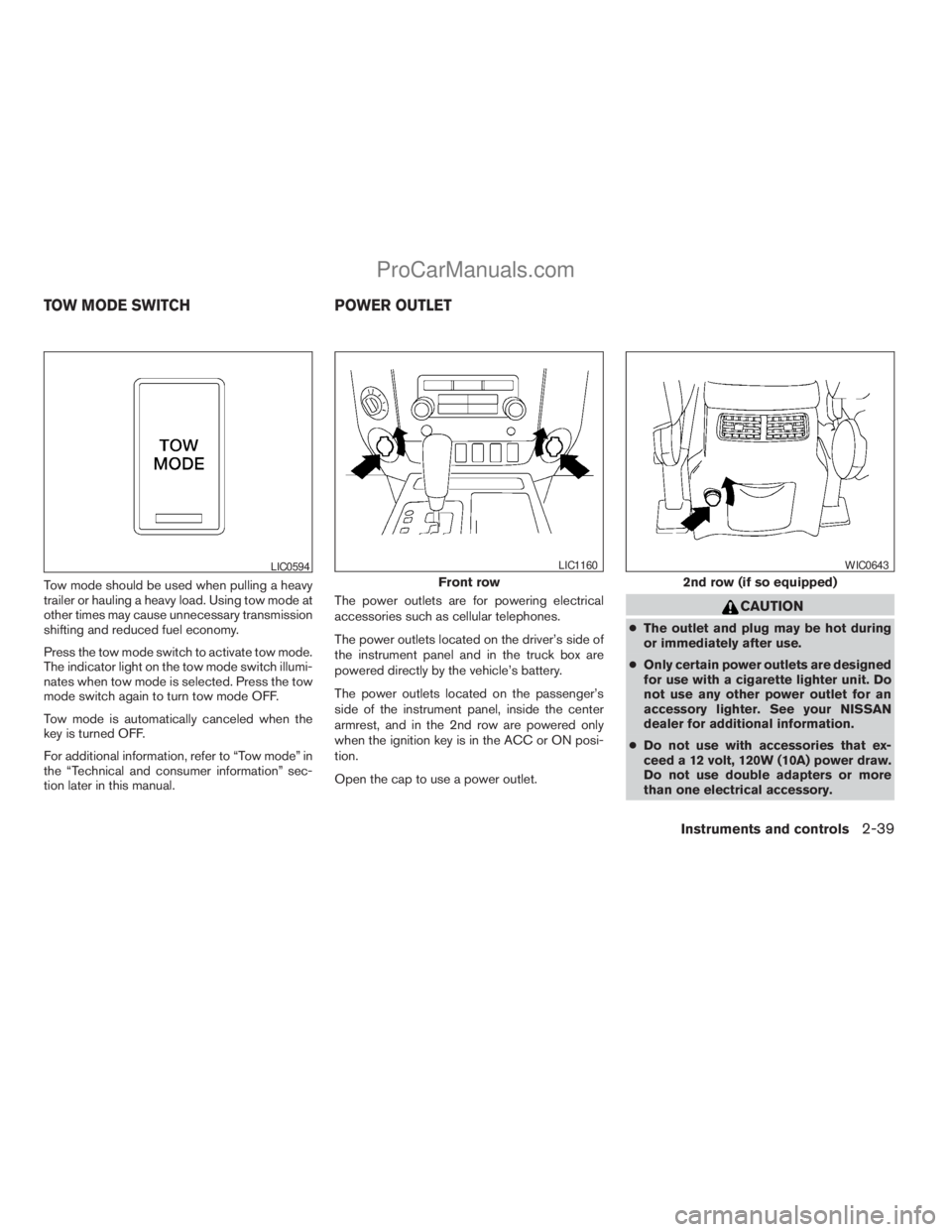
Tow mode should be used when pulling a heavy
trailer or hauling a heavy load. Using tow mode at
other times may cause unnecessary transmission
shifting and reduced fuel economy.
Press the tow mode switch to activate tow mode.
The indicator light on the tow mode switch illumi-
nates when tow mode is selected. Press the tow
mode switch again to turn tow mode OFF.
Tow mode is automatically canceled when the
key is turned OFF.
For additional information, refer to “Tow mode” in
the “Technical and consumer information” sec-
tion later in this manual.The power outlets are for powering electrical
accessories such as cellular telephones.
The power outlets located on the driver’s side of
the instrument panel and in the truck box are
powered directly by the vehicle’s battery.
The power outlets located on the passenger’s
side of the instrument panel, inside the center
armrest, and in the 2nd row are powered only
when the ignition key is in the ACC or ON posi-
tion.
Open the cap to use a power outlet.
CAUTION
cThe outlet and plug may be hot during
or immediately after use.
cOnly certain power outlets are designed
for use with a cigarette lighter unit. Do
not use any other power outlet for an
accessory lighter. See your NISSAN
dealer for additional information.
cDo not use with accessories that ex-
ceed a 12 volt, 120W (10A) power draw.
Do not use double adapters or more
than one electrical accessory.
LIC0594
Front row
LIC1160
2nd row (if so equipped)
WIC0643
TOW MODE SWITCH POWER OUTLET
Instruments and controls2-39
ZREVIEW COPYÐ2008 Titan(tzw)
Owners ManualÐUSA_English(nna)
10/11/07Ðdebbie
X
ProCarManuals.com
Page 130 of 408
POWER WINDOWS (if so equipped)
WARNING
cMake sure that all passengers have
their hands, etc. inside the vehicle while
it is in motion and before closing the
windows. Use the window lock switch
to prevent unexpected use of the power
windows.
cDo not leave children unattended inside
the vehicle. They could unknowingly ac-
tivate switches or controls and become
trapped in a window. Unattended chil-
dren could become involved in serious
accidents.
The power windows operate when the ignition
switch is in the ON position, or for about 45
seconds after the ignition switch is turned to the
OFF position. If the driver’s or passenger’s door
is opened during this period of about 45 sec-
onds, power to the windows is canceled.
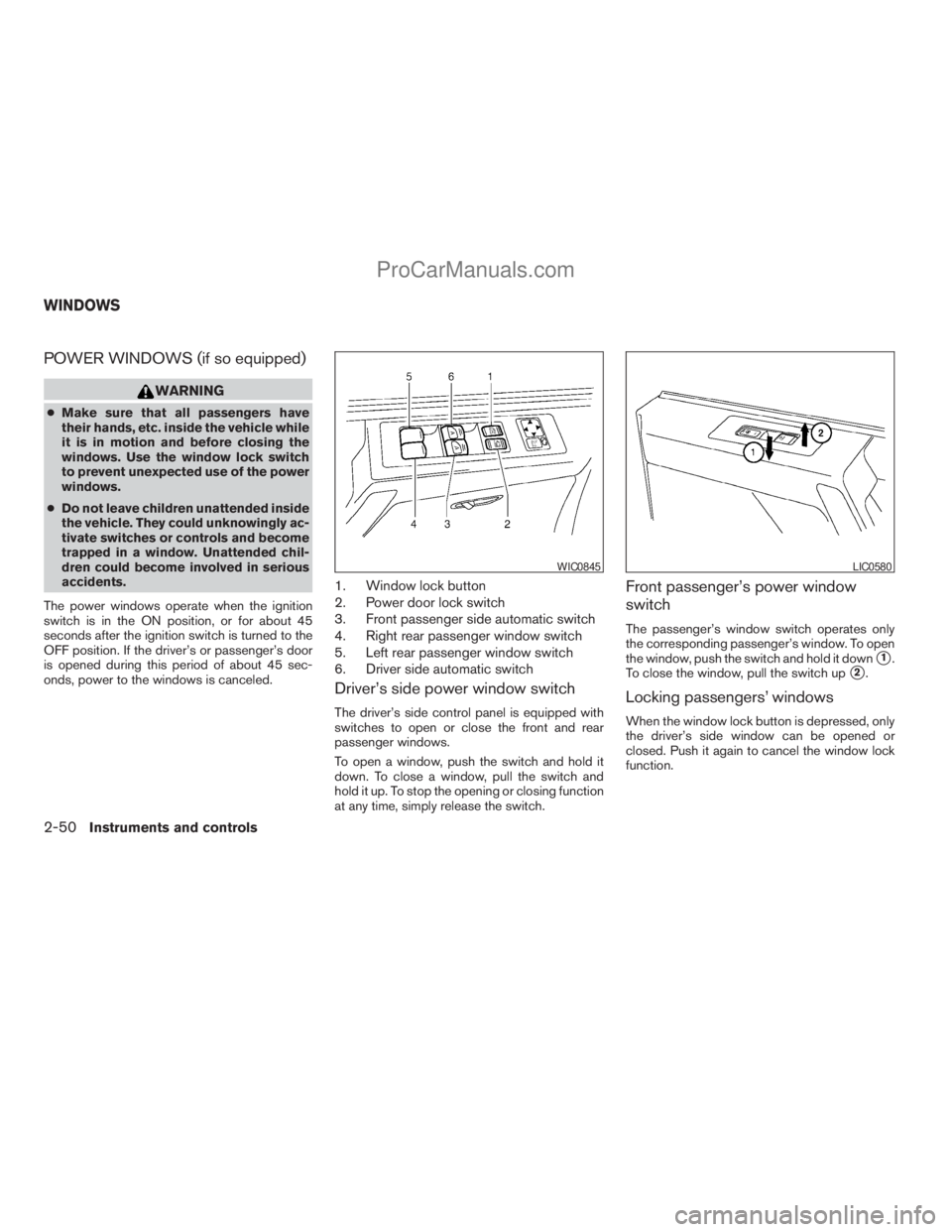
1. Window lock button
2. Power door lock switch
3. Front passenger side automatic switch
4. Right rear passenger window switch
5. Left rear passenger window switch
6. Driver side automatic switch
Driver’s side power window switch
The driver’s side control panel is equipped with
switches to open or close the front and rear
passenger windows.
To open a window, push the switch and hold it
down. To close a window, pull the switch and
hold it up. To stop the opening or closing function
at any time, simply release the switch.
Front passenger’s power window
switch
The passenger’s window switch operates only
the corresponding passenger’s window. To open
the window, push the switch and hold it down
s1.
To close the window, pull the switch up
s2.
Locking passengers’ windows
When the window lock button is depressed, only
the driver’s side window can be opened or
closed. Push it again to cancel the window lock
function.
WIC0845LIC0580
WINDOWS
2-50Instruments and controls
ZREVIEW COPYÐ2008 Titan(tzw)
Owners ManualÐUSA_English(nna)
10/11/07Ðdebbie
X
ProCarManuals.com
Page 133 of 408
NOTE:
If the rear power window (if so equipped) is
lowered while the defroster switch is on,
the rear window defroster will automati-
cally shut off. The heated outside mirrors (if
so equipped) will remain on. The rear win-
dow defroster will automatically turn on
when the rear power window is fully closed
if the switch is on.
AUTOMATIC MOONROOF
The moonroof will only operate when the ignition
switch is in the ON position. The automatic
moonroof is operational for about 45 seconds,
even if the ignition switch is turned to the ACC or
OFF position. If the driver’s door or the front
passenger’s door is opened during this period of
about 45 seconds, power to the moonroof is
canceled.
Sliding the moonroof
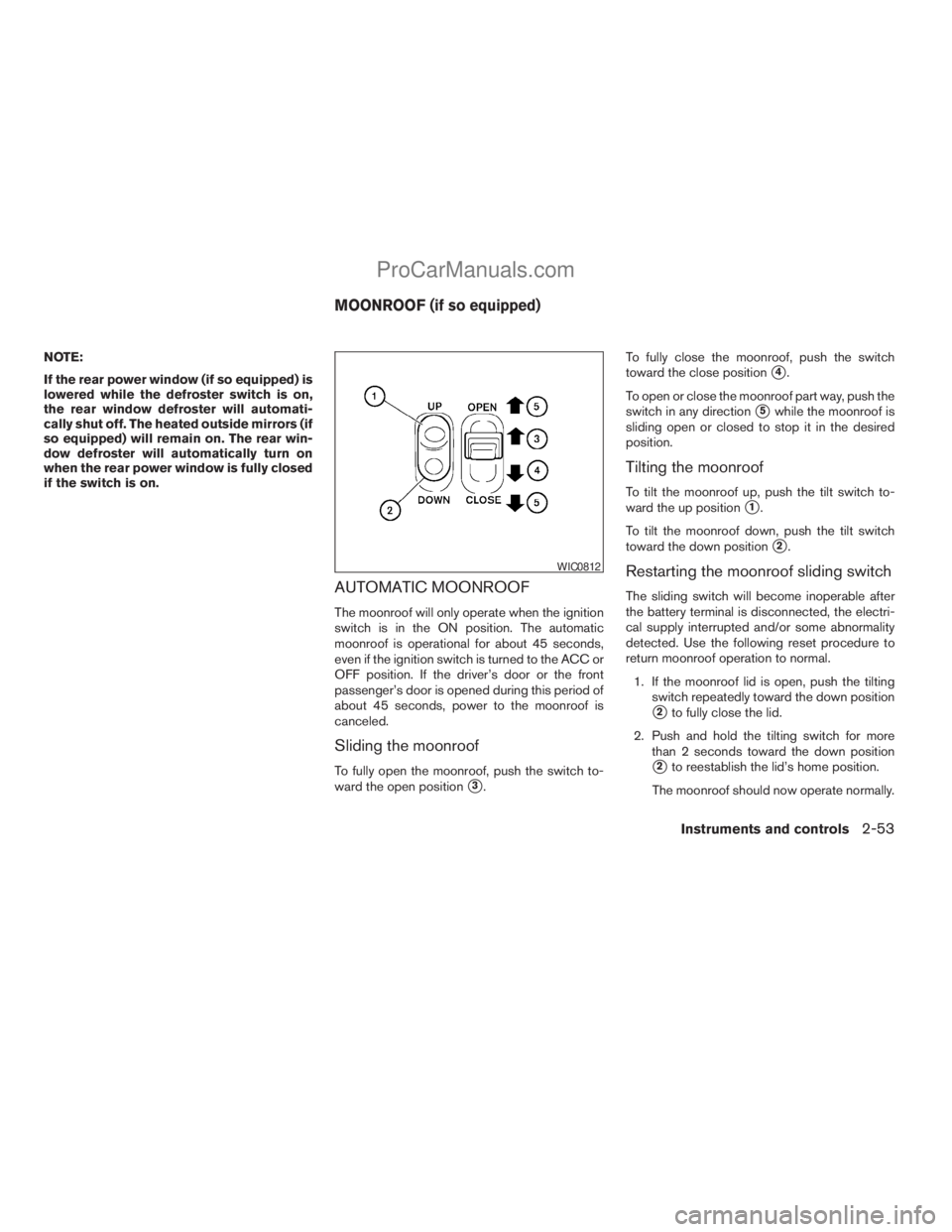
To fully open the moonroof, push the switch to-
ward the open position
s3.To fully close the moonroof, push the switch
toward the close position
s4.
To open or close the moonroof part way, push the
switch in any direction
s5while the moonroof is
sliding open or closed to stop it in the desired
position.
Tilting the moonroof
To tilt the moonroof up, push the tilt switch to-
ward the up position
s1.
To tilt the moonroof down, push the tilt switch
toward the down position
s2.
Restarting the moonroof sliding switch
The sliding switch will become inoperable after
the battery terminal is disconnected, the electri-
cal supply interrupted and/or some abnormality
detected. Use the following reset procedure to
return moonroof operation to normal.
1. If the moonroof lid is open, push the tilting
switch repeatedly toward the down position
s2to fully close the lid.
2. Push and hold the tilting switch for more
than 2 seconds toward the down position
s2to reestablish the lid’s home position.
The moonroof should now operate normally.
WIC0812
MOONROOF (if so equipped)
Instruments and controls2-53
ZREVIEW COPYÐ2008 Titan(tzw)
Owners ManualÐUSA_English(nna)
10/11/07Ðdebbie
X
ProCarManuals.com
Page 134 of 408
Auto reverse function (when closing or
tilting down the moonroof)
The auto reverse function can be activated when
the moonroof is closed or tilted down by auto-
matic operation when the ignition key is in the ON
position or for about 45 seconds after the ignition
key is turned to the OFF position.
Depending on the environment or driving
conditions, the auto reverse function may
be activated if an impact or load similar to
something being caught in the moonroof
occurs.
WARNING
There are some small distances immedi-
ately before the closed position which
cannot be detected. Make sure that all
passengers have their hands, etc., inside
the vehicle before closing the moonroof.
When closing:
If the control unit detects something caught in the
moonroof as it moves to the front, the moonroof
will immediately open backward.
When tilting down:
If the control unit detects something caught in the
moonroof as it tilts down, the moonroof will im-
mediately tilt up.If the auto reverse function malfunctions and re-
peats opening or tilting up the moonroof, keep
pushing the tilt down switch within 5 seconds
after it happens; the moonroof will fully close
gradually. Make sure nothing is caught in the
moonroof.
WARNING
cIn an accident you could be thrown from
the vehicle through an open moonroof.
Always use seat belts and child
restraints.
cDo not allow anyone to stand up or
extend any portion of their body out of
the moonroof opening while the vehicle
is in motion or while the moonroof is
closing.
CAUTION
cRemove water drops, snow, ice or sand
from the moonroof before opening.
cDo not place heavy objects on the
moonroof or surrounding area.
Sunshade
Open and close the sunshade by sliding it for-
ward or backward.
If the moonroof does not close
Have your NISSAN dealer check and repair the
moonroof.
2-54Instruments and controls
ZREVIEW COPYÐ2008 Titan(tzw)
Owners ManualÐUSA_English(nna)
10/11/07Ðdebbie
X
ProCarManuals.com
Page 135 of 408
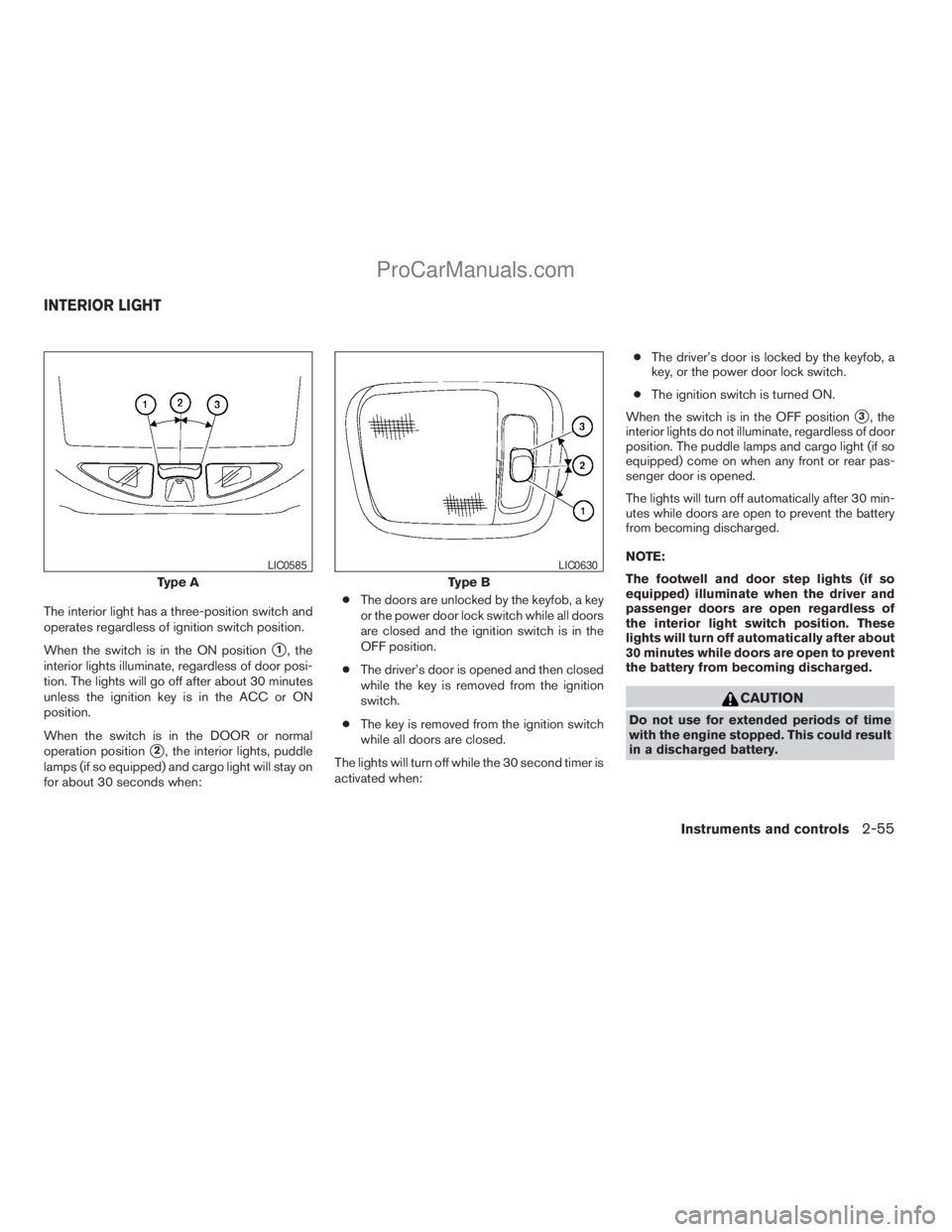
The interior light has a three-position switch and
operates regardless of ignition switch position.
When the switch is in the ON position
s1, the
interior lights illuminate, regardless of door posi-
tion. The lights will go off after about 30 minutes
unless the ignition key is in the ACC or ON
position.
When the switch is in the DOOR or normal
operation position
s2, the interior lights, puddle
lamps (if so equipped) and cargo light will stay on
for about 30 seconds when:cThe doors are unlocked by the keyfob, a key
or the power door lock switch while all doors
are closed and the ignition switch is in the
OFF position.
cThe driver’s door is opened and then closed
while the key is removed from the ignition
switch.
cThe key is removed from the ignition switch
while all doors are closed.
The lights will turn off while the 30 second timer is
activated when:cThe driver’s door is locked by the keyfob, a
key, or the power door lock switch.
cThe ignition switch is turned ON.
When the switch is in the OFF position
s3, the
interior lights do not illuminate, regardless of door
position. The puddle lamps and cargo light (if so
equipped) come on when any front or rear pas-
senger door is opened.
The lights will turn off automatically after 30 min-
utes while doors are open to prevent the battery
from becoming discharged.
NOTE:
The footwell and door step lights (if so
equipped) illuminate when the driver and
passenger doors are open regardless of
the interior light switch position. These
lights will turn off automatically after about
30 minutes while doors are open to prevent
the battery from becoming discharged.
CAUTION
Do not use for extended periods of time
with the engine stopped. This could result
in a discharged battery.
Type A
LIC0585
Type B
LIC0630
INTERIOR LIGHT
Instruments and controls2-55
ZREVIEW COPYÐ2008 Titan(tzw)
Owners ManualÐUSA_English(nna)
10/11/07Ðdebbie
X
ProCarManuals.com
Page 144 of 408
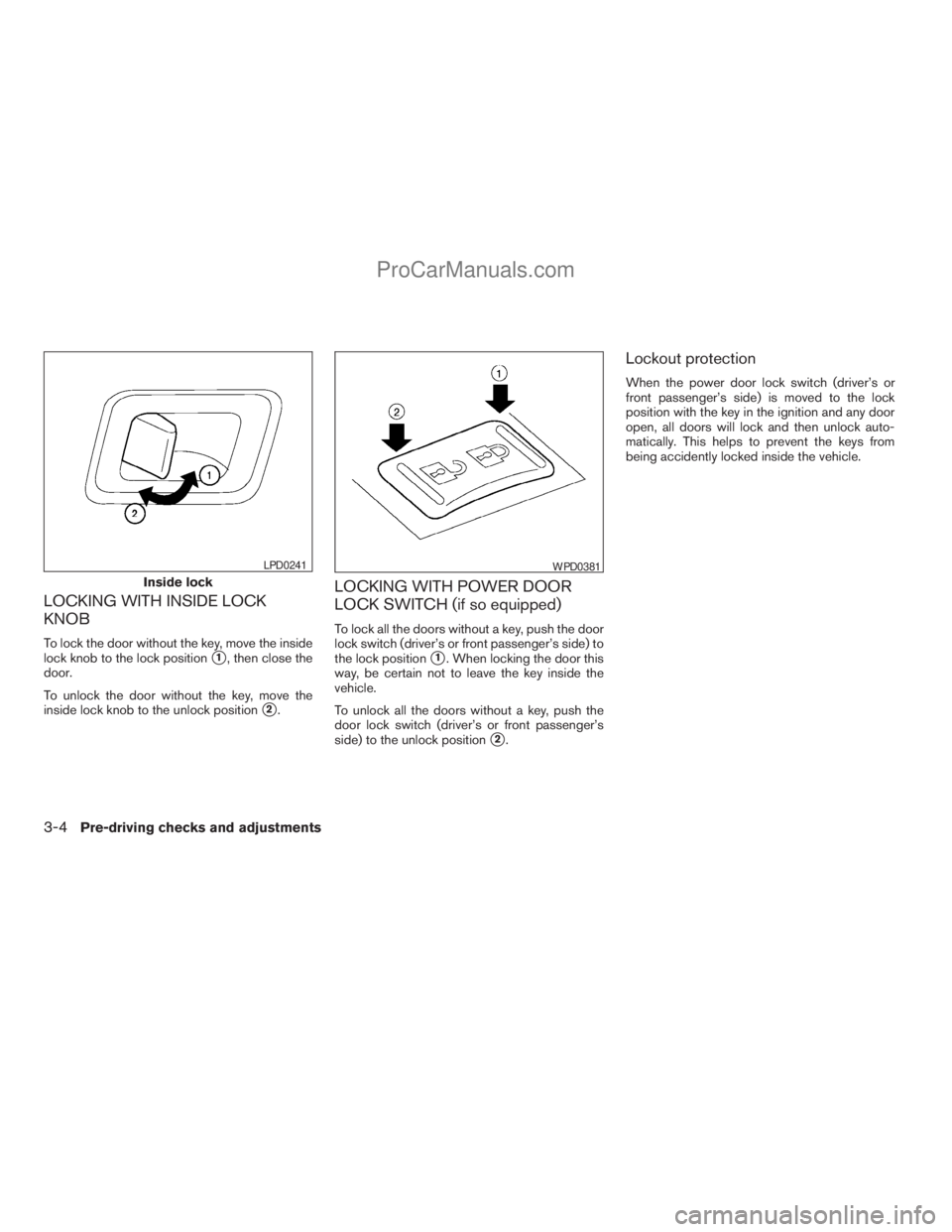
LOCKING WITH INSIDE LOCK
KNOB
To lock the door without the key, move the inside
lock knob to the lock position
s1, then close the
door.
To unlock the door without the key, move the
inside lock knob to the unlock position
s2.
LOCKING WITH POWER DOOR
LOCK SWITCH (if so equipped)
To lock all the doors without a key, push the door
lock switch (driver’s or front passenger’s side) to
the lock position
s1. When locking the door this
way, be certain not to leave the key inside the
vehicle.
To unlock all the doors without a key, push the
door lock switch (driver’s or front passenger’s
side) to the unlock position
s2.
Lockout protection
When the power door lock switch (driver’s or
front passenger’s side) is moved to the lock
position with the key in the ignition and any door
open, all doors will lock and then unlock auto-
matically. This helps to prevent the keys from
being accidently locked inside the vehicle.
Inside lock
LPD0241WPD0381
3-4Pre-driving checks and adjustments
ZREVIEW COPYÐ2008 Titan(tzw)
Owners ManualÐUSA_English(nna)
10/11/07Ðdebbie
X
ProCarManuals.com
Page 147 of 408
It is possible to lock/unlock all doors, turn on the
interior lights and puddle lamps (if so equipped) ,
and activate the panic alarm by using the keyfob
from outside the vehicle.
Some settings for the keyfob, such as horn beep,
can be adjusted. For vehicles without navigation
system, refer to “Silencing the horn beep feature”
later in this section. For vehicles with navigation
system, refer to “Vehicle electronic systems” in
the “Display screen, heater, air conditioner and
audio systems” section later in this manual.
Be sure to remove the key from the vehicle
before locking the doors.
The keyfob can operate at a maximum distance of
approximately 33 ft (10 m) from the vehicle. The
effective distance depends upon the conditions
around the vehicle.
As many as 5 keyfobs can be used with one
vehicle. For information concerning the purchase
and use of additional keyfobs, contact a NISSAN
dealer.
The keyfob will not function when:
cthe battery is discharged.
cthe distance between the vehicle and the
keyfob is over 33 ft (10 m) .
The panic alarm will not activate when the
key is in the ignition switch.CAUTION
Listed below are conditions or occur-
rences which will damage the keyfob:
cDo not allow the keyfob to become wet.
cDo not drop the keyfob.
cDo not strike the keyfob sharply against
another object.
cDo not place the keyfob for an extended
period in an area where temperatures
exceed 140°F (60°C) .
If a keyfob is lost or stolen, NISSAN rec-
ommends erasing the ID code of that key-
fob. This will prevent the keyfob from un-
authorized use to unlock the vehicle. For
information regarding the erasing proce-
dure, please contact a NISSAN dealer.
HOW TO USE REMOTE KEYLESS
ENTRY SYSTEM
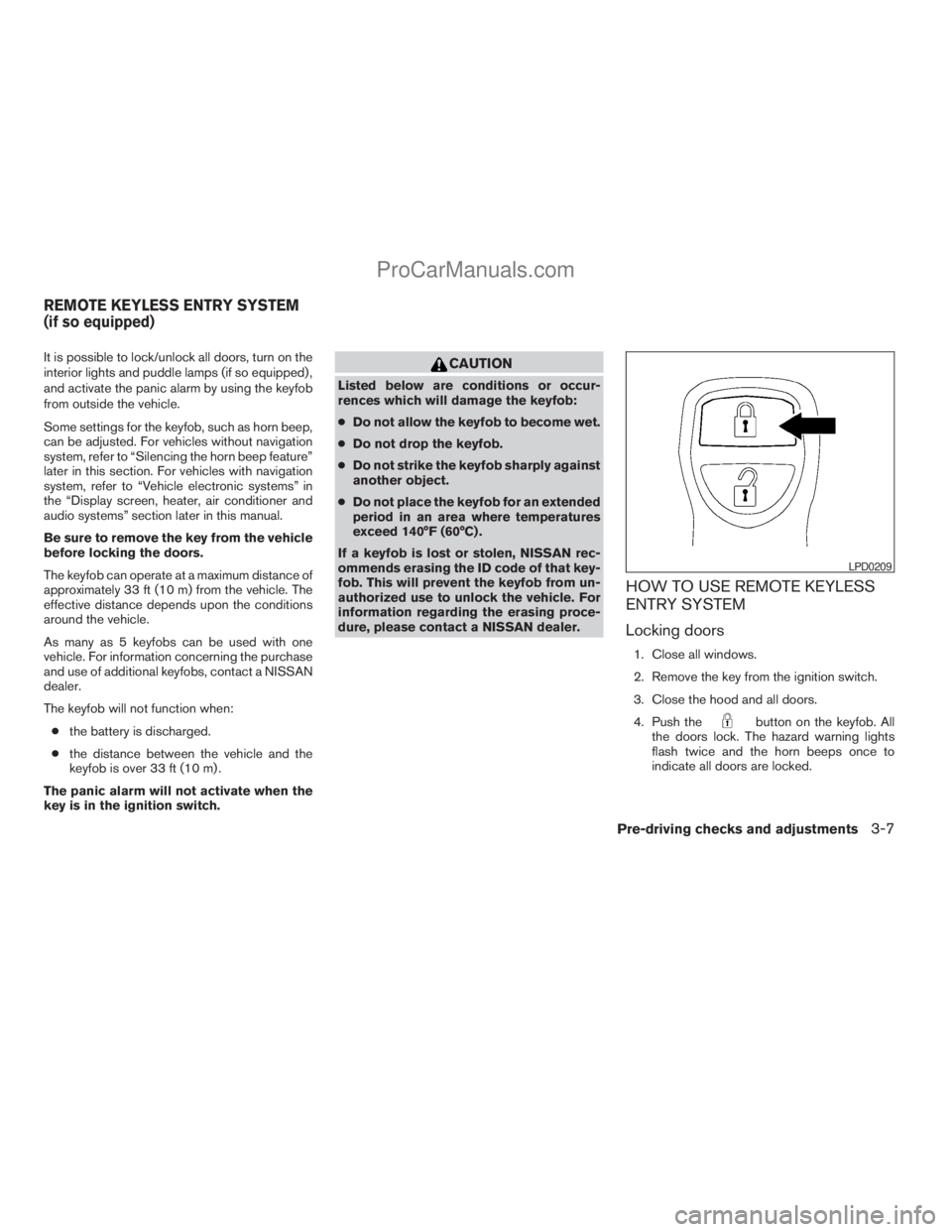
Locking doors
1. Close all windows.
2. Remove the key from the ignition switch.
3. Close the hood and all doors.
4. Push the
button on the keyfob. All
the doors lock. The hazard warning lights
flash twice and the horn beeps once to
indicate all doors are locked.
LPD0209
REMOTE KEYLESS ENTRY SYSTEM
(if so equipped)
Pre-driving checks and adjustments3-7
ZREVIEW COPYÐ2008 Titan(tzw)
Owners ManualÐUSA_English(nna)
10/11/07Ðdebbie
X
ProCarManuals.com
Page 148 of 408
cWhen thebutton is pushed with all
doors locked, the hazard warning lights flash
twice and the horn beeps once as a re-
minder that the doors are already locked.
cIf a door is open and you push the
button, the doors will lock but the horn will
not beep and the hazard warning lights will
not flash.
The horn may or may not beep. For vehicles
without navigation system, refer to “Silencing the
horn beep feature” later in this section. For ve-
hicles with navigation system, refer to “Comfort &
convenience settings” in the “Display screen,
heater, air conditioner and audio systems” sec-
tion later in this manual.
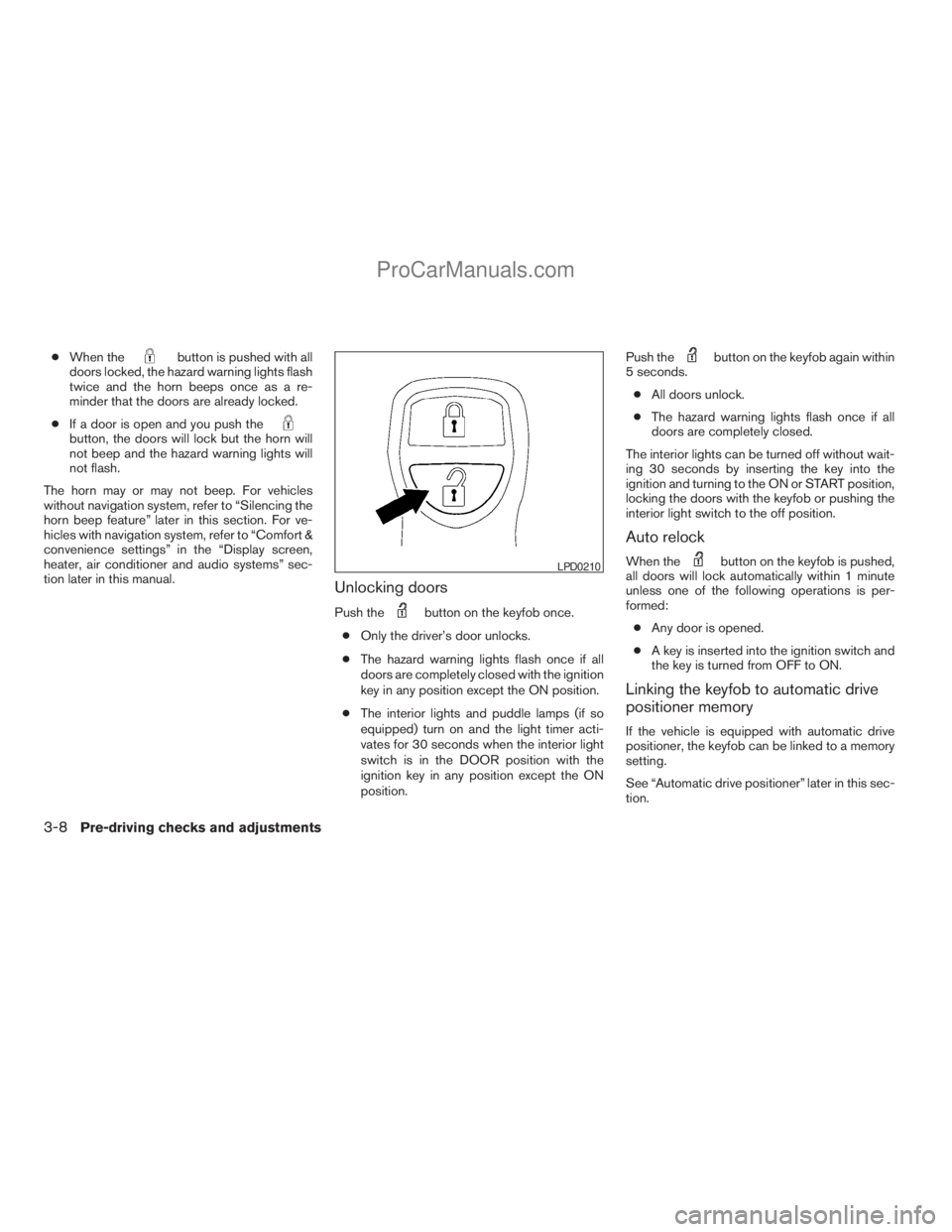
Unlocking doors
Push thebutton on the keyfob once.
cOnly the driver’s door unlocks.
cThe hazard warning lights flash once if all
doors are completely closed with the ignition
key in any position except the ON position.
cThe interior lights and puddle lamps (if so
equipped) turn on and the light timer acti-
vates for 30 seconds when the interior light
switch is in the DOOR position with the
ignition key in any position except the ON
position.Push the
button on the keyfob again within
5 seconds.
cAll doors unlock.
cThe hazard warning lights flash once if all
doors are completely closed.
The interior lights can be turned off without wait-
ing 30 seconds by inserting the key into the
ignition and turning to the ON or START position,
locking the doors with the keyfob or pushing the
interior light switch to the off position.
Auto relock
When thebutton on the keyfob is pushed,
all doors will lock automatically within 1 minute
unless one of the following operations is per-
formed:
cAny door is opened.
cA key is inserted into the ignition switch and
the key is turned from OFF to ON.
Linking the keyfob to automatic drive
positioner memory
If the vehicle is equipped with automatic drive
positioner, the keyfob can be linked to a memory
setting.
See “Automatic drive positioner” later in this sec-
tion.
LPD0210
3-8Pre-driving checks and adjustments
ZREVIEW COPYÐ2008 Titan(tzw)
Owners ManualÐUSA_English(nna)
10/11/07Ðdebbie
X
ProCarManuals.com
Page 152 of 408
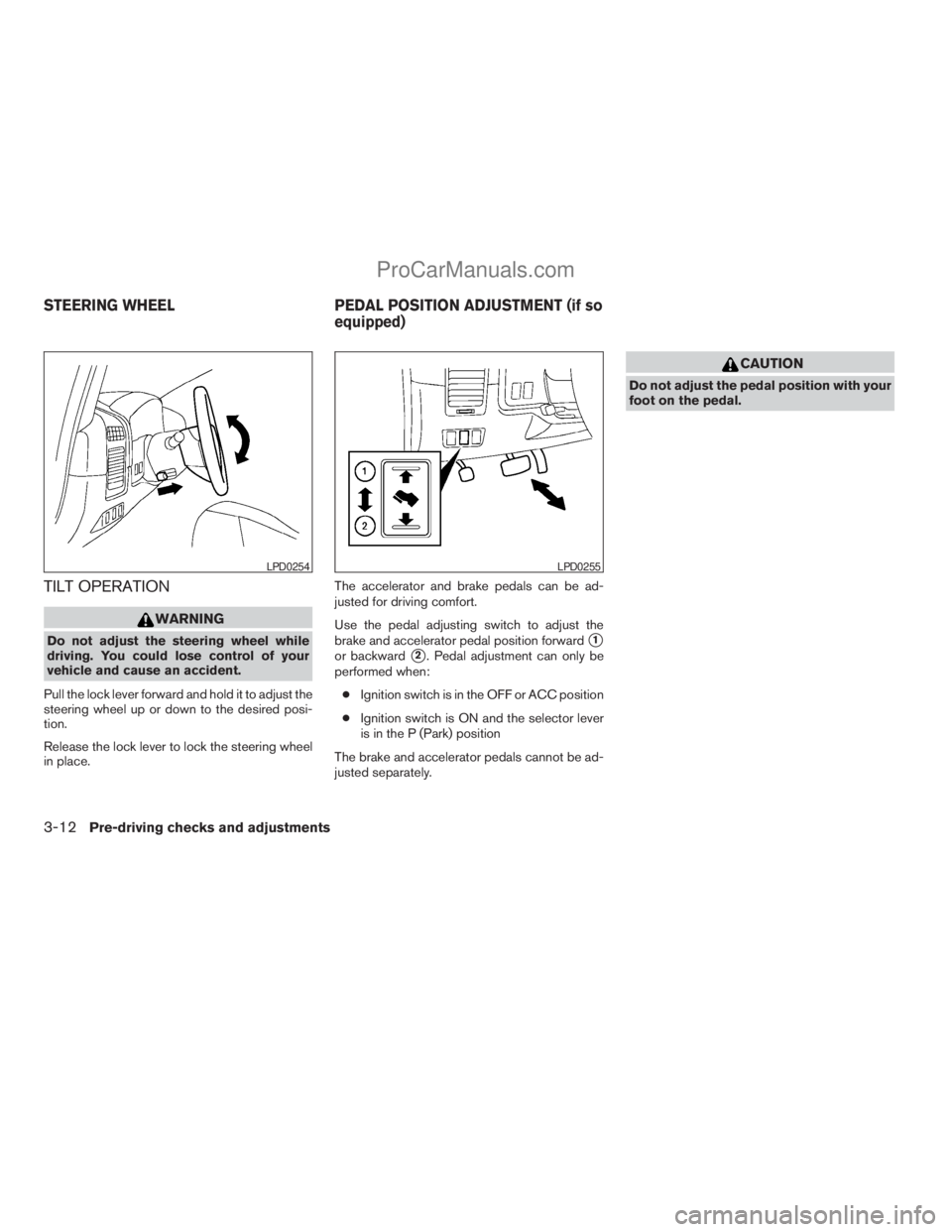
TILT OPERATION
WARNING
Do not adjust the steering wheel while
driving. You could lose control of your
vehicle and cause an accident.
Pull the lock lever forward and hold it to adjust the
steering wheel up or down to the desired posi-
tion.
Release the lock lever to lock the steering wheel
in place.The accelerator and brake pedals can be ad-
justed for driving comfort.
Use the pedal adjusting switch to adjust the
brake and accelerator pedal position forwards1
or backwards2. Pedal adjustment can only be
performed when:
cIgnition switch is in the OFF or ACC position
cIgnition switch is ON and the selector lever
is in the P (Park) position
The brake and accelerator pedals cannot be ad-
justed separately.
CAUTION
Do not adjust the pedal position with your
foot on the pedal.
LPD0254LPD0255
STEERING WHEEL PEDAL POSITION ADJUSTMENT (if so
equipped)
3-12Pre-driving checks and adjustments
ZREVIEW COPYÐ2008 Titan(tzw)
Owners ManualÐUSA_English(nna)
10/11/07Ðdebbie
X
ProCarManuals.com
Page 155 of 408
AUTOMATIC ANTI-GLARE
REARVIEW MIRROR (if so equipped)
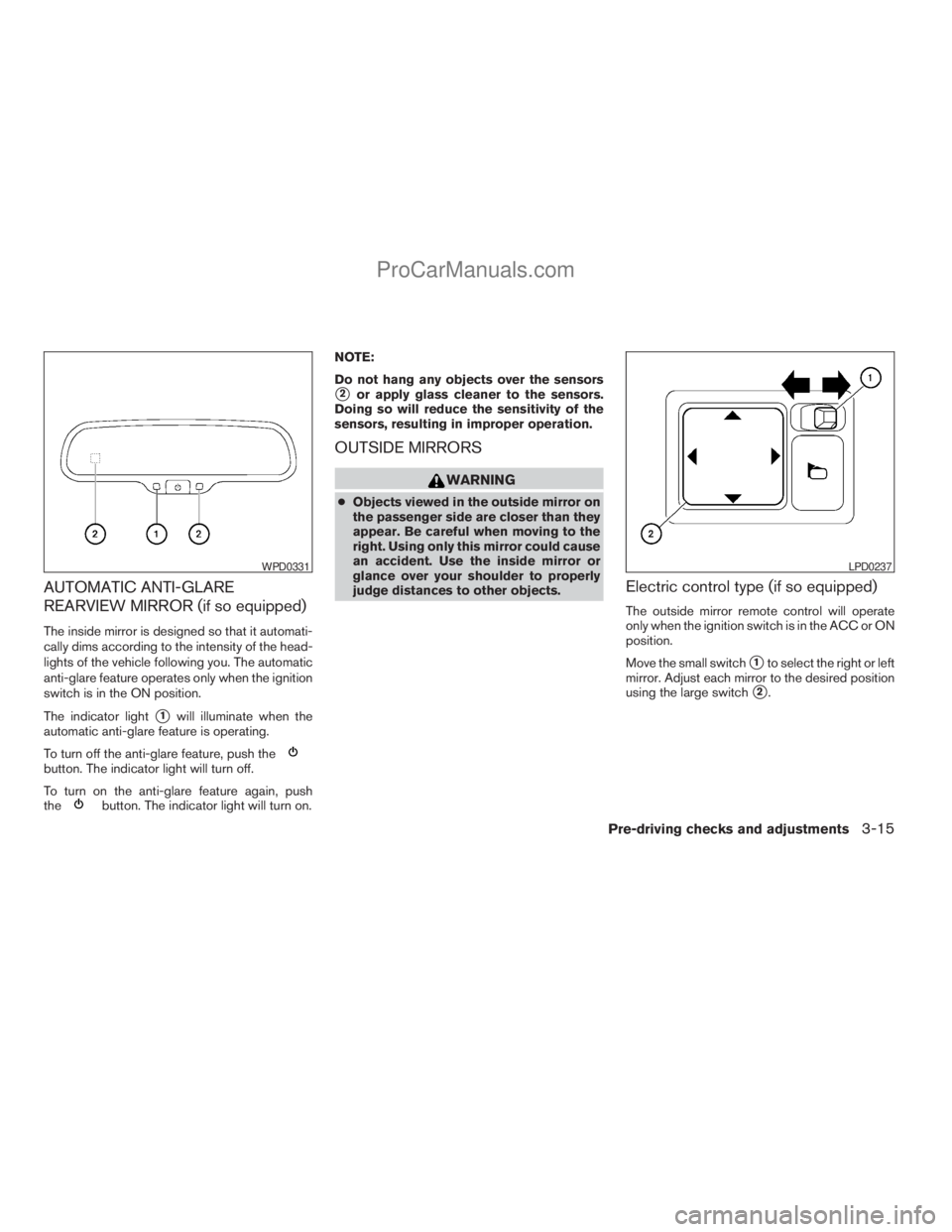
The inside mirror is designed so that it automati-
cally dims according to the intensity of the head-
lights of the vehicle following you. The automatic
anti-glare feature operates only when the ignition
switch is in the ON position.
The indicator light
s1will illuminate when the
automatic anti-glare feature is operating.
To turn off the anti-glare feature, push the
button. The indicator light will turn off.
To turn on the anti-glare feature again, push
the
button. The indicator light will turn on.NOTE:
Do not hang any objects over the sensors
s2or apply glass cleaner to the sensors.
Doing so will reduce the sensitivity of the
sensors, resulting in improper operation.
OUTSIDE MIRRORS
WARNING
cObjects viewed in the outside mirror on
the passenger side are closer than they
appear. Be careful when moving to the
right. Using only this mirror could cause
an accident. Use the inside mirror or
glance over your shoulder to properly
judge distances to other objects.
Electric control type (if so equipped)
The outside mirror remote control will operate
only when the ignition switch is in the ACC or ON
position.
Move the small switch
s1to select the right or left
mirror. Adjust each mirror to the desired position
using the large switch
s2.
WPD0331LPD0237
Pre-driving checks and adjustments3-15
ZREVIEW COPYÐ2008 Titan(tzw)
Owners ManualÐUSA_English(nna)
10/11/07Ðdebbie
X
ProCarManuals.com