ECU NISSAN TITAN 2008 Repair Manual
[x] Cancel search | Manufacturer: NISSAN, Model Year: 2008, Model line: TITAN, Model: NISSAN TITAN 2008Pages: 408, PDF Size: 6.08 MB
Page 364 of 408
5. Determine the combined weight of
luggage and cargo being loaded on
the vehicle. That weight may not
safely exceed the available cargo and
luggage load capacity calculated in
Step 4.
6. If your vehicle will be towing a trailer,
load from your trailer will be trans-
ferred to your vehicle. Consult this
manual to determine how this re-
duces the available cargo and lug-
gage load capacity of your vehicle.
Before driving a loaded vehicle, confirm
that you do not exceed the Gross Vehicle
Weight Rating (GVWR) or the Gross Axle
Weight Rating (GAWR) for your vehicle.
See “Measurement of Weights” later in
this section.
Also check tires for proper inflation pres-
sures. See the Tire and Loading Informa-
tion label.
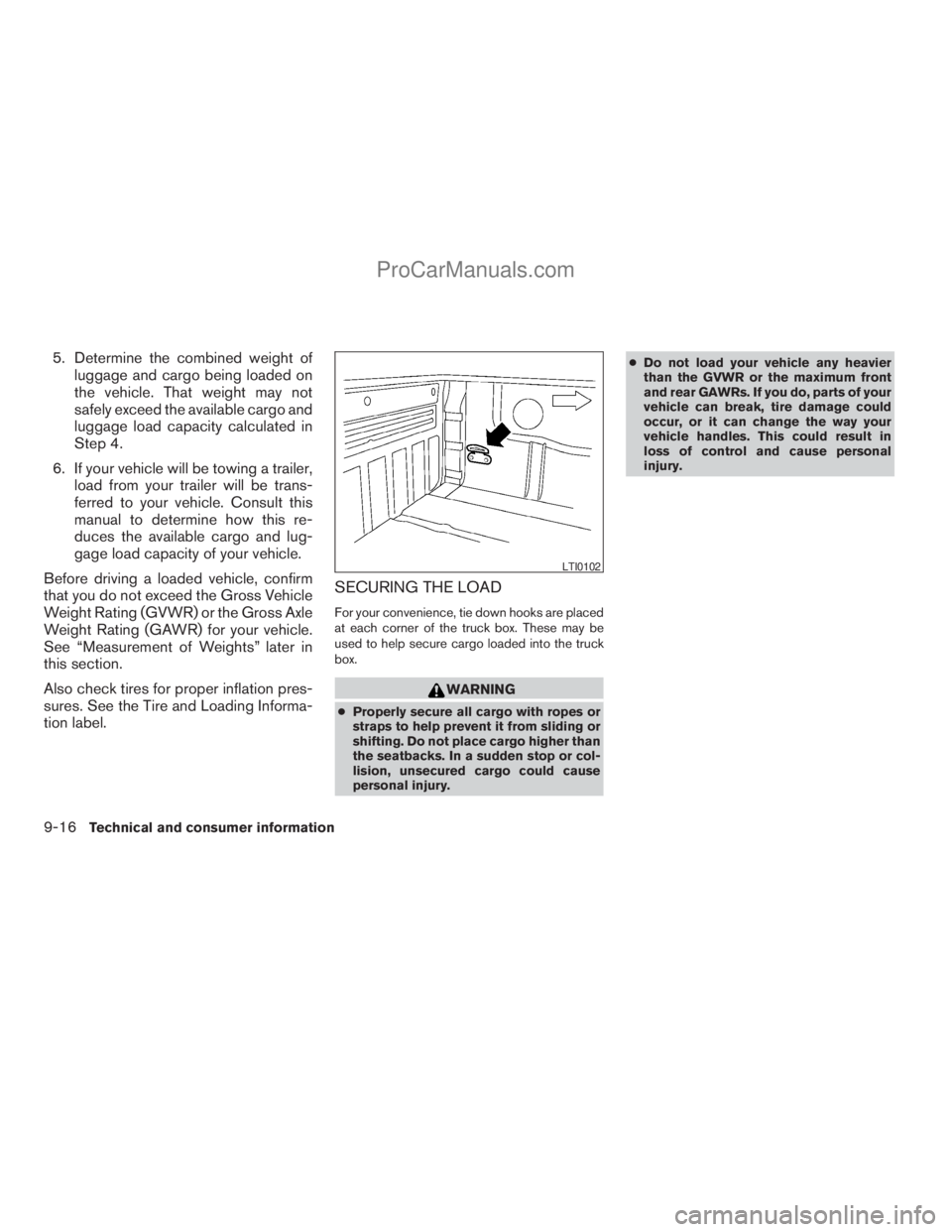
SECURING THE LOAD
For your convenience, tie down hooks are placed
at each corner of the truck box. These may be
used to help secure cargo loaded into the truck
box.
WARNING
cProperly secure all cargo with ropes or
straps to help prevent it from sliding or
shifting. Do not place cargo higher than
the seatbacks. In a sudden stop or col-
lision, unsecured cargo could cause
personal injury.cDo not load your vehicle any heavier
than the GVWR or the maximum front
and rear GAWRs. If you do, parts of your
vehicle can break, tire damage could
occur, or it can change the way your
vehicle handles. This could result in
loss of control and cause personal
injury.
LTI0102
9-16Technical and consumer information
ZREVIEW COPYÐ2008 Titan(tzw)
Owners ManualÐUSA_English(nna)
10/12/07Ðdebbie
X
ProCarManuals.com
Page 365 of 408
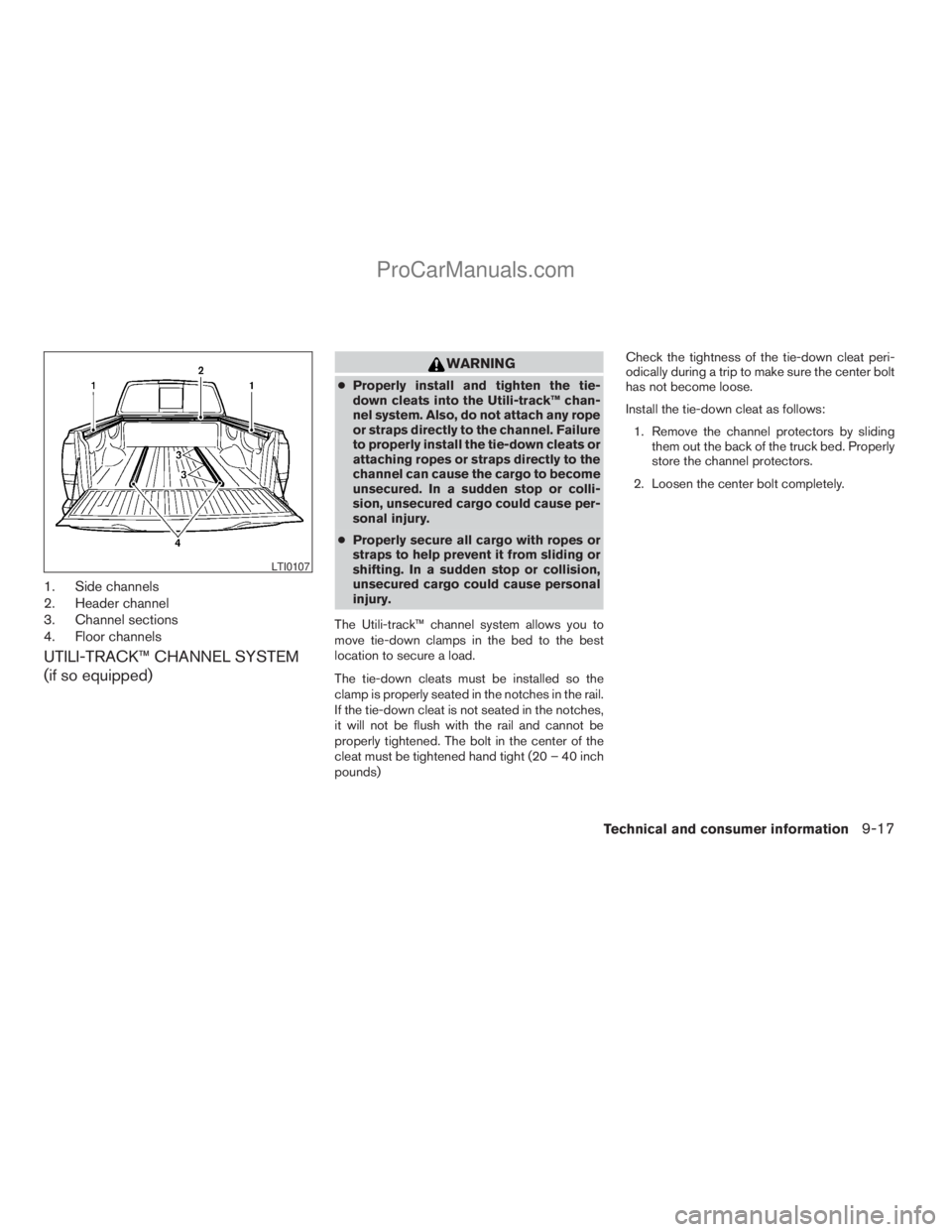
1. Side channels
2. Header channel
3. Channel sections
4. Floor channels
UTILI-TRACK™ CHANNEL SYSTEM
(if so equipped)
WARNING
cProperly install and tighten the tie-
down cleats into the Utili-track™ chan-
nel system. Also, do not attach any rope
or straps directly to the channel. Failure
to properly install the tie-down cleats or
attaching ropes or straps directly to the
channel can cause the cargo to become
unsecured. In a sudden stop or colli-
sion, unsecured cargo could cause per-
sonal injury.
cProperly secure all cargo with ropes or
straps to help prevent it from sliding or
shifting. In a sudden stop or collision,
unsecured cargo could cause personal
injury.
The Utili-track™ channel system allows you to
move tie-down clamps in the bed to the best
location to secure a load.
The tie-down cleats must be installed so the
clamp is properly seated in the notches in the rail.
If the tie-down cleat is not seated in the notches,
it will not be flush with the rail and cannot be
properly tightened. The bolt in the center of the
cleat must be tightened hand tight (20 – 40 inch
pounds)Check the tightness of the tie-down cleat peri-
odically during a trip to make sure the center bolt
has not become loose.
Install the tie-down cleat as follows:
1. Remove the channel protectors by sliding
them out the back of the truck bed. Properly
store the channel protectors.
2. Loosen the center bolt completely.
LTI0107
Technical and consumer information9-17
ZREVIEW COPYÐ2008 Titan(tzw)
Owners ManualÐUSA_English(nna)
10/12/07Ðdebbie
X
ProCarManuals.com
Page 369 of 408
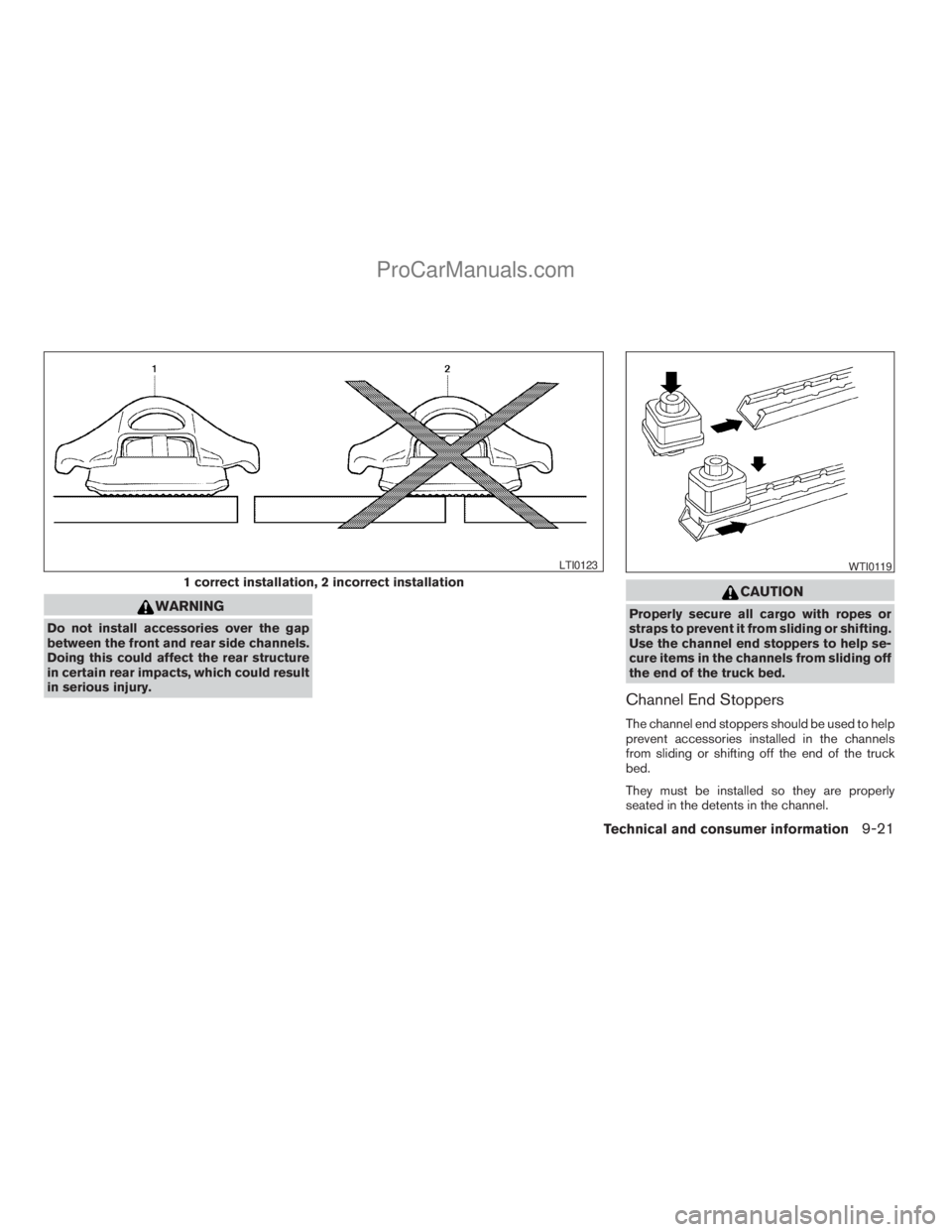
WARNING
Do not install accessories over the gap
between the front and rear side channels.
Doing this could affect the rear structure
in certain rear impacts, which could result
in serious injury.
CAUTION
Properly secure all cargo with ropes or
straps to prevent it from sliding or shifting.
Use the channel end stoppers to help se-
cure items in the channels from sliding off
the end of the truck bed.
Channel End Stoppers
The channel end stoppers should be used to help
prevent accessories installed in the channels
from sliding or shifting off the end of the truck
bed.
They must be installed so they are properly
seated in the detents in the channel.
1 correct installation, 2 incorrect installation
LTI0123WTI0119
Technical and consumer information9-21
ZREVIEW COPYÐ2008 Titan(tzw)
Owners ManualÐUSA_English(nna)
10/12/07Ðdebbie
X
ProCarManuals.com
Page 370 of 408
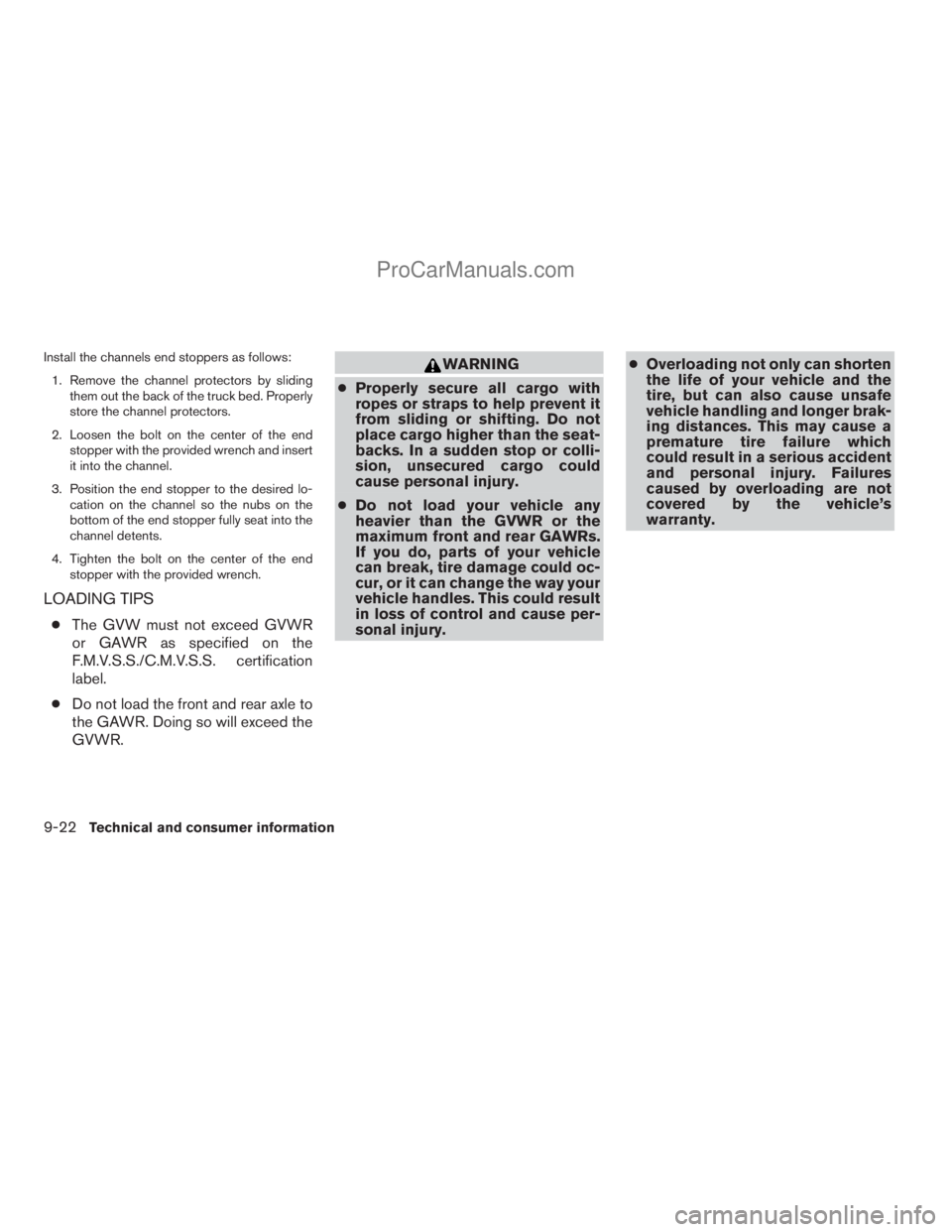
Install the channels end stoppers as follows:
1. Remove the channel protectors by sliding
them out the back of the truck bed. Properly
store the channel protectors.
2. Loosen the bolt on the center of the end
stopper with the provided wrench and insert
it into the channel.
3. Position the end stopper to the desired lo-
cation on the channel so the nubs on the
bottom of the end stopper fully seat into the
channel detents.
4. Tighten the bolt on the center of the end
stopper with the provided wrench.
LOADING TIPS
cThe GVW must not exceed GVWR
or GAWR as specified on the
F.M.V.S.S./C.M.V.S.S. certification
label.
cDo not load the front and rear axle to
the GAWR. Doing so will exceed the
GVWR.
WARNING
cProperly secure all cargo with
ropes or straps to help prevent it
from sliding or shifting. Do not
place cargo higher than the seat-
backs. In a sudden stop or colli-
sion, unsecured cargo could
cause personal injury.
cDo not load your vehicle any
heavier than the GVWR or the
maximum front and rear GAWRs.
If you do, parts of your vehicle
can break, tire damage could oc-
cur, or it can change the way your
vehicle handles. This could result
in loss of control and cause per-
sonal injury.cOverloading not only can shorten
the life of your vehicle and the
tire, but can also cause unsafe
vehicle handling and longer brak-
ing distances. This may cause a
premature tire failure which
could result in a serious accident
and personal injury. Failures
caused by overloading are not
covered by the vehicle’s
warranty.
9-22
Technical and consumer information
ZREVIEW COPYÐ2008 Titan(tzw)
Owners ManualÐUSA_English(nna)
10/12/07Ðdebbie
X
ProCarManuals.com
Page 372 of 408
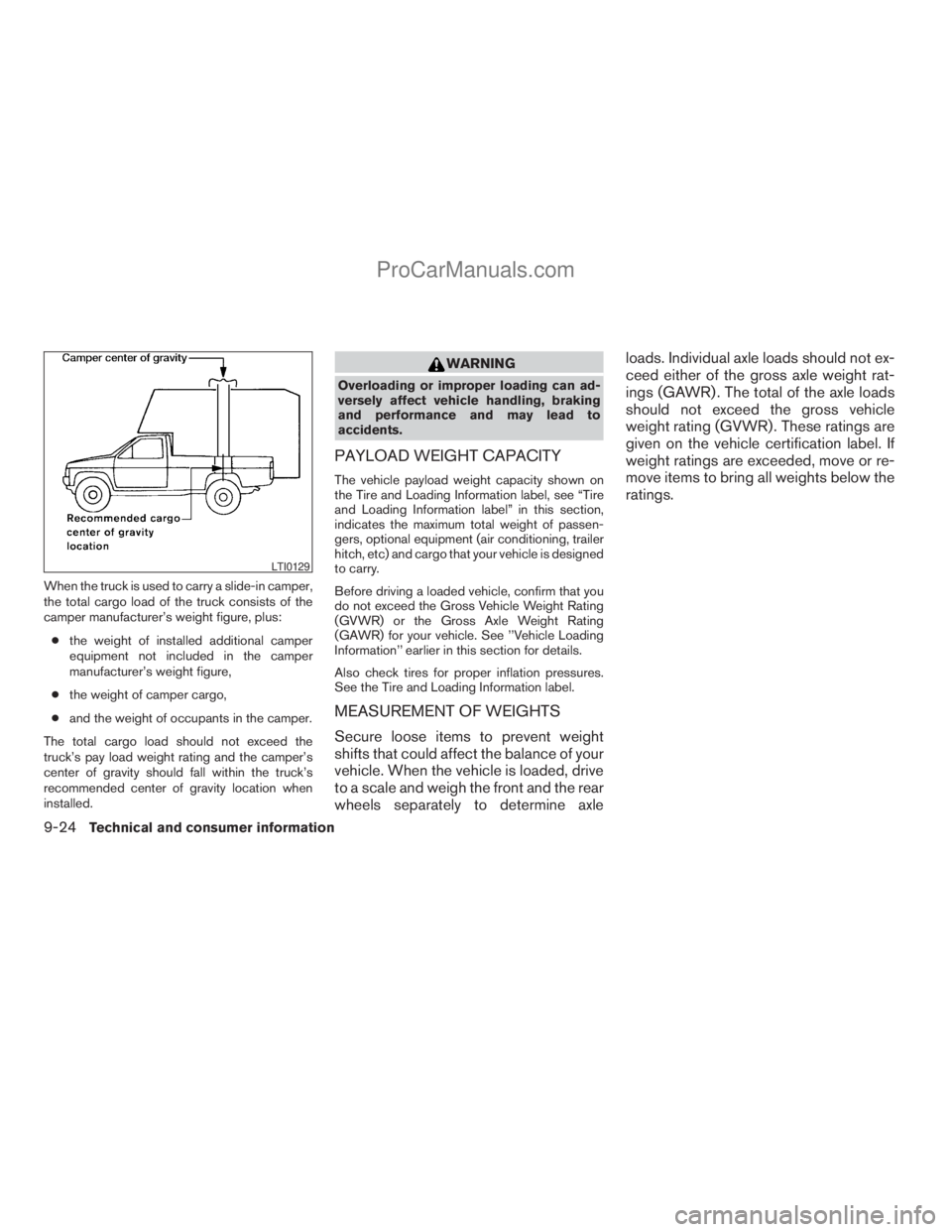
When the truck is used to carry a slide-in camper,
the total cargo load of the truck consists of the
camper manufacturer’s weight figure, plus:
cthe weight of installed additional camper
equipment not included in the camper
manufacturer’s weight figure,
cthe weight of camper cargo,
cand the weight of occupants in the camper.
The total cargo load should not exceed the
truck’s pay load weight rating and the camper’s
center of gravity should fall within the truck’s
recommended center of gravity location when
installed.
WARNING
Overloading or improper loading can ad-
versely affect vehicle handling, braking
and performance and may lead to
accidents.
PAYLOAD WEIGHT CAPACITY
The vehicle payload weight capacity shown on
the Tire and Loading Information label, see “Tire
and Loading Information label” in this section,
indicates the maximum total weight of passen-
gers, optional equipment (air conditioning, trailer
hitch, etc) and cargo that your vehicle is designed
to carry.
Before driving a loaded vehicle, confirm that you
do not exceed the Gross Vehicle Weight Rating
(GVWR) or the Gross Axle Weight Rating
(GAWR) for your vehicle. See ’’Vehicle Loading
Information’’ earlier in this section for details.
Also check tires for proper inflation pressures.
See the Tire and Loading Information label.
MEASUREMENT OF WEIGHTS
Secure loose items to prevent weight
shifts that could affect the balance of your
vehicle. When the vehicle is loaded, drive
to a scale and weigh the front and the rear
wheels separately to determine axleloads. Individual axle loads should not ex-
ceed either of the gross axle weight rat-
ings (GAWR) . The total of the axle loads
should not exceed the gross vehicle
weight rating (GVWR) . These ratings are
given on the vehicle certification label. If
weight ratings are exceeded, move or re-
move items to bring all weights below the
ratings.
LTI0129
9-24Technical and consumer information
ZREVIEW COPYÐ2008 Titan(tzw)
Owners ManualÐUSA_English(nna)
10/12/07Ðdebbie
X
ProCarManuals.com
Page 380 of 408
TOWING SAFETY
Trailer hitch
Your vehicle may be equipped with an optional
trailer tow package. The trailer tow package in-
cludes a receiver-type frame mounted hitch. This
hitch is rated for the maximum towing capacity of
this vehicle when the proper towing equipment is
used. Choose a proper ball mount and hitch ball
that is rated for the trailer to be towed. Genuine
Nissan ball mounts and hitch balls are available
from your NISSAN dealer.
If your vehicle is not equipped with the optional
trailer tow package, check the towing capacity of
your bumper hitch or receiver-type frame
mounted hitch. Choose a proper hitch for your
vehicle and trailer. A genuine Nissan trailer hitch
is available from your NISSAN dealer. Make sure
the trailer hitch is securely attached to the vehicle
to help avoid personal injury or property damage
due to sway caused by crosswinds, rough road
surfaces or passing trucks.
A hitch used for towing 5th wheel and gooseneck
trailers can also be installed on your vehicle.
Contact a professional supplier of towing equip-
ment to purchase and have a 5th wheel or goose-
neck hitch installed.
WARNING
Trailer hitch components have specific
weight ratings. Your vehicle may be ca-
pable of towing a trailer heavier than the
weight rating of the hitch components.
Never exceed the weight rating of the
hitch components. Doing so can cause
serious personal injury or property
damage.
Hitch ball
Choose a hitch ball of the proper size and weight
rating for your trailer:
cThe required hitch ball size is stamped on
most trailer couplers. Most hitch balls also
have the size printed on the top of the ball.
cChoose the proper class hitch ball based on
the trailer weight.
cThe diameter of the threaded shank of the
hitch ball must be matched to the ball mount
hole diameter. The hitch ball shank should
be no more than 1/16” smaller than the hole
in the ball mount.
cThe threaded shank of the hitch ball must be
long enough to be properly secured to the
ball mount. There should be at least 2
threads showing beyond the lock washer
and nut.
Ball mount
The hitch ball is attached to the ball mount and
the ball mount is inserted into the hitch receiver.
Choose a proper class ball mount based on the
trailer weight. Additionally, the ball mount should
be chosen to keep the trailer tongue level with the
ground.
9-32Technical and consumer information
ZREVIEW COPYÐ2008 Titan(tzw)
Owners ManualÐUSA_English(nna)
10/12/07Ðdebbie
X
ProCarManuals.com
Page 382 of 408
tem. Follow the instructions provided by the
manufacturer for installing and using the sway
control device.
Class I hitch
Class I trailer hitch equipment (receiver, ball
mount and hitch ball) can be used to tow trailers
of a maximum weight of 2,000 lb (909 kg) .
Class II hitch
Class II trailer hitch equipment (receiver, ball
mount and hitch ball) can be used to tow trailers
of a maximum weight of 3,500 lb (1,510 kg) .
Class III hitch
Class III trailer hitch equipment (receiver, ball
mount and hitch ball) can be used to tow trailers
of a maximum weight of 5,000 lb (2,272 kg) .
The genuine NISSAN step bumper is considered
a Class III ball mount.
Class IV hitch
Class IV trailer hitch equipment (receiver, ball
mount and hitch ball) can be used to tow trailers
of a maximum weight of 10,000 lb (4,545 kg) . A
weight distributing hitch should be used to tow
trailers that weigh over 5,000 lb (2,272 kg) .
Your vehicle may be equipped with Class IV
trailer hitch equipment that has a 10,000 lb(4,545 kg) maximum weight rating, but your ve-
hicle is only capable of towing the maximum
trailer weights shown in the “Towing
Load/Specification” chart earlier in this section.
5th wheel/gooseneck
A 5th wheel or gooseneck trailer can be towed by
installing a 5th wheel or gooseneck trailer hitch.
These types of hitches are mounted in the bed of
the pick-up. A professional trailer equipment sup-
plier should install these hitches as it is very
important to mount the hitch correctly to distrib-
ute the king pin weight for the proper load carry-
ing and sway control performance.
The king pin weight should be 15 to 25 percent of
the fully loaded trailer. Make sure the king pin
weight does not cause the gross vehicle weight
to exceed the Gross Maximum Weight Rating or
the rear axle weight to exceed the Rear Gross
Axle Weight rating, see “Maximum load limits”
earlier in this section.
The weight of the trailer should not exceed the
maximum towing capacity for the vehicle, see
“Towing Load/Specification” chart earlier in this
section.
Make sure the trailer design allows for the correct
vehicle to trailer clearances before purchasing a
5th wheel trailer.
CAUTION
cSpecial hitches which include frame re-
inforcements are required for towing
above 2,000 lb (907 kg) . Suitable genu-
ine NISSAN hitches, ball mounts and
hitch balls for pickup trucks and sport
utility vehicles are available at a
NISSAN dealer.
cThe hitch should not be attached to or
affect the operation of the impact-
absorbing bumper.
cDo not use axle-mounted hitches.
cDo not modify the vehicle exhaust sys-
tem, brake system, etc. to install a
trailer hitch.
cTo reduce the possibility of additional
damage if your vehicle is struck from
the rear, where practical, remove the
receiver when not in use.
cRegularly check that all trailer hitch
mounting bolts are securely mounted.
cWhen towing with the hitch ball
mounted to the rear bumper, do not
make sharp turns. The trailer may con-
tact the bumper and cause damage to
the bumper or trailer.
9-34Technical and consumer information
ZREVIEW COPYÐ2008 Titan(tzw)
Owners ManualÐUSA_English(nna)
10/12/07Ðdebbie
X
ProCarManuals.com
Page 386 of 408
Pre-towing tips
cBe certain your vehicle maintains a level
position when a loaded and/or unloaded
trailer is hitched. Do not drive the vehicle if it
has an abnormal nose-up or nose-down
condition; check for improper tongue load,
overload, worn suspension or other possible
causes of either condition.
cAlways secure items in the trailer to prevent
load shift while driving.
cKeep the cargo load as low as possible in
the trailer to keep the trailer center of gravity
low.
cLoad the trailer so approximately 60% of the
trailer load is in the front half and 40% is in
the back half. Also make sure the load is
balanced side to side.
cCheck your hitch, trailer tire pressure, ve-
hicle tire pressure, trailer light operation, and
trailer wheel lug nuts every time you attach a
trailer to the vehicle.
cBe certain your rearview mirrors conform to
all federal, state or local regulations. If not,
install any mirrors required for towing before
driving the vehicle.cDetermine the overall height of the vehicle
and trailer so the required clearance is
known.
Trailer towing tips
In order to gain skill and an understanding of the
vehicle’s behavior, you should practice turning,
stopping and backing up in an area which is free
from traffic. Steering stability and braking perfor-
mance will be somewhat different than under
normal driving conditions.
cAlways secure items in the trailer to prevent
load shift while driving.
cLock the trailer hitch coupler with a pin or
lock to prevent the coupler from inadvert-
ently becoming unlatched.
cAvoid abrupt starts, acceleration or stops.
cAvoid sharp turns or lane changes.
cAlways drive your vehicle at a moderate
speed.
cWhen backing up, hold the bottom of the
steering wheel with one hand. Move your
hand in the direction in which you want the
trailer to go. Make small corrections and
back up slowly. If possible, have someone
guide you when you are backing up.Always block the wheels on both vehicle and
trailer when parking. Parking on a slope is not
recommended; however, if you must do so:
CAUTION
If you move the shift selector lever to the P
(Park) position before blocking the
wheels and applying the parking brake,
transmission damage could occur.
1. Apply and hold the brake pedal.
2. Have someone place blocks on the downhill
side of the vehicle and trailer wheels.
3. After the wheel blocks are in place, slowly
release the brake pedal until the blocks ab-
sorb the vehicle load.
4. Apply the parking brake.
5. Shift the transmission into P (Park) .
6. Make sure the
indicator light (if so
equipped) indicates the transfer case is in
4H, 4L, or 2H and that the ATP light is off. If
the
indicator light is flashing, or the
ATP light is ON, make sure the transmission
is in P (Park) (AT) and turn the 4WD switch
to 2WD or 4H. See9Automatic transmission
park warning light9in the9Instruments and
controls9section and9Using four wheel
drive9in the9Starting and driving9section.
7. Turn off the engine.
9-38Technical and consumer information
ZREVIEW COPYÐ2008 Titan(tzw)
Owners ManualÐUSA_English(nna)
10/12/07Ðdebbie
X
ProCarManuals.com
Page 395 of 408
10 Index
4WD warning light...............2-15
A
Active brake limited slip (ABLS) system
(if so equipped).................5-30
Active Head Restraint..............1-7
Adjusting pedal position............3-12
Air bag (See supplemental restraint
system).....................1-46
Air bag system
Front (See supplemental front impact air
bag system).................1-54
Air bag warning labels.............1-61
Air bag warning light...........1-61, 2-17
Air cleaner housing filter............8-17
Air conditioner
Air conditioner operation . . .4-16, 4-23, 4-31
Air conditioner service...........4-37
Air conditioner specification label.....9-12
Air conditioner system refrigerant and
oil recommendations.............9-7
Heater and air conditioner controls. . . .4-13,
4-21, 4-28, 4-35
Servicing air conditioner..........4-37
Air flow charts...........4-17, 4-24, 4-31
Alarm system
(See vehicle security system).........2-27
Anchor point locations.............1-27
Antenna.....................4-60
Anti-lock brake warning light......2-13, 2-14Anti-lock Braking System (ABS)........5-29
Audible reminders................2-20
Audio system..................4-37
Compact Disc (CD) changer.......4-55
Compact disc (CD) player.........4-46
FM/AM radio with compact disc (CD)
player....................4-44
FM/AM/SAT radio with compact disc (CD)
changer...................4-52
Radio....................4-37
Rear audio controls.............4-60
Audio System
Settings...................4-52
Audio system
Steering wheel audio control switch. . . .4-58
Autolight switch.................2-32
Automatic
Automatic drive positioner.........3-21
Automatic power window switch.....2-51
Automatic transmission position indicator
light.....................2-26
Driving with automatic transmission. . . .5-12
Transmission selector lever lock
release....................5-16
Automatic transmission fluid temperature
gauge.......................2-8
AUX jack.....................4-57
B
Back button....................4-3Battery......................8-13
Charge warning light............2-15
Before starting the engine...........5-10
Belt (See drive belt)..............8-15
Block heater
Engine....................5-34
BluetoothThands-free phone system.....4-71
Booster seats..................1-41
Brake
Anti-lock Braking System (ABS)......5-29
Brake fluid..................8-12
Brake light (See stop light).........8-27
Brake system................5-28
Brake warning light.............2-14
Brake wear indicators........2-20, 8-20
Parking brake operation..........5-18
Self-adjusting brakes............8-20
Brakes......................8-20
Break-in schedule................5-20
Brightness control
Instrument panel..............2-34
Brightness/contrast button...........4-12
Bulb check/instrument panel..........2-13
Bulb replacement................8-27
C
Capacities and recommended
fuel/lubricants...................9-2
Car phone or CB radio.............4-71
Cargo light switch...............2-35
ZREVIEW COPYÐ2008 Titan(tzw)
Owners ManualÐUSA_English(nna)
10/12/07Ðdebbie
X
ProCarManuals.com
Page 398 of 408
C.M.V.S.S. certification label........9-11
Emission control information label.....9-11
Engine serial number............9-11
F.M.V.S.S. certification label........9-11
Tire and Loading Information label.....9-12
Vehicle identification number (VIN)
plate.....................9-10
Warning labels (for SRS)..........1-61
Language setting................4-10
LATCH (Lower Anchors and Tethers
for CHildren) System..............1-25
License plate
Installing the license plate.........9-12
Light
Air bag warning light.........1-61, 2-17
Brake light (See stop light).........8-27
Bulb check/instrument panel........2-13
Bulb replacement..............8-27
Charge warning light............2-15
Fog light switch...............2-34
Headlight and turn signal switch......2-31
Headlight control switch..........2-31
Headlights..................8-25
Interior light.................2-55
Light bulbs..................8-25
Low tire pressure warning light......2-16
Low washer fluid warning light.......2-26
Passenger air bag and status light.....1-55
Personal lights...............2-56
Security indicator light...........2-19
Warning/indicator lights and audible
reminders..................2-13
Lights
Map lights..................2-56
Lock
Child safety rear door lock..........3-6Door locks..................3-3
Glove box lock...............2-44
Power door locks...............3-4
Low fuel warning light......2-16, 2-17, 2-26
Low tire pressure warning light........2-16
Low washer fluid warning light.........2-26
Luggage (See vehicle loading information) . .9-13
M
Maintenance
Changing the maintenance interval.....4-5
Displaying the maintenance notice
reminder....................4-6
General maintenance............8-2
Inside the vehicle...............8-3
Maintenance precautions..........8-5
Outside the vehicle..............8-2
Resetting the maintenance interval.....4-5
Seat belt maintenance...........1-22
Setting....................4-5
Under the hood and vehicle.........8-4
Malfunction indicator light...........2-18
Manual front seat adjustment.......1-2, 1-3
Manual windows................2-52
Map lights....................2-56
Map pocket...................2-45
Meters and gauges................2-4
Instrument brightness control.......2-34
Mirror
Inside mirror.................3-14
Outside mirrors...............3-15
Vanity mirror.................3-14N
NISSAN mobile entertainment system
(MES)......................4-61
NISSAN vehicle immobilizer
system................2-28, 3-2, 5-9
O
Octane rating (See fuel octane rating).....9-4
Odometer.....................2-5
Oil
Capacities and recommended
fuel/lubricants.................9-2
Changing engine oil.............8-9
Changing engine oil filter..........8-10
Checking engine oil level..........8-8
Engine oil...................8-8
Engine oil and oil filter recommendation . .9-6
Engine oil pressure low/engine coolant
temperature high warning light.......2-15
Engine oil viscosity..............9-7
Outside mirrors.................3-15
Overheat
If your vehicle overheats..........6-10
Owner’s manual order form..........9-45
Owner’s manual/service manual order
information....................9-45
10-4
ZREVIEW COPYÐ2008 Titan(tzw)
Owners ManualÐUSA_English(nna)
10/12/07Ðdebbie
X
ProCarManuals.com