ECU NISSAN TITAN 2016 2.G Manual PDF
[x] Cancel search | Manufacturer: NISSAN, Model Year: 2016, Model line: TITAN, Model: NISSAN TITAN 2016 2.GPages: 636, PDF Size: 7.17 MB
Page 524 of 636
WARNING
●Properly secure all cargo with ropes or
straps to help prevent it from sliding or
shifting. Do not place cargo higher than
the seatbacks. In a sudden stop or col-
lision, unsecured cargo could cause
personal injury.
● Do not load your vehicle any heavier
than the GVWR or the maximum front
and rear GAWRs. If you do, parts of your
vehicle can break, tire damage could
occur, or it can change the way your
vehicle handles. This could result in loss
of control and cause personal injury.
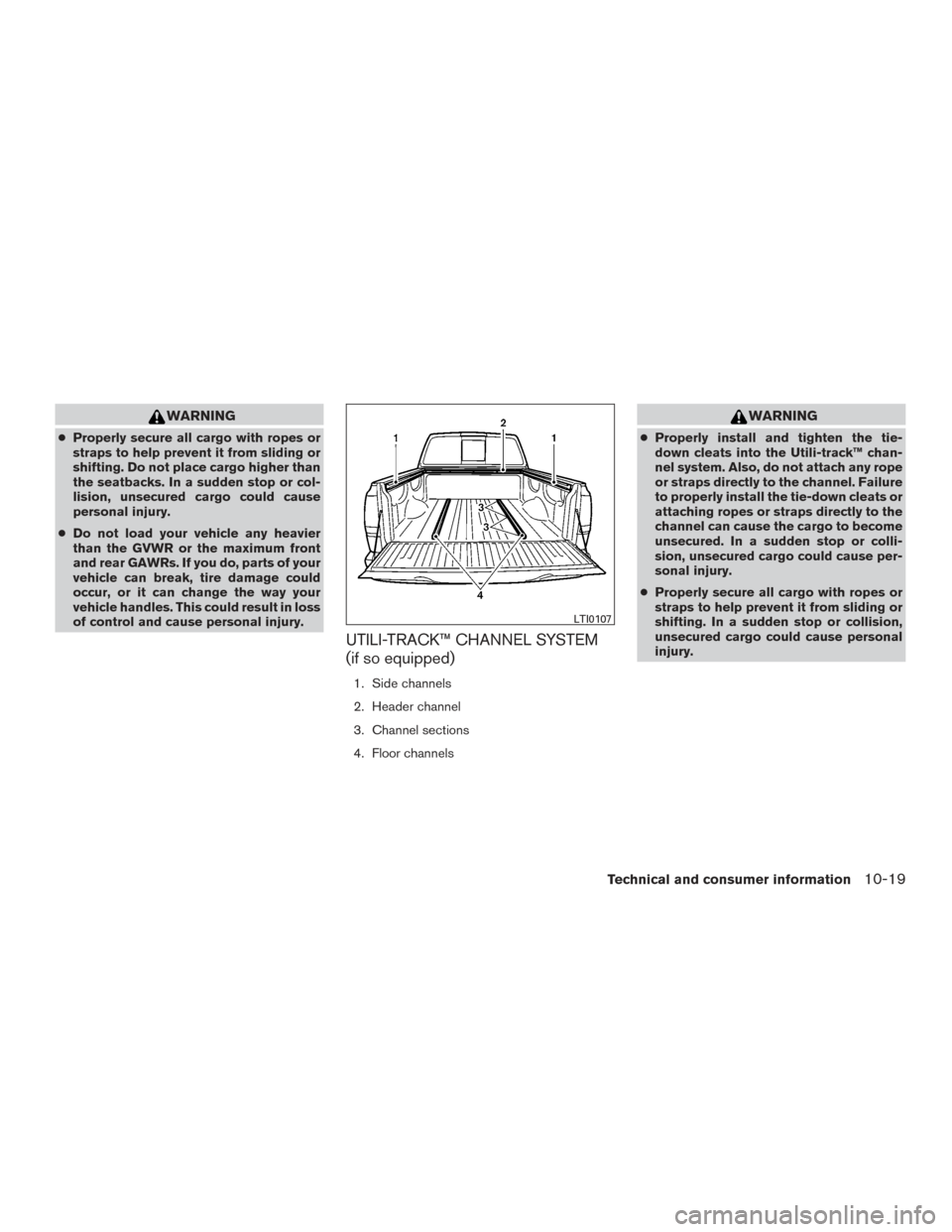
UTILI-TRACK™ CHANNEL SYSTEM
(if so equipped)
1. Side channels
2. Header channel
3. Channel sections
4. Floor channels
WARNING
● Properly install and tighten the tie-
down cleats into the Utili-track™ chan-
nel system. Also, do not attach any rope
or straps directly to the channel. Failure
to properly install the tie-down cleats or
attaching ropes or straps directly to the
channel can cause the cargo to become
unsecured. In a sudden stop or colli-
sion, unsecured cargo could cause per-
sonal injury.
● Properly secure all cargo with ropes or
straps to help prevent it from sliding or
shifting. In a sudden stop or collision,
unsecured cargo could cause personal
injury.
LTI0107
Technical and consumer information10-19
Page 525 of 636
NOTE:
If the bed liner storage bins (if so equipped)
are installed on the vehicle, use type B
cleats in the side channel locations. The
use of type A cleats in the side channel
locations with the bed liner storage bins
installed will interfere with bed liner stor-
age bin lid operation. For additional infor-
mation on bed liner storage bins, refer to
“Storage” in the “Instruments and con-
trols” section of this manual.
The Utili-track™ channel system allows you to
move tie-down clamps in the bed to the best
location to secure a load.
The tie-down cleats must be installed so the
clamp is properly seated in the notches in the rail.
If the tie-down cleat is not seated in the notches,
it will not be flush with the rail and cannot be
properly tightened. The bolt in the center of the
cleat must be tightened hand tight (20 – 40 in-
lbs)
Check the tightness of the tie-down cleat peri-
odically during a trip to make sure the center bolt
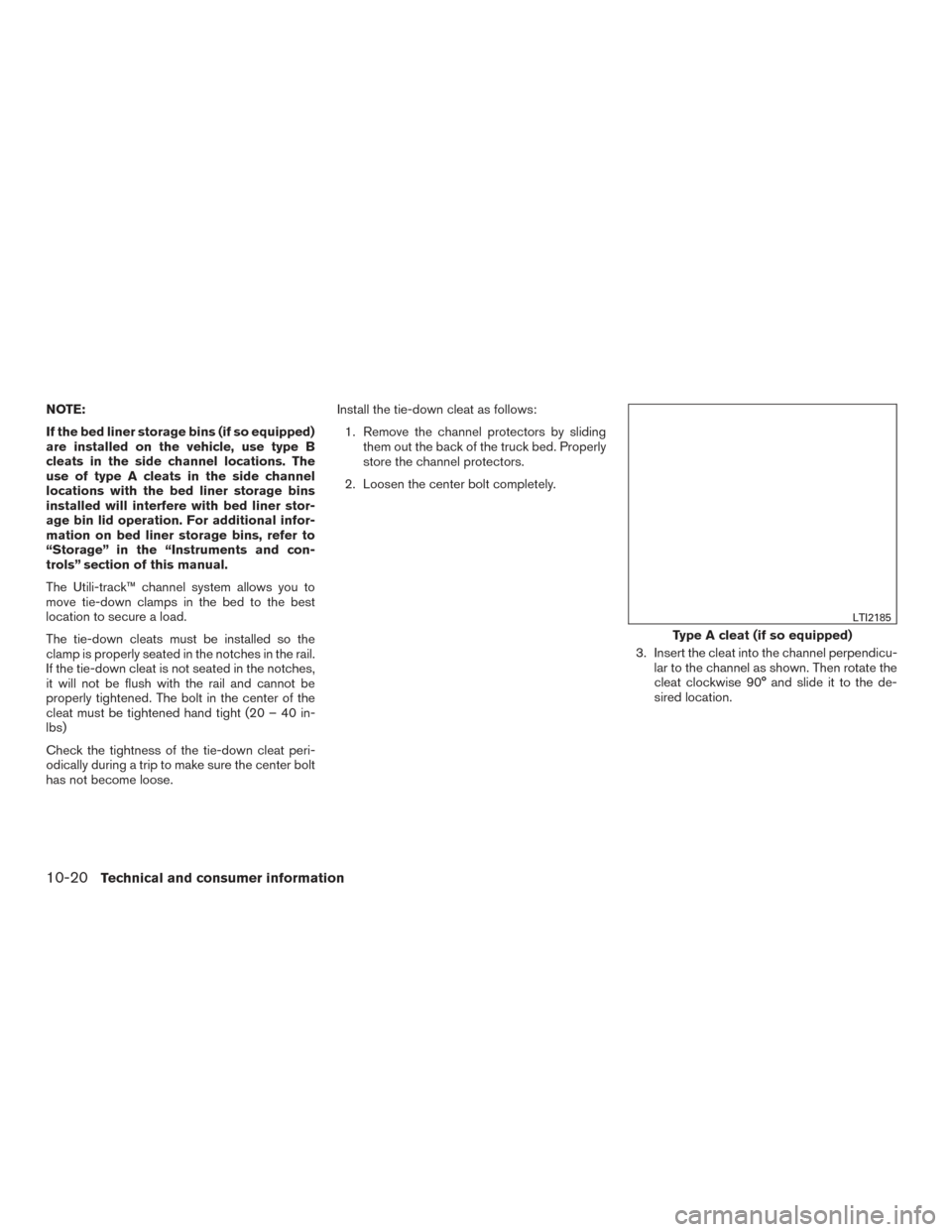
has not become loose.Install the tie-down cleat as follows:
1. Remove the channel protectors by sliding them out the back of the truck bed. Properly
store the channel protectors.
2. Loosen the center bolt completely.
3. Insert the cleat into the channel perpendicu-lar to the channel as shown. Then rotate the
cleat clockwise 90° and slide it to the de-
sired location.
Type A cleat (if so equipped)
LTI2185
10-20Technical and consumer information
Page 533 of 636
CAUTION
Properly secure all cargo with ropes or
straps to prevent it from sliding or shifting.
Use the channel end stoppers to help se-
cure items in the channels from sliding off
the end of the truck bed.
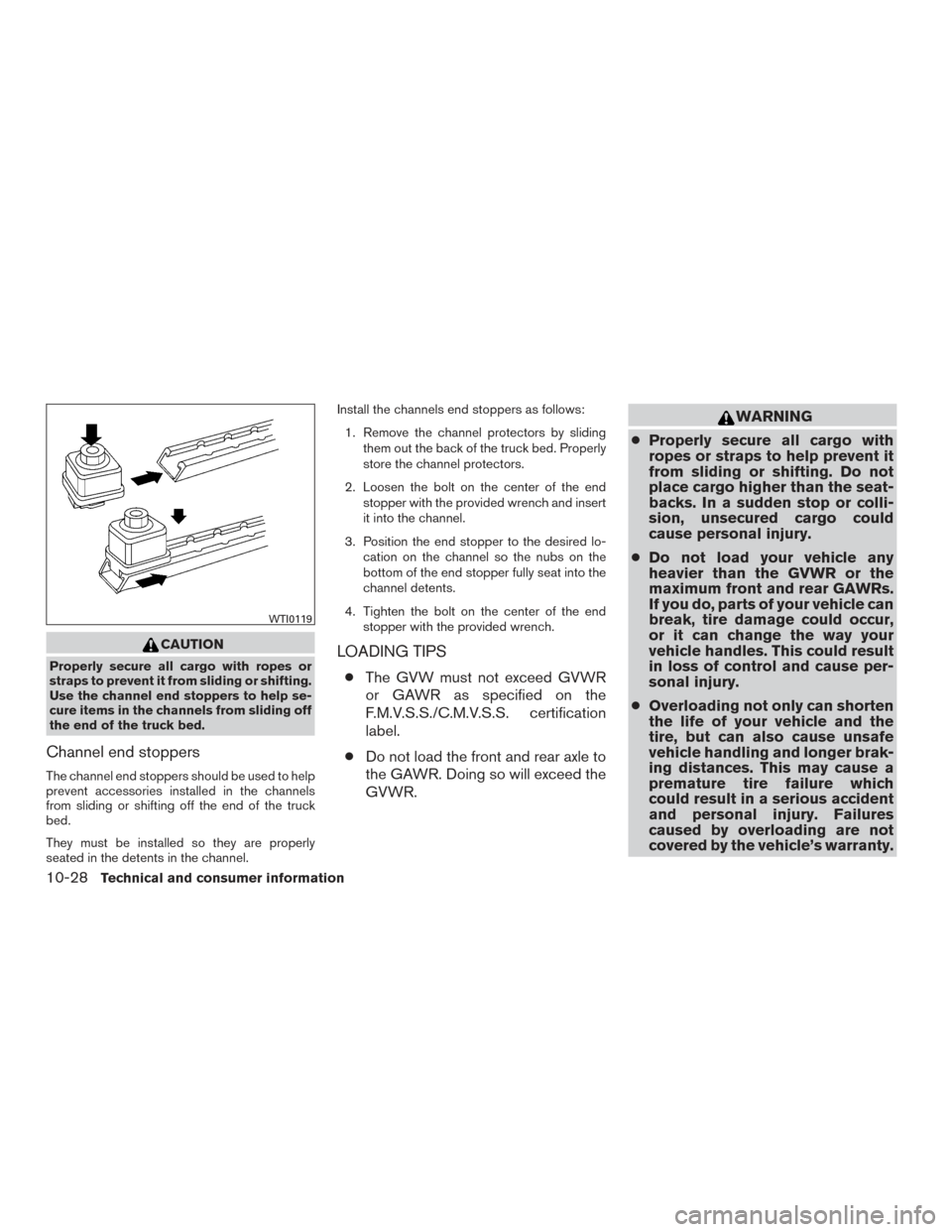
Channel end stoppers
The channel end stoppers should be used to help
prevent accessories installed in the channels
from sliding or shifting off the end of the truck
bed.
They must be installed so they are properly
seated in the detents in the channel.Install the channels end stoppers as follows:
1. Remove the channel protectors by sliding them out the back of the truck bed. Properly
store the channel protectors.
2. Loosen the bolt on the center of the end stopper with the provided wrench and insert
it into the channel.
3. Position the end stopper to the desired lo- cation on the channel so the nubs on the
bottom of the end stopper fully seat into the
channel detents.
4. Tighten the bolt on the center of the end stopper with the provided wrench.
LOADING TIPS
●The GVW must not exceed GVWR
or GAWR as specified on the
F.M.V.S.S./C.M.V.S.S. certification
label.
● Do not load the front and rear axle to
the GAWR. Doing so will exceed the
GVWR.
WARNING
● Properly secure all cargo with
ropes or straps to help prevent it
from sliding or shifting. Do not
place cargo higher than the seat-
backs. In a sudden stop or colli-
sion, unsecured cargo could
cause personal injury.
● Do not load your vehicle any
heavier than the GVWR or the
maximum front and rear GAWRs.
If you do, parts of your vehicle can
break, tire damage could occur,
or it can change the way your
vehicle handles. This could result
in loss of control and cause per-
sonal injury.
● Overloading not only can shorten
the life of your vehicle and the
tire, but can also cause unsafe
vehicle handling and longer brak-
ing distances. This may cause a
premature tire failure which
could result in a serious accident
and personal injury. Failures
caused by overloading are not
covered by the vehicle’s warranty.
WTI0119
10-28Technical and consumer information
Page 535 of 636
MEASUREMENT OF WEIGHTS
Secure loose items to prevent weight
shifts that could affect the balance of your
vehicle. When the vehicle is loaded, drive
to a scale and weigh the front and the rear
wheels separately to determine axle
loads. Individual axle loads should not ex-
ceed either of the gross axle weight rat-
ings (GAWR) . The total of the axle loads
should not exceed the gross vehicle
weight rating (GVWR) . These ratings are
given on the vehicle certification label. If
weight ratings are exceeded, move or re-
move items to bring all weights below the
ratings.
WARNING
Overloading or improper loading of a
trailer and its cargo can adversely affect
vehicle handling, braking and perfor-
mance and may lead to accidents.
CAUTION
●Do not tow a trailer or haul a heavy load
for the first 500 miles (805 km) . Your
engine, axle or other parts could be
damaged.
● For the first 500 miles (805 km) that you
tow a trailer, do not drive over 50 mph
(80 km/h) and do not make starts at full
throttle. This helps the engine and other
parts of your vehicle wear in at the
heavier load.
Your new vehicle was designed to be used pri-
marily to carry passengers and cargo. Remember
that towing a trailer places additional loads on
your vehicle’s engine, drive train, steering, brak-
ing and other systems.
A NISSAN Towing Guide (U.S. only) is available
on the website at www.nissanusa.com. This
guide includes information on trailer towing ca-
pability and the special equipment required for
proper towing.
MAXIMUM LOAD LIMITS
Maximum trailer loads
Never allow the total trailer load to exceed the
value specified in the “Towing
Load/Specification” chart found in this section.
The total trailer load equals trailer weight plus its
cargo weight. ● When towing a trailer load of 3,500 lbs.
(1,587 kg) or more, trailers with a brake
system MUST be used.
The maximum GCWR should not exceed the
value specified in the following “Towing
Load/Specification” chart.
TOWING A TRAILER
10-30Technical and consumer information
Page 541 of 636
TOWING SAFETY
Trailer hitch
Your vehicle may be equipped with an optional
trailer tow package. The trailer tow package in-
cludes a receiver-type frame mounted hitch. This
hitch is rated for the maximum towing capacity of
this vehicle when the proper towing equipment is
used. Choose a proper ball mount and hitch ball
that is rated for the trailer to be towed. Genuine
NISSAN ball mounts and hitch balls are available
at a NISSAN dealer.
If your vehicle is not equipped with the optional
trailer tow package, check the towing capacity of
your bumper hitch or receiver-type frame
mounted hitch. Choose a proper hitch for your
vehicle and trailer. A Genuine NISSAN trailer
hitch is available at a NISSAN dealer. Make sure
the trailer hitch is securely attached to the vehicle
to help avoid personal injury or property damage
due to sway caused by crosswinds, rough road
surfaces or passing trucks.
A hitch used for towing 5th wheel and gooseneck
trailers can also be installed on your vehicle.
Contact a professional supplier of towing equip-
ment to purchase and have a 5th wheel or goose-
neck hitch installed.
WARNING
Trailer hitch components have specific
weight ratings. Your vehicle may be ca-
pable of towing a trailer heavier than the
weight rating of the hitch components.
Never exceed the weight rating of the
hitch components. Doing so can cause
serious personal injury or property
damage.
Hitch ball
Choose a hitch ball of the proper size and weight
rating for your trailer:● The required hitch ball size is stamped on
most trailer couplers. Most hitch balls also
have the size printed on the top of the ball.
● Choose the proper class hitch ball based on
the trailer weight.
● The diameter of the threaded shank of the
hitch ball must be matched to the ball mount
hole diameter. The hitch ball shank should
be no more than 1/16” smaller than the hole
in the ball mount. ●
The threaded shank of the hitch ball must be
long enough to be properly secured to the
ball mount. There should be at least 2
threads showing beyond the lock washer
and nut.
Ball mount
The hitch ball is attached to the ball mount and
the ball mount is inserted into the hitch receiver.
Choose a proper class ball mount based on the
trailer weight. Additionally, the ball mount should
be chosen to keep the trailer tongue level with the
ground.
10-36Technical and consumer information
Page 544 of 636
●To reduce the possibility of additional
damage if your vehicle is struck from
the rear, where practical, remove the
receiver when not in use.
● Regularly check that all trailer hitch
mounting bolts are securely mounted.
● When towing with the hitch ball
mounted to the rear bumper, do not
make sharp turns. The trailer may con-
tact the bumper and cause damage to
the bumper or trailer.
● When towing a 5th wheel trailer, do not
make sharp turns while driving or back-
ing. The trailer may contact the vehicle
and cause damage to both the trailer
and vehicle.
CAUTION
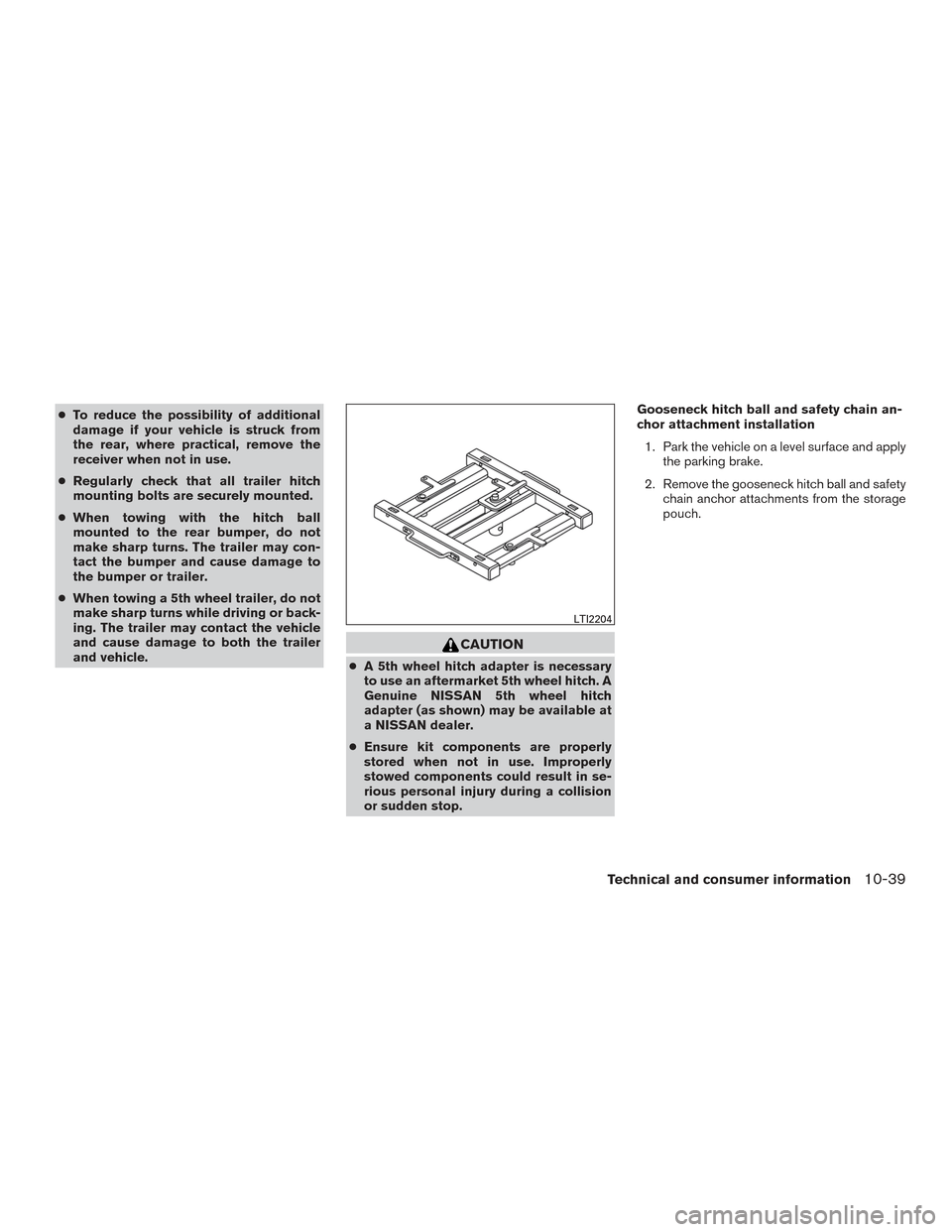
● A 5th wheel hitch adapter is necessary
to use an aftermarket 5th wheel hitch. A
Genuine NISSAN 5th wheel hitch
adapter (as shown) may be available at
a NISSAN dealer.
● Ensure kit components are properly
stored when not in use. Improperly
stowed components could result in se-
rious personal injury during a collision
or sudden stop. Gooseneck hitch ball and safety chain an-
chor attachment installation
1. Park the vehicle on a level surface and apply the parking brake.
2. Remove the gooseneck hitch ball and safety chain anchor attachments from the storage
pouch.
LTI2204
Technical and consumer information10-39
Page 553 of 636
WARNING
Do not exceed Gross Combined Weight
Rating (GVWR) . For additional informa-
tion about GVWR, refer to “Towing
Load/Specification” in this section of the
manual.
Pre-towing tips
●Be certain your vehicle maintains a level
position when a loaded and/or unloaded
trailer is hitched. Do not drive the vehicle if it
has an abnormal nose-up or nose-down
condition; check for improper tongue load,
overload, worn suspension or other possible
causes of either condition.
● Always secure items in the trailer to prevent
load shift while driving.
● Keep the cargo load as low as possible in
the trailer to keep the trailer center of gravity
low.
● Load the trailer so approximately 60% of the
trailer load is in the front half and 40% is in
the back half. Also make sure the load is
balanced side to side.
● Check your hitch, trailer tire pressure, ve-
hicle tire pressure, trailer light operation, and
trailer wheel lug nuts every time you attach a
trailer to the vehicle.
This graphic shows the suggested boost levels for different trailer sizes relative to the vehicle size.LTI2156
10-48Technical and consumer information
Page 554 of 636
●Be certain your rearview mirrors conform to
all federal, state or local regulations. If not,
install any mirrors required for towing before
driving the vehicle.
● Determine the overall height of the vehicle
and trailer so the required clearance is
known.
Trailer towing tips
In order to gain skill and an understanding of the
vehicle’s behavior, you should practice turning,
stopping and backing up in an area which is free
from traffic. Steering stability and braking perfor-
mance will be somewhat different than under
normal driving conditions.
● Always secure items in the trailer to prevent
load shift while driving.
● Lock the trailer hitch coupler with a pin or
lock to prevent the coupler from inadver-
tently becoming unlatched.
● Avoid abrupt starts, acceleration or stops.
● Avoid sharp turns or lane changes.
● Always drive your vehicle at a moderate
speed. ●
When backing up, hold the bottom of the
steering wheel with one hand. Move your
hand in the direction in which you want the
trailer to go. Make small corrections and
back up slowly. If possible, have someone
guide you when you are backing up.
Always block the wheels on both vehicle and
trailer when parking. Parking on a slope is not
recommended; however, if you must do so:CAUTION
If you move the shift selector to the P
(Park) position before blocking the
wheels and applying the parking brake,
transmission damage could occur.
1. Apply and hold the brake pedal.
2. Have someone place blocks on the downhill side of the vehicle and trailer wheels.
3. After the wheel blocks are in place, slowly release the brake pedal until the blocks ab-
sorb the vehicle load.
4. Apply the parking brake.
5. Shift the transmission into P (Park) . 6. Make sure the
indicator light (if so
equipped) indicates the transfer case is in
4H, 4L, or 2H and that the ATP light is off. If
the
indicator light is flashing, or the
ATP light is ON, make sure the transmission
is in P (Park) (A/T) and turn the 4WD switch
to 2WD or 4H. For additional information,
refer to “Automatic transmission park warn-
ing light” in the “Instruments and controls”
section and “Using 4-wheel drive (4WD)” in
the “Starting and driving” section of this
manual.
7. Turn off the engine.
To drive away:
1. Start the vehicle.
2. Apply and hold the brake pedal.
3. Shift the transmission into gear.
4. Release the parking brake.
5. Drive slowly until the vehicle and trailer are clear from the blocks.
6. Apply and hold the brake pedal.
7. Have someone retrieve and store the blocks.
Technical and consumer information10-49
Page 560 of 636
https://wwwapps.tc.gc.ca/Saf-Sec-Sur/
7/PCDB-BDPP/fc-cp.aspx?lang=fra
(French speakers)
Additional information concerning motor
vehicle safety may be obtained from Trans-
port Canada’s Road Safety Information
Centre at 1-800-333-0371 or online at
www.tc.gc.ca/roadsafety (English speak-
ers) or www.tc.gc.ca/securiteroutiere
(French speakers) .
To notify NISSAN of any safety concerns
please contact our Consumer Information
Centre toll free at 1-800-387-0122.
WARNING
A vehicle equipped with Four-Wheel Drive
(4WD) should never be tested using a two
wheel dynamometer (such as the dyna-
mometers used by some states for emis-
sions testing) , or similar equipment. Make
sure you inform the test facility personnel
that your vehicle is equipped with 4WD
before it is placed on a dynamometer.
Using the wrong test equipment may re-
sult in transmission damage or unex-
pected vehicle movement which could re-
sult in serious vehicle damage or personal
injury.
Due to legal requirements in some states and
Canadian Provinces, your vehicle may be re-
quired to be in what is called the “ready condi-
tion” for an Inspection/Maintenance (I/M) test of
the emission control system.
The vehicle is set to the “ready condition” when it
is driven through certain driving patterns. Usually,
the ready condition can be obtained by ordinary
usage of the vehicle. If a powertrain system component is repaired or
the battery is disconnected, the vehicle may be
reset to a “not ready” condition. Before taking the
I/M test, check the vehicle’s
inspection/maintenance test readiness condi-
tion. Place the ignition switch in the ON position
without starting the engine. If the Malfunction
Indicator Light (MIL) comes on steady for 20 sec-
onds and then blinks for 10 seconds, the I/M test
condition is “not ready”. If the MIL does not blink
after 20 seconds, the I/M test condition is
“ready”. It is recommended that you visit a
NISSAN dealer to set the “ready condition” or to
prepare the vehicle for testing.
diesel engine only
For additional information, refer to “Recom-
mended fluids/lubricants and capacities” chart of
the “Titan Diesel Owner’s Manual”.
READINESS FOR INSPECTION/
MAINTENANCE (I/M) TEST (gas
engine only)
Technical and consumer information10-55
Page 565 of 636
In-cabin microfilter................8-17
Increasing fuel economy .............5-44
Indicator lights and audible reminders
(See warning/indicator lights and audible
reminders).............2-19,2-20,2-26
Informationdisplay................2-29
Inside automatic anti-glare mirror ....3-27,3-28
Instrument brightness control ..........2-54
Instrument panel ...............0-6,2-2
Instrument panel dimmer switch ........2-54
Intelligent Key system Key operating range ..............3-9
Key operation ................3-10
Mechanicalkey ................3-4
Remote keyless entry operation.......3-13
Troubleshooting guide ............3-18
Warning signals ...............3-18
Interiorlight....................2-84
iPod®Player ...............4-73,4-75
ISOFIX child restraints .............1-28
J
Jump starting ...............6-10,8-14
K
Key.........................3-2
Key fob battery replacement ..........8-23
Keyless entry With Intelligent Key system
(See Intelligent Key system) .........3-13
Keys NISSAN Intelligent Key® ........3-2,3-8 NISSAN Vehicle Immobilizer System keys . .3-4
L
Labels Air conditioner specification label .....10-14
C.M.V.S.S. certification label .......10-13
Emission control information label ....10-14
Engine serial number ............10-13
F.M.V.S.S. certification label ........10-13
Tire and Loading Information label ....10-14
Vehicle identification number (VIN) ....10-12
Vehicle identification number (VIN)
plate.....................10-12
Warning labels (for SRS) ..........1-57
LATCH (Lower Anchors and Tethers for CHildren)
System ......................1-28
License plate Installing the license plate .........10-15
Light Air bag warning light .........1-58,2-26
Brake light (See stop light) .........8-28
Bulb check/instrument panel ........2-20
Bulbreplacement..............8-28
Charge warning light ............2-22
Consolelight.................2-85
Exterior and Interior lights ..........8-28
Foglights...................8-26
Foglightswitch ...............2-55
Headlight and turn signal switch ......2-51
Headlight control switch ..........2-51
Headlights..................8-25
Interiorlight..................2-84
Lightbulbs..................8-25
Low tire pressure warning light .......2-23Low windshield-washer fluid warning
light......................2-41
Personal lights
................2-86
Security indicator light ............2-28
Warning/indicator lights and audible
reminders ............2 -19, 2-20, 2-26
Lights.......................8-25 Maplights ..................2-85
Lock Child safety rear door lock ..........3-7
Door locks ...................3-5
Power door locks ............3-6,3-7
Loose fuel cap warning .............2-43
Low fuel warning light . . .2-23, 2-25, 2-39, 2-40
Low tire pressure warning light .........2-23
Low windshield-washer fluid warning light . . .2-41
Luggage
(See vehicle loading information) . .10-16
M
Maintenance General maintenance .............9-2
Insidethevehicle...............9-3
Maintenance precautions ...........8-2
Outside the vehicle ..............9-2
Seat belt maintenance ............1-23
Under the hood and vehicle .........9-4
Maintenancelog.................9-18
Maintenance requirements ............9-2
Malfunction indicator light ........2-25,2-27
Manual front seat adjustment ...........1-4
Maplights ....................2-85
Mappocket....................2-71
Memory Seat ...................3-36
Meters and gauges .............2-4,2-9
11-4