display NISSAN TITAN 2018 Owner´s Manual
[x] Cancel search | Manufacturer: NISSAN, Model Year: 2018, Model line: TITAN, Model: NISSAN TITAN 2018Pages: 650, PDF Size: 7.54 MB
Page 360 of 650
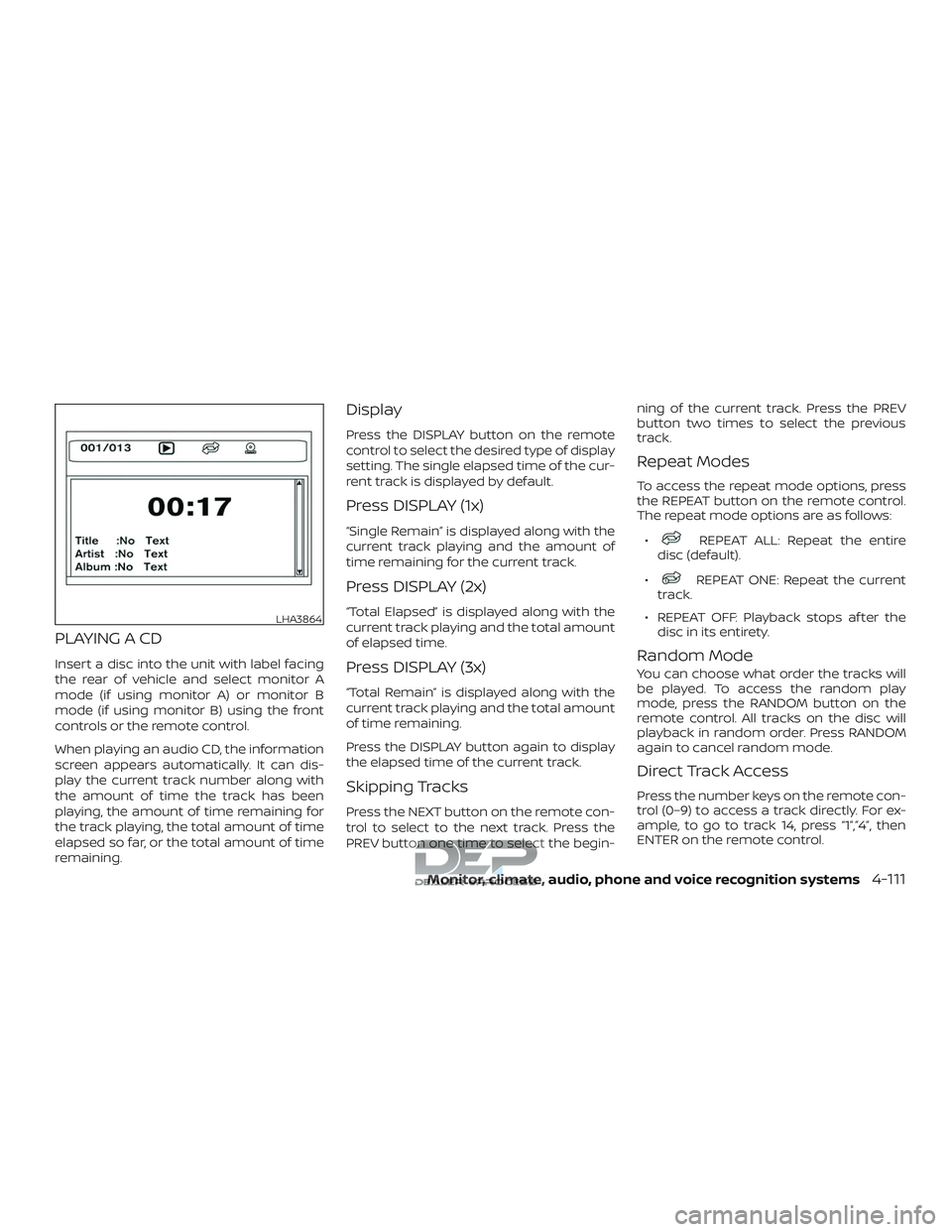
PLAYING A CD
Insert a disc into the unit with label facing
the rear of vehicle and select monitor A
mode (if using monitor A) or monitor B
mode (if using monitor B) using the front
controls or the remote control.
When playing an audio CD, the information
screen appears automatically. It can dis-
play the current track number along with
the amount of time the track has been
playing, the amount of time remaining for
the track playing, the total amount of time
elapsed so far, or the total amount of time
remaining.
Display
Press the DISPLAY button on the remote
control to select the desired type of display
setting. The single elapsed time of the cur-
rent track is displayed by default.
Press DISPLAY (1x)
“Single Remain” is displayed along with the
current track playing and the amount of
time remaining for the current track.
Press DISPLAY (2x)
“Total Elapsed” is displayed along with the
current track playing and the total amount
of elapsed time.
Press DISPLAY (3x)
“Total Remain” is displayed along with the
current track playing and the total amount
of time remaining.
Press the DISPLAY button again to display
the elapsed time of the current track.
Skipping Tracks
Press the NEXT button on the remote con-
trol to select to the next track. Press the
PREV button one time to select the begin-ning of the current track. Press the PREV
button two times to select the previous
track.
Repeat Modes
To access the repeat mode options, press
the REPEAT button on the remote control.
The repeat mode options are as follows:
∙
REPEAT ALL: Repeat the entire
disc (default).
∙
REPEAT ONE: Repeat the current
track.
∙ REPEAT OFF: Playback stops af ter the disc in its entirety.
Random Mode
You can choose what order the tracks will
be played. To access the random play
mode, press the RANDOM button on the
remote control. All tracks on the disc will
playback in random order. Press RANDOM
again to cancel random mode.
Direct Track Access
Press the number keys on the remote con-
trol (0–9) to access a track directly. For ex-
ample, to go to track 14, press “1”,”4”, then
ENTER on the remote control.
LHA3864
Monitor, climate, audio, phone and voice recognition systems4-111
Page 361 of 650
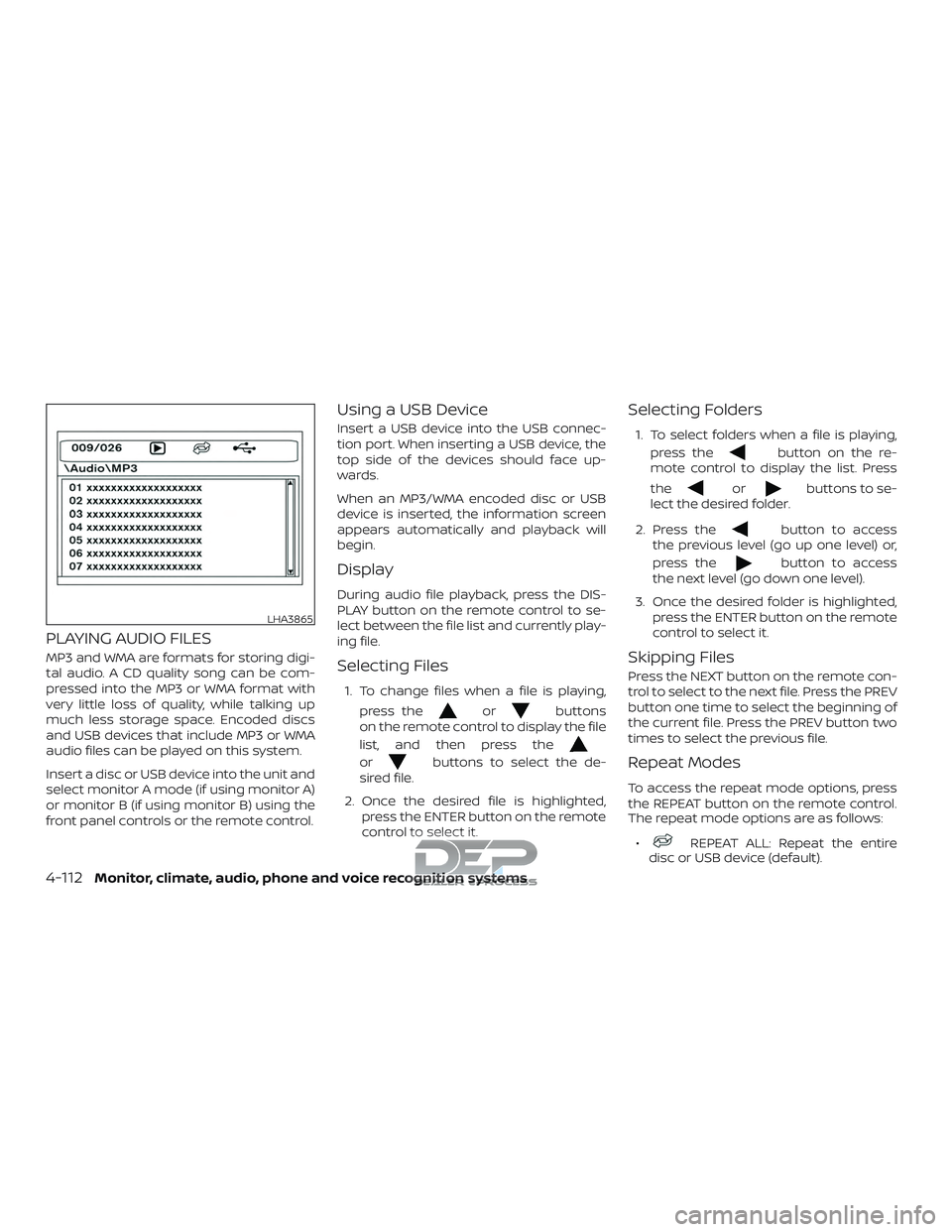
PLAYING AUDIO FILES
MP3 and WMA are formats for storing digi-
tal audio. A CD quality song can be com-
pressed into the MP3 or WMA format with
very little loss of quality, while talking up
much less storage space. Encoded discs
and USB devices that include MP3 or WMA
audio files can be played on this system.
Insert a disc or USB device into the unit and
select monitor A mode (if using monitor A)
or monitor B (if using monitor B) using the
front panel controls or the remote control.
Using a USB Device
Insert a USB device into the USB connec-
tion port. When inserting a USB device, the
top side of the devices should face up-
wards.
When an MP3/WMA encoded disc or USB
device is inserted, the information screen
appears automatically and playback will
begin.
Display
During audio file playback, press the DIS-
PLAY button on the remote control to se-
lect between the file list and currently play-
ing file.
Selecting Files
1. To change files when a file is playing,press the
orbuttons
on the remote control to display the file
list, and then press the
orbuttons to select the de-
sired file.
2. Once the desired file is highlighted, press the ENTER button on the remote
control to select it.
Selecting Folders
1. To select folders when a file is playing,
press the
button on the re-
mote control to display the list. Press
the
orbuttons to se-
lect the desired folder.
2. Press the
button to access
the previous level (go up one level) or,
press the
button to access
the next level (go down one level).
3. Once the desired folder is highlighted, press the ENTER button on the remote
control to select it.
Skipping Files
Press the NEXT button on the remote con-
trol to select to the next file. Press the PREV
button one time to select the beginning of
the current file. Press the PREV button two
times to select the previous file.
Repeat Modes
To access the repeat mode options, press
the REPEAT button on the remote control.
The repeat mode options are as follows:
∙
REPEAT ALL: Repeat the entire
disc or USB device (default).
LHA3865
4-112Monitor, climate, audio, phone and voice recognition systems
Page 363 of 650
Repeat Modes
To access the repeat mode options, press
the REPEAT button on the remote control.
The repeat mode options are as follows:∙
REPEAT ALL: Repeat the entire
disc or USB device (default).
∙
REPEAT FOLDER: Repeat the cur-
rent folder
∙
REPEAT ONE: Repeat the current
file.
∙ REPEAT OFF: Playback stops af ter the disc or USB device is played in its en-
tirety.
Thumbnail Views
1. Press the STOP button on the remote control during the slideshow to display
images in thumbnail mode. Press
the
orand
the
orbuttons on the
remote control to select the desired
language.
2. Once the desired image is highlighted, press the ENTER button on the remote
control to select it.
Rotating Images
During the slideshow, press thebutton on the remote control to rotate the
image 90° clockwise. Press the
button to rotate the image 90° counter-
clockwise.
Inverting Images
During the slideshow, press thebutton on the remote control to invert the
image (Up-Down).
Mirroring Images
During the slideshow, press
the
button on the remote control
to mirror the image (Lef t-Right).
Direct File Access
Press the number keys on the remote con-
trol (0–9) to access a file directly. For ex-
ample, to go to track 14, press “1”,”4”, then
ENTER on the remote control.
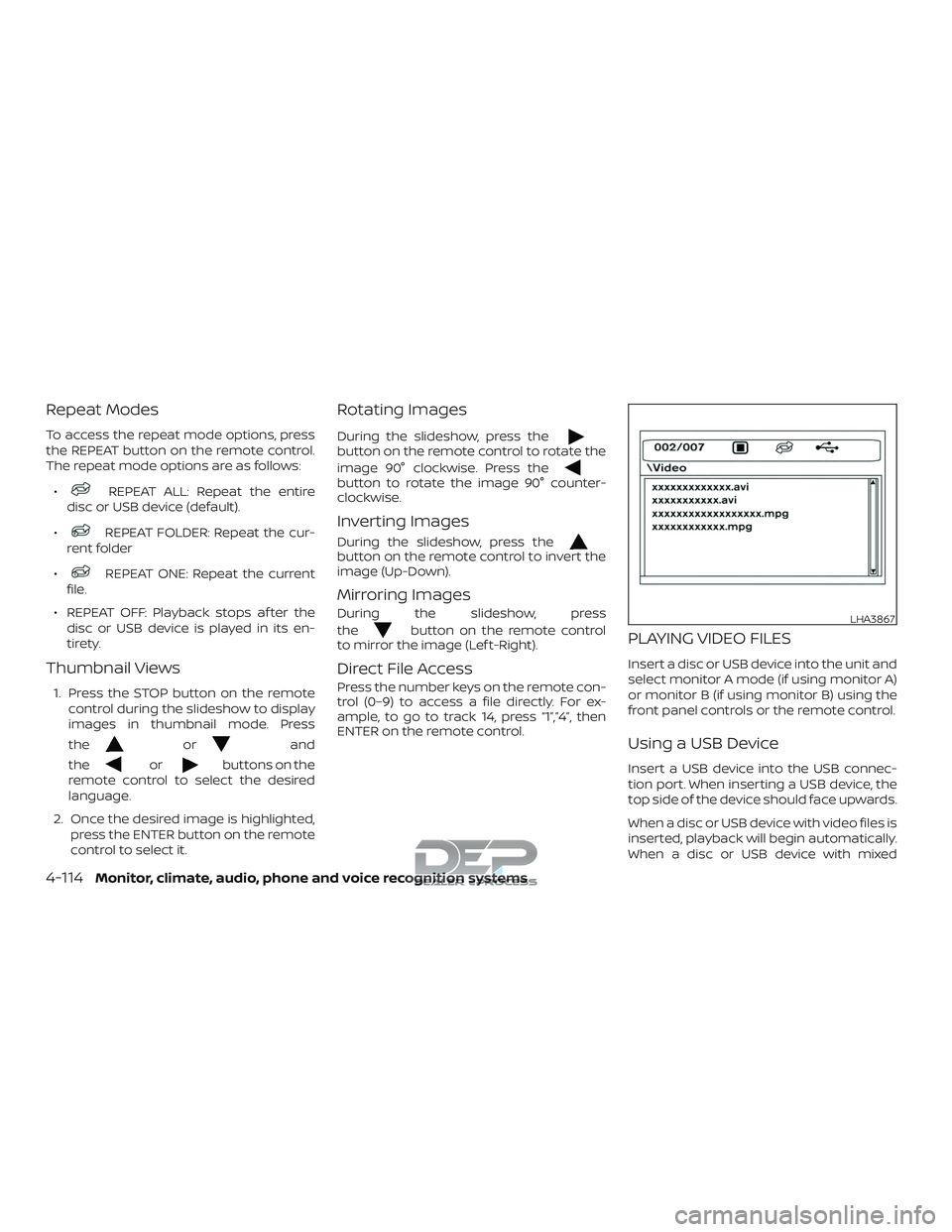
PLAYING VIDEO FILES
Insert a disc or USB device into the unit and
select monitor A mode (if using monitor A)
or monitor B (if using monitor B) using the
front panel controls or the remote control.
Using a USB Device
Insert a USB device into the USB connec-
tion port. When inserting a USB device, the
top side of the device should face upwards.
When a disc or USB device with video files is
inserted, playback will begin automatically.
When a disc or USB device with mixed
LHA3867
4-114Monitor, climate, audio, phone and voice recognition systems
Page 365 of 650
jacks. The auxiliary input connection over-
rides disc and USB playback.
The system provides priority for each of the
following device inputs:1. External RCA A/V input
2. USB port
3. Disc playback
For example if a disc is playing and a USB
device is plugged in, the USB device will
take priority over disc playback. The exter-
nal RCA A/V input connections have prior-
ity over both USB port and disc playback.
CONNECTING AN EXTERNAL A/V
MONITOR — OUTPUT
An external audio/video monitor may be
connected to the 3.5mm A/V connector
(sold separately).
NOTE:
Use the 3.5mm A/V cable made specifi-
cally for the device. An optional adapter
(sold separately) may be used to convert
the 3.5mm A/V output to the standard
RCA jacks.
SELECTING MONITOR A OR B AS
THE SOURCE
It is possible to select monitor B as the
source from monitor A and vice versa. This
will allow content that is playing on monitor
B to be displayed on monitor A.
Monitor A:
To select monitor B as the source for moni-
tor A, press the source button on the front
panel or the remote control until “MONITOR
B” is displayed.
Monitor B:
To select monitor A as the source for moni-
tor B, press the source button on the front
panel or the remote control until “MONITOR
A” is displayed.
TROUBLESHOOTING GUIDE
Symptom Remedy
Monitor does
not power on. Is ignition switch turned to the
ON or ACC position?
Are batteries installed in the re-
mote control?
Check the remote control to
make sure “DVD-A” button is
pressed for controlling monitor
A and “DVD-B” button is pressed
for controlling monitor B.
Symptom Remedy
Remote con-
trol does not
function.
Verif y that the batteries in the
remote control are good.
Verif y that the remote sensor
lens is not obstructed.
Disc will not
play. Insert the disc with label side
facing the rear of the vehicle.
Check if the disc is defective by
trying another disc.
Check the type of disc being
played. This unit only plays DVD
(Single, Dual Layer), DVD-R/+R,
DVD+R Dual layer, DVD-RW/+RW,
CD, CD-R, and CD-RW.
Both the unit and DVD discs are
coded by region. If the region
codes don’t match, the DVD
can’tbeplayed.
Disc plays, but
stops
intermittently. The disc is dirty and needs
cleaning.
Condensation has formed in-
side the unit. Remove the disc
and allow unit to dry out.
No picture. Check the signal source is
connected.
Check the menu source setting.
Match your monitor mode with
the source correctly.
Distorted
picture. Check the disc for fingerprints
and clean with a sof t cloths,
wiping from center to edge.
4-116Monitor, climate, audio, phone and voice recognition systems
Page 366 of 650
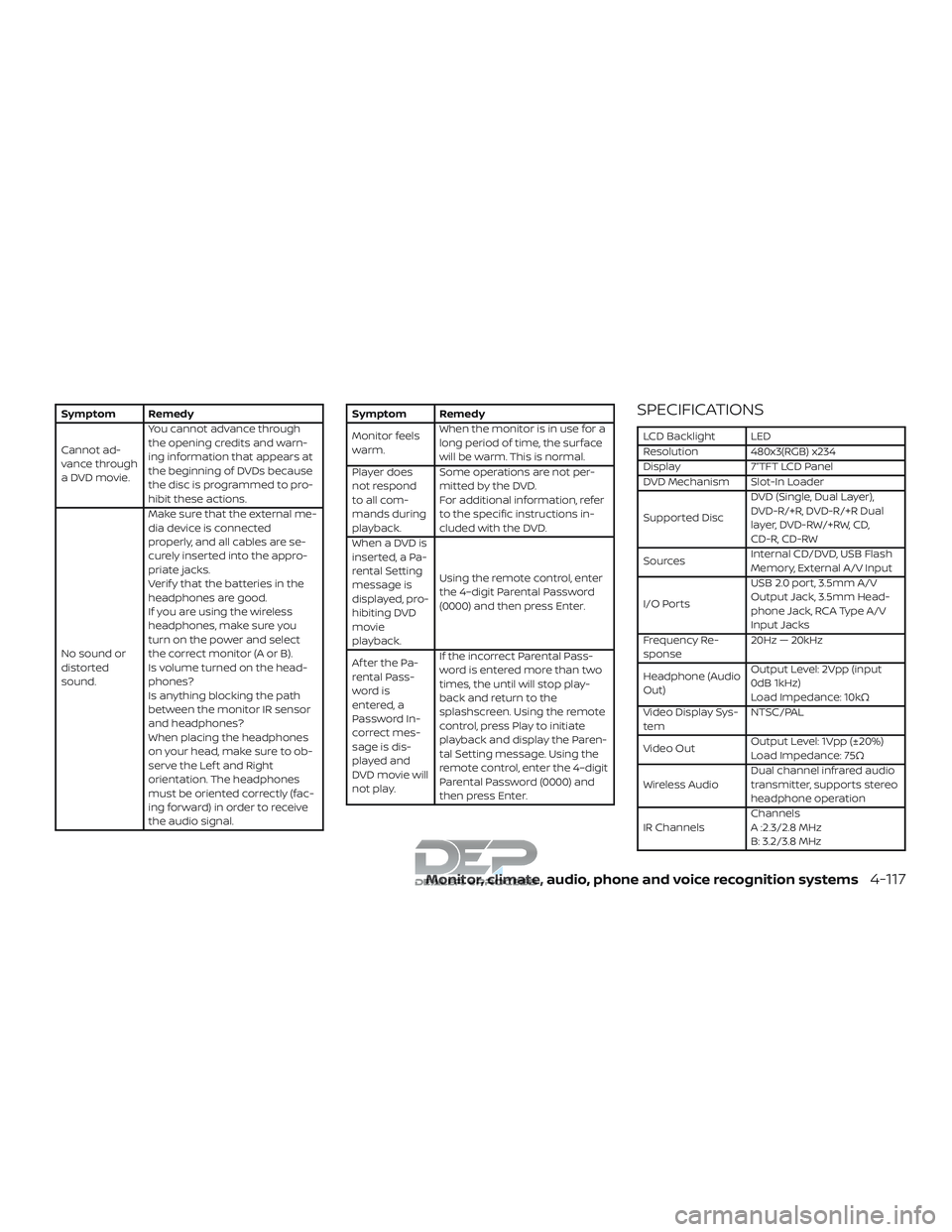
Symptom Remedy
Cannot ad-
vance through
a DVD movie.You cannot advance through
the opening credits and warn-
ing information that appears at
the beginning of DVDs because
the disc is programmed to pro-
hibit these actions.
No sound or
distorted
sound. Make sure that the external me-
dia device is connected
properly, and all cables are se-
curely inserted into the appro-
priate jacks.
Verif y that the batteries in the
headphones are good.
If you are using the wireless
headphones, make sure you
turn on the power and select
thecorrectmonitor(AorB).
Is volume turned on the head-
phones?
Is anything blocking the path
between the monitor IR sensor
and headphones?
When placing the headphones
on your head, make sure to ob-
serve the Lef t and Right
orientation. The headphones
must be oriented correctly (fac-
ing forward) in order to receive
the audio signal.Symptom Remedy
Monitor feels
warm.
When the monitor is in use for a
long period of time, the surface
will be warm. This is normal.
Player does
not respond
to all com-
mands during
playback. Some operations are not per-
mitted by the DVD.
For additional information, refer
to the specific instructions in-
cluded with the DVD.
When a DVD is
inserted, a Pa-
rental Setting
message is
displayed, pro-
hibiting DVD
movie
playback. Using the remote control, enter
the 4–digit Parental Password
(0000) and then press Enter.
Af ter the Pa-
rental Pass-
word is
entered, a
Password In-
correct mes-
sage is dis-
played and
DVD movie will
not play. If the incorrect Parental Pass-
word is entered more than two
times, the until will stop play-
back and return to the
splashscreen. Using the remote
control, press Play to initiate
playback and display the Paren-
tal Setting message. Using the
remote control, enter the 4–digit
Parental Password (0000) and
then press Enter.SPECIFICATIONS
LCD Backlight LED
Resolution 480x3(RGB) x234
Display 7”TFT LCD Panel
DVD Mechanism Slot-In Loader
Supported Disc
DVD (Single, Dual Layer),
DVD-R/+R, DVD-R/+R Dual
layer, DVD-RW/+RW, CD,
CD-R, CD-RW
Sources Internal CD/DVD, USB Flash
Memory, External A/V Input
I/O Ports USB 2.0 port, 3.5mm A/V
Output Jack, 3.5mm Head-
phone Jack, RCA Type A/V
Input Jacks
Frequency Re-
sponse 20Hz — 20kHz
Headphone (Audio
Out) Output Level: 2Vpp (input
0dB 1kHz)
Load Impedance: 10kΩ
Video Display Sys-
tem NTSC/PAL
Video Out Output Level: 1Vpp (±20%)
Load Impedance: 75Ω
Wireless Audio Dual channel infrared audio
transmitter, supports stereo
headphone operation
IR Channels Channels
A :2.3/2.8 MHz
B: 3.2/3.8 MHz
Monitor, climate, audio, phone and voice recognition systems4-117
Page 375 of 650
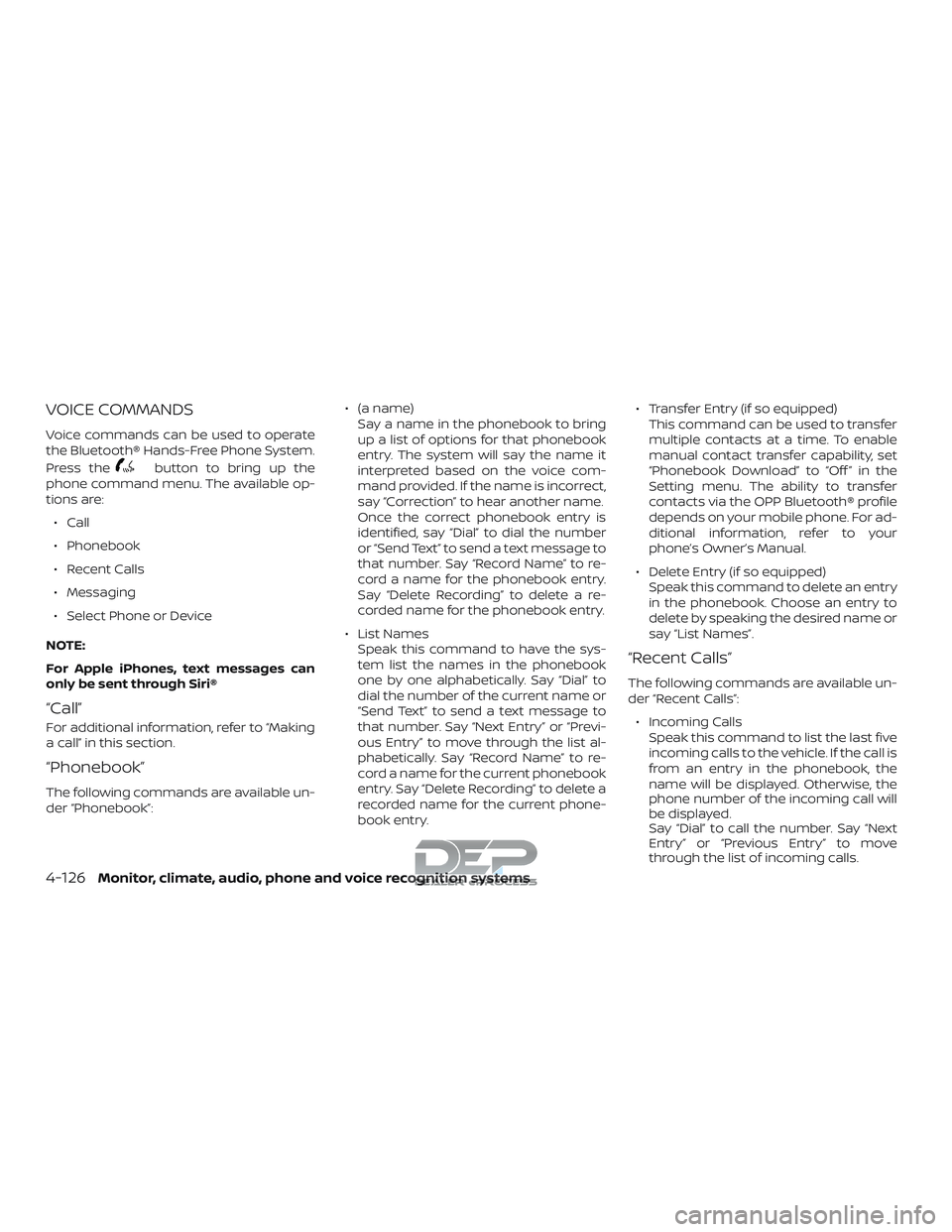
VOICE COMMANDS
Voice commands can be used to operate
the Bluetooth® Hands-Free Phone System.
Press the
button to bring up the
phone command menu. The available op-
tions are:
∙ Call
∙ Phonebook
∙ Recent Calls
∙ Messaging
∙ Select Phone or Device
NOTE:
For Apple iPhones, text messages can
only be sent through Siri®
“Call”
For additional information, refer to “Making
a call” in this section.
“Phonebook”
The following commands are available un-
der “Phonebook”: ∙ (a name)
Say a name in the phonebook to bring
up a list of options for that phonebook
entry. The system will say the name it
interpreted based on the voice com-
mand provided. If the name is incorrect,
say “Correction” to hear another name.
Once the correct phonebook entry is
identified, say “Dial” to dial the number
or “Send Text” to send a text message to
that number. Say “Record Name” to re-
cord a name for the phonebook entry.
Say “Delete Recording” to delete a re-
corded name for the phonebook entry.
∙ List Names Speak this command to have the sys-
tem list the names in the phonebook
one by one alphabetically. Say “Dial” to
dial the number of the current name or
“Send Text” to send a text message to
that number. Say “Next Entry” or “Previ-
ous Entry” to move through the list al-
phabetically. Say “Record Name” to re-
cord a name for the current phonebook
entry. Say “Delete Recording” to delete a
recorded name for the current phone-
book entry. ∙ Transfer Entry (if so equipped)
This command can be used to transfer
multiple contacts at a time. To enable
manual contact transfer capability, set
“Phonebook Download” to “Off ” in the
Setting menu. The ability to transfer
contacts via the OPP Bluetooth® profile
depends on your mobile phone. For ad-
ditional information, refer to your
phone’s Owner’s Manual.
∙ Delete Entry (if so equipped) Speak this command to delete an entry
in the phonebook. Choose an entry to
delete by speaking the desired name or
say “List Names”.
“Recent Calls”
The following commands are available un-
der “Recent Calls”:
∙ Incoming Calls Speak this command to list the last five
incoming calls to the vehicle. If the call is
from an entry in the phonebook, the
name will be displayed. Otherwise, the
phone number of the incoming call will
be displayed.
Say “Dial” to call the number. Say “Next
Entry” or “Previous Entry” to move
through the list of incoming calls.
4-126Monitor, climate, audio, phone and voice recognition systems
Page 376 of 650
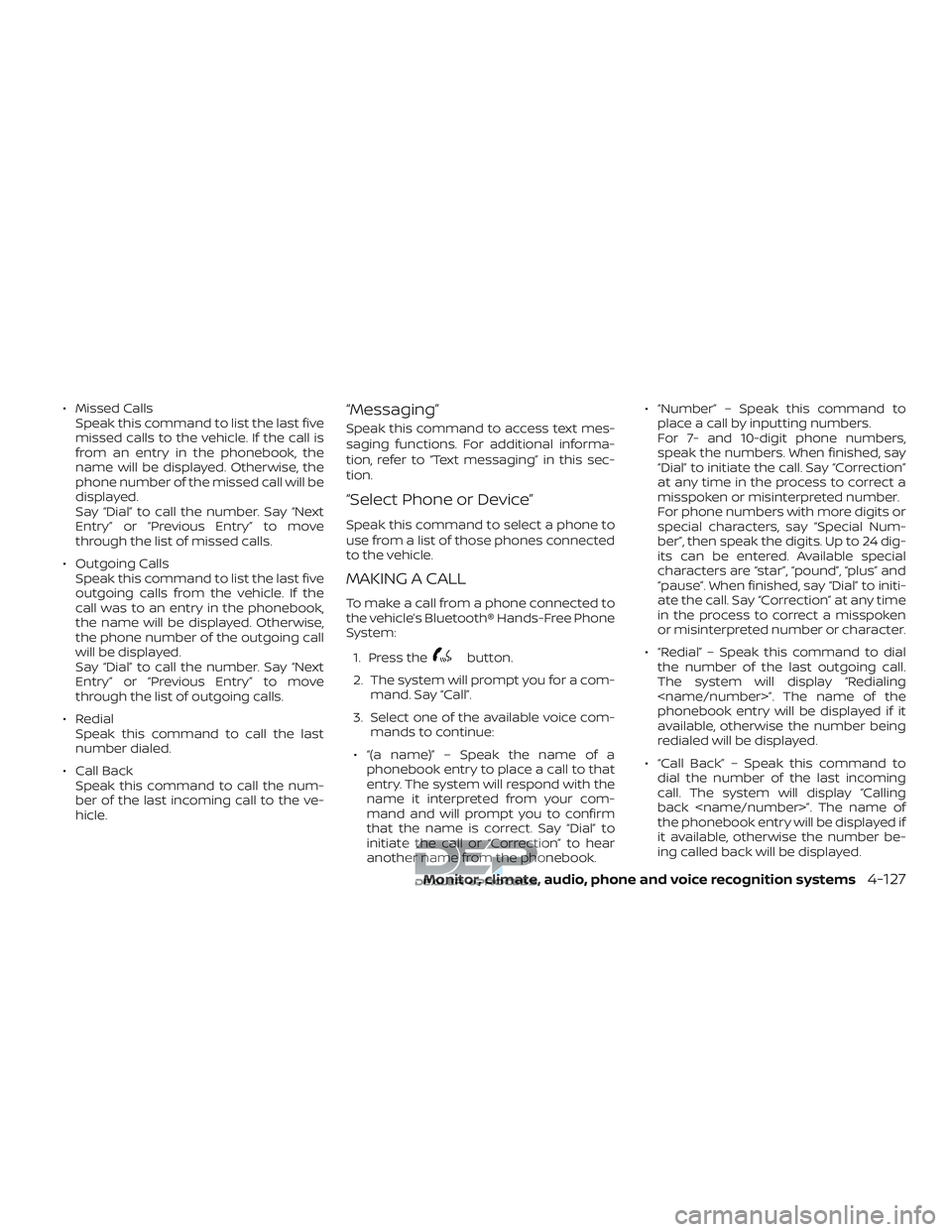
∙ Missed CallsSpeak this command to list the last five
missed calls to the vehicle. If the call is
from an entry in the phonebook, the
name will be displayed. Otherwise, the
phone number of the missed call will be
displayed.
Say “Dial” to call the number. Say “Next
Entry” or “Previous Entry” to move
through the list of missed calls.
∙ Outgoing Calls Speak this command to list the last five
outgoing calls from the vehicle. If the
call was to an entry in the phonebook,
the name will be displayed. Otherwise,
the phone number of the outgoing call
will be displayed.
Say “Dial” to call the number. Say “Next
Entry” or “Previous Entry” to move
through the list of outgoing calls.
∙ Redial Speak this command to call the last
number dialed.
∙ Call Back Speak this command to call the num-
ber of the last incoming call to the ve-
hicle.“Messaging”
Speak this command to access text mes-
saging functions. For additional informa-
tion, refer to “Text messaging” in this sec-
tion.
“Select Phone or Device”
Speak this command to select a phone to
use from a list of those phones connected
to the vehicle.
MAKING A CALL
To make a call from a phone connected to
the vehicle’s Bluetooth® Hands-Free Phone
System:
1. Press the
button.
2. The system will prompt you for a com- mand. Say “Call”.
3. Select one of the available voice com- mands to continue:
∙ “(a name)” – Speak the name of a phonebook entry to place a call to that
entry. The system will respond with the
name it interpreted from your com-
mand and will prompt you to confirm
that the name is correct. Say “Dial” to
initiate the call or “Correction” to hear
another name from the phonebook. ∙ “Number” – Speak this command to
place a call by inputting numbers.
For 7- and 10-digit phone numbers,
speak the numbers. When finished, say
“Dial” to initiate the call. Say “Correction”
at any time in the process to correct a
misspoken or misinterpreted number.
For phone numbers with more digits or
special characters, say “Special Num-
ber”, then speak the digits. Up to 24 dig-
its can be entered. Available special
characters are “star”, “pound”, “plus” and
“pause”. When finished, say “Dial” to initi-
ate the call. Say “Correction” at any time
in the process to correct a misspoken
or misinterpreted number or character.
∙ “Redial” – Speak this command to dial the number of the last outgoing call.
The system will display “Redialing
phonebook entry will be displayed if it
available, otherwise the number being
redialed will be displayed.
∙ “Call Back” – Speak this command to dial the number of the last incoming
call. The system will display “Calling
back
the phonebook entry will be displayed if
it available, otherwise the number be-
ing called back will be displayed.
Monitor, climate, audio, phone and voice recognition systems4-127
Page 377 of 650
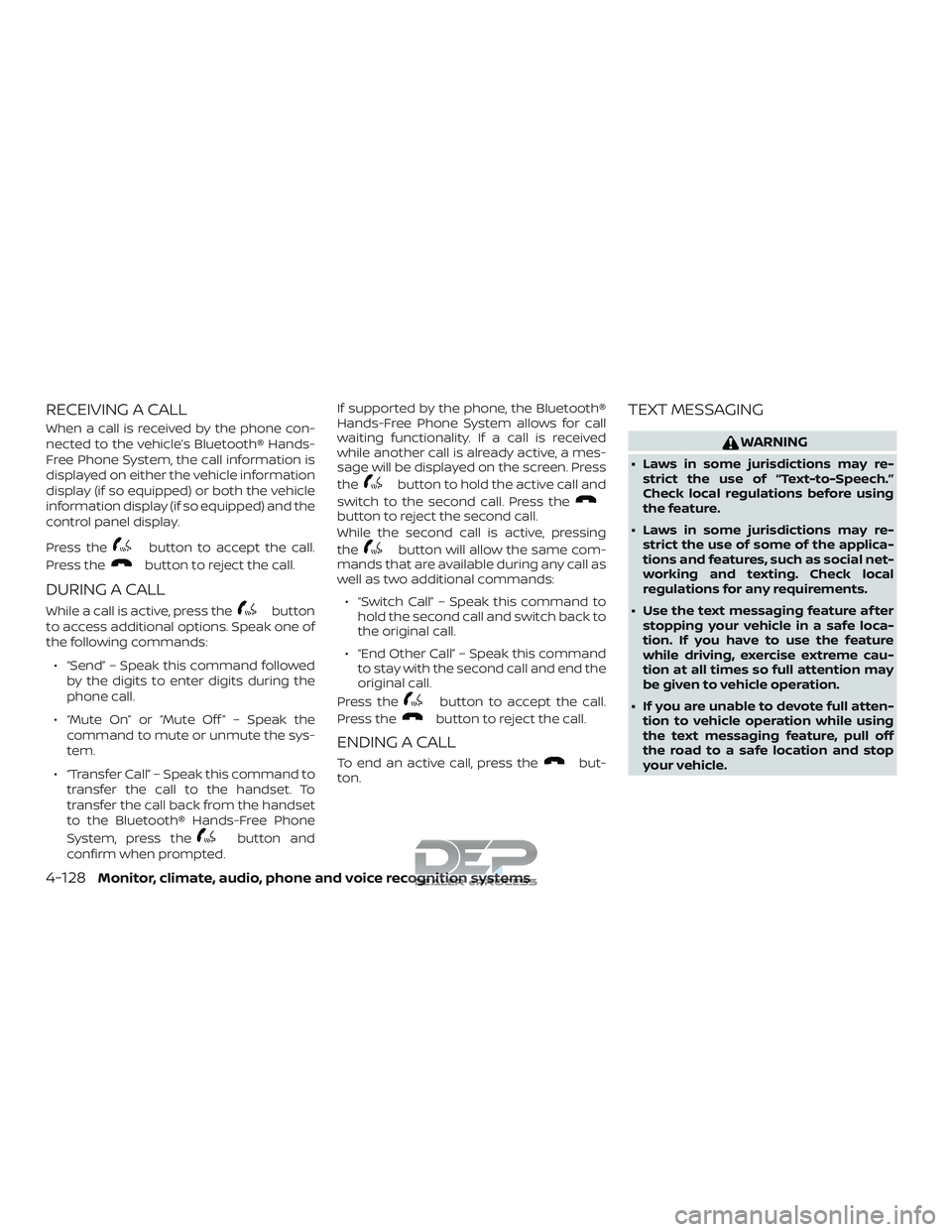
RECEIVING A CALL
When a call is received by the phone con-
nected to the vehicle’s Bluetooth® Hands-
Free Phone System, the call information is
displayed on either the vehicle information
display (if so equipped) or both the vehicle
information display (if so equipped) and the
control panel display.
Press the
button to accept the call.
Press the
button to reject the call.
DURING A CALL
While a call is active, press thebutton
to access additional options. Speak one of
the following commands:
∙ “Send” – Speak this command followed by the digits to enter digits during the
phone call.
∙ “Mute On” or “Mute Off ” – Speak the command to mute or unmute the sys-
tem.
∙ “Transfer Call” – Speak this command to transfer the call to the handset. To
transfer the call back from the handset
to the Bluetooth® Hands-Free Phone
System, press the
button and
confirm when prompted. If supported by the phone, the Bluetooth®
Hands-Free Phone System allows for call
waiting functionality. If a call is received
while another call is already active, a mes-
sage will be displayed on the screen. Press
the
button to hold the active call and
switch to the second call. Press the
button to reject the second call.
While the second call is active, pressing
the
button will allow the same com-
mands that are available during any call as
well as two additional commands:
∙ “Switch Call” – Speak this command to hold the second call and switch back to
the original call.
∙ “End Other Call” – Speak this command to stay with the second call and end the
original call.
Press the
button to accept the call.
Press the
button to reject the call.
ENDING A CALL
To end an active call, press thebut-
ton.
TEXT MESSAGING
WARNING
∙ Laws in some jurisdictions may re- strict the use of “Text-to-Speech.”
Check local regulations before using
the feature.
∙ Laws in some jurisdictions may re- strict the use of some of the applica-
tions and features, such as social net-
working and texting. Check local
regulations for any requirements.
∙ Use the text messaging feature af ter stopping your vehicle in a safe loca-
tion. If you have to use the feature
while driving, exercise extreme cau-
tion at all times so full attention may
be given to vehicle operation.
∙ If you are unable to devote full atten- tion to vehicle operation while using
the text messaging feature, pull off
the road to a safe location and stop
your vehicle.
4-128Monitor, climate, audio, phone and voice recognition systems
Page 379 of 650
Reading a received text message:1. Press the
button.
2. Say “Messaging”.
3. Say “Read Text”.
The text message, sender and delivery
time are shown on the screen. Use the tun-
ing switch on the steering wheel to scroll
through all text messages if more than one
are available. Press the
button to exit
the text message screen. Press the
button to access the following options for
replying to the text message:
∙ Call Back Speak this command to call the sender
of the text message using the
Bluetooth® Hands-Free Phone System.
∙ Send Text Speak this command to send a text
message response to the sender of the
text message.
∙ Read Text Speak this command to read the text
message again. ∙ Previous Text
Speak this command to move to the
previous text message (if available).
∙ Next Text Speak this command to move to the
next text message (if available).
Siri® Eyes Free
If a connected phone is equipped with Siri®,
it can also be used to create custom mes-
sages that are sent through the phone. For
additional information, refer to Siri® Eyes
Free in this section.
NOTE:
Text messages are only displayed if the
vehicle speed is less than 5 mph
(8 km/h).
NOTE:
For Apple iPhones, text messages can
only be sent through Siri.
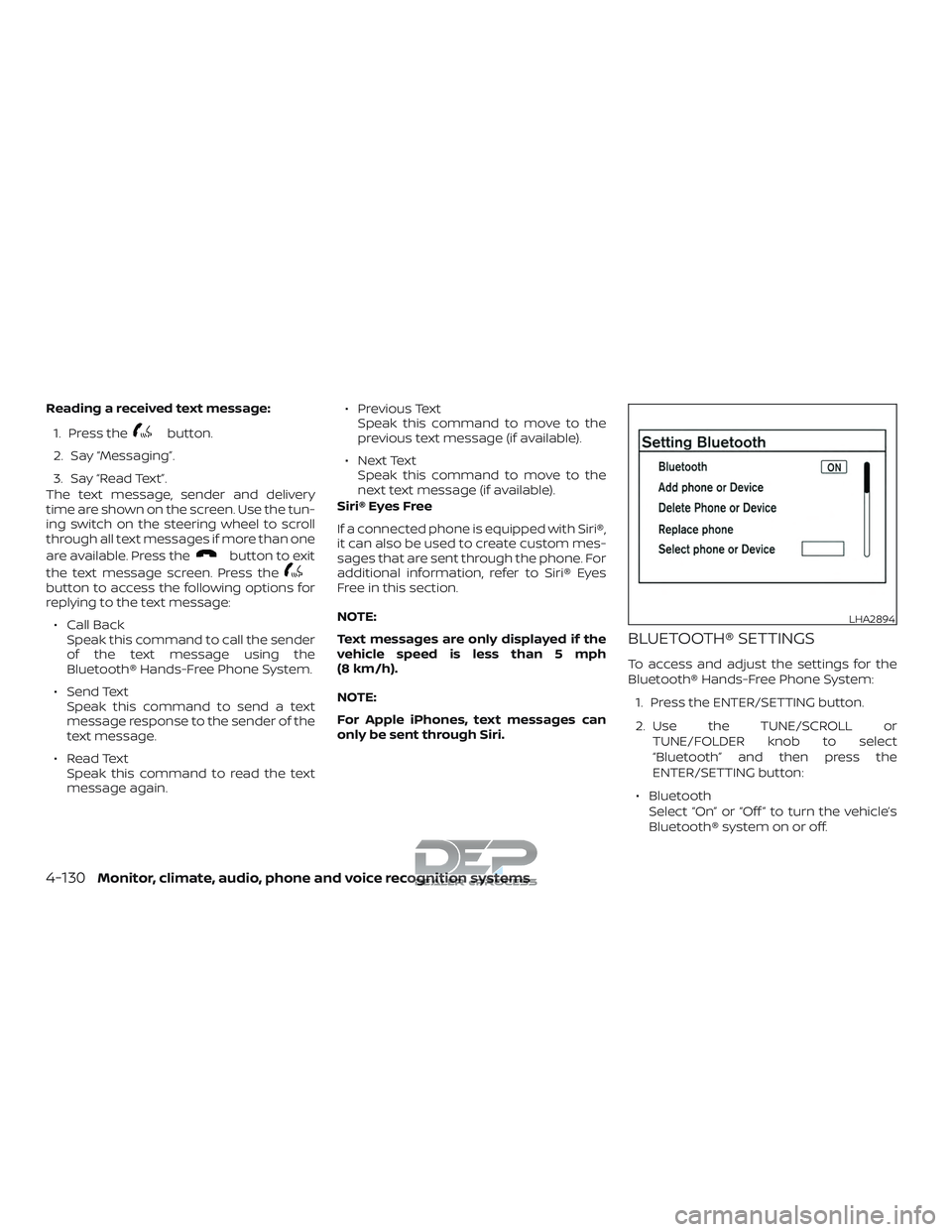
BLUETOOTH® SETTINGS
To access and adjust the settings for the
Bluetooth® Hands-Free Phone System:
1. Press the ENTER/SETTING button.
2. Use the TUNE/SCROLL or TUNE/FOLDER knob to select
“Bluetooth” and then press the
ENTER/SETTING button:
∙ Bluetooth Select “On” or “Off ” to turn the vehicle’s
Bluetooth® system on or off.
LHA2894
4-130Monitor, climate, audio, phone and voice recognition systems
Page 380 of 650
∙ Add Phone or DeviceFor additional information, refer to
“Connecting procedure” in this section.
∙ Delete Phone or Device Select to delete a phone from the dis-
played list. The system will ask to con-
firm before deleting the phone.
∙ Replace Phone Select to replace a phone from the dis-
played list. When a selection is made,
the system will ask to confirm before
proceeding. The recorded phonebook
for the phone being deleted will be
saved as long as the new phone’s
phonebook is the same as the old
phone’s phonebook.
∙ Select Phone or Device Select to connect to a previously con-
nected phone from the displayed list.
∙ Phonebook Download Select to turn on or off the automatic
download of a connected phone’s
phonebook. ∙ Show Incoming Calls
Select “Driver Only” to have incoming
call information displayed only in the
vehicle information display (if so
equipped). Select “Both” to have incom-
ing call information displayed in both
the vehicle information display (if so
equipped) and the center display
screen.
∙ Siri® Press the
button operation for
Siri® Eyes Free function from “Short
Press” and “Long Press” For additional
information, refer to “Siri® Eyes Free” in
this section. “Siri” is displayed only when
a Siri Eyes Free enabled iPhone® is con-
nected to the vehicle.
∙ Text Message Select to turn on or off the vehicle’s text
messaging feature.
∙ New Text Sound Select to adjust the volume of the
sound that plays when a new text is
received by a phone connected to the
Bluetooth® Hands-Free Phone System.
The setting all the way to the lef t indi-
cates that the new text sound will be
muted. ∙ Show Incoming Text
Select “Driver Only” to have incoming
text messages displayed only in the ve-
hicle information display (if so
equipped). Select “Both” to have incom-
ing text messages displayed in both the
vehicle information display (if so
equipped) and the center display
screen. Select “None” to have no display
of incoming text messages.
∙ Edit Custom Messages Select to set a custom message that
will be available with the standard op-
tions when sending a text message. To
set a custom message, send a text
message to your own phone number
while the phone is connected to the
system. Three custom messages can
be set. Custom messages can only be
set while the vehicle is stationary.
∙ Auto Reply Select to turn on or off the Auto Reply
function. When enabled, the vehicle will
automatically send a predefined text
message to the sender when a text
message is received while driving.
Monitor, climate, audio, phone and voice recognition systems4-131