ABS NISSAN TITAN 2018 Owner´s Manual
[x] Cancel search | Manufacturer: NISSAN, Model Year: 2018, Model line: TITAN, Model: NISSAN TITAN 2018Pages: 650, PDF Size: 7.54 MB
Page 458 of 650
WARNING
∙ The VDC system is designed to helpthe driver maintain stability but does
not prevent accidents due to abrupt
steering operation at high speeds or
by careless or dangerous driving
techniques. Reduce vehicle speed and
be especially careful when driving and
cornering on slippery surfaces and al-
ways drive carefully.
∙ Do not modif y the vehicle’s suspen- sion. If suspension parts such as
shock absorbers, struts, springs, sta-
bilizer bars, bushings and wheels are
not NISSAN recommended for your
vehicle or are extremely deteriorated,
the VDC system may not operate
properly. This could adversely affect
vehicle handling performance, and
the
indicator may flash or
the
indicator light may
illuminate. ∙ If brake related parts such as brake
pads, rotors and calipers are not
NISSAN recommended or are ex-
tremely deteriorated, the VDC system
may not operate properly and
the
indicator light may
illuminate.
∙ If engine control related parts are not NISSAN recommended or are ex-
tremely deteriorated, the
indi-
cator light may illuminate.
∙ When driving on extremely inclined surfaces such as higher banked cor-
ners, the VDC system may not operate
properly and the
indicator may
flash or the
indicator light may
illuminate. Do not drive on these types
of roads.
∙ When driving on an unstable surface such as a turntable, ferry, elevator or
ramp, the
indicator may flash or
the
indicator light may illumi-
nate. This is not a malfunction. Re-
start the engine af ter driving onto a
stable surface. ∙ If wheels or tires other than the
NISSAN recommended ones are used,
the VDC system may not operate
properly and the
indicator may
flash or the
indicator light may
illuminate.
∙ The VDC system is not a substitute for winter tires or tire chains on a snow
covered road.
BRAKE FORCE DISTRIBUTION
During braking while driving through turns,
the system optimizes the distribution of
force to each of the front and rear wheels
depending on the radius of the turn.
WARNING
∙ The VDC system is designed to helpthe driver maintain stability but does
not prevent accidents due to abrupt
steering operation at high speeds or
by careless or dangerous driving
techniques. Reduce vehicle speed and
be especially careful when driving and
cornering on slippery surfaces and al-
ways drive carefully.
Starting and driving5-61
Page 459 of 650
∙ Do not modif y the vehicle’s suspen-sion. If suspension parts such as
shock absorbers, struts, springs, sta-
bilizer bars, bushings and wheels are
not NISSAN recommended for your
vehicle or are extremely deteriorated,
the VDC system may not operate
properly. This could adversely affect
vehicle handling performance, and
the
indicator may flash or
the
indicator light may
illuminate.
∙ If brake related parts such as brake pads, rotors and calipers are not
NISSAN recommended or are ex-
tremely deteriorated, the VDC system
may not operate properly and
the
indicator light may
illuminate.
∙ If engine control related parts are not NISSAN recommended or are ex-
tremely deteriorated, the
indi-
cator light may illuminate. ∙ When driving on extremely inclined
surfaces such as higher banked cor-
ners, the VDC system may not operate
properly and the
indicator may
flash or the
indicator light may
illuminate. Do not drive on these types
of roads.
∙ When driving on an unstable surface such as a turntable, ferry, elevator or
ramp, the
indicator may flash or
the
indicator light may illumi-
nate. This is not a malfunction. Re-
start the engine af ter driving onto a
stable surface.
∙ If wheels or tires other than the NISSAN recommended ones are used,
the VDC system may not operate
properly and the
indicator may
flash or the
indicator light may
illuminate.
∙ The VDC system is not a substitute for winter tires or tire chains on a snow
covered road.
WARNING
∙ Never rely solely on the hill descentcontrol system to control vehicle
speed when driving on steep downhill
grades. Always drive carefully and at-
tentively when using the hill descent
control system and decelerate the ve-
hicle speed by depressing the brake
pedal if necessary. Be especially care-
ful when driving on frozen, muddy or
extremely steep downhill roads. Fail-
ure to control vehicle speed may re-
sult in a loss of control of the vehicle
and possible serious injury or death.
∙ The hill descent control may not con- trol the vehicle speed on a hill under
all load or road conditions. Always be
prepared to depress the brake pedal
to control vehicle speed. Failure to do
so may result in a collision or serious
personal injury.
The hill descent control system can only be
activated when the 4H or 4LO position is
engaged.
HILL DESCENT CONTROL SYSTEM (if
so equipped)
5-62Starting and driving
Page 518 of 650
WARNING
∙ Operating the engine with the aircleaner removed can cause you or
others to be burned. The air cleaner
not only cleans the air, it stops the
flame if the engine backfires. If it isn’t
there, and the engine backfires, you
could be burned. Do not drive with the
air cleaner removed, and be careful
when working on the engine with the
air cleaner removed. ∙ Never pour fuel into the throttle body
or attempt to start the engine with
the air cleaner removed. Doing so
could result in serious injury.
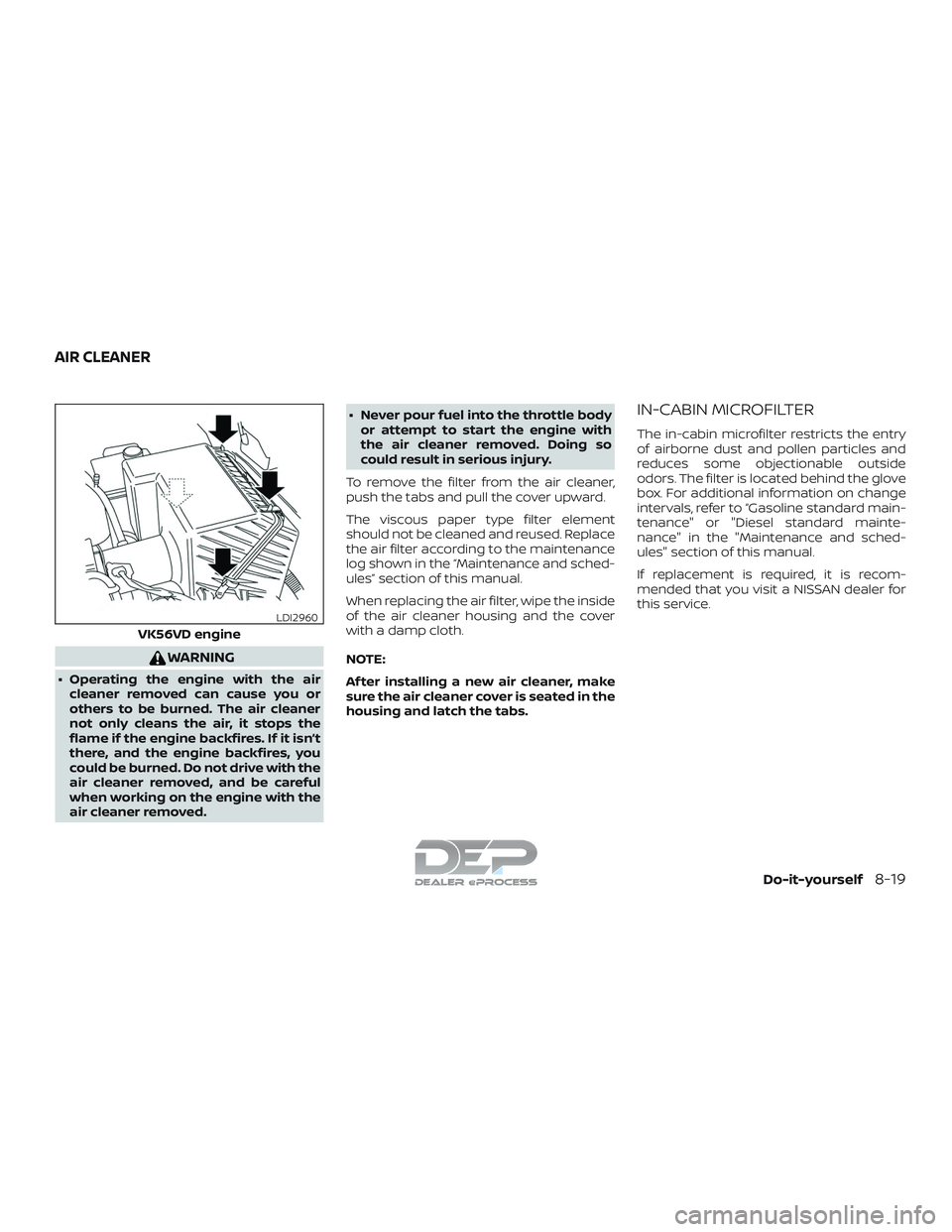
To remove the filter from the air cleaner,
push the tabs and pull the cover upward.
The viscous paper type filter element
should not be cleaned and reused. Replace
the air filter according to the maintenance
log shown in the “Maintenance and sched-
ules” section of this manual.
When replacing the air filter, wipe the inside
of the air cleaner housing and the cover
with a damp cloth.
NOTE:
Af ter installing a new air cleaner, make
sure the air cleaner cover is seated in the
housing and latch the tabs.
IN-CABIN MICROFILTER
The in-cabin microfilter restricts the entry
of airborne dust and pollen particles and
reduces some objectionable outside
odors. The filter is located behind the glove
box. For additional information on change
intervals, refer to “Gasoline standard main-
tenance" or "Diesel standard mainte-
nance" in the "Maintenance and sched-
ules" section of this manual.
If replacement is required, it is recom-
mended that you visit a NISSAN dealer for
this service.
VK56VD engine
LDI2960
AIR CLEANER
Do-it-yourself8-19
Page 615 of 650
Weight Rating or the rear axle weight to
exceed the Rear Gross Axle Weight rating.
For additional information, refer to “Maxi-
mum load limits” in this section.
The weight of the trailer should not exceed
the maximum towing capacity for the ve-
hicle. For additional information, refer to
“Towing Load/Specification” chart in this
section.
Make sure the trailer design allows for the
correct vehicle to trailer clearances before
purchasing a 5th wheel trailer.
WARNING
∙ The hitch should not be attached to oraffect the operation of the impact-
absorbing bumper.
∙ Do not use axle-mounted hitches.
∙ Do not modif y the vehicle exhaust system, brake system, etc. to install a
trailer hitch.
∙ To reduce the possibility of additional damage if your vehicle is struck from
the rear, where practical, remove the
receiver when not in use. ∙ Regularly check that all trailer hitch
mounting bolts are securely
mounted.
∙ When towing with the hitch ball mounted to the rear bumper, do not
make sharp turns. The trailer may
contact the bumper and cause dam-
age to the bumper or trailer.
∙ When towing a 5th wheel trailer, do not make sharp turns while driving or
backing. The trailer may contact the
vehicle and cause damage to both the
trailer and vehicle.CAUTION
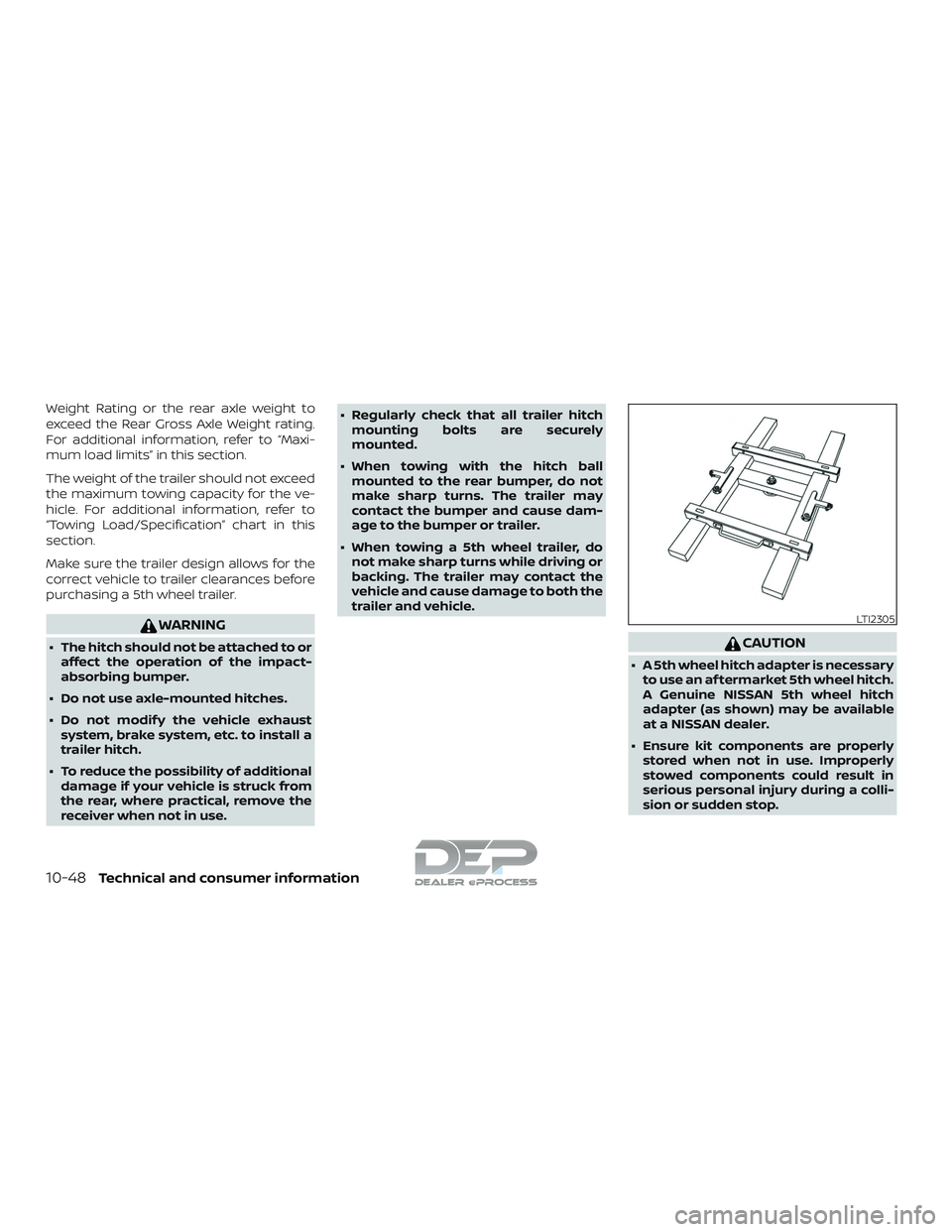
∙ A 5th wheel hitch adapter is necessaryto use an af termarket 5th wheel hitch.
A Genuine NISSAN 5th wheel hitch
adapter (as shown) may be available
at a NISSAN dealer.
∙ Ensure kit components are properly stored when not in use. Improperly
stowed components could result in
serious personal injury during a colli-
sion or sudden stop.
LTI2305
10-48Technical and consumer information
Page 625 of 650
∙ Check your hitch, trailer tire pressure,vehicle tire pressure, trailer light opera-
tion, and trailer wheel lug nuts every
time you attach a trailer to the vehicle.
∙ Be certain your rearview mirrors con- form to all federal, state or local regula-
tions. If not, install any mirrors required
for towing before driving the vehicle.
∙ Determine the overall height of the ve- hicle and trailer so the required clear-
ance is known.
Trailer towing tips
In order to gain skill and an understanding
of the vehicle’s behavior, you should prac-
tice turning, stopping and backing up in an
area which is free from traffic. Steering sta-
bility and braking performance will be
somewhat different than under normal
driving conditions.
∙ Always secure items in the trailer to pre- vent load shif t while driving.
∙ Lock the trailer hitch coupler with a pin or lock to prevent the coupler from in-
advertently becoming unlatched.
∙ Avoid abrupt starts, acceleration or stops.
∙ Avoid sharp turns or lane changes. ∙ Always drive your vehicle at a moderate
speed.
∙ When backing up, hold the bottom of the steering wheel with one hand. Move
your hand in the direction in which you
want the trailer to go. Make small cor-
rections and back up slowly. If possible,
have someone guide you when you are
backing up.
Always block the wheels on both vehicle
and trailer when parking. Parking on a
slope is not recommended; however, if you
must do so:
CAUTION
If you move the shif t selector to the P
(Park) position before blocking the
wheels and applying the parking brake,
transmission damage could occur.
1. Apply and hold the brake pedal.
2. Have someone place blocks on the downhill side of the vehicle and trailer
wheels.
3. Af ter the wheel blocks are in place, slowly release the brake pedal until the
blocks absorb the vehicle load.
4. Apply the parking brake. 5. Shif t the transmission into P (Park).
6. Make sure the
indicator light (if so
equipped) indicates the transfer case is
in 4H, 4LO, or 2H and that the ATP light is
off. If the
indicator light is flashing,
or the ATP light is ON, make sure the
transmission is in P (Park) (A/T) and
turn the 4WD switch to 2WD or 4H. For
additional information, refer to “Auto-
matic transmission park warning light”
in the “Instruments and controls” sec-
tion and “Using 4-wheel drive (4WD)” in
the “Starting and driving” section of this
manual.
7. Turn off the engine.
To drive away:
1. Start the vehicle.
2. Apply and hold the brake pedal.
3. Shif t the transmission into gear.
4. Release the parking brake.
5. Drive slowly until the vehicle and trailer are clear from the blocks.
6. Apply and hold the brake pedal.
7. Have someone retrieve and store the blocks.
10-58Technical and consumer information
Page 634 of 650
11 Index
4WD.......................5-45
4WDwarninglight..............2-22
4-Wheel Drive.................5-45
A
Active Brake Limited Slip (ABLS)
system .....................5-59
Aimingcontrol,headlights.........2-57
Air bag (See supplemental restraint
system) .................... .1-53
Air bag system Front (See supplemental front impact air
bagsystem).............1-60, 1-75
Air bag warning labels ............1-80
Airbagwarninglight..........1-81, 2-29
Air bag warning light,
supplemental ..............1-81, 2-29
Air cleaner ...................8-19
Air cleaner housing filter ..........8-19
Air conditioner Air conditioner operation ....4-38,4-44
Air conditioner specification label . .10-20
Air conditioner system refrigerant and oil
recommendations ............10-8
Air conditioner system refrigerant
recommendations ............10-8
Heater and air conditioner (automatic)
(if so equipped) ..............4-43
Heater and air conditioner
controls ..................4-44
Servicing air conditioner ........4-48Air flow charts
.................4-39
Alarm system
(See vehicle security system) .......2-48
Anchor point locations ............1-31
Antenna ....................4-88
Antifreeze ...................5-69
Anti-lock brake warning light .......2-22
Anti-lock Braking System (ABS) ......5-57
Apps ......................4-88
Audible reminders ..............2-32
Audiosystem.................4-48 AMradioreception............4-49
Bluetooth® audio .........4-84,4-85
Bluetooth® streaming audio . .4-84, 4-85
Compact disc (CD)
player.............4-59,4-65,4-72
FM-AM radio with compact disc (CD)
player....................4-57
FM/AM/SAT radio with compact disc (CD)
player.................4-61,4-67
FMradioreception............4-49
iPod®Player.............4-78,4-81
iPod® player operation ......4-78,4-81
Radio ....................4-48
Steering wheel audio control
switch....................4-87
USBinterface............4-74,4-76
USB (Universal Serial Bus) Connection
Port.....................4-76
Autolightswitch ...............2-55
Automatic Automatic drive positioner . . .3-42, 3-44
Automatic power window switch. . .2-89 Driving with automatic
transmission................5-17
Automatic anti-glare inside mirror ....3-32
Automatic door locks .............3-8
Automatic drive positioner .....3-42,3-44
Automatic transmission fluid temperature
gauge ......................2-11
AUXjack....................4-69
B
Back button ...................4-7
Battery..................5-69,8-15 Charge warning light ..........2-25
Battery replacement ............8-26
Keyfob...................8-26
NISSAN Intelligent Key® .........8-26
Before starting the engine .........5-14
Belt(Seedrivebelt)..............8-17
Blind Spot Warning (BSW) ..........5-23
Block heater Engine ....................5-71
Bluetooth® audio ...........4-84,4-85
Bluetooth® hands-free phone
system .................4-120,4-133
Booster seats .................1-49
Br ak
e
Anti-lock Braking System (ABS) ....5-57
Brakefluid.................8-13
Brakelight(Seestoplight) .......8-31
Brakesystem...............5-56
Brakewarninglight ...........2-24