wheel NISSAN TITAN 2018 Owner´s Manual
[x] Cancel search | Manufacturer: NISSAN, Model Year: 2018, Model line: TITAN, Model: NISSAN TITAN 2018Pages: 650, PDF Size: 7.54 MB
Page 122 of 650
Other
The other menu item allows the user to set
a maintenance reminder at a specific inter-
val to check various other maintenance
items (ie. air filter, brakes, coolant). To set
the reminder, press the ENTER button
when “OTHER” is shown. Using the
buttons, set the desired interval to receive
a maintenance reminder.
To reset the mileage, press and hold the
ENTER button for approximately 1 second.
To return to the main menu selections,
scroll to “EXIT” and press ENTER.
For additional information, refer to “Mainte-
nance schedules” in the “Maintenance and
schedules” section of this manual.
Units
The units menu item allows the user to
change the trip computer units to US or
METRIC. To select the units, press the EN-
TER button when desired unit is shown.
To return to the main menu selections,
scroll to “EXIT” and press ENTER.
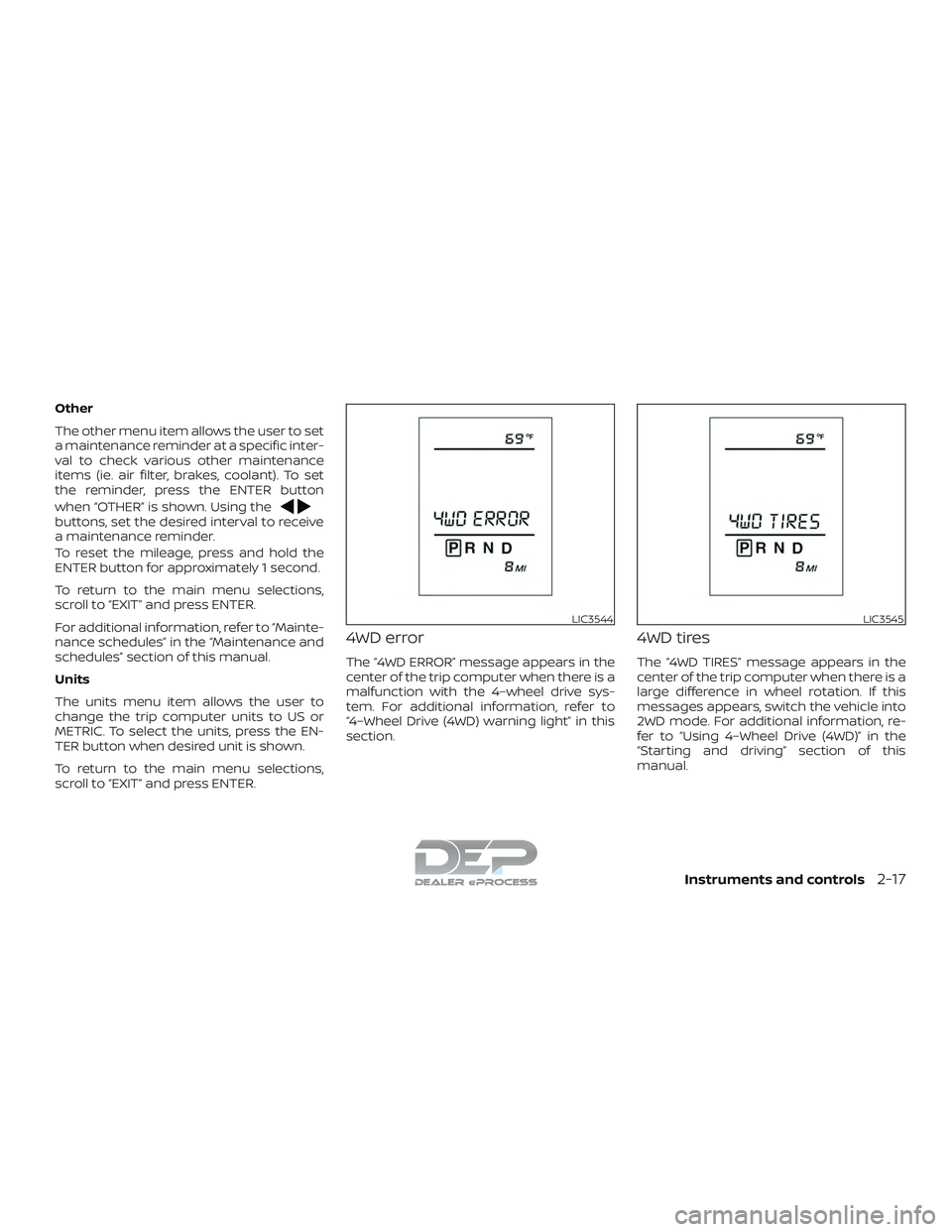
4WD error
The “4WD ERROR” message appears in the
center of the trip computer when there is a
malfunction with the 4–wheel drive sys-
tem. For additional information, refer to
“4–Wheel Drive (4WD) warning light” in this
section.
4WD tires
The “4WD TIRES” message appears in the
center of the trip computer when there is a
large difference in wheel rotation. If this
messages appears, switch the vehicle into
2WD mode. For additional information, re-
fer to “Using 4–Wheel Drive (4WD)” in the
“Starting and driving” section of this
manual.
LIC3544LIC3545
Instruments and controls2-17
Page 126 of 650
4–Wheel Drive (4WD) warning light (if so
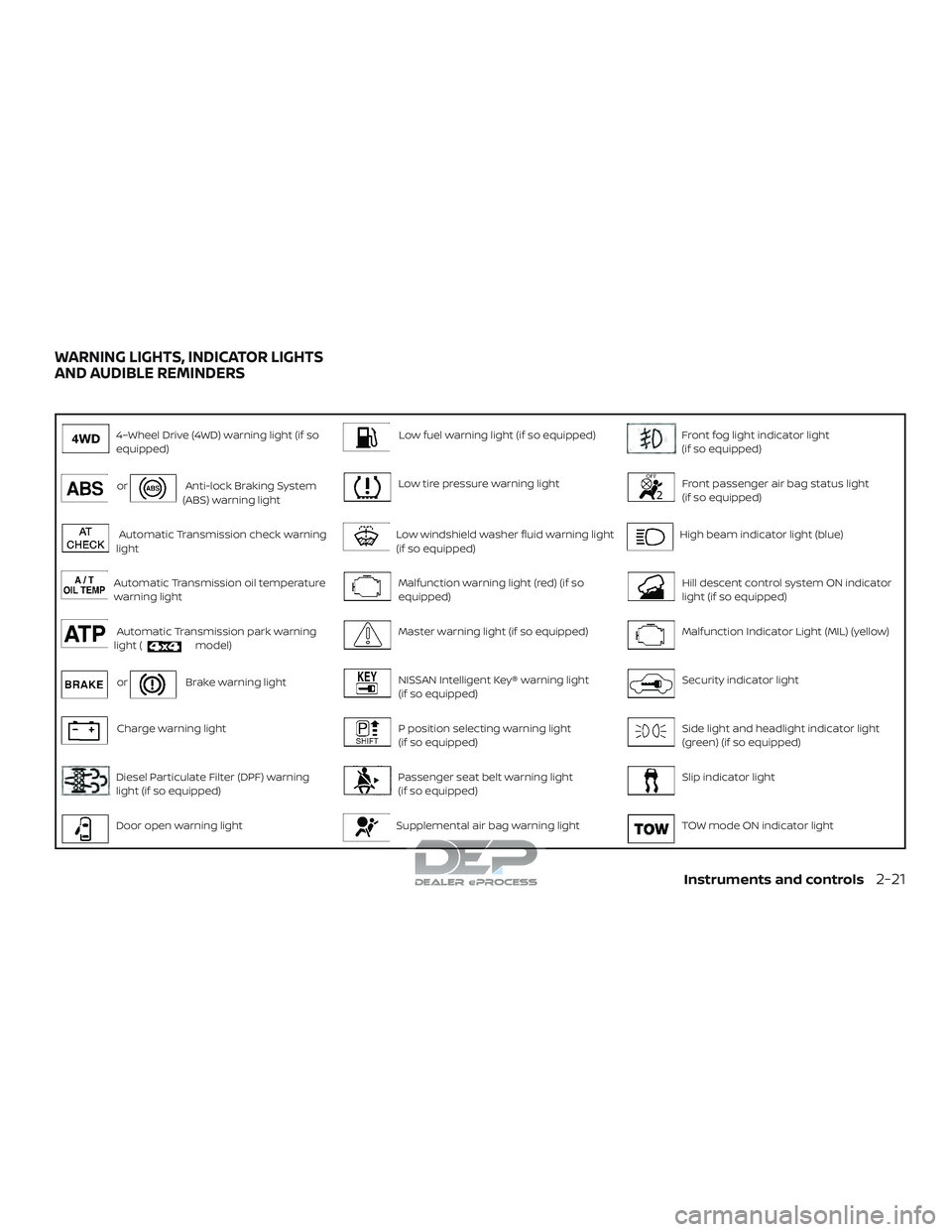
equipped)Low fuel warning light (if so equipped)Front fog light indicator light
(if so equipped)
orAnti-lock Braking System
(ABS) warning lightLow tire pressure warning lightFront passenger air bag status light
(if so equipped)
Automatic Transmission check warning
lightLow windshield washer fluid warning light
(if so equipped)High beam indicator light (blue)
Automatic Transmission oil temperature
warning lightMalfunction warning light (red) (if so
equipped)Hill descent control system ON indicator
light (if so equipped)
Automatic Transmission park warning
light (model)Master warning light (if so equipped)Malfunction Indicator Light (MIL) (yellow)
orBrake warning lightNISSAN Intelligent Key® warning light
(if so equipped)Security indicator light
Charge warning lightP position selecting warning light
(if so equipped)Side light and headlight indicator light
(green) (if so equipped)
Diesel Particulate Filter (DPF) warning
light (if so equipped)Passenger seat belt warning light
(if so equipped)Slip indicator light
Door open warning lightSupplemental air bag warning lightTOW mode ON indicator light
WARNING LIGHTS, INDICATOR LIGHTS
AND AUDIBLE REMINDERS
Instruments and controls2-21
Page 127 of 650
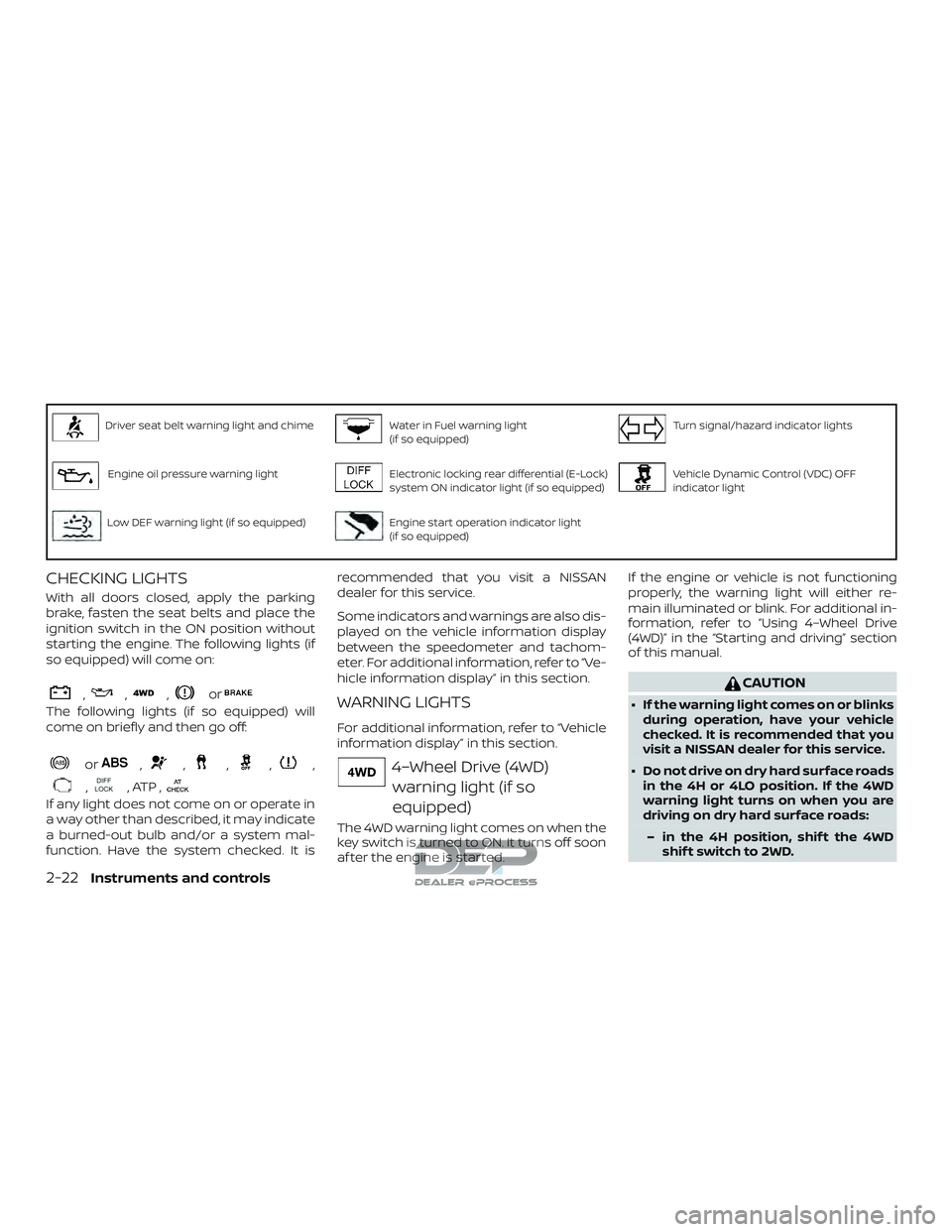
Driver seat belt warning light and chimeWater in Fuel warning light
(if so equipped)Turn signal/hazard indicator lights
Engine oil pressure warning lightElectronic locking rear differential (E-Lock)
system ON indicator light (if so equipped)Vehicle Dynamic Control (VDC) OFF
indicator light
Low DEF warning light (if so equipped)Engine start operation indicator light
(if so equipped)
CHECKING LIGHTS
With all doors closed, apply the parking
brake, fasten the seat belts and place the
ignition switch in the ON position without
starting the engine. The following lights (if
so equipped) will come on:
,,,or
The following lights (if so equipped) will
come on briefly and then go off:
or,,,,,
,, ATP ,
If any light does not come on or operate in
a way other than described, it may indicate
a burned-out bulb and/or a system mal-
function. Have the system checked. It isrecommended that you visit a NISSAN
dealer for this service.
Some indicators and warnings are also dis-
played on the vehicle information display
between the speedometer and tachom-
eter. For additional information, refer to “Ve-
hicle information display” in this section.
WARNING LIGHTS
For additional information, refer to “Vehicle
information display” in this section.
4–Wheel Drive (4WD)
warning light (if so
equipped)
The 4WD warning light comes on when the
key switch is turned to ON. It turns off soon
af ter the engine is started. If the engine or vehicle is not functioning
properly, the warning light will either re-
main illuminated or blink. For additional in-
formation, refer to “Using 4–Wheel Drive
(4WD)” in the “Starting and driving” section
of this manual.
CAUTION
∙ If the warning light comes on or blinks
during operation, have your vehicle
checked. It is recommended that you
visit a NISSAN dealer for this service.
∙ Do not drive on dry hard surface roads in the 4H or 4LO position. If the 4WD
warning light turns on when you are
driving on dry hard surface roads:
– in the 4H position, shif t the 4WD shif t switch to 2WD.
2-22Instruments and controls
Page 128 of 650
– in the 4LO position, stop the ve-hicle, move the shif t lever to the N
(Neutral) position with the brake
pedal depressed, and shif t the
4WD shif t switch to 2WD.
∙ If the warning light is still on af ter the above operation, have your vehicle
checked. It is recommended that you
visit a NISSAN dealer for this service as
soon as possible.
orAnti-lock Braking
System (ABS)
warning light
When the ignition switch is placed in the ON
position, the ABS warning light illuminates
and then turns off. This indicates the ABS is
operational.
If the ABS warning light illuminates while
the engine is running or while driving, it
may indicate the ABS is not functioning
properly. Have the system checked. It is
recommended that you visit a NISSAN
dealer for this service.
If an ABS malfunction occurs, the anti-lock
function is turned off. The brake system
then operates normally but without anti-
lock assistance. For additional information, refer to “Brake system” in the “Starting and
driving” section of this manual.
Automatic Transmission
check warning light
When the ignition switch is placed in the ON
position, the light comes on for about
2 seconds. If the light comes on at any
other time, it may indicate the automatic
transmission system is not functioning
properly. Have the system checked. It is
recommended that you visit a NISSAN
dealer for this service.
Automatic Transmission oiltemperature warning light
This light comes on when the automatic
transmission oil temperature is too high. If
the light comes on while driving, reduce the
vehicle speed as soon as safely possible
until the light turns off.
CAUTION
Continued vehicle operation when the
A/T oil temperature warning light is on
may damage the automatic
transmission.
Automatic Transmissionpark warning light (
model)
WARNING
∙ If the 4WD mode indicator is off or the ATP warning light is on, this indicates
that the automatic transmission P
(Park) position will not function and
could result in the vehicle moving un-
expectedly, causing serious personal
injury or property damage. Always set
the parking brake. For additional in-
formation, refer to “Using 4–wheel
drive (4WD)” in the “Starting and driv-
ing” section of this manual.
∙ If the ATP light is on, this indicates that the automatic transmission P (Park)
position will not function and the
transfer case is in neutral.
∙ When parking, always make sure that the 4WD shif t indicator light illumi-
nates and the parking brake is set.
Failure to engage the transfer posi-
tion in 2WD, 4H or 4LO could result in
the vehicle moving unexpectedly, re-
sulting in serious personal injury or
property damage.
Instruments and controls2-23
Page 129 of 650
∙ Shif t the 4WD switch into the 2WD, 4Hor 4LO position again to turn off the
ATP warning light when the shif t lever
is in the P position and the ATP warn-
ing light is on. (Before shif ting the
4WD switch into the 4LO position,
move the shif t lever to the N position
once, shif t the shif t lever into P again
and make sure the ATP warning light
is off.)
This light indicates that the automatic
transmission parking function is not en-
gaged. If the transfer control is not secured
in any drive position while the shif t lever is
in the P (Park) position, the transmission will
disengage and the drive wheels will not
lock.
orBrake warning light
This light functions for both the parking
brake and the foot brake systems.
Parking brake indicator
When the ignition switch is placed in the ON
position, the light comes on when the park-
ing brake is applied. Low brake fluid warning light
When the ignition switch is placed in the ON
position, the light warns of a low brake fluid
level. If the light comes on while the engine
is running, with the parking brake not ap-
plied, stop the vehicle and perform the fol-
lowing:
1. Check the brake fluid level. Add brake fluid as necessary. For additional infor-
mation, refer to “Brake fluid” in the “Do-
it-yourself ” section of this manual.
2. If the brake fluid level is correct, have the warning system checked. It is rec-
ommended that you visit a NISSAN
dealer for this service.
WARNING
∙ Your brake system may not be work-ing properly if the warning light is on.
Driving could be dangerous. If you
judge it to be safe, drive carefully to
the nearest service station for repairs.
Otherwise, have your vehicle towed
because driving it could be
dangerous. ∙ Pressing the brake pedal with the en-
gine stopped and/or a low brake fluid
level may increase your stopping dis-
tance and braking will require greater
pedal effort and pedal travel.
∙ If the brake fluid level is below the MINIMUM or MIN mark on the brake
fluid reservoir, do not drive until the
brake system has been checked. It is
recommended that you visit a NISSAN
dealer for this service.
Anti-lock Braking System (ABS) warning
indicator
When the parking brake is released and the
brake fluid level is sufficient, if both the
brake warning light and the ABS warning
light illuminate, it may indicate the ABS is
not functioning properly. Have the brake
system checked and, if necessary, repaired.
It is recommended that you visit a NISSAN
dealer for this service. Avoid high-speed
driving and abrupt braking. For additional
information, refer to “Anti-lock Braking Sys-
tem (ABS) warning light” in this section.
2-24Instruments and controls
Page 132 of 650
∙ If the light illuminates while driving,avoid sudden steering maneuvers or
abrupt braking, reduce vehicle speed,
pull off the road to a safe location and
stop the vehicle as soon as possible.
Driving with under-inflated tires may
permanently damage the tires and in-
crease the likelihood of tire failure. Se-
rious vehicle damage could occur and
may lead to an accident and could re-
sult in serious personal injury or
death. Check the tire pressure for all
four tires. Adjust the tire pressure to
the recommended COLD tire pressure
show on the Tire and Loading Infor-
mation label located in the driver’s
door opening to turn the low tire pres-
sure warning light off. If the light still
illuminates while driving af ter adjust-
ing the tire pressure, a tire may be flat
or the TPMS may be malfunctioning. If
you have a flat tire, replace it with a
spare tire as soon as possible. If no tire
is flat and all tires are properly in-
flated, have the vehicle checked. It is
recommended that you visit a NISSAN
dealer for this service. ∙ When replacing a wheel without the
TPMS such as the spare tire, the TPMS
will not function and the low tire pres-
sure warning light will flash for ap-
proximately 1 minute. The light will re-
main on af ter 1 minute. Have your
tires replaced and/or TPMS system
reset as soon as possible. It is recom-
mended that you visit a NISSAN dealer
for these services.
∙ Replacing tires with those not origi- nally specified by NISSAN could affect
the proper operation of the TPMS.
CAUTION
∙ The TPMS is not a substitute for theregular tire pressure check. Be sure to
check the tire pressure regularly.
∙ If the vehicle is being driven at speeds of less than 16 mph (25 km/h), the
TPMS may not operate correctly.
∙ Be sure to install the specified size of tires to the four wheels correctly.
Low windshield-washer
fluid warning light (if so
equipped)
This light comes on when the windshield-
washer fluid is at a low level. Add
windshield-washer fluid as necessary. For
additional information, refer to “Windshield-
washer fluid” in the “Do-it-yourself ” section
of this manual.
Malfunction warning light(red) (if so equipped)
If this warning light illuminates this indi-
cates either the coolant temperature is
above a critical threshold or the exhaust
temperatures are above a critical thresh-
old. When illuminated this lamp indicates
the need to stop the engine as soon as it
can be safely done. The engine must re-
main shut down until the engine can be
repaired. For additional information, refer
to the “Titan Diesel Owner’s Manual”.
Instruments and controls2-27
Page 138 of 650
∙ NISSAN Intelligent Key® operation infor-mation
∙ Indicators and warnings
∙ Tire Pressure information
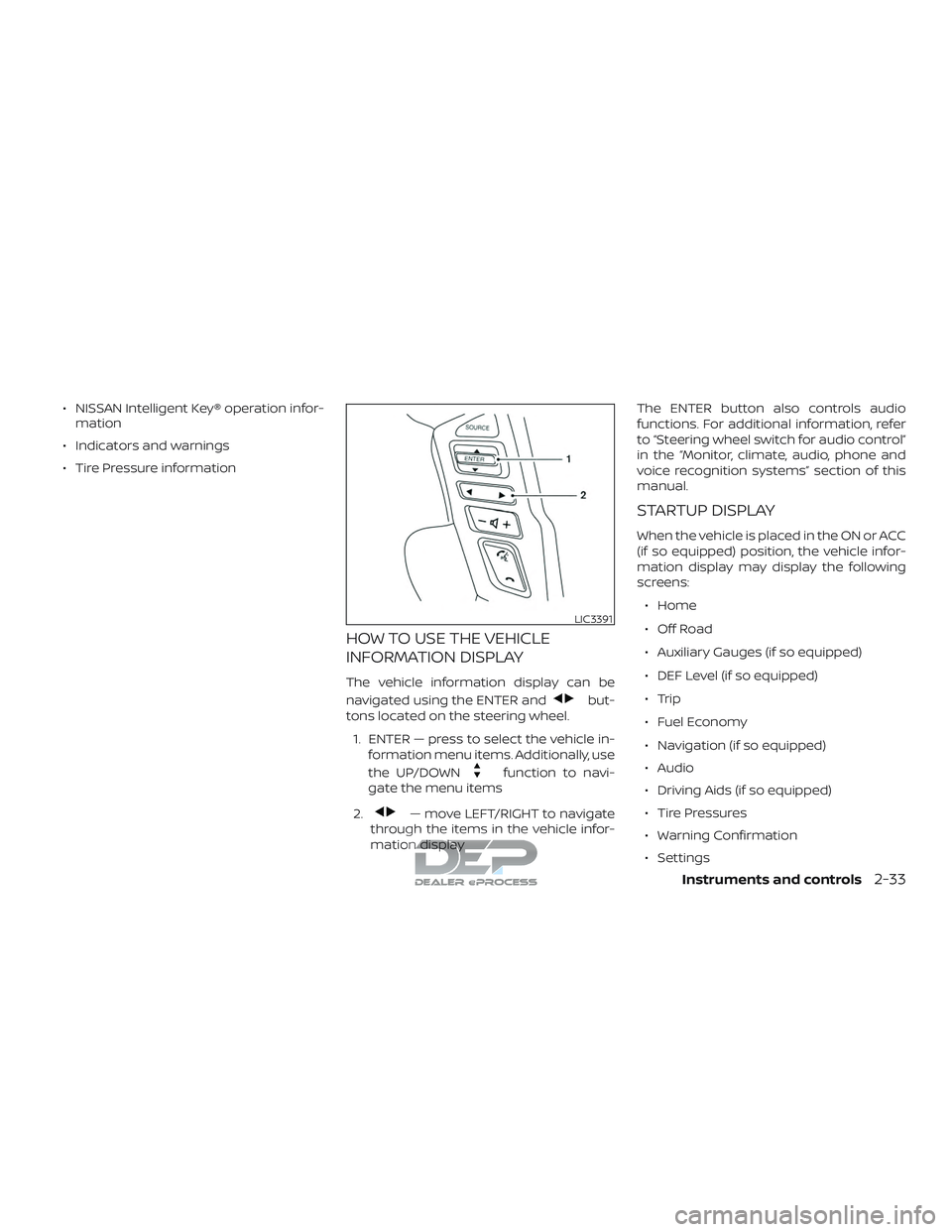
HOW TO USE THE VEHICLE
INFORMATION DISPLAY
The vehicle information display can be
navigated using the ENTER and
but-
tons located on the steering wheel.
1. ENTER — press to select the vehicle in- formation menu items. Additionally, use
the UP/DOWN
function to navi-
gate the menu items
2.
— move LEFT/RIGHT to navigate
through the items in the vehicle infor-
mation display The ENTER button also controls audio
functions. For additional information, refer
to “Steering wheel switch for audio control”
in the “Monitor, climate, audio, phone and
voice recognition systems” section of this
manual.
STARTUP DISPLAY
When the vehicle is placed in the ON or ACC
(if so equipped) position, the vehicle infor-
mation display may display the following
screens:
∙ Home
∙ Off Road
∙ Auxiliary Gauges (if so equipped)
∙ DEF Level (if so equipped)
∙ Trip
∙ Fuel Economy
∙ Navigation (if so equipped)
∙ Audio
∙ Driving Aids (if so equipped)
∙ Tire Pressures
∙ Warning Confirmation
∙ Settings
LIC3391
Instruments and controls2-33
Page 140 of 650
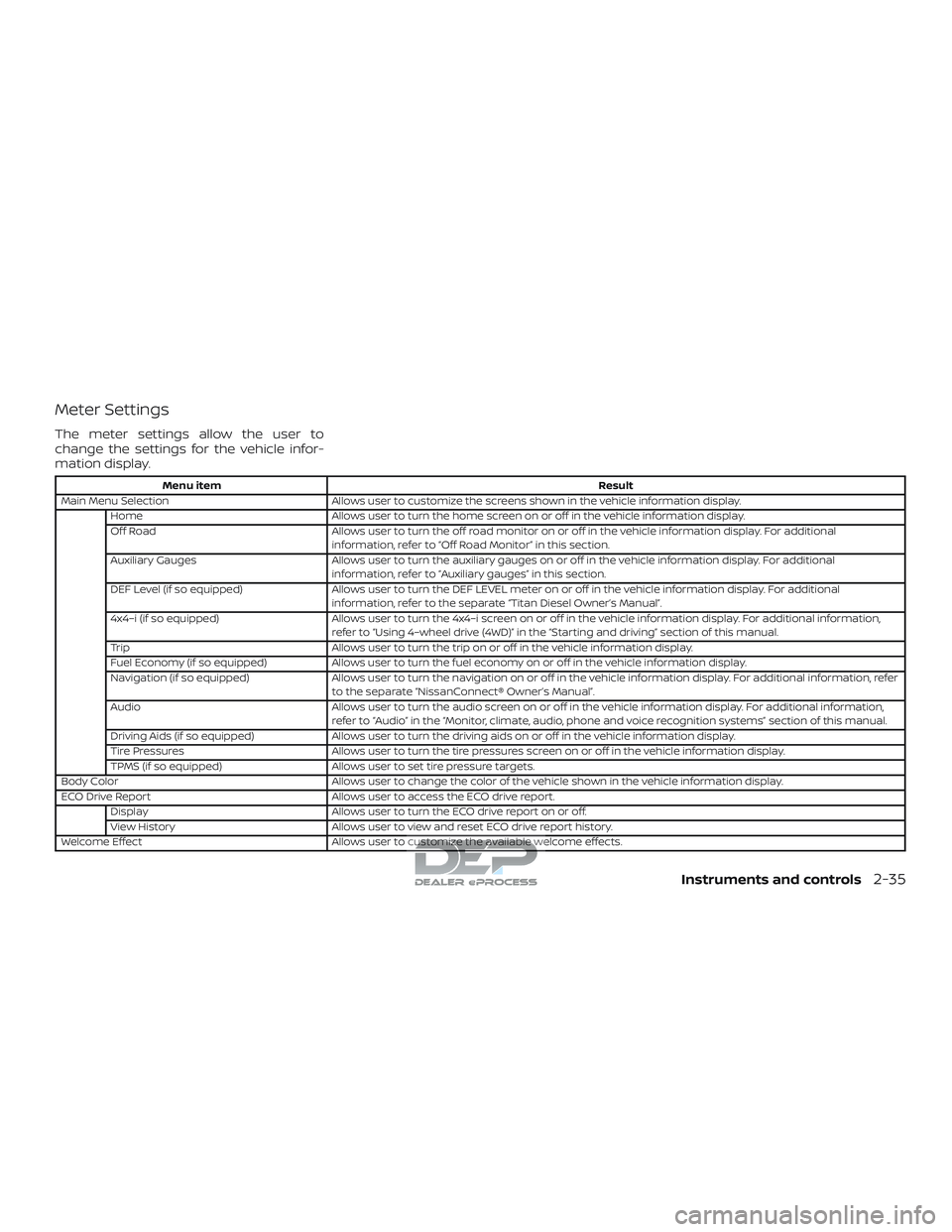
Meter Settings
The meter settings allow the user to
change the settings for the vehicle infor-
mation display.
Menu itemResult
Main Menu Selection Allows user to customize the screens shown in the vehicle information display.
Home Allows user to turn the home screen on or off in the vehicle information display.
Off Road Allows user to turn the off road monitor on or off in the vehicle information display. For additional
information, refer to “Off Road Monitor” in this section.
Auxiliary Gauges Allows user to turn the auxiliary gauges on or off in the vehicle information display. For additional
information, refer to “Auxiliary gauges” in this section.
DEF Level (if so equipped) Allows user to turn the DEF LEVEL meter on or off in the vehicle information display. For additional
information, refer to the separate “Titan Diesel Owner’s Manual”.
4x4–i (if so equipped) Allows user to turn the 4x4–i screen on or off in the vehicle information display. For additional information,
refer to “Using 4–wheel drive (4WD)” in the “Starting and driving” section of this manual.
Trip Allows user to turn the trip on or off in the vehicle information display.
Fuel Economy (if so equipped) Allows user to turn the fuel economy on or off in the vehicle information display.
Navigation (if so equipped) Allows user to turn the navigation on or off in the vehicle information display. For additional information, refer
to the separate “NissanConnect® Owner’s Manual”.
Audio Allows user to turn the audio screen on or off in the vehicle information display. For additional information,
refer to “Audio” in the “Monitor, climate, audio, phone and voice recognition systems” section of this manual.
Driving Aids (if so equipped) Allows user to turn the driving aids on or off in the vehicle information display.
Tire Pressures Allows user to turn the tire pressures screen on or off in the vehicle information display.
TPMS (if so equipped) Allows user to set tire pressure targets.
Body Color Allows user to change the color of the vehicle shown in the vehicle information display.
ECO Drive Report Allows user to access the ECO drive report.
Display Allows user to turn the ECO drive report on or off.
View History Allows user to view and reset ECO drive report history.
Welcome Effect Allows user to customize the available welcome effects.
Instruments and controls2-35
Page 142 of 650
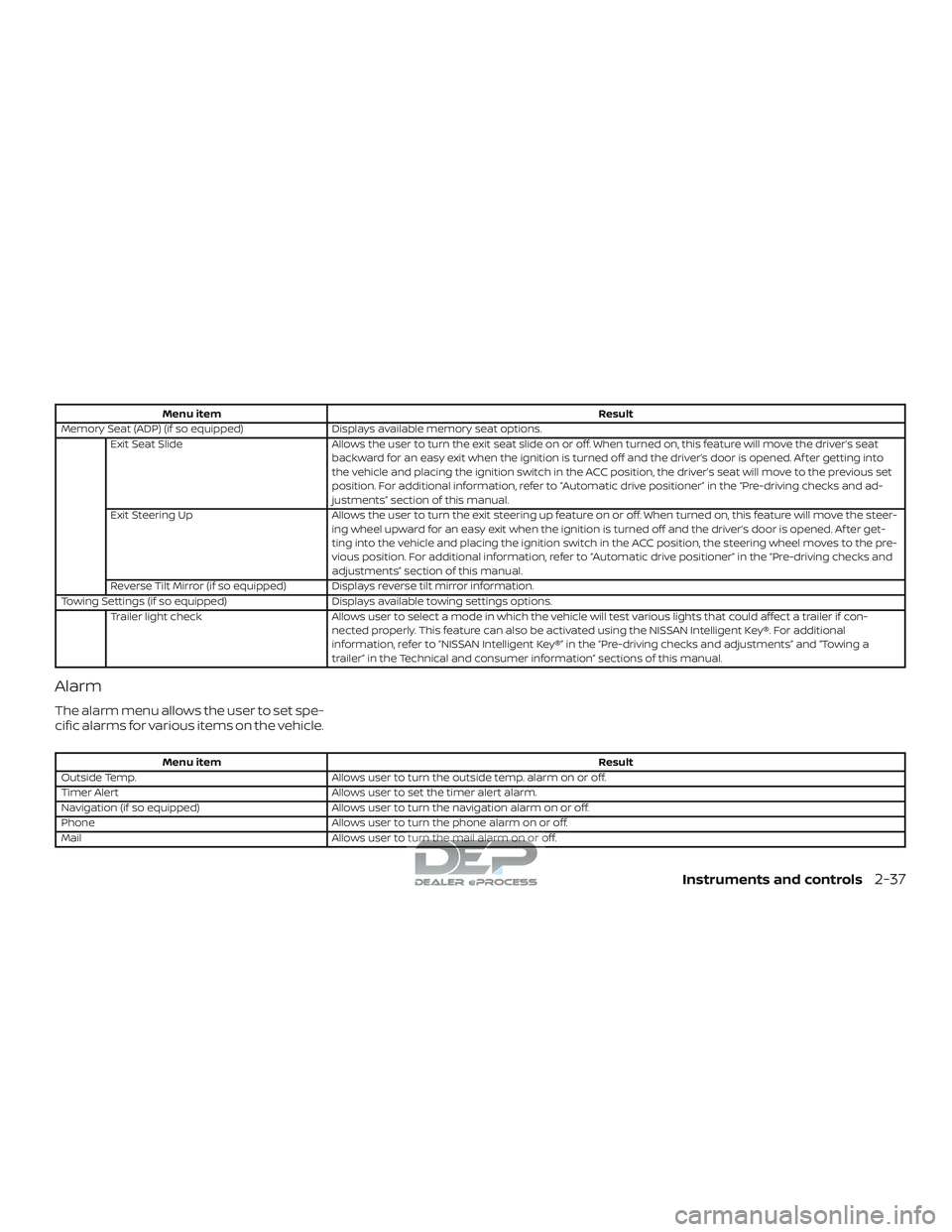
Menu itemResult
Memory Seat (ADP) (if so equipped) Displays available memory seat options.
Exit Seat Slide Allows the user to turn the exit seat slide on or off. When turned on, this feature will move the driver’s seat
backward for an easy exit when the ignition is turned off and the driver’s door is opened. Af ter getting into
the vehicle and placing the ignition switch in the ACC position, the driver’s seat will move to the previous set
position. For additional information, refer to “Automatic drive positioner” in the “Pre-driving checks and ad-
justments” section of this manual.
Exit Steering Up Allows the user to turn the exit steering up feature on or off. When turned on, this feature will move the steer-
ing wheel upward for an easy exit when the ignition is turned off and the driver’s door is opened. Af ter get-
ting into the vehicle and placing the ignition switch in the ACC position, the steering wheel moves to the pre-
vious position. For additional information, refer to “Automatic drive positioner” in the “Pre-driving checks and
adjustments” section of this manual.
Reverse Tilt Mirror (if so equipped) Displays reverse tilt mirror information.
Towing Settings (if so equipped) Displays available towing settings options.
Trailer light check Allows user to select a mode in which the vehicle will test various lights that could affect a trailer if con-
nected properly. This feature can also be activated using the NISSAN Intelligent Key®. For additional
information, refer to “NISSAN Intelligent Key®” in the “Pre-driving checks and adjustments” and “Towing a
trailer” in the Technical and consumer information” sections of this manual.
Alarm
The alarm menu allows the user to set spe-
cific alarms for various items on the vehicle.
Menu item Result
Outside Temp. Allows user to turn the outside temp. alarm on or off.
Timer Alert Allows user to set the timer alert alarm.
Navigation (if so equipped) Allows user to turn the navigation alarm on or off.
Phone Allows user to turn the phone alarm on or off.
Mail Allows user to turn the mail alarm on or off.
Instruments and controls2-37
Page 143 of 650
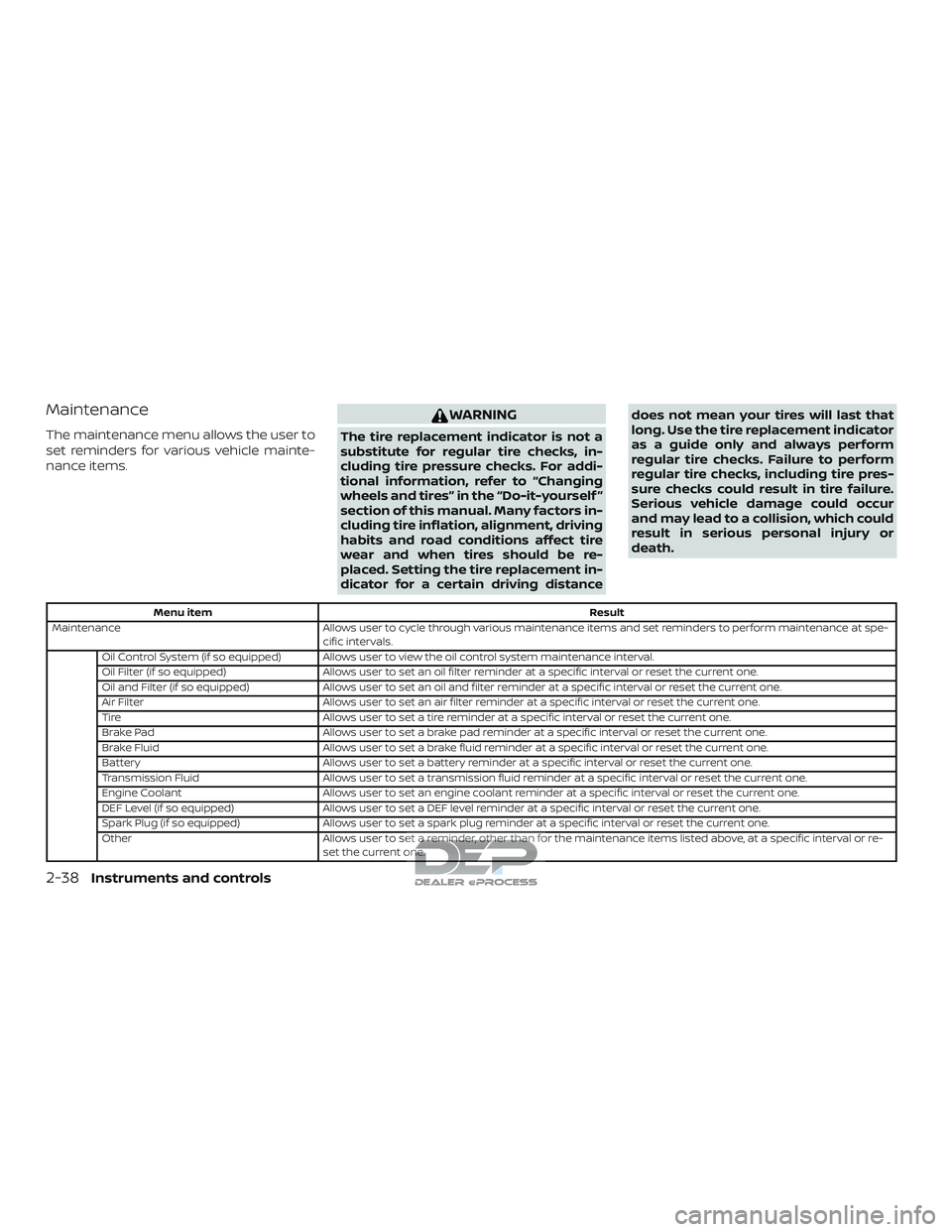
Maintenance
The maintenance menu allows the user to
set reminders for various vehicle mainte-
nance items.
WARNING
The tire replacement indicator is not a
substitute for regular tire checks, in-
cluding tire pressure checks. For addi-
tional information, refer to “Changing
wheels and tires” in the “Do-it-yourself ”
section of this manual. Many factors in-
cluding tire inflation, alignment, driving
habits and road conditions affect tire
wear and when tires should be re-
placed. Setting the tire replacement in-
dicator for a certain driving distancedoes not mean your tires will last that
long. Use the tire replacement indicator
as a guide only and always perform
regular tire checks. Failure to perform
regular tire checks, including tire pres-
sure checks could result in tire failure.
Serious vehicle damage could occur
and may lead to a collision, which could
result in serious personal injury or
death.
Menu item
Result
Maintenance Allows user to cycle through various maintenance items and set reminders to perform maintenance at spe-
cific intervals.
Oil Control System (if so equipped) Allows user to view the oil control system maintenance interval.
Oil Filter (if so equipped) Allows user to set an oil filter reminder at a specific interval or reset the current one.
Oil and Filter (if so equipped) Allows user to set an oil and filter reminder at a specific interval or reset the current one.
Air Filter Allows user to set an air filter reminder at a specific interval or reset the current one.
Tire Allows user to set a tire reminder at a specific interval or reset the current one.
Brake Pad Allows user to set a brake pad reminder at a specific interval or reset the current one.
Brake Fluid Allows user to set a brake fluid reminder at a specific interval or reset the current one.
Battery Allows user to set a battery reminder at a specific interval or reset the current one.
Transmission Fluid Allows user to set a transmission fluid reminder at a specific interval or reset the current one.
Engine Coolant Allows user to set an engine coolant reminder at a specific interval or reset the current one.
DEF Level (if so equipped) Allows user to set a DEF level reminder at a specific interval or reset the current one.
Spark Plug (if so equipped) Allows user to set a spark plug reminder at a specific interval or reset the current one.
Other Allows user to set a reminder, other than for the maintenance items listed above, at a specific interval or re-
set the current one.
2-38Instruments and controls