low oil pressure NISSAN TITAN 2018 Owner´s Manual
[x] Cancel search | Manufacturer: NISSAN, Model Year: 2018, Model line: TITAN, Model: NISSAN TITAN 2018Pages: 650, PDF Size: 7.54 MB
Page 20 of 650
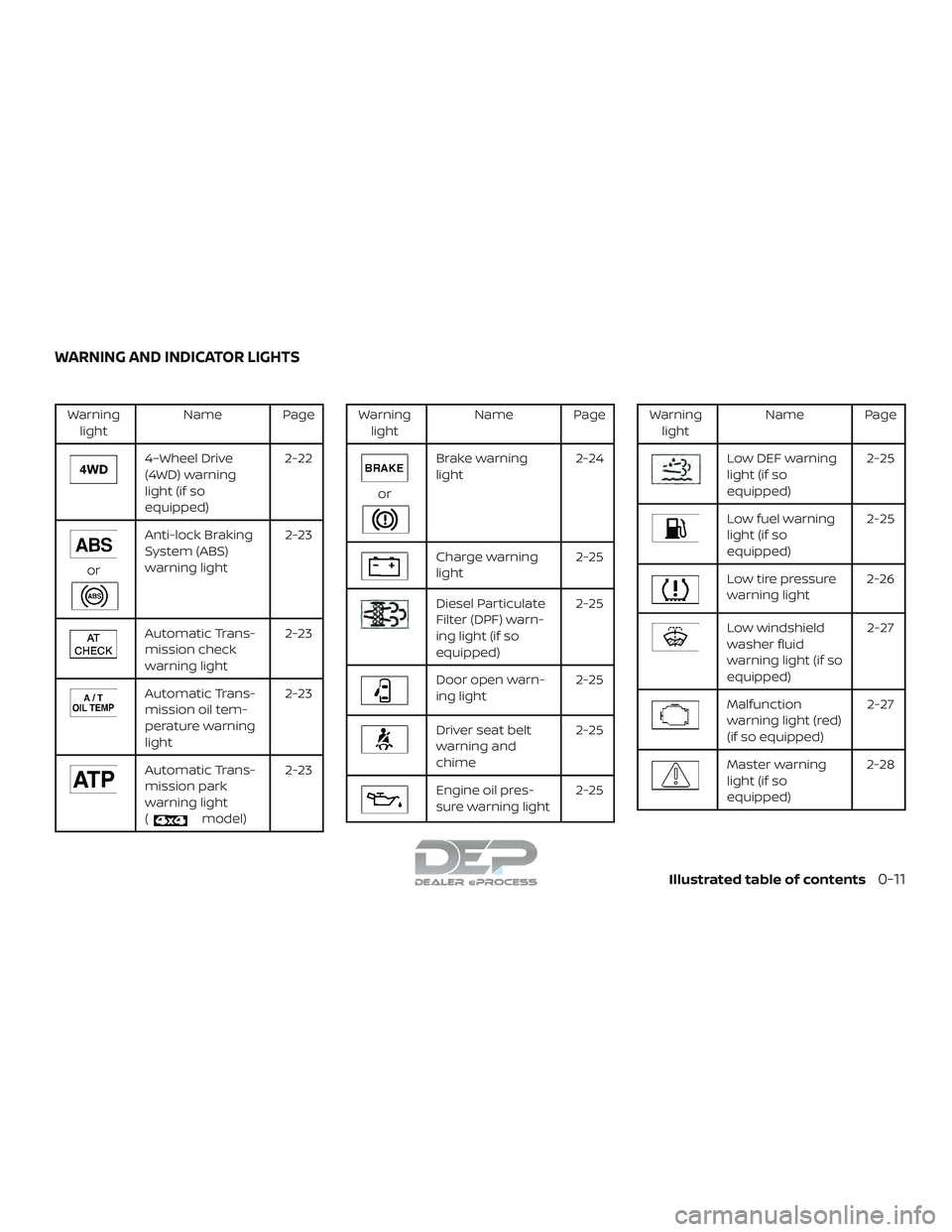
Warninglight Name Page
4–Wheel Drive
(4WD) warning
light (if so
equipped) 2-22
or
Anti-lock Braking
System (ABS)
warning light
2-23
Automatic Trans-
mission check
warning light2-23
Automatic Trans-
mission oil tem-
perature warning
light2-23
Automatic Trans-
mission park
warning light
(
model)2-23
Warning
light Name Page
or
Brake warning
light 2-24
Charge warning
light 2-25
Diesel Particulate
Filter (DPF) warn-
ing light (if so
equipped)2-25
Door open warn-
ing light
2-25
Driver seat belt
warning and
chime2-25
Engine oil pres-
sure warning light
2-25
Warning
light Name Page
Low DEF warning
light (if so
equipped) 2-25
Low fuel warning
light (if so
equipped)2-25
Low tire pressure
warning light
2-26
Low windshield
washer fluid
warning light (if so
equipped) 2-27
Malfunction
warning light (red)
(if so equipped)
2-27
Master warning
light (if so
equipped)2-28
WARNING AND INDICATOR LIGHTS
Illustrated table of contents0-11
Page 116 of 650
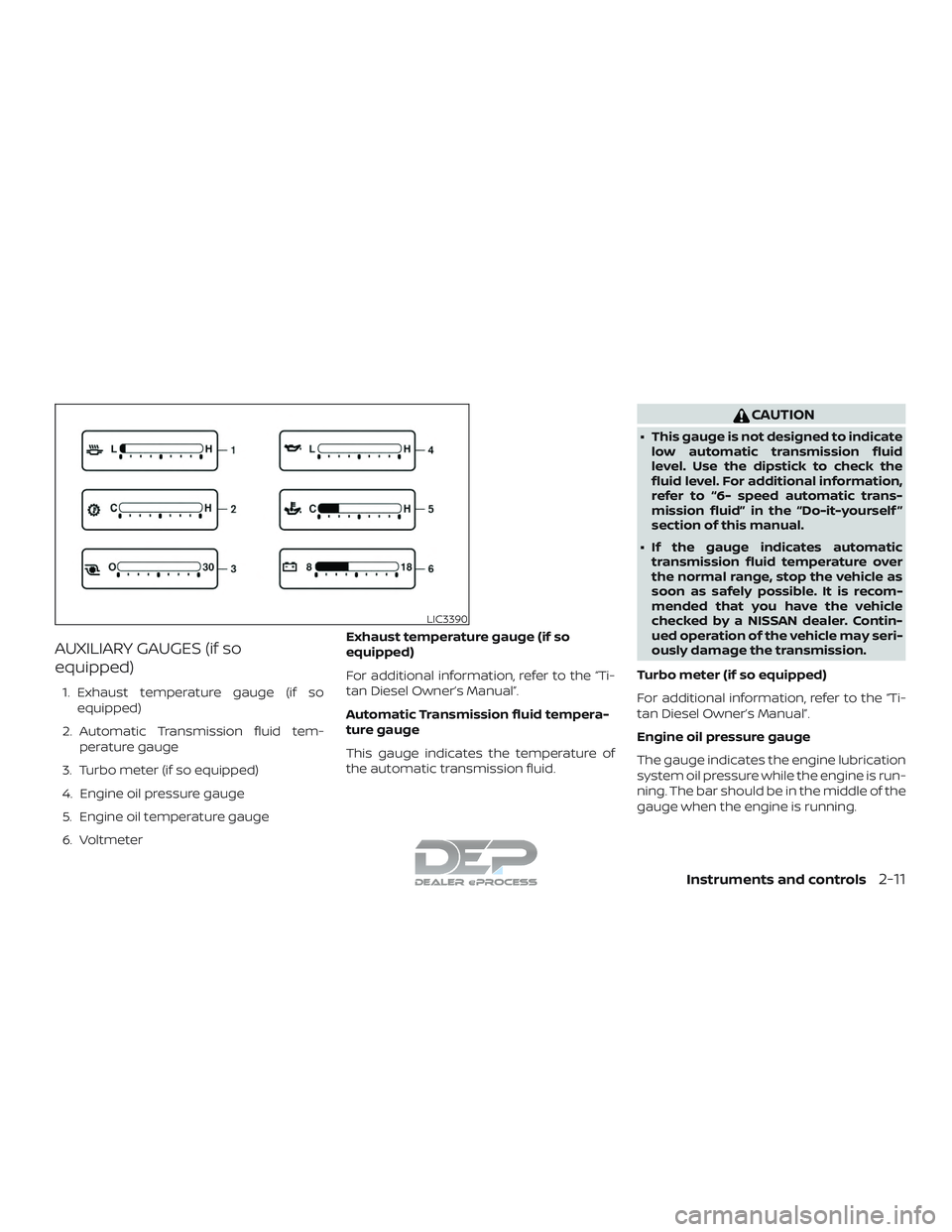
AUXILIARY GAUGES (if so
equipped)
1. Exhaust temperature gauge (if soequipped)
2. Automatic Transmission fluid tem- perature gauge
3. Turbo meter (if so equipped)
4. Engine oil pressure gauge
5. Engine oil temperature gauge
6. Voltmeter Exhaust temperature gauge (if so
equipped)
For additional information, refer to the “Ti-
tan Diesel Owner’s Manual”.
Automatic Transmission fluid tempera-
ture gauge
This gauge indicates the temperature of
the automatic transmission fluid.
CAUTION
∙ This gauge is not designed to indicate
low automatic transmission fluid
level. Use the dipstick to check the
fluid level. For additional information,
refer to “6- speed automatic trans-
mission fluid” in the “Do-it-yourself ”
section of this manual.
∙ If the gauge indicates automatic transmission fluid temperature over
the normal range, stop the vehicle as
soon as safely possible. It is recom-
mended that you have the vehicle
checked by a NISSAN dealer. Contin-
ued operation of the vehicle may seri-
ously damage the transmission.
Turbo meter (if so equipped)
For additional information, refer to the “Ti-
tan Diesel Owner’s Manual”.
Engine oil pressure gauge
The gauge indicates the engine lubrication
system oil pressure while the engine is run-
ning. The bar should be in the middle of the
gauge when the engine is running.
LIC3390
Instruments and controls2-11
Page 120 of 650
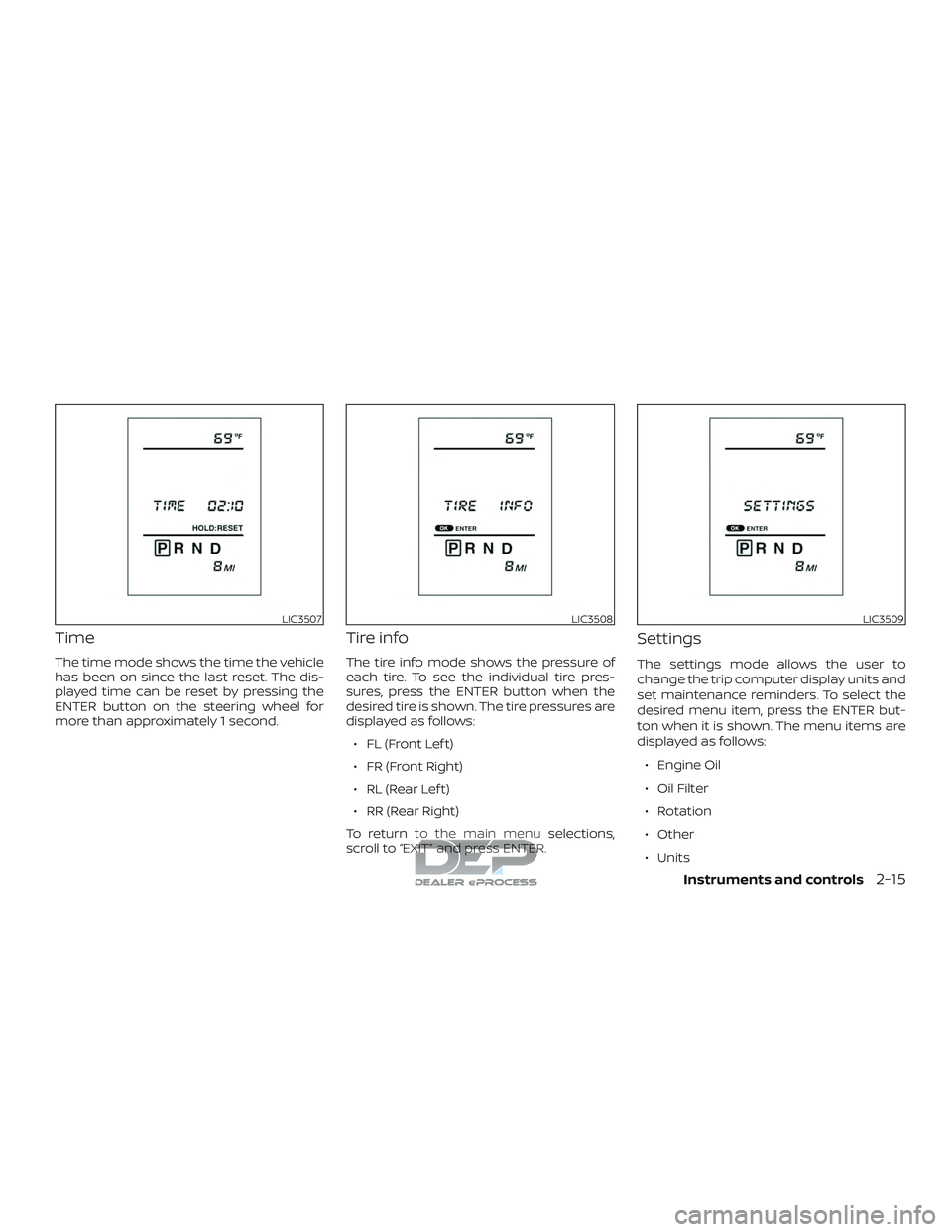
Time
The time mode shows the time the vehicle
has been on since the last reset. The dis-
played time can be reset by pressing the
ENTER button on the steering wheel for
more than approximately 1 second.
Tire info
The tire info mode shows the pressure of
each tire. To see the individual tire pres-
sures, press the ENTER button when the
desired tire is shown. The tire pressures are
displayed as follows:∙ FL (Front Lef t)
∙ FR (Front Right)
∙ RL (Rear Lef t)
∙ RR (Rear Right)
To return to the main menu selections,
scroll to “EXIT” and press ENTER.
Settings
The settings mode allows the user to
change the trip computer display units and
set maintenance reminders. To select the
desired menu item, press the ENTER but-
ton when it is shown. The menu items are
displayed as follows:
∙ Engine Oil
∙ Oil Filter
∙ Rotation
∙ Other
∙ Units
LIC3507LIC3508LIC3509
Instruments and controls2-15
Page 121 of 650
To return to the main menu selections,
scroll to “EXIT” and press ENTER.
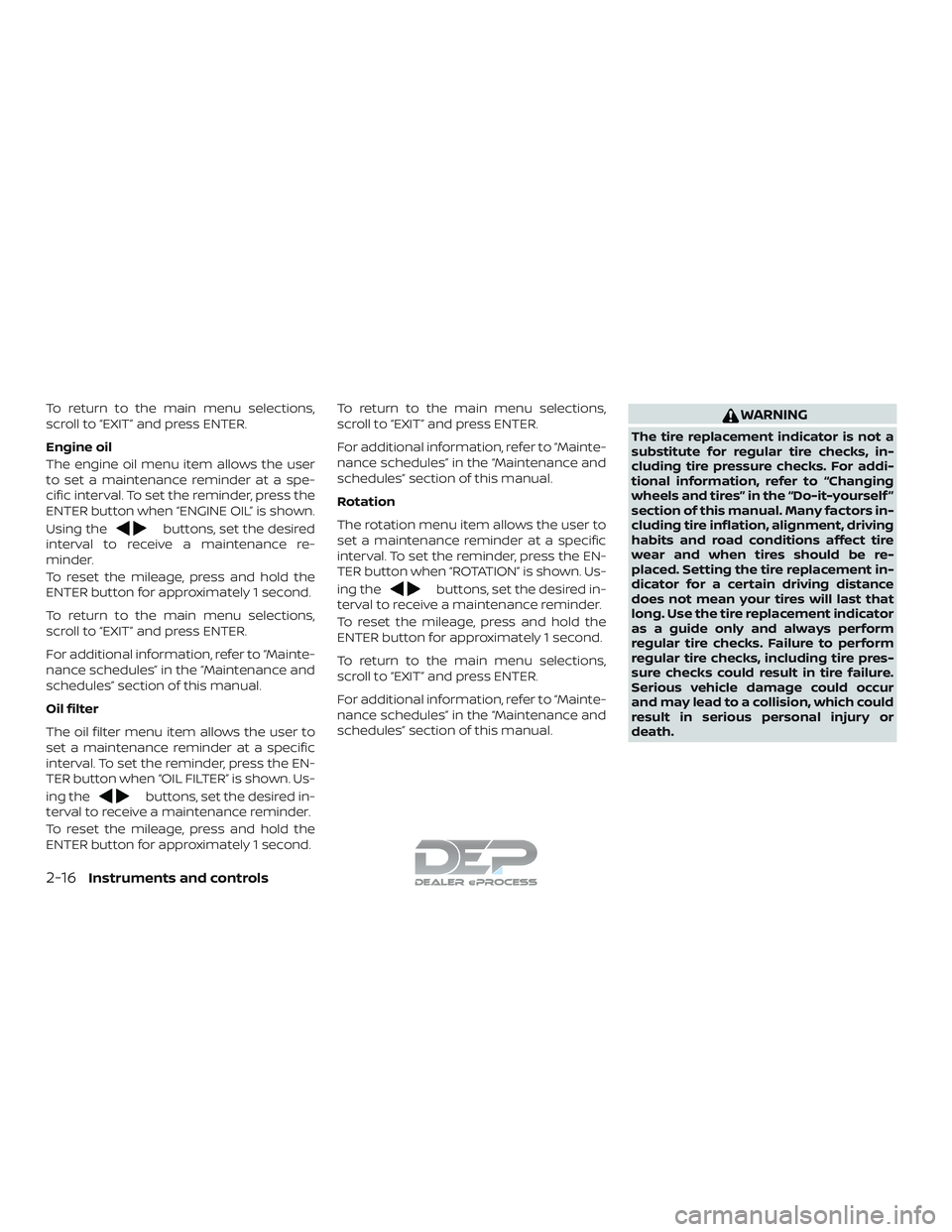
Engine oil
The engine oil menu item allows the user
to set a maintenance reminder at a spe-
cific interval. To set the reminder, press the
ENTER button when “ENGINE OIL” is shown.
Using the
buttons, set the desired
interval to receive a maintenance re-
minder.
To reset the mileage, press and hold the
ENTER button for approximately 1 second.
To return to the main menu selections,
scroll to “EXIT” and press ENTER.
For additional information, refer to “Mainte-
nance schedules” in the “Maintenance and
schedules” section of this manual.
Oil filter
The oil filter menu item allows the user to
set a maintenance reminder at a specific
interval. To set the reminder, press the EN-
TER button when “OIL FILTER” is shown. Us-
ing the
buttons, set the desired in-
terval to receive a maintenance reminder.
To reset the mileage, press and hold the
ENTER button for approximately 1 second. To return to the main menu selections,
scroll to “EXIT” and press ENTER.
For additional information, refer to “Mainte-
nance schedules” in the “Maintenance and
schedules” section of this manual.
Rotation
The rotation menu item allows the user to
set a maintenance reminder at a specific
interval. To set the reminder, press the EN-
TER button when “ROTATION” is shown. Us-
ing the
buttons, set the desired in-
terval to receive a maintenance reminder.
To reset the mileage, press and hold the
ENTER button for approximately 1 second.
To return to the main menu selections,
scroll to “EXIT” and press ENTER.
For additional information, refer to “Mainte-
nance schedules” in the “Maintenance and
schedules” section of this manual.
WARNING
The tire replacement indicator is not a
substitute for regular tire checks, in-
cluding tire pressure checks. For addi-
tional information, refer to “Changing
wheels and tires” in the “Do-it-yourself ”
section of this manual. Many factors in-
cluding tire inflation, alignment, driving
habits and road conditions affect tire
wear and when tires should be re-
placed. Setting the tire replacement in-
dicator for a certain driving distance
does not mean your tires will last that
long. Use the tire replacement indicator
as a guide only and always perform
regular tire checks. Failure to perform
regular tire checks, including tire pres-
sure checks could result in tire failure.
Serious vehicle damage could occur
and may lead to a collision, which could
result in serious personal injury or
death.
2-16Instruments and controls
Page 126 of 650
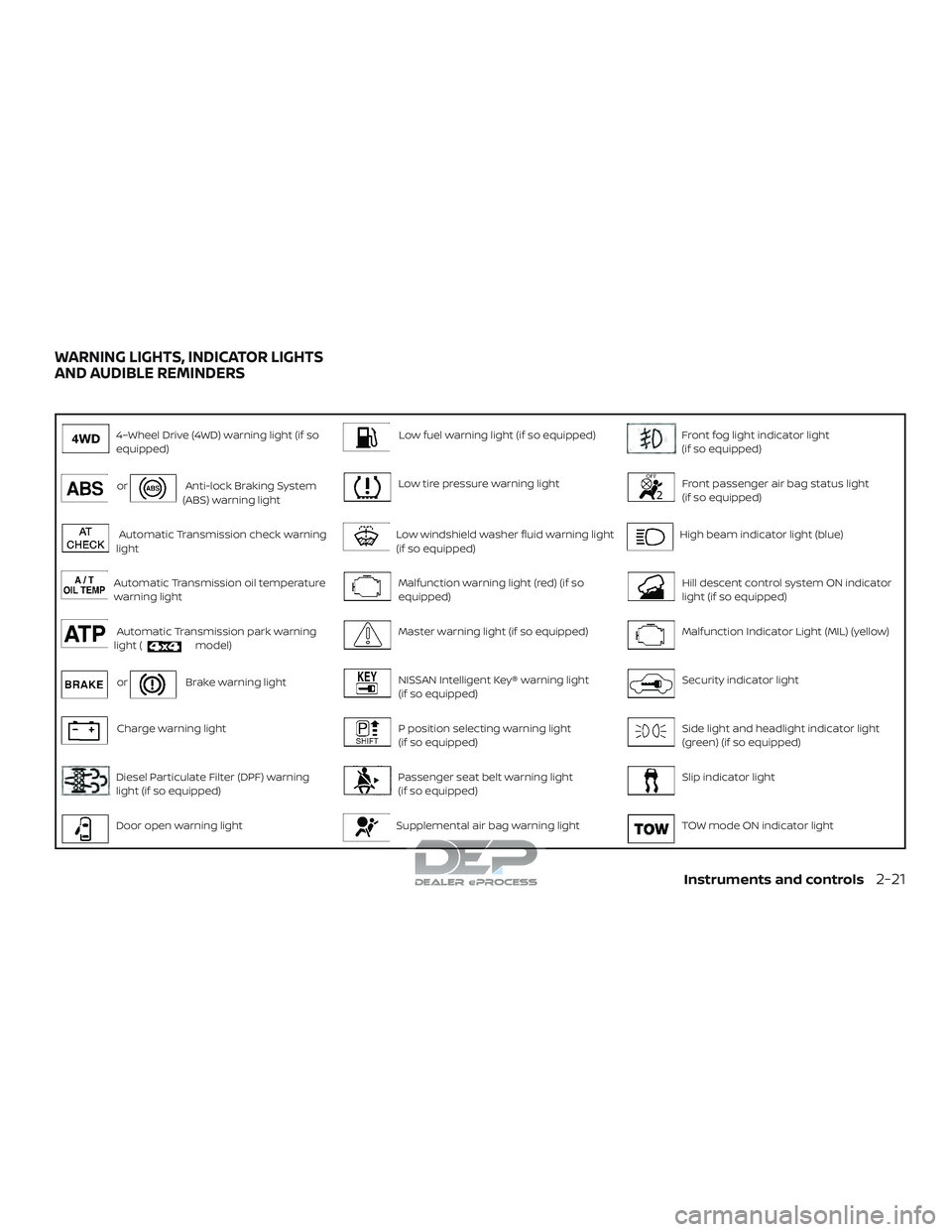
4–Wheel Drive (4WD) warning light (if so
equipped)Low fuel warning light (if so equipped)Front fog light indicator light
(if so equipped)
orAnti-lock Braking System
(ABS) warning lightLow tire pressure warning lightFront passenger air bag status light
(if so equipped)
Automatic Transmission check warning
lightLow windshield washer fluid warning light
(if so equipped)High beam indicator light (blue)
Automatic Transmission oil temperature
warning lightMalfunction warning light (red) (if so
equipped)Hill descent control system ON indicator
light (if so equipped)
Automatic Transmission park warning
light (model)Master warning light (if so equipped)Malfunction Indicator Light (MIL) (yellow)
orBrake warning lightNISSAN Intelligent Key® warning light
(if so equipped)Security indicator light
Charge warning lightP position selecting warning light
(if so equipped)Side light and headlight indicator light
(green) (if so equipped)
Diesel Particulate Filter (DPF) warning
light (if so equipped)Passenger seat belt warning light
(if so equipped)Slip indicator light
Door open warning lightSupplemental air bag warning lightTOW mode ON indicator light
WARNING LIGHTS, INDICATOR LIGHTS
AND AUDIBLE REMINDERS
Instruments and controls2-21
Page 127 of 650
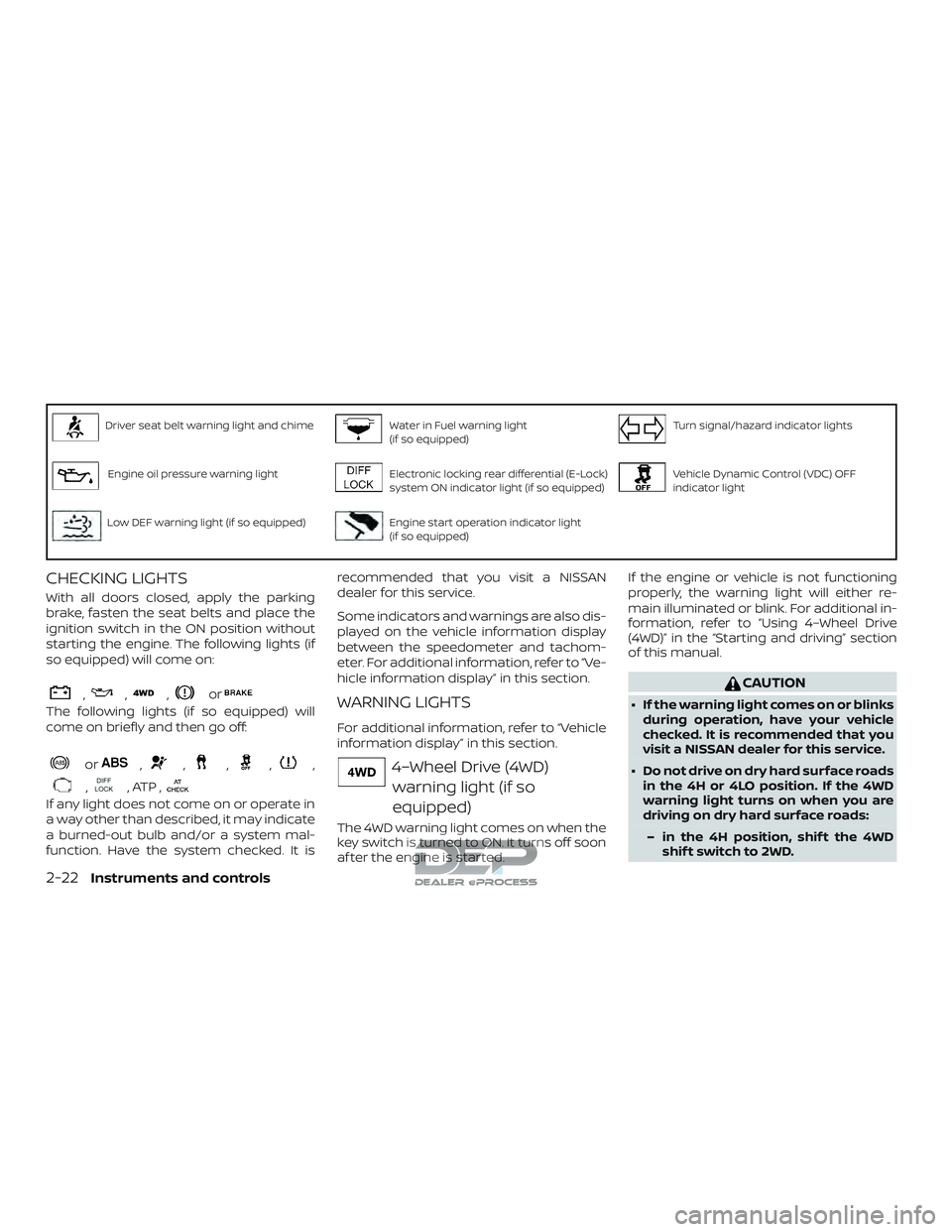
Driver seat belt warning light and chimeWater in Fuel warning light
(if so equipped)Turn signal/hazard indicator lights
Engine oil pressure warning lightElectronic locking rear differential (E-Lock)
system ON indicator light (if so equipped)Vehicle Dynamic Control (VDC) OFF
indicator light
Low DEF warning light (if so equipped)Engine start operation indicator light
(if so equipped)
CHECKING LIGHTS
With all doors closed, apply the parking
brake, fasten the seat belts and place the
ignition switch in the ON position without
starting the engine. The following lights (if
so equipped) will come on:
,,,or
The following lights (if so equipped) will
come on briefly and then go off:
or,,,,,
,, ATP ,
If any light does not come on or operate in
a way other than described, it may indicate
a burned-out bulb and/or a system mal-
function. Have the system checked. It isrecommended that you visit a NISSAN
dealer for this service.
Some indicators and warnings are also dis-
played on the vehicle information display
between the speedometer and tachom-
eter. For additional information, refer to “Ve-
hicle information display” in this section.
WARNING LIGHTS
For additional information, refer to “Vehicle
information display” in this section.
4–Wheel Drive (4WD)
warning light (if so
equipped)
The 4WD warning light comes on when the
key switch is turned to ON. It turns off soon
af ter the engine is started. If the engine or vehicle is not functioning
properly, the warning light will either re-
main illuminated or blink. For additional in-
formation, refer to “Using 4–Wheel Drive
(4WD)” in the “Starting and driving” section
of this manual.
CAUTION
∙ If the warning light comes on or blinks
during operation, have your vehicle
checked. It is recommended that you
visit a NISSAN dealer for this service.
∙ Do not drive on dry hard surface roads in the 4H or 4LO position. If the 4WD
warning light turns on when you are
driving on dry hard surface roads:
– in the 4H position, shif t the 4WD shif t switch to 2WD.
2-22Instruments and controls
Page 130 of 650
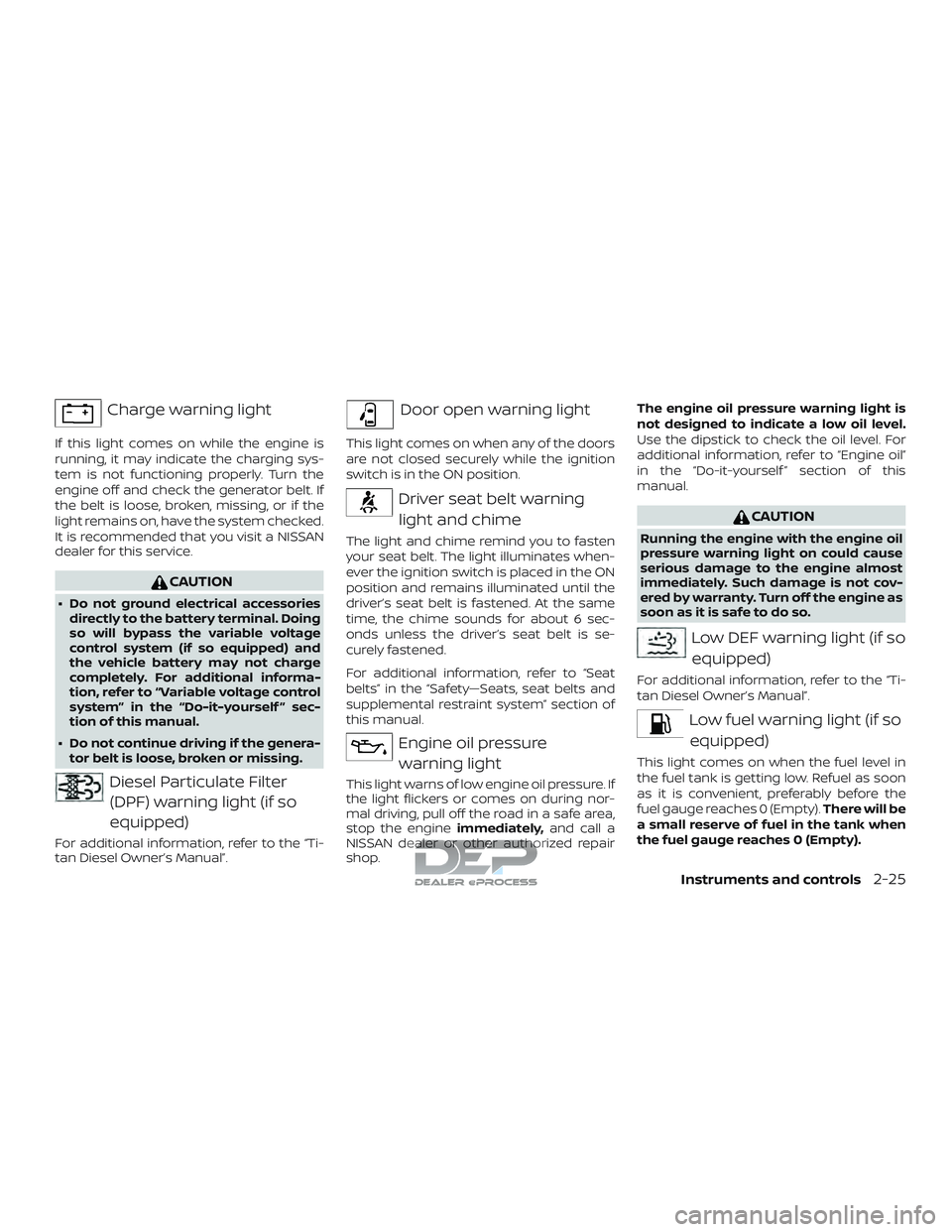
Charge warning light
If this light comes on while the engine is
running, it may indicate the charging sys-
tem is not functioning properly. Turn the
engine off and check the generator belt. If
the belt is loose, broken, missing, or if the
light remains on, have the system checked.
It is recommended that you visit a NISSAN
dealer for this service.
CAUTION
∙ Do not ground electrical accessoriesdirectly to the battery terminal. Doing
so will bypass the variable voltage
control system (if so equipped) and
the vehicle battery may not charge
completely. For additional informa-
tion, refer to “Variable voltage control
system” in the “Do-it-yourself ” sec-
tion of this manual.
∙ Do not continue driving if the genera- tor belt is loose, broken or missing.
Diesel Particulate Filter
(DPF) warning light (if so
equipped)
For additional information, refer to the “Ti-
tan Diesel Owner’s Manual”.
Door open warning light
This light comes on when any of the doors
are not closed securely while the ignition
switch is in the ON position.
Driver seat belt warning
light and chime
The light and chime remind you to fasten
your seat belt. The light illuminates when-
ever the ignition switch is placed in the ON
position and remains illuminated until the
driver’s seat belt is fastened. At the same
time, the chime sounds for about 6 sec-
onds unless the driver’s seat belt is se-
curely fastened.
For additional information, refer to “Seat
belts” in the “Safety—Seats, seat belts and
supplemental restraint system” section of
this manual.
Engine oil pressurewarning light
This light warns of low engine oil pressure. If
the light flickers or comes on during nor-
mal driving, pull off the road in a safe area,
stop the engine immediately,and call a
NISSAN dealer or other authorized repair
shop. The engine oil pressure warning light is
not designed to indicate a low oil level.
Use the dipstick to check the oil level. For
additional information, refer to “Engine oil”
in the “Do-it-yourself ” section of this
manual.
CAUTION
Running the engine with the engine oil
pressure warning light on could cause
serious damage to the engine almost
immediately. Such damage is not cov-
ered by warranty. Turn off the engine as
soon as it is safe to do so.
Low DEF warning light (if so
equipped)
For additional information, refer to the “Ti-
tan Diesel Owner’s Manual”.
Low fuel warning light (if soequipped)
This light comes on when the fuel level in
the fuel tank is getting low. Refuel as soon
as it is convenient, preferably before the
fuel gauge reaches 0 (Empty). There will be
a small reserve of fuel in the tank when
the fuel gauge reaches 0 (Empty).
Instruments and controls2-25
Page 143 of 650
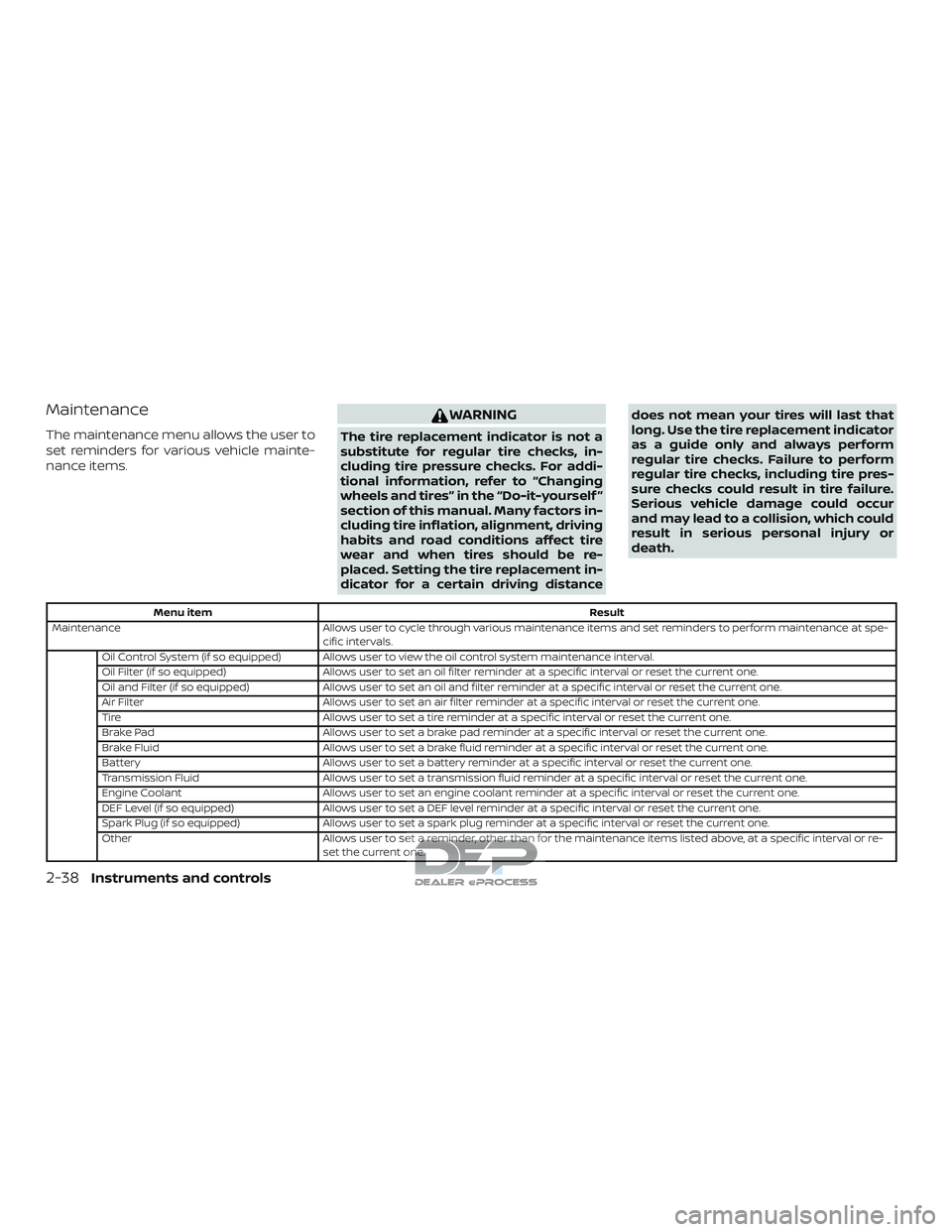
Maintenance
The maintenance menu allows the user to
set reminders for various vehicle mainte-
nance items.
WARNING
The tire replacement indicator is not a
substitute for regular tire checks, in-
cluding tire pressure checks. For addi-
tional information, refer to “Changing
wheels and tires” in the “Do-it-yourself ”
section of this manual. Many factors in-
cluding tire inflation, alignment, driving
habits and road conditions affect tire
wear and when tires should be re-
placed. Setting the tire replacement in-
dicator for a certain driving distancedoes not mean your tires will last that
long. Use the tire replacement indicator
as a guide only and always perform
regular tire checks. Failure to perform
regular tire checks, including tire pres-
sure checks could result in tire failure.
Serious vehicle damage could occur
and may lead to a collision, which could
result in serious personal injury or
death.
Menu item
Result
Maintenance Allows user to cycle through various maintenance items and set reminders to perform maintenance at spe-
cific intervals.
Oil Control System (if so equipped) Allows user to view the oil control system maintenance interval.
Oil Filter (if so equipped) Allows user to set an oil filter reminder at a specific interval or reset the current one.
Oil and Filter (if so equipped) Allows user to set an oil and filter reminder at a specific interval or reset the current one.
Air Filter Allows user to set an air filter reminder at a specific interval or reset the current one.
Tire Allows user to set a tire reminder at a specific interval or reset the current one.
Brake Pad Allows user to set a brake pad reminder at a specific interval or reset the current one.
Brake Fluid Allows user to set a brake fluid reminder at a specific interval or reset the current one.
Battery Allows user to set a battery reminder at a specific interval or reset the current one.
Transmission Fluid Allows user to set a transmission fluid reminder at a specific interval or reset the current one.
Engine Coolant Allows user to set an engine coolant reminder at a specific interval or reset the current one.
DEF Level (if so equipped) Allows user to set a DEF level reminder at a specific interval or reset the current one.
Spark Plug (if so equipped) Allows user to set a spark plug reminder at a specific interval or reset the current one.
Other Allows user to set a reminder, other than for the maintenance items listed above, at a specific interval or re-
set the current one.
2-38Instruments and controls
Page 146 of 650
VEHICLE INFORMATION DISPLAY
WARNINGS AND INDICATORS
1. Door Open
2. Release Parking Brake
3. Range XX miles
4. Low Fuel
5. Oil Level Low (For Diesel engines only)
6. Low Oil Pressure Stop Vehicle (For Die-sel engines only)
7. Oil Level Sensor Fault (For Diesel en- gines only)
8. AT (Automatic Transmission) CHECK
9. AT (Automatic Transmission) Error: See Owner’s Manual
10. Tire Pressure Low - Add Air
11. Low Tire Pressure Error — Info
12. Flat Tire
13. Shipping Mode On Push Storage Fuse
14. Push brake and start button to drive
15. Remote Engine Start Mode (if so equipped)
16. Brightness indicator 17. Low Outside Temperature
18. Shif t to Park
19. Low fuel Pressure: See Owner’s Manual
20. Low Washer Fluid
21. Cruise control indicator
22. 4WD shif t indicators (if so equipped)
23. FRT & RR tire size difference: See Own-
er’s Manual (if so equipped)
24. Push Ignition to OFF
25. Headlight System Error: See Owner’s Manual (if so equipped)
26. Key ID Incorrect
27. No Key Detected
28. Key System Error: See Owner’s Manual
29. Key Battery Low
30. Power will turn off to save the battery
31. Power turned off to save the battery
32. Reminder: Turn OFF Headlights
33. 4WD Error: See Owner’s Manual (if so equipped)
34. Battery Voltage Low Charge Battery
35. Maintenance indicators 36. Parking Sensor Error: See Owner’s
Manual (if so equipped)
37. TPMS Error: See Owner’s Manual
38. 4WD MODE SHIFTING (if so equipped)
39. Loose Fuel Cap (if so equipped)
40. Blind Spot Warning (BSW) and Rear Cross Traffic Alert (RCTA) indicator (if so
equipped)
41. Malfunction: See Owner’s Manual (if so equipped)
42. Side Radar Obstruction (if so equipped)
Door Open
This warning illuminates when a door has
been opened.
Release Parking Brake
This warning illuminates in the message
area of the vehicle information display
when the parking brake is set and the ve-
hicle is driven. Press the brake pedal to re-
lease the parking brake.
Range XX miles
This warning illuminates to indicate the ap-
proximate distance remaining before the
fuel reaches 0 (Empty).
Instruments and controls2-41
Page 147 of 650
Low Fuel
This warning illuminates when the fuel level
in the fuel tank is getting low. Refuel as
soon as it is convenient, preferably before
the fuel gauge reaches 0 (Empty).There
will be a small reserve of fuel in the tank
when the fuel gauge needle reaches 0
(Empty).
Oil Level Low (For Diesel engines only)
If the Oil Level Low indicator is displayed,
the engine oil level is low. If the low level
reminder is displayed, check the level using
the engine oil dipstick.
CAUTION
The oil level should be checked regu-
larly using the engine oil dipstick. Oper-
ating with an insufficient amount of oil
can damage the engine and such dam-
age is not covered by the warranty.
Low Oil Pressure Stop Vehicle (For Diesel
engines only)
This warning appears in the message area
of the vehicle information display if low oil
pressure is detected. This gauge is not de-
signed to indicate low oil level. The low oil
pressure warning is not designed to indi-
cate a low oil level. Use the dipstick to check the oil level. For additional informa-
tion, refer to “Engine oil” in the “Do-it-
yourself ” section of this manual.
Oil Level Sensor Fault (For Diesel en-
gines only)
This warning appears in the message area
of the vehicle information display if the oil
level sensor malfunctions. It is recom-
mended that you visit a NISSAN dealer to
have this system checked.
AT (Automatic Transmission) CHECK
If the AT Check warning appears while the
engine is running, or while driving, it may
indicate that the AT is not functioning prop-
erly and may need servicing. Have the sys-
tem checked, and if necessary, repaired
promptly. It is recommended that you visit
a NISSAN dealer for this service.
AT (Automatic Transmission) Error: See
Owner’s Manual
If this message appears while the engine is
running, or while driving, it may indicate
that the AT is not functioning properly and
may need servicing. Have the system
checked, and if necessary, repaired
promptly. It is recommended that you visit
a NISSAN dealer for this service. Tire Pressure Low - Add Air
This warning appears when the low tire
pressure warning light in the meter illumi-
nates and low tire pressure is detected. The
warning appears each time the ignition
switch is placed in the ON position as long
as the low tire pressure warning light re-
mains illuminated. If this warning appears,
stop the vehicle and adjust the tire pres-
sures of all four tires to the recommended
COLD tire pressure shown on the Tire and
Loading Information label. For additional
information, refer to “Low tire pressure
warning light” in this section and “Tire Pres-
sure Monitoring System (TPMS)” in the
“Starting and driving” section of this
manual.
Low Tire Pressure Error — Info
This warning appears when the low tire
pressure warning light in the meter illumi-
nates and low tire pressure is detected.
Press the
button for information
about the low tire pressure. For additional
information, refer to “Low tire pressure
warning light” in this section and “Tire Pres-
sure Monitoring System (TPMS)” in the
“Starting and driving” section of this
manual.
2-42Instruments and controls