navigation system NISSAN TITAN 2018 Owner´s Manual
[x] Cancel search | Manufacturer: NISSAN, Model Year: 2018, Model line: TITAN, Model: NISSAN TITAN 2018Pages: 650, PDF Size: 7.54 MB
Page 138 of 650
∙ NISSAN Intelligent Key® operation infor-mation
∙ Indicators and warnings
∙ Tire Pressure information
HOW TO USE THE VEHICLE
INFORMATION DISPLAY
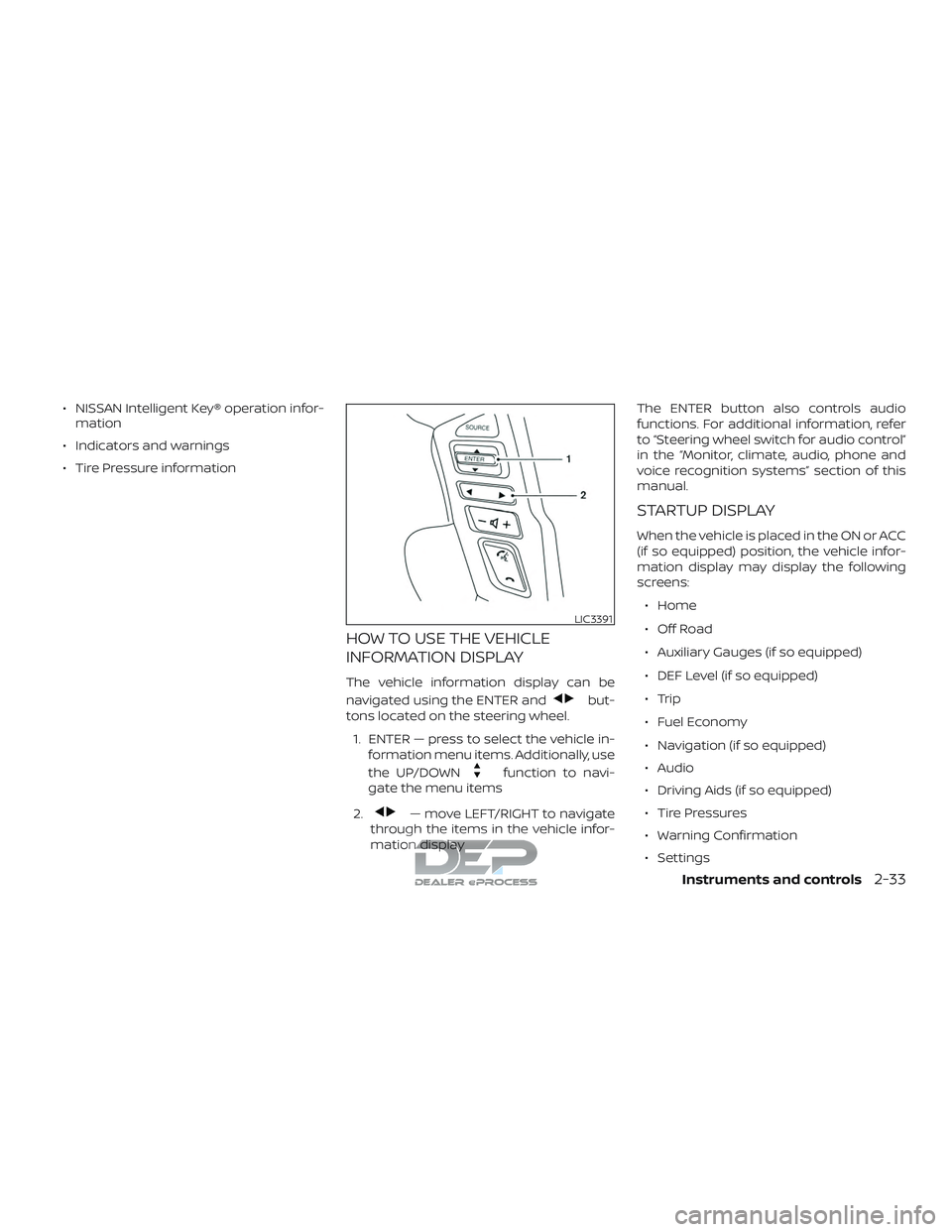
The vehicle information display can be
navigated using the ENTER and
but-
tons located on the steering wheel.
1. ENTER — press to select the vehicle in- formation menu items. Additionally, use
the UP/DOWN
function to navi-
gate the menu items
2.
— move LEFT/RIGHT to navigate
through the items in the vehicle infor-
mation display The ENTER button also controls audio
functions. For additional information, refer
to “Steering wheel switch for audio control”
in the “Monitor, climate, audio, phone and
voice recognition systems” section of this
manual.
STARTUP DISPLAY
When the vehicle is placed in the ON or ACC
(if so equipped) position, the vehicle infor-
mation display may display the following
screens:
∙ Home
∙ Off Road
∙ Auxiliary Gauges (if so equipped)
∙ DEF Level (if so equipped)
∙ Trip
∙ Fuel Economy
∙ Navigation (if so equipped)
∙ Audio
∙ Driving Aids (if so equipped)
∙ Tire Pressures
∙ Warning Confirmation
∙ Settings
LIC3391
Instruments and controls2-33
Page 140 of 650
Meter Settings
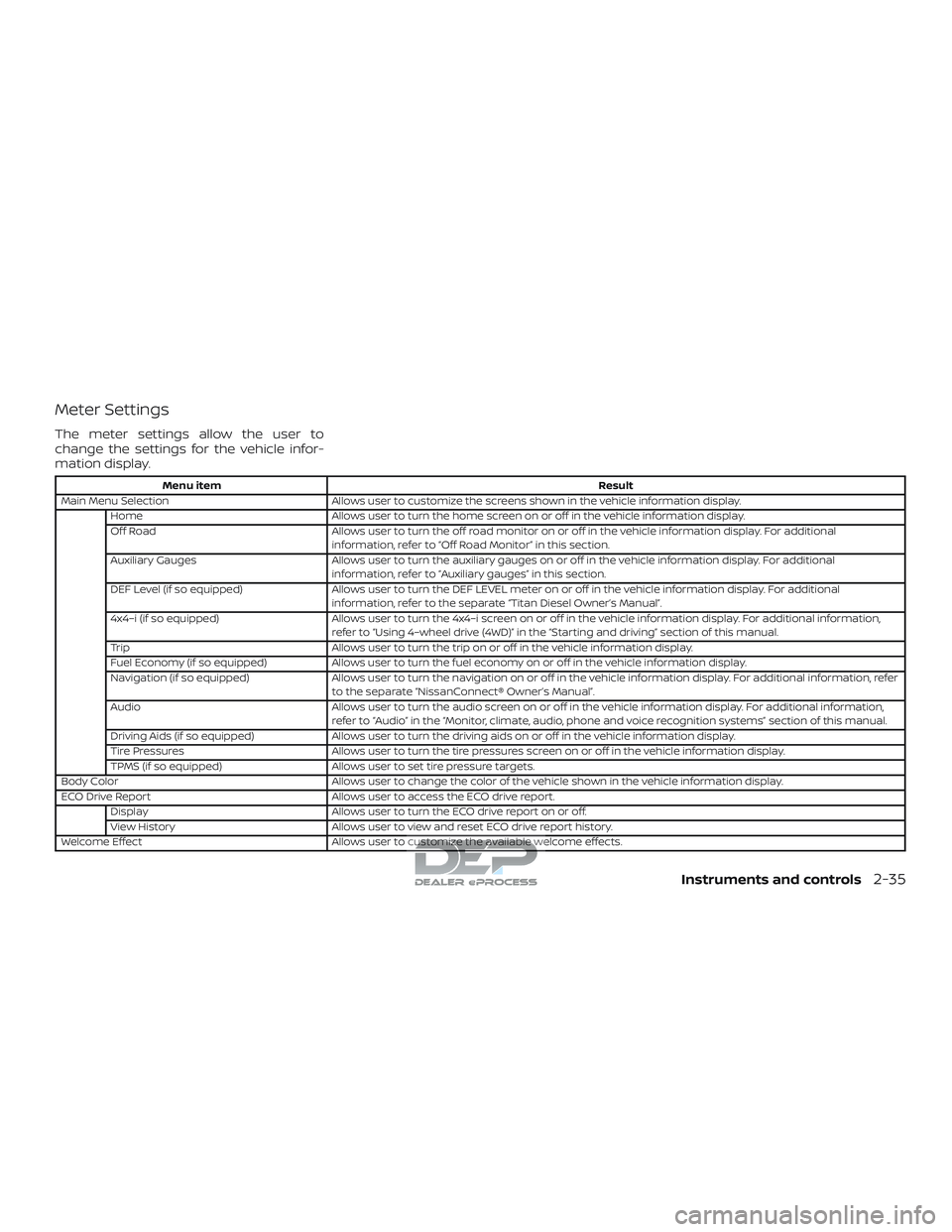
The meter settings allow the user to
change the settings for the vehicle infor-
mation display.
Menu itemResult
Main Menu Selection Allows user to customize the screens shown in the vehicle information display.
Home Allows user to turn the home screen on or off in the vehicle information display.
Off Road Allows user to turn the off road monitor on or off in the vehicle information display. For additional
information, refer to “Off Road Monitor” in this section.
Auxiliary Gauges Allows user to turn the auxiliary gauges on or off in the vehicle information display. For additional
information, refer to “Auxiliary gauges” in this section.
DEF Level (if so equipped) Allows user to turn the DEF LEVEL meter on or off in the vehicle information display. For additional
information, refer to the separate “Titan Diesel Owner’s Manual”.
4x4–i (if so equipped) Allows user to turn the 4x4–i screen on or off in the vehicle information display. For additional information,
refer to “Using 4–wheel drive (4WD)” in the “Starting and driving” section of this manual.
Trip Allows user to turn the trip on or off in the vehicle information display.
Fuel Economy (if so equipped) Allows user to turn the fuel economy on or off in the vehicle information display.
Navigation (if so equipped) Allows user to turn the navigation on or off in the vehicle information display. For additional information, refer
to the separate “NissanConnect® Owner’s Manual”.
Audio Allows user to turn the audio screen on or off in the vehicle information display. For additional information,
refer to “Audio” in the “Monitor, climate, audio, phone and voice recognition systems” section of this manual.
Driving Aids (if so equipped) Allows user to turn the driving aids on or off in the vehicle information display.
Tire Pressures Allows user to turn the tire pressures screen on or off in the vehicle information display.
TPMS (if so equipped) Allows user to set tire pressure targets.
Body Color Allows user to change the color of the vehicle shown in the vehicle information display.
ECO Drive Report Allows user to access the ECO drive report.
Display Allows user to turn the ECO drive report on or off.
View History Allows user to view and reset ECO drive report history.
Welcome Effect Allows user to customize the available welcome effects.
Instruments and controls2-35
Page 213 of 650
WARNING
∙ Radio waves could adversely affectelectric medical equipment. Those
who use a pacemaker should contact
the electric medical equipment
manufacturer for the possible influ-
ences before use.
∙ The Intelligent Key transmits radio waves when the buttons are pressed.
The FAA advises the radio waves may
affect aircraf t navigation and com-
munication systems. Do not operate
the Intelligent Key while on an air-
plane. Make sure the buttons are not
operated unintentionally when the
unit is stored for a flight.
∙ Never leave the Intelligent Key in the vehicle when you leave the vehicle.
The Intelligent Key system can operate all
the door locks using the remote control
function or pushing the request switch on
the vehicle without taking the key out from
a pocket or purse. The operating environ-
ment and/or conditions may affect the In-
telligent Key system operation.
Be sure to read the following before using
the Intelligent Key system.
CAUTION
Be sure to carry the Intelligent Key with
you when operating the vehicle.
The Intelligent Key is capable of receiving
and transmitting radio waves. The Intelli-
gent Key system transmits weak radio
waves from various distances. Environ-
mental conditions may interfere with the
operation of the Intelligent Key system un-
der the following operating conditions: ∙ When operating near a location where strong radio waves are transmitted,
such as a TV tower, power station and
broadcasting station.
∙ When in possession of wireless equip- ment, such as a cellular telephone,
transceiver, or a CB radio.
∙ When the Intelligent Key is in contact with or covered by metallic materials.
∙ When any type of radio wave remote control is used nearby.
∙ When the Intelligent Key is placed near an electric appliance such as a personal
computer.
∙ When the vehicle is parked near a park- ing meter. In such cases, correct the operating condi-
tions before using the Intelligent Key func-
tion or use the mechanical key.
Although the life of the battery varies de-
pending on the operating conditions, the
battery’s life is approximately two years. If
the battery is discharged, replace it with a
new one.
When the Intelligent Key battery is low, a
yellow indicator illuminates with the mes-
sage “Warning, Key ID Incorrect” in the ve-
hicle information display (if so equipped).
When the Intelligent Key battery is low, the
NISSAN Intelligent Key® warning light (if so
equipped) will blink green. For additional
information, refer to “Vehicle information
display warnings and indicators” in the “In-
struments and controls” section of this
manual.
Since the Intelligent Key is capable of re-
ceiving radio waves, if the key is lef t near
equipment which transmits strong radio
waves, such as signals from a TV and per-
sonal computer, the battery life may be-
come shorter.
For additional information, refer to “Battery
replacement” in the “Do-it-yourself ” section
of this manual.
NISSAN INTELLIGENT KEY®
3-10Pre-driving checks and adjustments
Page 249 of 650
4 Monitor, climate, audio, phone and
voice recognition systems
Control panel buttons — color screen with
Navigation System (if so equipped)..............4-4
How to use the touch-screen .................4-5
How to use the
BACKbutton............4-7
How to use the [
]button ...............4-7
button..................................4-9
How to use the CAMERA button ..............4-9
RearView Monitor (if so equipped) ..............4-10
RearView Monitor system operation ..........4-11
How to read the displayed lines ..............4-12
Difference between predicted and
actual distances ............................. 4-12
Adjusting the screen ........................ 4-14
RearView Monitor system limitations ........4-15
System maintenance ........................ 4-16
Intelligent Around View Monitor
(if so equipped) ................................. 4-17
Intelligent Around View Monitor system
operation .................................... 4-18
Difference between predicted and
actual distances ............................. 4-22
How to park with predicted course
lines ......................................... 4-23
How to switch the display ...................4-25Adjusting the screen
........................ 4-25
Intelligent Around View Monitor system
limitations ................................... 4-26
System maintenance ........................ 4-28
Moving Object Detection (MOD)
(if so equipped) ................................. 4-29
MOD system operation ......................4-30
Turning MOD on and off .....................4-32
MOD system limitations .....................4-32
System maintenance ........................ 4-33
Vents ........................................... 4-34
Heater and air conditioner (manual)
(if so equipped) ................................. 4-34
Controls ..................................... 4-35
Heater operation ............................ 4-36
Air conditioner operation ....................4-38
Air flow charts ............................... 4-39
Heater and air conditioner (automatic)
(if so equipped) ................................. 4-43
Automatic operation ........................ 4-44
Manual operation ........................... 4-45
Operating tips ...............................4-47
Servicing air conditioner ........................4-48
Audio system ................................... 4-48
Page 250 of 650
Radio........................................ 4-48
FM radio reception .......................... 4-49
AM radio reception .......................... 4-49
Satellite radio reception (if so equipped) .....4-49
Audio operation precautions ................4-50
FM/AM radio with compact disc (CD)
player (if so equipped) .......................4-57
FM/AM/SAT radio with compact disc
(CD) player (Type A) (if so equipped) ..........4-61
FM/AM/SAT radio with compact disc
(CD) player (Type B) (if so equipped) ..........4-67
USB (Universal Serial Bus) Connection
Port (models without Navigation
System) (if so equipped) .....................4-74
USB (Universal Serial Bus) Connection
Port (models with Navigation System)
(if so equipped) .............................. 4-76
iPod®* player operation without
Navigation System (if so equipped) ..........4-78
iPod®* player operation with Navigation
System (if so equipped) ......................4-81
Bluetooth® streaming audio without
Navigation System (if so equipped) ..........4-84 Bluetooth® streaming audio with
Navigation System (if so equipped)
..........4-85
CD care and cleaning ........................ 4-86
Steering wheel switch for audio control ......4-87
Antenna ..................................... 4-88
NissanConnect® Mobile Apps (if so equipped). . . 4-88
NissanConnect® Services (if so equipped) ......4-89
Siri® Eyes Free .................................. 4-89
Requirements ............................... 4-89
Siri® Activation ............................... 4-90
Operating Siri® Eyes Free ....................4-90
Changing Siri® Eyes Free settings
(models without navigation system) .........4-91
Changing Siri® Eyes Free settings
(models with navigation system) ............4-91
Troubleshooting guide ......................4-92
NISSAN Mobile Entertainment System (MES)
(if so equipped) ................................. 4-93
Front panel buttons ......................... 4-94
Front panel buttons operation ...............4-96
Wireless Headphone Operation ..............4-97
Remote control operation ...................4-98
Page 251 of 650
Remote Control Buttons.....................4-99
General operating instructions .............4-102
How to use the DVD OSD Menu .............4-103
How to use the Monitor OSD Menu .........4-109
PlayingaCD................................. 4-111
Playing Audio Files .......................... 4-112
Playing Image Files ......................... 4-113
Playing Video Files .......................... 4-114
Charging a USB Device .....................4-115
Connecting an External Auxiliary A/V
Source — Input ............................. 4-115
Connecting an External A/V Monitor —
Output ..................................... 4-116
Selecting Monitor A or B as the Source .....4-116
Troubleshooting guide .....................4-116
Specifications .............................. 4-117
FCC Notice ................................. 4-118
FCC Warning ............................... 4-118
ITE Notice .................................. 4-118
WEEE Notice ................................ 4-119
Macrovision Notice ......................... 4-119
Dolby Digital ................................ 4-119
Car phone or CB radio ......................... 4-120Bluetooth® Hands-Free Phone System
without Navigation System (if so equipped)
....4-120
Regulatory information .....................4-122
Using the system ........................... 4-123
Control buttons ............................ 4-124
Connecting procedure .....................4-125
Voice commands .......................... 4-126
Making a call ............................... 4-127
Receiving a call ............................. 4-128
During a call ................................ 4-128
Ending a call ................................ 4-128
Text messaging ............................ 4-128
Bluetooth® settings ........................ 4-130
Manual control ............................. 4-132
T r
oubleshooting guide .....................4-132
Bluetooth® Hands-Free Phone System with
Navigation System (if so equipped) ............4-133
Regulatory information .....................4-135
Voice commands .......................... 4-135
Connecting procedure .....................4-136
Vehicle phonebook ......................... 4-136
Making a call ............................... 4-136
Receiving a call ............................. 4-137
During a call ................................ 4-137
Page 252 of 650
Ending a call................................ 4-137
Text messaging ............................ 4-137
Bluetooth® settings ........................ 4-139
Phone settings ............................. 4-140
Troubleshooting guide .....................4-141
NISSAN Voice Recognition System
(if so equipped) ................................ 4-142
Using the system ........................... 4-142
System features ............................ 4-143Bluetooth® Hands-Free Phone System
voice commands
........................... 4-144
Navigation system voice commands .......4-145
Audio system voice commands ............4-145
Information voice commands ..............4-146
My Apps voice commands .................4-146
Help voice commands ......................4-146
Troubleshooting guide .....................4-147
Page 253 of 650
WARNING
∙ Positioning of the heating or air con-ditioning controls and display con-
trols should not be done while driving
in order that full attention may be
given to the driving operation.
∙ Do not disassemble or modif y this system. If you do, it may result in acci-
dents, fire, or electrical shock.
∙ Do not use this system if you notice any abnormality, such as a frozen
screen or lack of sound. Continued
use of the system may result in acci-
dent, fire or electric shock.
∙ In case you notice any foreign object in the system hardware, spill liquid on
it, or notice smoke or smell coming
from it, stop using the system imme-
diately. Ignoring such conditions may
lead to accidents, fire or electrical
shock. It is recommended that you
visit a NISSAN dealer for servicing.
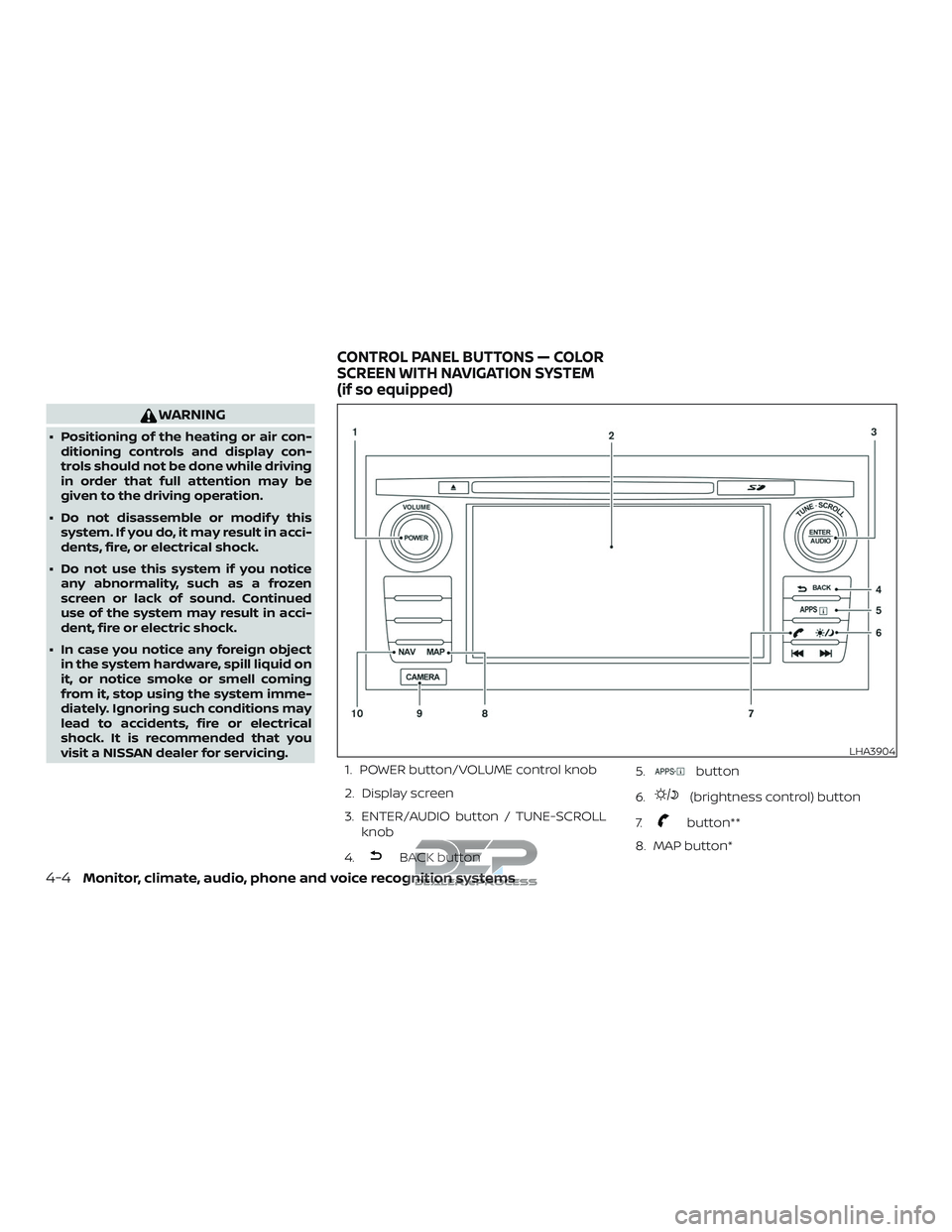
1. POWER button/VOLUME control knob
2. Display screen
3. ENTER/AUDIO button / TUNE-SCROLLknob
4.
BACK button 5.
button
6.
(brightness control) button
7.
button**
8. MAP button*
LHA3904
CONTROL PANEL BUTTONS — COLOR
SCREEN WITH NAVIGATION SYSTEM
(if so equipped)
4-4Monitor, climate, audio, phone and voice recognition systems
Page 254 of 650
9. CAMERA button
10. NAV button*
* For additional information regarding the
navigation system control buttons, refer to
the separate NissanConnect® Owner’s
Manual.
** For additional information regarding the
Bluetooth® Hands-Free Phone System
control button, refer to “Bluetooth® Hands-
Free Phone System with Navigation Sys-
tem” in this section.
When you use this system, make sure the
engine is running.
If you use the system with the engine not
running (ignition ON or ACC) for a long
time, it will discharge the battery, and
the engine will not start.
Reference symbols:
“Example” — Words marked in quotes refer
to a key shown only on the display. These
keys can be selected by touching the
screen.HOW TO USE THE TOUCH-SCREEN
CAUTION
∙ The glass display screen may break if it is hit with a hard or sharp object. If
the glass screen breaks, do not touch
it. Doing so could result in an injury.
∙ To clean the display, never use a rough cloth, alcohol, benzine, thinner or any
kind of solvent or paper towel with a
chemical cleaning agent. They will
scratch or deteriorate the panel.
∙ Do not splash any liquid such as water or car fragrance on the display. Con-
tact with liquid will cause the system
to malfunction.
To help ensure safe driving, some functions
cannot be operated while driving.
The on-screen functions that are not avail-
able while driving will be “grayed out” or
muted.
Park the vehicle in a safe location and then
operate the navigation system.
WARNING
∙ ALWAYS give your full attention to driving.
∙ Avoid using vehicle features that could distract you. If distracted, you
could lose control of your vehicle and
cause an accident.
Monitor, climate, audio, phone and voice recognition systems4-5
Page 257 of 650
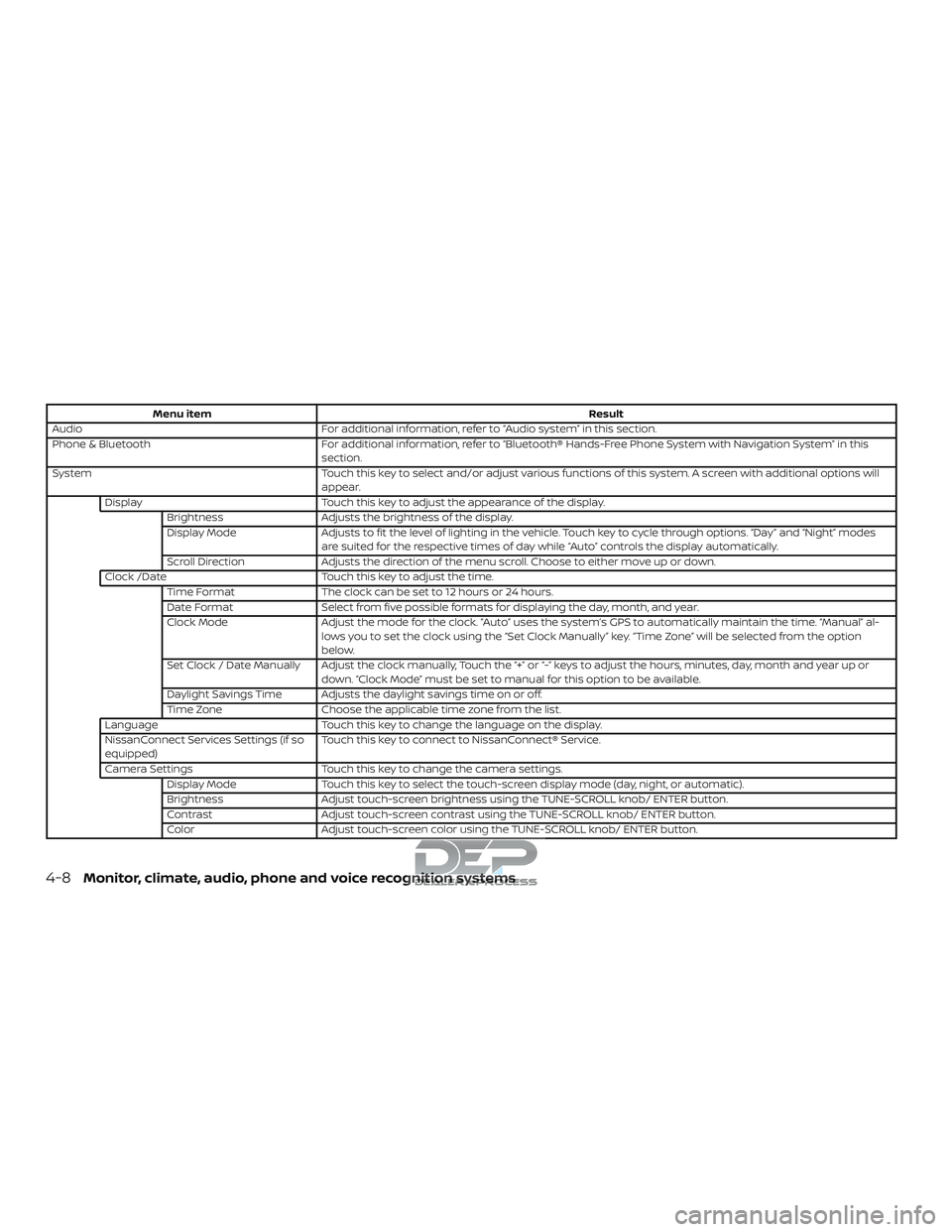
Menu itemResult
Audio For additional information, refer to “Audio system” in this section.
Phone & Bluetooth For additional information, refer to “Bluetooth® Hands-Free Phone System with Navigation System” in this
section.
System Touch this key to select and/or adjust various functions of this system. A screen with additional options will
appear.
Display Touch this key to adjust the appearance of the display.
Brightness Adjusts the brightness of the display.
Display Mode Adjusts to fit the level of lighting in the vehicle. Touch key to cycle through options. “Day” and “Night” modes
are suited for the respective times of day while “Auto” controls the display automatically.
Scroll Direction Adjusts the direction of the menu scroll. Choose to either move up or down.
Clock /Date Touch this key to adjust the time.
Time Format The clock can be set to 12 hours or 24 hours.
Date Format Select from five possible formats for displaying the day, month, and year.
Clock Mode Adjust the mode for the clock. “Auto” uses the system’s GPS to automatically maintain the time. “Manual” al-
lows you to set the clock using the “Set Clock Manually” key. “Time Zone” will be selected from the option
below.
Set Clock / Date Manually Adjust the clock manually, Touch the “+” or “-” keys to adjust the hours, minutes, day, month and year up or down. “Clock Mode” must be set to manual for this option to be available.
Daylight Savings Time Adjusts the daylight savings time on or off.
Time Zone Choose the applicable time zone from the list.
Language Touch this key to change the language on the display.
NissanConnect Services Settings (if so
equipped) Touch this key to connect to NissanConnect® Service.
Camera Settings Touch this key to change the camera settings.
Display Mode Touch this key to select the touch-screen display mode (day, night, or automatic).
Brightness Adjust touch-screen brightness using the TUNE-SCROLL knob/ ENTER button.
Contrast Adjust touch-screen contrast using the TUNE-SCROLL knob/ ENTER button.
Color Adjust touch-screen color using the TUNE-SCROLL knob/ ENTER button.
4-8Monitor, climate, audio, phone and voice recognition systems