remote start NISSAN TITAN 2019 Owner´s Manual
[x] Cancel search | Manufacturer: NISSAN, Model Year: 2019, Model line: TITAN, Model: NISSAN TITAN 2019Pages: 682, PDF Size: 7.99 MB
Page 308 of 682
CAUTION
∙ Do not touch the inner pins of thejacks on the front panel. Electrostatic
discharge may cause permanent
damage to the device.
∙ The LCD display screen is not touch- screen. Do not put pressure or add
suction cups on the screen.
∙ Caution children to avoid touching or scratching the screen, as it may be-
come dirty or damaged.
∙ Be sure to run the vehicle engine while using the system. Using this system
without running the engine can result
in battery drain. To avoid the risk of
battery drain, please remember to
turn off the system when the vehicle
is not in use.
WELCOME
Thank you for purchasing this advanced
Rear Seat Infotainment (RSI) system with
built-in Wi-Fi and DVD player. Before oper-
ating this system, read this sectionl thor-
oughly and retain it for future reference.
System features
∙ Twin 8-inch Color TFT-LCD Panels with 1024x600 Resolution
∙ Top-load DVD Player (Driver Side Only)
∙ Internal Wi-Fi Network
∙ Bluetooth® 4.1 Audio Streaming
∙ Miracast®/Smart View Capability
∙ SmartStream Content Sharing
∙ USB 2.0 Port, SDXC Card Input
∙ HDMI 1.4 Input with MHL 2.0 Support
∙ Exclusive Slingplayer® Application
∙ 3.5mm Stereo Headphone Output
∙ Front Panel Capacitive Touch Controls
∙ Infrared Wireless Headphones
∙ Full-Function Slimline Remote Control
∙ Monitor Screen Sharing
GETTING STARTED
Turning the monitor on or off
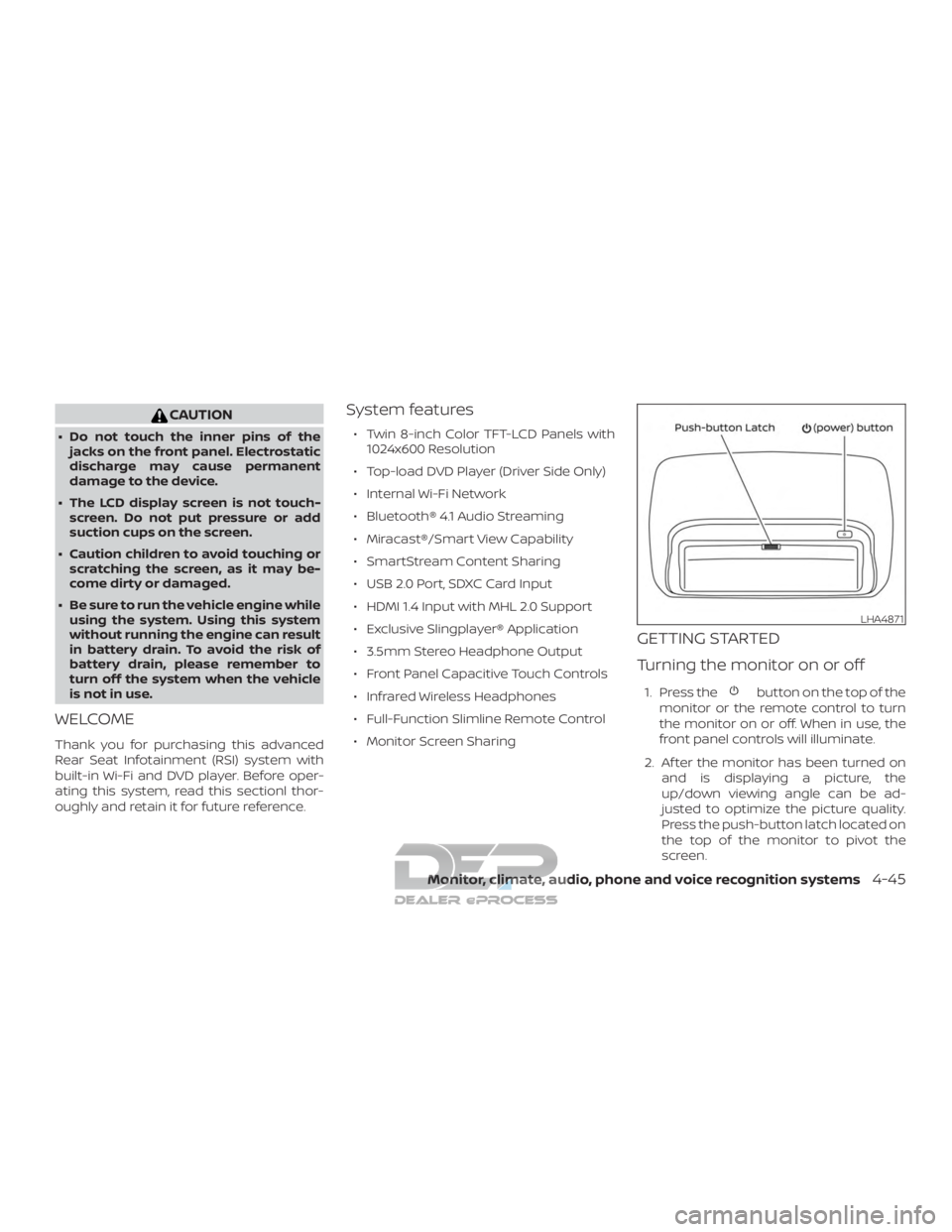
1. Press thebutton on the top of the
monitor or the remote control to turn
the monitor on or off. When in use, the
front panel controls will illuminate.
2. Af ter the monitor has been turned on and is displaying a picture, the
up/down viewing angle can be ad-
justed to optimize the picture quality.
Press the push-button latch located on
the top of the monitor to pivot the
screen.
LHA4871
Monitor, climate, audio, phone and voice recognition systems4-45
Page 321 of 682
Some DVDs may start at the root menu,
where playback must be selected to start a
movie. Use the remote control or front
panel buttons to navigate through the DVD
menu and begin playback.
The system supports DVD parental con-
trols that provide the ability to limit content
playback based on the Motion Picture As-
sociation of America (MPAA) ratings. For
additional information, refer to “About pa-
rental lock” in this section.
Mirroring content
To mirror the content of the opposite
monitor, using the directional pad on the
remote, select “MIRROR” from the Home
Screen. This will allow the identical content
to play on both monitors.
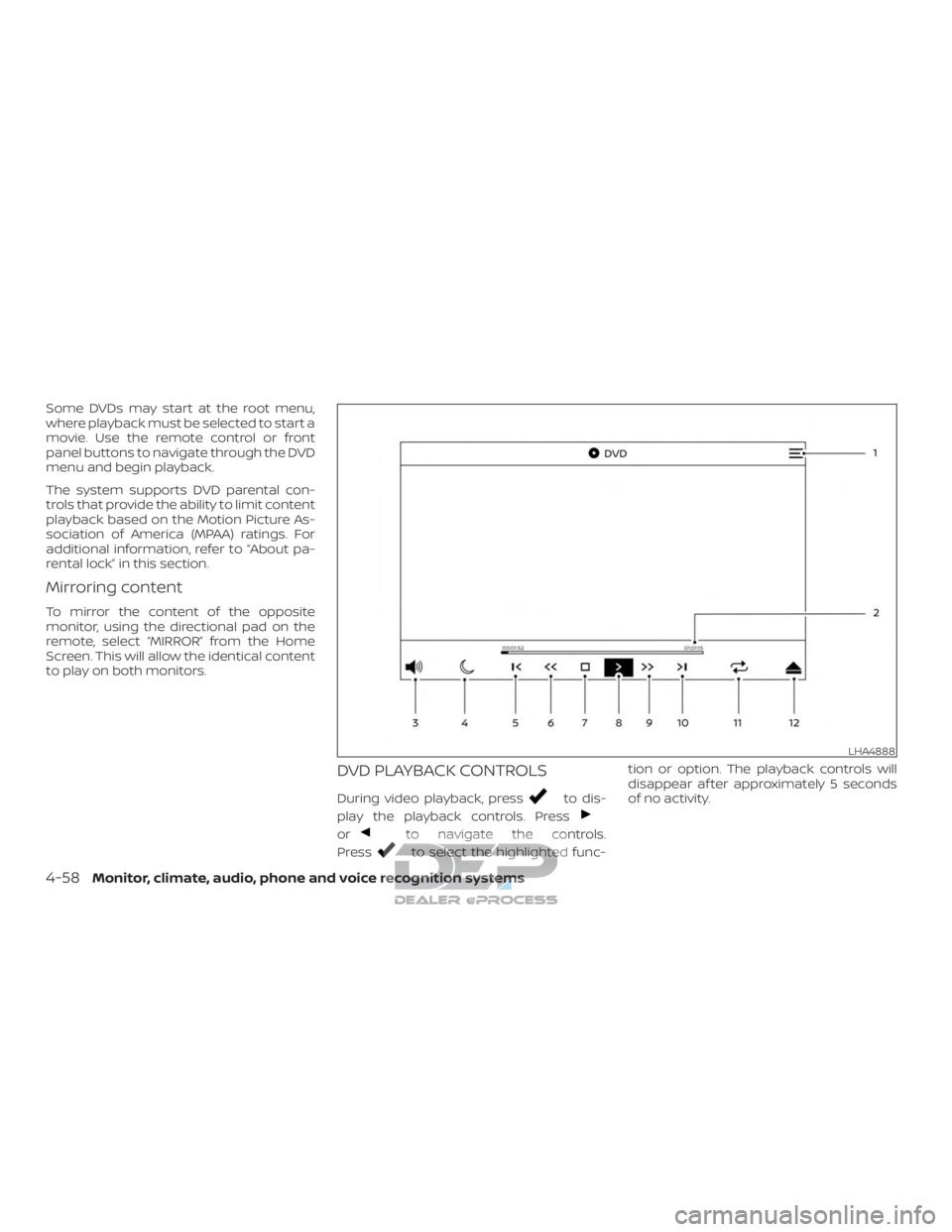
DVD PLAYBACK CONTROLS
During video playback, pressto dis-
play the playback controls. Press
orto navigate the controls.
Press
to select the highlighted func- tion or option. The playback controls will
disappear af ter approximately 5 seconds
of no activity.
LHA4888
4-58Monitor, climate, audio, phone and voice recognition systems
Page 330 of 682
8.Play/Pause
Select once to pause DVD playback.
Select again to resume DVD playback.
9. Fast Forward
Select to fast forward at 2x, 4x, 8x, and
16x speeds. Select
to resume
playback.
10. Next
Select to go to the next chapter.
11. Repeat
Select once to repeat the entire DVD.
Select again to repeat the currently
playing chapter one time.
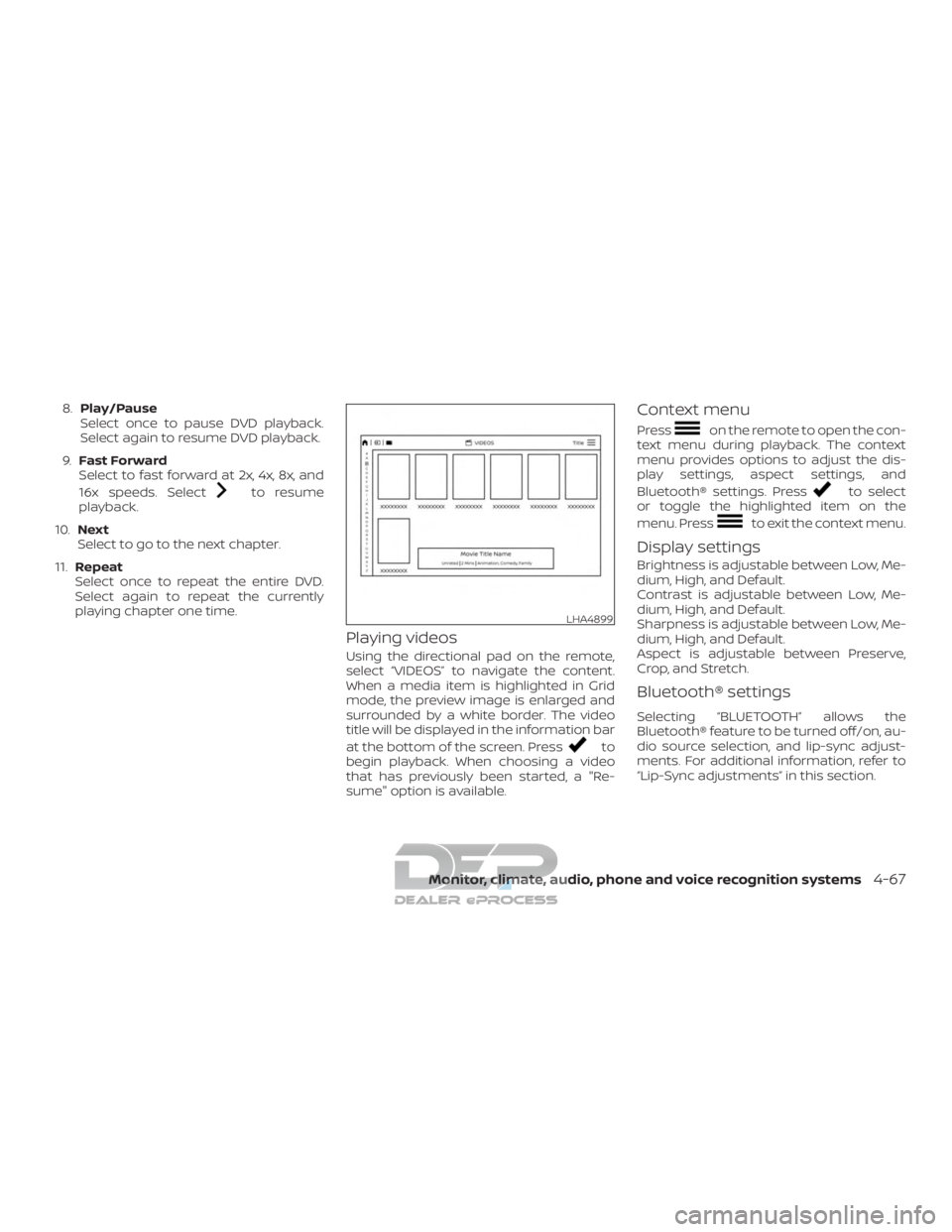
Playing videos
Using the directional pad on the remote,
select “VIDEOS” to navigate the content.
When a media item is highlighted in Grid
mode, the preview image is enlarged and
surrounded by a white border. The video
title will be displayed in the information bar
at the bottom of the screen. Press
to
begin playback. When choosing a video
that has previously been started, a "Re-
sume" option is available.
Context menu
Presson the remote to open the con-
text menu during playback. The context
menu provides options to adjust the dis-
play settings, aspect settings, and
Bluetooth® settings. Press
to select
or toggle the highlighted item on the
menu. Press
to exit the context menu.
Display settings
Brightness is adjustable between Low, Me-
dium, High, and Default.
Contrast is adjustable between Low, Me-
dium, High, and Default.
Sharpness is adjustable between Low, Me-
dium, High, and Default.
Aspect is adjustable between Preserve,
Crop, and Stretch.
Bluetooth® settings
Selecting “BLUETOOTH” allows the
Bluetooth® feature to be turned off/on, au-
dio source selection, and lip-sync adjust-
ments. For additional information, refer to
“Lip-Sync adjustments” in this section.
LHA4899
Monitor, climate, audio, phone and voice recognition systems4-67
Page 353 of 682
5 Starting and driving
Precautions when starting and driving..........5-2
Exhaust gas (carbon monoxide) ..............5-2
Three-way catalyst (if so equipped) ...........5-2
Tire Pressure Monitoring System
(TPMS)........................................5-3
On-pavement and off-road driving
precautions ..................................5-7
Avoiding collision and rollover ................5-7
Off-roadrecovery ............................5-7
Rapid air pressure loss .......................5-8
Drinking alcohol/drugs and driving ...........5-9
Driving safety precautions ....................5-9
Push-button ignition switch .....................5-11
Operating range ............................. 5-12
Push-button ignition switch positions .......5-12
Emergency engine shut off ..................5-13
NISSAN Intelligent Key® battery
discharge ................................... 5-14
NISSAN Vehicle Immobilizer System .........5-14
Before starting the engine ......................5-15
Starting the engine (gasoline engine only) ......5-15
Remote Engine Start (if so equipped) ........5-16
Starting the engine (diesel only) ................5-16
Driving the vehicle .............................. 5-17Engine protection mode
.....................5-17
Automatic transmission (A/T) ...............5-17
Parking brake .................................. 5-23
Blind Spot Warning (BSW) (if so equipped) .......5-23
BSW system operation ......................5-25
How to enable/disable the BSW system .....5-26
BSW system limitations ......................5-27
BSW driving situations .......................5-28
System temporarily unavailable .............5-31
System maintenance ........................ 5-32
Rear Cross Traffic Alert (RCTA) (if so equipped) . . 5-33 RCTA system operation ......................5-34
How to enable/disable the RCTA
system ...................................... 5-36
RCTA system limitations .....................5-37
System temporarily unavailable .............5-39
System maintenance ........................ 5-40
Cruise control .................................. 5-41
Pr ec autions
on cruise control ................5-41
Cruise control operations ....................5-42
Break-in schedule .............................. 5-43
Fuel efficient driving tips ........................5-43
Increasing fuel economy .......................5-44
Page 369 of 682
5. To stop the engine, move the shif t leverto the P (Park) position and push the
ignition switch to the OFF position.
In preparation for the next engine start, the
engine may have a slightly delayed shutoff
af ter placing the ignition switch in the OFF
position, depending on the driving condi-
tions.
NOTE:
Care should be taken to avoid situations
that can lead to potential battery dis-
charge and potential no-start conditions
such as: 1. Installation or extended use of elec-
tronic accessories that consume bat-
tery power when the engine is not
running (phone chargers, GPS, DVD
players, etc.).
2. The vehicle is not driven regularly
and/or only driven short distances.
In these cases, the battery may need to
be charged to maintain battery health.REMOTE ENGINE START (if so
equipped)
Vehicles started with the Remote Engine
Start require the ignition switch to be
placed in the ON position before the shif t
lever can be moved from the P (Park) posi-
tion. To place the ignition switch in the ON
position, follow these steps: 1. Make sure that the Intelligent Key is on you.
2. Apply the brake.
3. Push the ignition switch once to the ON position.
For additional information, refer to “NISSAN
Intelligent Key®” in the “Pre-driving checks
and adjustments” section of this manual. For additional information on starting your
diesel engine, refer to the Titan Diesel Own-
er’s Manual.
STARTING THE ENGINE (diesel only)
5-16Starting and driving
Page 594 of 682
Front air bag system
(See supplemental restraint
system)..................1-60, 1-75
Front and rear sonar system ........5-63
Front-door pocket ...............2-71
Front power seat adjustment ........1-5
Frontseats....................1-2
Fuel Capacities and recommended
fuel/lubricants...............10-2
Fuel economy ...............5-44
Fuel gauge ..................2-9
Fueloctanerating.............10-7
Fuel recommendation ..........10-5
Loose fuel cap warning .........2-40
Fuel Cell Vehicle (FCV) System Tire pressure ................8-35
Fuelefficientdrivingtips...........5-43
Fuel-filler door .................3-27
Fuel gauge ....................2-9
Fuses .......................8-23
Fusiblelinks...................8-25
G
Garage door opener, HomeLink® Universal
Transceiver . .2-89, 2-90, 2-91, 2-92, 2-92, 2-93
Gauge Automatic transmission fluid
temperature gauge ............2-10
Engine coolant temperature gauge . .2-8
Engine oil pressure gauge .....2-10,2-11
Fuel gauge ..................2-9
Odometer ..................2-7
Speedometer ................2-7 Tachometer
.................2-8
Trip odometer ................2-7
Voltmeter ..................2-11
General maintenance .............9-2
Glovebox....................2-75
Grocery hooks .................2-81
H
Hazard warning flasher switch ........6-2
Headlightaimingcontrol ..........2-52
Headlight and turn signal switch ......2-49
Headlightcontrolswitch...........2-49
Headlights ...................8-29
Headlights,aimingcontrol..........2-52
Headrestraints................ .1-10
Heatedrearseats...............2-57
Heatedseats..................2-56
Heated steering wheel switch .......2-59
Heater Heater and air conditioner (automatic)
(if so equipped) ..............4-38
Heater and air conditioner controls . .4-39
Heater operation ..........4-31, 4-40
Heater and air conditioner (automatic) . .4-38
Hill descent control switch ..........2-61
Hill descent control system .........5-61
Hill start assist system ............5-62
HomeLink® Universal Transceiver . .2-89, 2-90, 2-91, 2-92, 2-92, 2-93
Hood .......................3-27
Hook Luggage hook ...............2-82
Horn.......................2-54 I
Ignition switch Push-button ignition switch .......5-11
Immobilizer system ..........2-44,5-14
Important vehicle information label . . .10-20
In-cabinmicrofilter ..............8-21
Increasing fuel economy ..........5-44
Indicator lights and audible reminders
(See warning/indicator lights and audible
reminders) .................2-17,2-23
Informationdisplay............. .2-26
Inside automatic anti-glare mirror .....3-34
Instrument brightness control .......2-53
Instrument panel .............0-8,2-4
Instrument paneldimmer
switch.....2-53
Intelligent Around View Monitor .......4-11
Intelligent Key system Key operating range ............3-12
Key operation ................3-13
Mechanical key ...............3-4
Remote keyless entry operation ....3-16
Troubleshooting guide ..........3-22
Warning signals ..............3-22
Interiorlight...................2-87
ISOFIX child restraints .............1-29
J
Jumpstarting..............6-14,8-18
K
Key.........................3-2
11-3
Page 596 of 682
OilCapacities and recommended
fuel/lubricants...............10-2
Changing engine oil ............8-8
Changing engine oil filter .........8-9
Checking engine oil level .........8-7
Engine oil ...................8-7
Engine oil and oil filter
recommendation .............10-7
Engine oil viscosity ............10-8
Outsidemirrors................3-35
Overhead sunglasses holder ........2-77
Overheat Ifyourvehicleoverheats.........6-16
Owner's manual order form ........10-68
Owner's manual/service manual order
information..................10-68
P
Parking Parking brake operation .........5-23
Parking/parkingonhills.........5-55
Parkingbrake..................5-23
Personal lights .................2-89
Power Front seat adjustment ...........1-5
Power door locks ..............3-7
Poweroutlet..........2-67,2-67,2-69
Powerrearwindows...........2-84
Powersteeringfluid............8-12
Power steering system ..........5-55
Powerwindows..............2-83
Rearpowerwindows...........2-84
Powerinverterswitch ............2-63 Poweroutlet............2-67,2-67,2-69
Powersteering.................5-55
Powersteeringfluid..............8-12
Precautions
Maintenance precautions .........8-2
On-pavement and off-road driving
precautions .................5-7
Precautions on booster
seats ........1-26, 1-34, 1-40, 1-44, 1-49
Precautions on child restraints . .1-26, 1-34,
1-40, 1-44, 1-49
Precautions on seat belt usage .....1-15
Precautions on supplemental restraint
system .................1-53, 1-68
Precautions when starting and
driving..................5-2,5-9
Push starting ..................6-16
R
Radio Car phone or CB radio ..........4-89
Rain sensor ...................2-47
Readiness for inspection maintenance
(I/M) test ....................10-67
RearCrossTrafficAlert(RCTA)........5-33
Rear Door Alert .............2-41,2-66
Rearpowerwindows.............2-84
Rearseat.....................1-4
Rear Seat Infotainment (RSI) System . . .4-44
Rearslidingwindow .............2-86
Rear sonar system OFF switch .......2-64
Rearviewmirror................3-33
RearViewMonitor................4-3 Rear window and/or outside mirror
defrosterswitch................2-48
Recommended Fluids
............10-2
Recorders EventData.................10-67
Refrigerant recommendation ........10-8
Registering a vehicle in another
country .....................10-18
Remote Engine Start ..........3-24,5-16
Reporting safety defects (US only) . . . .10-66
S
Safety Child safety rear door lock ........3-10
Child seat belts . .1-26, 1-34, 1-40, 1-44, 1-49
Reporting safety defects (US only) . .10-66
Seat adjustment Front manual seat adjustment ......1-4
Front power seat adjustment ......1-5
Seatback pockets ...............2-72
Seat belt Childsafety.................1-24
Infants and small children ........1-25
InjuredPerson .............. .1-18
L a r
gerchildren.............. .1-25
Precautionsonseatbeltusage.....1-15
Pregnant women .............1-18
Seat belt extenders ............1-23
Seat belt maintenance ..........1-23
Seatbelts................1-15, 7-6
Shoulder belt height adjustment . . . .1-22
Three-pointtypewithretractor.....1-18
Seat belt extenders ..............1-23
Seatbeltwarninglight.........1-18, 2-19
11-5
Page 636 of 682
3 Starting and Stopping the Engine
Starting the diesel engine.......................3-2
Switching engine off ..........................3-3
Engine break-in recommendations ...........3-3Remote Engine Start (if so equipped)
.........3-3
Engine block heater (if so equipped) ..........3-4
Page 638 of 682
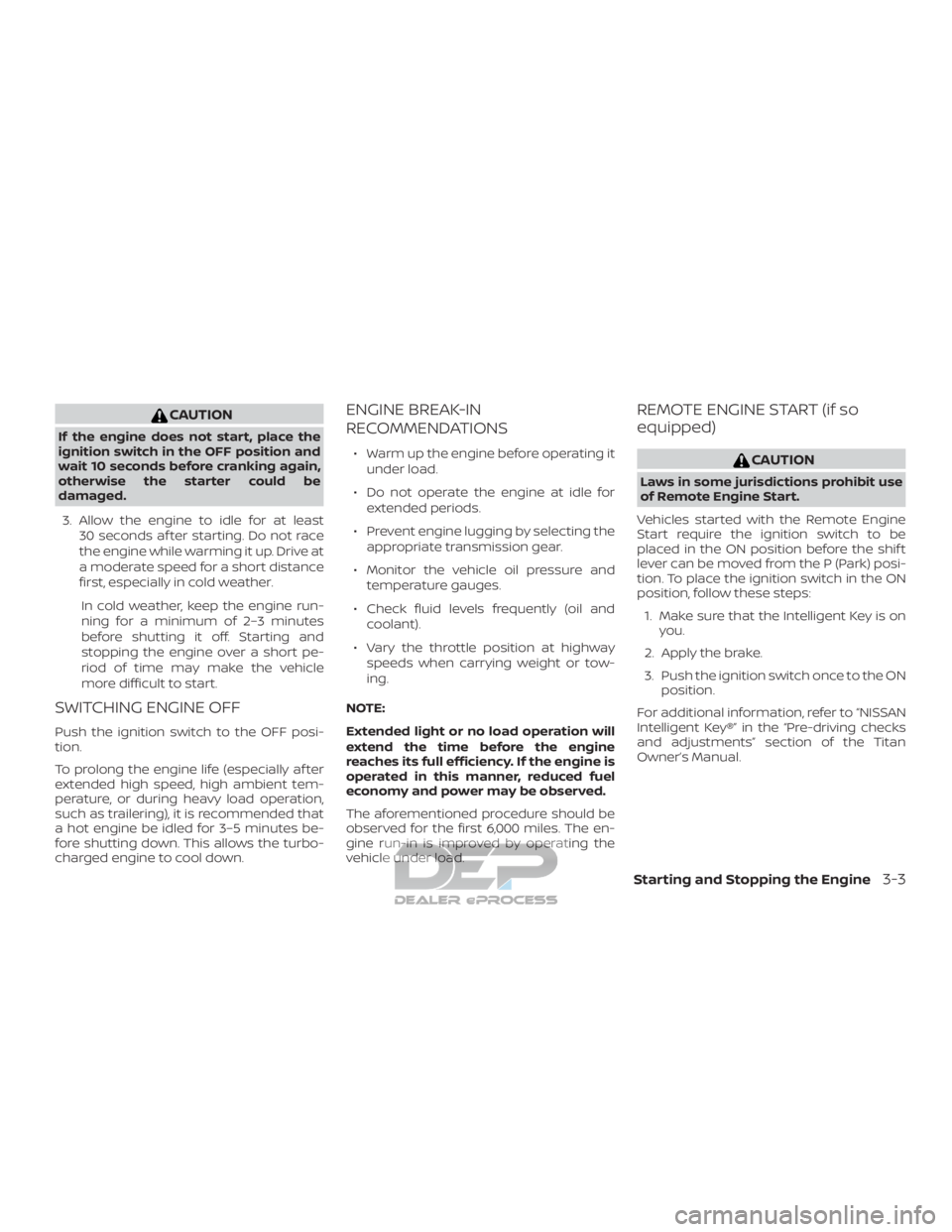
CAUTION
If the engine does not start, place the
ignition switch in the OFF position and
wait 10 seconds before cranking again,
otherwise the starter could be
damaged.3. Allow the engine to idle for at least 30 seconds af ter starting. Do not race
the engine while warming it up. Drive at
a moderate speed for a short distance
first, especially in cold weather.
In cold weather, keep the engine run-
ning for a minimum of 2–3 minutes
before shutting it off. Starting and
stopping the engine over a short pe-
riod of time may make the vehicle
more difficult to start.
SWITCHING ENGINE OFF
Push the ignition switch to the OFF posi-
tion.
To prolong the engine life (especially af ter
extended high speed, high ambient tem-
perature, or during heavy load operation,
such as trailering), it is recommended that
a hot engine be idled for 3–5 minutes be-
fore shutting down. This allows the turbo-
charged engine to cool down.
ENGINE BREAK-IN
RECOMMENDATIONS
∙ Warm up the engine before operating it under load.
∙ Do not operate the engine at idle for extended periods.
∙ Prevent engine lugging by selecting the appropriate transmission gear.
∙ Monitor the vehicle oil pressure and temperature gauges.
∙ Check fluid levels frequently (oil and coolant).
∙ Vary the throttle position at highway speeds when carrying weight or tow-
ing.
NOTE:
Extended light or no load operation will
extend the time before the engine
reaches its full efficiency. If the engine is
operated in this manner, reduced fuel
economy and power may be observed.
The aforementioned procedure should be
observed for the first 6,000 miles. The en-
gine run-in is improved by operating the
vehicle under load.
REMOTE ENGINE START (if so
equipped)
CAUTION
Laws in some jurisdictions prohibit use
of Remote Engine Start.
Vehicles started with the Remote Engine
Start require the ignition switch to be
placed in the ON position before the shif t
lever can be moved from the P (Park) posi-
tion. To place the ignition switch in the ON
position, follow these steps: 1. Make sure that the Intelligent Key is on you.
2. Apply the brake.
3. Push the ignition switch once to the ON position.
For additional information, refer to “NISSAN
Intelligent Key®” in the “Pre-driving checks
and adjustments” section of the Titan
Owner’s Manual.
Starting and Stopping the Engine3-3
Page 675 of 682
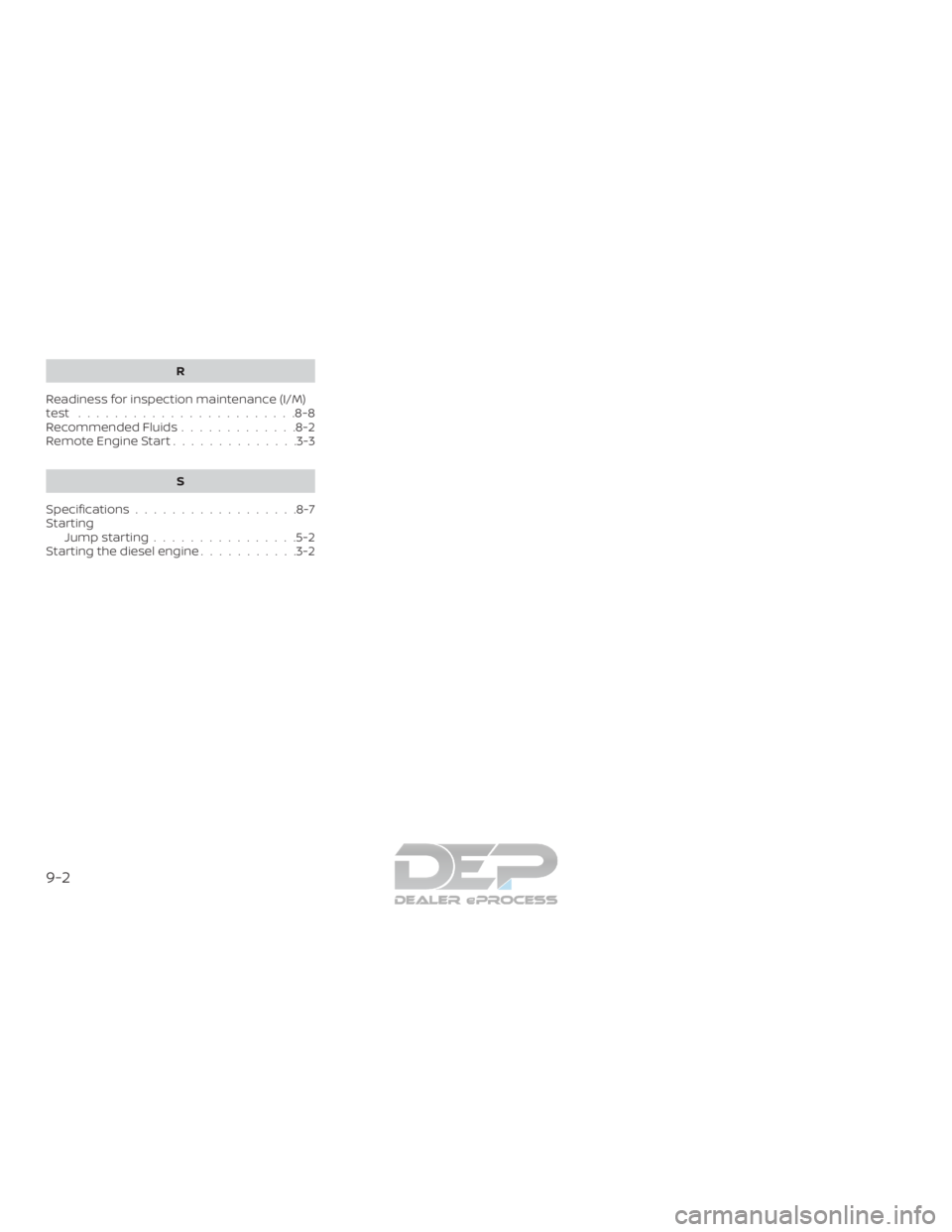
R
Readiness for inspection maintenance (I/M)
test ........................8-8
Recommended Fluids .............8-2
Remote Engine Start ..............3-3
S
Specifications ..................8-7
Starting Jumpstarting................5-2
Starting the diesel engine ...........3-2
9-2