brake NISSAN TITAN 2020 Owner´s Manual
[x] Cancel search | Manufacturer: NISSAN, Model Year: 2020, Model line: TITAN, Model: NISSAN TITAN 2020Pages: 657, PDF Size: 5.1 MB
Page 4 of 657
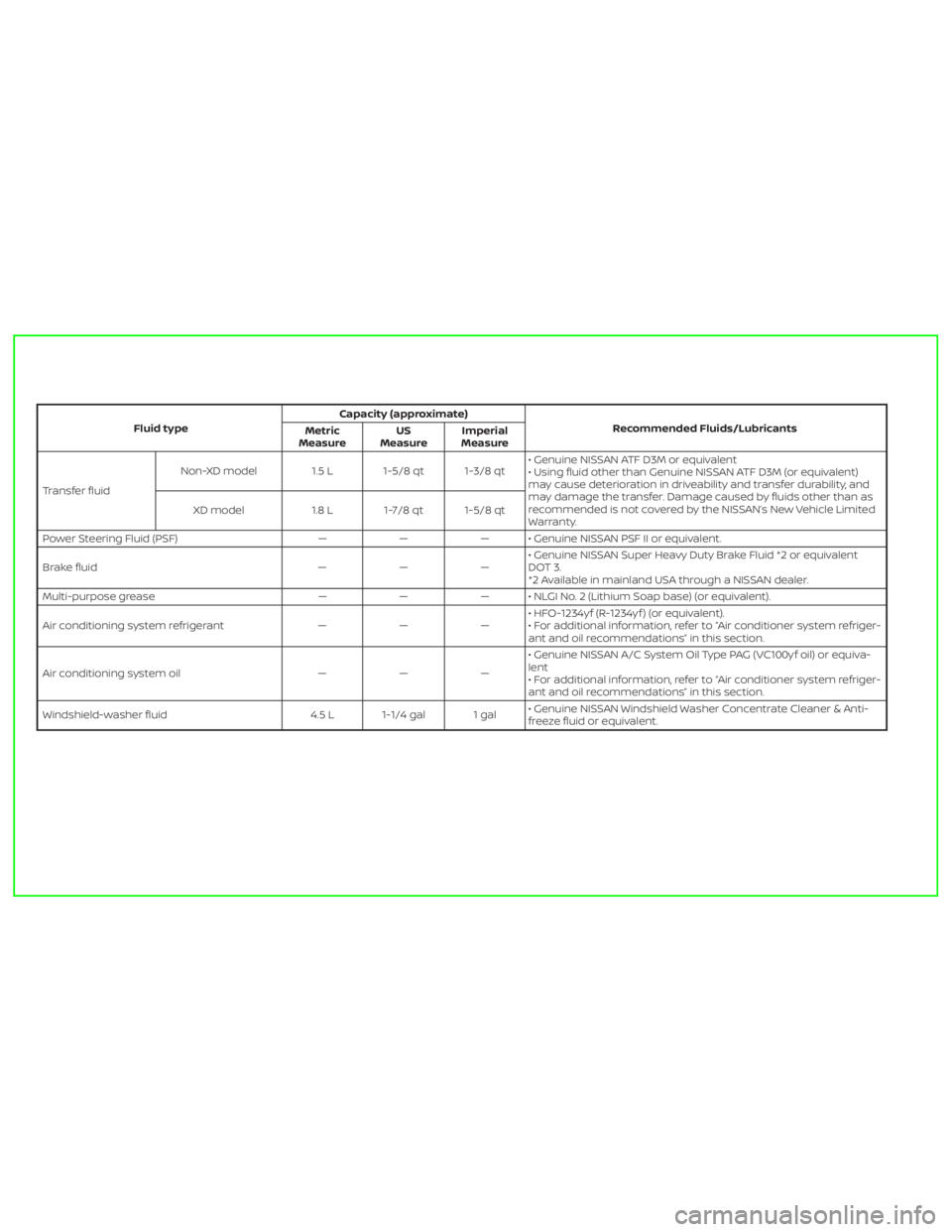
Fluid typeCapacity (approximate)
Recommended Fluids/Lubricants
Metric
MeasureUS
MeasureImperial
Measure
Transfer fluidNon-XD model 1.5 L 1-5/8 qt 1-3/8 qt• Genuine NISSAN ATF D3M or equivalent
• Using fluid other than Genuine NISSAN ATF D3M (or equivalent)
may cause deterioration in driveability and transfer durability, and
may damage the transfer. Damage caused by fluids other than as
recommended is not covered by the NISSAN’s New Vehicle Limited
Warranty. XD model 1.8 L 1-7/8 qt 1-5/8 qt
Power Steering Fluid (PSF) — — — • Genuine NISSAN PSF II or equivalent.
Brake fluid — — —• Genuine NISSAN Super Heavy Duty Brake Fluid *2 or equivalent
DOT 3.
*2 Available in mainland USA through a NISSAN dealer.
Multi-purpose grease — — — • NLGI No. 2 (Lithium Soap base) (or equivalent).
Air conditioning system refrigerant — — —• HFO-1234yf (R-1234yf ) (or equivalent).
• For additional information, refer to “Air conditioner system refriger-
ant and oil recommendations” in this section.
Air conditioning system oil — — —• Genuine NISSAN A/C System Oil Type PAG (VC100yf oil) or equiva-
lent
• For additional information, refer to “Air conditioner system refriger-
ant and oil recommendations” in this section.
Windshield-washer fluid 4.5 L 1-1/4 gal 1 gal• Genuine NISSAN Windshield Washer Concentrate Cleaner & Anti-
freeze fluid or equivalent.
Page 18 of 657
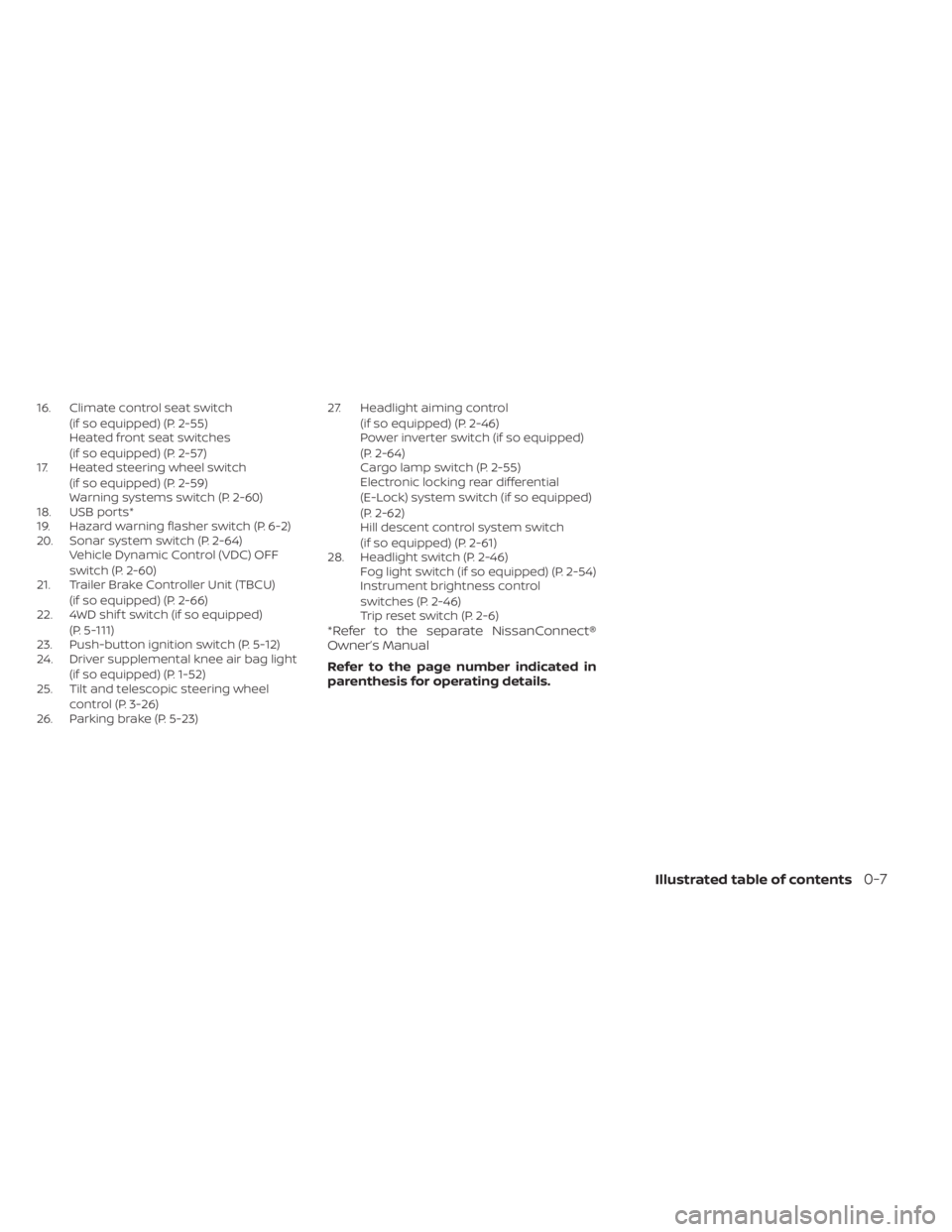
16. Climate control seat switch(if so equipped) (P. 2-55)
Heated front seat switches
(if so equipped) (P. 2-57)
17. Heated steering wheel switch
(if so equipped) (P. 2-59)
Warning systems switch (P. 2-60)
18. USB ports*
19. Hazard warning flasher switch (P. 6-2)
20. Sonar system switch (P. 2-64) Vehicle Dynamic Control (VDC) OFF
switch (P. 2-60)
21. Trailer Brake Controller Unit (TBCU)
(if so equipped) (P. 2-66)
22. 4WD shif t switch (if so equipped)
(P. 5-111)
23. Push-button ignition switch (P. 5-12)
24. Driver supplemental knee air bag light
(if so equipped) (P. 1-52)
25. Tilt and telescopic steering wheel
control (P. 3-26)
26. Parking brake (P. 5-23) 27. Headlight aiming control
(if so equipped) (P. 2-46)
Power inverter switch (if so equipped)
(P. 2-64)
Cargo lamp switch (P. 2-55)
Electronic locking rear differential
(E-Lock) system switch (if so equipped)
(P. 2-62)
Hill descent control system switch
(if so equipped) (P. 2-61)
28. Headlight switch (P. 2-46) Fog light switch (if so equipped) (P. 2-54)
Instrument brightness control
switches (P. 2-46)
Trip reset switch (P. 2-6)
*Refer to the separate NissanConnect®
Owner’s Manual
Refer to the page number indicated in
parenthesis for operating details.
Illustrated table of contents0-7
Page 19 of 657
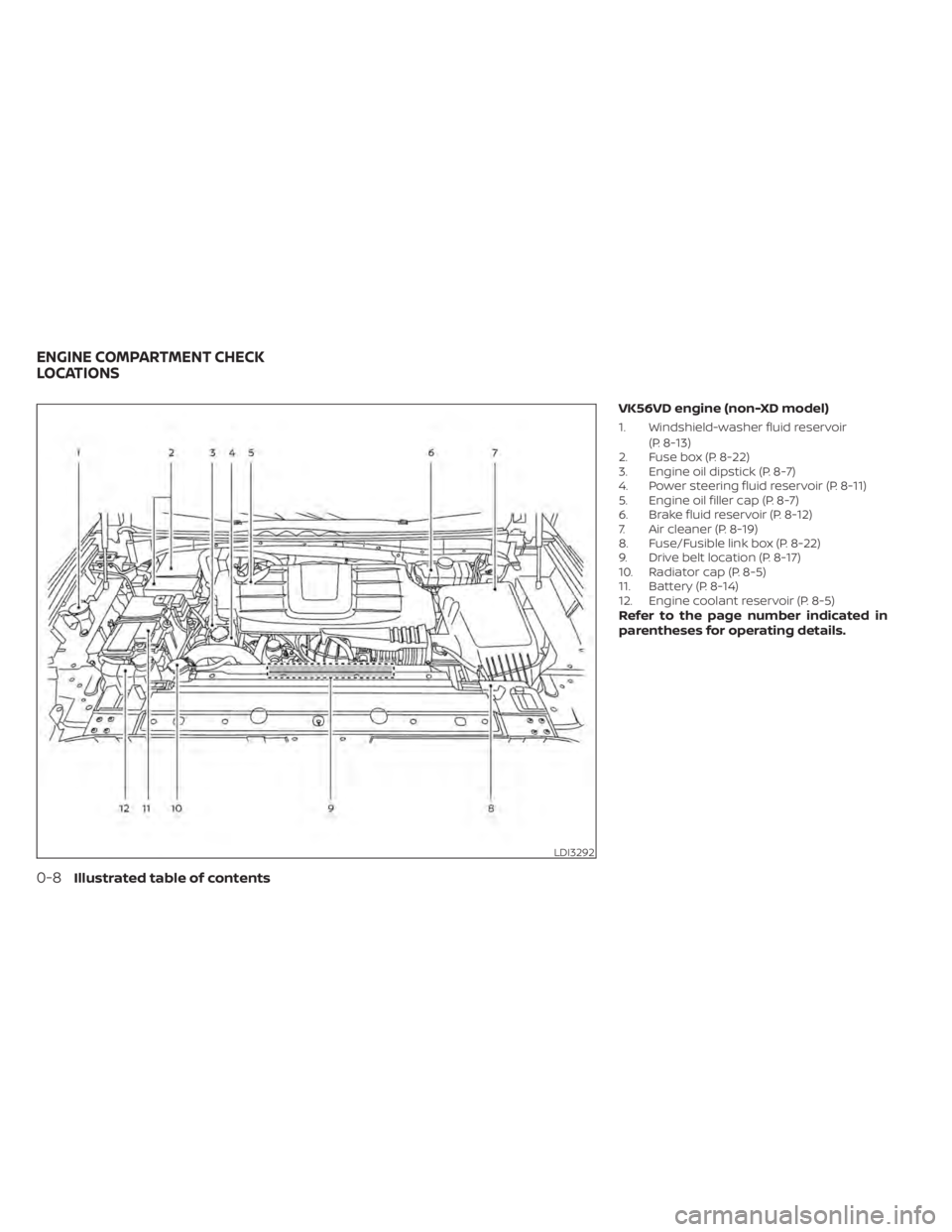
VK56VD engine (non-XD model)
1. Windshield-washer fluid reservoir(P. 8-13)
2. Fuse box (P. 8-22)
3. Engine oil dipstick (P. 8-7)
4. Power steering fluid reservoir (P. 8-11)
5. Engine oil filler cap (P. 8-7)
6. Brake fluid reservoir (P. 8-12)
7. Air cleaner (P. 8-19)
8. Fuse/Fusible link box (P. 8-22)
9. Drive belt location (P. 8-17)
10. Radiator cap (P. 8-5)
11. Battery (P. 8-14)
12. Engine coolant reservoir (P. 8-5)
Refer to the page number indicated in
parentheses for operating details.
LDI3292
ENGINE COMPARTMENT CHECK
LOCATIONS
0-8Illustrated table of contents
Page 20 of 657
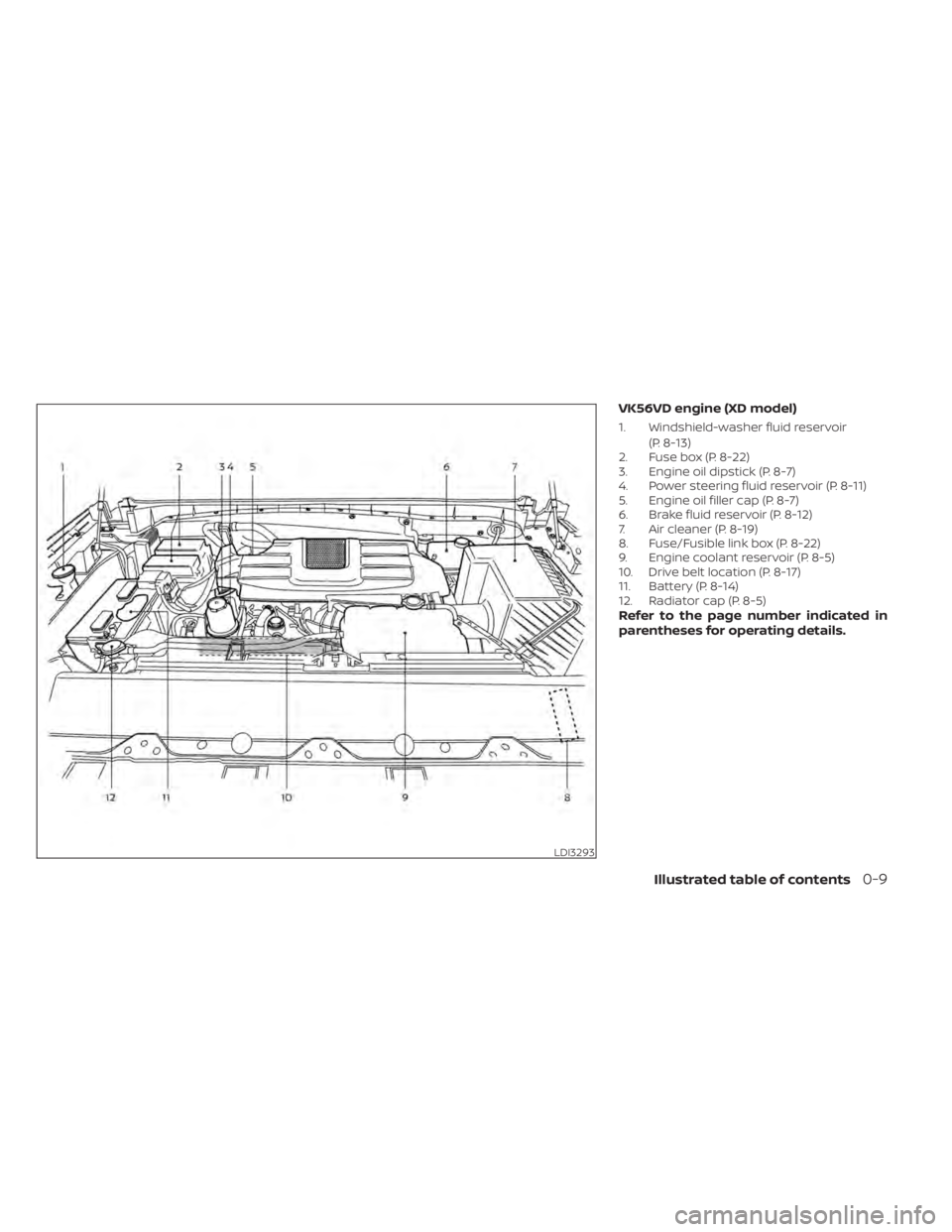
VK56VD engine (XD model)
1. Windshield-washer fluid reservoir(P. 8-13)
2. Fuse box (P. 8-22)
3. Engine oil dipstick (P. 8-7)
4. Power steering fluid reservoir (P. 8-11)
5. Engine oil filler cap (P. 8-7)
6. Brake fluid reservoir (P. 8-12)
7. Air cleaner (P. 8-19)
8. Fuse/Fusible link box (P. 8-22)
9. Engine coolant reservoir (P. 8-5)
10. Drive belt location (P. 8-17)
11. Battery (P. 8-14)
12. Radiator cap (P. 8-5)
Refer to the page number indicated in
parentheses for operating details.
LDI3293
Illustrated table of contents0-9
Page 21 of 657
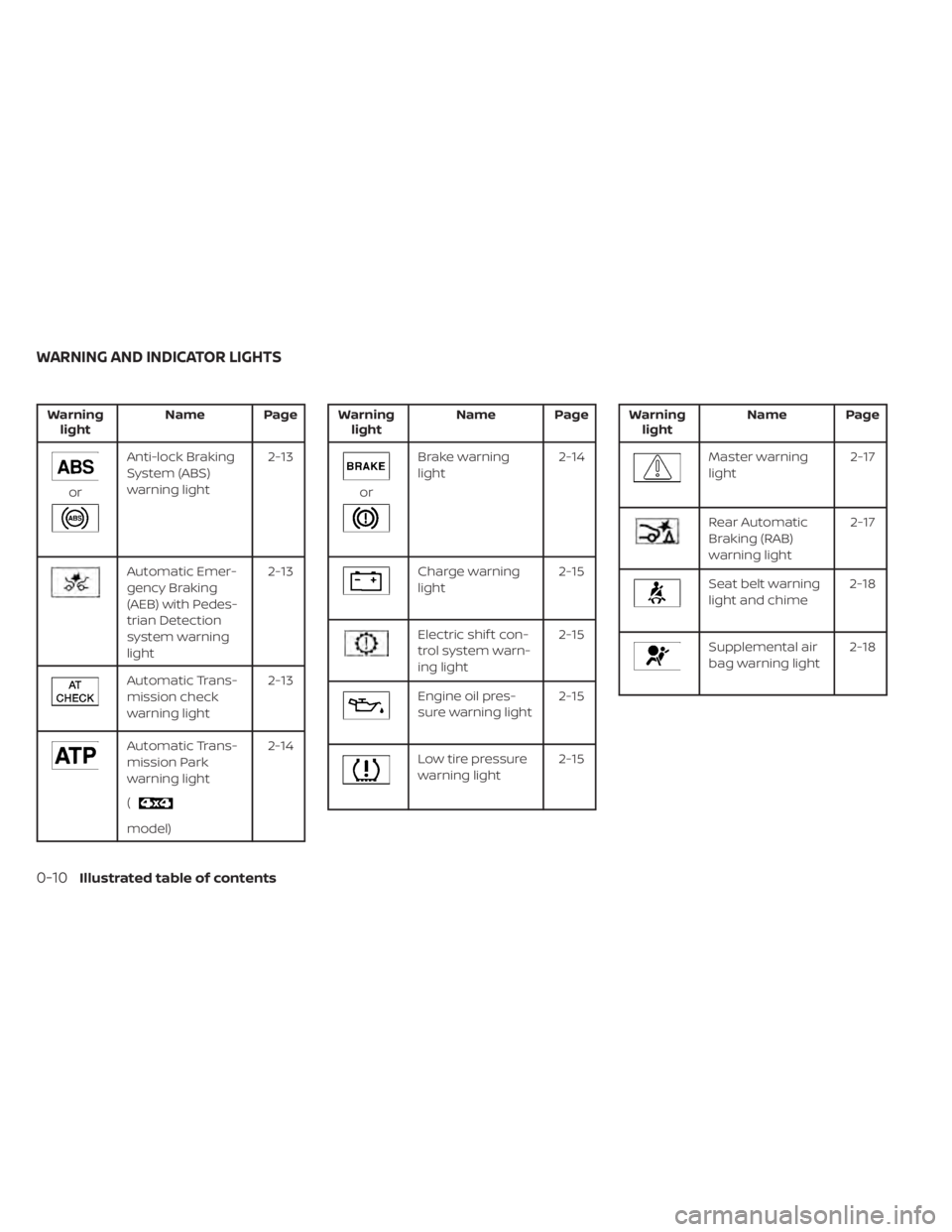
Warninglight Name Page
or
Anti-lock Braking
System (ABS)
warning light 2-13
Automatic Emer-
gency Braking
(AEB) with Pedes-
trian Detection
system warning
light2-13
Automatic Trans-
mission check
warning light
2-13
Automatic Trans-
mission Park
warning light
(
model)2-14
Warning
light Name Page
or
Brake warning
light 2-14
Charge warning
light 2-15
Electric shif t con-
trol system warn-
ing light2-15
Engine oil pres-
sure warning light
2-15
Low tire pressure
warning light2-15
Warning
light Name Page
Master warning
light 2-17
Rear Automatic
Braking (RAB)
warning light2-17
Seat belt warning
light and chime
2-18
Supplemental air
bag warning light2-18
WARNING AND INDICATOR LIGHTS
0-10Illustrated table of contents
Page 109 of 657
Electronic locking rear differential (E-Lock)
system switch (if so equipped).................2-62
Power inverter switch (if so equipped) ..........2-64
Sonar system switch ........................... 2-64
Tow mode switch .............................. 2-65
E-call (SOS) button (if so equipped) .............2-66
Trailer Brake Controller Unit (TBCU)
(if so equipped) ................................. 2-66
Rear Door Alert (if so equipped) .................2-66
Power outlets .................................. 2-67
12v Outlets .................................. 2-67
120v outlets (if so equipped) .................2-69
Extended storage switch .......................2-70
Storage ........................................ 2-71
Front-door pockets ......................... 2-71
Rear-door pockets .......................... 2-72
Console side pockets (if so equipped) .......2-72
Seatback pockets ........................... 2-72
Under-seat storage (if so equipped) .........2-73
Console box storage trays
(if so equipped) ..............................2-74
Cell phone storage tray (if so equipped) .....2-75
Glovebox ................................... 2-75
Console box (if so equipped) ................2-75Center armrest storage (if so equipped)
.....2-76
Under front seat storage bin
(if so equipped) .............................. 2-77
Overhead sunglasses storage
(if so equipped) .............................. 2-77
Cup holders ................................. 2-78
Grocery hooks (if so equipped) ..............2-81
Bed liner storage bins (if so equipped) .......2-81
Cargo hooks (if so equipped) ................2-82
C-Channel cargo hooks (if so equipped) .....2-82
Windows ....................................... 2-83
Power windows ............................. 2-83
Rear power window switch
(if so equipped) .............................. 2-86
Rear sliding window (if so equipped) .........2-87
Moonroof (if so equipped) ......................2-87
Power moonroof ............................ 2-87
Interior
lights ................................... 2-90
Console light (if so equipped) ................2-91
Map lights (if so equipped) ...................2-91
Personal Lights (if so equipped) .............2-91
HomeLink® Universal Transceiver
(if so equipped) ................................. 2-92
Programming HomeLink® ...................2-92
Page 112 of 657
16. Climate control seat switch(if so equipped) (P. 2-55)
Heated front seat switches
(if so equipped) (P. 2-57)
17. Heated steering wheel switch
(if so equipped) (P. 2-59)
Warning systems switch (P. 2-60)
18. USB ports*
19. Hazard warning flasher switch (P. 6-2)
20. Sonar system switch (P. 2-64) Vehicle Dynamic Control (VDC) OFF
switch (P. 2-60)
21. Trailer Brake Controller Unit (TBCU)
(if so equipped) (P. 2-66)
22. 4WD shif t switch (if so equipped)
(P. 5-111)
23. Push-button ignition switch (P. 5-12)
24. Driver supplemental knee air bag light
(if so equipped) (P. 1-52)
25. Tilt and telescopic steering wheel
control (P. 3-26)
26. Parking brake (P. 5-23) 27. Headlight aiming control
(if so equipped) (P. 2-46)
Power inverter switch (if so equipped)
(P. 2-64)
Cargo lamp switch (P. 2-55)
Electronic locking rear differential
(E-Lock) system switch (if so equipped)
(P. 2-62)
Hill descent control system switch
(if so equipped) (P. 2-61)
28. Headlight switch (P. 2-46) Fog light switch (if so equipped) (P. 2-54)
Instrument brightness control
switches (P. 2-46)
Trip reset switch (P. 2-6)
*Refer to the separate NissanConnect®
Owner’s Manual
Refer to the page number indicated in
parenthesis for operating details.
Instruments and controls2-5
Page 119 of 657
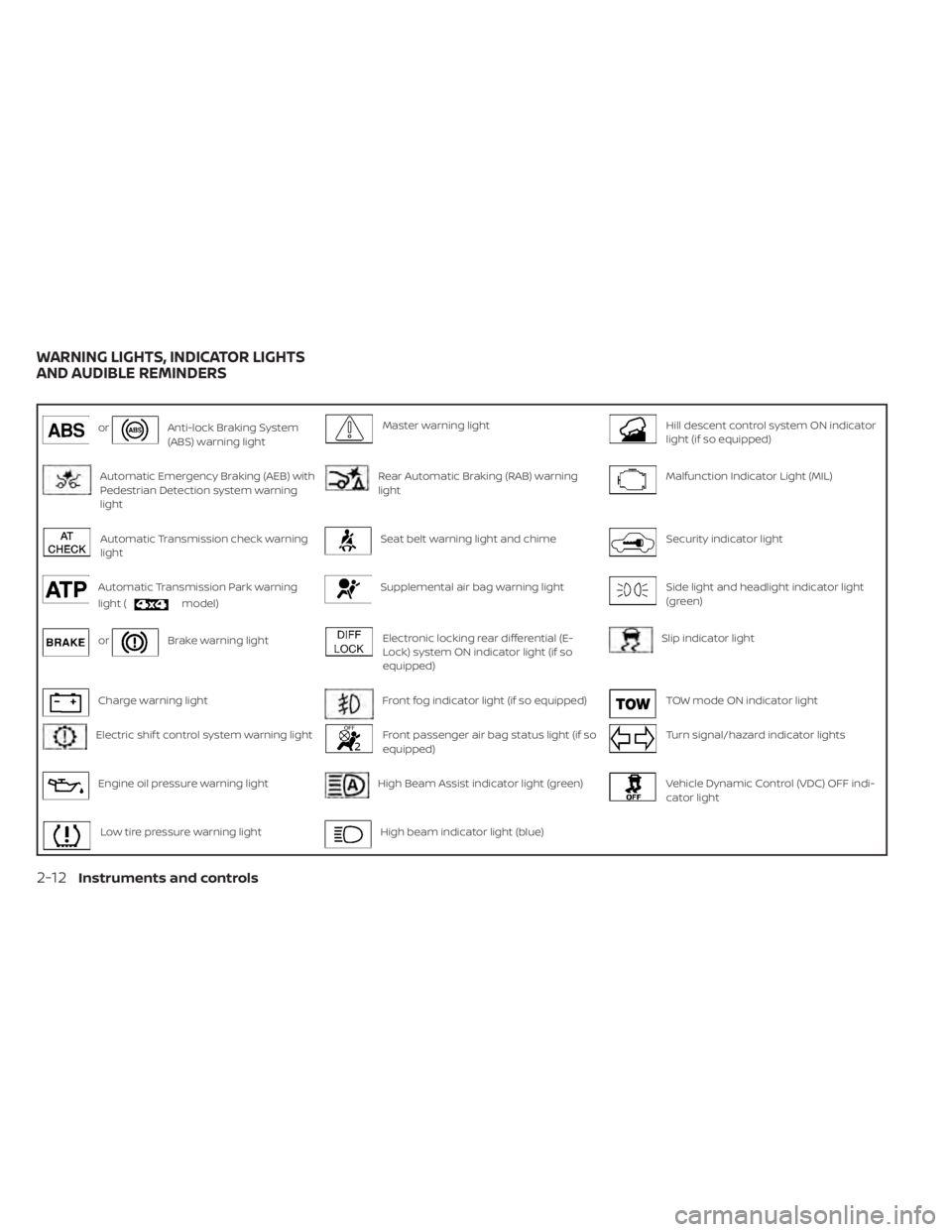
orAnti-lock Braking System
(ABS) warning lightMaster warning lightHill descent control system ON indicator
light (if so equipped)
Automatic Emergency Braking (AEB) with
Pedestrian Detection system warning
lightRear Automatic Braking (RAB) warning
lightMalfunction Indicator Light (MIL)
Automatic Transmission check warning
lightSeat belt warning light and chimeSecurity indicator light
Automatic Transmission Park warning
light (
model)
Supplemental air bag warning lightSide light and headlight indicator light
(green)
orBrake warning lightElectronic locking rear differential (E-
Lock) system ON indicator light (if so
equipped)Slip indicator light
Charge warning lightFront fog indicator light (if so equipped)TOW mode ON indicator light
Electric shif t control system warning lightFront passenger air bag status light (if so
equipped)Turn signal/hazard indicator lights
Engine oil pressure warning lightHigh Beam Assist indicator light (green)Vehicle Dynamic Control (VDC) OFF indi-
cator light
Low tire pressure warning lightHigh beam indicator light (blue)
WARNING LIGHTS, INDICATOR LIGHTS
AND AUDIBLE REMINDERS
2-12Instruments and controls
Page 120 of 657
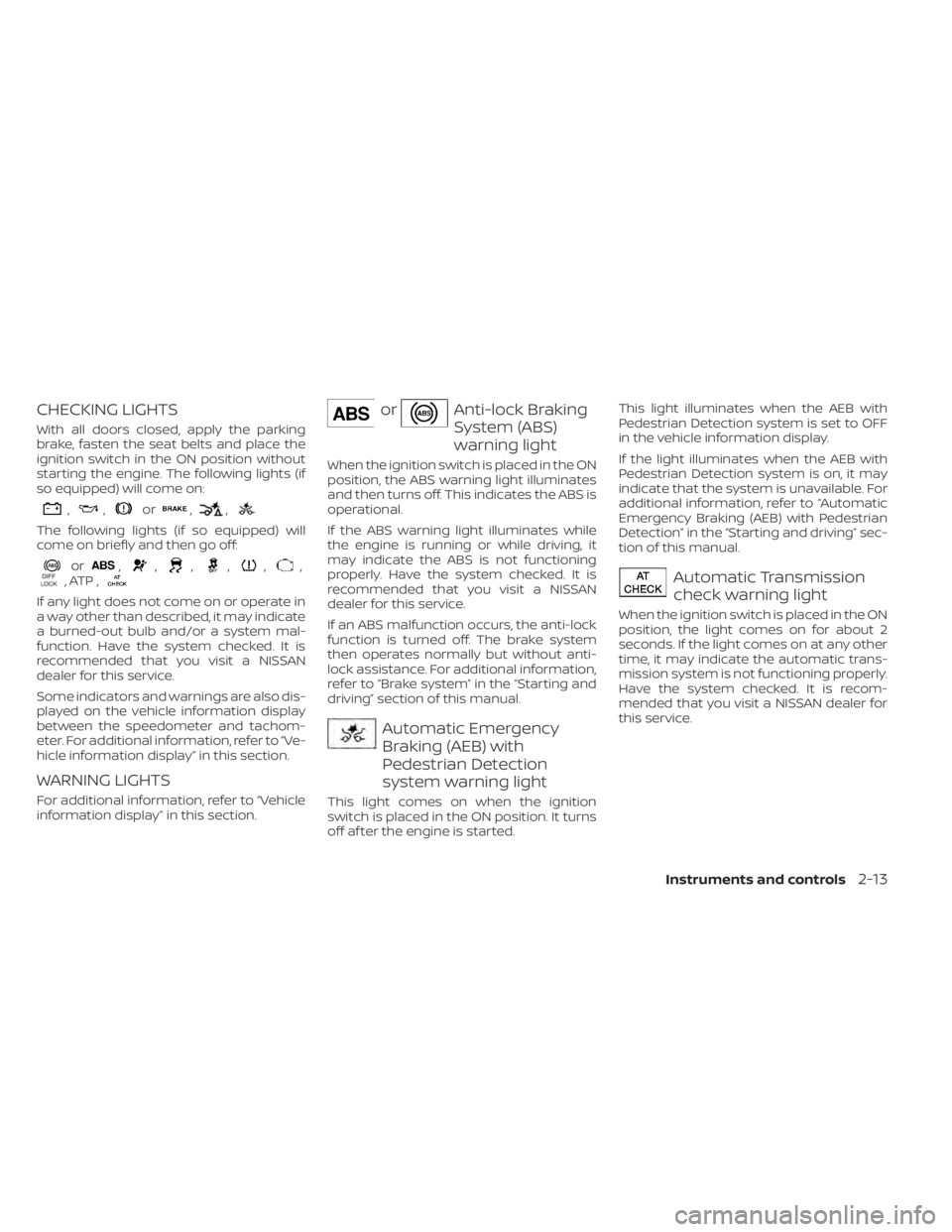
CHECKING LIGHTS
With all doors closed, apply the parking
brake, fasten the seat belts and place the
ignition switch in the ON position without
starting the engine. The following lights (if
so equipped) will come on:
,,or,,
The following lights (if so equipped) will
come on briefly and then go off:
or,,,,,,, ATP ,
If any light does not come on or operate in
a way other than described, it may indicate
a burned-out bulb and/or a system mal-
function. Have the system checked. It is
recommended that you visit a NISSAN
dealer for this service.
Some indicators and warnings are also dis-
played on the vehicle information display
between the speedometer and tachom-
eter. For additional information, refer to “Ve-
hicle information display” in this section.
WARNING LIGHTS
For additional information, refer to “Vehicle
information display” in this section.
orAnti-lock Braking
System (ABS)
warning light
When the ignition switch is placed in the ON
position, the ABS warning light illuminates
and then turns off. This indicates the ABS is
operational.
If the ABS warning light illuminates while
the engine is running or while driving, it
may indicate the ABS is not functioning
properly. Have the system checked. It is
recommended that you visit a NISSAN
dealer for this service.
If an ABS malfunction occurs, the anti-lock
function is turned off. The brake system
then operates normally but without anti-
lock assistance. For additional information,
refer to “Brake system” in the “Starting and
driving” section of this manual.
Automatic Emergency
Braking (AEB) with
Pedestrian Detection
system warning light
This light comes on when the ignition
switch is placed in the ON position. It turns
off af ter the engine is started.This light illuminates when the AEB with
Pedestrian Detection system is set to OFF
in the vehicle information display.
If the light illuminates when the AEB with
Pedestrian Detection system is on, it may
indicate that the system is unavailable. For
additional information, refer to “Automatic
Emergency Braking (AEB) with Pedestrian
Detection” in the “Starting and driving” sec-
tion of this manual.
Automatic Transmission
check warning light
When the ignition switch is placed in the ON
position, the light comes on for about 2
seconds. If the light comes on at any other
time, it may indicate the automatic trans-
mission system is not functioning properly.
Have the system checked. It is recom-
mended that you visit a NISSAN dealer for
this service.
Instruments and controls2-13
Page 121 of 657
Automatic Transmission
Park warning light (
model)
WARNING
• If the 4WD mode indicator is off or the
ATP warning light is on, this indicates
that the automatic transmission P
(Park) position will not function and
could result in the vehicle moving un-
expectedly, causing serious personal
injury or property damage. Always
set the parking brake. For additional
information, refer to “Using 4–wheel
drive (4WD)” in the “Starting and driv-
ing” section of this manual.
• If the ATP light is on, this indicates
that the automatic transmission P
(Park) position will not function and
the transfer case is in neutral.
• When parking, always make sure that
the 4WD shif t indicator light illumi-
nates and the parking brake is set.
Failure to engage the transfer posi-
tion in 2WD, 4H or 4LO could result in
the vehicle moving unexpectedly, re-
sulting in serious personal injury or
property damage. •
Shif t the 4WD switch into the 2WD, 4H
or 4LO position again to turn off the
ATP warning light when the shif t le-
ver is in the P position and the ATP
warning light is on. (Before shif ting
the 4WD switch into the 4LO position,
move the shif t lever to the N position
once, shif t the shif t lever into P again
and make sure the ATP warning light
is off.)
This light indicates that the automatic
transmission parking function is not en-
gaged. If the transfer control is not secured
in any drive position while the shif t lever is
in the P (Park) position, the transmission will
disengage and the drive wheels will not
lock.
orBrake warning
light
This light functions for both the parking
brake and the foot brake systems.
Parking brake indicator
When the ignition switch is placed in the ON
position, the light comes on when the park-
ing brake is applied.
Low brake fluid warning light
When the ignition switch is placed in the ON
position, the light warns of a low brake fluid
level. If the light comes on while the engine
is running, with the parking brake not ap-
plied, stop the vehicle and perform the fol-
lowing:
1. Check the brake fluid level. Add brake fluid as necessary. For additional infor-
mation, refer to “Brake fluid” in the “Do-it-
yourself ” section of this manual.
2. If the brake fluid level is correct, have the warning system checked. It is recom-
mended that you visit a NISSAN dealer
for this service.
WARNING
• Your brake system may not be work-
ing properly if the warning light is on.
Driving could be dangerous. If you
judge it to be safe, drive carefully to
the nearest service station for re-
pairs. Otherwise, have your vehicle
towed because driving it could be
dangerous.
2-14Instruments and controls