climate control NISSAN TITAN 2020 Owner´s Manual
[x] Cancel search | Manufacturer: NISSAN, Model Year: 2020, Model line: TITAN, Model: NISSAN TITAN 2020Pages: 657, PDF Size: 5.1 MB
Page 10 of 657
Table of
contentsIllustrated table of contents
Safety-Seats, seat belts and supplemental restraint system
Instruments and controls
Pre-driving checks and adjustments
Monitor, climate, audio, phone and voice recognition systems
Starting and driving
In case of emergency
Appearance and care
Do-it-yourself
Maintenance and schedules
Technical and consumer information
Index
0
1
2
3
4
5
6
7
8
9
10
11
Page 17 of 657
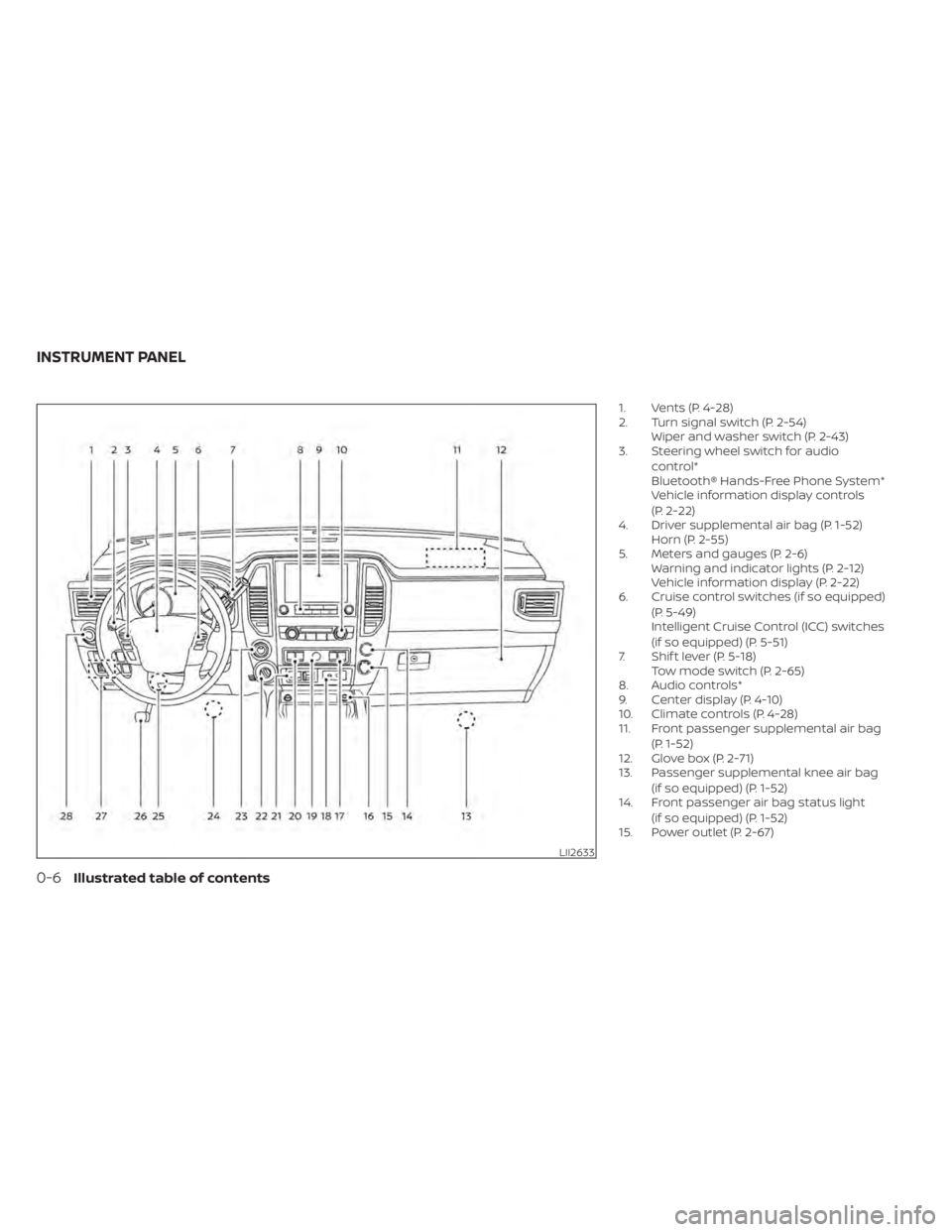
1. Vents (P. 4-28)
2. Turn signal switch (P. 2-54)Wiper and washer switch (P. 2-43)
3. Steering wheel switch for audio
control*
Bluetooth® Hands-Free Phone System*
Vehicle information display controls
(P. 2-22)
4. Driver supplemental air bag (P. 1-52) Horn (P. 2-55)
5. Meters and gauges (P. 2-6) Warning and indicator lights (P. 2-12)
Vehicle information display (P. 2-22)
6. Cruise control switches (if so equipped)
(P. 5-49)
Intelligent Cruise Control (ICC) switches
(if so equipped) (P. 5-51)
7. Shif t lever (P. 5-18) Tow mode switch (P. 2-65)
8. Audio controls*
9. Center display (P. 4-10)
10. Climate controls (P. 4-28)
11. Front passenger supplemental air bag
(P. 1-52)
12. Glove box (P. 2-71)
13. Passenger supplemental knee air bag
(if so equipped) (P. 1-52)
14. Front passenger air bag status light
(if so equipped) (P. 1-52)
15. Power outlet (P. 2-67)
LII2633
INSTRUMENT PANEL
0-6Illustrated table of contents
Page 18 of 657
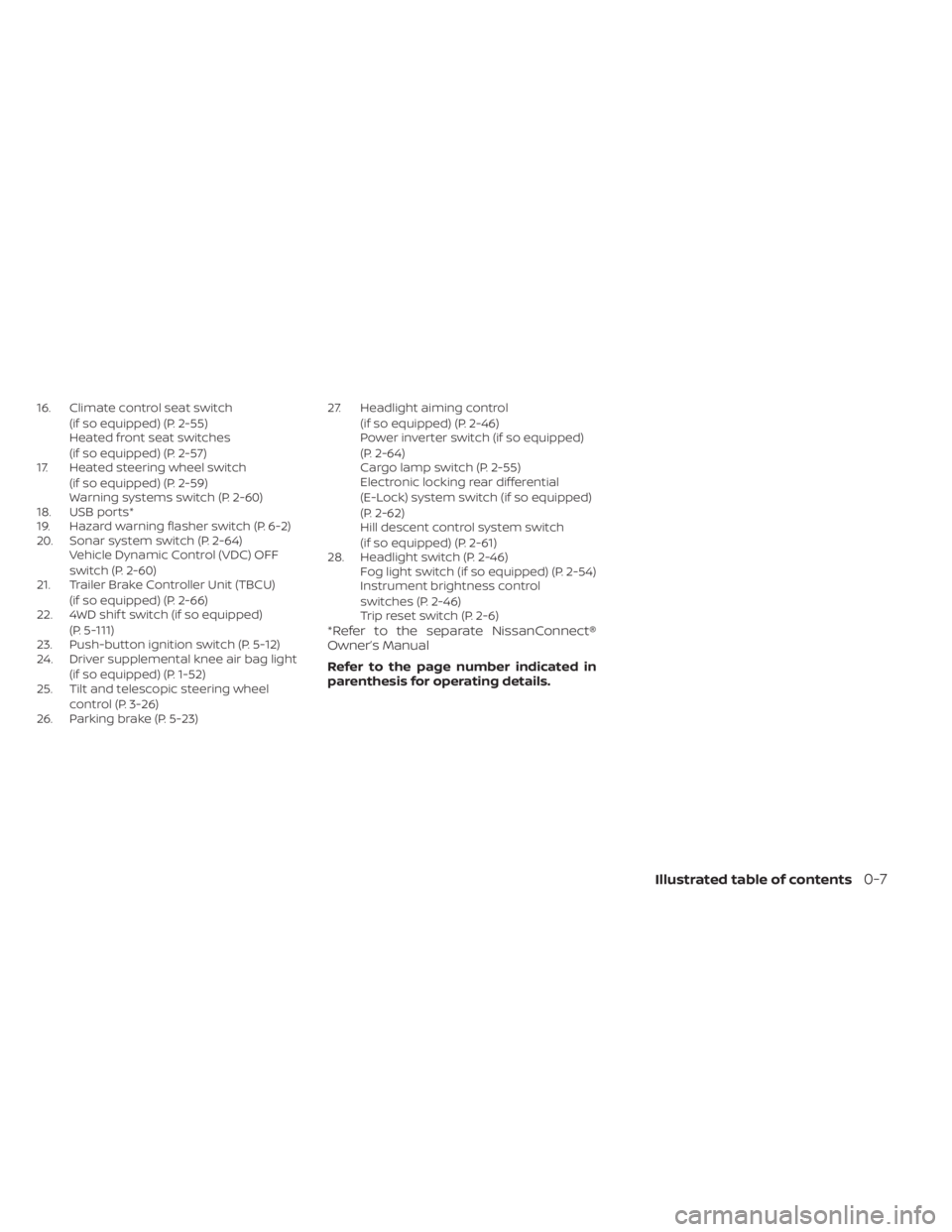
16. Climate control seat switch(if so equipped) (P. 2-55)
Heated front seat switches
(if so equipped) (P. 2-57)
17. Heated steering wheel switch
(if so equipped) (P. 2-59)
Warning systems switch (P. 2-60)
18. USB ports*
19. Hazard warning flasher switch (P. 6-2)
20. Sonar system switch (P. 2-64) Vehicle Dynamic Control (VDC) OFF
switch (P. 2-60)
21. Trailer Brake Controller Unit (TBCU)
(if so equipped) (P. 2-66)
22. 4WD shif t switch (if so equipped)
(P. 5-111)
23. Push-button ignition switch (P. 5-12)
24. Driver supplemental knee air bag light
(if so equipped) (P. 1-52)
25. Tilt and telescopic steering wheel
control (P. 3-26)
26. Parking brake (P. 5-23) 27. Headlight aiming control
(if so equipped) (P. 2-46)
Power inverter switch (if so equipped)
(P. 2-64)
Cargo lamp switch (P. 2-55)
Electronic locking rear differential
(E-Lock) system switch (if so equipped)
(P. 2-62)
Hill descent control system switch
(if so equipped) (P. 2-61)
28. Headlight switch (P. 2-46) Fog light switch (if so equipped) (P. 2-54)
Instrument brightness control
switches (P. 2-46)
Trip reset switch (P. 2-6)
*Refer to the separate NissanConnect®
Owner’s Manual
Refer to the page number indicated in
parenthesis for operating details.
Illustrated table of contents0-7
Page 108 of 657
2 Instruments and controls
Instrument panel................................2-4
Meters and gauges .............................2-6
Speedometer and odometer .................2-6
Tachometer ..................................2-8
Engine coolant temperature gauge ..........2-8
Fuel gauge ...................................2-9
Distance To Empty (DTE) .....................2-9
Auxiliary gauges (if so equipped) ............2-10
Off-road and 4–Wheel Drive (4WD)
monitor (if so equipped) ......................2-11
Warning lights, indicator lights and audible
reminders ...................................... 2-12
Checking lights .............................. 2-13
Warning lights ............................... 2-13
Indicator lights .............................. 2-18
Audible reminders ........................... 2-21
Vehicle information display .....................2-22
How to use the vehicle information
display ...................................... 2-22
Startup display .............................. 2-23
Settings ..................................... 2-23
Vehicle information display warnings
and indicators ............................... 2-31
Security systems ............................... 2-40
Vehicle security system .....................2-40
NISSAN Vehicle Immobilizer System .........2-41 Wiper and washer switch
.......................2-43
Switch operation ............................ 2-43
Rain-sensing auto wiper system
(if so equipped) .............................. 2-44
Rear window and/or outside mirror defroster
switch (if so equipped) ......................... 2-45
Headlight switch ............................... 2-46
Headlight control switch ....................2-47
Daytime Running Lights (DRL) system
(Type A) (if so equipped) .....................2-52
LED Daytime Running Lights (DRL)
system (Type B) (if so equipped) .............2-53
Instrument brightness control ..............2-53
Turn signal switch ........................... 2-54
Fog light switch (if so equipped) ................2-54
Horn ........................................... 2-55
Cargo lamp switch (if so equipped) .............2-55
Climate controlled seat switches
(if so equipped) ................................. 2-55
He
ated seat switches (if so equipped) ..........2-57
Heated rear seat switches (if so equipped) .....2-58
Heated steering wheel switch (if so equipped) . . 2-59
Warning systems switch .......................2-60
Vehicle Dynamic Control (VDC) OFF switch .....2-60
Hill descent control switch (if so equipped) .....2-61
Page 111 of 657
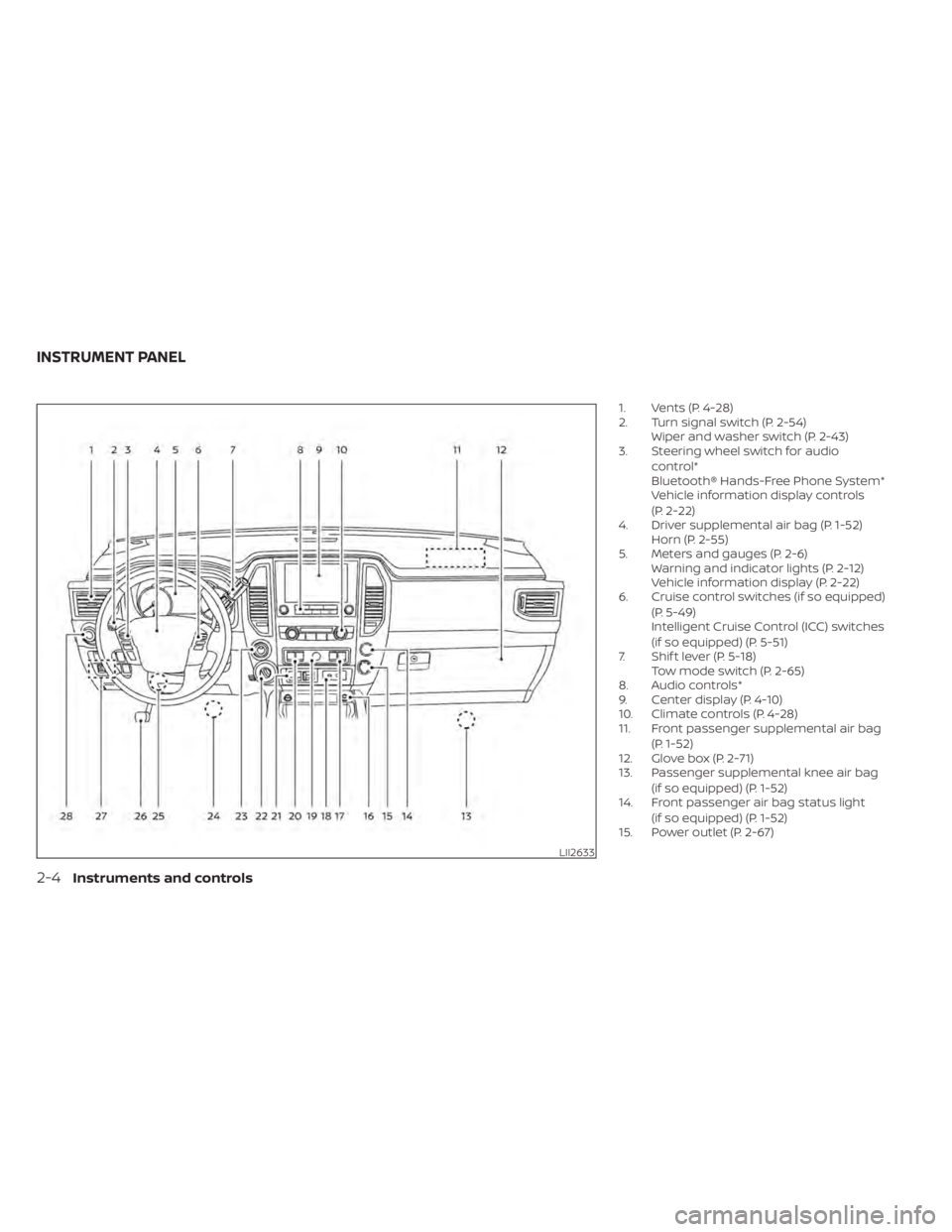
1. Vents (P. 4-28)
2. Turn signal switch (P. 2-54)Wiper and washer switch (P. 2-43)
3. Steering wheel switch for audio
control*
Bluetooth® Hands-Free Phone System*
Vehicle information display controls
(P. 2-22)
4. Driver supplemental air bag (P. 1-52) Horn (P. 2-55)
5. Meters and gauges (P. 2-6) Warning and indicator lights (P. 2-12)
Vehicle information display (P. 2-22)
6. Cruise control switches (if so equipped)
(P. 5-49)
Intelligent Cruise Control (ICC) switches
(if so equipped) (P. 5-51)
7. Shif t lever (P. 5-18) Tow mode switch (P. 2-65)
8. Audio controls*
9. Center display (P. 4-10)
10. Climate controls (P. 4-28)
11. Front passenger supplemental air bag
(P. 1-52)
12. Glove box (P. 2-71)
13. Passenger supplemental knee air bag
(if so equipped) (P. 1-52)
14. Front passenger air bag status light
(if so equipped) (P. 1-52)
15. Power outlet (P. 2-67)
LII2633
INSTRUMENT PANEL
2-4Instruments and controls
Page 112 of 657
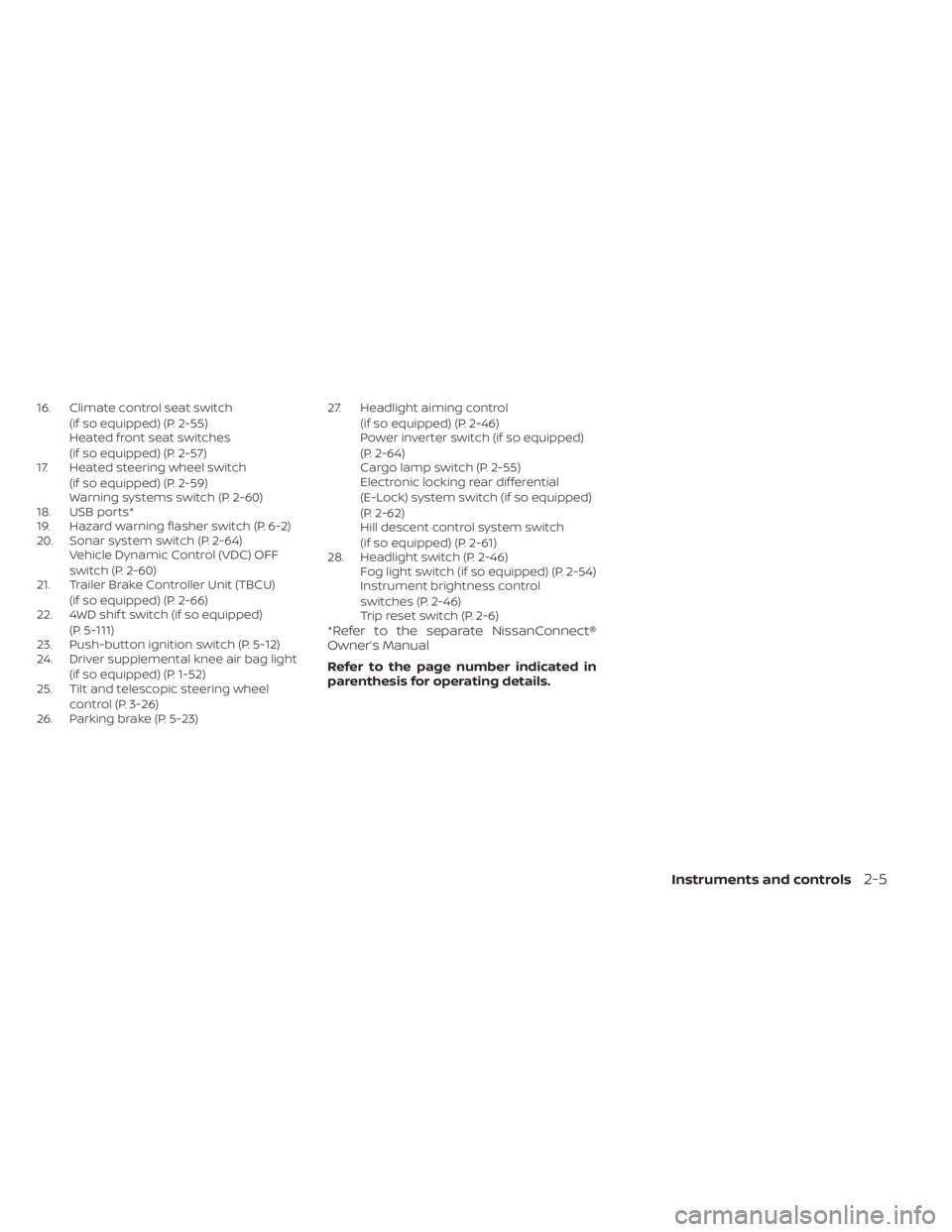
16. Climate control seat switch(if so equipped) (P. 2-55)
Heated front seat switches
(if so equipped) (P. 2-57)
17. Heated steering wheel switch
(if so equipped) (P. 2-59)
Warning systems switch (P. 2-60)
18. USB ports*
19. Hazard warning flasher switch (P. 6-2)
20. Sonar system switch (P. 2-64) Vehicle Dynamic Control (VDC) OFF
switch (P. 2-60)
21. Trailer Brake Controller Unit (TBCU)
(if so equipped) (P. 2-66)
22. 4WD shif t switch (if so equipped)
(P. 5-111)
23. Push-button ignition switch (P. 5-12)
24. Driver supplemental knee air bag light
(if so equipped) (P. 1-52)
25. Tilt and telescopic steering wheel
control (P. 3-26)
26. Parking brake (P. 5-23) 27. Headlight aiming control
(if so equipped) (P. 2-46)
Power inverter switch (if so equipped)
(P. 2-64)
Cargo lamp switch (P. 2-55)
Electronic locking rear differential
(E-Lock) system switch (if so equipped)
(P. 2-62)
Hill descent control system switch
(if so equipped) (P. 2-61)
28. Headlight switch (P. 2-46) Fog light switch (if so equipped) (P. 2-54)
Instrument brightness control
switches (P. 2-46)
Trip reset switch (P. 2-6)
*Refer to the separate NissanConnect®
Owner’s Manual
Refer to the page number indicated in
parenthesis for operating details.
Instruments and controls2-5
Page 131 of 657
Driver Assistance
The driver assistance menu allows the user to change the various driving and parking aids.
Menu itemResult
Lane Displays available lane options.
Warning (LDW) Allows user to turn the Lane Departure Warning (LDW) system on or off. For additional information, refer to “Lane
Departure Warning (LDW)” in the “Starting and driving” section of this manual.
Blind Spot Displays available blind spot options.
Warning (BSW) Allows user to turn the Blind Spot Warning (BSW) system on or off. For additional information, refer to “Blind Spot
Warning (BSW)” in the “Starting and driving” section of this manual.
Emergency Brake Displays available emergency brake options.
Front Allows user to turn the front emergency braking system on or off. For additional information, refer to “Automatic
Emergency Braking (AEB) with Pedestrian Detection” and “Intelligent Forward Collision Warning (I-FCW)” in the
“Starting and driving” section of this manual.
Rear Allows user to turn the rear emergency braking system on or off. For additional information, refer to “Rear Auto-
matic Braking (RAB)” in the “Starting and driving” section of this manual.
Driver Attention Allows user to turn the Intelligent Driver Alertness on or off. For additional information, refer to “Intelligent Driver
Alertness (I-DA)” in the “Starting and driving” section of this manual.
Speed Limit Sign (if so equipped) Allows use to turn the Speed Limit Sign recognition on or off. For additional information, refer to “Traffic Sign Rec-
ognition” in the “Starting and driving” section of this manual.
Parking Aids Displays available parking aids.
Moving Object (if so equipped) Allows user to turn the Moving Object Detection (MOD) on or off. For additional information, refer to “Moving Object Detection (MOD)” in the “Monitor, climate, audio, phone and voice recognition systems” section of this manual.
CTA Allows user to turn the Rear Cross Traffic Alert (RCTA) system on or off. For additional information, refer to “Rear
Cross Traffic Alert (RCTA)” in the “Starting and driving” section of this manual.
Sensor Allows the user to turn the sensors on, or off.
Display Allows user to turn the display on or off in the vehicle information display.
Volume Allows user to adjust the volume of warning chimes.
Range Allows user to set a specific range for the sensors to engage.
2-24Instruments and controls
Page 162 of 657
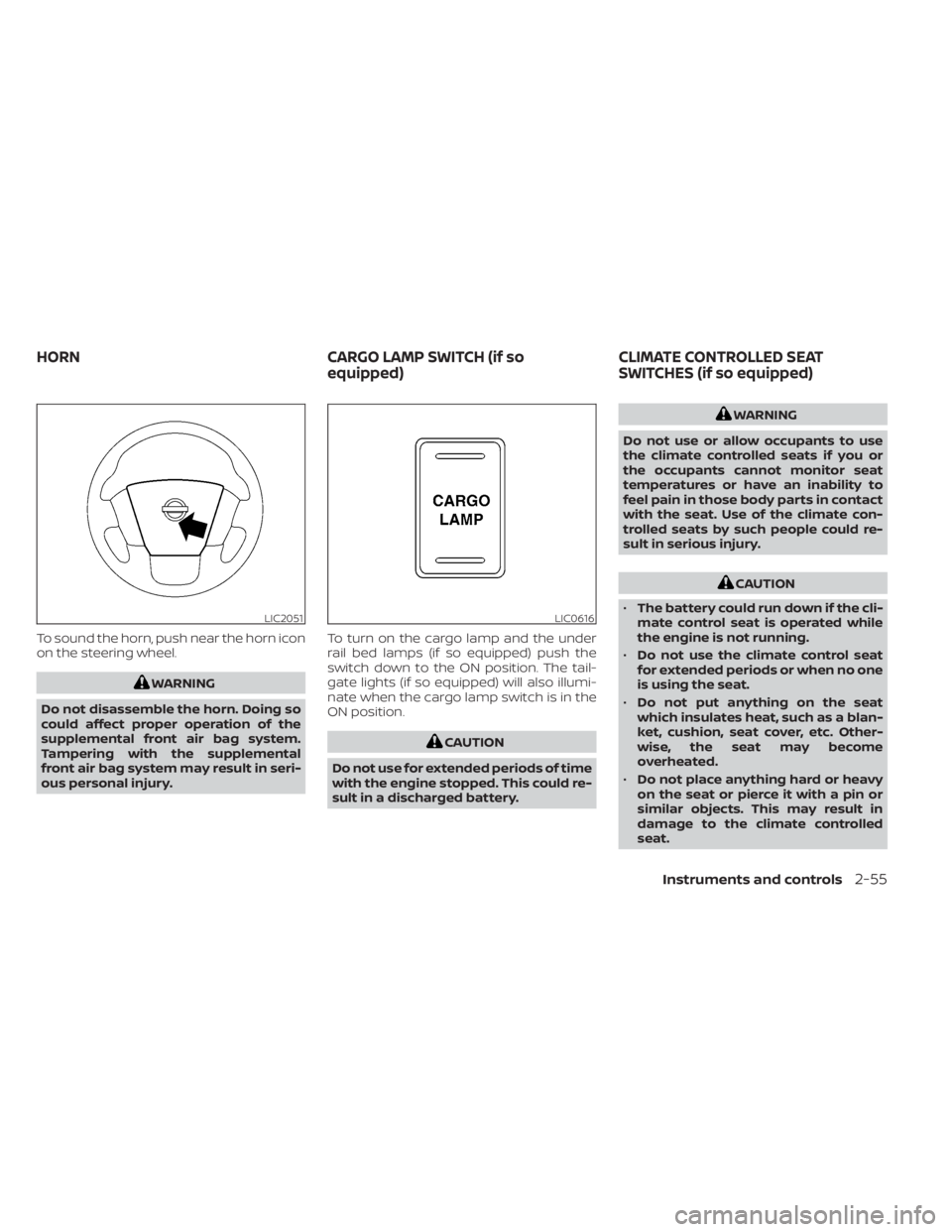
To sound the horn, push near the horn icon
on the steering wheel.
WARNING
Do not disassemble the horn. Doing so
could affect proper operation of the
supplemental front air bag system.
Tampering with the supplemental
front air bag system may result in seri-
ous personal injury. To turn on the cargo lamp and the under
rail bed lamps (if so equipped) push the
switch down to the ON position. The tail-
gate lights (if so equipped) will also illumi-
nate when the cargo lamp switch is in the
ON position.
CAUTION
Do not use for extended periods of time
with the engine stopped. This could re-
sult in a discharged battery.
WARNING
Do not use or allow occupants to use
the climate controlled seats if you or
the occupants cannot monitor seat
temperatures or have an inability to
feel pain in those body parts in contact
with the seat. Use of the climate con-
trolled seats by such people could re-
sult in serious injury.
CAUTION
• The battery could run down if the cli-
mate control seat is operated while
the engine is not running.
• Do not use the climate control seat
for extended periods or when no one
is using the seat.
• Do not put anything on the seat
which insulates heat, such as a blan-
ket, cushion, seat cover, etc. Other-
wise, the seat may become
overheated.
• Do not place anything hard or heavy
on the seat or pierce it with a pin or
similar objects. This may result in
damage to the climate controlled
seat.
LIC2051LIC0616
HORN CARGO LAMP SWITCH (if so
equipped)CLIMATE CONTROLLED SEAT
SWITCHES (if so equipped)
Instruments and controls2-55
Page 163 of 657
•Any liquid spilled on the seat should
be removed immediately with a dry
cloth.
• The climate controlled seat has an air
filter. Do not operate the climate con-
trolled seat without an air filter. This
may result in damage to the system.
• When cleaning the seat, never use
gasoline, benzine, thinner, or any
similar materials.
• If any malfunctions are found or the
climate controlled seat does not op-
erate, turn the switch off and have
the system checked. It is recom-
mended that you visit a NISSAN
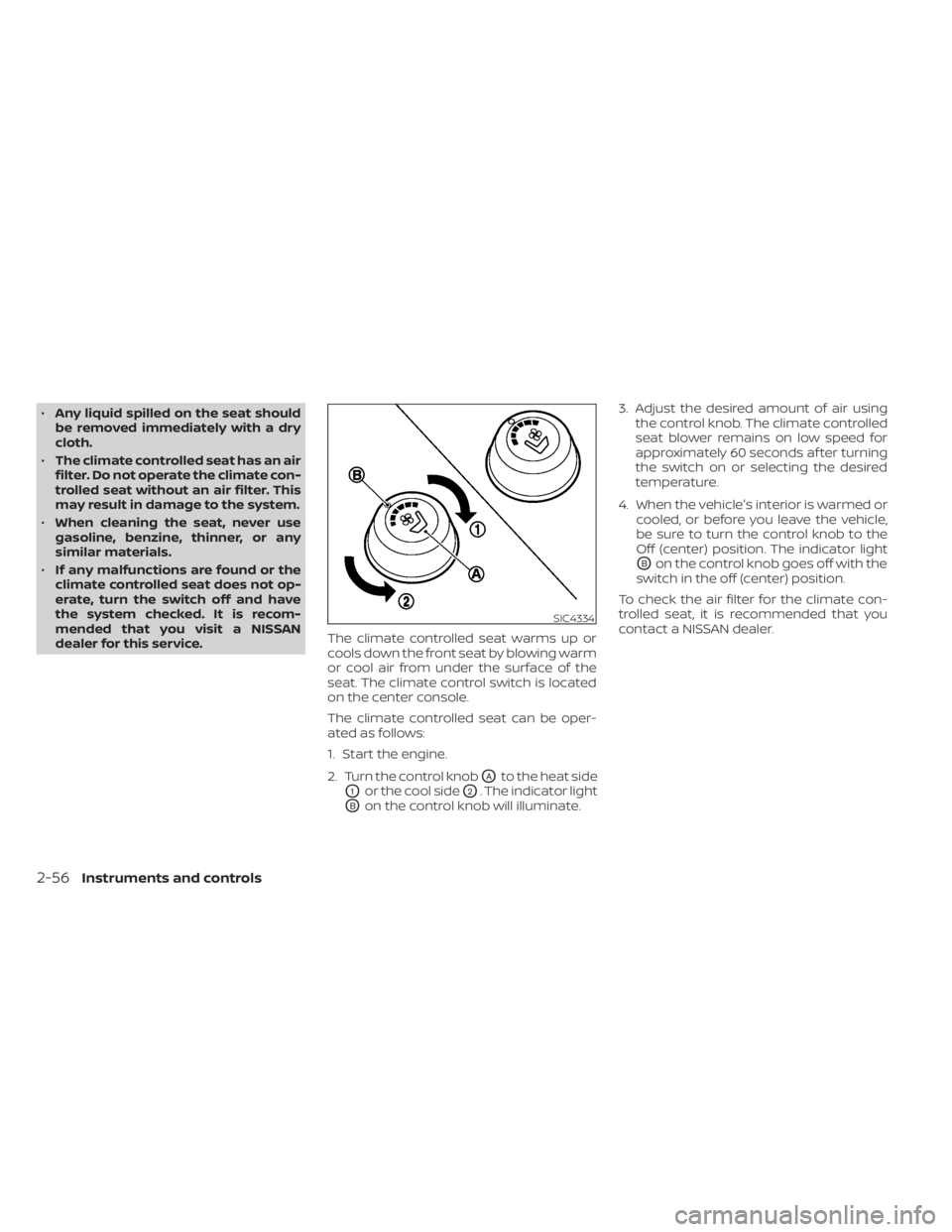
dealer for this service. The climate controlled seat warms up or
cools down the front seat by blowing warm
or cool air from under the surface of the
seat. The climate control switch is located
on the center console.
The climate controlled seat can be oper-
ated as follows:
1. Start the engine.
2. Turn the control knob
OAto the heat side
O1or the cool sideO2. The indicator light
OBon the control knob will illuminate.3. Adjust the desired amount of air using
the control knob. The climate controlled
seat blower remains on low speed for
approximately 60 seconds af ter turning
the switch on or selecting the desired
temperature.
4. When the vehicle's interior is warmed or cooled, or before you leave the vehicle,
be sure to turn the control knob to the
Off (center) position. The indicator light
OBon the control knob goes off with the
switch in the off (center) position.
To check the air filter for the climate con-
trolled seat, it is recommended that you
contact a NISSAN dealer.
SIC4334
2-56Instruments and controls
Page 172 of 657
If the indicator light flashes when the Front
and rear sonar system, MOD, RAB, or RCTA
systems are not turned off, it may indicate
a malfunction in one or more of these sys-
tems (if so equipped).
The Front and rear sonar system, MOD,
RAB, or RCTA systems will be turned on
automatically under the following condi-
tions:
• When the ignition switch is switched fromthe OFF position to the ON position.
• When the shif t lever is shif ted into the R (Reverse) position.
The automatic turning on function can be
turned on and off for these systems in the
vehicle information display. For additional
information, refer to “Settings” in the “In-
strument and controls” section of this
manual.
For additional information, refer to “Front
and rear sonar system”, ”Rear Automatic
Braking (RAB)” or “Rear Cross Traffic Alert
(RCTA)” in the “Starting and driving” section
of this manual, or the “Moving Object De-
tection (MOD)” in the “Monitor, climate, au-
dio, phone and voice recognition systems”
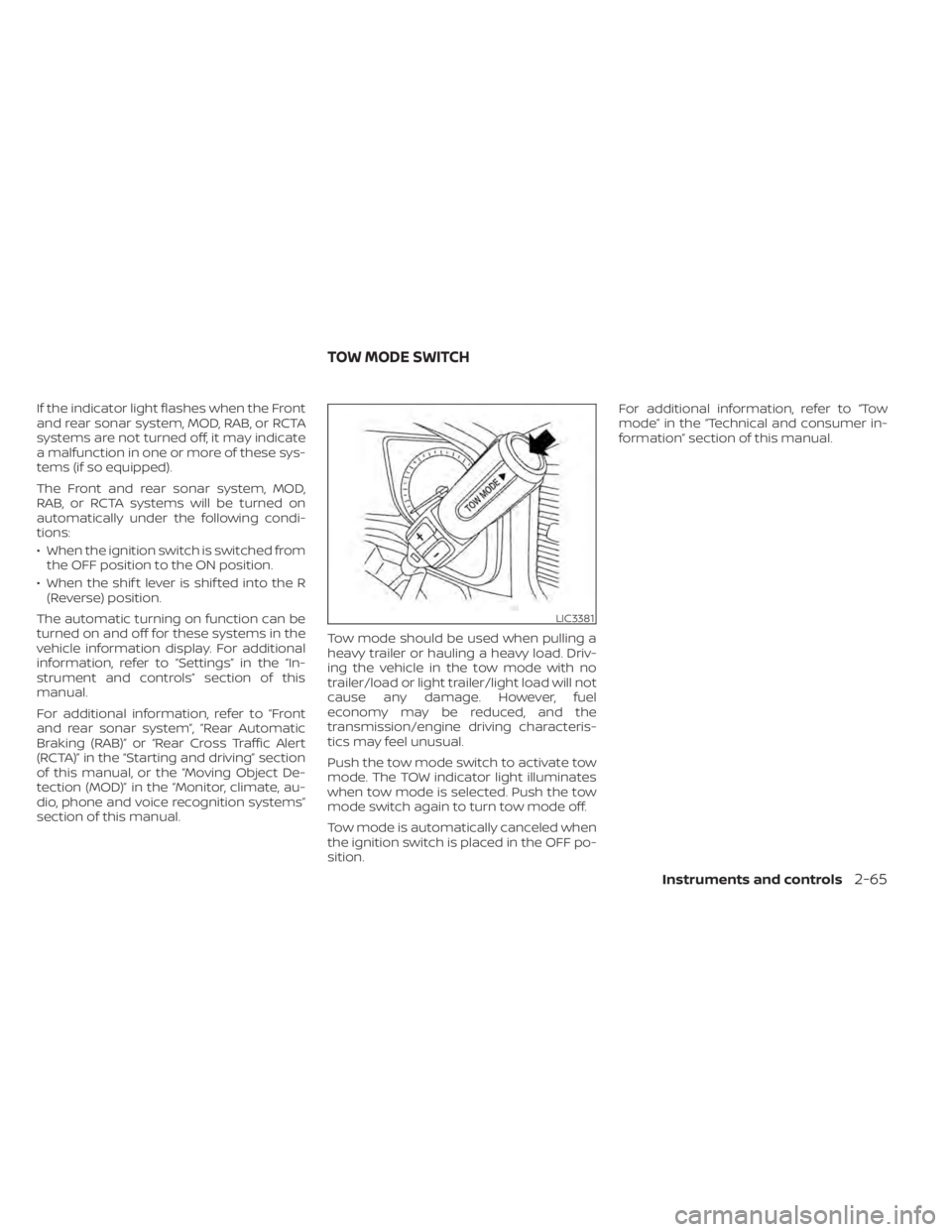
section of this manual. Tow mode should be used when pulling a
heavy trailer or hauling a heavy load. Driv-
ing the vehicle in the tow mode with no
trailer/load or light trailer/light load will not
cause any damage. However, fuel
economy may be reduced, and the
transmission/engine driving characteris-
tics may feel unusual.
Push the tow mode switch to activate tow
mode. The TOW indicator light illuminates
when tow mode is selected. Push the tow
mode switch again to turn tow mode off.
Tow mode is automatically canceled when
the ignition switch is placed in the OFF po-
sition.For additional information, refer to “Tow
mode” in the “Technical and consumer in-
formation” section of this manual.
LIC3381
TOW MODE SWITCH
Instruments and controls2-65