fuse NISSAN TITAN 2020 Owner´s Manual
[x] Cancel search | Manufacturer: NISSAN, Model Year: 2020, Model line: TITAN, Model: NISSAN TITAN 2020Pages: 657, PDF Size: 5.1 MB
Page 19 of 657
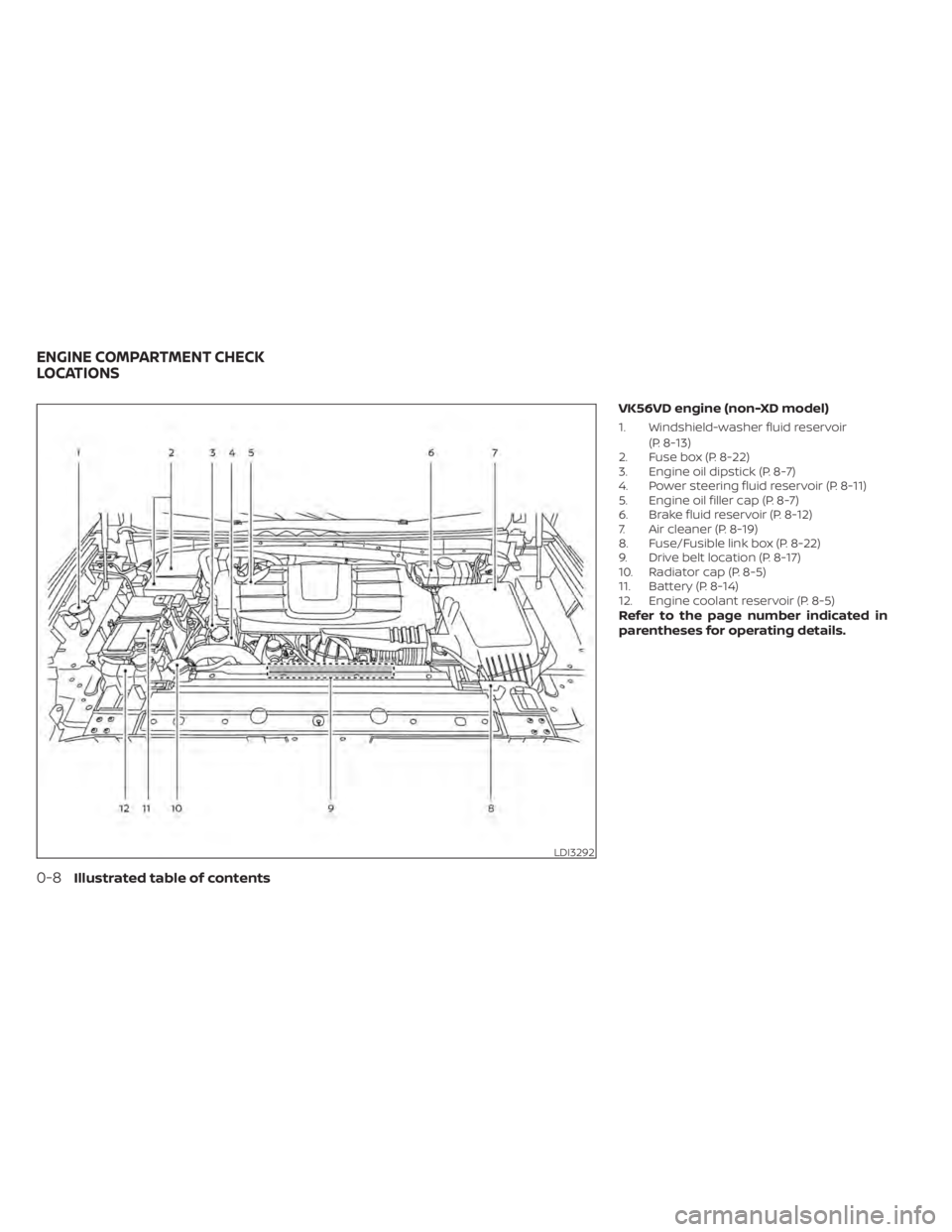
VK56VD engine (non-XD model)
1. Windshield-washer fluid reservoir(P. 8-13)
2. Fuse box (P. 8-22)
3. Engine oil dipstick (P. 8-7)
4. Power steering fluid reservoir (P. 8-11)
5. Engine oil filler cap (P. 8-7)
6. Brake fluid reservoir (P. 8-12)
7. Air cleaner (P. 8-19)
8. Fuse/Fusible link box (P. 8-22)
9. Drive belt location (P. 8-17)
10. Radiator cap (P. 8-5)
11. Battery (P. 8-14)
12. Engine coolant reservoir (P. 8-5)
Refer to the page number indicated in
parentheses for operating details.
LDI3292
ENGINE COMPARTMENT CHECK
LOCATIONS
0-8Illustrated table of contents
Page 20 of 657
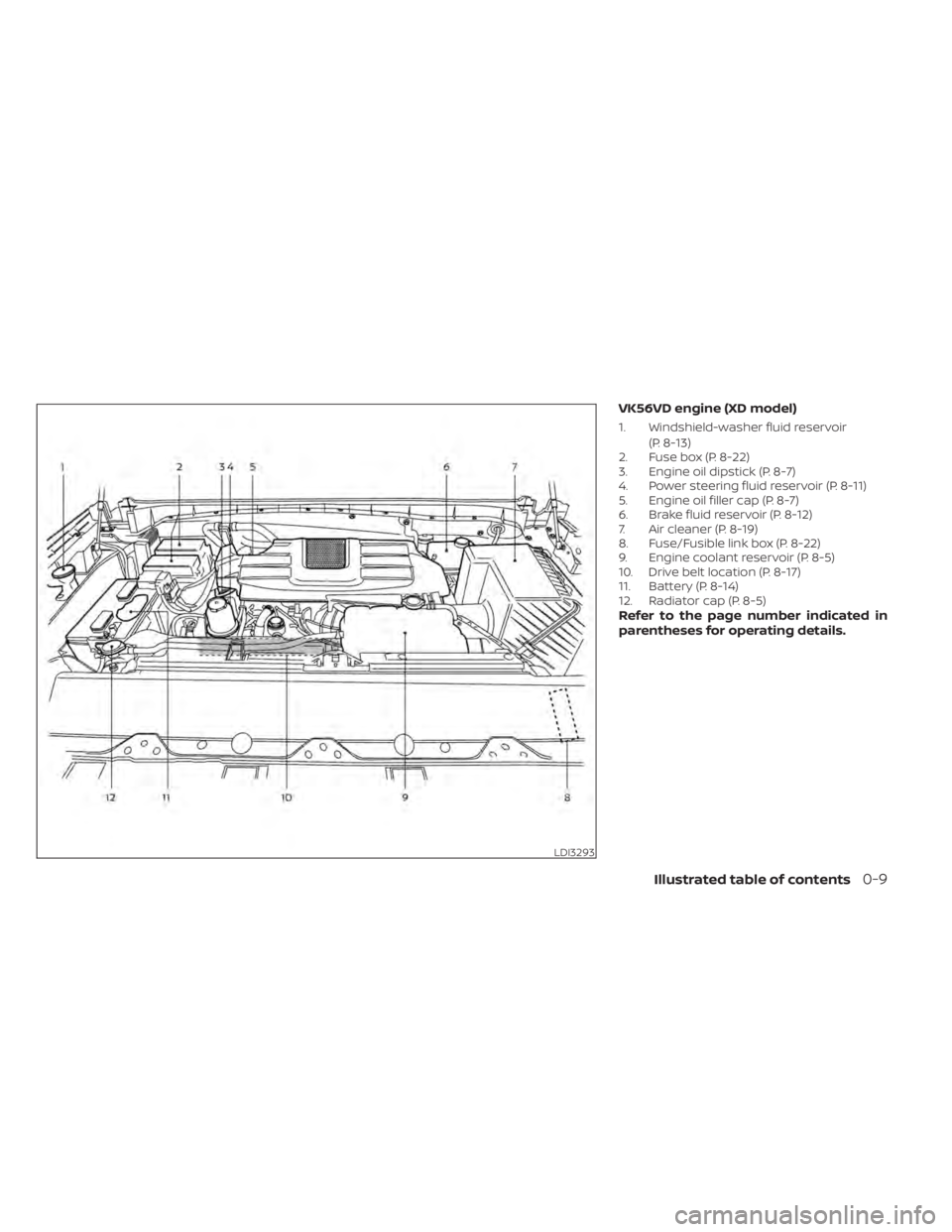
VK56VD engine (XD model)
1. Windshield-washer fluid reservoir(P. 8-13)
2. Fuse box (P. 8-22)
3. Engine oil dipstick (P. 8-7)
4. Power steering fluid reservoir (P. 8-11)
5. Engine oil filler cap (P. 8-7)
6. Brake fluid reservoir (P. 8-12)
7. Air cleaner (P. 8-19)
8. Fuse/Fusible link box (P. 8-22)
9. Engine coolant reservoir (P. 8-5)
10. Drive belt location (P. 8-17)
11. Battery (P. 8-14)
12. Radiator cap (P. 8-5)
Refer to the page number indicated in
parentheses for operating details.
LDI3293
Illustrated table of contents0-9
Page 140 of 657
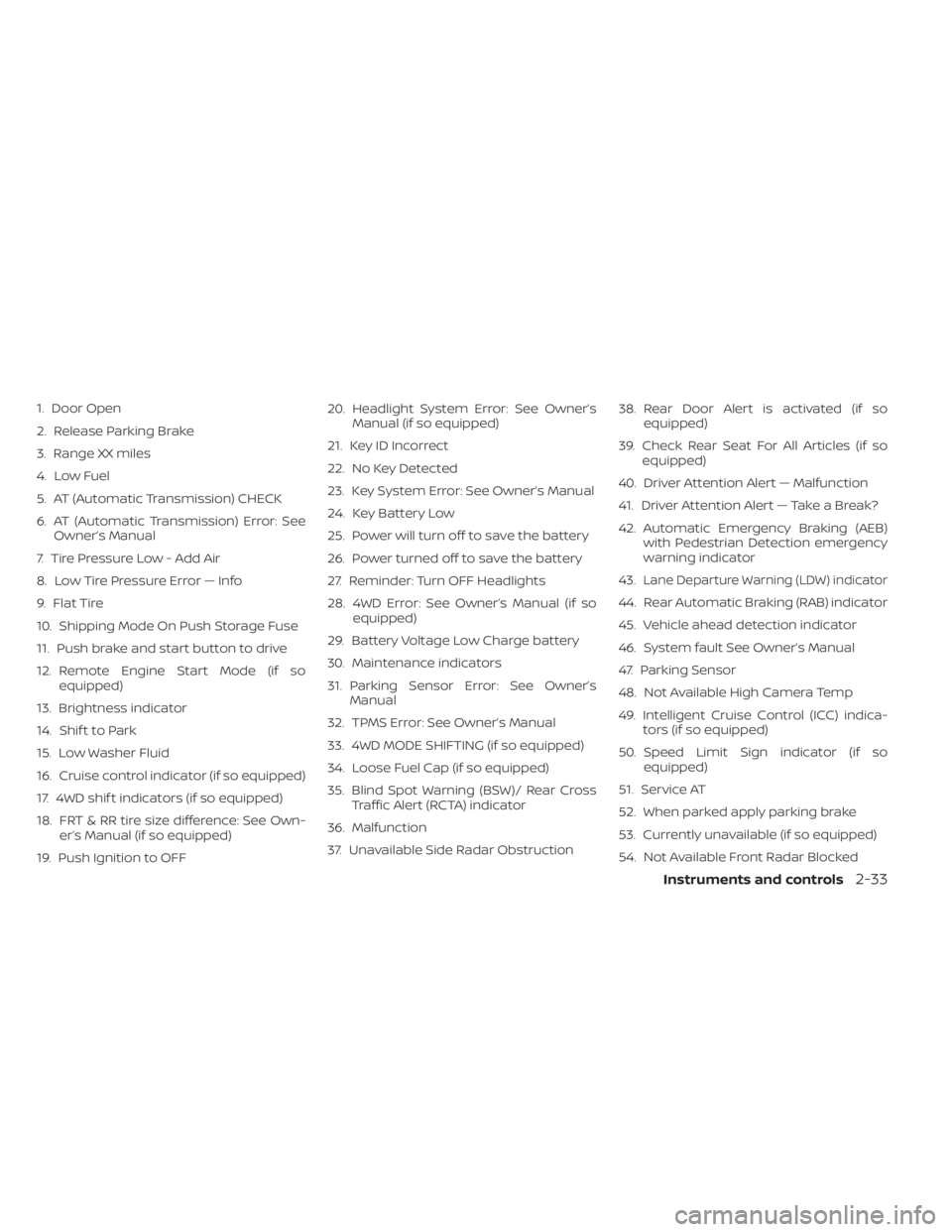
1. Door Open
2. Release Parking Brake
3. Range XX miles
4. Low Fuel
5. AT (Automatic Transmission) CHECK
6. AT (Automatic Transmission) Error: SeeOwner’s Manual
7. Tire Pressure Low - Add Air
8. Low Tire Pressure Error — Info
9. Flat Tire
10. Shipping Mode On Push Storage Fuse
11. Push brake and start button to drive
12. Remote Engine Start Mode (if so equipped)
13. Brightness indicator
14. Shif t to Park
15. Low Washer Fluid
16. Cruise control indicator (if so equipped)
17. 4WD shif t indicators (if so equipped)
18. FRT & RR tire size difference: See Own- er’s Manual (if so equipped)
19. Push Ignition to OFF 20. Headlight System Error: See Owner’s
Manual (if so equipped)
21. Key ID Incorrect
22. No Key Detected
23. Key System Error: See Owner’s Manual
24. Key Battery Low
25. Power will turn off to save the battery
26. Power turned off to save the battery
27. Reminder: Turn OFF Headlights
28. 4WD Error: See Owner’s Manual (if so equipped)
29. Battery Voltage Low Charge battery
30. Maintenance indicators
31. Parking Sensor Error: See Owner’s Manual
32. TPMS Error: See Owner’s Manual
33. 4WD MODE SHIFTING (if so equipped)
34. Loose Fuel Cap (if so equipped)
35. Blind Spot Warning (BSW)/ Rear Cross Traffic Alert (RCTA) indicator
36. Malfunction
37. Unavailable Side Radar Obstruction 38. Rear Door Alert is activated (if so
equipped)
39. Check Rear Seat For All Articles (if so equipped)
40. Driver Attention Alert — Malfunction
41. Driver Attention Alert — Take a Break?
42. Automatic Emergency Braking (AEB) with Pedestrian Detection emergency
warning indicator
43.
Lane Departure Warning (LDW) indicator
44. Rear Automatic Braking (RAB) indicator
45. Vehicle ahead detection indicator
46. System fault See Owner’s Manual
47. Parking Sensor
48. Not Available High Camera Temp
49. Intelligent Cruise Control (ICC) indica- tors (if so equipped)
50. Speed Limit Sign indicator (if so equipped)
51. Service AT
52. When parked apply parking brake
53. Currently unavailable (if so equipped)
54. Not Available Front Radar Blocked
Instruments and controls2-33
Page 141 of 657
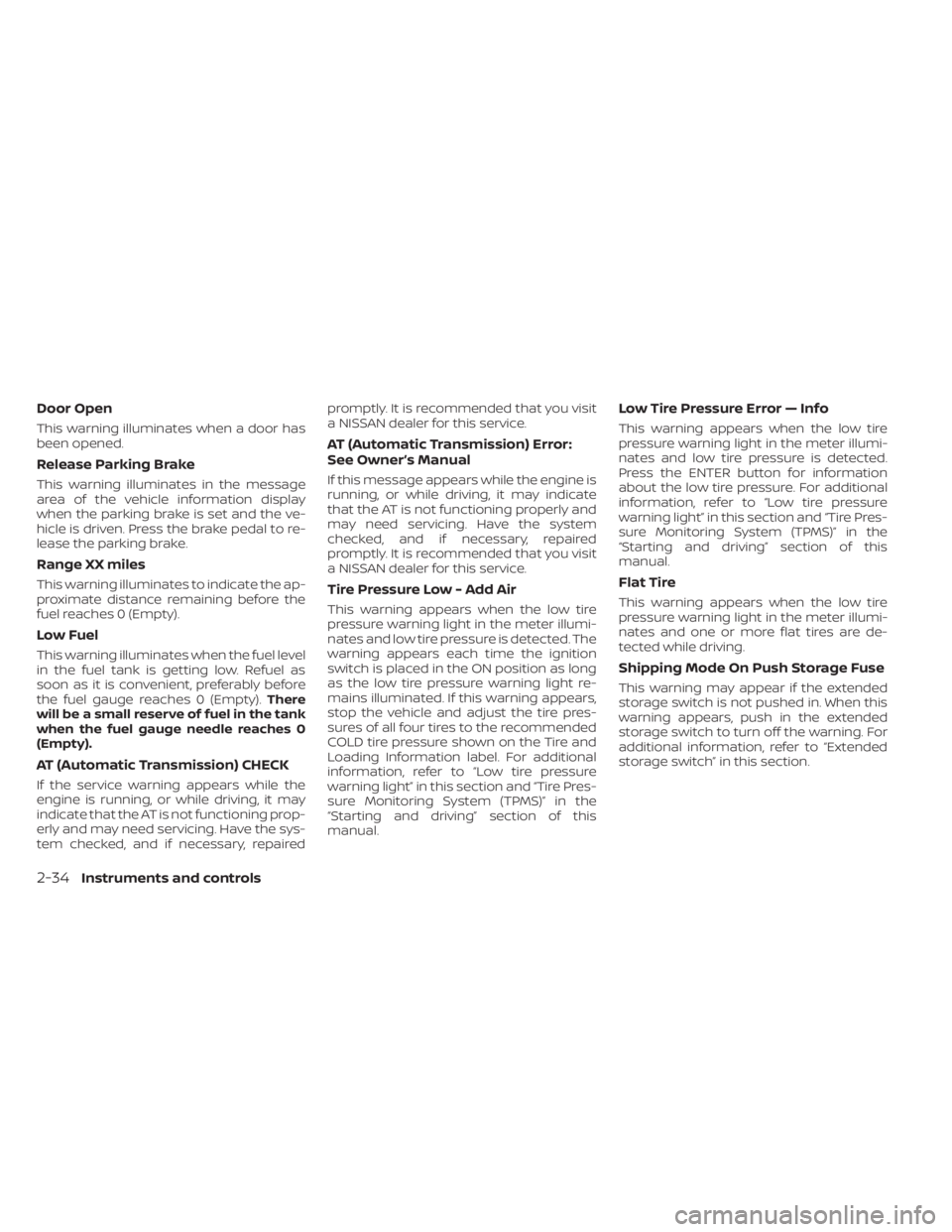
Door Open
This warning illuminates when a door has
been opened.
Release Parking Brake
This warning illuminates in the message
area of the vehicle information display
when the parking brake is set and the ve-
hicle is driven. Press the brake pedal to re-
lease the parking brake.
Range XX miles
This warning illuminates to indicate the ap-
proximate distance remaining before the
fuel reaches 0 (Empty).
Low Fuel
This warning illuminates when the fuel level
in the fuel tank is getting low. Refuel as
soon as it is convenient, preferably before
the fuel gauge reaches 0 (Empty).There
will be a small reserve of fuel in the tank
when the fuel gauge needle reaches 0
(Empty).
AT (Automatic Transmission) CHECK
If the service warning appears while the
engine is running, or while driving, it may
indicate that the AT is not functioning prop-
erly and may need servicing. Have the sys-
tem checked, and if necessary, repaired promptly. It is recommended that you visit
a NISSAN dealer for this service.
AT (Automatic Transmission) Error:
See Owner’s Manual
If this message appears while the engine is
running, or while driving, it may indicate
that the AT is not functioning properly and
may need servicing. Have the system
checked, and if necessary, repaired
promptly. It is recommended that you visit
a NISSAN dealer for this service.
Tire Pressure Low - Add Air
This warning appears when the low tire
pressure warning light in the meter illumi-
nates and low tire pressure is detected. The
warning appears each time the ignition
switch is placed in the ON position as long
as the low tire pressure warning light re-
mains illuminated. If this warning appears,
stop the vehicle and adjust the tire pres-
sures of all four tires to the recommended
COLD tire pressure shown on the Tire and
Loading Information label. For additional
information, refer to “Low tire pressure
warning light” in this section and “Tire Pres-
sure Monitoring System (TPMS)” in the
“Starting and driving” section of this
manual.
Low Tire Pressure Error — Info
This warning appears when the low tire
pressure warning light in the meter illumi-
nates and low tire pressure is detected.
Press the ENTER button for information
about the low tire pressure. For additional
information, refer to “Low tire pressure
warning light” in this section and “Tire Pres-
sure Monitoring System (TPMS)” in the
“Starting and driving” section of this
manual.
Flat Tire
This warning appears when the low tire
pressure warning light in the meter illumi-
nates and one or more flat tires are de-
tected while driving.
Shipping Mode On Push Storage Fuse
This warning may appear if the extended
storage switch is not pushed in. When this
warning appears, push in the extended
storage switch to turn off the warning. For
additional information, refer to “Extended
storage switch” in this section.
2-34Instruments and controls
Page 175 of 657
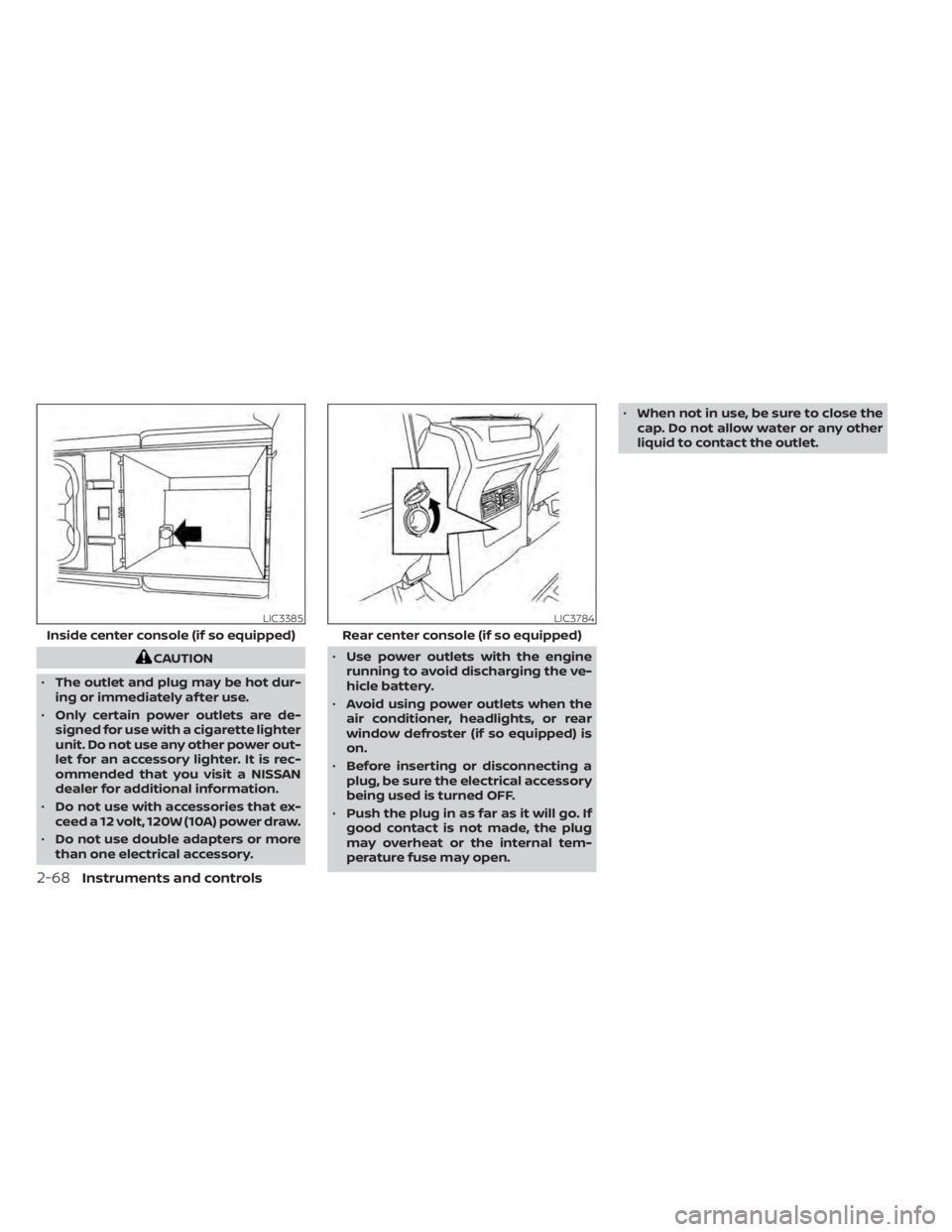
CAUTION
• The outlet and plug may be hot dur-
ing or immediately af ter use.
• Only certain power outlets are de-
signed for use with a cigarette lighter
unit. Do not use any other power out-
let for an accessory lighter. It is rec-
ommended that you visit a NISSAN
dealer for additional information.
• Do not use with accessories that ex-
ceed a 12 volt, 120W (10A) power draw.
• Do not use double adapters or more
than one electrical accessory. •
Use power outlets with the engine
running to avoid discharging the ve-
hicle battery.
• Avoid using power outlets when the
air conditioner, headlights, or rear
window defroster (if so equipped) is
on.
• Before inserting or disconnecting a
plug, be sure the electrical accessory
being used is turned OFF.
• Push the plug in as far as it will go. If
good contact is not made, the plug
may overheat or the internal tem-
perature fuse may open. •
When not in use, be sure to close the
cap. Do not allow water or any other
liquid to contact the outlet.
LIC3385
Inside center console (if so equipped)
LIC3784
Rear center console (if so equipped)
2-68Instruments and controls
Page 177 of 657
Do not use the outlet located in the truck
box with accessories that exceed 120 volt.
Do not use double adapters or more than
one electrical accessory. When the dual
wall bed liner is installed (if so equipped),
the power outlet is still accessible through
the access door in the bed liner.
CAUTION
• Operation of the 120 volt system with
the ignition in the ON position and
the engine not running (idle) will
drain the battery charge. This could
lead to a dead battery or no start
condition.
• The outlet and plug may be hot dur-
ing or immediately af ter use.
• Use power outlets with the engine
running to avoid discharging the ve-
hicle battery.
• Do not use double adaptors or more
than one electrical accessory.
• Avoid using power outlets when the
air conditioner, headlights or rear
window defroster is on.
• Before inserting or disconnecting a
plug, be sure the electrical accessory
being used is turned OFF. •
Push the plug in as far as it will go. If
good contact is not made, the plug
may overheat or the internal tem-
perature fuse may open.
• When not in use, be sure to close the
cap. Do not allow water or any other
liquid to contact the outlet.
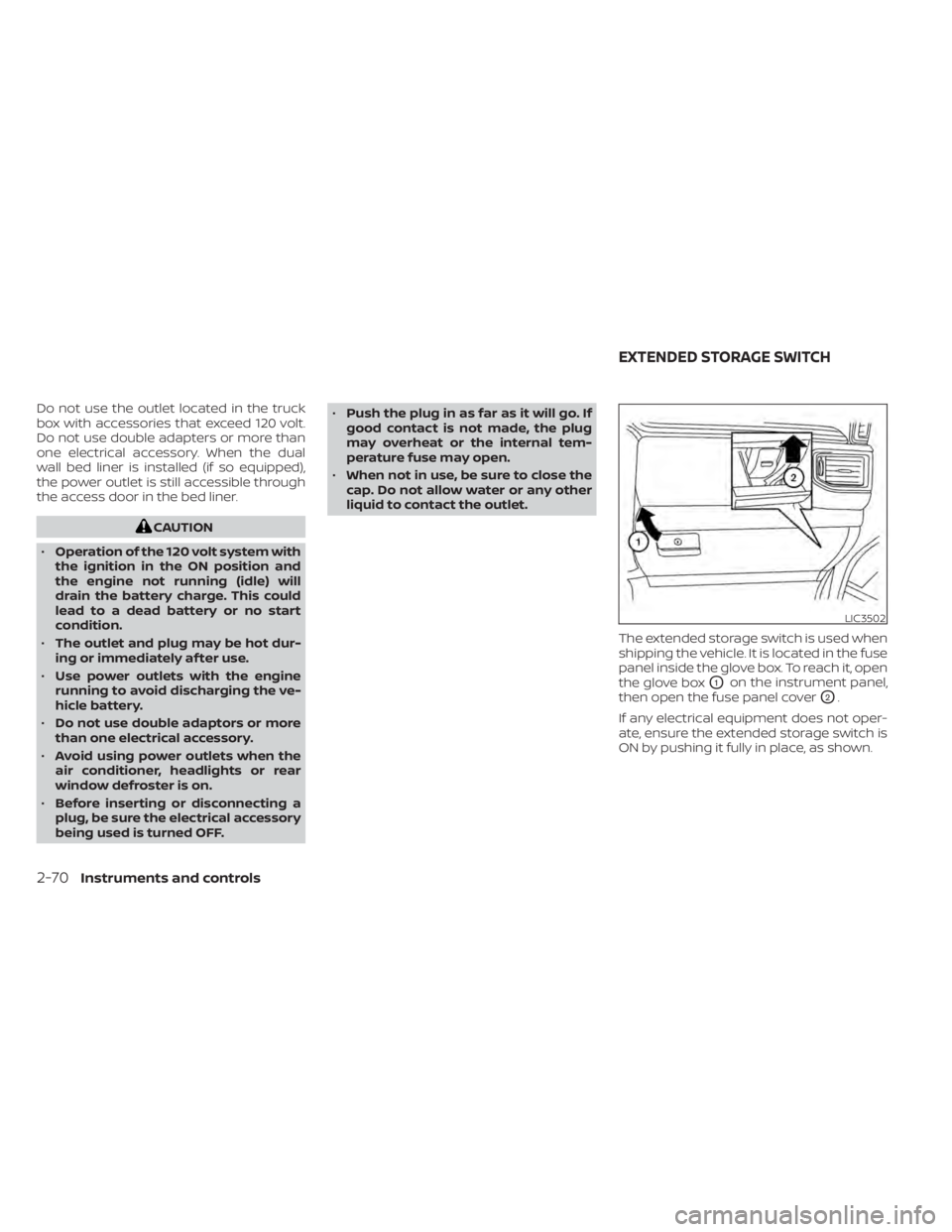
The extended storage switch is used when
shipping the vehicle. It is located in the fuse
panel inside the glove box. To reach it, open
the glove box
O1on the instrument panel,
then open the fuse panel cover
O2.
If any electrical equipment does not oper-
ate, ensure the extended storage switch is
ON by pushing it fully in place, as shown.
LIC3502
EXTENDED STORAGE SWITCH
2-70Instruments and controls
Page 243 of 657
ENTRY/EXIT FUNCTION
This system is designed so that the driver's
seat and steering column will automati-
cally move when the shif t lever is in the P
(Park) position. This allows the driver to
easily get in and out of the driver’s seat.
The driver’s seat will slide backward and
the steering column will move up:
• When the driver’s door is opened with theignition switch in the OFF position.
• When the ignition switch is changed from ACC to OFF with the driver’s door open.
The driver’s seat and steering wheel will
return to the previous position:
• When the ignition switch is changed from ACC or ON while the shif t lever is in the P
(Park) position.
The entry/exit function can be adjusted or
canceled through the vehicle settings in
the vehicle information display by perform-
ing the following:
• Switch the Exit Seat Slide from ON to OFF.
• Switch the Exit Steering UP from ON to OFF.
Restarting the entry/exit function
If the battery cable is disconnected, or if the
fuse opens, the stored memory positions
will be lost and some of the functions will
be restricted:
1. Drive the vehicle over 25 mph (40 km/h).
OR
2. Open and close the driver's door more than two times with the ignition switch
in the OFF position.
The entry/exit function should now work
properly.
SYSTEM OPERATION
The Memory Seat system will not work or
will stop operating under the following
conditions:
• When the vehicle speed is above 4 mph (7 km/h).
• When any of the memory switches are pushed while the Memory Seat is operat-
ing. • When the switch for the driver’s seat and
steering column is pushed while the
Memory Seat is operating.
• When the seat has already been moved to the memorized position.
• When no seat position is stored in the memory switch.
• When the shif t lever is moved from P (Park) to any other position.
3-40Pre-driving checks and adjustments
Page 325 of 657
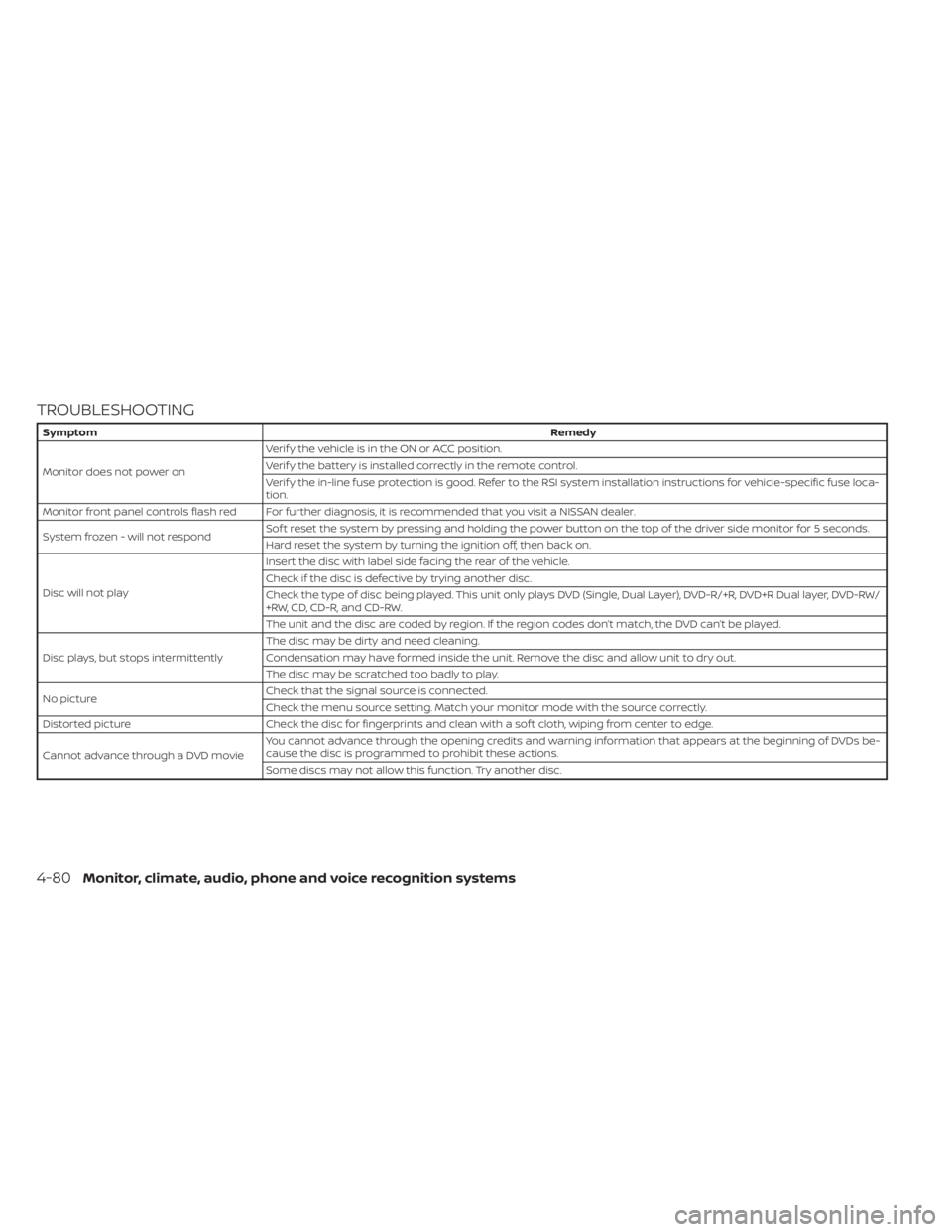
TROUBLESHOOTING
SymptomRemedy
Monitor does not power on Verif y the vehicle is in the ON or ACC position.
Verif y the battery is installed correctly in the remote control.
Verif y the in-line fuse protection is good. Refer to the RSI system installation instructions for vehicle-specific fuse loca-
tion.
Monitor front panel controls flash red For further diagnosis, it is recommended that you visit a NISSAN dealer.
System frozen - will not respond Sof t reset the system by pressing and holding the power button on the top of the driver side monitor for 5 seconds.
Hard reset the system by turning the ignition off, then back on.
Disc will not play Insert the disc with label side facing the rear of the vehicle.
Check if the disc is defective by trying another disc.
Check the type of disc being played. This unit only plays DVD (Single, Dual Layer), DVD-R/+R, DVD+R Dual layer, DVD-RW/
+RW, CD, CD-R, and CD-RW.
The unit and the disc are coded by region. If the region codes don’t match, the DVD can’t be played.
Disc plays, but stops intermittently The disc may be dirty and need cleaning.
Condensation may have formed inside the unit. Remove the disc and allow unit to dry out.
The disc may be scratched too badly to play.
No picture Check that the signal source is connected.
Check the menu source setting. Match your monitor mode with the source correctly.
Distorted picture Check the disc for fingerprints and clean with a sof t cloth, wiping from center to edge.
Cannot advance through a DVD movie You cannot advance through the opening credits and warning information that appears at the beginning of DVDs be-
cause the disc is programmed to prohibit these actions.
Some discs may not allow this function. Try another disc.
4-80Monitor, climate, audio, phone and voice recognition systems
Page 488 of 657
8 Do-it-yourself
Maintenance precautions.......................8-2
Engine compartment check locations ...........8-3
Engine cooling system ..........................8-5
Checking engine coolant level ................8-6
Changing engine coolant ....................8-6
Engine oil .......................................8-7
Checking engine oil level .....................8-7
Changing engine oil and oil filter ..............8-8
Automatic Transmission Fluid (ATF) ..............8-11
Power Steering Fluid (PSF) .......................8-11
Brake fluid ...................................... 8-12
Windshield-washer fluid ........................8-13
Windshield-washer fluid reservoir ...........8-13
Battery......................................... 8-14
Jump starting ............................... 8-16
Variable voltage control system
(if so equipped) ................................. 8-17
Drive belt ....................................... 8-17
Spark plugs .................................... 8-18
Replacing spark plugs .......................8-18
Air cleaner ..................................... 8-19
In-cabin microfilter .......................... 8-19Windshield wiper blades
........................8-20
Cleaning .................................... 8-20
Replacing ................................... 8-20
Brakes ......................................... 8-21
Fuses .......................................... 8-22
Engine compartment .......................8-22
Passenger compartment ...................8-24
Battery replacement ........................... 8-25
NISSAN Intelligent Key® ......................8-26
Lights .......................................... 8-27
Headlights .................................. 8-27
Fog lights (if so equipped) ...................8-28
Daytime Running Light (DRL)
(if so equipped) .............................. 8-29
Exterior and interior lights ...................8-30
Wheels and tires ............................... 8-33
Tire pressure ................................
8-33
Tir
e labeling ................................. 8-38
Types of tires ................................ 8-40
Tire chains .................................. 8-41
Changing wheels and tires ..................8-42
Page 490 of 657
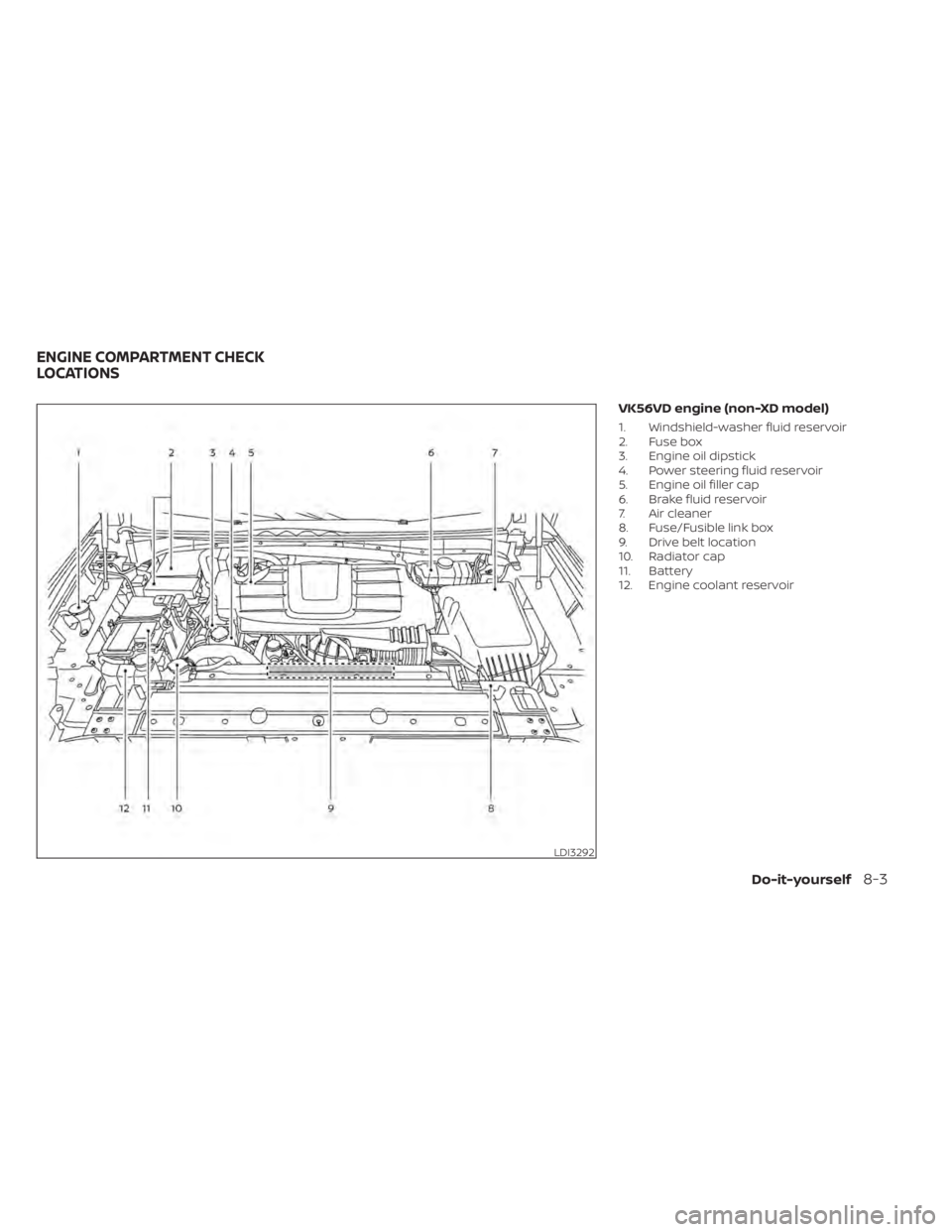
VK56VD engine (non-XD model)
1. Windshield-washer fluid reservoir
2. Fuse box
3. Engine oil dipstick
4. Power steering fluid reservoir
5. Engine oil filler cap
6. Brake fluid reservoir
7. Air cleaner
8. Fuse/Fusible link box
9. Drive belt location
10. Radiator cap
11. Battery
12. Engine coolant reservoir
LDI3292
ENGINE COMPARTMENT CHECK
LOCATIONS
Do-it-yourself8-3