ECO mode NISSAN TITAN 2021 Owner´s Manual
[x] Cancel search | Manufacturer: NISSAN, Model Year: 2021, Model line: TITAN, Model: NISSAN TITAN 2021Pages: 638, PDF Size: 4.31 MB
Page 355 of 638
•In the manual shif t mode, the trans-
mission may not shif t to the selected
gear immediately because of vehicle
speed. The transmission will upshif t
or downshif t when vehicle speed
matches the programmed transmis-
sion shif t points. This helps maintain
driving performance and reduces the
chance of vehicle damage or loss of
control.
• In the manual shif t mode, the trans-
mission will not upshif t to a higher
gear than is manually selected. When
the vehicle speed decreases, the trans-
mission automatically shif ts down and
shif ts to 1st gear before the vehicle
comes to a stop.
Accelerator downshif t
— in D (Drive) position —
For passing or hill climbing, depress the
accelerator pedal to the floor. This shif ts
the transmission down into a lower gear,
depending on the vehicle speed.
Fail-safe
When the fail-safe operation occurs, please
note that the transmission will be locked in
any of the forward gears according to the
condition.
If the vehicle is driven under extreme
conditions, such as excessive wheel
spinning and subsequent hard braking,
the fail-safe system may be activated.
This will occur even if all electrical cir-
cuits are functioning properly. In this
case, place the ignition switch in the OFF
position and wait for 3 seconds. Then
place the ignition switch back in the ON
position. The vehicle should return to its
normal operating condition. If it does not
return to its normal operating condition,
have the transmission checked and re-
paired, if necessary. It is recommended
that you visit a NISSAN dealer for this
service.
WARNING
• Be sure the parking brake is fully re-
leased before driving. Failure to do so
can cause brake failure and lead to
an accident.
• Do not release the parking brake
from outside the vehicle.
• Do not use the shif t lever in place of
the parking brake. When parking, be
sure the parking brake is fully
engaged.
• To help avoid risk of injury or death
through unintended operation of the
vehicle and/or its systems, do not
leave children, people who require
the assistance of others or pets unat-
tended in your vehicle. Additionally,
the temperature inside a closed ve-
hicle on a warm day can quickly be-
come high enough to cause a signifi-
cant risk of injury or death to people
and pets.
PARKING BRAKE
Starting and driving5-23
Page 373 of 638
For Canada
Model: SRR3–B
Canada 310
This device contains licence-exempt
transmitter(s)/receiver(s) that comply
with Innovation, Science and Economic
Development Canada’s licence-exempt
RSS(s). Operation is subject to the fol-
lowing two conditions:
1.This device may not cause
interference.
2. This device must accept any interfer-
ence, including interference that may
cause undesired operation of the
device.
Radiofrequency radiation exposure in-
formation:
This equipment complies with radiation
exposure limits set forth for an uncon-
trolled environment. This equipment
should be installed and operated with
minimum distance of 20 cm between the
radiator and your body. Droit applicable: Canada 310
L’émetteur/récepteur exempt de licence
contenu dans le présent appareil est
conforme aux CNR d’Innovation, Sci-
ences et Développement économique
Canada applicables aux appareils radio
exempts de licence. L’exploitation est au-
torisée aux deux conditions suivantes:
1.
L’appareil ne doit pas produire de
brouillage;
2. L’appareil doit accepter tout brouil-
lage radioélectrique subi, même si le
brouillage est susceptible d’en com-
promettre le fonctionnement.
Informations sur l'exposition aux rayon-
nements radiofréquences:
Cet équipement est conforme aux lim-
ites d'exposition aux rayonnements
définies pour un environnement non
être installé et utilisé avec un minimum
de 20 cm decontrôlé. Cet équipement
doit distance entre la source de rayonne-
ment et votre corps.WARNING
Failure to follow the warnings and in-
structions for proper use of the RCTA
system could result in serious injury or
death.
• The RCTA system is not a replace-
ment for proper driving procedures
and is not designed to prevent con-
tact with vehicles or objects. When
backing out of a parking space, al-
ways use the side and rear mirrors
and turn and look in the direction
your vehicle will move. Never rely
solely on the RCTA system.
• Do not use the RCTA system when
towing a trailer. The system may not
function properly.
The RCTA system will assist you when
backing out from a parking space. When
the vehicle is in reverse, the system is de-
signed to detect other vehicles approach-
ing from the right or lef t of the vehicle. If the
system detects cross traffic, it will alert you.
REAR CROSS TRAFFIC ALERT (RCTA)
Starting and driving5-41
Page 381 of 638
For Canada
Model: SRR3–B
Canada 310
This device contains licence-exempt
transmitter(s)/receiver(s) that comply
with Innovation, Science and Economic
Development Canada’s licence-exempt
RSS(s). Operation is subject to the fol-
lowing two conditions:
1.This device may not cause
interference.
2. This device must accept any interfer-
ence, including interference that may
cause undesired operation of the
device.
Radiofrequency radiation exposure in-
formation:
This equipment complies with radiation
exposure limits set forth for an uncon-
trolled environment. This equipment
should be installed and operated with
minimum distance of 20 cm between the
radiator and your body. Droit applicable: Canada 310
L’émetteur/récepteur exempt de licence
contenu dans le présent appareil est
conforme aux CNR d’Innovation, Sci-
ences et Développement économique
Canada applicables aux appareils radio
exempts de licence. L’exploitation est au-
torisée aux deux conditions suivantes:
1.
L’appareil ne doit pas produire de
brouillage;
2. L’appareil doit accepter tout brouil-
lage radioélectrique subi, même si le
brouillage est susceptible d’en com-
promettre le fonctionnement.
Informations sur l'exposition aux rayon-
nements radiofréquences:
Cet équipement est conforme aux lim-
ites d'exposition aux rayonnements
définies pour un environnement non
être installé et utilisé avec un minimum
de 20 cm decontrôlé. Cet équipement
doit distance entre la source de rayonne-
ment et votre corps.
PRECAUTIONS ON CRUISE
CONTROL
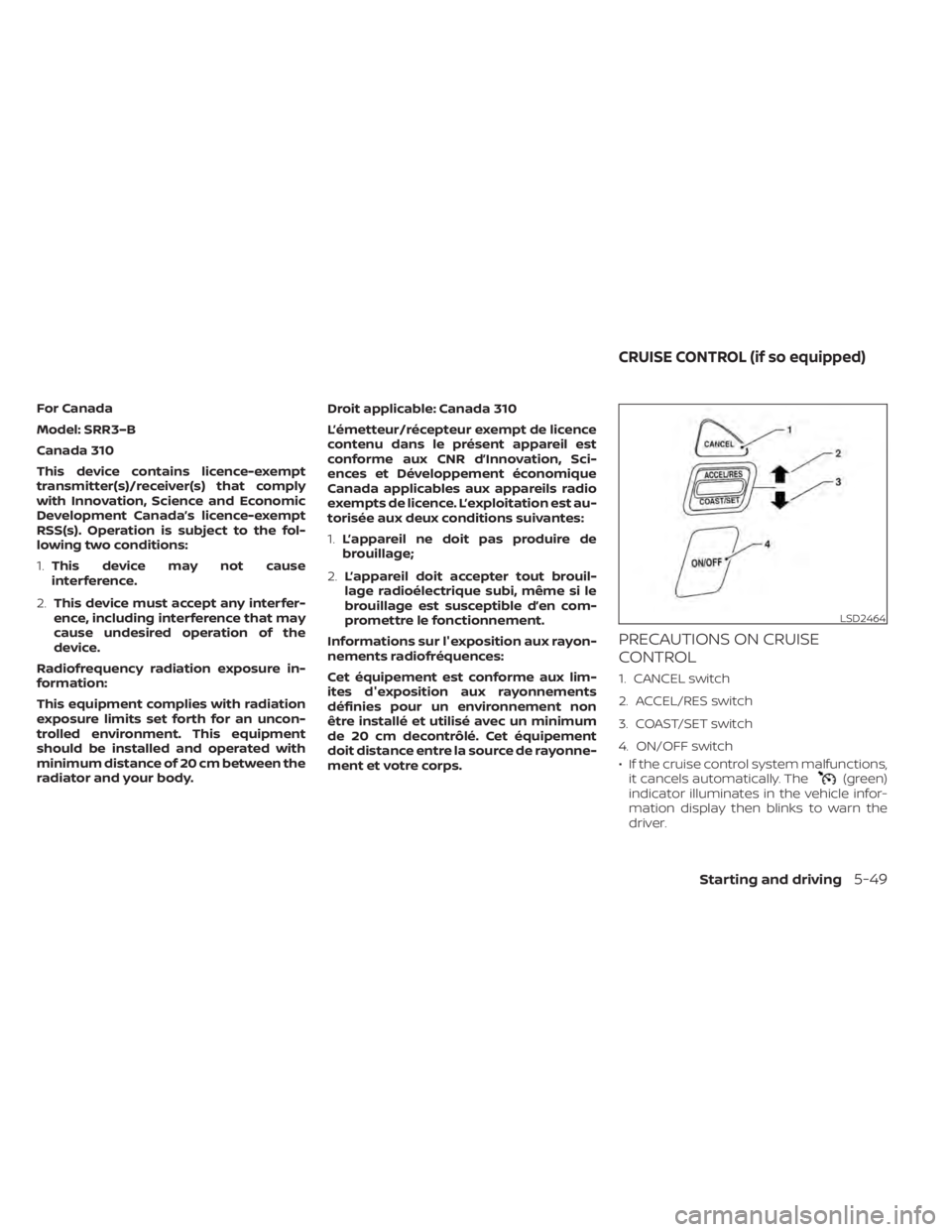
1. CANCEL switch
2. ACCEL/RES switch
3. COAST/SET switch
4. ON/OFF switch
• If the cruise control system malfunctions, it cancels automatically. The
(green)
indicator illuminates in the vehicle infor-
mation display then blinks to warn the
driver.
LSD2464
CRUISE CONTROL (if so equipped)
Starting and driving5-49
Page 390 of 638
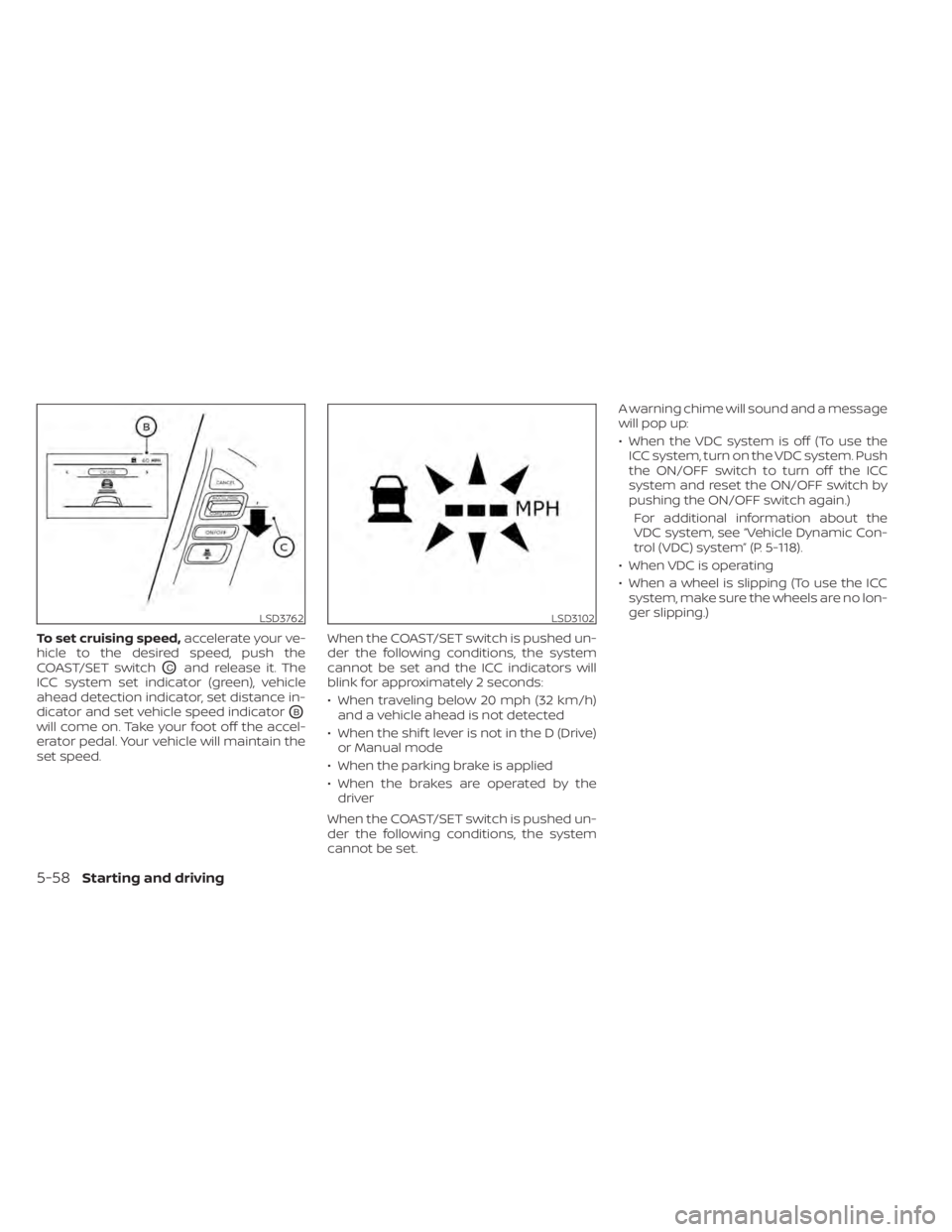
To set cruising speed,accelerate your ve-
hicle to the desired speed, push the
COAST/SET switch
OCand release it. The
ICC system set indicator (green), vehicle
ahead detection indicator, set distance in-
dicator and set vehicle speed indicator
OB
will come on. Take your foot off the accel-
erator pedal. Your vehicle will maintain the
set speed. When the COAST/SET switch is pushed un-
der the following conditions, the system
cannot be set and the ICC indicators will
blink for approximately 2 seconds:
• When traveling below 20 mph (32 km/h)
and a vehicle ahead is not detected
• When the shif t lever is not in the D (Drive) or Manual mode
• When the parking brake is applied
• When the brakes are operated by the driver
When the COAST/SET switch is pushed un-
der the following conditions, the system
cannot be set. A warning chime will sound and a message
will pop up:
• When the VDC system is off (To use the
ICC system, turn on the VDC system. Push
the ON/OFF switch to turn off the ICC
system and reset the ON/OFF switch by
pushing the ON/OFF switch again.)
For additional information about the
VDC system, see “Vehicle Dynamic Con-
trol (VDC) system” (P. 5-118).
• When VDC is operating
• When a wheel is slipping (To use the ICC system, make sure the wheels are no lon-
ger slipping.)
LSD3762LSD3102
5-58Starting and driving
Page 394 of 638
NOTE:
The approach warning chime may sound
and the system display may blink when
the ICC sensor detects objects on the
side of the vehicle or on the side of the
road. This may cause the ICC system to
decelerate or accelerate the vehicle. The
ICC sensor may detect these objects
when the vehicle is driven on winding
roads, narrow roads, hilly roads, or when
entering or exiting a curve. In these
cases you will have to manually control
the proper distance ahead of your
vehicle.
Also, the sensor sensitivity can be affected
by vehicle operation (steering maneuver or
driving position in the lane) or traffic or ve-
hicle condition (for example, if a vehicle is
being driven with some damage).
Acceleration when passing
When the ICC system is engaged above
37 mph and following a slower vehicle (be-
low ICC set speed), and the turn signal is
activated to the lef t, the ICC system will
automatically start to accelerate the ve-
hicle to help initiate passing on the lef t and
will begin to reduce the distance to vehicle
directly ahead. Only the lef t side turn signal
operates this feature. As the driver steersthe vehicle and moves into the passing
lane, if no vehicle is detected ahead the ICC
system will continue to accelerate to the
ICC system set speed. If another vehicle is
detected ahead, then the vehicle will accel-
erate up to the following speed of that ve-
hicle. If the vehicle is not steered into the
lef t lane to pass, the acceleration will stop
af ter a short time and regain the set follow-
ing distance. Acceleration can be stopped
at any point by depressing the brake pedal
or the CANCEL switch on the steering
wheel.
WARNING
In order to reduce the risk of a collision
that may result in serious injury or
death, please be aware of the following:
• This function is only activated with
the lef t turn signal and will briefly ac-
celerate the vehicle even if a lane
change is not initiated. This can in-
clude non-passing situations such as
lef t side exits. •
Ensure that when passing another
vehicle, the adjacent lane is clear be-
fore initiating the pass. Sudden
changes in traffic may occur while
passing — always manually steer or
brake as needed — never solely rely
on the system.
Automatic cancellation
A chime sounds under the following condi-
tions and the control is automatically can-
celed:
• When the vehicle ahead is not detected and your vehicle is traveling below the
speed of 15 mph (24 km/h)
• When the system judges the vehicle is at a standstill
• When the shif t lever is not in the D (Drive) position, Manual mode or L (Low) range.
• When the parking brake system is applied
• When the VDC system is turned off
• When VDC operates
• When distance measurement becomes impaired due to adhesion of dirt or ob-
struction to the sensor
• When a wheel slips
• When the radar signal is temporarily in- terrupted
5-62Starting and driving
Page 396 of 638
•Do not use the ICC system if you are
towing a trailer. The system may not
detect a vehicle ahead.
• In some road or traffic conditions, a
vehicle or object can unexpectedly
come into the sensor detection zone
and cause automatic braking. Al-
ways stay alert and avoid using the
ICC system where not recommended
in this warning section.
The radar sensor will not detect the follow-
ing objects:
• Stationary and slow moving vehicles
• Pedestrians or objects in the roadway
• Oncoming vehicles in the same lane
• Motorcycles traveling offset in the travel lane
The sensor generally detects the signals
returned from the vehicle ahead. Therefore,
if the sensor cannot detect the reflection
from the vehicle ahead, the ICC system
may not maintain the selected distance. The following are some conditions in which
the sensor cannot properly detect a ve-
hicle ahead and the system may not oper-
ate properly:
• When snow or road spray from traveling
vehicles reduces the sensor’s detection.
• When your vehicle is towing a trailer, etc.
• When excessively heavy baggage is loaded in the rear seat or cargo area of
your vehicle.
The ICC system is designed to automati-
cally check the sensor’s operation within
the limitations of the system.
When the sensor is covered with dirt or is
obstructed, the system will automatically
be canceled. If the sensor is covered with
ice, a transparent or translucent vinyl bag,
etc., the ICC system may not detect them.
In these instances, the vehicle-to-vehicle
distance control mode may not cancel and
may not be able to maintain the selected
following distance from the vehicle ahead.
Be sure to check and clean the sensor
regularly. The detection zone of the radar sensor is
limited. A vehicle ahead must be in the de-
tection zone for the vehicle-to-vehicle dis-
tance detection mode to maintain the se-
lected distance from the vehicle ahead.
A vehicle ahead may move outside of the
detection zone due to its position within
the same lane of travel. Motorcycles may
not be detected in the same lane ahead if
they are traveling offset from the centerline
of the lane. A vehicle that is entering the
lane ahead may not be detected until the
vehicle has completely moved into the
lane.
If this occurs, the ICC system may warn
you by blinking the system indicator and
sounding the chime. The driver may
have to manually control the proper dis-
tance away from vehicle traveling ahead.
5-64Starting and driving
Page 404 of 638
• Cruise control warning (yellow): Indi-cates that there is a malfunction in the
ICC system
2. Set vehicle speed indicator: This indicator indicates the set vehicle
speed. For Canadian models, the speed
is displayed in km/h.
Operating conventional (fixed
speed) cruise control mode
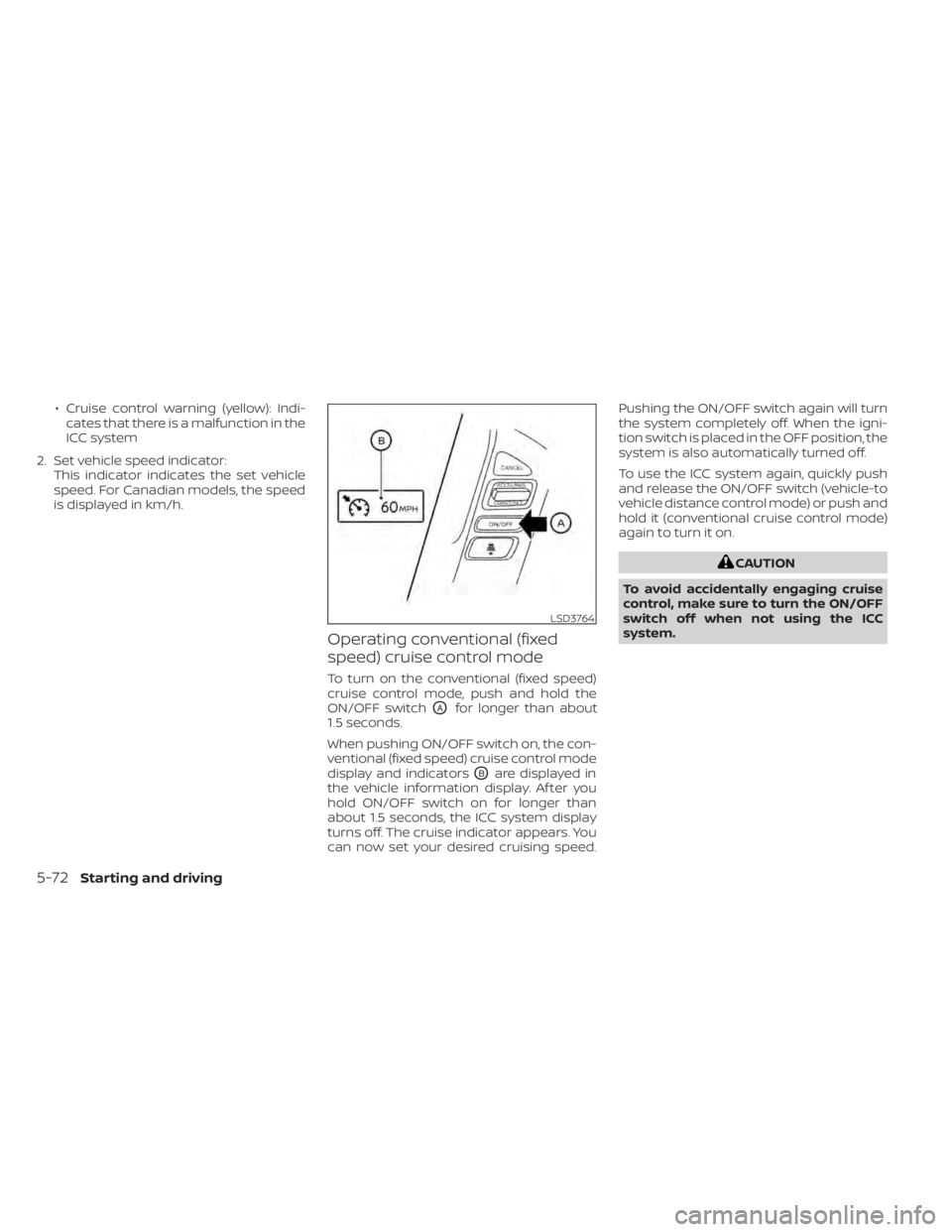
To turn on the conventional (fixed speed)
cruise control mode, push and hold the
ON/OFF switch
OAfor longer than about
1.5 seconds.
When pushing ON/OFF switch on, the con-
ventional (fixed speed) cruise control mode
display and indicators
OBare displayed in
the vehicle information display. Af ter you
hold ON/OFF switch on for longer than
about 1.5 seconds, the ICC system display
turns off. The cruise indicator appears. You
can now set your desired cruising speed. Pushing the ON/OFF switch again will turn
the system completely off. When the igni-
tion switch is placed in the OFF position, the
system is also automatically turned off.
To use the ICC system again, quickly push
and release the ON/OFF switch (vehicle-to
vehicle distance control mode) or push and
hold it (conventional cruise control mode)
again to turn it on.
CAUTION
To avoid accidentally engaging cruise
control, make sure to turn the ON/OFF
switch off when not using the ICC
system.
LSD3764
5-72Starting and driving
Page 406 of 638
System temporarily unavailableA chime sounds under the following condi-
tions and the control is automatically can-
celed:• When the vehicle slows down more than
8 mph (13 km/h) below the set speed
• When the shif t lever is not in the D (Drive) or manual shif t mode
• When the parking brake is applied
• When the VDC operates (including the traction control system)
• When a wheel slips
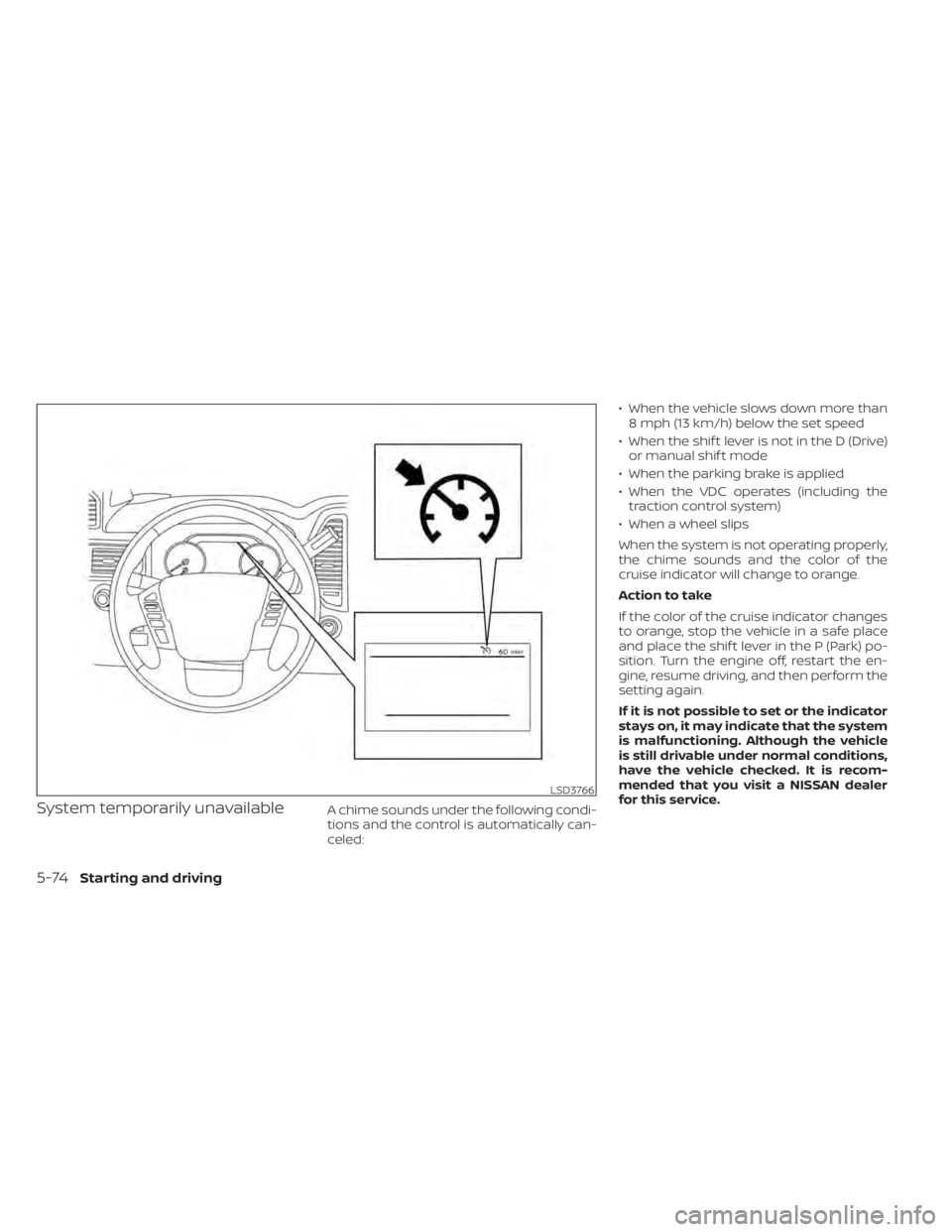
When the system is not operating properly,
the chime sounds and the color of the
cruise indicator will change to orange.
Action to take
If the color of the cruise indicator changes
to orange, stop the vehicle in a safe place
and place the shif t lever in the P (Park) po-
sition. Turn the engine off, restart the en-
gine, resume driving, and then perform the
setting again.
If it is not possible to set or the indicator
stays on, it may indicate that the system
is malfunctioning. Although the vehicle
is still drivable under normal conditions,
have the vehicle checked. It is recom-
mended that you visit a NISSAN dealer
for this service.
LSD3766
5-74Starting and driving
Page 438 of 638
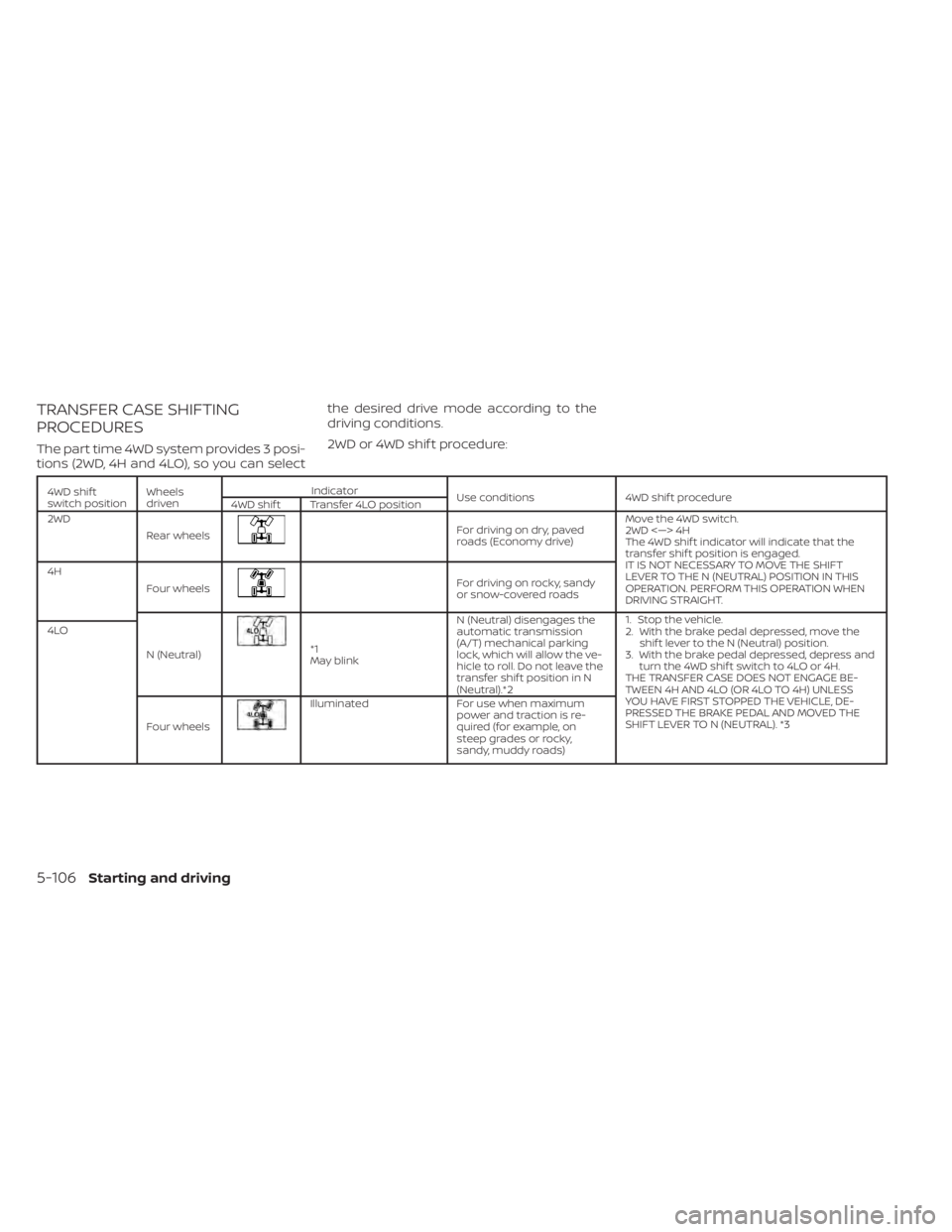
TRANSFER CASE SHIFTING
PROCEDURES
The part time 4WD system provides 3 posi-
tions (2WD, 4H and 4LO), so you can selectthe desired drive mode according to the
driving conditions.
2WD or 4WD shif t procedure:
4WD shif t
switch position
Wheels
driven Indicator
Use conditions 4WD shif t procedure
4WD shif t Transfer 4LO position
2WD
Rear wheels
Fordrivingondry,paved
roads (Economy drive) Move the 4WD switch.
2WD <—> 4H
The 4WD shif t indicator will indicate that the
transfer shif t position is engaged.
IT IS NOT NECESSARY TO MOVE THE SHIFT
LEVER TO THE N (NEUTRAL) POSITION IN THIS
OPERATION. PERFORM THIS OPERATION WHEN
DRIVING STRAIGHT.
4H
Four wheels
For driving on rocky, sandy
or snow-covered roads
N (Neutral)
*1
May blink N (Neutral) disengages the
automatic transmission
(A/T) mechanical parking
lock, which will allow the ve-
hicle to roll. Do not leave the
transfer shif t position in N
(Neutral).*2 1. Stop the vehicle.
2. With the brake pedal depressed, move the
shif t lever to the N (Neutral) position.
3. With the brake pedal depressed, depress and turn the 4WD shif t switch to 4LO or 4H.
THE TRANSFER CASE DOES NOT ENGAGE BE-
TWEEN 4H AND 4LO (OR 4LO TO 4H) UNLESS
YOU HAVE FIRST STOPPED THE VEHICLE, DE-
PRESSED THE BRAKE PEDAL AND MOVED THE
SHIFT LEVER TO N (NEUTRAL). *3
4LO
Four wheels
Illuminated For use when maximum
power and traction is re-
quired (for example, on
steep grades or rocky,
sandy, muddy roads)
5-106Starting and driving
Page 439 of 638
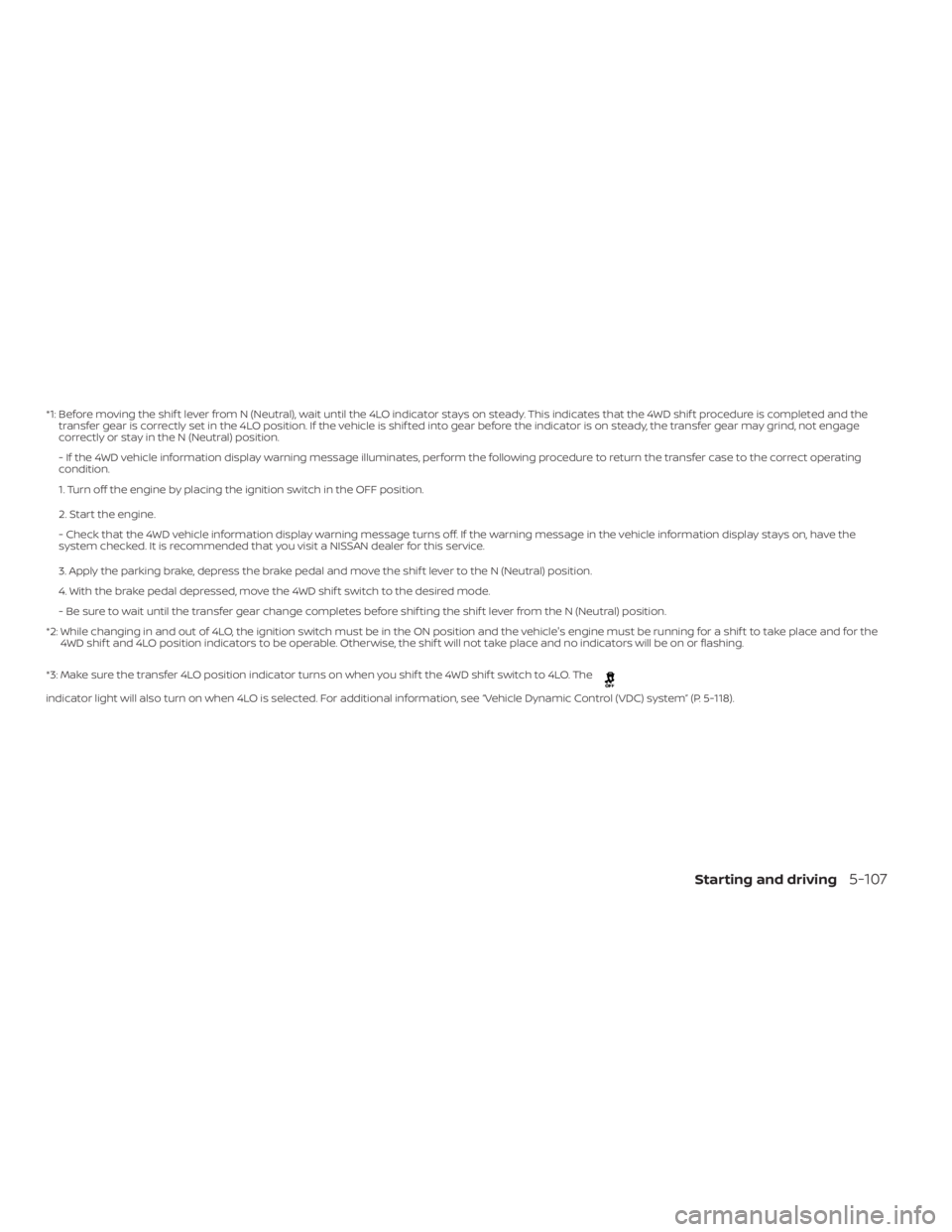
*1: Before moving the shif t lever from N (Neutral), wait until the 4LO indicator stays on steady. This indicates that the 4WD shif t procedure is completed and the
transfer gear is correctly set in the 4LO position. If the vehicle is shif ted into gear before the indicator is on steady, the transfer gear may grind, not engage
correctly or stay in the N (Neutral) position.
- If the 4WD vehicle information display warning message illuminates, perform the following procedure to return the transfer case to the correct oper ating
condition.
1. Turn off the engine by placing the ignition switch in the OFF position.
2. Start the engine.
- Check that the 4WD vehicle information display warning message turns off. If the warning message in the vehicle information display stays on, have th e
system checked. It is recommended that you visit a NISSAN dealer for this service.
3. Apply the parking brake, depress the brake pedal and move the shif t lever to the N (Neutral) position.
4. With the brake pedal depressed, move the 4WD shif t switch to the desired mode.
- Be sure to wait until the transfer gear change completes before shif ting the shif t lever from the N (Neutral) position.
*2: While changing in and out of 4LO, the ignition switch must be in the ON position and the vehicle's engine must be running for a shif t to take place and fo rthe
4WD shif t and 4LO position indicators to be operable. Otherwise, the shif t will not take place and no indicators will be on or flashing.
*3: Make sure the transfer 4LO position indicator turns on when you shif t the 4WD shif t switch to 4LO. The
indicator light will also turn on when 4LO is selected. For additional information, see “Vehicle Dynamic Control (VDC) system” (P. 5-118).
Starting and driving5-107